
We’re excited to announce several significant enhancements to PeopleSoft’s Page and Field Configurator (PFC) in Financials Image 56 with plans to rollout to additional PeopleSoft pillars later in 2026. These upgrades will make configuring, controlling, and streamlining your business processes simpler and even more powerful!
Here’s What’s New:
1. Prompt Table Overrides: Dynamic, Context-Sensitive Prompt Values
A frequently-requested capability, Prompt Table Overrides lets you dynamically change the prompt table (the list of values users can select from) based on your business criteria—directly in PFC.
What does this mean for you?
- Context-sensitive values: Show your users just the values they need.
- Seamless integration: Apply changes directly in PFC. Create a custom prompt record if it doesn’t already exist and then assign it in PFC.
- Remove Existing Customizations: Move existing page customizations that already use a different prompt record to PFC.
Potential Use Cases:
- Limit a prompt for people/employees to those with a specific role.
- Display extra info (like employee email) on prompts.
- Display a filtered listed of values using fields in the component as criteria.
- The potential use cases are limitless!
Example:
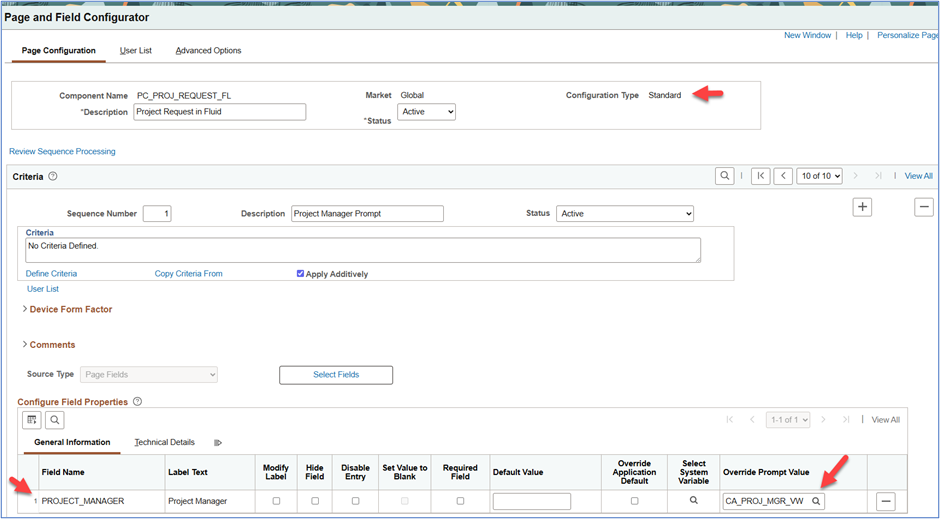
Consider the scenario where a page has a prompt for a person. Many such prompts exist across PeopleSoft applications. The Fluid Project Request component includes a prompt to identify the Project Manager and as delivered includes a list of employees. Now, assume the organization would like to trim the list in the prompt to include employees with the Project Manager role to simplify the experience for the requester and improve quality of data entry.
In the example below, a new view called CA_PROJ_MGR_VW was created to include employees with the Project Manager role and selected in PFC as the prompt table override. Another organization may want to include employees with a different role. Once the view is created with your specific criteria, it’s available for selection in PFC. The organization could even take this a step further and select business unit, project type or another field in the component as criteria to dynamically change the prompt record based on information entered on the page.
2. Streamlined User Interface: Faster, Simpler, Less Error-Prone Configuration
We’ve simplified the PFC user interface to make setup faster and less confusing:
- Event Mapping is now automatic on Save. No more “Map to Portal Registry” step—event mapping is created for all content references for the component when you save your configuration!
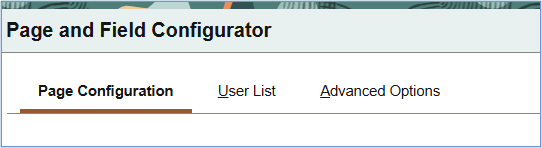
- Configuration options consolidated: The ‘Advanced Options’ tab centralizes links and settings for options used less frequently.
Why You’ll Love It:
- Fewer steps to apply changes.
- Less chance of missing critical event mapping creation
- Consistent use of tabs across standard, masking and change tracking configuration types
Note: If your component has multiple content references and menus you may need to include %Menu or %CREF (new system variable in 8.62) as criteria if your goal is to apply your configuration to a specific navigation.
The updated PFC interface does not require PeopleTools 8.62.
3. %CREF System Variable: Target Precise User Navigation
With the introduction of the new %CREF system variable, you can now leverage detailed content reference (CREF) navigation as criteria for your PFC configurations—including standard setups, data masking, and change tracking.
Benefits:
- Pinpoint control: Apply configurations based on specific navigation (if required)
- Enhanced reporting: If you’re using PFC Change Tracking to identify changes made by users, know that the change data now includes the content reference used when the change was made. In most cases, the content reference label is more recognizable to users making it much easier to understand in your reporting the pages users updated. This can be added to your Change Tracking Insights dashboard.
The %CREF system variable requires PeopleTools 8.62.
4. Expanded Criteria: Use Hidden Fields for Powerful Targeting
For more powerful, granular rules, you can now use hidden Level 0 fields as criteria in your configurations.
For example:
- Use business unit or other hidden fields on the page to drive configurations, giving you additional flexibility when setting up targeted rules in PFC.
This functionality does not require PeopleTools 8.62.
Key Takeaways
- Reduce customizations: Gain new abilities from configuration, not code.
- Faster, easier setup: Thanks to a streamlined user interface and automated creation of event mapping.
- More targeted business rules: Leverage new variables and more field options.
- Better audits and controls: Improved logging and tracking of user navigation.
We encourage all customers to review your existing configurations and plan for a smooth upgrade. These enhancements focus on flexibility and reducing manual effort—improving both admin and end-user experiences.
Your Implementation Stories
We look forward to hearing all the new and interesting ways you’re implementing the prompt table override and other functionality. Have you already implemented PFC Change Tracking functionality? This feature allows you to track changes made by users to specific fields on a page and to notify others when changes are made, or new transactions are added. This is much lighter to implement than the traditional auditing functionality. Criteria-based change tracking and criteria-based notifications all setup from the PFC interface. Changes are captured including who made the change, when it was made, the before and after values and if they used correction mode. The change detail can be displayed as Related Content on the page giving your users a history of life-to-date changes made to the transaction or setup page which is particularly helpful for components with a long-life. If you are interested in sharing the scenarios where you implemented PFC Change Tracking, please submit your PeopleSoft Innovator Story with a feature name of PeopleTools and Technology – Isolating Customizations.