
Every developer of PeopleSoft Global Payroll (GP) and Absence Management rules has long aspired to modify the text of the formula element directly without having to enter line by line, but the ability to make this change was a dream.
With the introduction of our new Formula Designer tool, the dream came to reality, as this tool expedites the task of creating, editing & debugging GP Formulas through a free form text editor.
Formula Designer – With the Free Form Text Editor
This feature comes with an intuitive fluid user interface which allows the user to create/modify formulas using a free form text editor. The text editor in the Formula Designer can be accessed in the following modes.
- Edit Mode: To create or edit a formula.
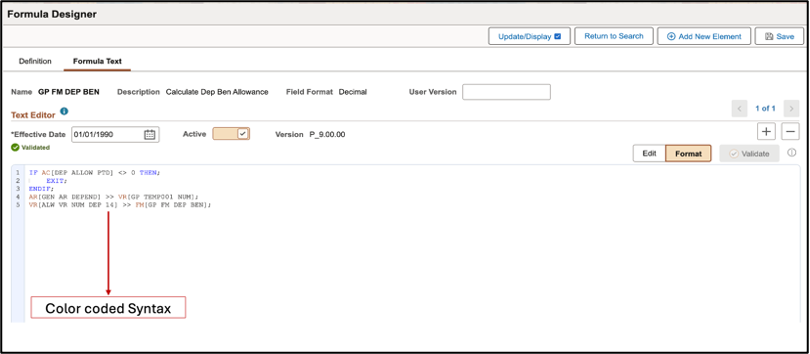
- Format Mode: To view the color-coded syntax of the formatted formula text.
Highlights of Free Form Text Editor are as below:
- Type Ahead
You may be concerned about potentially losing the flexibility to select elements from the prompts and the need to memorize the names of the elements used in the formula logic. The Formula Designer tackles this problem by providing Type Ahead suggestions.
This feature recommends the types, names or descriptions of elements and functions while the user types the formula in the editor, providing an intuitive way to choose from the available options and greatly minimizing the likelihood of human errors during the input process.
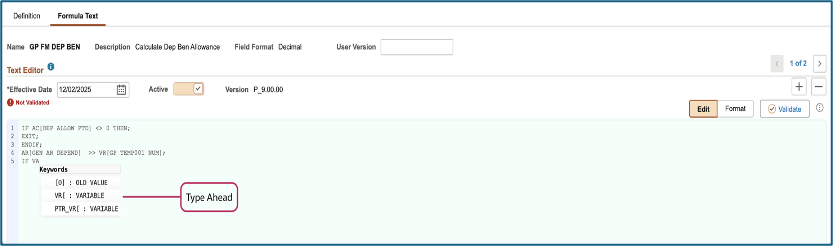
Note: Type Ahead capability can be turned on or off using Global Payroll user preferences.
- Syntax Highlighting and Indentation
Unlike the legacy feature, Formula Designer provides a Text Editor where the keywords (Element Type & Name) & functions are highlighted in different colors and offers indentation for nested ‘IF’ Conditions.
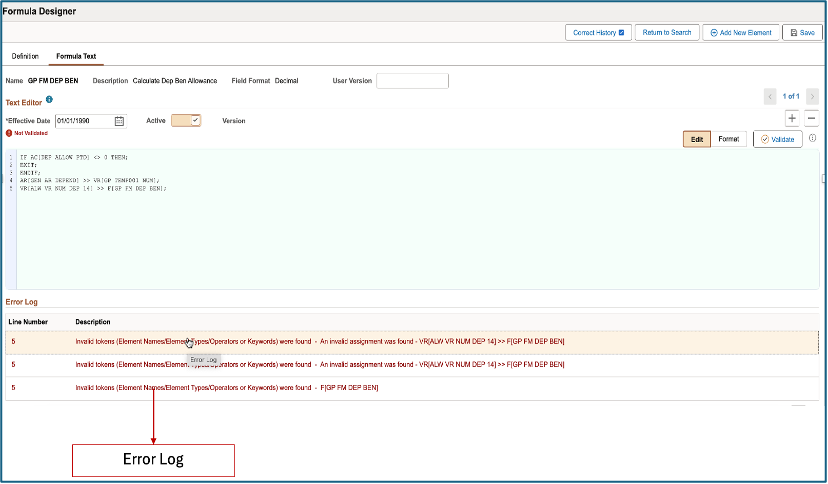
- Error log
Validation errors are reported as clickable grid items. Selecting the error will take the user to the line number in the editor where the error is present
Note: The tool also provides help instructions that aids the user with syntax and functions with the valid constructs that are allowed to be entered through the tool.
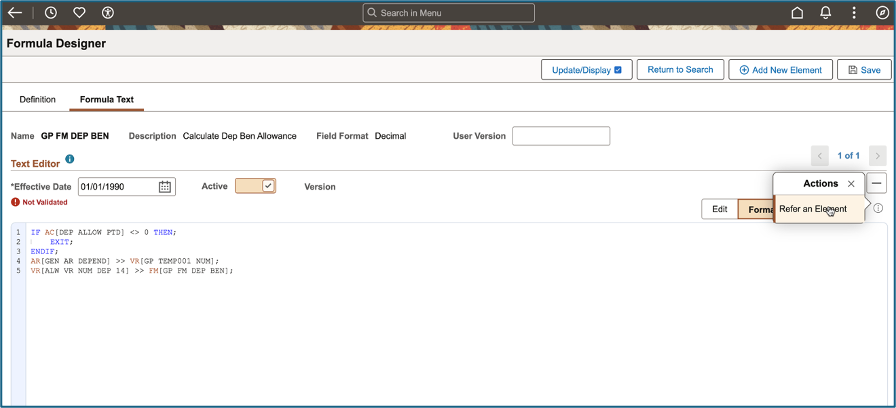
Refer an Element:
This feature also includes an additional capability to refer an element with the Element Browser tool without navigating away to a different component while designing the Formula. Using Formula Designer, the users can copy and paste the content from the clipboard to the text editor including formula text selected from another formula.
The formula edited using Formula Designer can also be accessed via the Legacy formula element and vice-versa with changes being synchronized.
This tool will significantly help functional and technical Global Payroll and Absence Management specialists who intend configure Payroll or Absence rules using the GP Formulas.
For Additional Details: Refer to PeopleBooks link