


Oracle Database Appliance X10, X9, X8, X7, and X6 offer flexibility on the storage capacity of the systems. It’s recommended to initially configure the system with enough storage capacity to accommodate future data growth. However, if you experienced more data growth than expected and purchased an ODA with a partially populated storage configuration, you can add storage for additional capacity.
Note: We recommend you upgrade to the latest ODA software release before adding storage to ensure you have the latest firmware. Refer to the documentation library for the latest Oracle Database Appliance release, for the procedure to configure the storage.
Single Node Models
ODA X10 Single Node Models
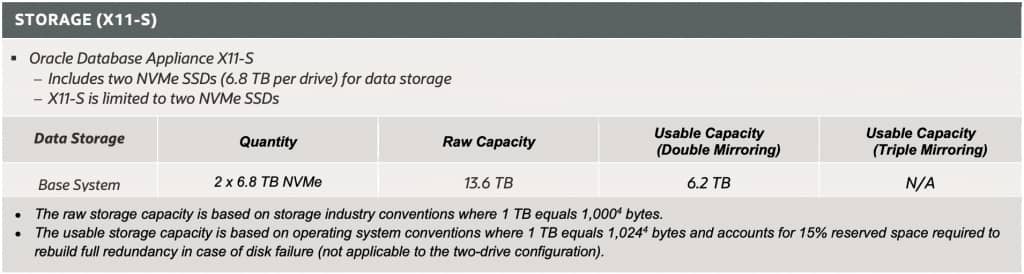
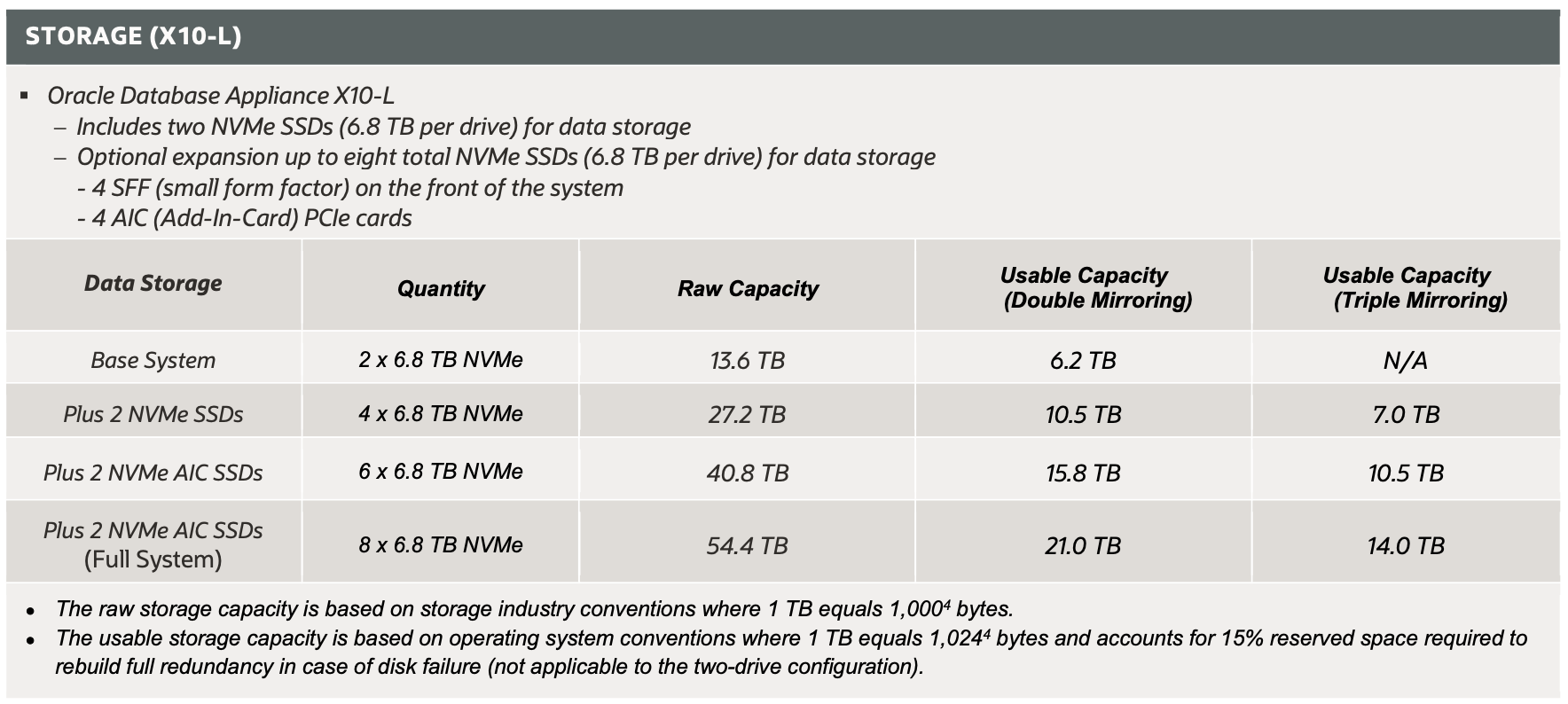
The Oracle Database Appliance X10-S and X10-L base systems shipped with two 6.8TB NVMe Drives, providing 13.6TB raw storage capacity. See table below for ODA X10-S and X10-L configuration options.
ODA X10-S:
- The storage for the ODA X10-S cannot be expanded to more than 13.6TB raw storage.
ODA X10-L:
- The ODA X10-L offers the option to expand up to 54.4TB of raw storage by adding up to six additional 6.8TB NVMe devices (must add in multiples of 2).
- First, fill up the SFF (small form factor) devices first
- Order qty:1 of 7606150 – Two 6.8 TB 2.5-inch NVMe PCIe SFF SSD with marlin bracket for Oracle Database Appliance X10-L
- Then use the AIC (Add-in card) PCI cards
- Order qty:1 or 2 of 7605325 – Two 6.8 TB NVMe PCIe Cards for Oracle Database Appliance X10-2L
- First, fill up the SFF (small form factor) devices first
ODA X9-2 Single Node Models
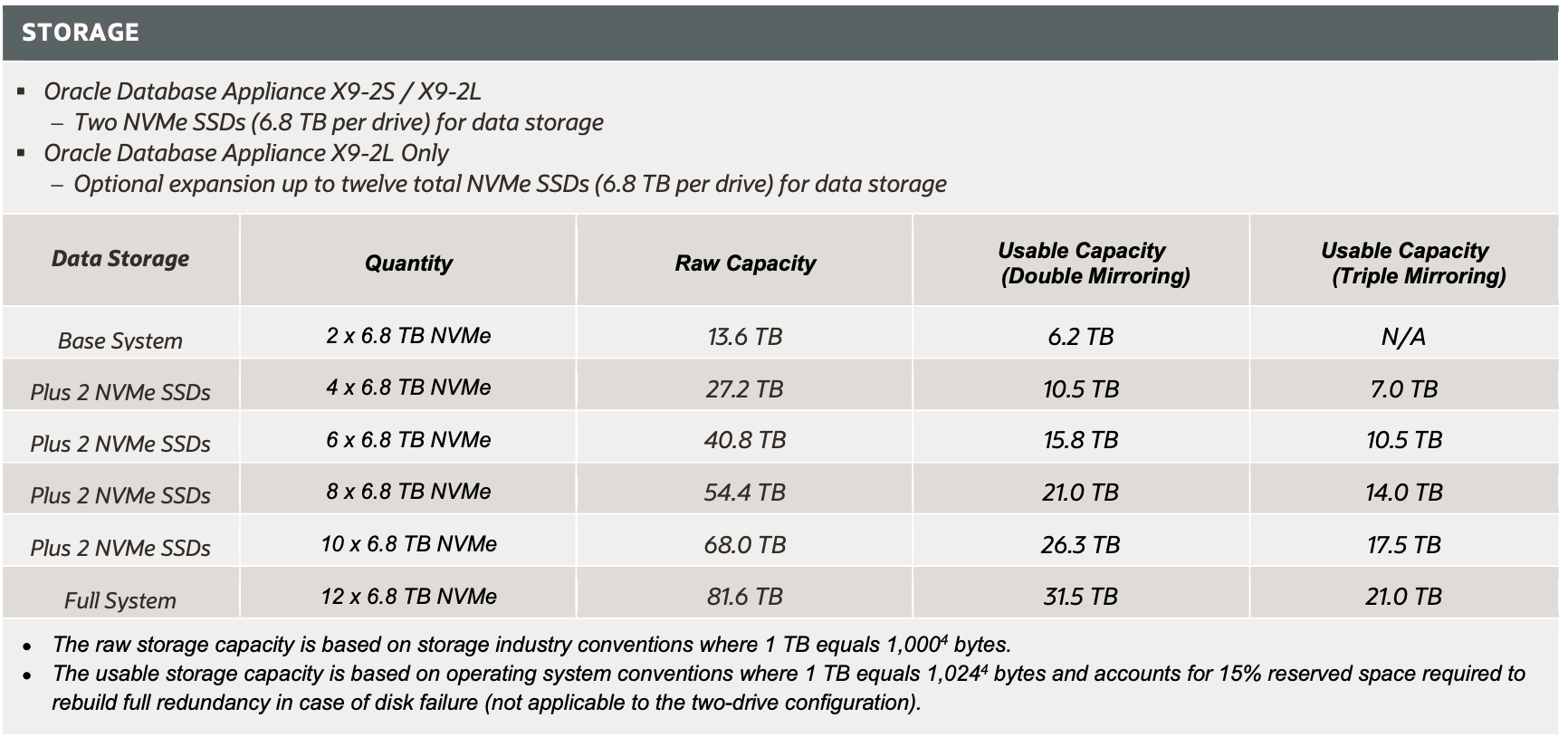
The Oracle Database Appliance X9-2S and X9-2L base systems shipped with two 6.8TB NVMe Drives, providing 13.6TB raw storage capacity. See table below for ODA X9-2L configuration options.
ODA X9-2S:
- The storage for the ODA X9-2S cannot be expanded to more than 13.6TB raw storage.
ODA X9-2L
- The ODA X9-2L offers the option to expand up to 81.6TB of raw storage by adding up to ten additional 6.8TB NVMe drives (must add drives in multiples of 2).
- Order qty:2 of 7606211 (One 6.8 TB (max 7.68 TB) 2.5-inch NVMe PCIe 4.0 SSD v2 mix use with 3.5-inch bracket and 2.5-inch adapter). ODA SW 19.25 or newer is required.
- Note: the following part numbers are no longer available
- 7603394 – Two 6.8 TB 2.5-inch NVMe PCIe 4.0 SSD with coral-d bracket for Oracle Database Appliance X9-2L
ODA X8-2 Single Node Models
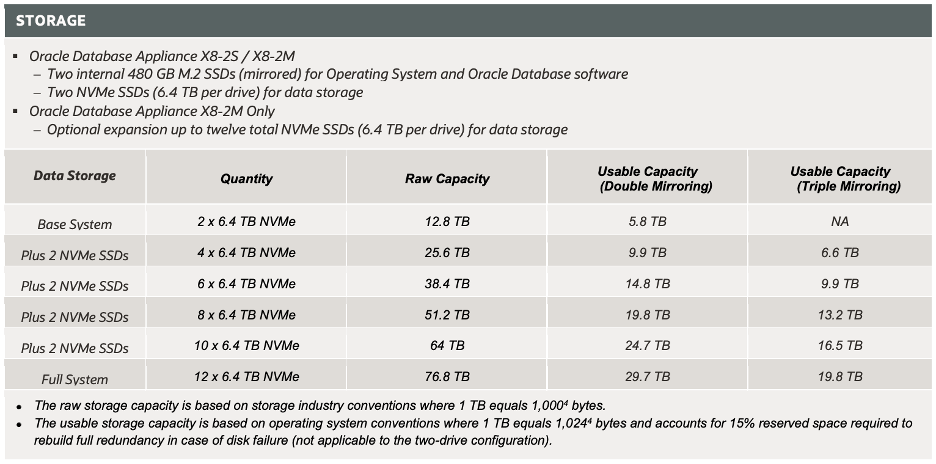
The Oracle Database Appliance X8-2S and X8-2M base systems shipped with two 6.4TB NVMe Drives, providing 12.8TB raw storage capacity. See table below for ODA X8-2M configuration options.
ODA X8-2S:
- The storage for the ODA X8-2S cannot be expanded to more than 12.8TB raw storage.
ODA X8-2M
- The ODA X8-2M offers the option to expand up to 76.8TB of raw storage by adding up to ten additional 6.4TB NVMe drives (must add drives in multiples of 2). The 6.4TB NVMe drives are no longer available, order the 6.8TB listed below.
- Order qty:2 of 7606211 One 6.8 TB (max 7.68 TB) 2.5-inch NVMe PCIe 4.0 SSD v2 mix use with 3.5-inch bracket and 2.5-inch adapter”. ODA SW 19.25 or newer is required, and only 6.4TB will be used, to match the size of the original drives.
- Note: the following part numbers are no longer available
- 7600927 (Two 6.4 TB 2.5-inch NVMe PCIe 3.0 SSD v2 with coral-d bracket for Oracle Database Appliance X8-2M)
- 7603394 (Two 6.8 TB 2.5-inch NVMe PCIe 4.0 SSD with coral-d bracket for Oracle Database Appliance X9-2L)
ODA X7-2 Single Node Models
The Oracle Database Appliance X7-2S/M base system shipped with two 6.4TB NVMe Drives, providing 12.8TB raw storage. The ODA X7-2M offers the option to expand up to 51.2TB of raw storage by adding up to six additional 6.4TB NVMe Drives (must add three NVMe drives at a time). The storage for the ODA X7-2S cannot be expanded to more than 12.8TB raw storage.
The initial ODA X7-2S/M release only supported the first generation of 6.4TB NVMe drives, which are no longer available. Order the 6.8TB listed below.
- Order qty:3 or 6 of 7605206 (One 6.8 TB (max 7.68 TB) 2.5-inch NVMe PCIe 4.0 SSD v2 mix use with 2.5-inch bracket). ODA SW 19.25 or newer is required, and only 6.4TB will be used, to match the size of the original drives.
- Note: the following part numbers are no longer available
- 7120558 (one 6.4TB NVMe NVMe SSD)
- 7602643 (One 6.8 TB (max 7.68 TB) 2.5-inch NVMe PCIe 4.0 SSD mix use 2.5-inch bracket)
| CONFIGURATION | ODA X7-2S | ODA X7-2M |
| BASE CONFIGURATION | Two 6.4TB NVMe Drives populated in Slots 0 & 1 | Two 6.4TB NVMe Drives populated in Slots 0 & 1 |
| EXPANSION OPTIONS | None | Three 6.4TB NVMe Drives populated in Slots 2 – 4. or Six 6.4TB NVMe Drives populated in Slots 2 – 7. |
X6-2 Single Node Models
Capacity upgrades for ODA X6 are no longer available. Talk to your Oracle Sales representative for information on the latest Oracle Database Appliance models.
The last certified version of ODA SW Appliance Manager for ODA X6-2S/M is the release 19.19 (May 2023).
The Oracle Database Appliance X6-2S/M base system shipped with two 3.2TB NVMe drives, providing 6.4TB raw storage, and it was expandable to 12.8TB raw storage by adding two 3.2TB NVMe Drives.The ODA X6-2L base system shipped with six 3.2TB NVMe drives, providing 19.2TB NVMe raw storage, and it was expandable to 28.8TB raw storage by adding three additional 3.2TB NVMe drives and using ODA release 12.2.1.4.
- Note: the following part numbers are no longer available
- 7120558 (one 6.4TB NVMe NVMe SSD)
- 7120558 – 6.4TB NVMe Drive
| CONFIGURATION | SCENARIO | OPERATION |
| X6-2S/M Base Configuration | Storage Expansion | 3.2TB NVMe Drives populated in Slots 0 & 1 The are no options to expand capacity |
| X6-2L Base Configuration | Storage Expansion | 3.2TB NVMe Drives populated in Slots 0,1,3,4,6,7 The are no options to expand capacity |
High Availability Models
ODA X10-HA Model
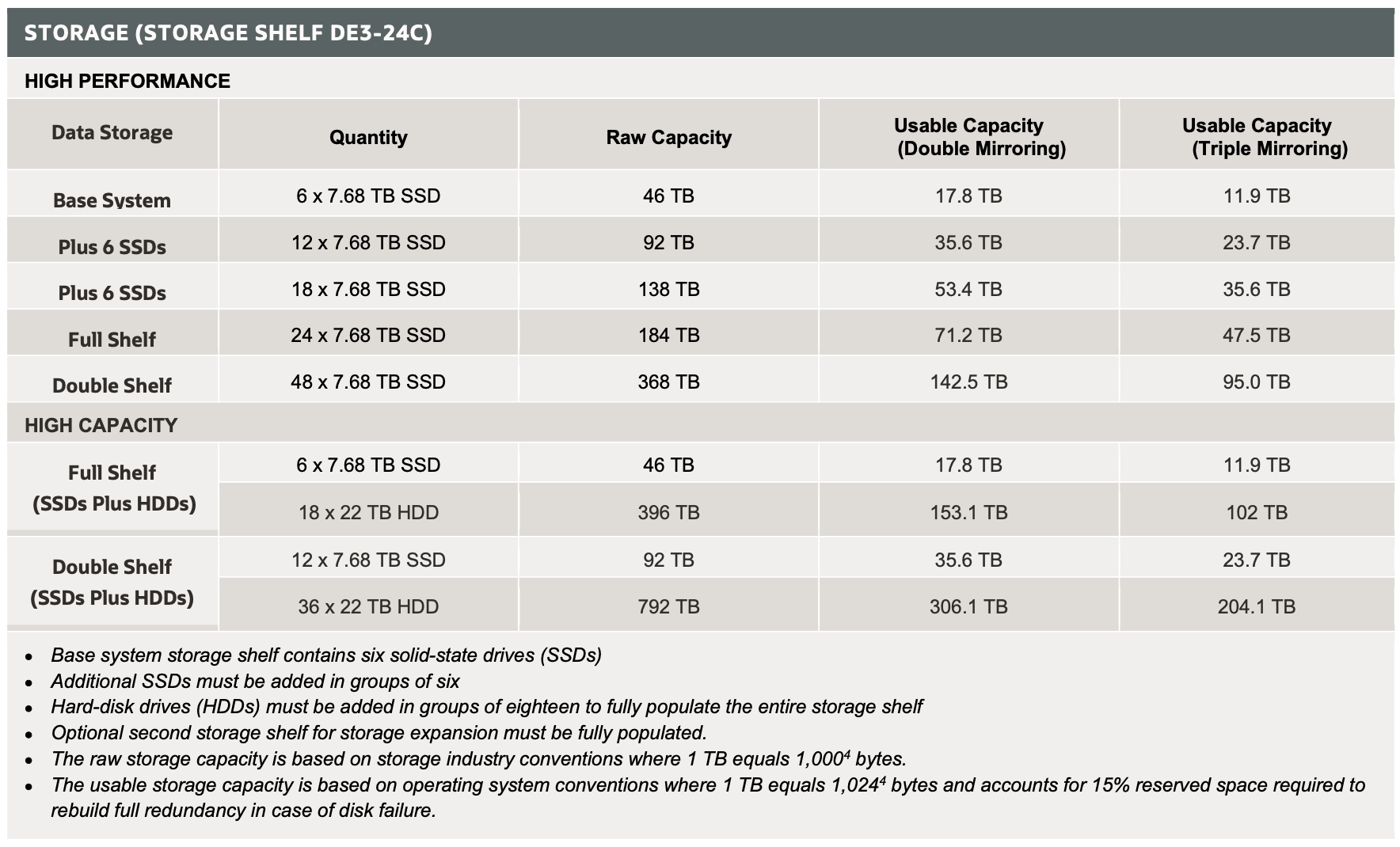
The Oracle Database Appliance X10-HA supports a high-performance (all SSD) and a high-capacity configuration (Six SSDs and 18 hard disk drives per disk shelf). The table below shows the valid configurations.
For high-performance configuration:
- Add SSD drives in multiples of six. Order Qty:1, 2, or 3 of 7603150 (Six 7.68 TB 2.5-inch SAS SSD with 3.5-inch coral-d bracket for Oracle Database Appliance X11-HA and Oracle Database Appliance X10-HA). It requires ODA SW 19.18 or higher).
- The second disk shelf can only be added after the first disk shelf is fully populated with 24 SSDs. Order qty:1 of 7600485 – Oracle Storage Drive Enclosure DE3-24C with fully populated with twenty-four 7.68 TB SSDs, for Oracle Database Appliance X11-HA, Oracle Database Appliance X10-HA and Oracle Database Appliance X9-2-HA.
For high-capacity configuration:
- The minimum high-capacity configuration is a full disk shelf with 6×7.68TB SSDs and 18x22TB HDDs.
- To add disk drives to the disk shelf with 6x SSDs, order qty:1 of 7606755 – Eighteen 22 TB 7200 rpm 3.5-inch SAS-3 HDD with coral bracket for Oracle Database Appliance X11-HA and Oracle Database Appliance X10-HA
ODA X9-2-HA Model
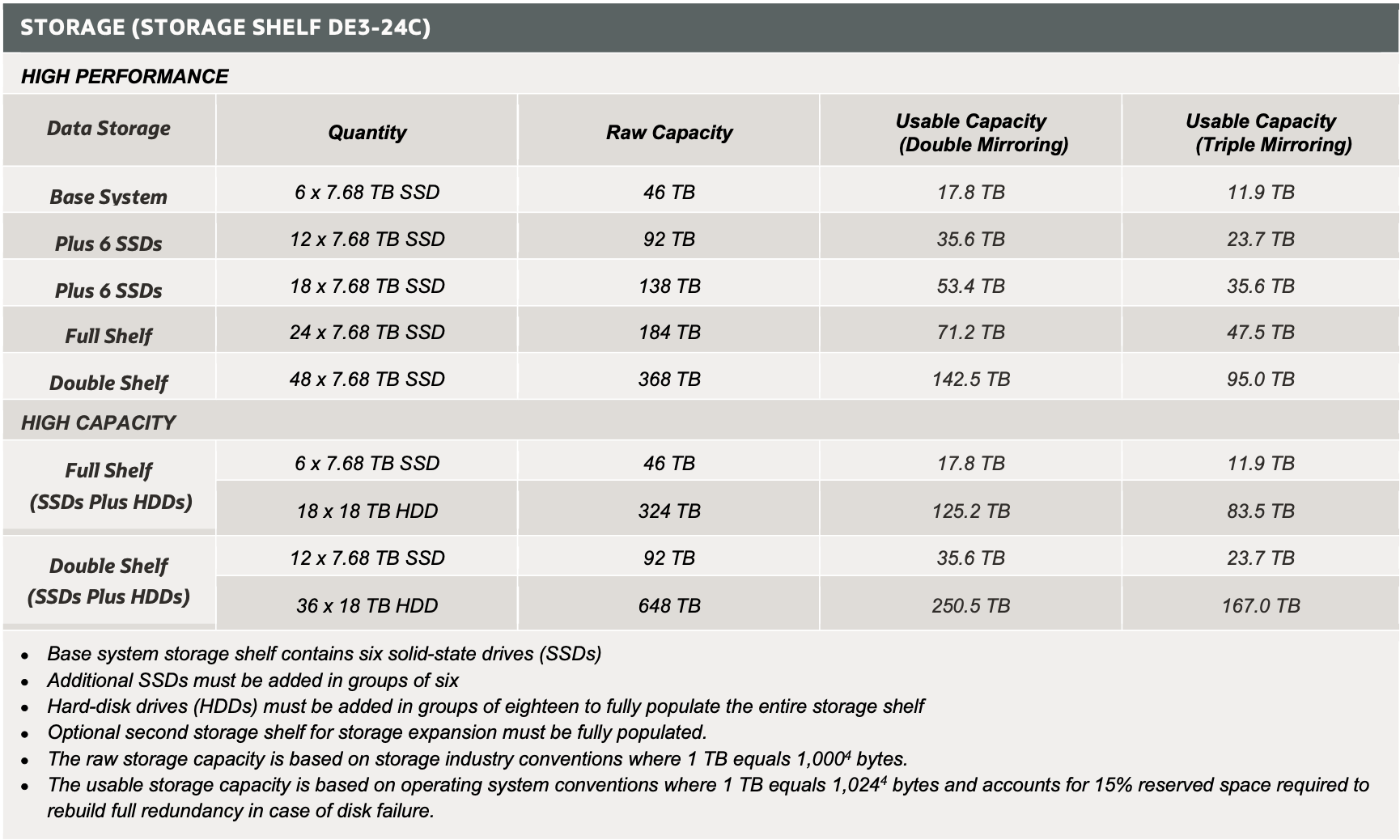
The Oracle Database Appliance X9-2-HA supports a high-performance (all SSD) and a high-capacity configuration (Six SSDs and 18 hard disk drives per disk shelf). The table below shows the valid configurations.
For high-performance configuration:
- Add SSD drives in multiples of six. Order Qty:1, 2, or 3 of 7603150 (Six 7.68 TB 2.5-inch SAS SSD with 3.5-inch coral-d bracket for Oracle Database Appliance X11-HA, Oracle Database Appliance X10-HA and Oracle Database Appliance X9-2-HA)
- The second disk shelf can only be added after the first disk shelf is fully populated with 24 SSDs. Order qty:1 of 7600485 – Oracle Storage Drive Enclosure DE3-24C with fully populated with twenty-four 7.68 TB SSDs, for Oracle Database Appliance X11-HA, Oracle Database Appliance X10-HA and Oracle Database Appliance X9-2-HA.
For high-capacity configuration:
- The minimum high-capacity configuration is a full disk shelf with 6×7.68TB SSDs and 18x18TB HDDs.
- To add disk drives to the disk shelf with 6x SSDs, order qty:1 of 7603395 – Eighteen 18 TB 7200 rpm 3.5-inch SAS-3 HDD with coral bracket for Oracle Database Appliance X9-2-HA
- Note: The 22TB drive is also supported. If desired, order qty:1 of 7606755 – Eighteen 22 TB 7200 rpm 3.5-inch SAS-3 HDD with coral bracket for Oracle Database Appliance X11-HA and Oracle Database Appliance X10-HA. The 22TB requires ODA SW 19.30 or higher.
- To add disk drives to the disk shelf with 6x SSDs, order qty:1 of 7603395 – Eighteen 18 TB 7200 rpm 3.5-inch SAS-3 HDD with coral bracket for Oracle Database Appliance X9-2-HA
- To add a second disk shelf (first shelf must be fully populated):
- order qty:1 of 7603390 – Oracle Database Appliance X9-2-HA storage enclosure fully populated with six 7.68 TB SDD and eighteen 18 TB HDDs
- Note: The 22TB drive is also supported. If the first disk shelf contains 22TB HDDs, order qty:1 of 7606754 – Oracle Storage Drive Enclosure DE3-24C with six 7.68 TB SSDs and eighteen 22 TB HDDs, for Oracle Database Appliance X11-HA and Oracle Database Appliance X10-HA. This requires ODA SW 19.30 or higher
- Note: The 22TB drive is also supported. If the first disk shelf contains 22TB HDDs, order qty:1 of 7606754 – Oracle Storage Drive Enclosure DE3-24C with six 7.68 TB SSDs and eighteen 22 TB HDDs, for Oracle Database Appliance X11-HA and Oracle Database Appliance X10-HA. This requires ODA SW 19.30 or higher
- order qty:1 of 7603390 – Oracle Database Appliance X9-2-HA storage enclosure fully populated with six 7.68 TB SDD and eighteen 18 TB HDDs
ODA X8-2-HA Model
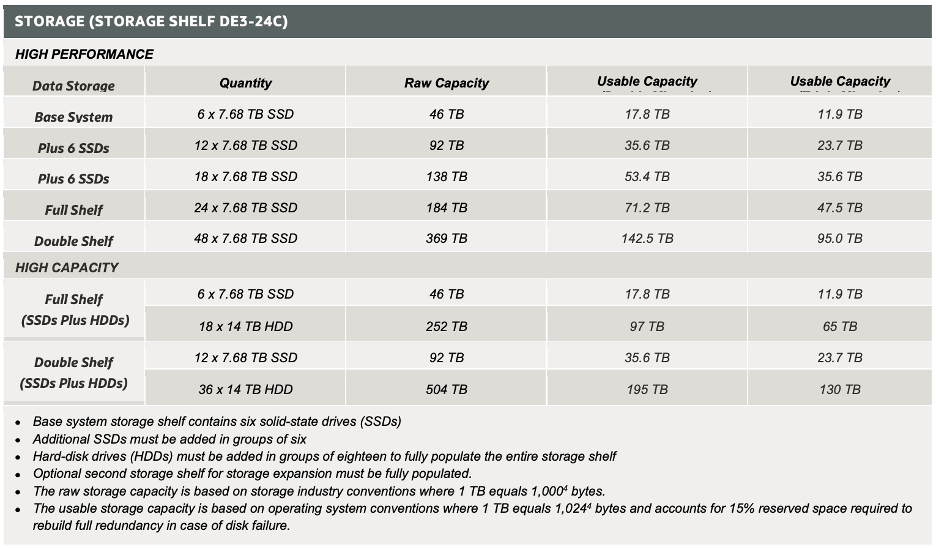
The Oracle Database Appliance X8-2-HA supports a high-performance (all SSD) and a high-capacity configuration (Six SSDs and 18 hard disk drives per disk shelf). The table below shows the valid configurations.
For high-performance configuration:
- Add SSD drives in multiples of six. Order Qty:1, 2, or 3 of 7603150-Six 7.68 TB 2.5-inch SAS SSD with 3.5-inch coral-d bracket for Oracle Database Appliance X11-HA, Oracle Database Appliance X10-HA and Oracle Database Appliance X9-2-HA). It requires ODA SW 19.18 or higher.
- The second disk shelf can only be added after the first disk shelf is fully populated with 24 SSDs. Order qty:1 of 7600485 – Oracle Storage Drive Enclosure DE3-24C with fully populated with twenty-four 7.68 TB SSDs, for Oracle Database Appliance X11-HA, Oracle Database Appliance X10-HA and Oracle Database Appliance X9-2-HA.
For high-capacity configuration:
- The minimum high-capacity configuration is a full disk shelf with 6×7.68TB SSDs and 18x14TB HDDs. The 14TB is no longer available.
- To add disk drives to the disk shelf with 6x SSDs, order qty:1 of 7603395 – Eighteen 18 TB 7200 rpm 3.5-inch SAS-3 HDD with coral bracket for Oracle Database Appliance X9-2-HA. This requires ODA SW 19.16 or higher.
- Note: The 22TB drive is also supported. If desired, order qty:1 of 7606755 – Eighteen 22 TB 7200 rpm 3.5-inch SAS-3 HDD with coral bracket for Oracle Database Appliance X11-HA and Oracle Database Appliance X10-HA. The 22TB requires ODA SW 19.30 or higher.
- Note: The 22TB drive is also supported. If desired, order qty:1 of 7606755 – Eighteen 22 TB 7200 rpm 3.5-inch SAS-3 HDD with coral bracket for Oracle Database Appliance X11-HA and Oracle Database Appliance X10-HA. The 22TB requires ODA SW 19.30 or higher.
- To add disk drives to the disk shelf with 6x SSDs, order qty:1 of 7603395 – Eighteen 18 TB 7200 rpm 3.5-inch SAS-3 HDD with coral bracket for Oracle Database Appliance X9-2-HA. This requires ODA SW 19.16 or higher.
- To add a second disk shelf (first shelf must be fully populated):
- Order qty:1 of 7603390 – Oracle Database Appliance X9-2-HA storage enclosure fully populated with six 7.68 TB SDD and eighteen 18 TB HDDs. This requires ODA SW 19.16 or higher.
- Note: The 22TB drive is also supported. If the first disk shelf contains 22TB HDDs, order qty:1 of 7606754 – Oracle Storage Drive Enclosure DE3-24C with six 7.68 TB SSDs and eighteen 22 TB HDDs, for Oracle Database Appliance X11-HA and Oracle Database Appliance X10-HA. This requires ODA SW 19.30 or higher.
- If the second disk shelf contains HDDs of higher capacity than in the first disk shelf, the drive capacity will be formatted down to match the capacity in the first disk shelf
- Order qty:1 of 7603390 – Oracle Database Appliance X9-2-HA storage enclosure fully populated with six 7.68 TB SDD and eighteen 18 TB HDDs. This requires ODA SW 19.16 or higher.
- Note: the following part numbers are no longer available
- 7600487–Oracle Database Appliance X8-2-HA storage enclosure fully populated with six 7.68 TB SDD and eighteen 14 TB HDDs
ODA X7-2-HA Model
The last certified version of ODA SW Appliance Manager for ODA X7-2-HA is the release 19.27 (June 2025) . We recommend customers to contact their Oracle sales representative to consider upgrading to the latest ODA systems.
The Oracle Database Appliance X7-2-HA base system shipped with five 3.2TB SSDs providing 16TB of raw storage for DATA/RECO and four 800GB SSDs providing 3.2TB raw storage for REDO. The system provided support for two storage expansion configuration options, all SSDs for high performance or SSDs in the base system plus HDDs for high capacity. The expansion shelf is no longer available. Customers who have the base configuration with five 3.2TB SSDs can still upgrade their first disk shelf by adding either the SSD option or the HDD option.
High-Performance SSD Option
Note: The 3.2TB SSDs and the 5-pack of 7.68TB SSDs are no longer available. Customers have the choice to use 7603150 (Six 7.68 TB 2.5-inch SAS SSD with 3.5-inch coral-d bracket for Oracle Database Appliance X11-HA, Oracle Database Appliance X10-HA and Oracle Database Appliance X9-2-HA). Use five, and one will remain as a spare. It requires ODA 19.18 release or higher. See the table below.
- If all the 3.2TB SSDS are replaced with the 7.68TB SSDs, the system must be re-imaged and re-deployed to utilize the full capacity, using ODA release 19.18 or later.
- If adding the 7.68 SSDs to a configuration with existing 3.2TB SSDs, the 7.68TB SSDs will be partitioned down to match the 3.2TB SSD capacity.
- The following are no longer available:
- 3.2TB SSDs
- 7603151: Five 7.68TB SSD drive-pack
- Expansion shelf (2nd shelf)
High Capacity HDD Option
Note: The 10TB, 14TB, and 18TB HDDs are no longer available. There are no upgrade options for HDD capacity
- The following parts are no longer available:
- 7604456: Fifteen 18 TB 7200 rpm 3.5-inch SAS-3 HDD with coral bracket for Oracle Database Appliance X7-2-HA. Requires minimum ODA 19.14 release
- The expansion shelf is no longer available.
CONFIGURATION | ODA X7-2-HA | |
Base configuration | • Four 800GB SSDs populated in Slots 20 – 23 • Five 3.2TB SSDs populated in Slots 0 – 4 | |
| Expansion Options | High-Performance (all SSD) | High-Capacity (SSD and HDD) |
| Base shelf expansion (adding drives) | Note: The 3.2TB SSDs and the 5-pack of 7.68TB SSDs are no longer available. (Order 7603150-Six 7.68 TB 2.5-inch SAS SSD with 3.5-inch coral-d bracket) • If all the 3.2TB SSDs are replaced with the 7.68TB SSDs, the system must be re-imaged and re-deployed to utilize the full capacity • If adding the 7.68 SSDs to a configuration with existing 3.2TB SSDs, the 7.68TB SSDs will be partitioned down to match the 3.2TB SSD capacity. | HDD no longer available for ODA X7-2-HA |
| Expansion shelf | The expansion shelf is no longer available. | The expansion shelf is no longer available. |
ODA X6-2-HA Model
The last certified version of ODA SW Appliance Manager for ODA X6-2-HA is the release 19.19 (May 2023) . We recommend customers to contact their Oracle sales representative to consider upgrading to the latest ODA systems.
The Oracle Database Appliance X6-2-HA only supported SSDs. The 200GB SSDs are dedicated to database REDO and the 1.6TB SDDs, (partitioned to 1.2 TB to improve performance), are used for DATA/RECO.
Note: 1.6TB, 3.2TB and 5-pack 7.68TB SSDs are no longer available. The only option is the 7603150 (Six 7.68 TB 2.5-inch SAS SSD with 3.5-inch coral-d bracket).
- All the 1.6TB and/or 3.2TB SSDs may be replaced with the 7.68TB SSDs and the system must be re-imaged/re-deployed to utilize the full capacity.
- If adding the 7.68 SSDs to a configuration with existing 1.6TB and/or 3.2TB SSDs, the 7.68TB SSDs will be partitioned down to match the existing SSD capacity.
- Add ten or twenty SSDs to the base system
- The expansion shelf is no longer available.
| Configuration | ODA X6-2-HA |
|---|---|
| Base Configuration | Ten 1.6TB SSDs in slots 0-9 and four 200GB SSD in slots 20-23 |
| Base shelf expansion (adding drives) | Note: 1.6TB and 3.2TB SSDs are no longer available, customers must use the 5-pack of 7.68TB SSDs. • Add Ten or Twenty 7.68TB SSD (Order Qty 2 or 4: 7603150-Six 7.68 TB 2.5-inch SAS SSD with 3.5-inch coral-d bracket). There will remain 2 or 4 SSDs as spares • Requires ODA 19.18 or later |
| Expansion Shelf | The Expansion Shelf is no longer available |