



Why key management matters
Managing encryption keys is almost more important than using encryption. How encryption keys are generated, stored, shared, accessed, and monitored is critical to data security. If an attacker gains access to encryption keys, they can instantly decrypt the data. Oracle Key Vault (OKV) addresses this by centralizing and securing keys for Oracle Transparent Data Encryption (TDE) and SSH, making your management as robust as the encryption itself. Deploying Oracle Key Vault on Oracle Database Appliance allows you to quickly, easily and confidently protect your data. In this article, we will tell you how and why this is the best way to manage your critical data encryption keys.
The Risk of Generic Hardware
Deploying OKV on generic servers introduces infrastructure risks and complex integration burdens that can postpone critical rollouts by months, leaving keys and data exposed. Deploying OKV on ODA reduces factors such as:
- Integration Burden: Manually integrating hardware, OS, and networking converts a simple security task into a complex, resource-heavy project.
- Operational Risk: Using unvalidated hardware stacks leads to late-stage compatibility issues and support uncertainty.
The Solution: Oracle Database Appliance (ODA)
Oracle Database Appliance (ODA) is an engineered system that replaces this complexity with a single, pre-integrated stack. It combines compute, NVMe flash storage, Oracle Linux, and built-in KVM virtualization into an Oracle-validated platform.
Unlike generic servers, ODA provides coordinated firmware and OS updates managed via the Appliance Manager automation tool. This ensures your entire security environment remains in sync and protected without the need for manual validation. Refer to the ODA X11 datasheet for details; below showing ODA X11 Small and Large models. ODA X11-HA (high availability) model is also available.

How OKV on ODA removes integration and infrastructure friction
As a fully tested Oracle platform, OKV on ODA removes the guesswork from hardware and OS integration, providing a reliable and stable foundation. OKV runs as a dedicated virtual machine on ODA. Starting with OKV release 21.12, every release is validated on ODA before it ships, ensuring customers receive streamlined support and a single point of accountability across the entire hardware and software stack.
High-availability deployment options for OKV on ODA
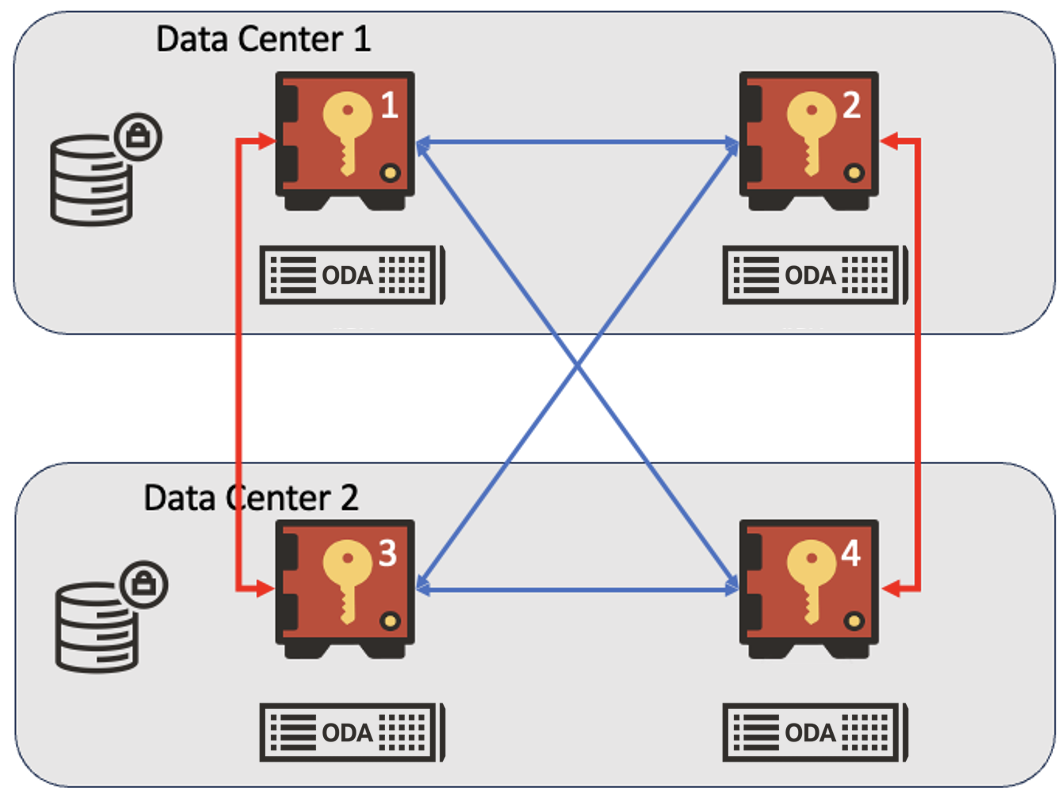
Figure: 4-node OKV Mixed Deployment
- Recommended 4-node cluster: Two read/write pairs spread across data centers provide robust HA and fast failover in most enterprise deployments.
- Multi-region HA/DR designs: Deploying OKV on ODA instances across regions ensures key management services remain available even if a region goes down
Migrating existing OKV clusters to ODA
- Step 1 – Deploy OKV on ODA
Deploy Oracle Key Vault 21.12 or later as a dedicated KVM virtual machine on an Oracle Database Appliance X11-S (2 RU, 32-core AMD EPYC, 256 GB RAM, 13.6 TB NVMe). Configure OKV to match your current cluster settings.
- Step 2 – Enroll ODA-based OKV node(s) in the OKV cluster
The OKV cluster architecture allows for the addition of new ODA-based OKV nodes without downtime, but due to the critical nature of OKV, Oracle recommends adding ODA-based OKV node during a regular Release Update (RU) maintenance window.
- Step 3 – Delete OKV node on generic hardware from the OKV cluster
Once the ODA-based OKV nodes are fully in service and clients are actively using the cluster, decommission the OKV nodes running on generic hardware from the OKV cluster. This transition requires no changes on the client side.
For detailed configuration steps, see the OKV documentation here.
OKV-on-ODA Reference Configuration
- Key Management Software: Oracle Key Vault 21.12 or later
- Deployment Model: Oracle Key Vault 21.12 runs as a KVM virtual machine on an Oracle Database Appliance X11-S.
Benefits of the ODA platform for the OKV customers:
1. Simplified infrastructure: With OKV on ODA, you get a pre-integrated combination of Oracle hardware, Oracle Linux with built-in KVM virtualization, and Oracle Key Vault. This lets you run OKV, and all required supporting services on a single engineered appliance with strong workload isolation, without the need to design or validate a custom key management software/hardware stack.
2. Pretested lifecycle and coordinated updates: In a generic off-the-shelf environment, you are responsible for continually testing servers, storage, firmware, network, OS, and OKV together as each layer can change independently. With OKV on ODA, Oracle validates the full stack in advance.
More importantly, ODA updates keep the platform (servers, storage, networking, firmware) in sync, and a separate OKV release update (which also delivers the relevant OS updates for OKV) is applied on top. Together, these coordinated updates reduce your integration effort.
3. Simple deployment and operations: ODA platform management is handled through the Appliance Manager for ODA—the built-in lifecycle automation tool accessible via browser UI, CLI, or REST APIs. It provides a single interface to deploy, configure, monitor, and apply coordinated updates, which simplifies day-to-day operations.
4. Seamless scalability: Start with as few as 16 cores using capacity-on-demand, and scale up as needed, ensuring your OKV deployment can handle more keys and clients over time without redesigning the environment.
5. Security, compliance, and hardening: Your key management stack runs on Oracle Linux hardened with only the required OS services and end-to-end auditing across ODA and OKV, providing a secure and compliant platform.
Conclusion
Deploying Oracle Key Vault on ODA provides strong security, tight integration, reliability, and simplified management. Oracle Database Appliance is more than just a server; it is a fully engineered platform that provides a complete, validated, secured foundation integrated with OKV for your key management needs.
Getting Started:
- Use the basic sizing guidance as a starting point, and then ask your Oracle support to set up an OKV-on-ODA sizing and migration workshop.
- Consult the Installing Oracle Key Vault on ODA documentation to guide your technical design and day-to-day operations.
- Refer to the ODA datasheet specs (ODA datasheet link) for detailed ODA hardware and configuration information.