
Upgrading a mission-critical database is always a high-stakes exercise. What if SQL performance degrades? What if a platform change introduces regressions? With the right tools and processes, you can turn these risks into manageable tasks.
Using the core features of Oracle Real Application Testing (RAT), namely SQL Performance Analyzer and Database Replay, you can validate database functionality and control performance regressions during major changes, such as upgrading from Oracle Database 19c to 23ai/26ai or migrating to Exadata. In addition to major changes, any database infrastructure change such as patching, gathering optimizer statistics, or index creation and dropping, can be validated for functional and performance regressions.
- Watch the Webinar recording on YouTube: Oracle Real Application Testing – Database Upgrade, Best Practices & Deep Dive, presented by Alfredo Krieg, Master Principal Cloud Architect at Oracle.
Foundation: Diagnostics, Tuning, and Real Application Testing
Before you begin any upgrade, having the right instrumentation is essential. Enabling the Database Diagnostics Pack and Tuning Pack is the first step. Once these are in place, you can proceed to change validation, with Real Application Testing providing essential workflows alongside diagnostic and tuning tools.
SPA First, Then Database Replay
SQL Performance Analyzer (SPA) is diagnostic tool designed to assess the impact of system changes on SQL statement performance.
With SPA, you can:
- Load SQL statements from production into a SQL tuning set (STS).
- Deploy them to a test environment.
- Run a pre-change trial and capture baseline performance.
- Make the change, for example, upgrade, patch, or parameter modification.
- Run a post-change trial and compare results.
SPA identifies which SQL statements have regressed, improved, or remained stable by measuring key metrics such as elapsed time, buffer gets, and I/O reads/writes.
Best Practices for SPA
- Keep each STS under 5,000 statements to ensure manageable analysis.
- Filter out non-application workloads, such as background tasks, scheduler jobs, and SYS/DBSNMP calls.
- Capture STS using the incremental cursor cache method over a period of time, and repeat the capture for each interesting workload, such as batch jobs, online OLTP, and weekend jobs, into separate STS.
- Prepare your test environment, for example, disable unrelated maintenance jobs.
- Focus primarily on elapsed time, using buffer gets and I/O reads as secondary metrics.
Database Replay: Capture, Prepare, Replay and Validate
Once you’ve addressed all SQL regressions using SPA, the next step is comprehensive workload testing with Database Replay. This tool captures the production workload and replays it on a test system, preserving the original timing, concurrency, and transaction characteristics.
Best Practices for Database Replay
- Store capture files on fast storage for minimal production impact and fewer iterations of workload replay.
- Filter the captured workload to include only business-critical processes, rather than capturing monitoring workload such as those from DBSNMP or EM.
- Limit capture to a 24-hour or 36-hour window and use the subsetting of workloads to make testing manageable.
After capture, you can subset workloads, for example, “just the Friday-night batch process”, or run multiple subsets in parallel for stress testing.
Real Application Testing Workflow
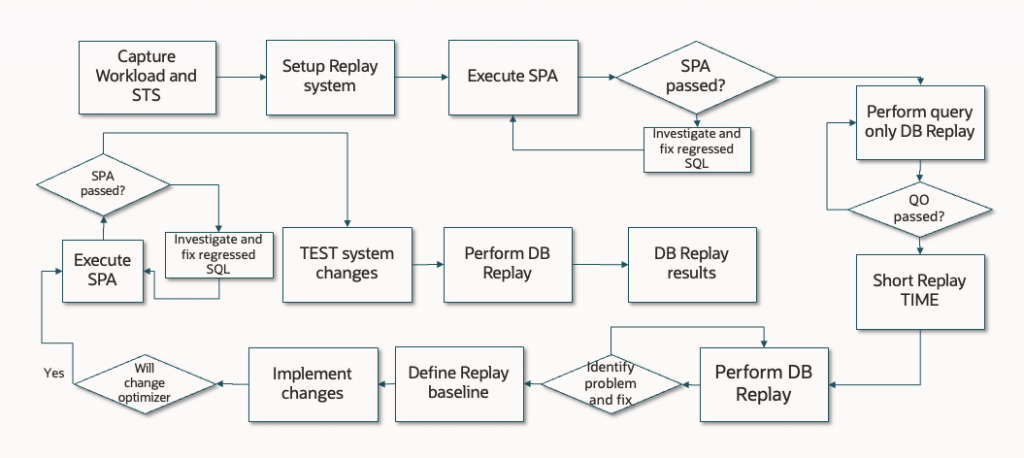
The flowchart below illustrates the recommended workflow for conducting Real Application Testing when testing your databases. The process begins by capturing the existing workload and setting up the replay system. After running SPA and resolving any regressed SQL, Database Replay is used to validate the intended changes by replaying real production workloads. This iterative approach helps ensure that changes can be safely introduced with minimal risk, preserving database performance and stability, before implementing changes in production. The “SPA first, then Database Replay” approach also significantly reduces the number of iterations of workload capture and replay, thereby reducing the overall testing time.
Conclusion
Upgrading or migrating a database isn’t just about running an installer—it’s about ensuring that performance remains stable or improves afterward. By following the right processes and using the right tools, such as enabling Diagnostics and Tuning packs, eliminating SQL regressions with SPA, and validating workloads with Database Replay, you can execute upgrades with confidence. As highlighted in the webinar, these tools and processes work best as an integrated workflow. Skipping steps, especially SPA, risks leaving regressions undiscovered until after go-live.