
MySQL HeatWave is a fully-managed MySQL database service that combines transactions, analytics, machine learning, and GenAI services, without ETL duplication. Also included is HeatWave Lakehouse, allowing users to query data stored in object storage, MySQL databases, or a combination of both.
Introduction
In the 9.6.1 release of MySQL HeatWave, Lakehouse now supports the _metadata_filename column name.
_metadata_filename is a special, reserved column name. If you add a column with this name to a table, the column is populated with the name of the file from which the row of data is loaded. This makes it easy to identify each row of data’s provenance to object storage, and which file (bucket, folder, sub-folder, file) the data has been loaded from. In other words, a useful feature to have.
Illustration
Let’s see with an example.
In my bucket in OCI Object Storage, I have a folder named ‘test1‘ (yes, it won’t win any contests for originality, but it gets the job done). In this folder, I have one or more CSV format files. To load all these files into a table, I can run Autopilot and have HeatWave do all the heavy lifting – from figuring out the field delimiters, schema inferencing, creating the table, and loading data into the table.
These are the commands we used, and this is the resulting table and the data:
SET @input_list = '
[{
"db_name": "lakehouse",
"tables":
[{
"table_name": "temp1",
"engine_attribute": {
"dialect": {"format": "csv", "has_header": true},
"file": [{"uri": "oci://aa-test@mysqlpm/test1/file*.csv"
        }]
                    }
}]
}]';

SET @options = JSON_OBJECT('mode', 'normal');
CALL sys.heatwave_load(CAST(@input_list AS JSON), @options);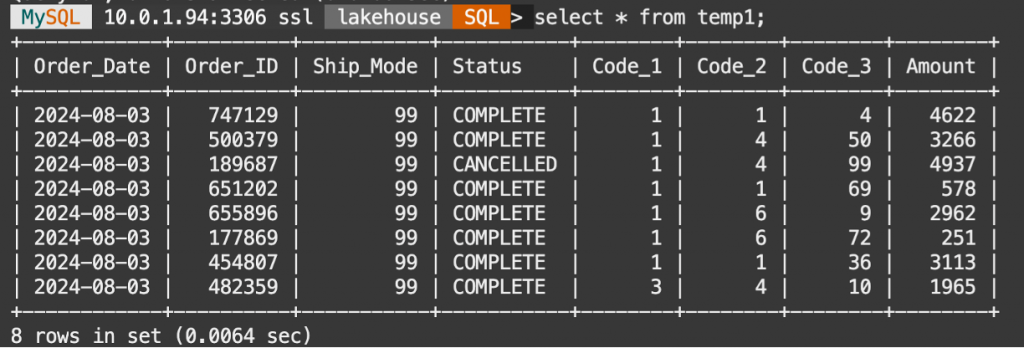
What if I need to add the _metadata_filename column to the table? And what if we did not have the table created, either?
We can run Autopilot in ‘dryrun‘ mode, which means that we get the schema inferencing, delimiter detection, and the CREATE TABLE commands, but the table itself is not created.
Therefore, running Autopilot in ‘dryrun’ mode yields the following:
The script we ran:
SET @input_list = '
[{
    "db_name": "lakehouse",
    "tables":
      [{
        "table_name": "t10",
        "engine_attribute": {
            "dialect": {"format": "csv", "has_header": true},
            "file": [{"uri": "oci://aa-test@mysqlpm/test1/file*.csv"
                    }]
                            }
      }]
}]';

SET @options = JSON_OBJECT('mode', 'dryrun');
CALL sys.heatwave_load(CAST(@input_list AS JSON), @options);
we get the following CREATE TABLE command:
SQL> SELECT log->>"$.sql" AS "Load Script" FROM sys.heatwave_autopilot_report WHERE type = "sql" ORDER BY id;

SQL> CREATE TABLE `lakehouse`.`t10`
( `Order_Date` date ENGINE_ATTRIBUTE='{"date_format": "%Y-%m-%d"}',
`Order_ID` bigint,
`Ship_Mode` bigint,
`Status` longtext COMMENT 'RAPID_COLUMN=ENCODING=VARLEN',
`Code_1` bigint,
`Code_2` bigint,
`Code_3` bigint,
`Amount` bigint)
ENGINE=lakehouse
SECONDARY_ENGINE=RAPID
ENGINE_ATTRIBUTE='{"file": [{"uri": "oci://aa-test@mysqlpm/test1/file-1.csv"}],
"dialect": {"format": "csv",
            "has_header": true,
            "field_delimiter": "\\t",
            "record_delimiter": "\\n"}}';

ALTER TABLE `lakehouse`.`t10` SECONDARY_LOAD GUIDED OFF;
We will add the column name to the table definition, so that the new CREATE TABLE command looks like this:
SQL> CREATE TABLE `lakehouse`.`t10`
( `Order_Date` date ENGINE_ATTRIBUTE='{"date_format": "%Y-%m-%d"}',
`Order_ID` bigint,
`Ship_Mode` bigint,
`Status` longtext COMMENT 'RAPID_COLUMN=ENCODING=VARLEN',
`Code_1` bigint,
`Code_2` bigint,
`Code_3` bigint,
`Amount` bigint,
_metadata_filename varchar(128))
ENGINE=lakehouse
SECONDARY_ENGINE=RAPID
ENGINE_ATTRIBUTE='{"file": [{"uri": "oci://aa-test@mysqlpm/test1/file-1.csv"}],
"dialect": {"format": "csv",
            "has_header": true,
            "field_delimiter": "\\t",
            "record_delimiter": "\\n"}}';

ALTER TABLE `lakehouse`.`t10` SECONDARY_LOAD GUIDED OFF;
Now, let’s run the CREATE TABLE command, and then the command to load data into the table
Once the command has completed, let’s look at the data in the table:

That’s it! Simple as that.
When the table data is refreshed, the column is also updated.
Before we go, one more thing.
In the example above, we defined the column, _metadata_filename as a variable length column 128 characters long. That will do for many cases. However, if you have several sub-folders in the path where your data is, or if you are using PAR URLs, it is likely that this length of 128 may be insufficient. In that case, use a longer length, like 256.
If there are any other kinds of metadata columns you would like to see supported in Lakehouse, please let us know!