
One of the fastest ways to get productive on Autonomous AI Database is to start with the built-in example templates. The library gives you a practical way to explore both Oracle Machine Learning and Select AI through ready-to-use notebooks that can be opened, run, adapted, and extended inside the notebook environment. You can find examples for data preparation, model building, scoring, and monitoring, alongside newer generative AI scenarios such as chat, natural language to SQL, retrieval-augmented generation, and synthetic data generation.
The Example Templates library is part of Oracle Machine Learning Notebooks, the browser-based workspace where you can create, version, and run notebooks with SQL, R, Python, and conda interpreters. What makes the library especially useful is its range. Examples span Oracle Machine Learning for Python, Oracle Machine Learning for R, Oracle Machine Learning for SQL, OML Services and REST-based workflows, and Select AI examples for both SQL and Python APIs. Instead of starting from a blank page, begin with tested examples that cover classic machine learning, data engineering, text analytics, model monitoring, and LLM-powered use cases in one place.
A template library that meets you where you work
The Template Examples area contains pre-populated notebook templates that you can browse and turn into your own editable and runnable notebooks. The templates are organized for discovery, and the page supports search and sorting by, for example, name, tag, author, and usage, which makes it practical to browse by interest rather than by product manual. The examples are designed to run on Autonomous AI Database, and you can create a new notebook from any example template directly from the UI.
That matters because the available examples are not all the same kind of asset. Some are quick introductions. Some are end-to-end algorithm walkthroughs. Others focus on operational tasks such as monitoring, environment setup, package management, or REST-driven execution. Taken together, they form a discoverable learning path for analysts, data scientists, developers, and SQL-first practitioners.
What you will find in the template examples
Oracle Machine Learning for Python
The Python-oriented examples are broad enough to help both new and experienced users. The OML4Py notebooks includes introductions and general workflow notebooks, data selection and manipulation, AutoML-oriented material, datastore and script repository usage, and examples that bridge Python with SQL and REST patterns.
The machine learning coverage is deep. Explore classification, regression, clustering, anomaly detection, feature extraction, feature selection, association rules, attribute importance, text mining, time series, and partitioned models. There are also practical notebooks for data cleaning and data transformation, covering issues such as duplicates, missing values, outlier removal, binning, categorical handling, and date-related transformations.
This is important because it means the Python library is not just a model zoo. It also helps you learn the full workflow around preparing data, experimenting in notebooks, and operationalizing their work.
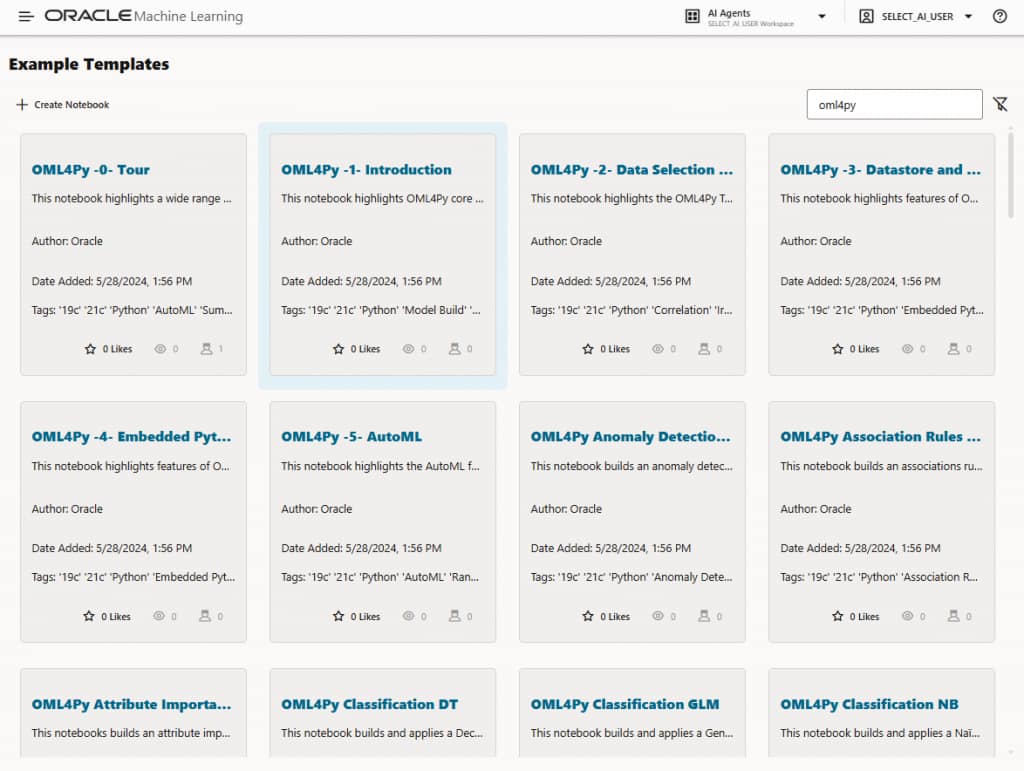
Figure 1: OML4Py example notebooks listing
Oracle Machine Learning for R
The R template set mirrors much of the same analytical depth, but from an OML4R perspective. Work through notebooks for classification, regression, clustering, anomaly detection, feature extraction, feature selection, association rules, attribute importance, statistical functions, text mining, time series, and partitioned models.
The R examples also cover practical data preparation tasks, including transformation and cleaning workflows, as well as general notebooks that help you get comfortable with the transparency layer, datastore patterns, and embedded R execution concepts. For teams with established R skills, these examples provide a direct path into in-database machine learning without requiring a switch in language or mindset.
Oracle Machine Learning for SQL
The SQL template collection is especially compelling for users who want machine learning close to the data and close to familiar database workflows. In the notebook inventory, the OML4SQL examples include classification, regression, clustering, anomaly detection, feature extraction, feature selection, attribute importance, association rules, text mining, time series, time series regression, partitioned models, row importance, survival analysis, and nested-column scenarios.
There are also data preparation examples for cleaning and transformation, plus introductory notebooks that help you get started with importing data and exploring the SQL-based workflow. For database-centric teams, this makes the template library feel less like a separate data science track and more like a natural extension of SQL development.
REST and OML Services examples
The template library is not limited to in-notebook API usage. It also includes OML Services and REST-focused examples that show how to move beyond interactive experimentation and into service-driven workflows.
Examples include batch scoring through REST, data monitoring, model monitoring, data bias detection, serialized model export and import, model import for ESA-based feature extraction workflows, and run-me-first setup content. There are also examples for third-party package and environment management in notebook sessions, including workflows for creating and using Python and R conda environments.
This is a valuable part of the collection because it helps you understand that the notebook environment is not just for exploration. It can also be a launch point for repeatable operational patterns.
Select AI examples are also part of the experience
A particularly strong addition is the presence of Select AI examples for both SQL and Python APIs.
On the SQL side, the template set includes examples for prerequisites and setup, chat, natural language to SQL, retrieval-augmented generation, and synthetic data generation. On the Python side, the same pattern appears again with Select AI examples for setup, chat, NL2SQL, RAG, and synthetic data generation.
That makes the template library relevant not only to traditional machine learning users, but also to teams exploring LLM-enabled database interactions. See how natural language prompts become SQL workflows, how retrieval can ground model responses, and how synthetic data generation can help when production data is limited or sensitive.
This is exactly the kind of content that encourages exploration. Someone may arrive looking for a familiar classification example and leave having discovered that the same platform also includes practical notebooks for conversational access, schema-aware NL2SQL, and grounded generative workflows.
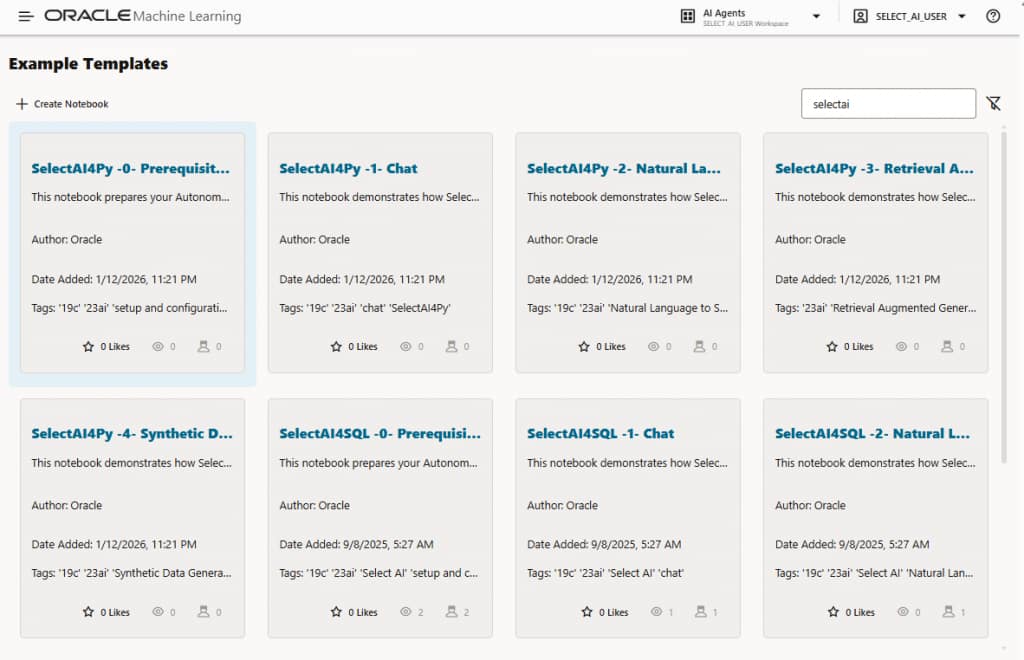
Figure 2: Select AI example notebooks listing
Why this library is worth exploring
The most attractive thing about the template collection is not any single notebook. It is the range.
You can start with a simple introduction, jump into algorithm-specific examples, borrow a data-cleaning pattern, review a monitoring workflow, or test a Select AI scenario without building everything from scratch. The examples also make it easier to compare approaches across languages. A team may prototype in Python, validate a concept in R, or operationalize a workflow in SQL, all while staying in the same broader notebook environment.
And because the templates are meant to become runnable notebooks, they are far more useful than a static list of features. You’re not just reading about capabilities but opening working examples and adapting them to their own data and projects.
How to navigate to the template examples in the Oracle Machine Learning UI
Getting to the examples is straightforward.
You can access Oracle Machine Learning from either the OCI Console or Database Actions. From the OCI Console, open the Autonomous AI Database details page, go to Tools configuration. Under Oracle Machine Learning user interface,copy the Public access URL, and sign in to enter the Oracle Machine Learning environment. From Database Actions, open the database, click the dropdown menu Database actions and choose View all database actions, and under Development select Machine Learning. If the Machine Learning is missing in Database Actions, the database user likely does not have the OML_DEVELOPER role. Machine learning can be enabled for individual users from the Administration tab, Database Users, and on the user tile, click the three dot menu, click Edit. Then toggle OML to enable.
Once inside the Oracle Machine Learning UI, you can access the notebooks area from the left navigation pane by expanding Projects and selecting Notebooks, or by using the Notebooks quick link on the home page. Oracle Machine Learning notebooks live inside projects within workspaces, and the environment supports creation, editing, copying, moving, versioning, and saving notebooks as templates.
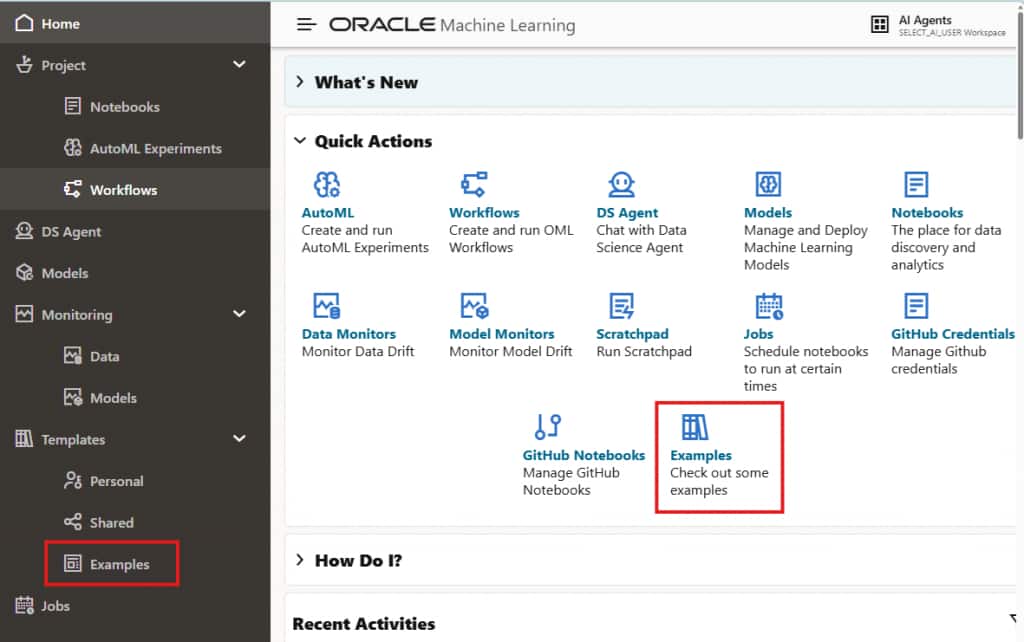
Figure 3: Oracle Machine Learning UI on Autonomous AI Database Serverless – access example notebooks
From the Templates area, you can open Example, where the pre-populated notebook templates are listed. you can browse the collection, search by name, tag, or author. To create a notebook from one of the examples, select the template, which highlights to tile in blue, click Create Notebook, choose the project and workspace, and save it by clicking OK. The new notebook then appears on the Notebooks listing page, ready to run and modify.
The takeaway
The Oracle Machine Learning Notebooks template examples on Autonomous AI Database are not just starter content. They are a practical discovery layer for the platform itself.
They show that you have access to much more than a handful of introductory notebooks: there are examples for Python, R, SQL, REST-driven services, operational monitoring, environment setup, and Select AI in both SQL and Python forms. For anyone trying to get from curiosity to hands-on work quickly, that combination makes the Template Examples library one of the most useful places to begin.
The best way to understand what is available is to open the library and explore it. You may come in looking for one notebook and discover an entire workflow they did not realize was already waiting for them.
Resources
For more information…