
Enterprise AI applications become more powerful when they can move beyond answering questions to start taking actions.
With OCI Agent Development Kit (ADK), developers can build agentic applications that reason through tasks, orchestrate workflows, call tools, and interact with enterprise systems. But for these agents to be useful, they need secure access to trusted business data.
This is where Oracle Autonomous AI Database MCP Server becomes essential.
Oracle Autonomous AI Database MCP Server provides a managed MCP endpoint directly from Autonomous AI Database, allowing OCI ADK agents to discover tools, invoke business logic, retrieve enterprise information, and perform actions.
Why Autonomous AI Database MCP Server matters for OCI ADK
Instead of building custom APIs, middleware layers, or separate service integrations, developers can use Autonomous AI Database MCP Server to expose database tools directly to OCI ADK agents using MCP. Through native MCP support, agents can dynamically discover the Select AI Agent framework tools that you created in your database schema.
This dramatically reduces development effort because teams do not need to recreate database logic in application code. Existing SQL, stored procedures, notification workflows, RAG pipelines and operation logic can be reused via MCP tools. Developers can spend less time writing boilerplate integration code and more time building business specific experiences.
Using the Autonomous AI Database MCP Server with OCI ADK is simple. Once you enable MCP in Autonomous AI Database and create your tools, you just configure your agent using OCI ADK and connect it to OCI GenAI Agent endpoint. The agent can then directly use those database tools no extra APIs or complex setup needed. This makes it easy to go from defining logic in the database to actually using it in your application.
Autonomous AI Database MCP Server eliminates the need to deploy and manage MCP server infrastructure. This MCP server runs natively as part of your database environment, with Oracle managing updates, patching, scaling, and operational support. This reduces infrastructure overhead and allows teams to focus on building applications instead of maintaining integration services.
Autonomous AI Database MCP Server also provides OCI ADK users with enterprise-grade controls such as Deep Data Security, as well as role-based access, access control lists, encryption, auditing and Virtual Private Database policies.
By running queries and AI workflows directly inside the database, organizations can reduce latency, minimize unnecessary data movement, and improve overall performance. With built-in auto scaling, ECPU-based resource controls, automated patching, and OCI Monitoring, Oracle Autonomous AI Database MCP Server provides the reliability, governance, and operational visibility for enterprise-grade OCI ADK deployments.
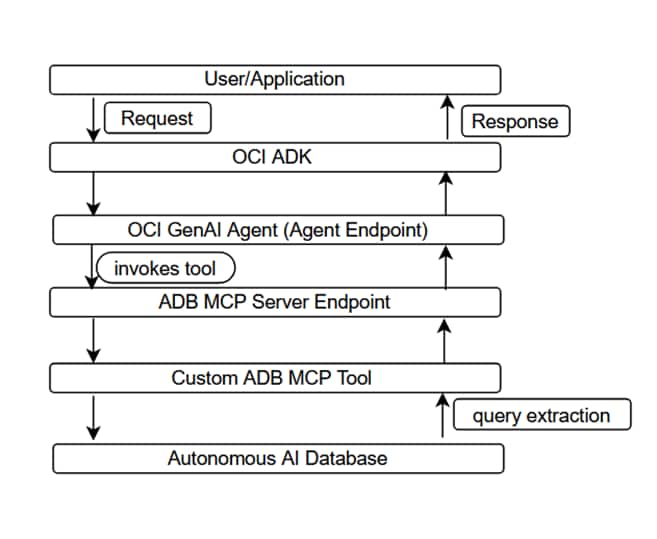
Figure 1: Architecture flow for OCI ADK, AI agent, and ADB MCP Server integration
Getting Started
Ready to get started? Follow these steps:
1.Enable the MCP Server
2. Create Tools using Select AI Agent framework tools
3.Provision an OCI AI Agent with an endpoint in the OCI Console
4. Configure and run your OCI GenAI Agent
5. Example using OCI ADK with Autonomous AI Database MCP Server
Log in to the OCI Console and add this free-form tag to your Autonomous AI Database Serverless:
Tag Name: adb$feature
Tag Value: {“name”:”mcp_server”,”enable”:true}
Once you add this tag, the MCP server gets enabled.
After enabling, your database will expose an MCP endpoint like this:
https://dataaccess.adb.{region}.oraclecloudapps.com/adb/mcp/v1/databases/{database-ocid}This endpoint allows authorized clients to connect and run tools on your database.
If your Autonomous AI Database Serverless is set up with a Private Endpoint then access is limited to your VCN (Virtual Cloud Network) and anyone outside that network won’t be able to connect.
Your endpoint will look like this instead:
https://{hostname_prefix}.adb.{region}.oraclecloudapps.com/adb/mcp/v1/databases/{database-ocid}2. Create Select AI Agent framework tools
One of the most powerful features of MCP is the ability to define your own tools. These tools act as controlled interfaces that MCP clients can invoke to perform specific operations on your database.
Let’s walk through a simple example creating a tool that runs read-only SQL queries.
In this case, we define a tool named MY_RUN_SQL_TOOL and describe what it does, the function it calls, and the inputs it expects.
BEGIN
  DBMS_CLOUD_AI_AGENT.CREATE_TOOL (
    tool_name  => 'MY_RUN_SQL_TOOL',
    attributes => '{
      "instruction": "This tool runs the provided read-only (SELECT) SQL query.",
      "function": "RUN_SQL",
      "tool_inputs": [
        {"name":"QUERY","description":"SELECT SQL statement without trailing semicolon."},
        {"name":"OFFSET","description":"Pagination parameter for page size."},
        {"name":"LIMIT","description":"Pagination parameter for result offset."}
      ]
    }'
  );
END;
This step essentially tells MCP how to expose your tool and how clients should interact with it.
Next, you define the PL/SQL function (run_sql) that executes the query. This function takes a SQL statement along with pagination parameters and returns the results as JSON.
CREATE OR REPLACE FUNCTION run_sql(
    query   IN CLOB,
    offset  IN NUMBER,
    limit   IN NUMBER
) RETURN CLOB
AS
    v_sql   CLOB;
    v_json  CLOB;
BEGIN
    v_sql := 'SELECT NVL(JSON_ARRAYAGG(JSON_OBJECT(*) RETURNING CLOB), ''[]'') ' ||
             'FROM ( ' ||
             '  SELECT * FROM ( ' || query || ' ) sub_q ' ||
             '  OFFSET :off ROWS FETCH NEXT :lim ROWS ONLY ' ||
             ')';

    EXECUTE IMMEDIATE v_sql
        INTO v_json
        USING offset, limit;

    RETURN v_json;
END;
3. Provision an OCI AI Agent with an endpoint in the OCI Console
In this step, you’ll use the OCI Console to create an agent instance along with its endpoint.
At this stage, you don’t need to configure or attach any tools, the focus here is purely on setting up the underlying infrastructure.
If you prefer automation, you can also create the agent and its endpoint using the OCI SDK or Terraform.
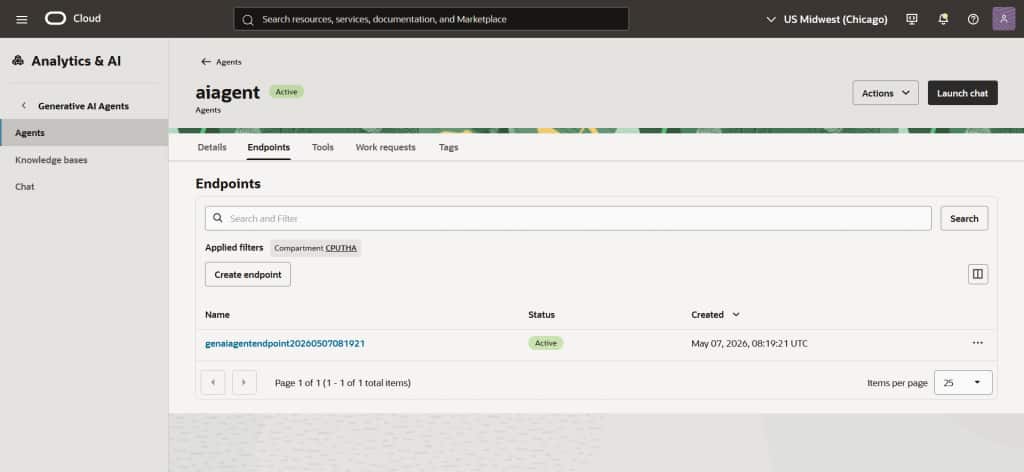
Figure 2: OCI GenAI Agent with endpoint
4. Configure and run your OCI GenAI Agent
With your MCP server enabled in Autonomous Database and custom tools registered, the final step is to connect everything through your agent application.
At a high level, your agent acts as the bridge between user input and the database invoking MCP tools exposed by Autonomous AI Database Serverless through a secure endpoint.
Step 1: Set Up Your Python Environment
Start by preparing your local development environment:
pip install "oci[adk]"Make sure you’re using Python 3.10 or later, as required by the OCI ADK.
Step 2: Authenticate Your Application
Next, configure authentication using the ADK’s AgentClient
- Security tokens (for local testing)
- Instance principals (for OCI compute)
- Resource principals (for OCI services)
Step 3: Connect the Agent to MCP
With authentication in place, configure your agent to connect to:
- The OCI Generative AI Agent endpoint (via endpoint OCID)
- The ADB MCP Server endpoint
This connection enables your agent to invoke database-backed MCP tools such as the custom tools you created earlier.
At runtime, your application provides:
Agent Endpoint OCID → identifies the agent
MCP Endpoint (ADB) → exposes the tools
Together, these allow seamless interaction between the agent and your database.
Step 4: Run the Agent
Once everything is configured:
Call setup() to sync instructions and tools with the agent
Use run() to process user input The agent will automatically determine when to invoke MCP tools.
5. Sample Python code OCI ADK with Autonomous AI Database MCP Server
This example shows how to connect an OCI GenAI agent to the Autonomous Database MCP Server and use its tools.
The code sets up a connection to the MCP server, registers the available database tools with the agent, and lets you ask questions in a loop. When a tool (for example like a SQL query) is needed, the agent asks for confirmation, runs it, and returns the result. This shows how you can go from a user question to executing database logic using MCP tools.
import os
import asyncio
from mcp.client.session_group import StreamableHttpParameters
from oci.addons.adk import Agent, AgentClient
from oci.addons.adk.mcp import MCPClientStreamableHttp
from oci.addons.adk.run.types import RequiredAction, FunctionCall, PerformedAction

async def main():
    # Retrieve bearer token from environment for security
    bearer_token = os.environ.get("MCP_BEARER_TOKEN")
    if not bearer_token:
        raise RuntimeError("Bearer token environment variable (MCP_BEARER_TOKEN) not set.")

    # Set the remote MCP server endpoint
    params = StreamableHttpParameters(
        url="[adb-mcpserver-url]",
        headers={
            "Authorization": f"Bearer {bearer_token}"
        }
    )

    # Create MCP client using Streamable HTTP transport
    async with MCPClientStreamableHttp(
        params=params,
        name="Streamable MCP Server"
    ) as mcp_client:
        # Set up AgentClient (update with your auth/profile/region as needed)
        client = AgentClient(
            auth_type="api_key",
            profile="DEFAULT",
            region="us-chicago-1"
        )

        # Replace with your real Agent Endpoint OCID below
        agent_endpoint_id = "[agent-endpoint-ocid]"

        class InteractiveAgent(Agent):
            async def _handle_required_actions(
                self,
                response,
                on_fulfilled_required_action=None,
            ):
                required_actions = response.get("required_actions", [])
                performed_actions = []
                for action in required_actions:
                    required_action = RequiredAction.model_validate(action)
                    if required_action.required_action_type == "FUNCTION_CALLING_REQUIRED_ACTION":
                        function_call = required_action.function_call
                        print(f"Proposed tool: {function_call.name}")
                        print(f"With arguments: {function_call.arguments}")
                        confirm = input("Should I execute this tool? (yes/no): ").strip().lower()
                        if confirm == 'yes':
                            performed_action = await self._execute_function_call(
                                function_call, required_action.action_id
                            )
                            if performed_action:
                                performed_actions.append(performed_action)
                            if on_fulfilled_required_action:
                                on_fulfilled_required_action(required_action, performed_action)
                        else:
                            print("Skipping tool execution.")
                            performed_actions.append(
                                PerformedAction(
                                    action_id=required_action.action_id,
                                    performed_action_type="FUNCTION_CALLING_PERFORMED_ACTION",
                                    function_call_output="User denied execution."
                                )
                            )
                return performed_actions

        agent = InteractiveAgent(
            client=client,
            agent_endpoint_id=agent_endpoint_id,
            instructions="Use the tools to answer the questions.",
            tools=[await mcp_client.as_toolkit()]
        )
        agent.setup()
        print("Setup complete — ADB MCP tools registered with agent.")

        # Interactive bot loop
        while True:
            query = input("Enter your question (or 'quit' to exit): ").strip()
            if query.lower() == 'quit':
                break
            if query:
                print(f"\nQuery: {query}")
                response = await agent.run_async(query)
                response.pretty_print()
if __name__ == "__main__":
    asyncio.run(main())
Resources
For more information: