
Modern enterprise applications are increasingly integrating generative AI to enable natural language interaction with data. Oracle Select AI enables users to ask business questions using natural language, such as “Show my quarterly sales?” or “What is the revenue by region?” and automatically converts those prompts into SQL using large language models (LLMs) and the DBMS_CLOUD_AI package. This empowers business users with self-service analytics while eliminating the need to write SQL. At the same time, Oracle Virtual Private Database (VPD) provides row-level security, meaning it controls which rows of data each user can access. It does this by automatically adding filtering conditions to SQL queries in the form of predicates using DBMS_RLS and policy functions helping to ensure users see only authorized data, even if the application does not apply its own filters.
The real power emerges when Select AI and VPD are combined. In AI-driven applications, SQL statements are generated dynamically based on natural language prompts. This raises an important enterprise concern: what if the LLM generates a broad query like SELECT * FROM SALES_DATA? Without row-level controls, such queries could expose sensitive data. By enabling VPD on the underlying tables, every AI-generated query is automatically limited by the policy specification. Even though Select AI produces the SQL dynamically, the database enforces VPD policies before execution. This means AI-driven access remains intelligent but governed by strict data security policies. The combination enables natural language access without compromising enterprise-grade security.
Below, we show how to build an AI-powered APEX application using:
- Oracle Select AI
- DBMS_RLS (VPD)
- Row-level security policy
- APEX authentication context
This post is written in collaboration with Nalini M, Staff Solution Engineer, JAPAC Hub.
Workflow
The workflow below illustrates how a user’s natural language request in APEX is converted into SQL by Select AI. Though the SQL is generated dynamically, Virtual Private Database (VPD) automatically enforces security policies on that SQL before it runs.
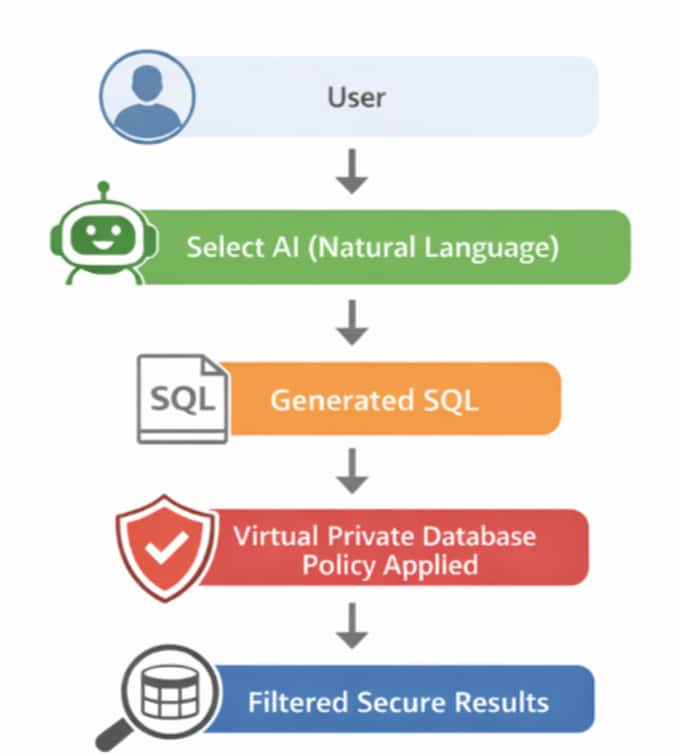
Figure 1: Implementation workflow: Step-by-Step Guide
Once the Autonomous AI Database instance has been provisioned and the user created, the next step is to have the ADMIN user grant the required privileges to enable Select AI and VPD functionality. The user must have execution rights on the necessary packages to be able to create AI profiles and define row-level security policies.
Log into Database Actions SQL Worksheet as ADMIN user, run the following grants:
GRANT EXECUTE ON DBMS_CLOUD TO SELECT_AI_USER;
GRANT EXECUTE ON DBMS_CLOUD_AI TO SELECT_AI_USER;
GRANT EXECUTE ON DBMS_RLS TO SELECT_AI_USER;
These privileges allow the user SELECT_AI_USER to configure Select AI profile and implement VPD policies within the database.
Access the SQL script Virtual Private Database multi region sales dataset, which creates a sample database tables for a multi-region sales setup. It defines four tables:
- REGIONS (for geographic areas)
- PRODUCTS (for product details)
- SALES (for transactions linking products and regions)
- APP_USERS (for users with assigned regions and roles)
It then populates these tables with sample data, including regions from different parts of the world, a variety of products across categories, and multiple sales records. It also adds users such as regional managers and a global manager who is application admin
Create a credential to authenticate with OCI
This credential enables the Autonomous AI Database user SELECT_AI_USER to connect to the OCI Generative AI service by securely storing the required OCI authentication details. It will later be referenced when creating the Select AI profile.
BEGIN
  DBMS_CLOUD.CREATE_CREDENTIAL(
    credential_name => 'OCI_GENERATIVE_AI_CRED',
  user_ocid => '',
  tenancy_ocid => '',
  fingerprint => '',
  private_key => '');
END;
Create a Select AI profile
A Select AI profile defines which AI provider and model to use. It also includes the necessary details about metadata and database objects needed to generate responses from natural language prompts.
Select AI supports using wide range of AI Providers and LLMs.
BEGIN
  DBMS_CLOUD_AI.create_profile(
    profile_name => 'SALES_PROFILE',
    attributes => '{"provider": "oci",
    "credential_name": "SELECT_AI_CRED",
    "model": "meta.llama-3.3-70b-instruct",
    "comments":"true",
    "object_list": [{"owner": " SELECT_AI_USER ", "name": "SALES"},
                    {"owner": " SELECT_AI_USER ", "name": "PRODUCTS"},
                    {"owner": " SELECT_AI_USER ", "name": "REGIONS"},
                    {"owner": " SELECT_AI_USER ", "name": "APP_USERS"}]}');
END;
Create VPD Policy
Create the VPD policy function and attach the policy to the table to enforce row-level security. This ensures that data access is dynamically restricted based on the logged-in user context.
The function below checks the current user’s role and region from the app_users table. If the user has role ADMIN, it allows access to all rows; otherwise, it limits the data to those rows that match the user’s region. If the user is not found in the table, it blocks access by returning a condition that shows no data.
create or replace FUNCTION sales_region_policy (
  schema_name IN VARCHAR2,
  table_name IN VARCHAR2)
RETURN VARCHAR2 AS
  v_region_id NUMBER;
  v_role VARCHAR2(50);
BEGIN
  -- Get current user info from app_users
  SELECT region_id, role
  INTO v_region_id, v_role
  FROM app_users
  WHERE upper(username) = upper(SYS_CONTEXT('APEX$SESSION','APP_USER'));
  -- If ADMIN, allow all rows
  IF upper(v_role) = 'ADMIN' THEN
    RETURN '1=1';
  -- If not ADMIN, restrict to their region
  ELSE
    RETURN 'region_id = ' || v_region_id;
  END IF;
EXCEPTION
  WHEN NO_DATA_FOUND THEN
  -- If user not found in table, deny access
  RETURN '1=0';
END sales_region_policy;
The PL/SQL block below adds a security rule to the SALES table using DBMS_RLS.ADD_POLICY (Oracle’s row-level security feature). It links the sales_region_policy function to the table so that whenever a SELECT query is run, the function decides which rows the user can see. In simple terms, it automatically filters data, so users only see what they are allowed to access.
BEGIN
 DBMS_RLS.ADD_POLICY(
   object_schema   => 'SELECT_AI_USER',
   object_name     => 'SALES',
   policy_name     => 'sales_region_policy',
   function_schema => 'SELECT_AI_USER',
   policy_function => 'sales_region_policy',
   statement_types => 'SELECT');
END;
Validate the Setup Using the Ask Oracle Chatbot (APEX Application)
Ask Oracle powered by Select AI is a sample Oracle APEX app that provides a chatbot-style interface for interacting with AI using natural language. It enables LLM conversations, NL2SQL queries, RAG, and AI agent workflows, and can be used as-is or customized for your needs.
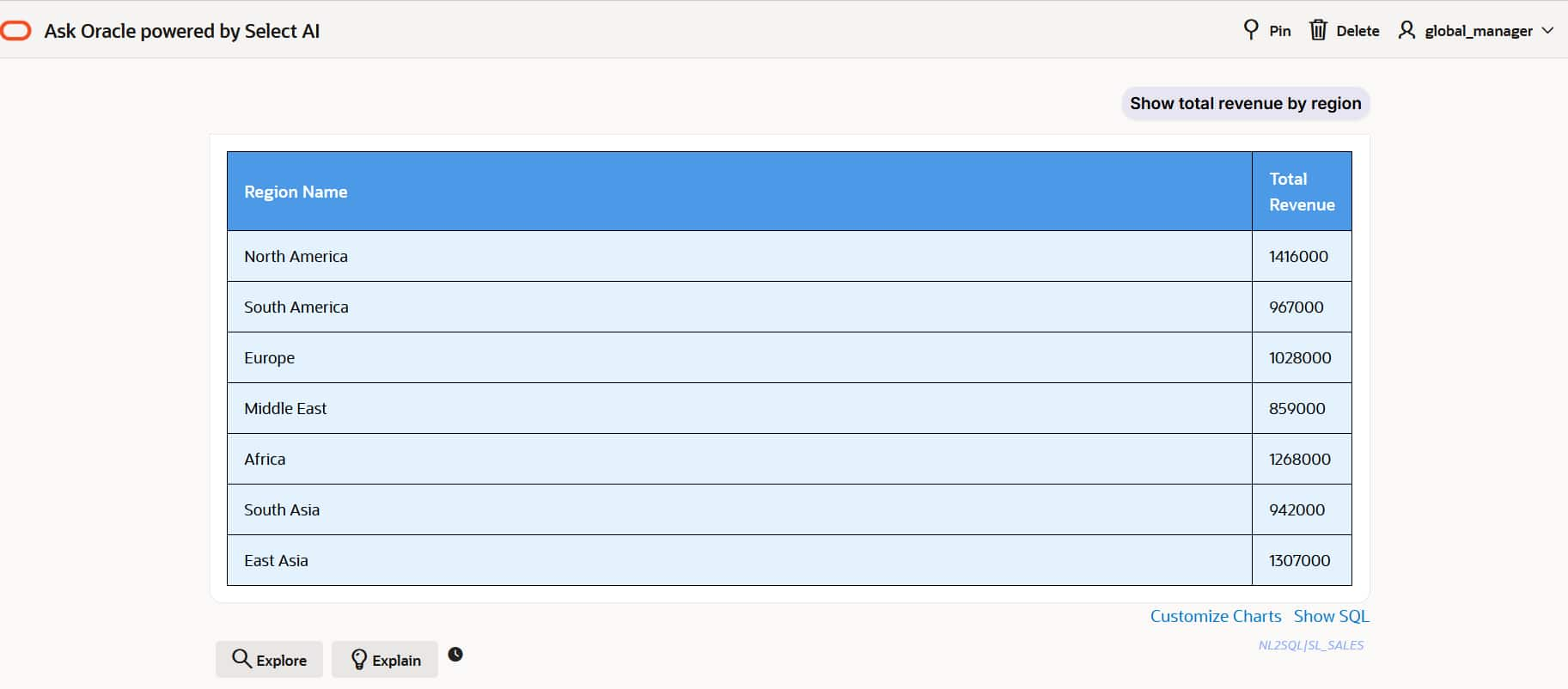
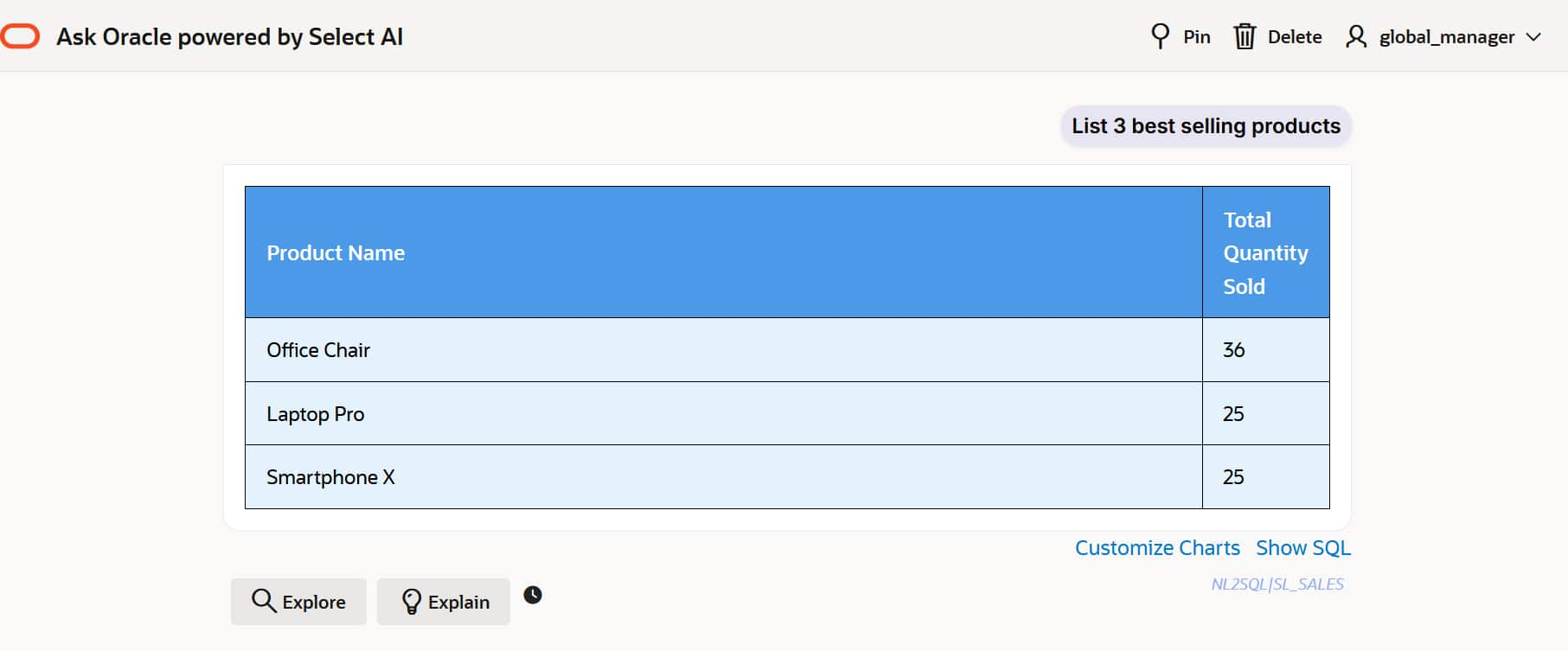
Virtual Private Database global_manager is an application admin user who has access to all data across all regions. The global_manager user has the application admin role and is not restricted by the region filter.
The other users like NA_manager, SA_manager, EU_manager etc., are regional managers, and each of them can access only data related to their specific region.
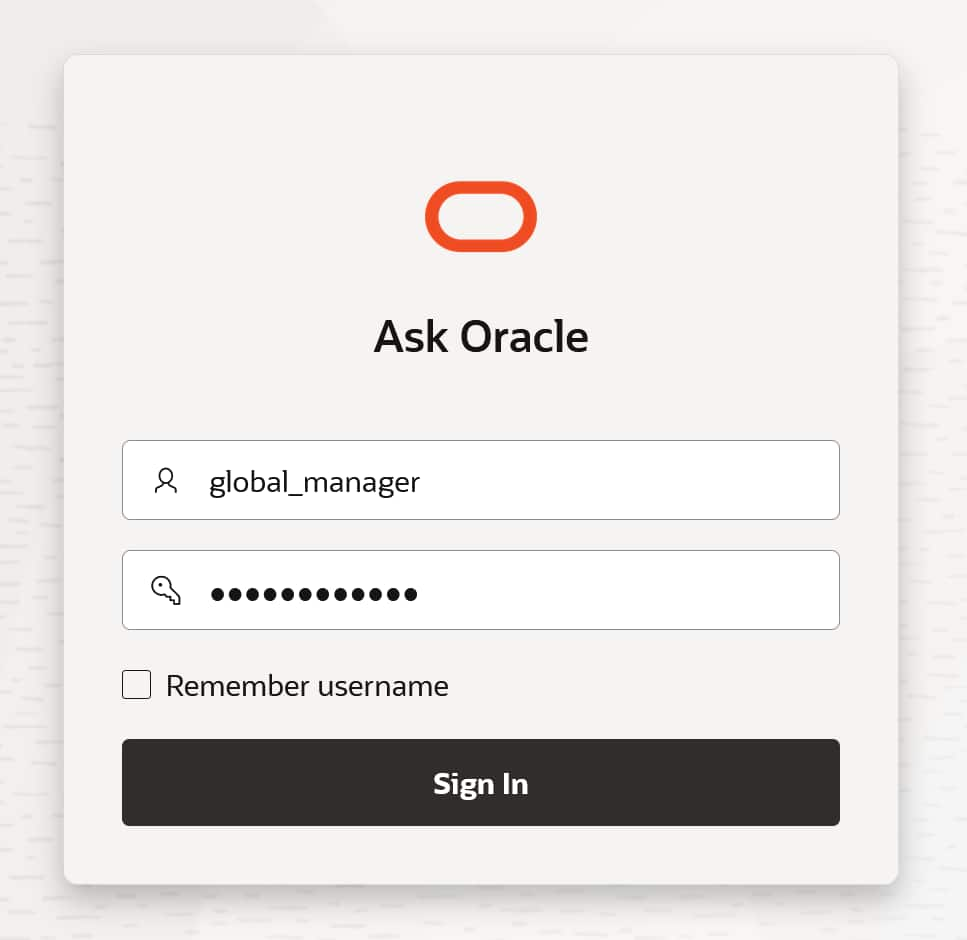
The global_manager user has access to data across all regions. Log into the application as global_manager:
Run this natural language query “Show total revenue by region”:
Run this natural language query “List 3 best selling products”
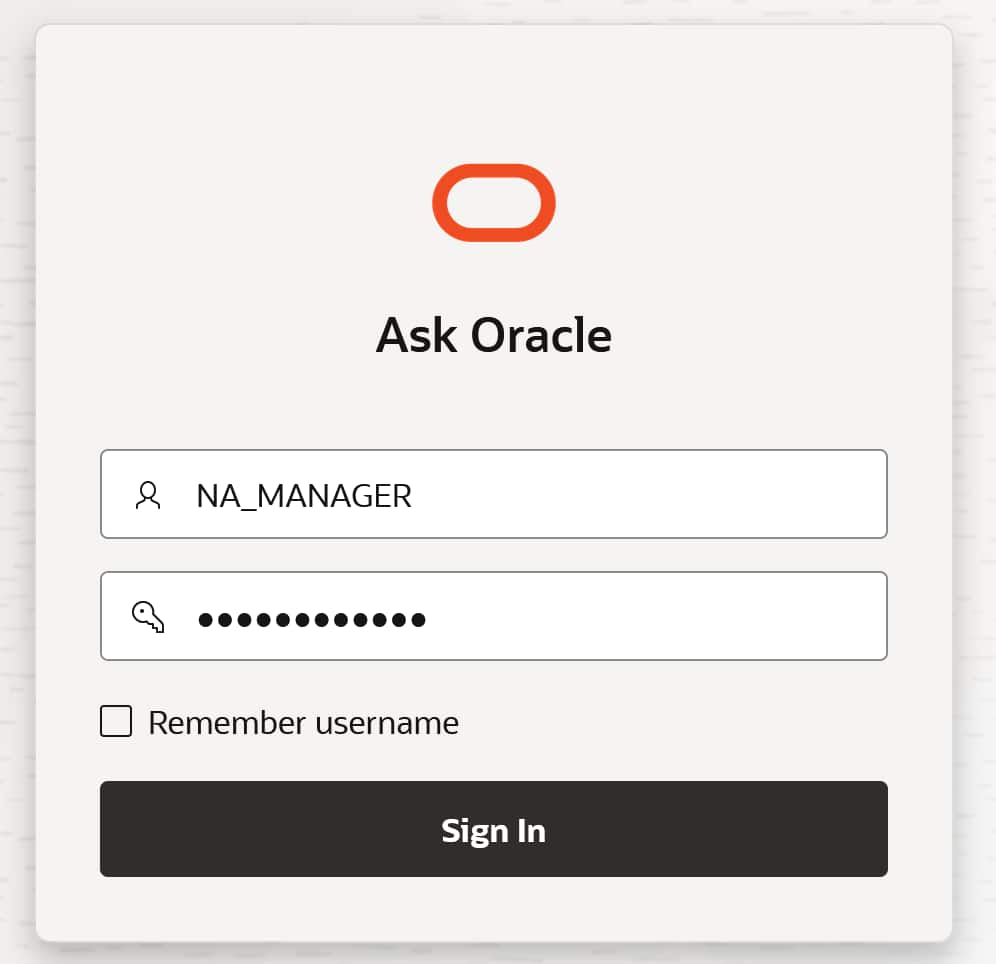
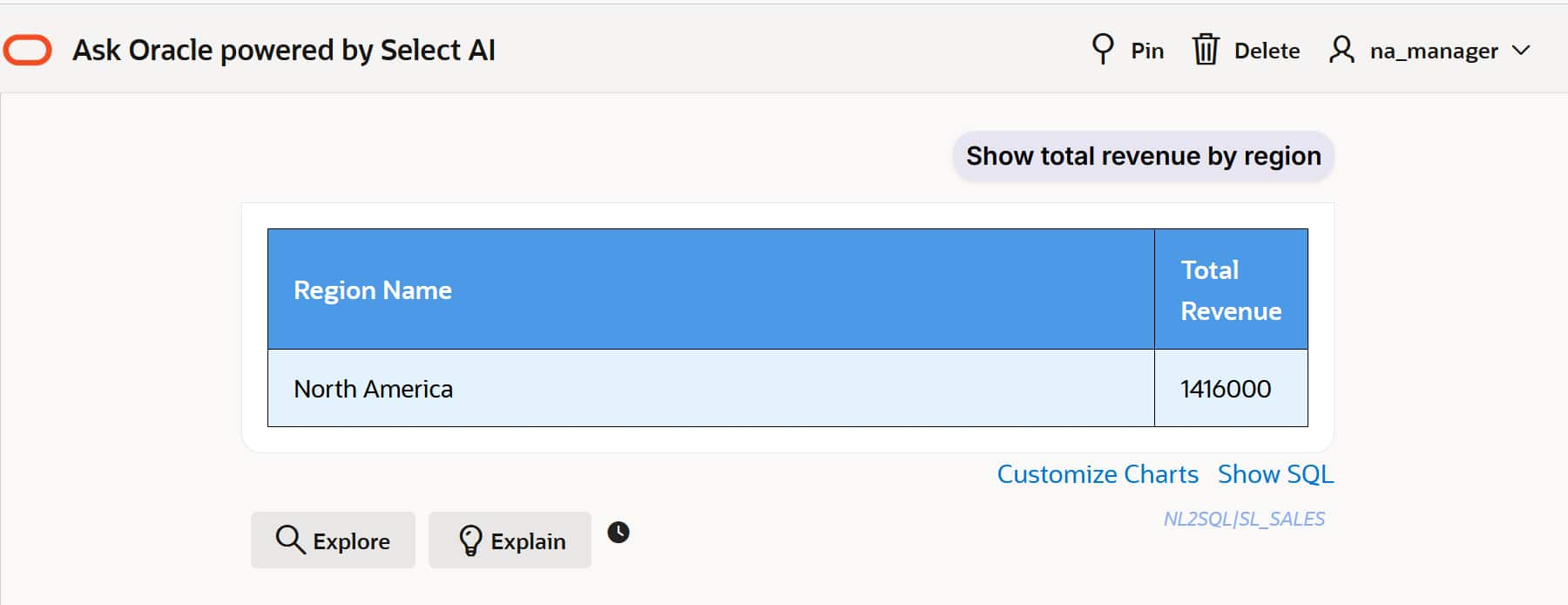
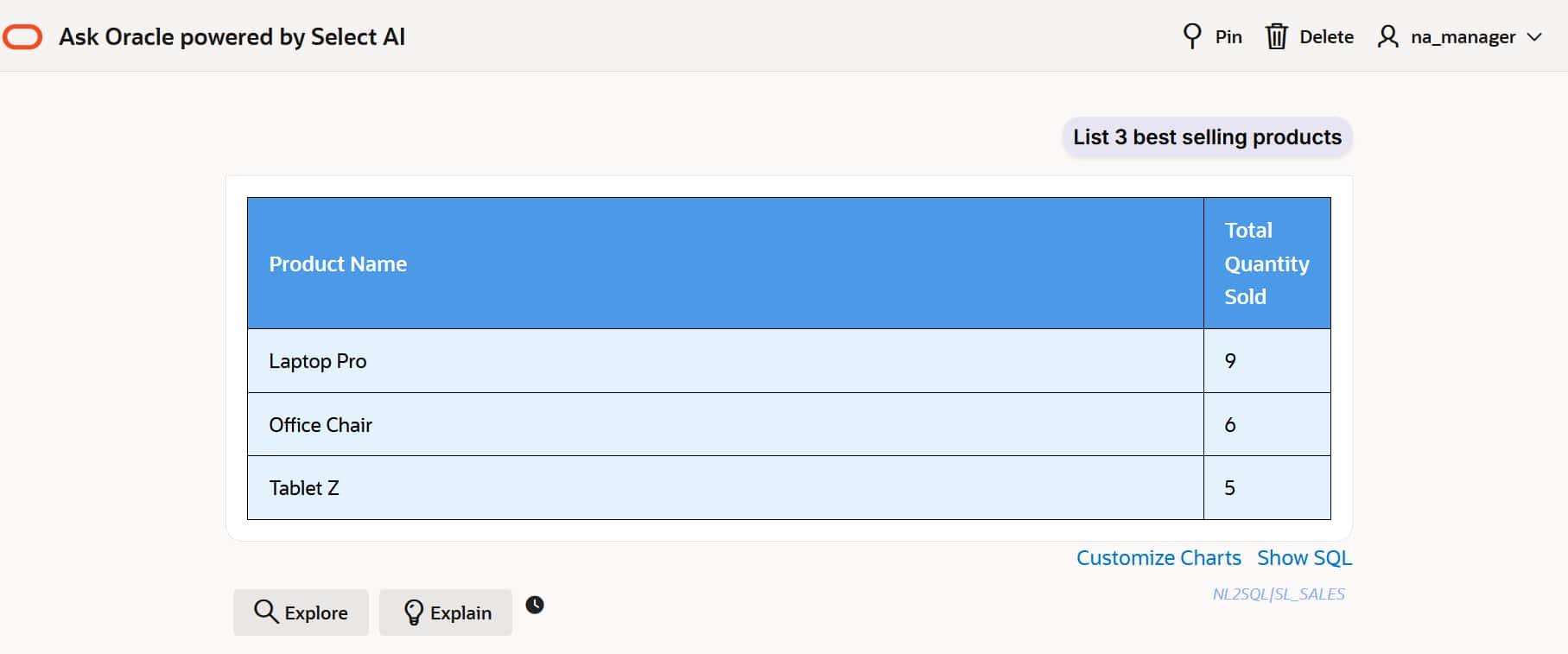
We login to the application as na_manager and run natural language queries. NA_manager can only access data related to their specific region:
Run this natural language query “Show total revenue by region”
Run this natural language query “List 3 best selling products”
Oracle Virtual Private Database (VPD) enforces row-level security by restricting what data each user can see, while Select AI enables natural language queries—and together they ensure AI-generated responses only return data users are authorized to access. We recommend you also take a look at Oracle Deep Data Security, the latest Oracle technology developed to help you address security threats in the AI era. Deep Data Security uses declarative, database-native controls that enforce end-user access privileges at the row and column level. By centralizing and decoupling end-user security from application code, it enables organizations to continuously update defenses as new threats emerge. You can learn more about Deep Data Security here.
Resources
For more information, see: