
Disaster Recovery operations demand precision when timing matters most. Whether you are preparing for a planned switchover, reviewing a drill execution, or responding to an incident, operators need fast access to Disaster Recovery Protection Group (DRPG) state, plan readiness, execution history, and any blocking conditions before taking action. The OCI Full Stack Disaster Recovery MCP Server brings that operational context into a single AI-assisted workflow.
It gives MCP-compatible agents structured access to live OCI Full Stack DR data, so they can summarize readiness, identify blocking conditions, locate the correct DR plan, and guide the next operational step. For workflows that require action, the operator remains in control of every decision.
The OCI Full Stack DR MCP server is available now in the Oracle MCP repository: OCI Full Stack DR MCP Server
The Problem It Solves
OCI Full Stack Disaster Recovery orchestrates role transitions across compute, database, and application tiers from a single control plane. It handles Switchover, Failover, Start Drill, and Stop Drill plans across paired DRPGs in two OCI regions.
Before executing or reviewing a DR plan, operators often need a fast way to confirm readiness and understand the current DR state. That typically includes verifying that the paired DRPGs are properly associated, checking that each DRPG is in the expected lifecycle state for the intended operation, confirming that no conflicting DR operation is in progress, checking that all expected DRPG members are present, and confirming that the relevant DR plan is available for execution.
The OCI Full Stack DR MCP Server answers those readiness questions from live Full Stack DR state and helps the operator move from assessment to the next appropriate action, with the operator still in control.
What Is MCP
The Model Context Protocol (MCP) is an open standard that enables AI agents to communicate securely with external systems and take actions against them. It is the infrastructure layer that lets an AI assistant move from answering questions to interacting with live systems.
Without MCP, an AI assistant is limited to what it already knows. With MCP, an agent calls structured tools, receives live data from external APIs, reasons over the results, and acts on them where you permit it. For DR operations, that means an agent can check DRPG readiness across both regions, identify a blocking condition like an in-progress drill, surface the correct plan OCID, and walk you through execution, all within a single conversation thread.
Oracle has published a growing collection of MCP servers at github.com/oracle/mcp covering services including Full Stack Disaster Recovery, Autonomous Recovery Service, Oracle Database Cloud Services, MySQL HeatWave, and SQLcl. Each server runs locally, inherits your OCI credentials, and connects to any MCP-compatible client. That includes AI chat interfaces like Claude Desktop, IDEs like Cursor and VS Code with Copilot, agentic frameworks like LangChain and AutoGen, and custom-built agents that implement the MCP protocol.
What the Server Can Do
The Full Stack DR MCP Server covers two areas: observability and operations.
Observability: Ask Questions About Your DR State
The server exposes seven read tools that cover the full observability surface of Full Stack DR. Every tool targets a specific region via a profile parameter, so you can compare primary and standby state in one conversation.
| Tool | What It Returns |
|---|---|
list_dr_protection_groups | All DRPGs in a compartment with role, lifecycle state, and peer details |
get_dr_protection_group | Full DRPG detail including members and association status |
list_dr_plans_for_protection_group | All DR plans for a DRPG, filterable by plan type |
get_dr_plan | Full plan detail including plan groups and steps |
list_dr_plan_executions_for_protection_group | Execution history, filterable by lifecycle state |
get_dr_plan_execution | Per-step execution detail including duration and failure messages |
get_work_request | Async operation status and percent complete |
Here are the kinds of questions you can ask once connected:
- Which DR Protection Groups are in Needs Attention state across both regions?
- Show me the last five executions for my Mumbai primary DRPG and summarize which steps had issues.
- Is there a drill in progress that would block tonight’s switchover window?
- Are both DRPGs ACTIVE and associated before the maintenance window?
- Which Switchover plans on my standby DRPG are currently ACTIVE?
- Which step failed in last night’s execution and how long did it stall?
Operations: Run Guided DR Workflows
Beyond observability, the server can execute DR operations through a single write interface called fsdr_raw_call. It accepts any DisasterRecoveryClient SDK method name (create, update, associate, execute, refresh, cancel) and executes it against OCI.
This design is intentional. A fixed set of write tools would constrain what an agent can do. fsdr_raw_call gives an agent the full action surface of the DisasterRecoveryClient SDK, with a fixed allowed-operations list as the safety boundary. The agent reasons about what needs to happen; the server enforces what is permitted.
To make this safe, the server ships seven guided workflow prompts. These are structured multi-step runbooks that the AI follows when you ask for a higher-level workflow:
| Prompt | What It Guides You Through |
|---|---|
check_dr_status | Read-only health check across both regions |
setup_drpg_pair | Create and associate a PRIMARY/STANDBY DRPG pair |
add_members | Add compute, database, and other resources to a DRPG |
plan_refresh_workflow | Refresh DR plans after member changes |
run_switchover | Planned Switchover with pre-checks and post-role verification |
run_drill | Start Drill and Stop Drill with drill-state isolation warnings |
run_failover | Emergency Failover including mandatory post-failover reset guidance |
For example, when you ask “Guide me through running a switchover for my EBS application DRPG,” the AI follows run_switchover. It reads both DRPG states, confirms no drill is in progress, locates the correct Switchover plan OCID, presents the full execution payload for your review, and waits for your confirmation before calling fsdr_raw_call. The AI handles the sequencing; you stay in control of the decision.
One important note: fsdr_raw_call executes immediately when called. There is no dry-run mode inside the server. Confirmation before write operations is the responsibility of the calling workflow, which is exactly what the guided prompts enforce.
What It Does Not Do
The MCP Server does not autonomously decide to trigger DR operations. It is designed as a human-in-the-loop interface where the operator reviews and approves action-oriented workflows. For automated DR execution patterns, use the appropriate OCI event-driven architecture or Full Stack DR automatic execution capabilities where supported.
How to Get Started
Requirements: Python 3.13+, uv (brew install uv on macOS), OCI CLI configured, and any MCP-compatible client (OpenAI Codex, Claude Desktop, Cursor, VS Code with Copilot, or a custom agent).
Step 1: Configure two OCI profiles. The server uses FSDR_REGION1 for your primary region and FSDR_REGION2 for your standby. Add both to ~/.oci/config:
[FSDR_REGION1]
user=ocid1.user.oc1..{your-user-ocid}
tenancy=ocid1.tenancy.oc1..{your-tenancy-ocid}
region=us-ashburn-1
fingerprint={your-fingerprint}
key_file=~/.oci/oci_api_key.pem

[FSDR_REGION2]
user=ocid1.user.oc1..{your-user-ocid}
tenancy=ocid1.tenancy.oc1..{your-tenancy-ocid}
region=us-phoenix-1
fingerprint={your-fingerprint}
key_file=~/.oci/oci_api_key.pem
Step 2: Clone and install:
git clone https://github.com/oracle/mcp.git
cd mcp/src/oci-full-stack-disaster-recovery-mcp-server
uv sync
Step 3: Register the server with your MCP client. MCP clients use a JSON config to register servers. The structure below works for Claude Desktop, Cursor, and most stdio-based MCP clients. Adjust the config file path for your specific client.
For Claude Desktop: ~/Library/Application Support/Claude/claude_desktop_config.json (macOS) or %APPDATA%\Claude\claude_desktop_config.json (Windows).
{
  "mcpServers": {
    "oci-fsdr": {
      "command": "uvx",
      "args": [
        "--from", "/path/to/mcp/src/oci-full-stack-disaster-recovery-mcp-server",
        "oracle.oci-fsdr-mcp-server"
      ],
      "env": {
        "FSDR_PROFILE_1": "FSDR_REGION1",
        "FSDR_PROFILE_2": "FSDR_REGION2"
      }
    }
  }
}
Step 4: Restart your client and verify:
Try this as your first query:
Show me the current Full Stack DR inventory for compartment
ocid1.compartment.oc1..axxxxxxxx. Query both configured regions and return a table containing each DR Protection Group, its region, role, lifecycle state, peer association status, and any DR Protection Groups that are not in ACTIVE state. Highlight any groups that require attention.
This single query exercises the server across both region profiles, invokes list_dr_protection_groups and get_dr_protection_group in sequence, and asks the agent to reason over the results, surfacing groups that need attention rather than just listing raw API output.
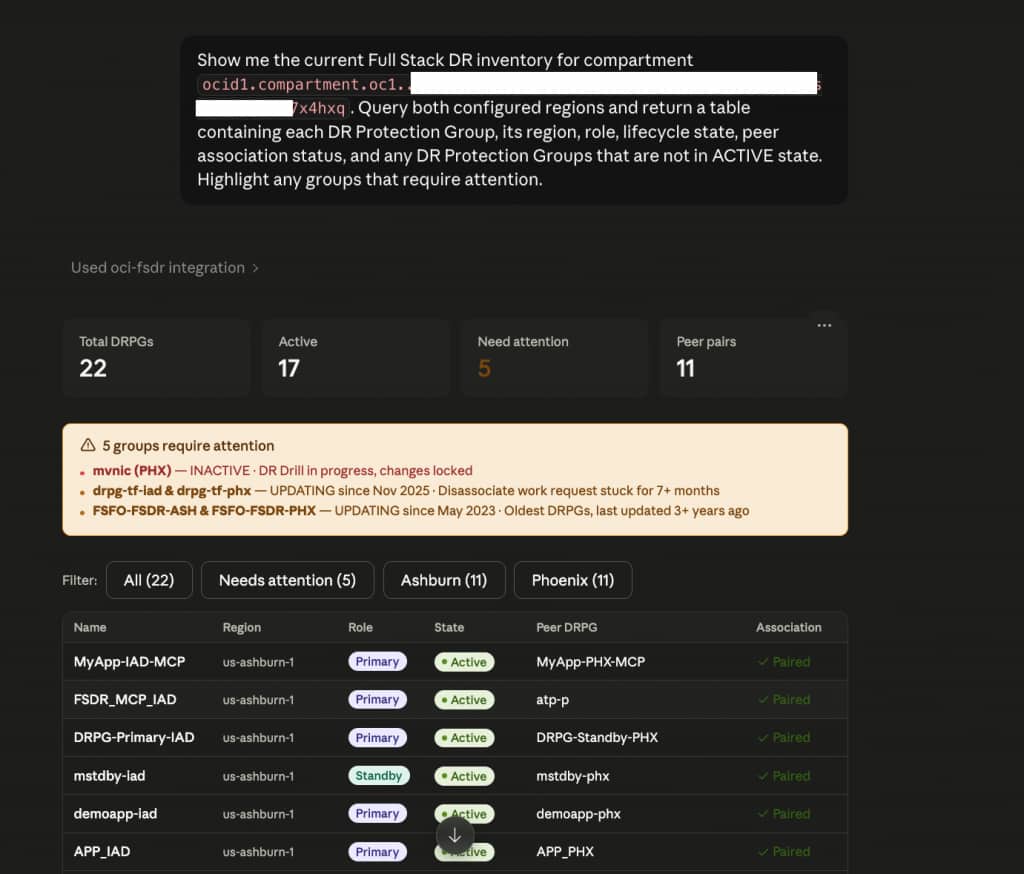
The agent queried both regions (us-ashburn-1 and us-phoenix-1), returned a summary dashboard showing 22 DRPGs, 17 Active, 5 requiring attention, and 11 peer pairs, then rendered a filterable inventory table with role, state, peer DRPG, and association status for every group. The 5 groups needing attention were immediately surfaced at the top with specific reasons: a DR Drill in progress with changes locked, a disassociate work request stuck since November 2025, and DRPGs last updated in May 2023.
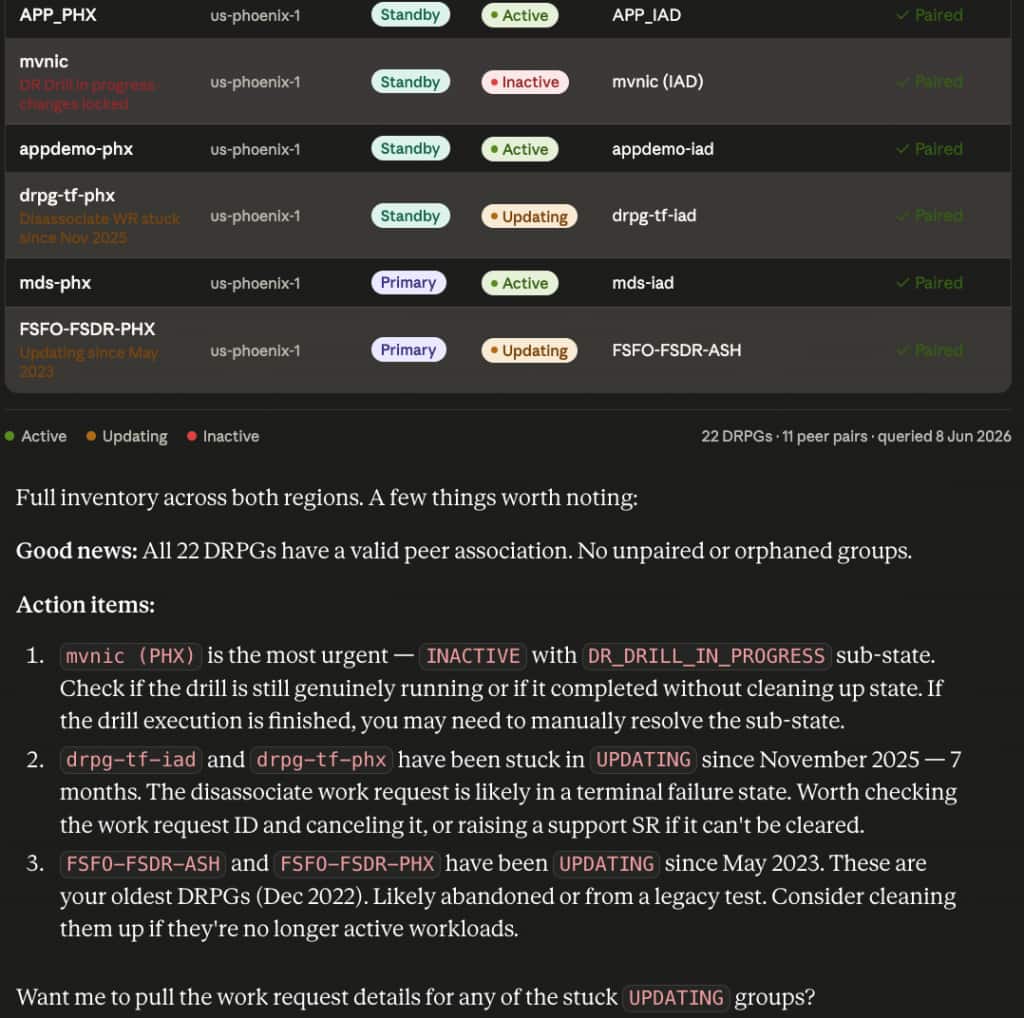
The agent did not stop at listing state. It reasoned over the results and produced a prioritized action list:
mvnic (PHX)is INACTIVE withDR_DRILL_IN_PROGRESSsub-state. The agent flagged this as most urgent and suggested checking whether the drill completed without cleaning up state, which would require manual resolution.drpg-tf-iadanddrpg-tf-phxstuck in UPDATING since November 2025. The agent identified the disassociate work request as likely in a terminal failure state and recommended canceling the work request or raising a support SR.FSFO-FSDR-ASHandFSFO-FSDR-PHXin UPDATING since May 2023. The agent flagged these as likely abandoned legacy DRPGs and suggested cleanup if the workloads are no longer active.
The agent then offered to pull work request details for the stuck UPDATING groups, the next step in the diagnostic chain, without any additional prompting. That is the agentic behavior in practice: not just retrieving data, but reasoning over it and proposing the next action.
If the server is connected and your OCI profiles are correctly configured, you will have a full DR inventory with prioritised action items in under a minute. Setup to first query takes under 15 minutes.
Going Further: Combine with Other Oracle MCP Servers
Full Stack DR orchestrates at the application stack level. Oracle Data Guard operates at the database level. You can run both servers together to correlate Data Guard standby lag with DR plan readiness in the same conversation, something that previously required switching between two separate tools.
Add the SQLcl MCP server alongside the Full Stack DR server in your MCP client config:
{
  "mcpServers": {
    "oci-fsdr": {
      "command": "uvx",
      "args": ["--from", "/path/to/mcp/src/oci-full-stack-disaster-recovery-mcp-server", "oracle.oci-fsdr-mcp-server"],
      "env": { "FSDR_PROFILE_1": "FSDR_REGION1", "FSDR_PROFILE_2": "FSDR_REGION2" }
    },
    "sqlcl": {
      "command": "uvx",
      "args": ["--from", "/path/to/mcp/src/sqlcl-mcp-server", "oracle.oci-sqlcl-mcp-server"],
      "env": {}
    }
  }
}
Beyond interactive use, the MCP Server fits directly into agentic pipelines. A monitoring agent watching OCI Alarms can call the Full Stack DR server to check DRPG readiness before escalating. An orchestration agent handling a DR runbook can combine the Full Stack DR server, the SQLcl server, and a notification tool to execute a switchover, validate the Data Guard role transition, and post a summary to a messaging channel, without a human navigating between tools. The MCP protocol is the connective tissue that makes that kind of multi-tool agent possible.
Learn More
If you are new to Full Stack DR, the OCI LiveLabs hands-on lab is the fastest way to get a working environment. The links below cover IAM policy setup and supported member types.
- Source code: github.com/oracle/mcp, under
src/oci-full-stack-disaster-recovery-mcp-server - OCI Full Stack DR product page: oracle.com/cloud/full-stack-disaster-recovery
- OCI Full Stack DR documentation: docs.oracle.com/en/cloud/iaas/disaster-recovery
- IAM policy setup: Configuring IAM Policies for Full Stack DR
- OCI Full Stack DR LiveLabs: OCI Full Stack DR hands-on lab
Feel free to connect with me directly on LinkedIn, X, and Bluesky.