
Introduction: Why ‘Up and Running’ Isn’t Enough
Most DBAs define success by whether the database is “up.” However, in the context of Oracle Maximum Availability Architecture (MAA), availability is more than a binary status; it is a measure of resilience. As highlighted in our previous post on Oracle Update Advisor, “Software Health” is the foundation of this resilience.
From the Oracle Update Advisor (OUA) perspective, if your software health is “Red” or “Yellow,” your MAA architecture—no matter how robust—is at risk. This post explores how to align your software maintenance strategy with your MAA tier (as defined by the MAA best practices here) to ensure continuous availability.
1. Mapping Health Status to MAA SLAs
The Oracle Update Advisor provides a simple Traffic Light status (Green, Yellow, or Red) determined by the selected policy. For example, a monthly policy (i.e., a customer wanting monthly updates) would align with monthly Monthly Recommended Patches (MRPs) being applied. In addition to aligning with selected policies on quarterly release updates (RUs) and MRPs, status can also be impacted by missing critical or important updates on top of MRPs and/or Rus. While there is no direct mapping between OUA status and MAA, here is how those statuses could translate to MAA risk:
- GREEN (In Sync): You are protected against known critical bugs that severely impact stability or database availability. Regardless of your MAA tier, your software health is optimal.
- YELLOW (1 Release Update (RU) or MRP behind, depending on policy): You are entering a “Maintenance Debt” zone. While your Data Guard or RAC might still be running, you are missing the latest stability fixes that prevent performance problems, “brownouts,” or edge-case failures. Depending on how critical the application is, this could be an issue for Silver MAA and above.
- RED (Outdated): Your MAA SLA (regardless of the tier) is effectively compromised. No amount of redundancy (Gold/Platinum/Diamond Tier) can fully protect you from a known software defect or security exploit that has already been patched in a newer Release Update (RU).
2. The ‘Out-of-Place’ Advantage: Speeding Up Planned Maintenance
The 26ai documentation strongly recommends out-of-place patching via gold images, so if you are not already using gold images, it is time to switch strategies to utilize them when updating your software. This is considered a critical MAA best practice:
- Reduced Downtime: By creating and preparing a new Oracle Home from a gold image while the database is still running, you reduce the maintenance window to a simple “switch” rather than a lengthy “apply.”
- Zero-Risk Rollback: If a software update introduces an issue, moving back to the previous Oracle Home is near-instant, aligning with the Platinum or Diamond Tier goal of near-zero RTO.
3. Tiered Maintenance Policies
Not every database needs to be on the “N” version (latest). Use Oracle Update Advisor via FPP, DBCA, or AutoUpgrade (26.2 or higher) to set policies that match your MAA Tiers:
- Bronze/Silver Tiers: May choose a “Lag of 1 RU” (N-1) to prioritize stability over the absolute latest features.
- Gold/Platinum/Diamond Tiers: Should aim for “N” (latest) or use Monthly Recommended Patches (MRPs) on top of the current RU to address high-impact bugs before they can cause a site-wide disaster.
Recommended default for mission-critical stability + timely monthly updates (applicable to any MAA tier, but especially for mission-critical environments)
For mission-critical environments (at any MAA tier), the safest and most stable “policy-wise” place to be, while still receiving timely (monthly) stability/security updates, is Monthly – Long Term Release Update (M‑LTRU) using the prior Long Term RU (or the current LTRU if there is no overlap).
- Policy setting: applyFrequency=MonthlyLTRU, updateLag=N-1
- Annual LTRU change cadence: Customers typically change LTRU once per year (often in the Jan/Feb timeframe) and adopt that new LTRU ~6 months after it was released.
- Monthly currency via MRPs: Install MRPs monthly to stay current with minimal, stability/security-focused updates—typically MRP7 through MRP18 on the “adopted” (prior) LTRU.
- Runway for onboarding the next LTRU: Use the MRP1 through MRP6 timeframe on the new LTRU as the “runway” to validate and prepare for a future cutover (since a new LTRU can represent ~one year of accumulated change).
- Important overlap reality: Even though there are 18 months of MRPs, you should not treat this as an 18‑month window between RU updates because there is a ~6‑month overlap of MRPs between the prior and current LTRU.
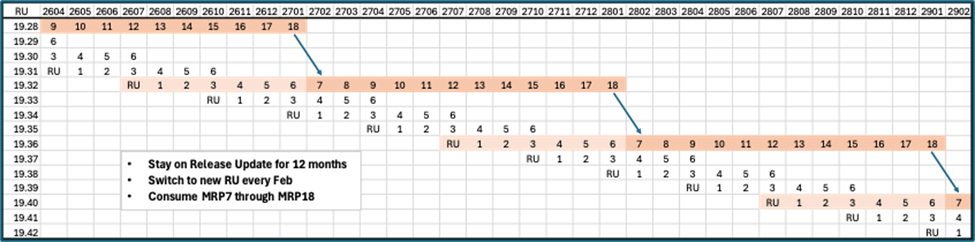
This approach gives you a predictable annual “major” adoption point while still staying current monthly on the fixes most likely to impact availability, brownouts, and security exposure. Please keep in mind that there are many supported options for you regarding your update policy. For example, you could also go with a similar LTRU approach, but without the 6-month lag.
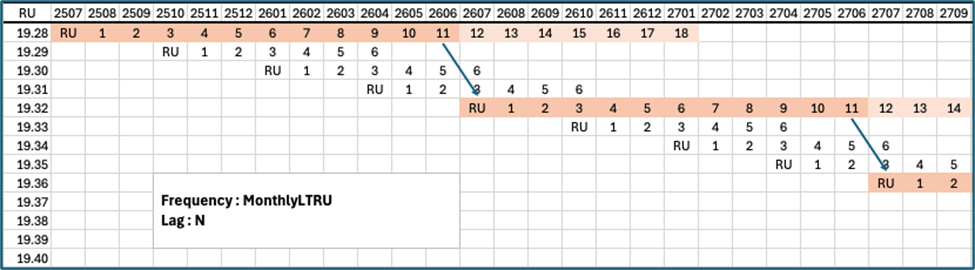
For more information regarding the different policy options, please check out our MAA Software Maintenance Best Practices.
4. Automating the Fleet with FPP
For customers managing large mission-critical fleets (which routinely are “Gold MAA and higher” for many), manual health checks are impossible. The integration of Oracle Update Advisor with Fleet Patching and Provisioning (FPP) allows you to:
- Identify health gaps across thousands of databases instantly.
- Automatically download and deploy the recommended “Gold Image.”
- Standardize your environment to eliminate “snowflake” configurations that are the leading cause of failed failovers.
For customers that are not managing fleets, OUA integrates with DBCA and AutoUpgrade, providing additional options to ensure you are meeting software health best practices and guidelines.
Conclusion: Health is a Prerequisite for Availability
You can’t have Maximum Availability without Maximum Health. By using Oracle Update Advisor to maintain a “Green” status and adopting “Out-of-Place” patching workflows, you transform software maintenance from a risky chore into a strategic component of your MAA strategy.
Want to start streamlining your software health updates today?
Oracle makes it easy to take advantage of Oracle Update Advisor in your environment with multiple levels of integration with your favorite Oracle gold-image solution.
- Run the Oracle Update Advisor via FPP or DBCA and see if your ‘Gold Tier’ architecture is running on ‘Red’ health software.”
In addition, you can utilizeAutoUpgrade 26.2 or higher, which integrates with Oracle Update Advisor to generate gold images but doesn’t yet do software recommendations.