

To provide disaster recovery, especially in regions where Oracle Database@Azure is available in only one Availability Zone, and customers have regulatory compliance requirements to keep their data within the same region, you can create a standby database in an OCI Availability Domain (AD), which is a separate data center providing physical isolation within the same region. In regions with multiple ADs, we recommend selecting an AD other than that linked to the Azure zone to enhance availability.
This blog post describes the Oracle Active Data Guard setup on Oracle Exadata Database Service on Exascale Infrastructure across Oracle Database@Azure and Oracle Cloud Infrastructure in the same region. The same solution applies similarly to Oracle Exadata Database Service on Dedicated Infrastructure.
Oracle Database@Azure offers built-in high availability and scalability with Oracle Real Application Clusters (Oracle RAC) while ensuring low latency for Azure applications. Extending the solution with an Active Data Guard standby database hosted on another Oracle Exadata Database Service on Exascale Infrastructure in the OCI availability domain within the same region enhances availability and data protection in case of an entire outage on the Azure side. The physical proximity of OCI and Azure data centers enables synchronous replication, ensuring a zero data loss configuration.
Architecture
This architecture shows Oracle Exadata Database Service on Exascale Infrastructure with an Active Data Guard deployment with the primary database on Oracle Database@Azure and the standby database on Oracle Cloud Infrastructure.
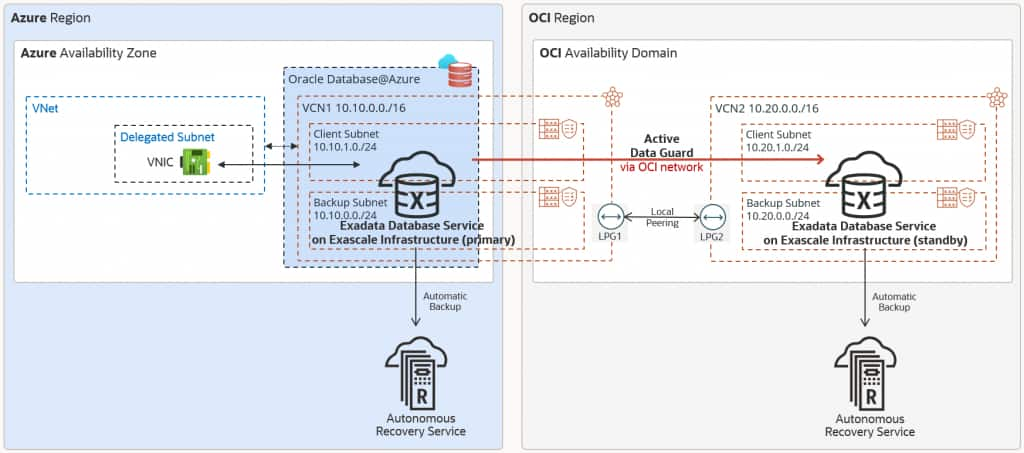
The Oracle Database runs in an Exascale VM Cluster in the primary availability zone. For data protection, Oracle Active Data Guard replicates the data to the OCI availability domain in the same geographical region.
Active Data Guard network traffic is directed through the OCI network via the dedicated backbone. When the Exascale VM cluster on Oracle Database@Azure is created, a corresponding VCN on the OCI side will be automatically created. The Exascale VM Cluster on Oracle Cloud uses its own VCN.
In this architecture:
- The primary Exascale VM Cluster is deployed in the Azure availability zone in VCN1 with CIDR 10.10.0.0/16 and client subnet CIDR 10.10.1.0/24.
- VCN1 has a Local Peering Gateway LPG1.
- The standby Exascale VM Cluster is deployed in the OCI availability domain in VCN2 with CIDR 10.20.0.0/16 and client subnet CIDR 10.20.1.0/24.
- VCN2 has a Local Peering Gateway LPG2.
- VCN1 and VCN2 are peered with a Local Peering Connection via LPG1 and LPG2.
- Oracle Managed Keys (local TDE wallet) is used for both the primary and standby databases.
Recommendations
Use the following recommendations as a starting point when implementing disaster recovery for Oracle Exascale Database Service on Oracle Database@Azure. Your requirements might differ from the architecture described here.
- Use Active Data Guard for comprehensive data corruption prevention with automatic block repair, online upgrades and migrations, and offload workload to standby with read-mostly scale-out.
- Enable Application Continuity to mask database outages during planned and unplanned events from end-users and ensure uninterrupted access to applications.
- Set up automatic backup to Oracle Database Autonomous Recovery Service (in Azure and OCI), even though the data is protected by Oracle Data Guard, to minimize the backup workload on the database by implementing the incremental forever backup strategy that eliminates weekly full backups.
- Enable backups from standby to achieve backup replication across Azure and OCI.
- Use OCI Full Stack Disaster Recovery to orchestrate database switchover and failover operations.
Considerations
When ensuring business continuity for Oracle Exascale Database Service on Oracle Database@Azure with a Data Guard standby database on Oracle Cloud Infrastructure, consider the following:
- When Exascale VM Clusters are created in the Oracle Database@Azure child site, each Exascale VM Cluster is created within its own OCI VCN. Data Guard requires that the databases communicate with each other to ship redo data. The VCNs need to be peered to enable this communication. Hence, the Exascale VM Cluster VCNs must not share overlapping IP CIDR ranges.
- Choose the Data Guard protection mode depending on the network latency between the Azure availability zone and OCI availability domain, and your application requirements for performance and zero data loss.
- You can create up to six standby databases for a primary database via cloud tooling.
Network Configuration
Establish the local peering between the VCNs of the primary and standby Exadata VM Clusters and configure the route tables and network security groups to enable network communication for Active Data Guard between the availability zones. For details, follow the OCI documentation for local VCN peering.
DNS Resolution
To be able to resolve hostnames across the Azure VNet and the OCI VCN network, we recommend using the Oracle Private DNS feature. This solution enables your application to use the SCAN names from Azure to OCI and vice versa.
Additionally, Private DNS allows for DNS resolution across VCNs and between the VCN and the on-premises network. For more details, see DNS Resolution between VCNs.
Data Guard Deployment
Data Guard or Active Data Guard standby databases can be created using OCI cloud tooling.
Use the new Data Guard Group resource with new APIs supporting adding multiple standby databases and providing additional enhancements. If you currently have automation that manages Data Guard operations using the existing Data Guard Association API, you can update your applications to use the new API to take advantage of these new capabilities. For more details, see To enable Data Guard on Oracle Exadata Database Service on Exascale Infrastructure.
Application Replication and Connectivity
Application replication and connectivity to the primary and standby databases are described based on the following scenarios:
Database Failure Protection
In case of database failure, while the Azure application remains available, the Azure application can connect to the OCI database over VPN or Oracle Interconnect for Azure, which is the recommended solution for lower latency, higher throughput, and private dedicated connectivity. The latency to the OCI database will usually be higher than the latency to the local database in Azure. However, Oracle Interconnect for Azure still provides low single-digit millisecond latency.
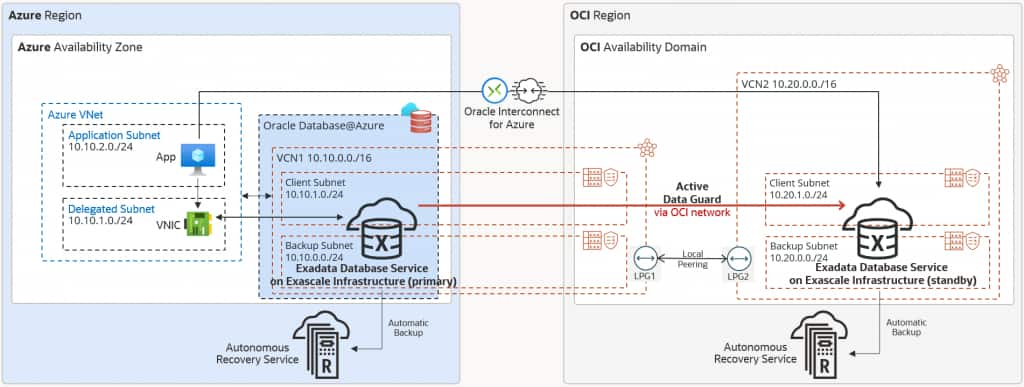
Use the following connection string for your application to ensure high availability and connectivity to both primary and standby databases:
Alias = (DESCRIPTION =
(CONNECT_TIMEOUT= 90)(RETRY_COUNT=100)(RETRY_DELAY=3)(TRANSPORT_CONNECT_TIMEOUT=1000ms)(LOAD_BALANCE=off)
    (ADDRESS_LIST =
        (LOAD_BALANCE=on)
        (ADDRESS = (PROTOCOL = TCP)(HOST=azure-scan)(PORT=1521)))
    (ADDRESS_LIST =
        (LOAD_BALANCE=on)
        (ADDRESS = (PROTOCOL = TCP)(HOST=oci-scan)(PORT=1521)))
    (CONNECT_DATA=(SERVICE_NAME = my_service)))
If the latency to the database in OCI is not acceptable from the application perspective, you need to replicate your applications to OCI and fail the application over alongside the database. This is described in the Site Failure Protection use cases.
Site Failure Protection for Stateful Applications
To protect the entire stack from data center failures, replicate the application and any further components across both clouds. Application to database latency is lowest as the Azure application accesses the local database in Azure, while the OCI application accesses the local database in OCI.
In case of stateful applications, Oracle Interconnect for Azure is needed to keep the applications in sync. Additionally, with Oracle Interconnect for Azure, the solution provides full flexibility for both applications to access either database during normal operations.
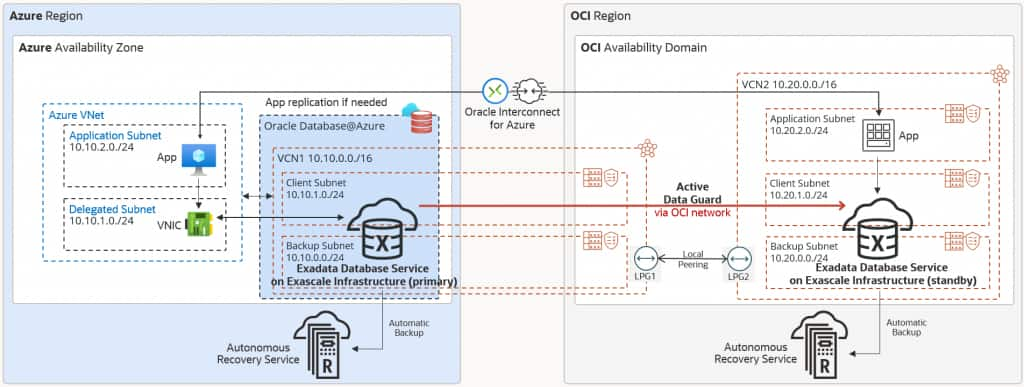
For the Azure application, use the following connection string to primarily connect to the Azure database:
Alias = (DESCRIPTION =
(CONNECT_TIMEOUT= 90)(RETRY_COUNT=100)(RETRY_DELAY=3)(TRANSPORT_CONNECT_TIMEOUT=1000ms)(LOAD_BALANCE=off)
    (ADDRESS_LIST =
        (LOAD_BALANCE=on)
        (ADDRESS = (PROTOCOL = TCP)(HOST=azure-scan)(PORT=1521)))
    (ADDRESS_LIST =
        (LOAD_BALANCE=on)
        (ADDRESS = (PROTOCOL = TCP)(HOST=oci-scan)(PORT=1521)))
    (CONNECT_DATA=(SERVICE_NAME = my_service)))
For the OCI application, use the following connection string to primarily connect to the OCI database:
Alias = (DESCRIPTION =
(CONNECT_TIMEOUT= 90)(RETRY_COUNT=100)(RETRY_DELAY=3)(TRANSPORT_CONNECT_TIMEOUT=1000ms)(LOAD_BALANCE=off)
    (ADDRESS_LIST =
        (LOAD_BALANCE=on)
        (ADDRESS = (PROTOCOL = TCP)(HOST=oci-scan)(PORT=1521)))
    (ADDRESS_LIST =
        (LOAD_BALANCE=on)
        (ADDRESS = (PROTOCOL = TCP)(HOST=azure-scan)(PORT=1521)))
    (CONNECT_DATA=(SERVICE_NAME = my_service)))
Site Failure Protection for Stateless Applications
Stateless applications do not require synchronizations, and hence, Oracle Interconnect for Azure is not mandatory in this case when each application only accesses its local database. In case of database failure or entire site failure, both application and database failover are required. Application to database latency is lowest as the Azure application accesses the local database in Azure, while the OCI application accesses the local database in OCI.
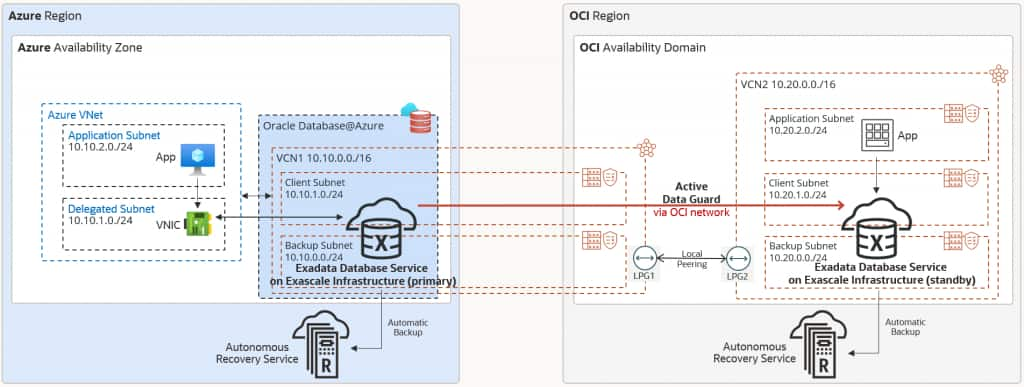
For the Azure application, use the following connection string, which connects to the Azure database only:
Alias = (DESCRIPTION =
(CONNECT_TIMEOUT= 90)(RETRY_COUNT=20)(RETRY_DELAY=3)(TRANSPORT_CONNECT_TIMEOUT=1000ms)
    (ADDRESS_LIST =
        (LOAD_BALANCE=on)
        (ADDRESS = (PROTOCOL = TCP)(HOST=azure-scan)(PORT=1521)))
    (CONNECT_DATA=(SERVICE_NAME = my_service)))
For the OCI application, use the following connection string, which connects to the OCI database only:
Alias = (DESCRIPTION =
(CONNECT_TIMEOUT= 90)(RETRY_COUNT=20)(RETRY_DELAY=3)(TRANSPORT_CONNECT_TIMEOUT=1000ms)
    (ADDRESS_LIST =
        (LOAD_BALANCE=on)
        (ADDRESS = (PROTOCOL = TCP)(HOST=oci-scan)(PORT=1521)))
    (CONNECT_DATA=(SERVICE_NAME = my_service)))
Read More
To learn more about implementing Disaster Recovery using Data Guard, see the following resources:
- Oracle Maximum Availability Architecture for Oracle Database@Azure
- Implement disaster recovery with local and regional standbys on Oracle Database@Azure
- Deploy Active Data Guard Far Sync to protect data across Oracle Database@Azure regions
- Design a Multicloud Network to Deploy Oracle Database@Azure
- Continuous Availability for Applications
- Deploy multicloud Oracle Database cloud services with Oracle Notification Service