
We’re excited to announce significant updates to OCI Full Stack Disaster Recovery Service, broadening deployment options and protection capabilities. These enhancements fulfill key DR community requests, adding native support for Oracle Integration workloads and extending availability to the US government and defense cloud environments.
This blog post highlights three major enhancements that extend OCI Full Stack DR’s reach and simplify the protection of critical workloads. In Part 2, we’ll delve into advanced features for customizing DR plans and improving operational visibility during recovery operations.
1. Full Stack DR Now Available in US Government and Defense Cloud
OCI Full Stack DR is now available in Oracle US Government Cloud (OC2) and US Defense Cloud (OC3).
Why This Matters:
Government agencies, defense contractors, and organizations with FedRAMP or DoD compliance requirements need disaster recovery solutions that operate within secure, compliant environments. Previously, these organizations couldn’t leverage Full Stack DR’s automated recovery capabilities in their mandated cloud environments. This expansion enables comprehensive disaster recovery while maintaining the strict security and compliance boundaries these sectors require.
This expansion brings complete feature parity to OC2 and OC3—all capabilities available in OCI commercial public cloud regions are now available in government and defense cloud environments. You get the same comprehensive disaster recovery automation while maintaining the strict security and compliance boundaries these sectors require.
Explore the OCI Full Stack Disaster Recovery usage documentation for a full list of regions and realms where Full Stack DR is available.
2. Integrated Native Member Support: Oracle Integration Cloud
Oracle Integration Cloud (OIC) instances are now natively supported in Full Stack DR, allowing the seamless addition of Oracle Integration Cloud resources to DR protection groups alongside existing compute and database resources.
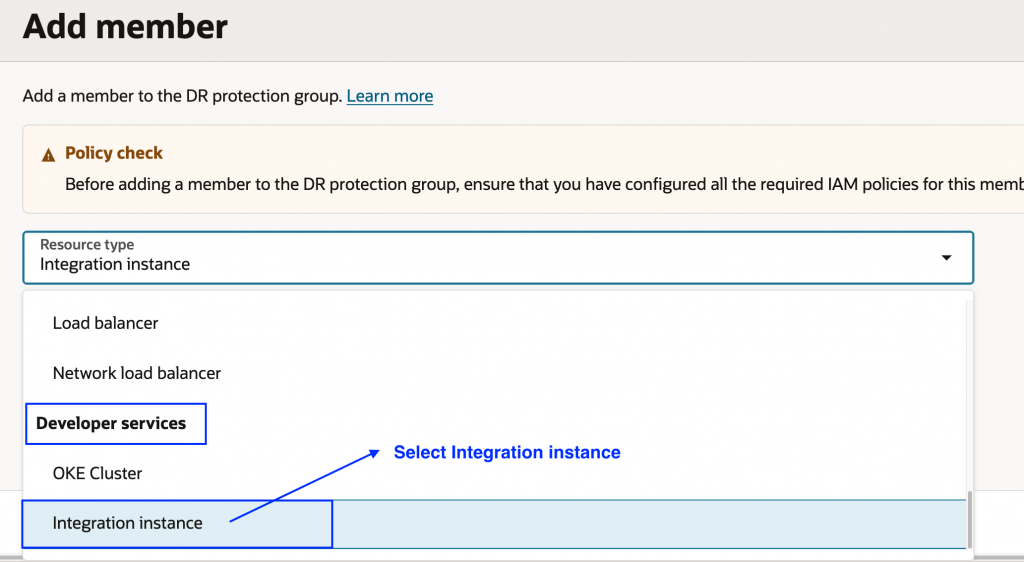
Why This Matters:
OIC has become central to how modern applications communicate, handling APIs, Business-to-Business (B2B) connections, and integration flows that tie systems together. This integration offers several key benefits:
- Simplified Management: Add your Oracle Integration instances directly to DR protection groups.
- Faster Recovery: Your integrations recover automatically alongside other resources during failover, eliminating manual intervention.
- Consistent Protection: Your integration layer receives the same automated recovery capabilities as your databases and compute instances.
- Reduced Risk: Native automation ensures reliable, repeatable recovery with built-in error handling.
This unified approach delivers seamless protection across your entire application stack, ensuring your critical application pathways are restored together when you need them most.
Prerequisites:
OCI Full Stack DR utilizes the native Oracle Managed DR features provided by Oracle Integration 3. Before adding an Oracle Integration instance to your DR protection group, review the supported configurations, limitations, and region pairing requirements in the Oracle Integration 3 documentation. Once your Oracle Integration instance is provisioned with Disaster Recovery configuration enabled, you can add it as a member to your DR protection group.
Quick Walkthrough:
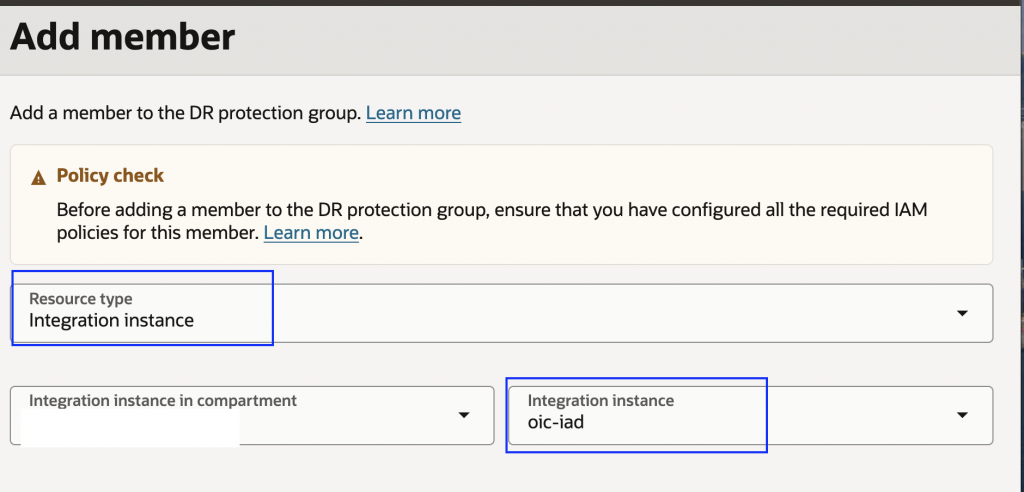
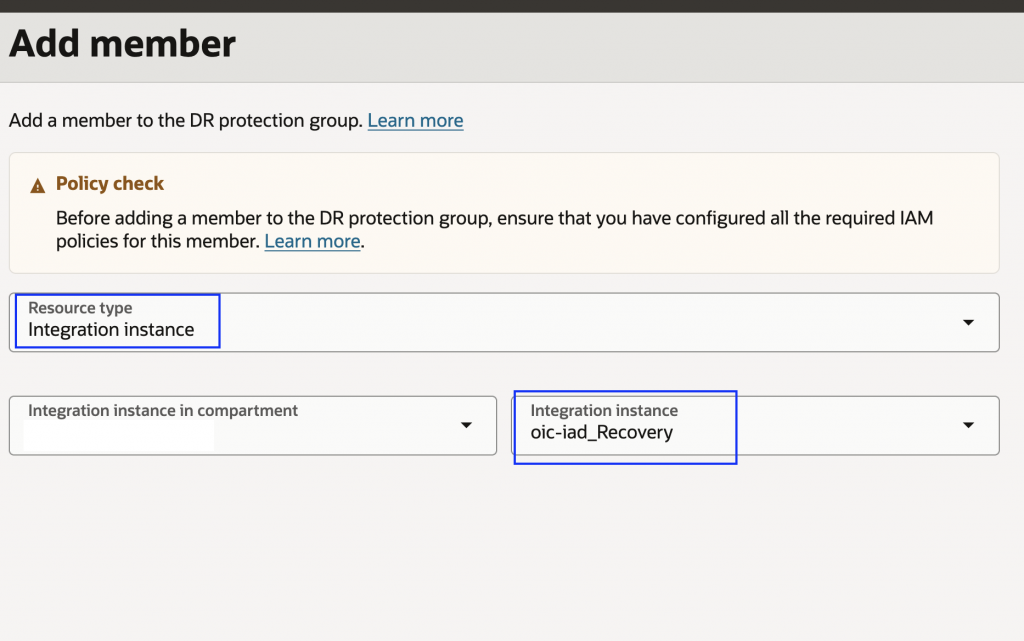
Here’s how to set up DR protection and execute DR plans for your Oracle Integration instances, using Ashburn (IAD) as the primary region and Phoenix (PHX) as the standby region:
1. Add your primary Oracle Integration instance to the primary DR protection group
2. Add the standby Oracle Integration instance to the standby DR protection group
3. Create Switchover and Failover DR plans in the standby DR protection group
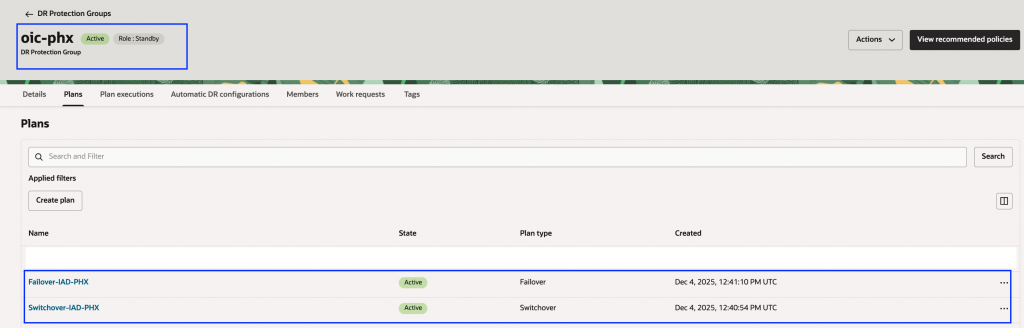
4. Full Stack DR automatically generates built-in plan groups for Switchover and Failover plans. Note that Drill plans won’t have built-in plan groups since Oracle Integration doesn’t provide clone capabilities.
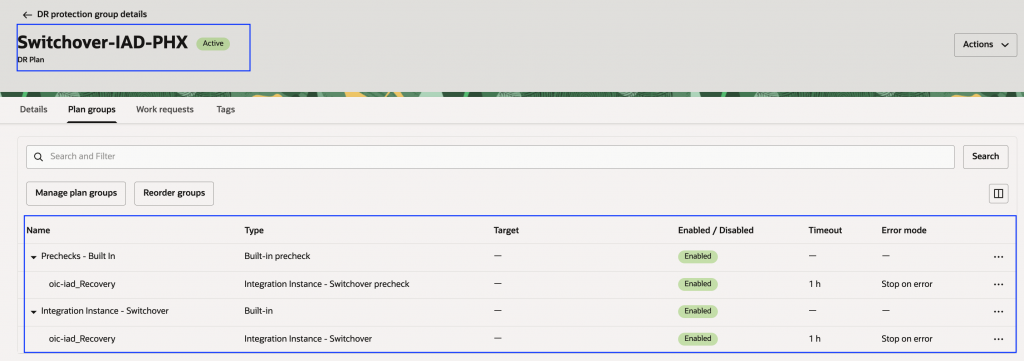
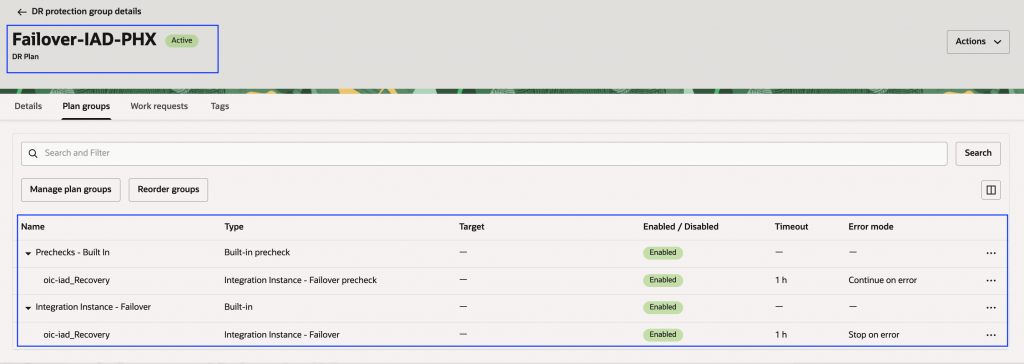
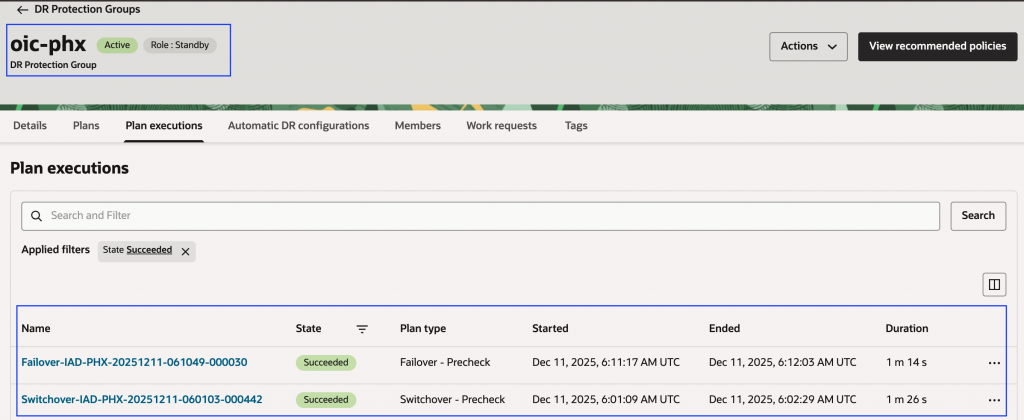
5. Run prechecks to validate your DR plans
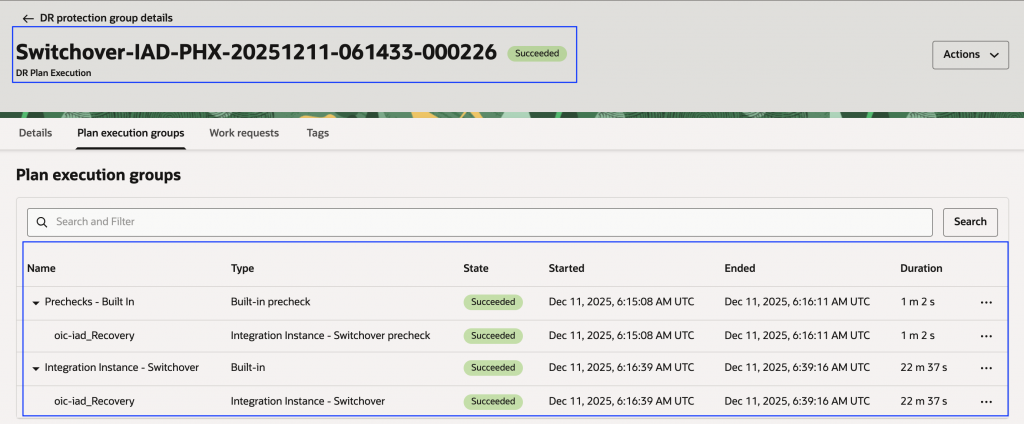
6. Execute the Switchover plan in the standby DR protection group and verify successful execution. After completion, the Oracle Integration instance running in Phoenix will be in the primary role.
7. After switchover completes, create Switchover and Failover plans in the new standby DR protection group (Ashburn). You can execute the Switchover plan to make the integration instance running in Ashburn the primary again.
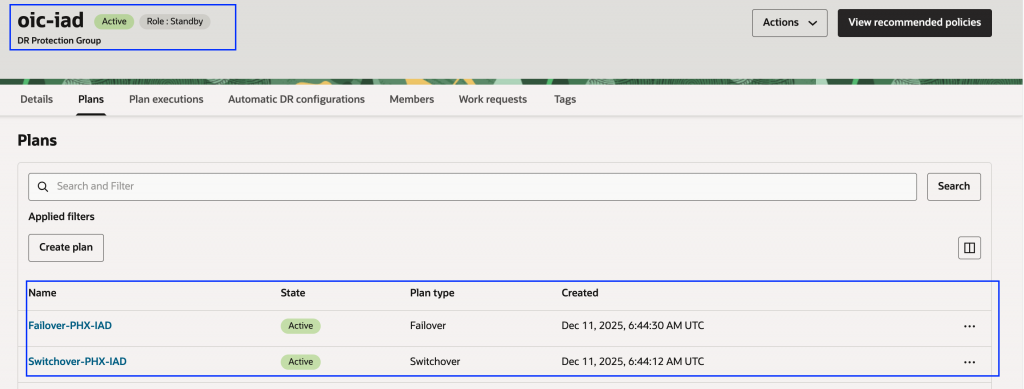
The setup aligns with the standard Full Stack DR workflow, ensuring a seamless experience for those familiar with protecting other OCI services. Additionally, you can include dependent resources, such as Oracle Autonomous Database, in your DR protection group alongside your Oracle Integration instance. For more information, see the documentation Add an Integration Instance to a Disaster Recovery Protection Group.
3. Enhanced Automation: Object Storage Scripts with Run Command
We’ve enhanced the Oracle Cloud Agent’s (OCA) Run Command plugin to provide better control over script execution during DR operations.
Why This Matters:
Automation is crucial for meeting aggressive Recovery Time Objectives (RTOs). Many organizations store configuration files, application states, and recovery scripts in OCI Object Storage. These enhancements enable you to package related recovery scripts into logical archives, pass runtime parameters for script reusability across different scenarios, and execute scripts under specific user contexts for proper security boundaries. The result: faster, more reliable DR automation with improved error handling and clearer diagnostics that reduce troubleshooting time during critical recovery operations.
New Capabilities:
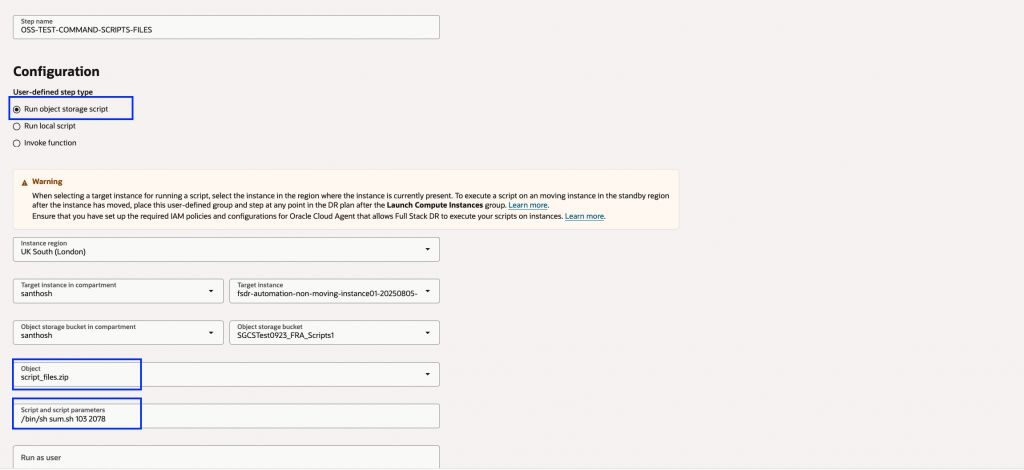
- Archived Script Packages: Upload compressed archives (.zip, .tar.gz) containing multiple scripts to Object Storage. OCA automatically extracts the archive and executes the specified script within it.
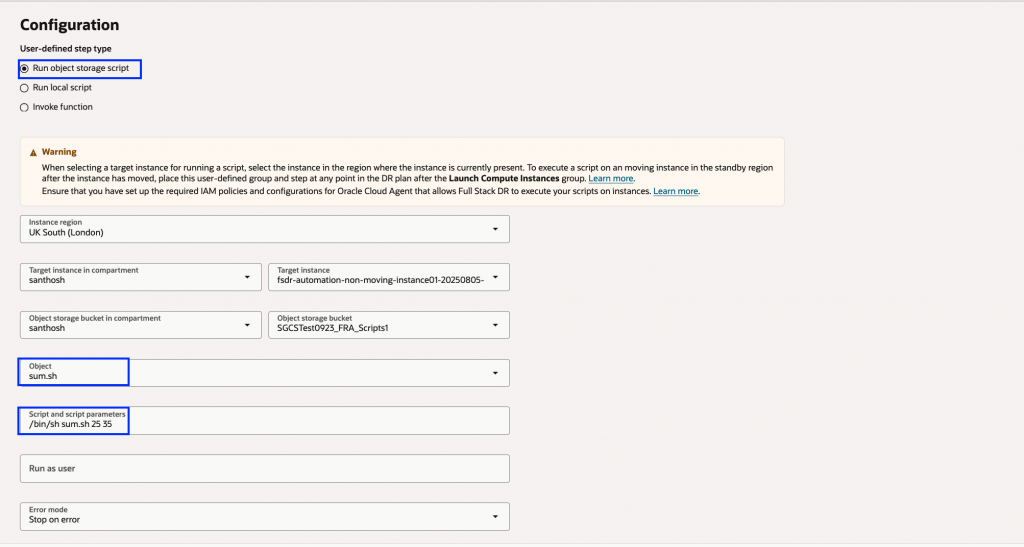
- Script Parameterization: Utilize the “Script and script parameters” field to pass input parameters at runtime, enhancing script reusability and modularity.
- User Context Execution: Specify an alternate user for script execution using the “Run as user” field, ensuring precise control over permissions and execution environments.
These enhancements eliminate friction by:
- Organizing related recovery scripts into logical packages.
- Reusing scripts across different scenarios by passing varied parameters.
- Maintaining proper security boundaries by executing under appropriate user contexts.
Improved error handling and logging provide clearer diagnostics, reducing troubleshooting time during critical recovery operations. The result is faster, more reliable, and maintainable DR automation.
Examples:
1. Execute a script stored in object storage while passing parameters. In this example, the script sum.sh is invoked with parameters and is referenced directly from an object storage bucket.
2. Execute a script from an object storage archive while passing parameters. In this example, the script sum.sh is executed with parameters and is referenced from the script_files.zip archive stored in object storage.
Important: Existing workflows that execute scripts directly from Object Storage remain fully supported, ensuring backward compatibility.
For more information, see the documentation Configure a Step to Execute an Object Storage Script.
What’s Next:
In Part 2 of this series, we’ll explore how to take control of your DR operations with:
- Advanced dependency mapping and plan customization.
- OKE resource modifiers for Kubernetes workloads.
- Enhanced execution visibility and warning handling.
These features provide precision control over recovery sequences and better operational intelligence during DR events.
Learn More:
If you haven’t seen OCI Full Stack Disaster Recovery in action yet, ask your Oracle Cloud Infrastructure account team to set up a demonstration today. For more information, including documentation, pricing, customer success stories, videos, tutorials, and hands-on labs, visit Full Stack Disaster Recovery.
Additional Resources:
Feel free to connect with me directly on LinkedIn, X (Formerly Twitter), and Bluesky.