
A newly created XFS filesystem may show less usable space in df than the raw partition or logical volume size. This can look like lost space or a filesystem layout problem. In reality, the raw device size is still correct. The difference comes from space reserved internally by XFS, especially for the XFS internal log.
This behavior is driven by the version and defaults of mkfs.xfs from xfsprogs. Newer xfsprogs versions can create a larger internal log than older versions did. On fast non-rotational devices such as SSD or NVMe, newer mkfs.xfs can also size the log based on CPU count. That means two systems with the same raw partition size can show different df sizes if the filesystems were created with different xfsprogs versions or on systems with different CPU counts.
During a filesystem sizing review, we found that multiple systems with the same 10 GiB root partition reported different capacities in df. A filesystem created with xfsprogs 5.15 showed nearly the full 10G of usable space, while filesystems created with xfsprogs 6.12 showed approximately 9.8G and 9.4G depending on system characteristics. The newer filesystems also had significantly larger internal XFS logs, resulting in more space being reserved for filesystem metadata. The raw partition size was unchanged in every case, the difference was caused by XFS reserving a larger internal log during filesystem creation.
Starting with xfsprogs 6.x, mkfs.xfs introduced concurrency-aware log sizing. For non-rotational devices such as SSDs and NVMe storage, the default log concurrency value is derived from the number of CPUs in the system. Instead of sizing the internal log solely from filesystem geometry, mkfs.xfs can now increase the log size to better support highly parallel metadata workloads. As a result, systems with identical partition sizes can end up with different internal log sizes and therefore different df-visible capacities depending on CPU count and other filesystem creation parameters.
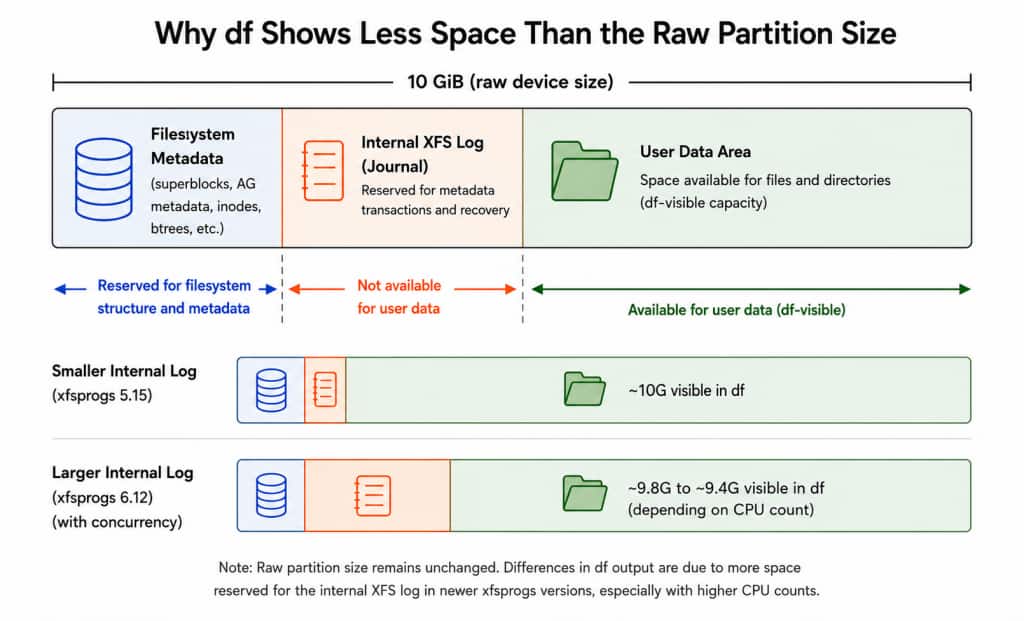
The Role of the Internal Log
The XFS internal log is a journal that records metadata updates before they are written to their final on-disk locations. This is a key part of how XFS maintains filesystem consistency and enables fast recovery after an unexpected shutdown.
Because the log is a reserved region inside the filesystem, any space allocated to it is unavailable for regular files and directories. Historically, the internal log was relatively small and rarely noticeable on most filesystems. However, as XFS log-sizing heuristics evolved to support modern hardware and more concurrent workloads, the amount of space reserved for the log became more visible, particularly on small system filesystems.
How XFS Log Size Is Chosen
Historically, XFS log sizing was based mainly on filesystem geometry. A common way to describe the traditional algorithm is a ratio-based rule: for every 2048 filesystem blocks, XFS adds 1 log block, subject to minimum and maximum limits. With a 4 KiB filesystem block size, this works out to roughly 1 MiB of log for every 2 GiB of filesystem space. This is why older mkfs.xfs behavior often produced similar df-visible capacity for filesystems created from the same raw partition size.
Newer xfsprogs releases added concurrency-aware log sizing. This behavior was introduced upstream by the xfsprogs commit “mkfs: allow sizing internal logs for concurrency”: c02a18733fc0a0e1b607f75e90962b3adc27c8fa
The change is present in xfsprogs 6.8 and later. It added the -l concurrency= path, allowing mkfs.xfs to size the internal log for a target level of concurrent metadata activity. On non-rotational devices such as SSDs and NVMe storage, mkfs.xfs can use the system CPU count as part of this log-sizing decision. In practice, that means the log can become larger on systems with higher concurrency, even when the raw partition size is unchanged.
if (cli->log_concurrency < 0) {
        if (!ddev_is_solidstate(xi))
                goto out;

        cli->log_concurrency = nr_cpus();
}
It then estimates how much log space is needed for concurrent large metadata transactions:
log_bytes = (uint64_t)max_tx_bytes * 3 * cli->log_concurrency / 2;
logblocks = max(logblocks, log_bytes >> cfg->blocklog);
A simplified view of the sizing logic is:
start with traditional 2048:1 filesystem-to-log sizing
if concurrency sizing applies:
    increase the log enough for concurrent transactions
apply minimum, maximum, and allocation-group fit limits.
then align the resulting log length to the log stripe unit.
On SSD and NVMe filesystems, the concurrency-aware layout can also use more allocation groups (AGs). More AGs spread allocation work across separate per-AG locks, which can reduce lock contention under parallel metadata workloads, but each additional AG consumes a small amount of space for its own metadata.
Finally, log stripe-length alignment can change the final log reservation by a few blocks. This is normally a small adjustment, but it is another reason the final on-disk layout need not match the initial ratio calculation exactly.
Why CPU Count Can Matter
CPU count does not directly consume disk space. It matters because newer mkfs.xfs versions can treat CPU count as a signal for expected metadata concurrency.
On SSD or NVMe devices, mkfs.xfs assumes the storage can keep up with a higher rate of parallel filesystem activity. If the system also has many online CPUs, it may be able to issue many metadata updates at the same time. A larger internal log gives XFS more room to handle those updates without threads waiting for log space.
Because of this, two systems with the same partition size can receive different internal log sizes. The higher-CPU system may reserve more log space, which leaves less capacity visible through df.
This decision is made only when the filesystem is created. Existing filesystems keep their original layout after OS upgrades, xfsprogs updates, or CPU changes.
Is This an XFS or OS Problem?
This is not a partitioning error, data loss, or an XFS correctness problem. The block device is still the size that was allocated.
The difference comes from mkfs.xfs choosing a different filesystem layout. Newer xfsprogs versions may reserve more space for the internal log to improve metadata scalability on modern hardware.
It is often noticed during newer OS deployments because those systems include newer xfsprogs packages. However, the operating system does not resize an existing XFS log during upgrade or boot. The behavior appears only when a filesystem is newly created.
So the issue is best described as a mkfs.xfs default change. The filesystem is valid, it just has more space reserved for internal use.
Why Small Filesystems Show It More Clearly
Small system filesystems make this easier to notice. Examples include /, /var, /tmp, /home, /opt/oracle, and /var/log/audit.
On a 10 GiB filesystem, a few hundred MiB of additional reserved space is visible in df. On a multi-terabyte filesystem, the same reservation is usually too small to matter operationally. This is why the concern commonly appears on root or system partitions. These filesystems are often sized tightly and are also used during patching, upgrades, image deployment, and log collection. The behavior is expected, but the capacity impact can still be important. For small filesystems, filesystem-visible space should be checked directly instead of assuming it will match the raw partition size.
Recommendations for System Administrators
There is no single correct approach. The best choice depends on whether the priority is predictable filesystem sizing or allowing mkfs.xfs to optimize for the underlying hardware.
Keep the existing raw filesystem sizes
Continue defining filesystem layouts in terms of raw partition or logical volume size and accept that df-visible capacity may vary with the xfsprogs version and, when concurrency-aware sizing is enabled, CPU count. This allows mkfs.xfs to use its default sizing heuristics.
Increase raw filesystem sizes
If maintaining approximately the same df-visible capacity as earlier deployments is important, increase the raw partition or logical volume sizes to account for the larger internal log reservation.
Override the default log sizing
If consistent filesystem geometry is required across systems, mkfs.xfs allows the log sizing to be controlled explicitly. Disable CPU-based concurrency sizing while retaining automatic geometry-based sizing:
mkfs.xfs -l concurrency=0 <device>This removes the CPU-driven part of the calculation. mkfs.xfs still chooses a valid default log size, but it does not increase the log based on detected concurrency.
To make the log size fully explicit:
mkfs.xfs -l size=<value> <device>This is useful when consistent filesystem geometry is required across systems. The tradeoff is that the chosen value should be appropriate for the workload and filesystem size.
-l concurrency=0provides predictable behavior without fully manual sizing.-l size=provides exact repeatability.
Conclusion
Concurrency-aware log sizing is a performance-oriented mkfs.xfs behavior, not a storage allocation problem. The raw device size stays the same, but newer mkfs.xfs may reserve more space for the internal log so XFS can handle more simultaneous metadata activity.
This is most visible on small filesystems, where a few hundred MiB of additional log reservation can noticeably reduce the space reported by df. On larger filesystems, the same reservation is usually much less significant.
The main takeaway is that XFS layout depends on the mkfs.xfs version, device type, and concurrency assumptions at creation time. For predictable results across systems, define the desired mkfs behavior explicitly instead of relying on changing defaults.