

Introduction
Oracle E-Business Suite (EBS) supports core business processes such as finance, procurement, inventory, and order management. Routine activities often require users to navigate screens, enter data, check status, and coordinate approvals. Agentic AI can simplify these interactions by interpreting natural-language requests, selecting predefined tools, and initiating supported EBS transactions from collaboration platforms such as Slack.
This blog describes how we used the agentic AI capabilities of Oracle Integration (OIC) to automate purchase order (PO) close and reopen actions. We deployed the solution at a leading North American gaming company, where business users have adopted it for daily EBS operations. The solution reduces the steps needed to request an action and receive its outcome, allowing users and support teams to focus on exceptions, analysis, and higher-value work.
Architecture and Component Responsibilities
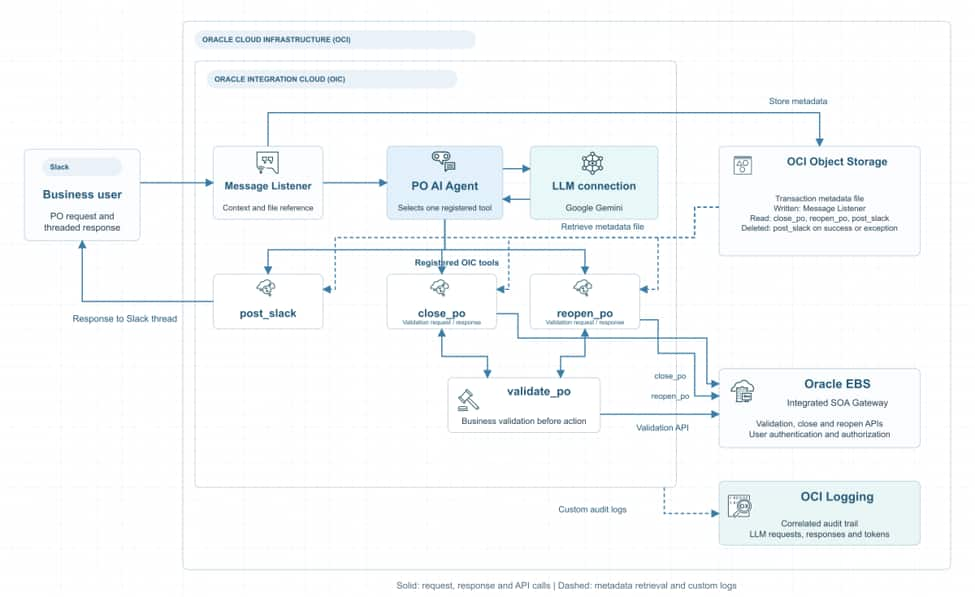
Figure 1. Logical architecture. Solid arrows show request, data, and response flows; the dashed arrow shows custom audit logs. The LLM box represents the configured connection, not model hosting.
The solution connects Slack, OIC, Oracle E-Business Suite (EBS), and OCI Logging to turn a conversational request into a validated purchase-order action with an audit trail. Each component has a defined responsibility:
- Slack provides the customer-required user interface. Other interfaces, such as Oracle APEX or a custom web application, can be supported by adapting the request-entry and response integrations.
- The OIC Message Listener receives requests directly from Slack, and the post_slack integration sends responses directly to Slack.
- The OIC AI agent interprets user intent and selects a registered tool. This implementation uses Google Gemini through the configured language-model connection. Alternative models depend on the connections and model requirements supported by the OIC environment.
- OIC integrations validate and execute transactions through EBS APIs exposed by Oracle E-Business Suite Integrated SOA Gateway. EBS APIs handle user authentication and authorization.
- OCI Logging captures custom audit logs from OIC, correlating user messages, LLM interactions, and responses through the conversation_id.
This separation allows conversational interaction and transaction processing to evolve independently while keeping business validation within the execution flow.
Users request PO close or reopen actions in Slack. The OIC Message Listener receives each request directly, and the post_slack integration returns acknowledgments, transaction results, and errors to the originating Slack thread.
The OIC listener prepares each request for agent processing, derives a conversation identifier from the Slack user ID and thread timestamp, and stores user, routing, request, and transaction metadata in OCI Object Storage. It passes the user’s message and a metadata file reference (file name) to the agent through system_context.
Downstream integrations use this reference to retrieve the metadata needed for execution and Slack response routing. Keeping the metadata contents outside the LLM’s context reduces the risk of unintended disclosure to users.
The PO agent uses the ReAct pattern to interpret the request and select one registered tool: close_po, reopen_po, or post_slack. The close and reopen tools invoke their corresponding OIC integrations. These integrations retrieve transaction metadata and validate the requested action before invoking the corresponding EBS API through the Integrated SOA Gateway.
The action integrations retrieve the referenced metadata, check required inputs, and invoke the shared validate_po integration. Only successful PO business validation permits the corresponding EBS action API call through the configured private endpoint. Validation failures follow an error-response path. Before each EBS API execution, EBS APIs authenticate the user and verify the user’s authorization.
The shared post_slack integration returns acknowledgments, business outcomes, and errors directly to the originating Slack thread. It checks message-delivery results, notifies support when exceptions occur, and uses a deletion flag to control transaction-metadata cleanup after processing completes.
The conversation identifier connects each Slack request with its stored transaction metadata, OIC integration tracking, and custom logs in OCI Logging. Built-in OIC observability provides visibility into integration and agent instances. Together, these mechanisms help support teams investigate intent interpretation, tool selection, business validation, EBS execution, and response delivery.
OCI Logging for Auditing and Token Usage
We used OCI Logging to capture explicit, custom logs from the OIC layer and create an audit trail of request processing. Each log entry includes the conversation_id generated or reused for the transaction, allowing the recorded events to be traced to the corresponding conversation and transaction context.
The logs capture the submitting user, user message, each LLM request and response, and the response delivered to Slack. Correlating these records through the conversation_id provides an end-to-end audit trail.
The logged LLM responses provide token usage information for each model call. At the time of this implementation, OIC did not provide a dashboard for viewing agent token consumption, so these logs gave us the visibility we needed to assess usage. We used that information to refine prompts and define an appropriate tokens-per-minute (TPM) quota for the solution.
Benefits of Developing an AI Agent in OIC
Developing the AI agent in OIC brings conversational orchestration and enterprise transaction processing into a common platform. The agent interprets user intent and selects registered tools, while OIC integrations handle input checks, business validation, EBS API calls, and response delivery. Existing integrations serve as reusable agent capabilities, with transaction rules maintained in the integration layer. Shared PO validation and post_slack messaging reduce duplicated logic and simplify maintenance.
OIC projects group integrations, connections, lookups, tools, and agent artifacts for deployment across environments. Environment-specific configuration accommodates different endpoints and supporting services. Integration tracking, OIC observability through the OIC dashboard, and custom logs in OCI Logging help support teams investigate failures. The architecture can support additional integration-backed tools when each action has clear intent boundaries, validation rules, and tests.
Implementation Challenges and Lessons
1. Preventing Metadata Disclosure through Reference-Based Handling
The OIC listener stores transaction metadata in OCI Object Storage and passes the user’s message and a metadata file reference to the agent. The following example shows the tool arguments:
{
“poNumber”: 101,
“system_context”: “<transaction-metadata-object-reference>”
}
This approach addressed unintended disclosure observed when transaction metadata was included in the model’s context. Keeping those fields outside the model context reduces their exposure while preserving access for downstream processing and Slack response routing. The reference itself remains visible to the model and must be passed through unchanged. The metadata file remains available throughout processing and is deleted after the full transaction flow completes, with cleanup controlled through the post_slack integration’s deletion flag.
2. Guiding Agent Tool Selection and Fallback Behavior
The agent initially struggled to select post_slack for greetings, conversational messages, and requests that did not require a PO action. These messages still needed a response in Slack. We updated the system prompt to require one tool call per turn—close_po, reopen_po, or post_slack—and added routing rules for greetings, negated actions, unsupported cancellation requests, and missing information. The system prompt included the following instruction:
“invoke EXACTLY ONE tool execution block per turn (close_po, reopen_po, or post_slack). Every turn MUST output a valid tool call formatted as JSON.”
The fallback rules also accounted for missing information and conversation history. When a request lacked a purchase-order number and none was available from earlier exchanges, the agent was instructed to use post_slack to request a valid PO number and a supported action. Longer or ambiguous messages followed a clarification path before transaction execution. This made the messaging tool responsible for keeping the conversation moving whenever an executable action could not be established. A key lesson was that reliable agent behavior requires clear instructions for both selecting business tools and responding when those tools do not apply.
3. Guiding Agent Intent Recognition for Close and Cancel Requests
During testing, the agent sometimes interpreted a purchase-order cancellation request as a close request and selected the close_po tool. This was a significant routing error because close and cancel represent distinct business intentions, and the implemented tool catalog supports only close and reopen actions. The availability of a close tool must not lead the agent to treat it as an acceptable substitute for an unsupported cancellation request. Business validation provides a separate execution checkpoint, but it does not replace accurate interpretation of the user’s intent.
We refined the agent instructions to distinguish close from cancel explicitly, evaluate cancellation requests before the core purchase-order action rules, and route unsupported cancellation requests to post_slack with an explanatory response. A cancellation example reinforced this boundary in the prompt. The lesson was to define both what each tool supports and which related intentions it must exclude. When a request falls outside the supported action catalog, the agent should explain that limitation or seek clarification rather than select the closest available operation.
Conclusion
This implementation shows how agentic AI can connect natural-language requests in Slack to validated EBS transactions. OIC combines intent interpretation, registered tools, business validation, and response delivery, while conversation-correlated logs support operational investigation. The same approach can extend to other EBS actions when each tool has clear scope, transaction controls, and tests.