
Key takeaways
- Oracle Fusion Cloud Field Service now supports Apple CarPlay and Android Auto, making Oracle the only major field service provider to offer a seamless in-vehicle experience.
- Mobile workers can access navigation, view essential job details, and communicate with customers hands-free using voice-activated commands and a simple dashboard interface.
- By moving core tasks to the vehicle display, Field Service significantly improves worker safety and productivity by reducing distractions and keeping teams connected in real time.
For field service workers, vehicles are mobile offices. Between service calls, they juggle navigation, customer communications, and schedule updates. However, managing these tasks on handheld devices while driving compromises their safety. With Release 26A, Oracle Fusion Cloud Field Service offers an alternative, delivering the essential information mobile workers need directly to the vehicle console through Apple CarPlay and Android Auto.
A new standard for mobile work
Prior to this solution, mobile workers faced a fragmented experience. While they could launch third-party maps from the Field Service mobile app, those maps could not be natively displayed on the vehicle console. This caused them to look at their phones for guidance, a dangerous distraction. Alternatively, workers could copy and paste addresses into a separate navigation app, but doing so took them out of the Field Service app, causing them to miss critical real-time alerts or dispatcher updates.
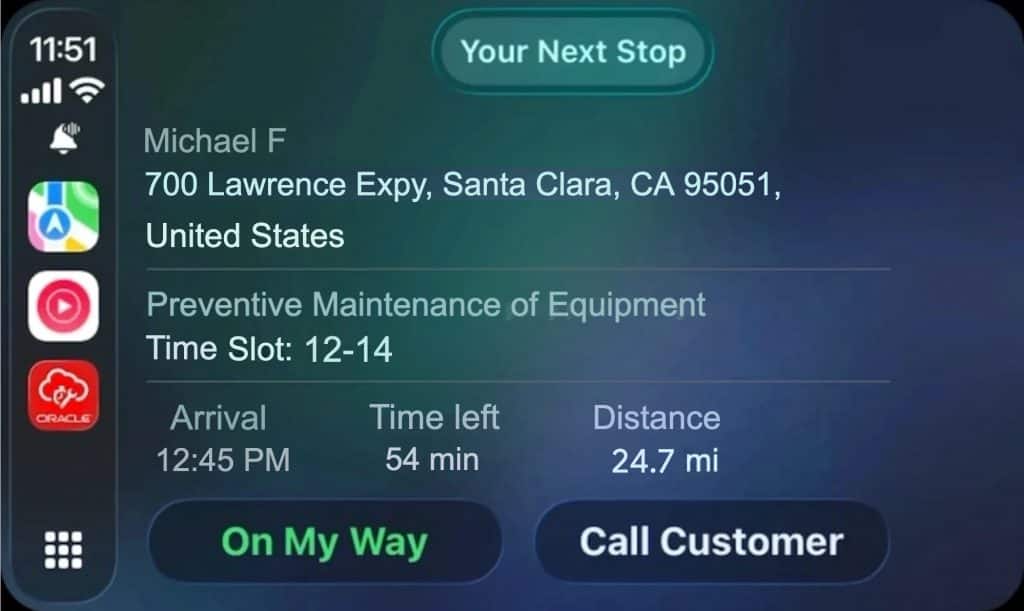
As the only major field service vendor with support for Apple CarPlay and Android Auto, Oracle is turning the vehicle dashboard into an extension of the Field Service mobile app. The new functionality allows mobile workers to access navigation, alerts, and in-app messages hands-free. (Voice control is available now via Apple Siri and is coming soon for Google Gemini.) Moving tasks and operations to the vehicle display significantly reduces the need for workers to interact with their handheld devices while driving, improving both safety and productivity.
Key capabilities
The key capabilities delivered in Release 26A include:
- Start-of-day launch: When a mobile worker connects their phone to the vehicle, the system prompts them to activate their route and displays the day’s first assignment on the vehicle screen.
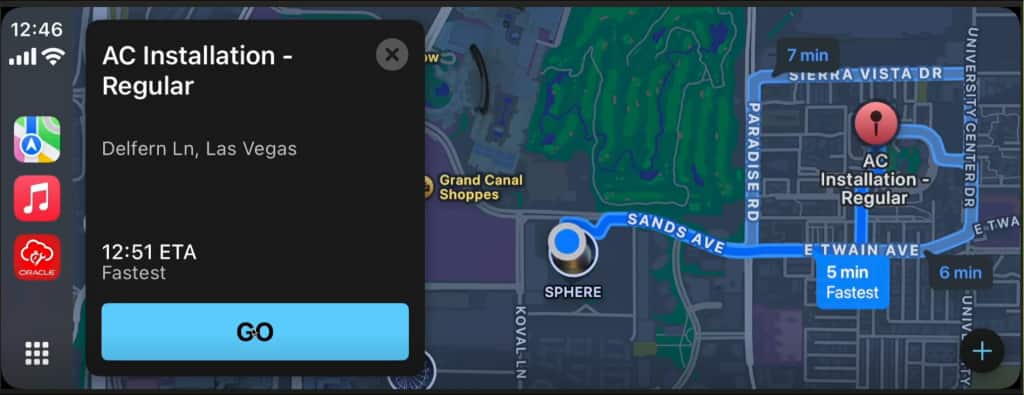
- Seamless navigation: The system automatically launches the worker’s preferred third-party navigation app (like Google Maps or Apple Maps) and guides them to the next destination.
- Real-time alerts: The app provides prompts such as, “You’ve arrived. Start activity?” or notifications if a dispatcher sends an update like instructions for accessing a work site.
- Hands-free communication: Workers can call customers directly from the dashboard, helping them to provide ETAs safely while in transit.
The user interface displayed on the on the vehicle is intentionally simple, showing only the most essential job information so the driver stays focused on the road. Anything complex, like detailed form entry, still happens in the Field Service mobile app.
Looking ahead
More capabilities are already in development. Later this year, the Field Service mobile app will support automatic rerouting directly on the vehicle’s display. If a job is cancelled or a higher-priority task is assigned while a technician is in transit, the system will seamlessly redirect them from their original destination to the new site in real time. This and other features will continue to focus on improving safety and efficiency.
Getting started
Adopting these new features is straightforward for Field Service customers. For detailed instructions, visit the Help Center web pages for the Apple CarPlay and Android Auto capabilities. To see them in action, check out this webinar presented by our product development team (Oracle Cloud Customer Community login required).
Related posts you might like
- New—more SCM and CX agents for Fusion Apps
- A step-by-step plan for adopting Fusion Apps features
- See the new AI agent for asset maintenance and repair

If you’re an Oracle customer and want to get new stories from The Fusion Insider by email, sign up for Oracle Cloud Customer Connect. If you’re an Oracle Partner and want to learn more, visit the Oracle Partner Community.