
Give your workflow agents persistent semantic memory. Store normalized data as embeddings and retrieve it with intelligent, metadata-filtered search
Semantic Memory for Workflow Agents
Vector Read and Vector Write nodes provide Workflow Agents with a Semantic Retrieval layer — allowing them to store important knowledge as embeddings and retrieve it intelligently when needed. When used correctly, they dramatically improve storing and retrieval of enriched semantic data.
The key is to write clean, structured, reusable knowledge with metadata, and read with precise queries, strong filters, and validation. This ensures agents store and use enriched semantic objects to help automate complex business flows.
Unlike the RAG Document Tool (which provides grounded Q&A over curated document corpora), Vector DB nodes give you fine-grained control over what gets stored, how it’s indexed, and how it’s retrieved. Think of them as the long-term semantic memory for your workflow agents.
| ✍️ Vector DB Writer Store normalized, metadata-rich knowledge capsules as vector embeddings. Supports Overwrite, Upsert, Insert, and Delete operations with custom metadata properties for downstream filtering. | 🔍 Vector DB Reader Perform semantic search across stored indexes using natural-language queries. Apply metadata-based filter criteria and feed retrieved context into LLM nodes for intelligent summarization. |
Vector DB Writer Node
Store high-value knowledge as embeddings for future semantic retrieval
The Writer converts content into vector embeddings and stores them in Oracle’s 23ai vector database within the customer tenant. Each entry is uniquely identified by a Document ID and enriched with custom metadata properties that enable precise downstream filtering.
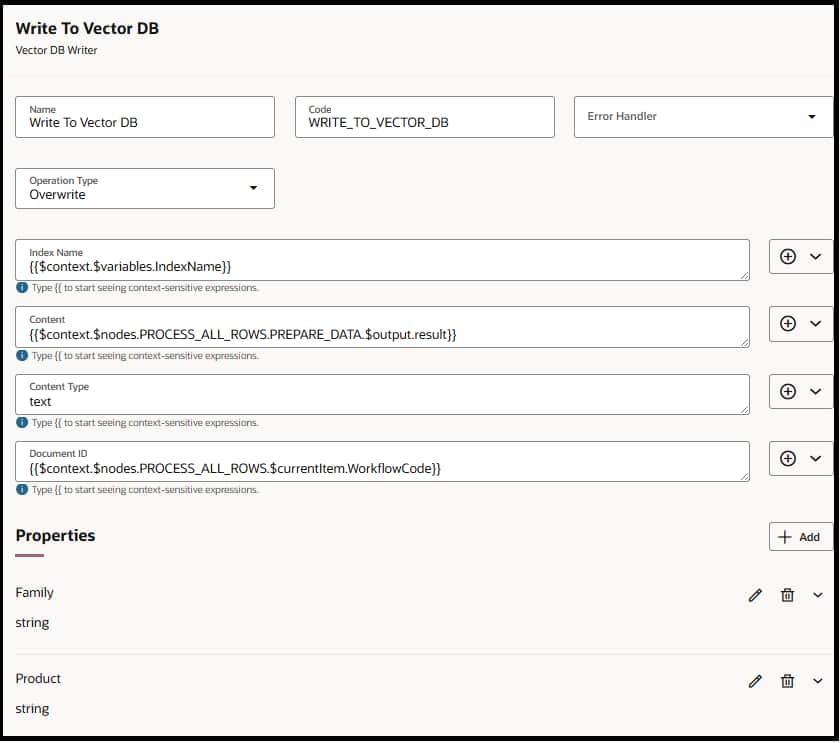
Configuration Details
| Field | Type / Value | What It Means | How It Should Be Used | |
| Name | string | Design-time name for the node | Use descriptive names like WriteResolutionSummaryToVectorDB so the workflow is easy to understand. | |
| Code | string | Programmatic identifier in the workflow schema | Auto-filled or user-defined. Use lowercase and underscores (e.g., write_resolution_vector). | |
| Operation | INSERT, OVERWRITE, UPSERT, DELETE | Defines how the document is written | Use Insert for new entries only. Overwrite to replace existing content. Upsert to safely update-or-create. Delete to remove outdated entries. | |
| Index Name | string (required) | Name of the vector index to write into | Choose an existing index or specify a new one (e.g., support_ticket_summaries, product_docs_index). | |
| Content | string (required) | The textual data to embed | Should be summarized, clean, and structured. Avoid raw logs; use LLM-generated summaries, extracted facts, or curated knowledge. | |
| Content Type | string (required) | Type of content being indexed/embedded | json, text | |
| Document ID | string (required for DELETE) | Unique identifier for this record | Use stable IDs like ticket_1123, customer_450_profile. Prevents duplicates and enables safe retries. | |
| Properties | array of {name, type, value} | Additional optional metadata key-value pairs | E.g., {objectId:”a12333″, region:”NA”, severity:”High”}. Used as filters during read operations. | |
⚠️ Normalize Before Writing – Always use a Code node upstream to clean and standardize data. Summarize large documents, enrich with key metadata, deduplicate overlapping information, and remove irrelevant details. Produce small, clean semantic capsules and extract key fields.
Writer Best Practices
- Vector Writes Are Not Permission-Aware
Anything written becomes retrievable to any workflow using that index. Therefore, only store safe, non-restricted, reusable knowledge. Never store PII, compensation data, credentials, or confidential documents.
- Write Only Durable, Reusable Knowledge
Vector store should contain long-lasting, reusable insights such as case resolutions, document summaries, extracted entities, troubleshooting patterns, or meaningful product/customer/supplier insights. Avoid writing noisy, one-off, or ephemeral content.
- Normalize Before Writing
Always clean and standardize content before writing. Summarize large documents, enrich with key metadata, deduplicate overlapping information, and remove irrelevant details. Produce small, clean semantic capsules.
- Keep Data Fresh
Stale entries decrease accuracy. Use Overwrite or UPSERT to keep summaries current. Set up automatic triggers whenever business objects change. Proactively delete outdated or unused entries.
- Smart Update Practices
Use UPSERT when refining an existing summary. Overwrite only when content is clearly newer or higher-quality. Continuously prune redundant or conflicting entries. Establish clear versioning strategies.
- Always Include Metadata
Every write should include rich metadata such as entity type, business object IDs, product and version numbers, region, severity, timestamps, and key filter attributes. Consistent metadata schemas dramatically improve retrieval accuracy.
- Avoid Data Pollution
A vector store quickly becomes noisy if not actively maintained. Avoid creating duplicate indexes or storing overlapping content. Before writing, always check whether similar knowledge already exists and replace or refine rather than duplicate.
Vector DB Reader Node
Retrieve the most relevant stored knowledge using semantic similarity + metadata filters
The Reader performs semantic search against a specified index, returning the most relevant entries based on natural-language queries. Combined with filter criteria and metadata, it delivers precise, context-aware retrieval that can be summarized by an LLM.
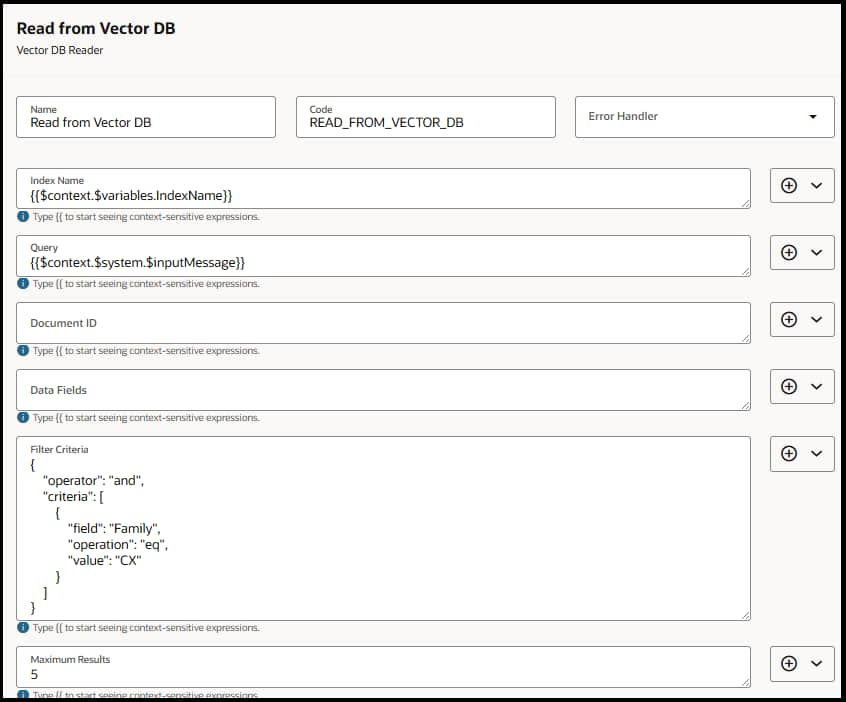
Configuration Details
| Field | Type / Value | What It Means | How It Should Be Used | |
| Name | string | Display name for the node | Use clear names like RetrieveTicketContextFromVectorDB to keep the workflow readable. | |
| Index Name | string (required) | Vector index to search | Choose the same index used by the writer (e.g., support_ticket_summaries, employee_profile_index). | |
| Query | string (required) | Natural language search query | Ask for intent-specific info, e.g., “What troubleshooting steps were taken?” Avoid vague queries. | |
| Document ID | string (optional) | Fetches chunks for a specific document | Use when you want details tied to a known record, e.g., ticket_12345_summary. | |
| Data Fields | array of strings | Metadata fields to return | An array of fields (strings) that will be used in the filter. | |
| Filter Criteria | object with {operator, conditions} | Logical filters applied before ranking | Use to constrain retrieval (e.g., product = Payroll, region = US, severity >= High). Enables high precision. | |
| Max Results | integer | Maximum number of ranked results returned | Configure an integer value. Use 3–5 where appropriate; don’t depend on a single hit. | |
💡 Use Metadata Filters Aggressively Filter criteria prevent cross-contamination between product families, regions, or versions. This dramatically improves precision — especially in shared indexes where multiple teams write data. Always validate that returned metadata aligns with the current task context.
Reader Best Practices
- Write Intent-Aligned, High-Quality Queries First
Queries should reflect the exact task the agent is trying to accomplish — clear, specific, and aligned with workflow intent. Good queries dramatically improve semantic precision, while vague prompts pull irrelevant content. Use purpose-built prompts like “What resolved similar issues?”
- Use Metadata Filters for Precision (Critical for Enterprise Retrieval)
By filtering on entity type, product/version, region, severity, timestamps, or business object IDs, the agent retrieves only content that actually applies to the case at hand. This prevents cross-product contamination and ensures high relevance.
- Validate Retrieved Results Before Using Them
Before passing data into the workflow, validate results by checking the respective metadata field values. This prevents incorrect answers, silent workflow failures, and LLM hallucinations grounded in bad evidence.
- Configure maxResults Properly
Use MaxResults field efficiently as it can allow for fetching multiple results that help the agent make better decisions. Use 3–5 where appropriate; don’t depend on a single hit.
- Fail Gracefully with Fallback Logic
Retrieval is not guaranteed. If there are no results, workflows should have fallback branches to BO/API lookups. Add a case for no results. This makes the agent reliable in real-world conditions.
- Avoid Redundant or Irrelevant Retrieval
Pulling in too much data increases noise and slows the workflow without improving accuracy. Retrieval should be intentional and scoped precisely. Retrieve only what the workflow needs.
When to Use What – Vector DB vs. RAG Document Tool vs. Document Processor
Choose the right tool based on your data lifecycle, access pattern, and content type.
| Criteria | Vector DB Read / Write | RAG Document Tool | Document Processor |
| Purpose | Store/retrieve reusable knowledge memory with semantic search + metadata | Grounded retrieval over a curated document corpus | Parse a runtime document into usable text for downstream steps |
| When to Use | Durable summaries, validated facts across runs, metadata-constrained retrieval with lifecycle control | Grounded Q&A over curated docs — policies, playbooks, manuals | Workflow instance attachments — quotes, invoices, emails |
| Avoid When | Dumping raw data, sensitive PII, simple Q&A over one doc set | Dynamic runtime docs, frequently changing attachments | Stable corpus Q&A, sensitive/permissioned content |
| Lifecycle | Full control — Insert, Upsert, Overwrite, Delete | Publish / republish cycle | Per-run processing |
Example Scenarios by Vertical
Below are examples of what should and should not be written to the vector store, organized by Oracle Fusion product vertical.
| Vertical | Use Cases | What Gets Written | What Is NOT Written |
| HCM | Policy recall, Skill taxonomy & competency insights, HR helpdesk resolution patterns, Onboarding best practices | Policy summaries, General skill categories, De-identified ticket resolutions, Standard onboarding steps | PII, compensation, medical data, personal performance notes |
| CX | Objection-handling playbooks, Product value messages, Customer journey friction patterns, SLA/policy summaries | General objection patterns, Product benefit snippets, Aggregated sentiment themes, SLA rule summaries | Customer-specific details, account info, private communications |
| HR Helpdesk | Similar issue resolution memory, Troubleshooting playbooks, Product knowledge capsules, RCA pattern library | Error-code-based fixes, Clean troubleshooting steps, Manual extracts, General RCA categories | Customer logs, sensitive debug data, raw transcripts |
| SCM | Supplier risk patterns (de-identified), Quality issue knowledge, Logistics exception patterns, Inventory & fulfillment playbooks | Aggregated risk signals, Failure modes, Exception categories, Process best practices | Specific supplier contract terms, pricing, confidential agreements |
| ERP | Procurement/finance policy summaries, PO/invoice exception-handling patterns, Project management best practices, Vendor performance patterns | General process rules, Exception categories, Project learnings, High-level performance signals | Financial identifiers, contract clauses, sensitive vendor data |
Operational Limits & Defaults
Sizing and retrieval boundaries to keep your vector operations efficient
| ~50 KB Recommended doc size per entry | 15 Default retrieval (10 semantic + 5 text) | 3 – 5 Recommended max results per read | |
📏 Sizing Guidance Keep retrieval tight with minimal relevant items. Do not store more than 500 objects per workflow execution. Use strong metadata filters to improve precision. Apply a semantic match score threshold before using results — if scores are low or empty, implement a fallback path to deterministic lookup or Human-in-the-Loop. Avoid noisy, raw, or sensitive data. Keep entries fresh with UPSERT/OVERWRITE for updates and DELETE for stale records.
Key Takeaways
| Writer: Your Agent’s Memory The Vector DB Writer transforms your agent from stateless to stateful. By storing normalized, metadata-rich embeddings, you create a reusable knowledge layer that persists across runs — enabling precedent-based reasoning, case matching, and semantic indexing at scale. | Reader: Intelligent Retrieval The Vector DB Reader turns natural-language queries into precise, metadata-scoped searches. Combined with an LLM summarization step, it delivers contextually relevant answers grounded in your stored knowledge — true semantic understanding, not just keyword matches. |