
Use AI to understand rules. Use deterministic code to apply them.
Many enterprise decisions cannot be left to a best-effort answer. A payment calculation, eligibility determination, warranty disposition, or policy-based recommendation may involve detailed rate cards, date rules, exception precedence, and financial or operational consequences. In these situations, an LLM is invaluable for interpreting an unstructured policy document, but it should not be the runtime decision-maker.
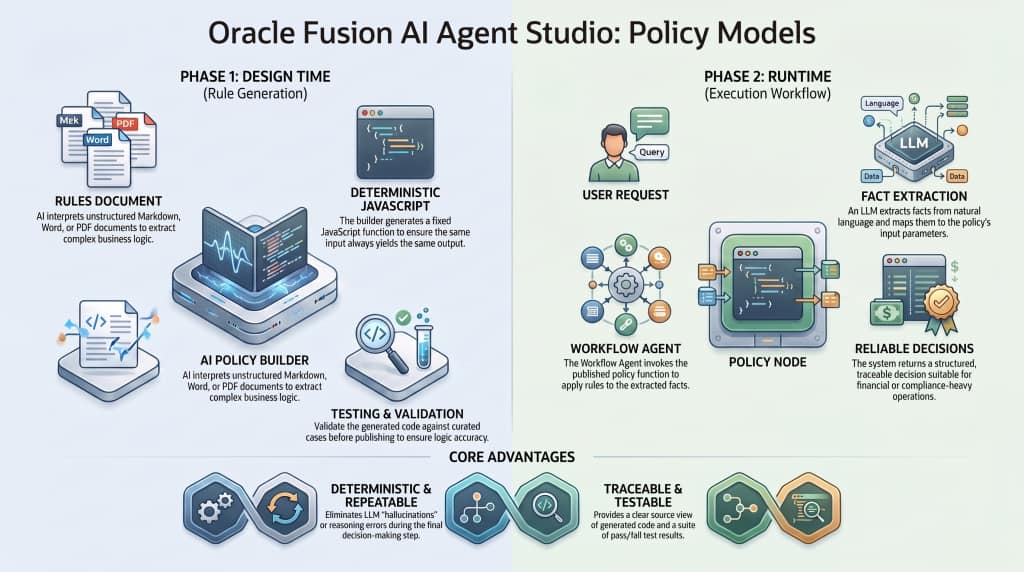
With the Policy capability introduced in Oracle Fusion AI Agent Studio 26C, you can transform business rules into a deterministic JavaScript policy function, validate it with test cases, publish it, and invoke it from a Workflow Agent through a Policy node. This gives you a useful and deliberate split of responsibilities:
- Business rules -> Policy builder generates JavaScript -> Test and publish -> Policy node executes function
- User request -> LLM extracts facts -> Workflow maps inputs -> Policy node returns a structured decision
The LLM helps at design time to turn a rules document into code, and at runtime to understand a user’s request or explain the result. The policy function is what applies the defined rules consistently.
Why Policy Models Matter
Traditional rules engines can handle complex decisions correctly, but they often require specialist skills, significant implementation time, and ongoing changes whenever the policy evolves. The alternative – hard-coding rules into application logic – makes change and reuse difficult.
Policy Models bring those decisions into an agentic workflow without asking an LLM to calculate or reason through every exception on the fly. They are a strong fit when the outcome must be repeatable and traceable, such as:
- eligibility and entitlement decisions;
- pricing, fee, discount, or payment-plan calculations;
- return, repair, replace, or scrap dispositions;
- tax, benefit, or compliance rules; and
- routing decisions governed by an established policy.
The principle is simple: use a policy when the same input must yield the same output every time, and when that output needs to be tested before it influences the business.
From a Rules Document to a Runtime Decision
Policy Models have two distinct phases.
Design time: Generate the policy function
Start with the business policy – typically an unstructured or semi-structured document such as Markdown, Word, Excel, or PDF. In the Policy builder, provide the document and instructions for generation. AI Agent Studio uses an LLM to extract the business logic and generate JavaScript that implements the rules.
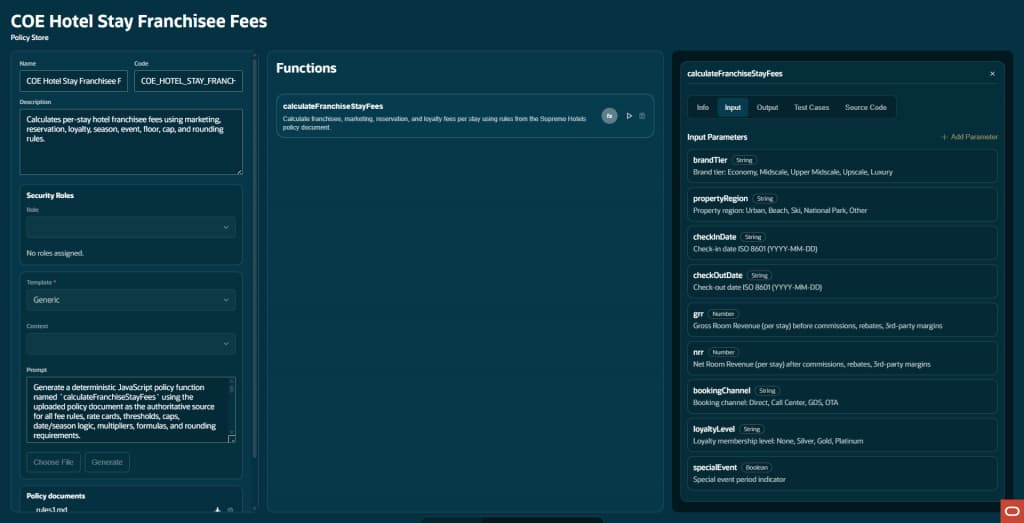
The result is no longer an LLM interpretation at runtime. It is generated source code that applies the rule set in a fixed, deterministic way. The Policy builder shows the generated function, its input parameters, output schema, test cases, and source code. This source view gives teams the traceability to inspect what was generated, even when policy owners do not intend to edit the code directly.
Runtime: Invoke the function from a Workflow Agent
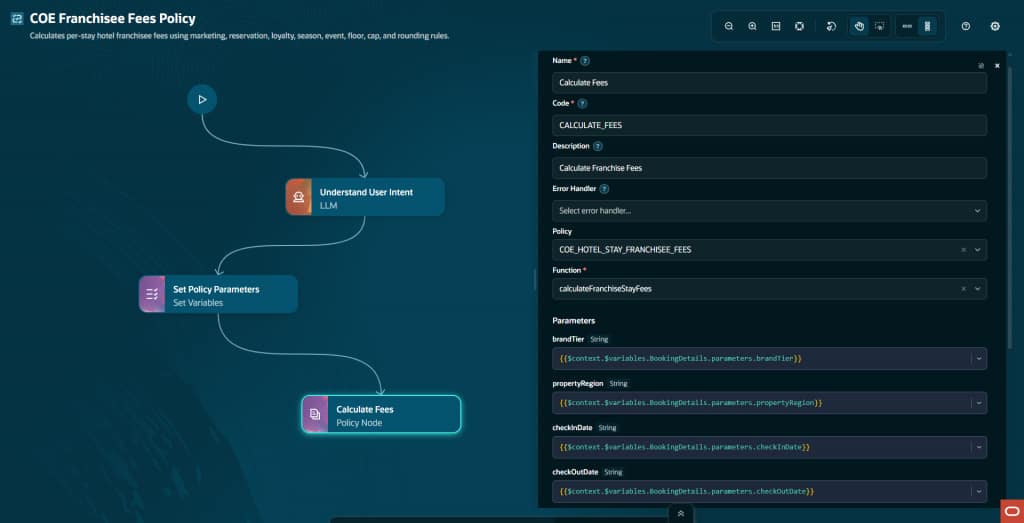
After the policy is tested and published, a Workflow Agent’s Policy node selects the policy and a function within it. The workflow maps values from variables or upstream node outputs to every required input parameter. The Policy node executes the function and makes the structured output available to downstream nodes, just like any other node output.
This keeps the boundary clear: an upstream LLM can extract the facts expressed in natural language, while the policy function applies the business logic to those facts.
Policy Templates vs. Standalone Policies
The Policy area has two related concepts: Policy Templates and Policies.
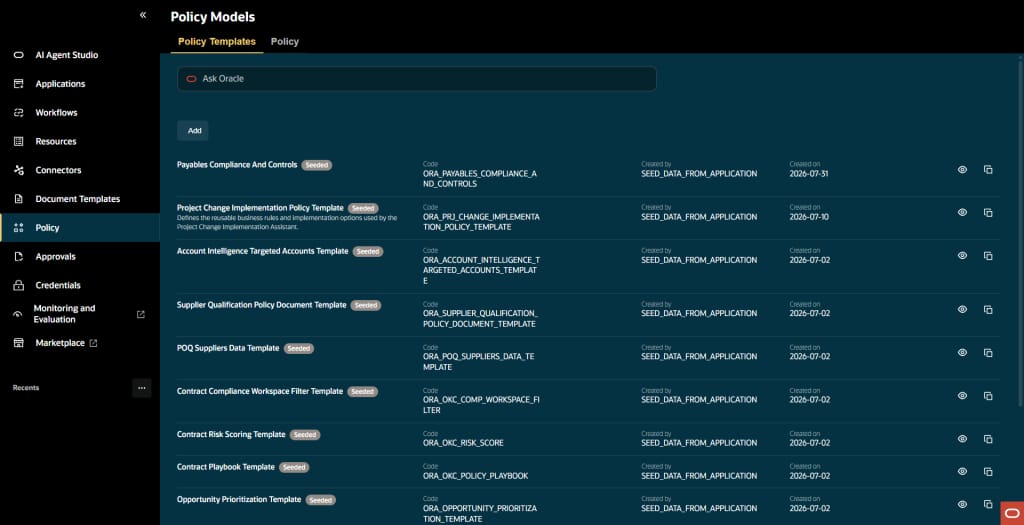
A useful mental model is a Java interface and an implementation:
| Concept | Role |
| Policy Template | Defines the reusable shape or contract: function signatures, input/output parameters, and shared generation guidance. |
| Policy | The concrete, executable implementation of a particular ruleset. |
You do not need a template to create a policy. A standalone policy is often the quickest route for a single ruleset. Templates become valuable when you have a class of related policies that must use the same function contract.
Choose a Generic standalone policy when
Use the Generic template when you have one policy document and want to generate a self-contained policy. This is the simplest approach and the one used in the hotel-fee lab.
With Generic, you can provide a policy-specific prompt to guide generation. The prompt is optional, but it is particularly useful when the policy document is complex. It can instruct the model to create one function, use a defined name, follow exact input/output fields, validate dates, preserve calculation precision, and apply caps and rounding in the prescribed order.
For example, the hotel policy prompt asks the generator to create a single deterministic function named calculateFranchiseStayFees. That matters: without a clear contract, a complex document could lead the generator to create multiple helper decisions where the workflow expects one callable function.
Choose a Policy Template when
Use a Policy Template when multiple policies share the same decision shape but differ in regional, organizational, or policy-specific details. For example, an opportunity-prioritization policy may share the same inputs and outputs across regions while using different scoring rules for the Americas, EMEA, and Asia Pacific.
Templates provide two important benefits:
- A stable function contract. The template can define the functions and their input and output schemas in advance, so every policy created from it follows the required shape rather than deriving it independently from each rules document.
- Layered generation guidance. A template can have an overall prompt for the entire policy family, while each defined function can have its own focused prompt. These instructions work together when the LLM generates the code.
For a single function, a Generic policy prompt and a template-level function prompt can serve a similar purpose. The real advantage of a template appears when you need repeatable interfaces, multiple prescribed functions, or consistent generation across many policy instances.
| **Design guidance:** Treat a Policy Template as an API contract. Define its function signatures and schemas carefully before creating dependent policies. A later template change should be assessed and tested deliberately; previously generated policy code does not become a new implementation until it is regenerated. |
Build for Reliable Generation
The quality of the generated policy is strongly influenced by the quality of the source material.
Start with structured rules
Markdown is an excellent policy format because headings, tables, lists, and examples make relationships clear. Word and Excel documents are also supported, and a source document can be complex, but a messy document is less likely to yield a correct policy on the first generation.
For intricate policies, consider a preparation step: turn the original document into a clear, human-readable rules specification before using it in the Policy builder. Separate definitions, inputs, outputs, formulas, rate tables, exceptions, caps, and rounding instructions. This gives the generator a much more reliable source of truth.
Be explicit in the generation prompt
For a standalone policy, include instructions that define:
- the required function name and whether one or more functions are expected;
- the exact input and output properties;
- allowed values, required fields, and validation behavior;
- date-only and time-zone-safe calculations where dates are involved;
- formula, threshold, cap, floor, exception, and rounding rules;
- deterministic behavior for identical inputs; and
- constraints such as no network calls, current-date dependency, randomness, or placeholder logic.
The goal is not merely to receive plausible JavaScript. It is to produce a function whose interface and behavior are unambiguous enough to test.
Test Cases Are the Proof Point
Generation is only the start. The most important part of the Policy lifecycle is validating the generated function against meaningful examples.
You can add test cases manually, ask AI Agent Studio to generate them, or upload a file that contains predefined cases. Generated tests can help, but the strongest practice is to bring curated tests from the policy owner or subject-matter expert. They establish the known-correct outcomes that the generated policy must meet.
Each test case should contain a concrete input and expected output. Ensure the fields follow the function’s input and output schemas exactly. Then run the suite: the Policy builder executes the generated code against every case and shows pass or fail.
When a test fails, trace the problem methodically:
- Is the expected result correct?
- Does the test case satisfy the input and output contract?
- Is the generated code implementing the intended rule?
- Is the original policy specification clear enough?
The Policy builder can use AI to explain an individual test case and help diagnose a failure, but the business owner remains essential for deciding whether the rule itself was expressed and implemented correctly.
What good policy tests cover
Do not stop at a happy path. Include tests for each rule boundary and exception: values just below, at, and above a threshold; effective-date transitions; cap and floor behavior; optional versus required fields; and conflicting conditions where precedence matters.
Good test data makes a workshop and a production rollout much smoother. It gives the team a trusted baseline before the policy is embedded in a workflow.
Operational Considerations
- Publish before use. A policy must be published before it can be selected in a Workflow Agent.
- Separate ownership is possible. A business-rules team can create and maintain policies independently of the team that builds the workflow.
- Use roles deliberately. Policy configuration supports security roles; confirm the appropriate execution and management model for your implementation.
- Use context when helpful. Associating policy generation with workflow context can provide useful semantic hints to the generator.
- Inspect inputs in Debug. When a result is unexpected, first verify the values mapped into the Policy node. This quickly distinguishes extraction or integration issues from a policy-rule issue.
- Regenerate and retest after change. A material change to rules, prompts, schemas, or templates deserves a new test run before publication.
Summary
Policy Models bring a disciplined form of determinism to agentic workflows. They use AI where it is most effective – translating rule documents into an initial implementation, understanding user language, and helping diagnose test failures – while reserving runtime decisions for a testable JavaScript function.
Start with a Generic standalone policy for a single, well-defined ruleset. Introduce a Policy Template when you need a family of policies to share the same functions, schemas, and generation guidance. In both cases, the recipe is the same: provide clear rules, define the contract, test known outcomes, publish deliberately, and invoke the result through a Workflow Agent’s Policy node.
New to Oracle AI Agent Studio?
Check out the Fusion AI Agent Studio Learning Path — a full blog series from zero to production-grade AI agents, with deep dives on every agent pattern, node type, and tool integration.