



Identity propagation, agent-team building blocks, security personas, and layered controls
Imagine a manager asking an agent, “Show me details for my direct report.” The answer appears in seconds. Simple for the user—but behind that response, identity, roles, privileges, and data security all need to work together.
That is what this blog explains. We’ll first follow the identity propagation flow inside Oracle Fusion Applications. Then we’ll step back and look at the broader security model in AI Agent Studio: what you are securing, who gets access, and where each control is applied.
Identity Propagation Flow in Oracle Fusion Applications
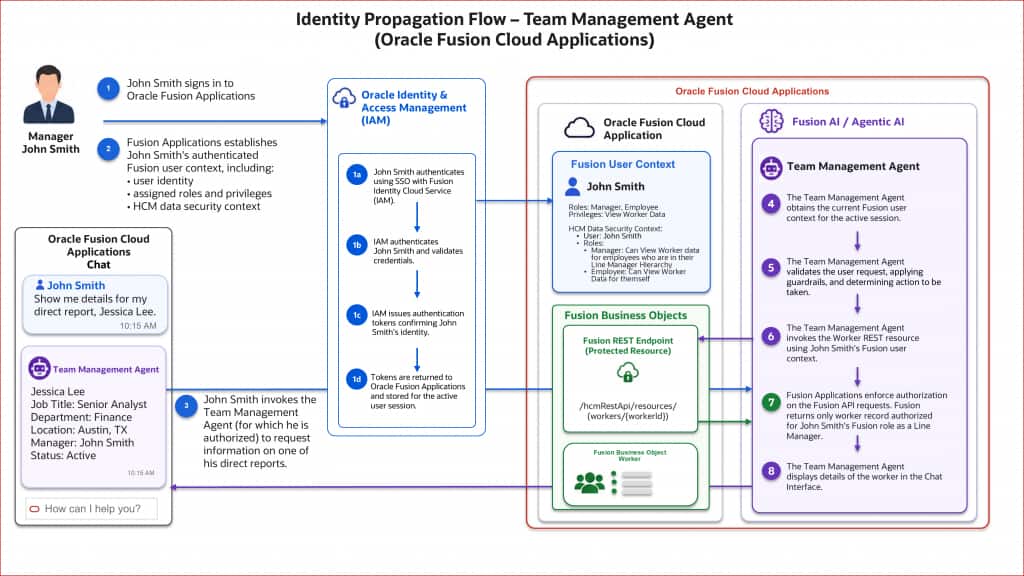
Let’s use a simple example. John Smith is a line manager. He signs in to Oracle Fusion Applications and asks the Team Management Agent:
| Show me details for my direct report, Jessica Lee. |
Here is what happens behind the scenes.
- John signs in to Oracle Fusion Applications. During sign-in, he authenticates using SSO with Fusion Identity Cloud Service (IAM). IAM validates his credentials, issues authentication tokens confirming his identity, and returns those tokens to Fusion Applications for the active user session.
- Fusion establishes John’s authenticated user context. This includes his user identity, assigned roles and privileges, and HCM data-security context. As a manager, John may view worker data for employees in his line-manager hierarchy. As an employee, he can view his own worker data.
- John invokes the Team Management Agent. This works only because he is already authorized to run that agent team.
- The agent obtains John’s current Fusion user context for the active session.
- The agent validates John’s request. It applies its guardrails and determines which action to take.
- The agent invokes the protected Worker REST resource at /hcmRestApi/resources/workers/{workerId} using John’s Fusion user context.
- Fusion performs the authorization check. The API does not simply trust the agent. Fusion applies John’s roles, privileges, and HCM data-security policies, then returns only the worker record authorized for his role as a line manager.
- The agent displays the authorized worker details in the chat interface.
This separation is important:
- Agent-team security decides whether John can run the agent.
- Fusion application security decides which data the running user can access.
If John asks for someone outside his management hierarchy, using an agent does not expand his access. Fusion remains the authorization authority.
The easiest way to remember it is this:
| The agent gives John a simpler way to ask for information, while Oracle Fusion security still determines what he is authorized to see. |
How to Approach Security in AI Agent Studio
Now that we’ve followed the end-to-end identity propagation flow, let’s focus on the AI Agent Studio part of the picture—what needs to be secured, who receives access, and where each control is applied.
Know the building blocks first
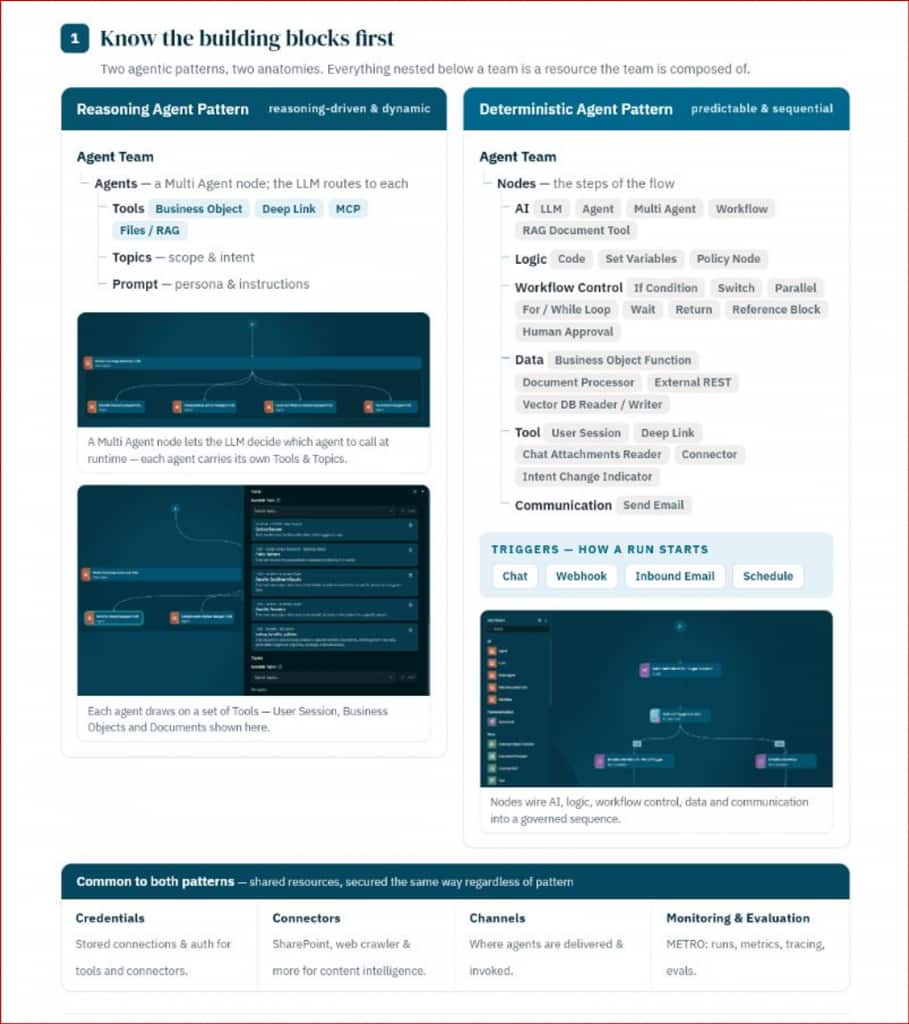
AI Agent Studio supports two agent-team patterns, and each has a different anatomy.
Reasoning Pattern – Supervisor Agent
A Supervisor Agent Team is reasoning-driven and dynamic. The supervisor routes work to one or more worker agents.
- Agents: Supervisor and worker agents
- Tools: Business Object, Deep Link, MCP, and Files/RAG
- Topics: The scope and intent handled by each worker
- Prompt: The agent’s persona and instructions
Each worker can carry its own tools and topics, allowing the supervisor to select the right specialist for the request.
Deterministic Pattern – Workflow Agent
A Workflow Agent Team is deterministic, predictable, and sequential. Its nodes are connected into a governed process.
- AI: LLM, Agent, Multi Agent, Workflow, and RAG Document Tool
- Logic: Code, Set Variables, and Policy Node
- Workflow Control: If Condition, Switch, Parallel, For/While Loop, Wait, Return, Reference Block, and Human Approval
- Data: Business Object Function, Document Processor, External REST, and Vector DB Reader/Writer
- Tool: User Session, Deep Link, Chat Attachments Reader, Connector, and Intent Change Indicator
- Communication: Send Email
- Triggers: Chat (user-initiated), webhook (invocable over REST), inbound email, or schedule
Both patterns also use shared resources: Credentials store connections and authentication, Connectors bring in content from sources such as SharePoint or web crawlers, Channels determine where agents are delivered, and Monitoring and Evaluation (METRO) provides runs, metrics, tracing, and evaluations.
Why start here? Because everything nested below an agent team is a resource the team is composed of. Before assigning privileges, you need to know exactly what the team can touch.
How security works, by persona
There are two useful ways to look at security: the builder who designs the agent and the execution identity used when it runs.
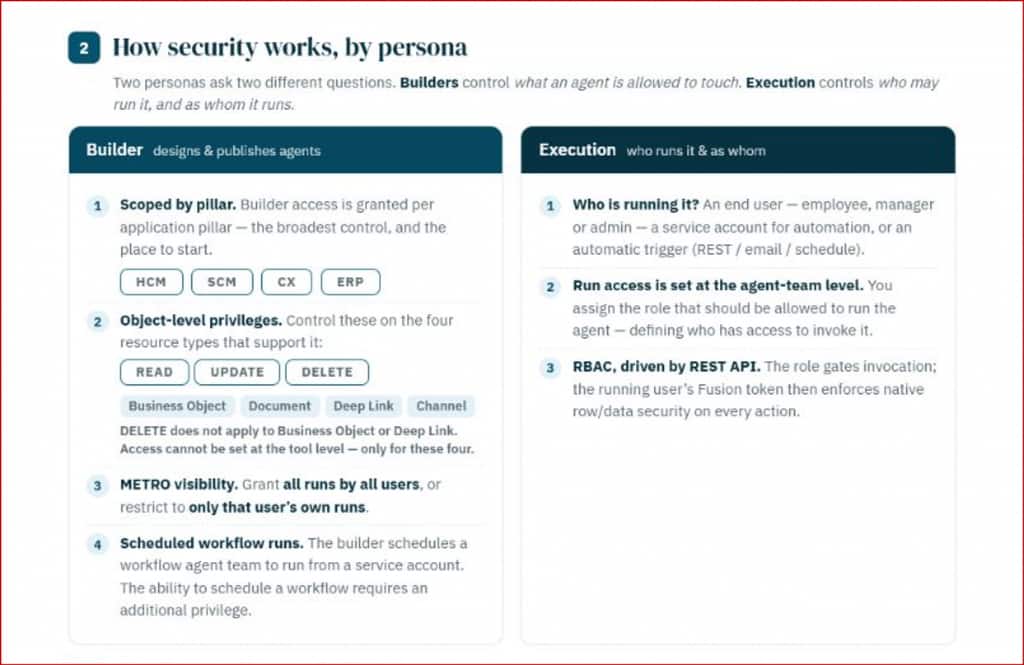
Builder: What is the agent allowed to use?
Builder access is scoped in stages:
- Start with the application pillar. You can give access to a user to configure AI agents in all or specific product pillars.
- Apply object-level privileges. READ, UPDATE, and DELETE can be controlled for supported Business Object, Document, Deep Link, and Channel resource types. DELETE does not apply to Business Object or Deep Link. These privileges are assigned at the supported resource-type level, not to an individual tool or resource instance.
- Set METRO visibility. A builder may be allowed to see all runs by all users or only that builder’s own runs.
- Control scheduled workflows. A builder can schedule a Workflow Agent Team to run under a service account, but scheduling requires an additional privilege.
Execution: Who is running it, and as whom?
An agent may be run by an employee, manager, or administrator; by a service account; or through an automatic REST, email, or scheduled trigger.
Run access is assigned at the agent-team level. The assigned role determines who may invoke the team. Once execution begins, role-based access is enforced through the REST API, and the running user’s Fusion token carries native row- and data-security enforcement into every Fusion action.
A practical rule of thumb: keep builder privileges, run access, and service-account access separate. It makes least-privilege reviews much easier and avoids giving one persona more control than the job requires.
The layers that make it secure
Think of an agent request as moving through a series of gates. It must clear each one before it can act on business data.
- Network edge (WAF/LBAC): Only approved APIs from the network can reach the Fusion platform.
- Role-based access control: Roles determine who can build and who can run each agent, with enforcement through REST APIs.
- Execution identity: Every action carries the running user’s Fusion token.
- Object-level data governance: Supported resource-type privileges constrain what builders can use. During execution, the agent still cannot exceed the running user’s native Fusion data access.
- Human in the loop: Transactional POST, PATCH, or DELETE actions can require approval before they are committed.
- Monitoring and evaluation (METRO): Runs are traced and measurable, with visibility scoped to the appropriate audience.
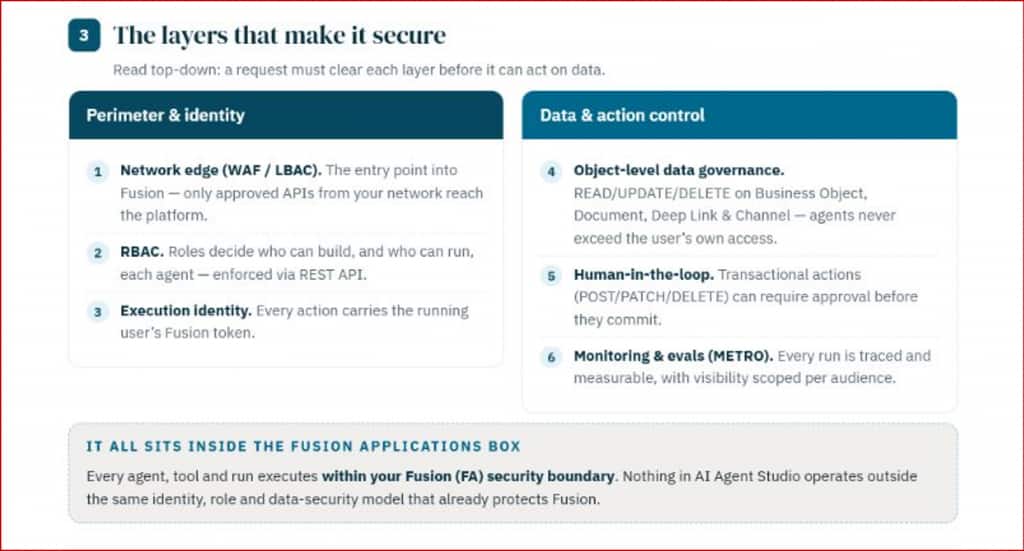
The final point is the most reassuring one: the agent, its tools, and its runs all operate inside the Fusion Applications security boundary. Prompts and guardrails help shape behavior, but they do not replace the identity, role, and data-security model already protecting Fusion.
Things to remember
- Grant agent-team access only to the roles that need it.
- Test the same request with users who have different data scopes.
- Include a negative test—for example, a manager requesting a worker outside their hierarchy.
- Apply least privilege to builders and service accounts.
- Add human approval before consequential business updates.
- Treat traces and evaluation output as business data and restrict who can view them.
Summary
Identity propagation connects the conversational agent experience to Fusion security. The user’s context travels with the request, while Fusion remains responsible for the final authorization decision.
Around that flow, AI Agent Studio adds a clear security structure:
- Understand the Supervisor (reasoning-driven) and Workflow (deterministic) building blocks.
- Separate builder access from execution access.
- Apply controls using role-based access, execution identity, data governance, approval, and monitoring.
Get those three areas right, and the agent can feel simple to the user without making security simplistic behind the scenes.
Useful links
- Securing Oracle Fusion AI Agent Studio: Setup & Access Guide
- Oracle AI for Fusion Applications: How do I use AI Agent Studio?
New to Oracle AI Agent Studio?
Check out the Fusion AI Agent Studio Learning Path — a full blog series from zero to production-grade AI agents, with deep dives on every agent pattern, node type, and tool integration.