


The complete reference to $OraMessageHint routing, context variables, App Context, User Context, and the code node patterns that wire everything together
Introduction
Every time the agentic app framework invokes your agent workflow, it delivers a rich set of context variables that tell your agent what type of request it is handling, who the user is, what they asked, what action they triggered, and what additional data is available. These variables are the information pipeline between the framework and your agent. If you understand them deeply, you can build agents that respond precisely to every situation. If you miss them, your agent operates blind.
This post is the definitive reference for workflow context parameters. We will cover every variable in the $context object, explain when each is available and what it contains, map the relationship between OraMessageHint values and their associated variables, and provide the code node patterns that wire context into your downstream prompts. Bookmark this one — you will refer to it every time you build a workflow.
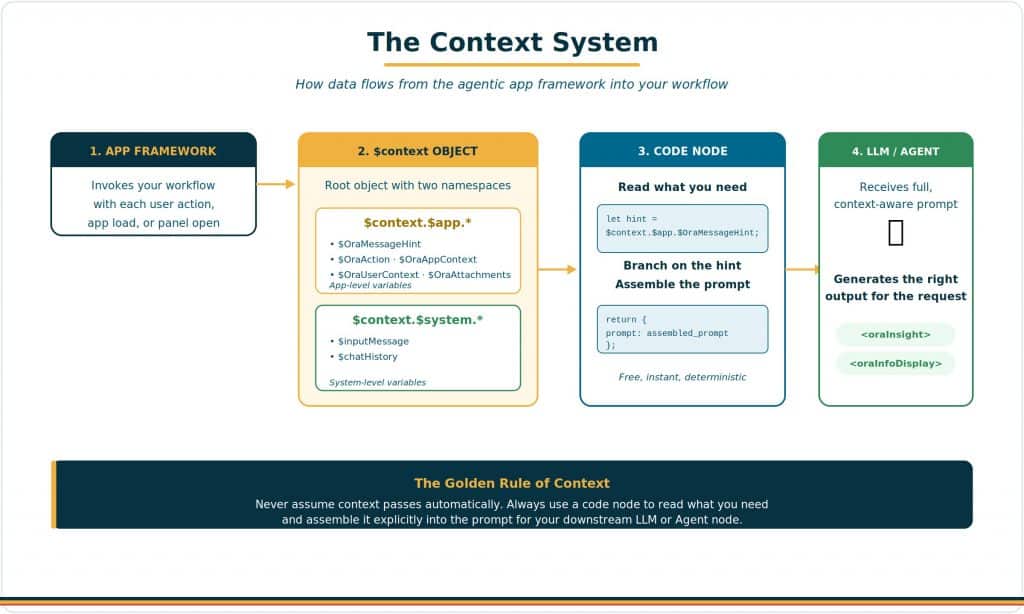
The $context Object: Your Information Pipeline
All context variables are accessed through the $context root object, which has two namespaces:
- $context.$app.* — App-level variables provided by the agentic app framework. These include the message hint, action payload, user context, app context, attachments, communication parameters, panel names, and agent lists.
- $context.$system.* — System-level variables provided by AI Agent Studio’s runtime. These include the input message (the full text delivered to the workflow) and the chat history (prior conversation turns).
The critical distinction: $context.$system.$inputMessage contains everything the framework delivers to your workflow — including the user’s message, any Builder UI prompts, and system instructions. This is the variable you must explicitly pass to downstream nodes in your workflow. Without it, internal nodes have no input to work with.
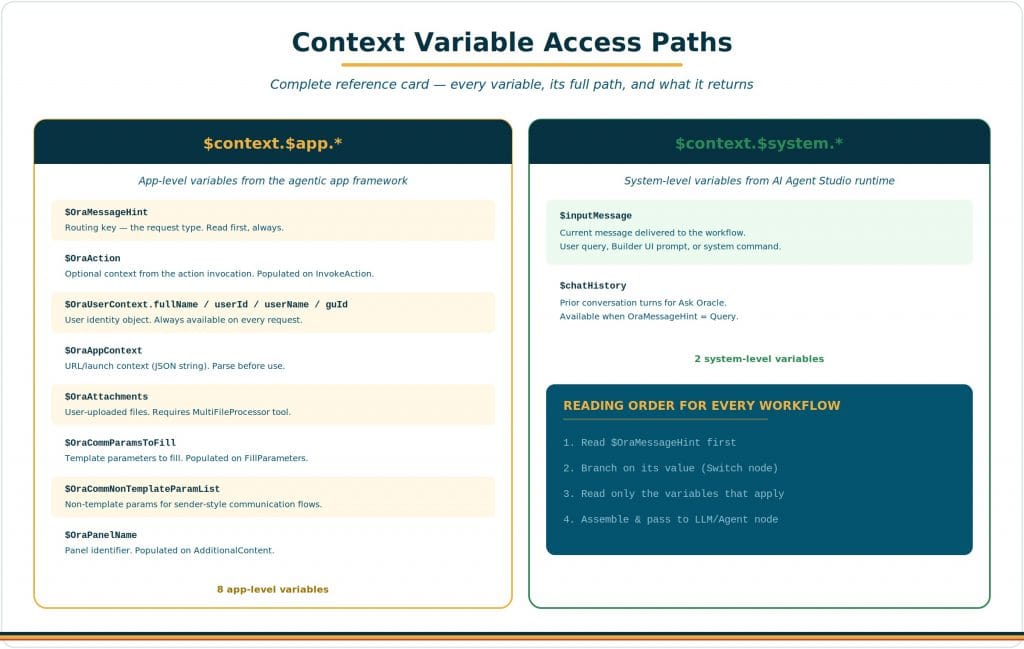
Variable-by-Variable Deep Dive
$OraMessageHint — The Routing Key
This is the most important context variable in every workflow. It tells your agent what type of request the framework is delivering. Your workflow’s first code node should read this value and route to the appropriate processing path. There are ten possible values:
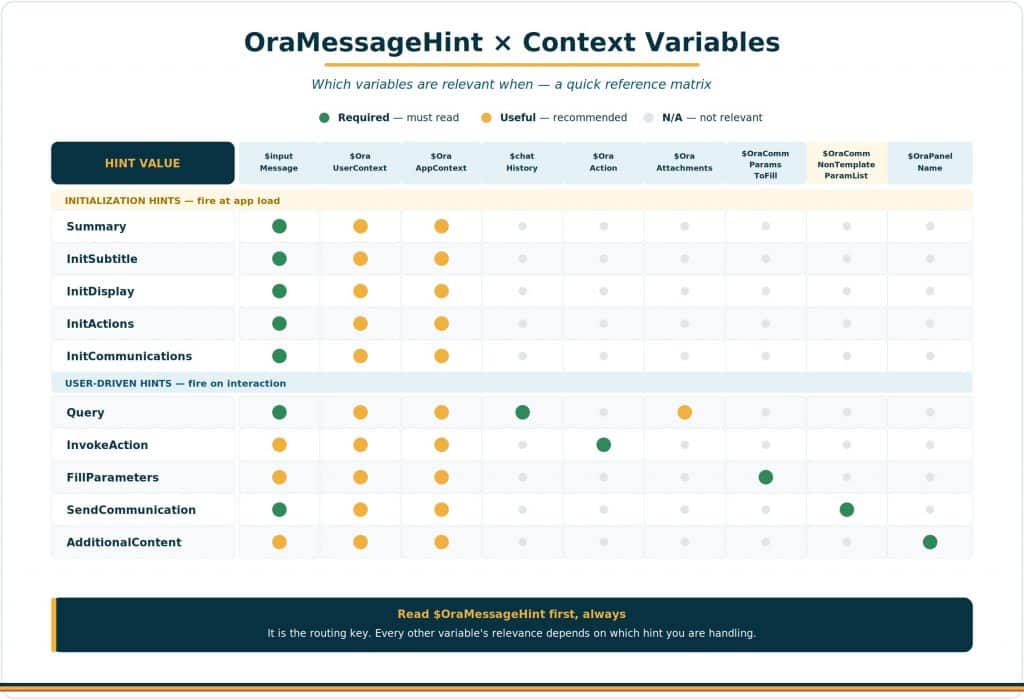
- Initialization hints (fire in parallel at app load): InitSubtitle, Summary, InitDisplay, InitActions, InitCommunications.
- User-driven hints (triggered by user actions after initialization): Query, InvokeAction, FillParameters, SendCommunication, AdditionalContent.
Every hint has a specific set of companion variables that are relevant to that request type. The matrix below shows exactly which variables are available and relevant for each hint.
$OraAction — The Action Payload
Available when OraMessageHint = InvokeAction. This string contains the optional context passed when an action is invoked. When a user clicks an action button, the followUpCommand from the <oraInsight> tag determines what is placed in $OraAction — and that depends on which of the three supported command formats was used.
Format 1: ora.Invoke(“command”, “context?”)
Invokes a predefined Application Action (reusable workflow) from agent output, widgets, or clickable items. The optional context is passed as the action payload, commonly a JSON string. This is the format that populates $OraAction.
- No context: ora.Invoke(“refreshAllAgents”)
- Simple context: ora.Invoke(“viewOrderDetails”, “ORDER-12345”)
- JSON context: ora.Invoke(“processItem”, “{\”id\”:\”123\”,\”type\”:\”urgent\”}”)
Where can you use it: as widget item/row actions (message lists, multi-record actions), as immediate commands (only when explicitly requested by the user), or anywhere commands are accepted (action buttons, steps).
| How ora.Invoke() works end-to-end Use ora.Invoke() when you want to trigger a specific named action and optionally pass context into that workflow. Make sure the agent is configured with Actions enabled and is explicitly prompted to generate actionable insights, since actions are produced by the agent and handled by that same agent on invocation. |
Format 2: ora.Agent(…)
Sends content directly to an agent or LLM for processing. The content can be a string or a JSON object. ora.Agent() sends the command as the input message. Use this when you want the system to route a direct instruction or query to an LLM/agent.
- String: ora.Agent(“investigate issue”)
- JSON: ora.Agent({“command”: “lights.off”, “reason”: “safety”})
Format 3: ora.App.*
App-level commands that tell the host application to perform UI, navigation, or configuration/state actions. These are handled by the host app, not the agent.
- Update: ora.App.update()
- Launch app: ora.App.launch(“ORDERDETAILSAPP”, {“orderId”:”12345″})
Where can you use it: for host-app UI/navigation/state changes — update UI, navigate, launch apps, or set config/context.
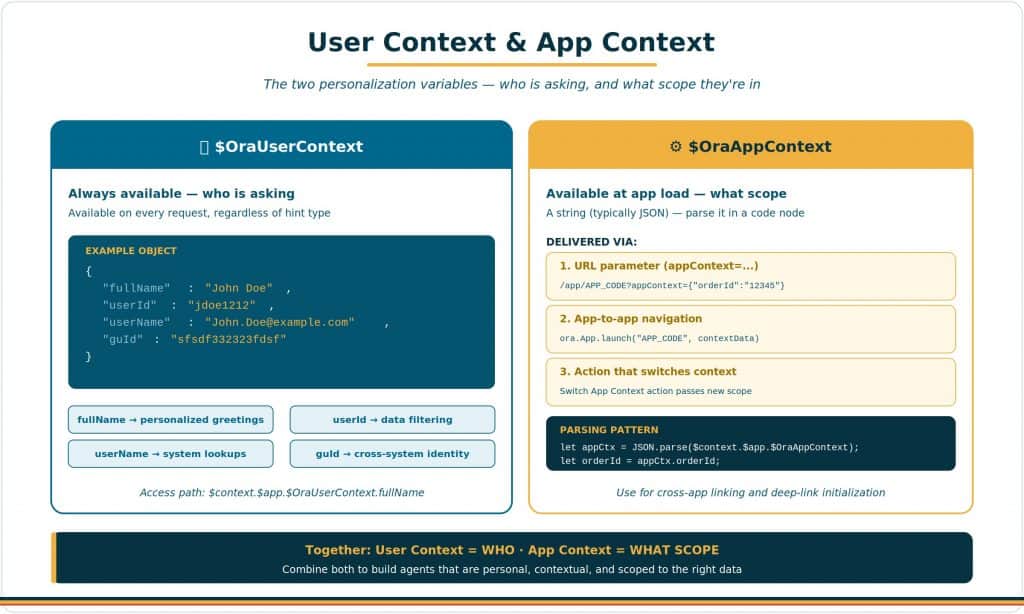
$OraUserContext — The User Identity
This object is always available on every request, regardless of the hint type. It contains four properties that identify the current user:
| Property | Description & Usage |
| fullName | The user’s full display name (e.g., “John Doe”). Use this for personalized greetings in InitSubtitle and Summary: “Good morning, John.” |
| userId | The user’s unique identifier (e.g., “jdoe1212”). Use for data queries that filter by user. |
| userName | The user’s username, typically in email format (e.g., “John.Doe@example.com”). Use for system-level lookups. |
| guId | The user’s global unique identifier (e.g., “sfsdf332323fdsf”). Use for cross-system identity correlation. |
| Example $OraUserContext Object |
| { “fullName”: “John Doe”, “userId”: “jdoe1212”, “userName”: “John.Doe@example.com”, “guId”: “sfsdf332323fdsf” } |
$OraAppContext — Initialization Context
This variable contains context passed via the appContext URL parameter, from app-to-app navigation, or from an action that switches context. It is a string value — typically JSON — that you parse in a code node. This is the mechanism for cross-app linking and deep-link initialization:
Example URL: https://your-app-url.com/app/APP_CODE?appContext={“orderId”:”12345″,”priority”:”high”}
When another agentic app uses ora.App.launch(“APP_CODE”, contextData), the contextData becomes $OraAppContext in the destination app. Use this to open apps pre-filtered to a specific record, priority level, or scope. Your code node should parse the JSON and incorporate the values into the prompt sent to downstream nodes.
$chatHistory — Conversation Context
Available when OraMessageHint = Query. This string contains the prior conversation turns between the user and the agent via Ask Oracle. It is essential for maintaining conversational context — without it, every Ask Oracle question is treated as if it is the first one, and the agent cannot reference prior answers or follow up on earlier topics.
Access it via $context.$system.$chatHistory. Note that the older $OraChatHistory variable is deprecated — always use the $context.$system path. Your code node should append both $inputMessage (the current question) and $chatHistory (prior turns) to the prompt sent to the LLM/Agent node.
$OraAttachments — User-Uploaded Files
Populated for query flows when the conversation includes attachments. If no attachments exist, the map is empty. To process attachments, the MultiFileProcessor tool must be included in your agent team’s tool configuration. Without this tool, the agent receives the attachment metadata but cannot read the file contents. Attachments are most commonly used in Query handling where users share documents for analysis.
$OraCommParamsToFill — Communication Parameters
Available when OraMessageHint = FillParameters. This array contains the parameter definitions that need to be populated for a communication template. Each parameter has an id and title. Your agent should read these parameters, use its knowledge to determine appropriate default values, and return the populated array. This is how the communications lifecycle automates the “prefill” stage.
$OraCommNonTemplateParamList — Non-Template Communication Parameters
Available for communication sender flows that need non-template parameter information. Required when OraMessageHint = SendCommunication.
$OraPanelName — Panel Content Requests
Available when OraMessageHint = AdditionalContent. This string identifies which additional panel is requesting content. It matches the Name you configured in the Agent Editor’s panel section. Your code node should read this value and route to the appropriate prompt for that specific panel.
Practical Tips
- Read $OraMessageHint first, always. It is the routing key. Every other variable’s relevance depends on which hint you are handling.
- Parse JSON defensively. $OraAction and $OraAppContext contain JSON strings. Always wrap your parsing in try/catch to handle malformed or unexpected input gracefully.
- Personalize with $OraUserContext. Use fullName in summaries and subtitles for a personal touch. Use userId for data-scoped queries. This small effort dramatically improves user experience.
- Use $chatHistory for conversational continuity. Without it, every Ask Oracle question is stateless. With it, agents can reference prior answers, follow up on topics, and build on earlier analysis.
- Remember: $OraChatHistory is deprecated. Always use $context.$system.$chatHistory instead. The old path may stop working in future releases.
- Watch the variable name precisely. It is $OraCommParamsToFill (singular Comm), not $OraCommsParamsToFill. Use the exact name from the Oracle documentation.
- Test each hint independently. In Preview mode, trigger each hint type and verify that your code node correctly reads and passes the relevant variables. Missing context is one of the most common — and most frustrating — sources of bugs.
| The Context Principle Context variables are the nervous system of your agentic app. $OraMessageHint is the brain’s signal for what to do. $inputMessage is the sensory input. $OraUserContext is awareness of who you’re talking to. $chatHistory is memory. $OraAction is the command to execute. Master these variables, and your agents will be responsive, contextual, and precise. Ignore them, and your agents are deaf, blind, and amnesiac. |
New to Oracle Fusion AI Agents?
Explore AI Agent Studio Learning Path — blog series to help build from zero to production-grade AI agents, with deep dives on every agent pattern, node type, and tool integration.
Explore AI Agentic Apps Learning Path — blog series on everything you need to build Oracle Fusion AI Agentic Apps using AI Agent Studio.