


The four guiding principles for building effective, user-centered agentic applications that act as decision-making partners
Introduction
Before you write a single prompt, configure a single agent, or choose a single widget, you need to internalize a critical truth: agentic apps are not data retrieval tools. They are decision-making partners.
This distinction is not marketing language – it is the single most important design decision you will make. It shapes how you think about what your agents surface, how they present information, what actions they recommend, and how they prioritize the user’s attention. Get this wrong, and you build a fancy dashboard. Get this right, and you build something that fundamentally changes how people work.
The design philosophy of agentic apps rests on four foundational principles. Every choice you make as a builder – from which agents to include, to how sections are structured, to what actions are offered – should be evaluated against these principles. They are your north star.
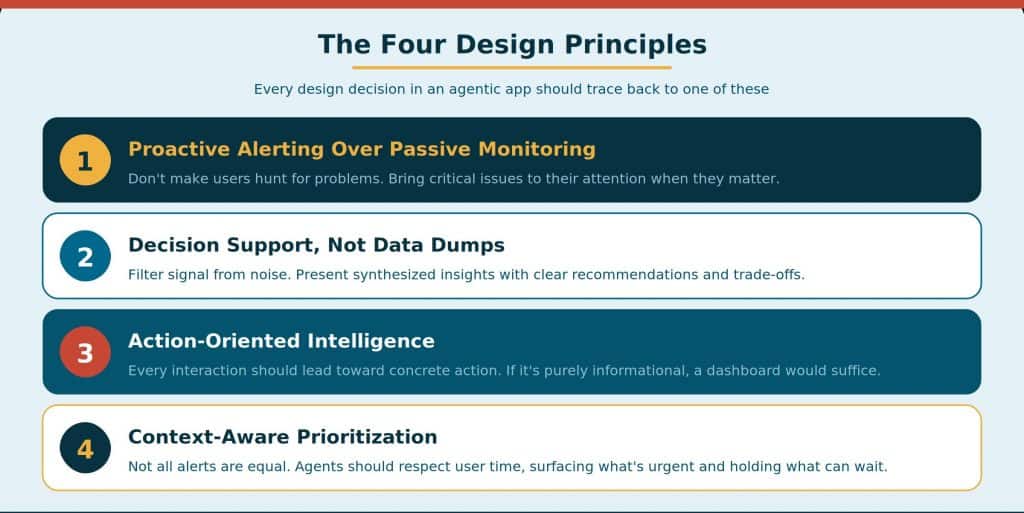
Principle 1: Proactive Alerting Over Passive Monitoring
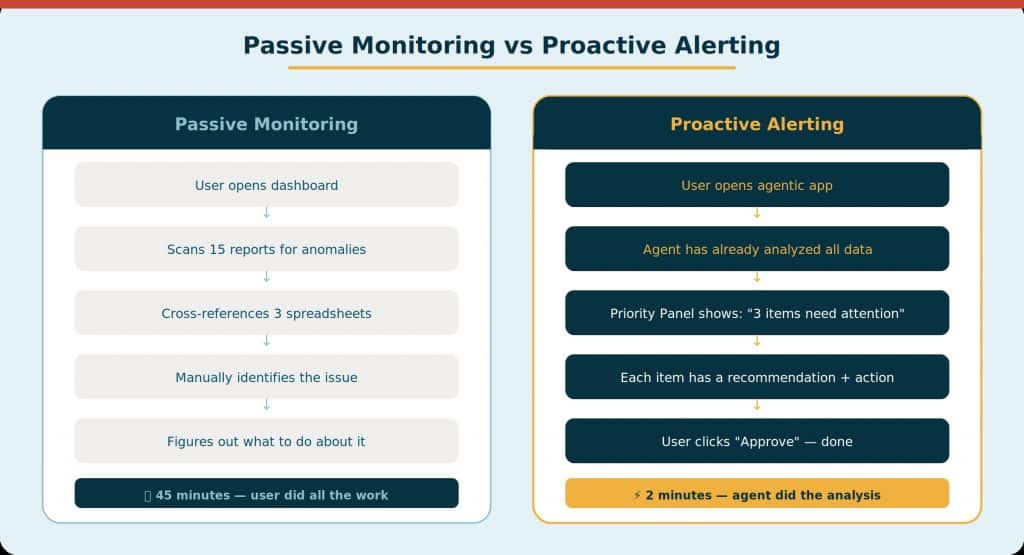
The most fundamental shift in agentic design is moving from passive monitoring to proactive alerting. In traditional applications, the system sits idle until a user decides to check it. Data exists in tables and dashboards, but the user must know where to look, what to look for, and when to look for it. Problems are discovered late—or not at all.
In an agentic app, agents are continuously analyzing the underlying data. When they identify an anomaly, an opportunity, or a risk, they surface it immediately—with context, urgency classification, and enough background for the user to understand why it matters. The user does not go hunting for problems. The problems come to the user.
What This Looks Like in Practice
Consider an HR application. In a traditional system, a manager would need to run an attrition risk report, review the results, sort by risk score, cross-reference with team assignment, and then decide which employees need attention. That is five steps before any action happens—and it assumes the manager remembers to check in the first place.
In an agentic app, the agent does this work proactively. The moment the user opens the app, they see: “3 employees in your Engineering team have elevated attrition risk. Two cite career development concerns. One has not received a promotion in 28 months.” The agent found the issue, analyzed the root cause, and delivered the insight—all before the user asked a single question.
The Design Mandate
- Don’t make users hunt for problems. Bring critical issues directly to their attention when they matter.
- Surface context alongside the alert. An alert without context creates anxiety, not action. Tell the user what happened, why it matters, and what they can do about it.
- Classify urgency. Not all alerts are equal. Use priority flags (critical, high, medium, info) so users can triage effectively and focus on what matters most.
- Respect user attention. Proactive does not mean aggressive. Agents should surface the right amount of information at the right time—not overwhelm users with a wall of notifications.
Principle 2: Decision Support, Not Data Dumps
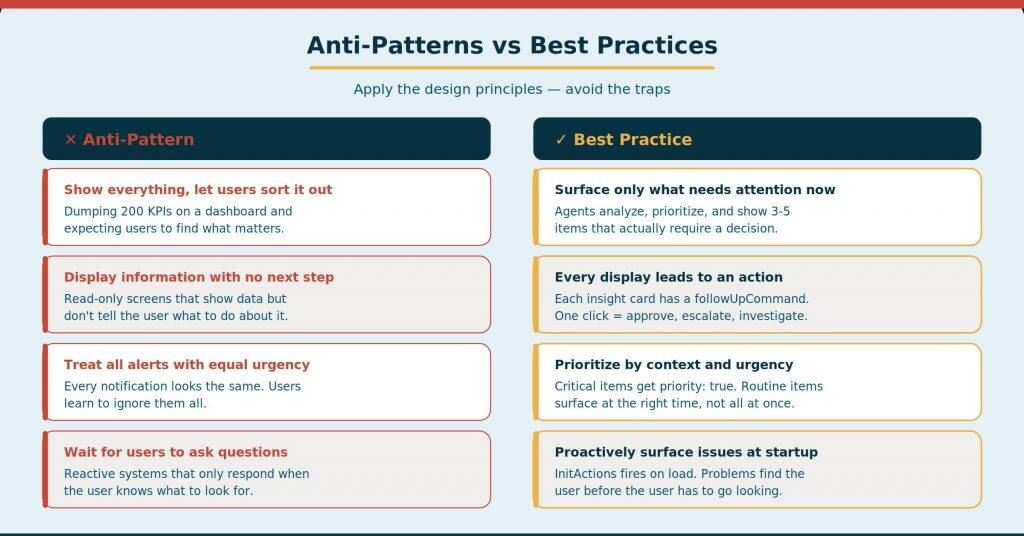
The second principle addresses a common trap in enterprise application design: equating more data with better insight. Traditional applications excel at showing you every row, every metric, every dimension of a dataset. The problem is that most users do not need all that data—they need the signal hidden inside it.
Agentic apps should filter signal from noise. Instead of presenting 200 rows of supplier performance data, the agent should tell you: “4 suppliers are underperforming on delivery SLAs. AcmeParts has missed 3 consecutive deadlines and is trending worse. Recommended action: schedule a performance review.” That is decision support. The user has enough information to decide what to do without wading through a spreadsheet.
The Synthesis Mindset
As a builder, every time you configure an agent’s display prompt, ask yourself: “Am I asking the agent to show data or to synthesize insight?” The answer should always be the latter. Here is what that means in practice:
- Lead with the conclusion, not the data. The headline of every section should be the agent’s most important finding. The supporting data comes underneath for users who want to verify or explore.
- Include recommendations and trade-offs. Do not just identify the problem—suggest what to do about it. If there are multiple options, present the trade-offs so the user can make an informed choice.
- Quantify impact. Instead of “several invoices are overdue,” say “12 invoices totaling $847K are overdue, representing 6% of Q3 receivables.” Context turns observation into urgency.
- Aggregate intelligently. When showing lists, group by priority or category. When showing metrics, compare to benchmarks or historical trends. Raw numbers without context are data dumps.
| The Synthesis Test Before publishing any agent configuration, review the initial display output. If a human would need to spend more than 10 seconds interpreting the data before understanding the key takeaway, the agent is not synthesizing enough. Rewrite the prompt to lead with insight. |
Principle 3: Action-Oriented Intelligence
The third principle is arguably the most transformative. In traditional enterprise software, the path from insight to action involves leaving the application. You discover a problem in one system, open another system to address it, compose a communication in your email client, and track the resolution in a spreadsheet. Every transition is a drop-off point where work stalls.
Agentic apps close this gap. Every agent interaction should lead toward concrete action—approving a proposal, adjusting a strategy, resolving a blocker, or communicating a decision. The app does not just show you the problem; it gives you the tools to solve it, right there, without leaving the context.
The Action Spectrum
Not all actions are the same, and good agentic design accounts for the full spectrum:
- Instant Actions: Complete immediately with one click. Example: “Extend the negotiation deadline by 7 days.” The system executes, confirms, and updates the display. These are the gold standard—minimum friction, maximum momentum.
- Workflow Actions: Multi-step actions requiring review or user inputs before completion. Example: “Award this negotiation to Supplier B.” The agent presents a review summary, asks for confirmation, and then executes. More steps, but justified by the decision’s weight.
- Communication-Triggering Actions: Tied to a high-priority item, these automatically generate a tailored message. Example: “Notify the supplier about the contract renewal terms.” The communication is pre-drafted, specific to that record, and ready for the user to review and send.
The Critical Design Question
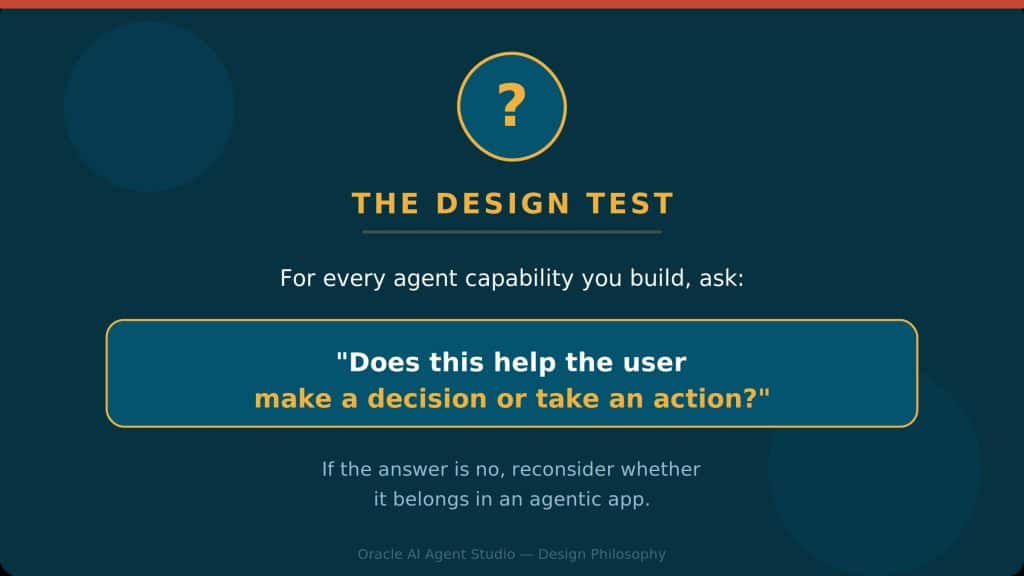
For every agent capability you build, ask: “Does this help the user make a decision or take an action?” If the answer is no, reconsider. An insight that does not lead to action is purely informational—and for purely informational needs, a traditional API or dashboard would suffice. The whole point of agentic apps is shortening the distance between knowing and doing.
Principle 4: Context-Aware Prioritization
The fourth principle is about respect—specifically, respecting the user’s time and attention. Even the best proactive alerting and decision support can become overwhelming if everything is presented with equal weight. An app that surfaces 47 items all marked “important” is no better than an app that surfaces none.
Context-aware prioritization means agents must understand business goals and user workflows to determine what is urgent versus what can wait. The procurement agent does not just list all pending contracts—it knows that the contracts expiring in 3 days are more urgent than those expiring in 30 days, and that a $5M contract is higher impact than a $50K one. It ranks accordingly.
Implementing Prioritization
- Use priority tiers consistently. The framework supports standard priority flags: critical (red), high/warning (yellow/orange), medium/info (blue/gray), and success (green). Agents should use these consistently across all outputs—card widgets, message lists, action suggestions—so users develop intuition about urgency at a glance.
- Surface the vital few, not the trivial many. In the Summary View, show only the items that demand attention today. In Section Focus, expand to include the broader context. In Item Focus, go deep. Match information density to the user’s current intent.
- Consider the user’s role and context. An executive reviewing their morning summary has different needs than a procurement specialist investigating a specific supplier. Agent prompts should account for the user context available via OraUserContext and shape output accordingly.
- Allow agents to hide or collapse lower-priority items. Not everything needs to be visible at all times. Critical items should be expanded and prominent. Routine items can be collapsed or available on demand. This visual hierarchy is a form of prioritization.
| Prioritization Anti-Pattern If your app’s Summary View routinely shows more than 5–7 top-level items, your agents are not prioritizing aggressively enough. Users cannot meaningfully act on 15 things at once. Tune your prompts to surface only what genuinely needs attention today, and let the rest surface when users drill into Section Focus. |
Putting It All Together: The Principles in Action
These four principles are not independent—they compound. Here is how they work together in a well-designed agentic app:
1. Proactive Alerting identifies that a critical issue exists (“3 supplier contracts expire this week”).
2. Decision Support synthesizes the data into an actionable insight (“AcmeParts has the highest risk—their delivery SLA has degraded 40% in 6 months, and switching suppliers would cost $120K in transition fees”).
3. Action-Oriented Intelligence provides clear next steps (“Renew with a 5% volume discount based on 18-month spend trend” with one-click approval and a pre-drafted supplier notification email).
4. Context-Aware Prioritization ensures the AcmeParts renewal appears at the top because it is the highest-value contract expiring soonest, while the two routine renewals are visible but not highlighted.
The user goes from “unaware” to “problem resolved” in a single session, without ever leaving the app. That is the promise of agentic design.
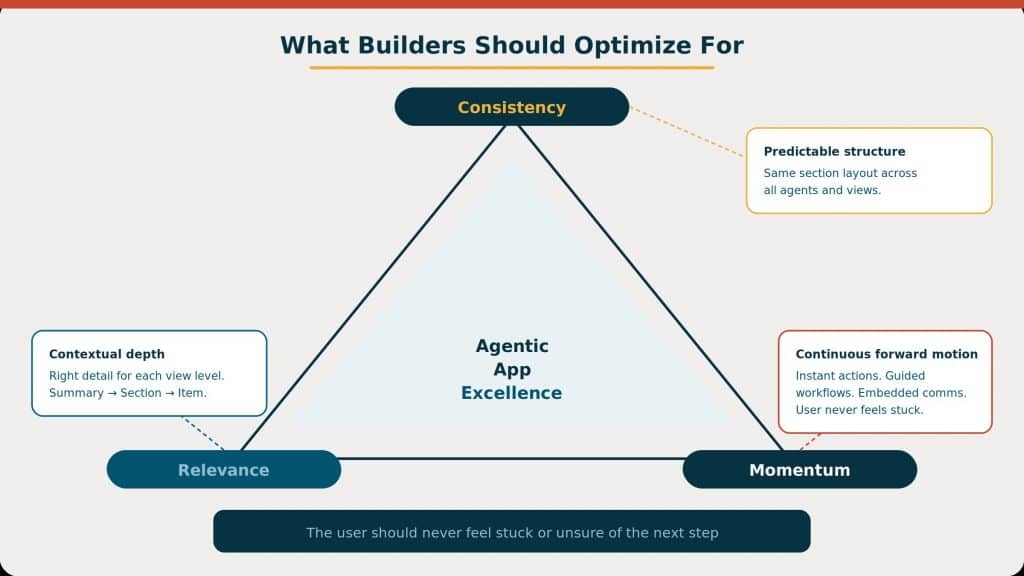
What Builders Should Optimize For
Beyond the four principles, Oracle’s guidance for agentic app builders emphasizes three optimization targets that translate the philosophy into practical UX decisions.
Consistency
Every section in an agentic app should follow a predictable structure: headline (the most important insight), short description (context), content (detailed data via widgets), visualizations (charts and diagrams), and footer (sources and suggested actions). When users encounter the same pattern in every section, they develop muscle memory. They know where to look for the key takeaway, where to find supporting data, and where to find actions. Consistency reduces cognitive load and builds trust.
Contextual Relevance
The same data should be presented differently depending on which view the user is in. In the Summary View, show the headline and one or two key metrics. In Section Focus, expand to show the full list with priority indicators and actions. In Item Focus, go deep with historical trends, related records, and detailed analysis. Builders should configure their agent prompts to account for the user’s current depth and serve the appropriate level of detail—no more, no less.
Momentum
The app should never leave users stuck. Wherever possible, offer instant actions that complete with one click. When a decision requires more deliberation, provide guided workflows that walk the user through the steps. When a decision requires outreach, embed communications directly in the workflow so the user can draft, review, and send without switching tools. The goal is continuous forward motion—from insight to decision to action to communication, all within the same experience.
Applying the Design Test: A Practical Checklist
Use this checklist every time you configure a new agent, write a prompt, or review an app’s output. If you cannot confidently answer “yes” to each question, revisit your design.
Design Checkpoint
- Does this agent proactively surface issues, or does it wait for the user to ask?
- Is the agent leading with a synthesized insight, or is it showing raw data?
- Does every insight include a clear recommendation or suggested action?
- Are priorities clearly differentiated — can the user instantly see what is most urgent?
- Does the Summary View show only the vital few items that demand action today?
- Does each section follow the standard structure: headline, description, content, visualizations, footer?
- Is the level of detail appropriate for the view (summary vs. section focus vs. item focus)?
- Can the user take action directly from the app, or must they switch to another tool?
- Are communications embedded so outreach happens without leaving the workflow?
- Would a user feel this is an intelligent advisor, or just a data display?
| The Ultimate Test The most successful agentic apps are those where users feel they have an intelligent advisor who understands their domain, anticipates their needs, and shortens the distance between insight and action. Build for decisions, not data. |
New to Oracle Fusion AI Agents?
Explore AI Agent Studio Learning Path — blog series to help build from zero to production-grade AI agents, with deep dives on every agent pattern, node type, and tool integration.
Explore AI Agentic Apps Learning Path — blog series on everything you need to build Oracle Fusion AI Agentic Apps using AI Agent Studio.