
As AI adoption grows, organizations are no longer building just one agent – they’re building many, each specialized for different tasks across systems and domains. The real value, however, comes when these agents can work together seamlessly.
Agent-to-Agent (A2A) is an open protocol designed to make this possible. It enables AI agents to discover, communicate, and collaborate with each other in a standardized way, regardless of how or where they are built. Instead of relying on custom integrations, A2A provides a consistent model for invoking agents, exchanging information, and managing tasks across platforms.
The value of A2A is clear:
- Interoperability – Agents can work across applications, clouds, and vendors
- Reduced integration complexity – No need for bespoke, point-to-point APIs
- Scalability – Easily add new agents into an ecosystem without rework
- Governance and control – Standardized interaction patterns enable secure, managed communication
Oracle Fusion AI Agent Studio supports A2A, allowing Fusion agents to participate in this broader ecosystem. Agents built in Fusion can be published, discovered, and invoked by external systems and third-party agents – extending their reach far beyond Fusion Applications while maintaining enterprise-grade security and governance.
A2A addresses this by defining the following elements consistently across any platform
- A common agent description format – Agent Cards: A machine-readable “business card” that tells any other agent or platform exactly what this agent is, what it can do, and how to call it.
- A standard request and response model: A consistent way to invoke any agent, regardless of where it lives or who built it.
- A shared task lifecycle: Especially important for long-running or asynchronous tasks, which is basically all real enterprise work.
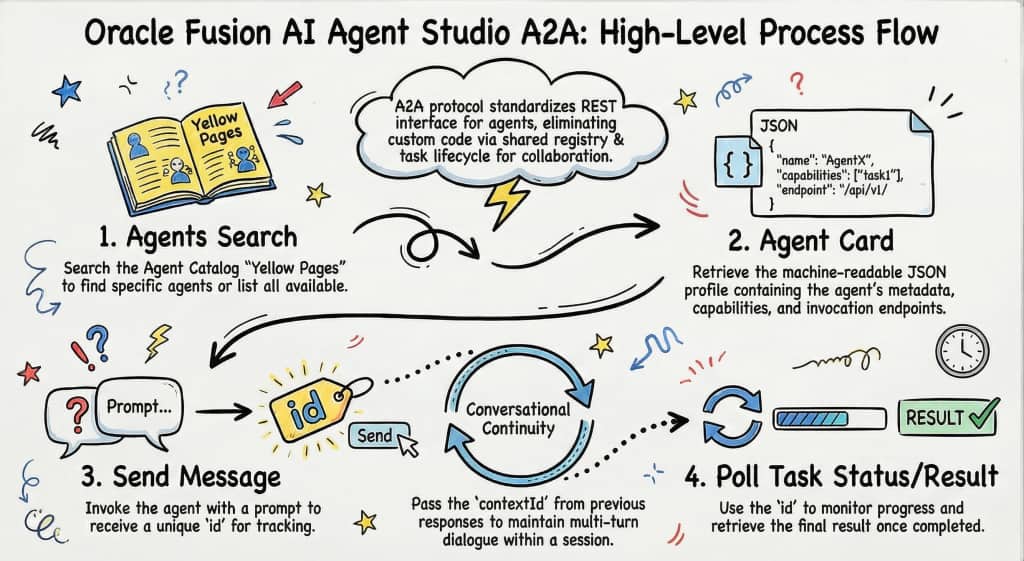
The complete flow goes like below:
- Discover the agent – Search the registry, find what you need.
- Retrieve the Agent Card – Get the full metadata including the invocation endpoint.
- Send Message(Invoke) – Send your prompt or task. You’ll get back a Id.
- Poll for Results – Use that Id to check status and retrieve the result when the agent is done.
The Agent Catalog
A2A defines how agents talk. But how does an agent know who to talk to? That’s where the Agent Catalog also called the Agent Registry comes in. Think of it as a searchable Yellow Pages for AI agents. It doesn’t run agents or manage their logic. Its job is much simpler and more valuable: it tells you what agents exist, what they do, and how to reach them.
Step 1: Discover
Discovery is handled through the search endpoint.
Endpoint
POST https://{pod_host}/api/fusion-ai/orchestrator/a2a/v1/agents/searchSample Request Body
You can search for agents using the search query or you can list all agents by passing an empty query
{ "query": "" } -- returns all agents
{ "query": "Product" } -- results are filtered to agents matching the query
Sample Response
{
    "registry_version": "0.1",
    "resources": [
        {
            "id": "PRODUCT_COMPARISON_ADVISOR_COE",
            "name": "Product Comparison Advisor COE",
            "location": {
                "url": "Optional[https://xxxx-dev.fa.ocs.oraclecloud.com]/api/fusion-ai/orchestrator/a2a/v1/PRODUCT_COMPARISON_ADVISOR_COE/.well-known/agent.json",
                "type": "agent_card"
            }
        }
    ],
    "total_count": 1
}
Agent Cards:
The Agent Card is a machine-readable JSON document that acts as an agent’s complete digital profile. An Agent Card provides details about the agent like name, description, provider etc.
Step 2: Retrieve Agent Card
Perform a GET request on the .well-known endpoint to verify capabilities.
Endpoint
GET https://{pod_host}/api/fusion-ai/orchestrator/a2a/v1/{{AGENT_CODE}}/.well-known/agent.jsonSample Response
{
    "name": "Product Comparison Advisor COE",
    "description": "Our Product Comparison Advisor provides Product Designers, Product Managers and Quality Engineers an intelligent and automated way to compare products. The AI advisor Standards answer any questions a user may have on these comparison results.",
    "url": "Optional[https://xxxx-dev.fa.ocs.oraclecloud.com]/api/fusion-ai/orchestrator/a2a/v1/PRODUCT_COMPARISON_ADVISOR_COE",
    "provider": {
        "organization": "Oracle",
        "url": "www.oracle.com"
    },
    "version": "13",
    "documentationUrl": null,
    "capabilities": {
        "streaming": true,
        "pushNotifications": false,
        "stateTransitionHistory": false
    },
    "authentication": {
        "schemes": [
            "Bearer"
        ],
        "credentials": null
    },
    "defaultInputModes": [
        "text"
    ],
    "defaultOutputModes": [
        "text"
    ],
    "skills": [
        {
            ......
        }
    ]
}
Step 3: Send Message(Invoke):
Once an agent is discovered and its Agent Card retrieved, we can invoke the agent in an asynchronous execution model. Initiate the agent session by posting to the below endpoint. The request body carries the user prompt, agent teams configuration, and any custom parameters your integration requires. The id in the response will be used to poll for results.
Endpoint:
POST https://{pod_host}/api/fusion-ai/orchestrator/a2a/v1/{{AGENT_CODE}}Sample Request Body:
{
    "method": "message/send",
    "params": {
        "message": {
            "role": "user",
            "parts": [
                {
                    "text": "Compare M1000034 of org IMO and M1000040 of Org SBI?"
                }
            ]
        }
    }
}
Sample Response:
{
    "id": "79d651d2-6306-4feb-81cf-ffcf03f407cd",
    "jsonrpc": "2.0",
    "method": "message/send",
    "result": {
        "id": "79d651d2-6306-4feb-81cf-ffcf03f407cd",
        "contextId": "1153f29a-47e0-4fbe-823f-9139729e3303",
        "status": {
            "state": "working",
            "message": null,
            "timestamp": "2026-03-26T18:58:23.000503"
        },
        "artifacts": null,
        "history": null,
        "metadata": null,
        "kind": "task"
    },
    "error": null
}
Note: To continue a conversation across multiple turns, pass the ‘contextId’ from a previous response. Setting it to null/not passing starts a new session.
Step 4: Poll Task Status:
Use the Id to monitor progress or retrieve the final, context-aware result.
Endpoint:
POST https://{pod_host}/api/fusion-ai/orchestrator/a2a/v1/{{AGENT_CODE}}Sample Request Body:
{
    "method": "tasks/get",
    "params": {
        "id": "id" -- Use the Id from the Send Message request to poll for result
    }
}
Sample Response:
{
    "id": "ce435c77-4718-4393-a631-b3758ce5c945",
    "jsonrpc": "2.0",
    "method": "tasks/send",
    "result": {
        "id": "ce435c77-4718-4393-a631-b3758ce5c945",
        "contextId": "52b64ce3-75a7-401d-8e26-aba9c8fc1dc4",
        "status": {
            "state": "completed",
            "message": null,
            "timestamp": "2026-03-26T18:55:37.000096"
        },
        "artifacts": [
            {
                "artifactId": "0",
                "name": null,
                "description": null,
                "parts": [
                    {
                        "type": "text",
                        "text": "Here’s a clear side-by-side summary and short recommendation comparing the two items....",
                        "metadata": null,
                        "kind": "text"
                    }
                ],
                "append": false,
                "metadata": null,
                "lastChunk": false
            }
        ],
        "history": null,
        "metadata": null,
        "kind": "task"
    },
    "error": null
}
Roadmap:
26B:
Search: Semantic search, Enhanced search parameters(name, description, skills) and pagination
Agent Card Quality: Auto-populated skills in Agent Cards based on Agent schema
Results: Streaming support
With enterprise AI the first wave was about getting individual agents working, making one capable, reliable, useful AI workflow. That’s mostly solved. The second wave, which is where we are now, is about making agents work together at scale.
And that second wave only becomes manageable with a standard like A2A. Without it, every cross-agent integration is custom and expensive to maintain. With it, you get a composable ecosystem where agents from Oracle, from third parties, from your own teams can all collaborate without anyone having to write bespoke code.
Note: The following blog covers API Authentication in Fusion AI Agent Studio. This will enable you to invoke agents as the real end user, not a service account