
Tactical guidance for defining roles, setting boundaries, writing descriptions, troubleshooting prompts, and deploying production-quality agent teams in Oracle AI Agent Studio.
Defining Agent Roles with Precision
In a hierarchical (multi-agent) team, every agent must have a distinct, unambiguous role. Vague role definitions are the number-one source of agent misbehavior — they cause overlapping responsibilities, missed tasks, and unpredictable routing.
Supervisor vs. Worker Role Separation
The supervisor agent’s role is orchestration: analyzing user intent, routing requests to the right worker, managing context across turns, and handling multi-topic conversations. It should never execute domain tasks itself.
The worker agent’s role is execution: performing a specific, well-bounded function with its assigned tools and reporting results back. It should never route or make decisions outside its domain.
| CLEAR ROLE DEFINITION ✅ “You are a payroll worker agent that retrieves, interprets, and analyzes pay slip information. You handle payment details, deductions, and tax withholdings. You do NOT provide financial advice, modify system data, or answer questions about benefits, career development, or organizational structure.” |
| VAGUE ROLE DEFINITION ❌ “You are an HR assistant that helps employees with their questions.” |
Agent Partitioning Strategies
You can partition workers by domain (Payroll, Benefits, Talent, Recruiting) or by function (Data Retrieval, Data Updates, Analysis & Reporting). For team sizing, aim for 3–5 agents per team, 1–5 tools per agent, and a maximum of 10 tools across the team.
Setting Responsibility Boundaries
Even with clear roles, agents need explicit boundaries — the lines they must not cross. Without boundaries, agents overstep their scope, hallucinate capabilities they don’t have, or fail silently when they encounter situations outside their training.
Every agent’s prompt should address five responsibility dimensions:
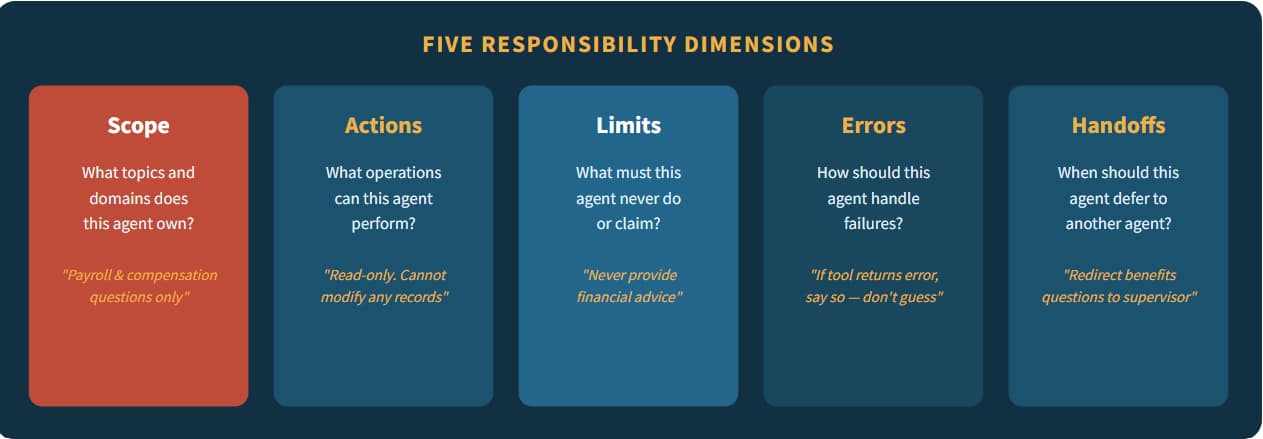
Fig 1 — Every agent prompt should address all five responsibility dimensions.
| WELL-BOUNDED ✅ “You handle payroll queries only. If the user asks about benefits, career development, or org structure, politely decline and explain that these topics are handled by a different specialist. Never generate facts — all answers must come from tool call responses.” |
| UNBOUNDED ❌ “You are a helpful HR assistant. Answer whatever the employee asks about.” |
Writing Accurate Descriptions
In AI Agent Studio, descriptions are not passive metadata — they are injected directly into the assembled prompt that the LLM reasons over. Inaccurate or vague descriptions directly cause routing errors, tool misuse, and unexpected agent behavior.
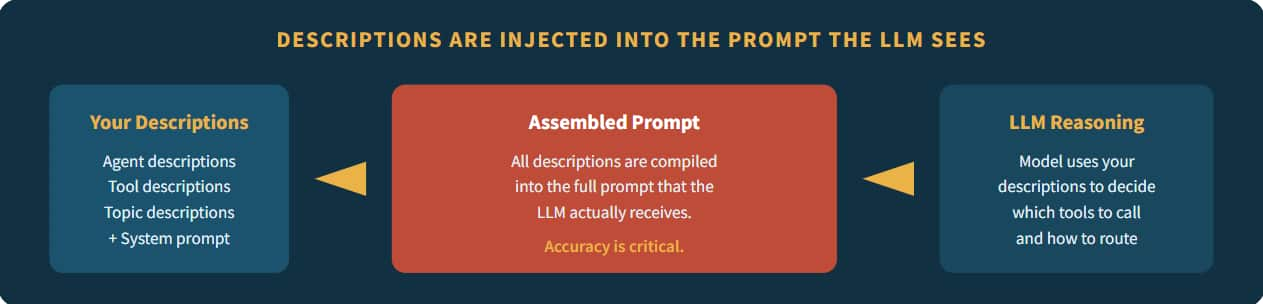
Fig 2 — Descriptions flow directly into the assembled prompt.
Description Guidelines by Object Type
| Object Type | Description Should Include | Example |
|---|---|---|
| Supervisor Agent | Orchestration role, routing logic, context management | “An intelligent orchestration agent that analyzes employee inquiries, determines intent, and routes to specialized workers.” |
| Worker Agent | Function, inputs, outputs, scope boundaries | “A specialized payroll assistant that retrieves pay slip information including deductions and tax withholdings.” |
| Tool | Purpose, inputs, output structure, dependencies | “Retrieves a worker’s email, username, and display name using person ID.” |
| Topic | Conversational domain, user intents, activation trigger | “Handles pay slip retrieval for current period including gross, net, deductions, tax.” |
| CRITICAL RULE Treat descriptions like legal documents. Define all terms precisely. If your tool description says “retrieves worker information,” the LLM doesn’t know if that means name, email, salary, or assignment. Specify exactly: “Retrieves a worker’s email, username, and display name using person ID.” |
Prompt Engineering Tactics
These tactical patterns come from real-world production deployments in Oracle Fusion Applications. Each tactic addresses a specific challenge you’ll encounter when writing prompts for hierarchical agent teams.
| 1. Start Simple & Iterate Begin with a minimal prompt that covers the core task. Test it. Then add constraints, edge-case handling, and refinements one layer at a time. Complex prompts written all at once are harder to debug. |
| 2. Experiment with Structure The order of instructions matters. Try moving critical constraints to the top vs. bottom. Test with section headers vs. flat prose. Different placements can significantly impact model compliance. |
| 3. Use Explicit Action Verbs Instruct the model using precise action commands: Write, Classify, Summarize, Translate, Order, Extract, Validate, Compare. Vague verbs like ‘handle’ or ‘process’ give the LLM too much latitude. |
| 4. Be Specific, Not Verbose More words do not equal better prompts. Be mindful of length. A 10-line prompt with precise instructions outperforms a 50-line prompt full of redundant or contradictory guidance. |
| 5. Use Modular, Reusable Prompts Break down tasks into manageable sub-prompts using Topics. One topic per function. Share common topics (greetings, error handling, out-of-scope) across agents. |
| 6. Anticipate Dependencies Define prerequisites explicitly. If Tool B requires the output of Tool A, state it: “You MUST call getUserSession before calling getPayslip. Do not proceed if getUserSession fails.” |
| 7. Provide Context & Assumptions Share background information. Document assumptions. If the agent serves a specific user population or operates within specific business rules, state these explicitly. |
| 8. Never Use PII in Prompts System prompts and topics are configuration, not runtime data. Never embed real employee names, IDs, or personal information. Use tool calls to retrieve user-specific data at runtime. |

Fig 3 — Prompt engineering is iterative: Draft → Test → Analyze → Refine → Loop.
Solving Common Prompt Mistakes
These seven errors appear repeatedly in production agent deployments. Recognizing them early saves significant debugging time.
| Mistake | What Happens | Solution |
|---|---|---|
| Ambiguity — not clarifying roles or outputs | Inconsistent, unpredictable answers | Use structured role definitions with explicit scope and actions |
| No boundaries — missing scope restrictions | Agent hallucinates capabilities | Restrict domain explicitly: “You handle X only. For Y, decline politely.” |
| Overloaded prompts — too much information | LLM confusion, ignored instructions | Break into multiple agents or topics. Be mindful of length. |
| No error handling — missing failure instructions | Silent failures or fabricated data | “If tool returns error, inform user honestly. Never fabricate data.” |
| Ignored dependencies — undefined tool order | Out-of-order tool calls, missing data | “Call A before B. Stop if A fails.” |
| Inconsistent instructions — conflicting rules | Unpredictable behavior | Audit all prompts and topics for contradictions before deployment |
| Assuming tacit knowledge — omitting context | Wrong assumptions, missing context | Document every assumption. The LLM only knows what you tell it. |
Troubleshooting Prompts Using LLMs
When your agent misbehaves and you’ve exhausted manual review, you can use an LLM itself as a prompt debugging tool. This technique leverages the model’s ability to identify conflicts, gaps, and ambiguities in your prompt text that may not be obvious to a human reviewer.
What LLMs Can Identify in Your Prompts
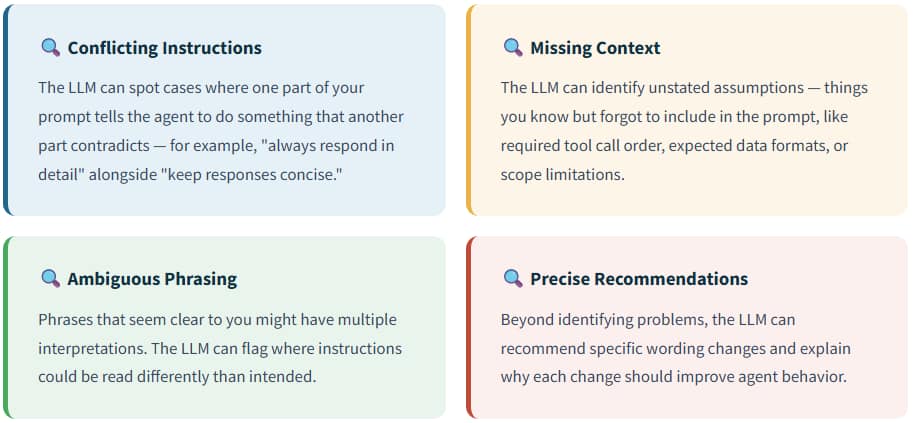
The Troubleshooting Prompt Template
Use this structured template to debug misbehaving agents. Paste it into any LLM along with your prompt, the problem scenario, and the desired outcome:
Here is my agent and current prompt:
<insert current prompt>
The agent behaves incorrectly in the scenario when asked:
<insert problematic utterance to agent>
The desired output of the agent is:
<insert desired output from agent>
Recommend specific changes and explain why.
| TROUBLESHOOTING WORKFLOW Use this approach systematically: (1) Reproduce the problem with a specific test utterance. (2) Copy the exact prompt the agent is using. (3) Paste both into the troubleshooting template. (4) Review the LLM’s recommendations. (5) Apply changes and re-test. This dramatically accelerates the iterative refinement cycle. |
Example: Debugging a Routing Problem
Here is my agent and current prompt:
“You are an HR assistant. Route payroll questions to Worker A
and benefits questions to Worker B. Be helpful.”
The agent behaves incorrectly when asked:
“How much will my dental insurance cost after my raise?”
The desired output:
Route to Worker A (payroll) first for raise amount,
then Worker B (benefits) for dental cost calculation.
Recommend specific changes and explain why.
// LLM would likely identify: The prompt doesn’t handle
// multi-topic queries that span both domains. It also lacks
// instructions for sequential routing when a question
// requires information from multiple workers.
Tool Configuration Best Practices
Tools are the agent’s hands — they connect the LLM to Fusion Application data and actions.
| Write Clear Tool Descriptions Be precise about purpose, inputs, outputs, and dependencies. Tool descriptions are inserted directly into prompt templates — accuracy is critical. Mention prerequisites and response structure. |
| Limit Exposed Fields Only expose the fields the agent actually needs. Returning 50 fields when the agent needs 5 wastes token budget and increases confusion. |
| Validate Inputs Gracefully Include required field validation in your prompts. Instruct the agent to ask the user for missing required parameters before calling a tool. |
| Maintain Tool-to-Topic Discipline Each topic should reference only the tools relevant to its function. When calling multiple tools, instruct: “Call each tool sequentially and not as nested calls.” |
Testing & Deployment Checklist
Before deploying a hierarchical agent team to production, validate it against this checklist. Create at least 1 test scenario per tool function, 5+ scenarios for complex teams, and test each scenario with 10+ variations of user phrasing.
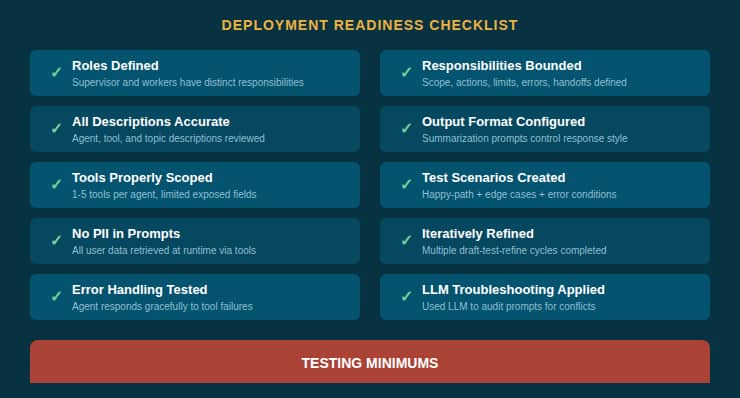
Fig 4 — The 10-point deployment readiness checklist.
| PRE-LAUNCH AUDIT Before final deployment, use the LLM troubleshooting technique from Section 6: paste your complete supervisor and worker prompts into an LLM and ask it to identify any conflicting instructions, ambiguous phrasing, missing error handling, or unstated assumptions. This single step catches issues that manual review often misses. |
What’s Next?
If you haven’t already, read our companion blog post, “Basics of Prompt Engineering in AI Agent Studio”, which covers the four prompt types (system, topic, summarization, and workflow LLM node), prompt anatomy, agent patterns, and practical examples.