


Everything your security team needs to provision and protect Oracle Fusion AI Agent Studio across pillars.
Oracle AI Agent Studio empowers organizations to design, manage, and interact with intelligent agents across multiple pillars. For a secure and seamless experience, establishing correct security settings and user access is critical. Below is a step-by-step guide (based on 26A documentation), to help you properly secure and provision your Oracle Fusion AI Agent Studio.
- Essential Prerequisites & System Setup
- Defining Access Categories
- Other Access Tasks
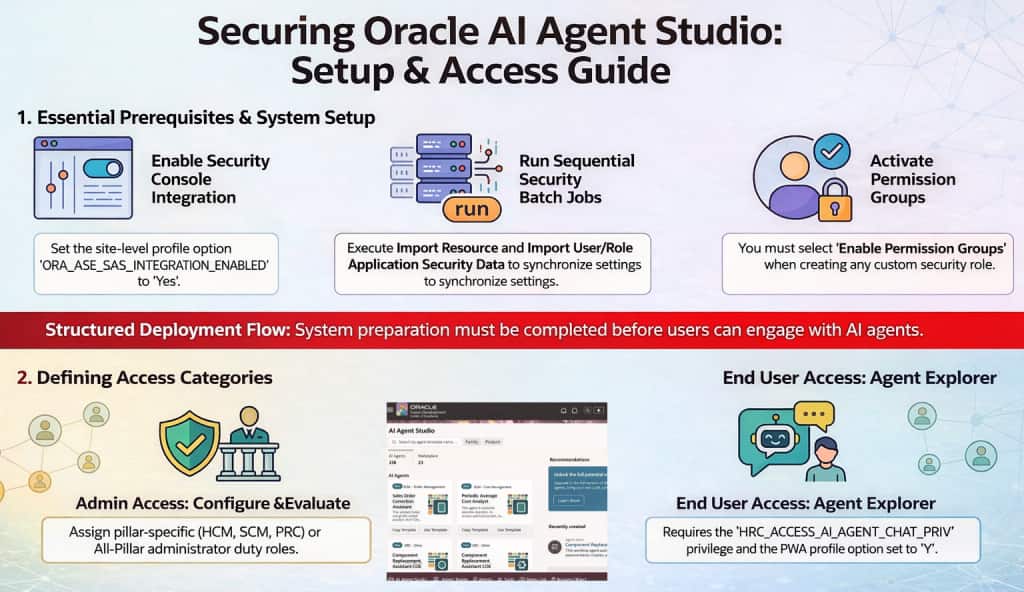
Step 1: Essential Prerequisites & System Setup
Enable Security Console Integration\Sync with SAS Policy Store
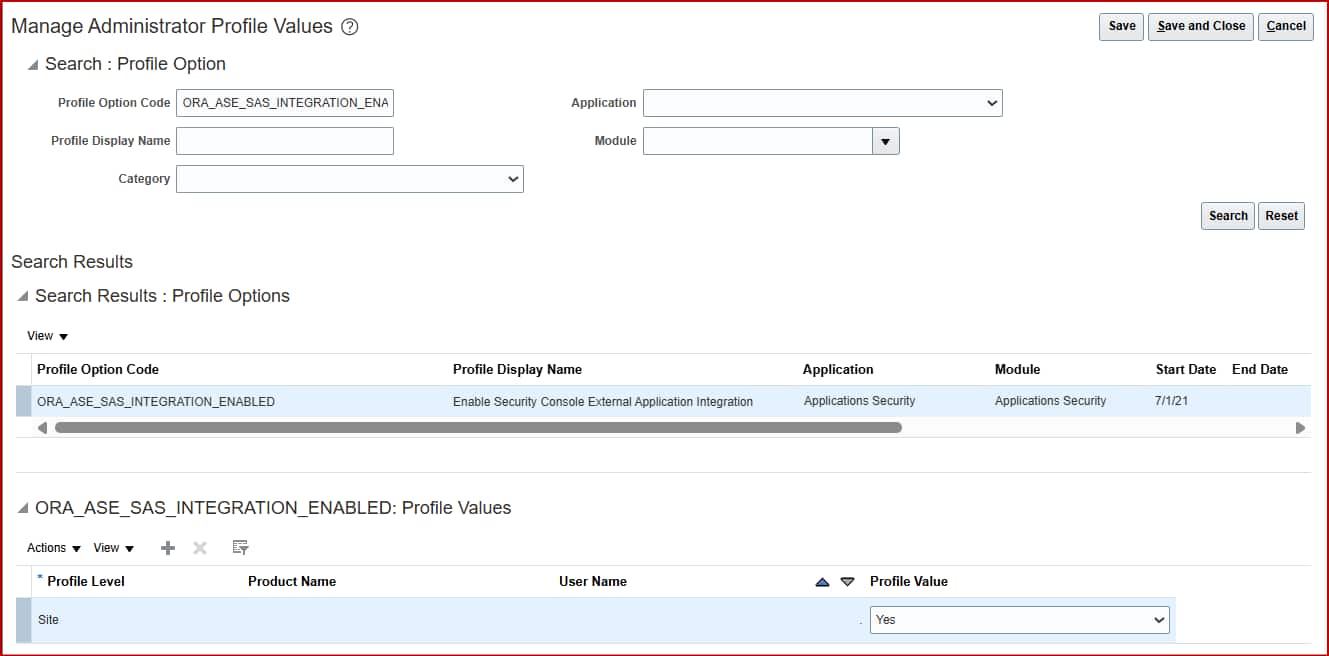
You must set the profile option ORA_ASE_SAS_INTEGRATION_ENABLED to Yes at the Site level to allow the Security Console to work with permission groups.
- Navigate to: Setup and Maintenance > Manage Administrator Profile Values
- Search for the profile option code: ORA_ASE_SAS_INTEGRATION_ENABLED
- Set the value at the Site level to Yes and save your changes
Run Security Batch Jobs
To import resources from LDAP and populate security tables, you must execute below jobs sequentially:
- Import Resource Application Security Data
- Import User and Role Application Security Data
Run Integrated AI Help Agent Jobs
The integrated AI help agent inside AI Agent Studio allows users to ask questions about agents, search for tools, and receive AI-powered suggestions. To enable this feature, two additional scheduled processes must be executed:
- Index AI Agent Studio Assistant Documents
- Index AI Agent Studio Assistant Objects and Attributes
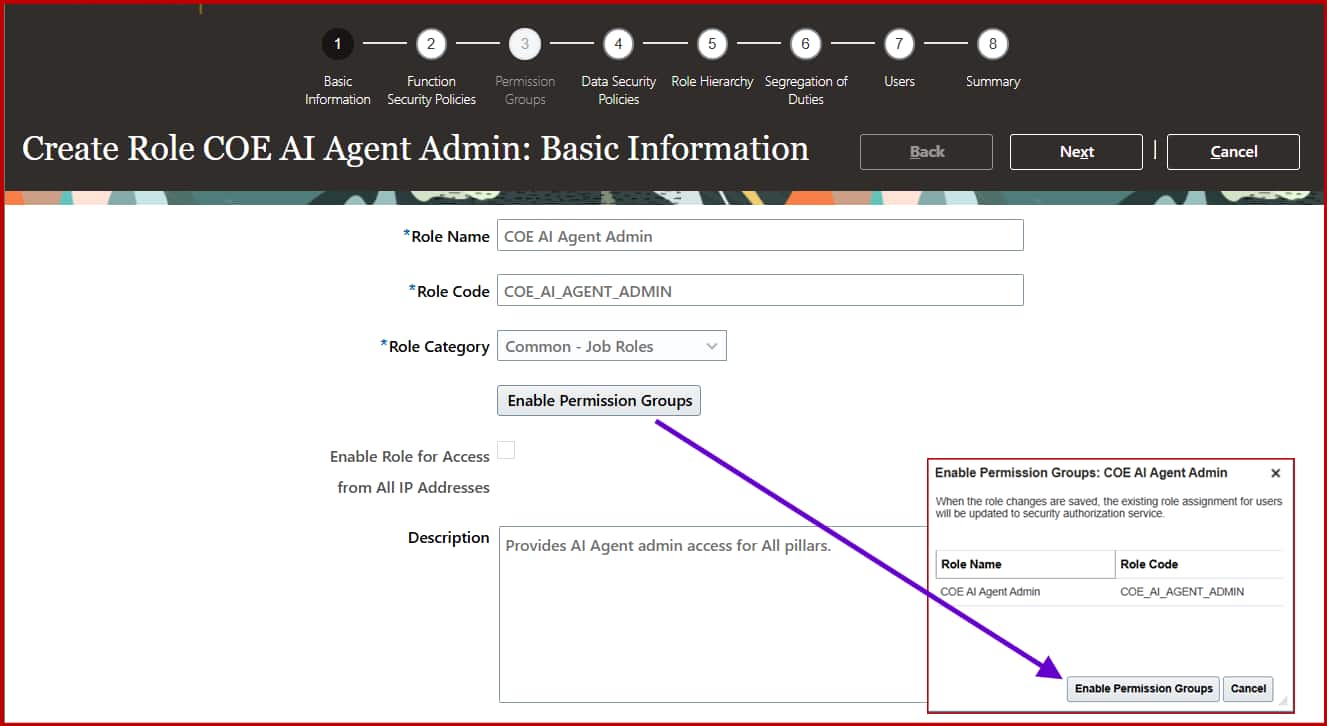
Enable Permission Groups
When you create or edit a custom security role for AI Agent Studio access, make sure to select Enable Permission Groups in the role creation workflow. This flag will enable the permission groups tab, which can be used to configure policies for the agent studio components.
Step 2: Defining Access Categories
Admin Access
Give administrators the ability to configure and manage agents within a specific business pillar (or across all pillars): Assign the appropriate duty role: For e.g.
- HCM: ORA_DR_FAI_GENERATIVE_AI_AGENT_HCM_ADMINISTRATOR_DUTY
- SCM: ORA_DR_FAI_GENERATIVE_AI_AGENT_SCM_ADMINISTRATOR_DUTY
- PRC: ORA_DR_FAI_GENERATIVE_AI_AGENT_PRC_ADMINISTRATOR_DUTY
- All Pillars: Assign the set of all administrator duty roles for cross-pillar control
Next, we’ll walk through an example for the HCM pillar. We’ll also summarize everything in a table near the end of the blog.
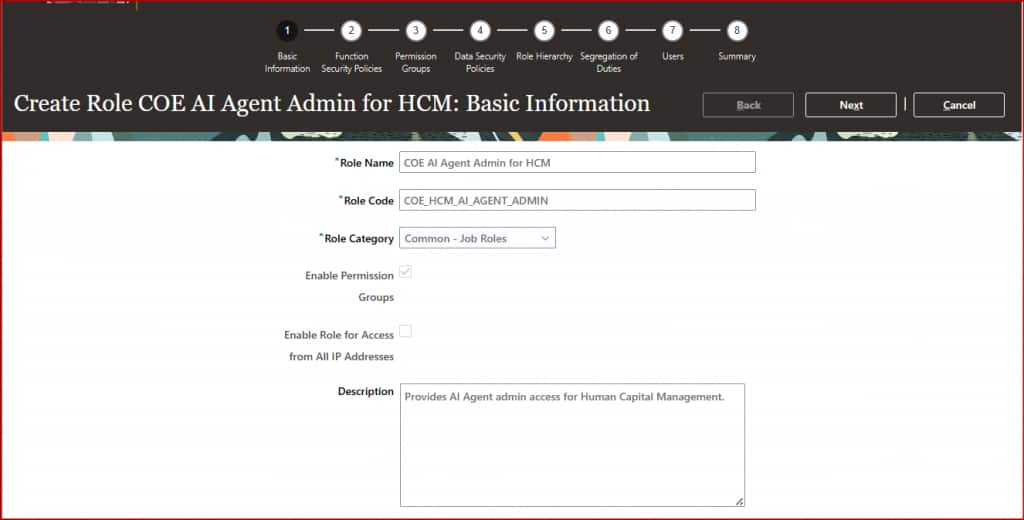
AI Agent Studio Admin Role for Human Capital Management
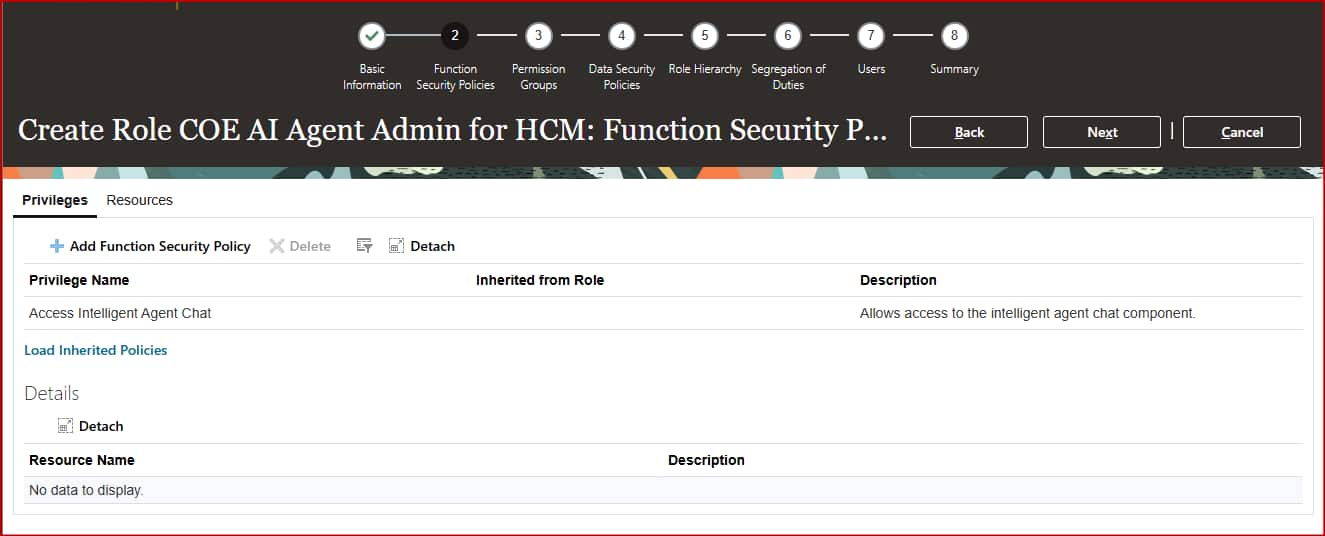
- Create a custom role and Enable Permission Groups.
- On the Function Security Policies page, add below privilege
- Access Intelligent Agent Chat (HRC_ACCESS_AI_AGENT_CHAT_PRIV)
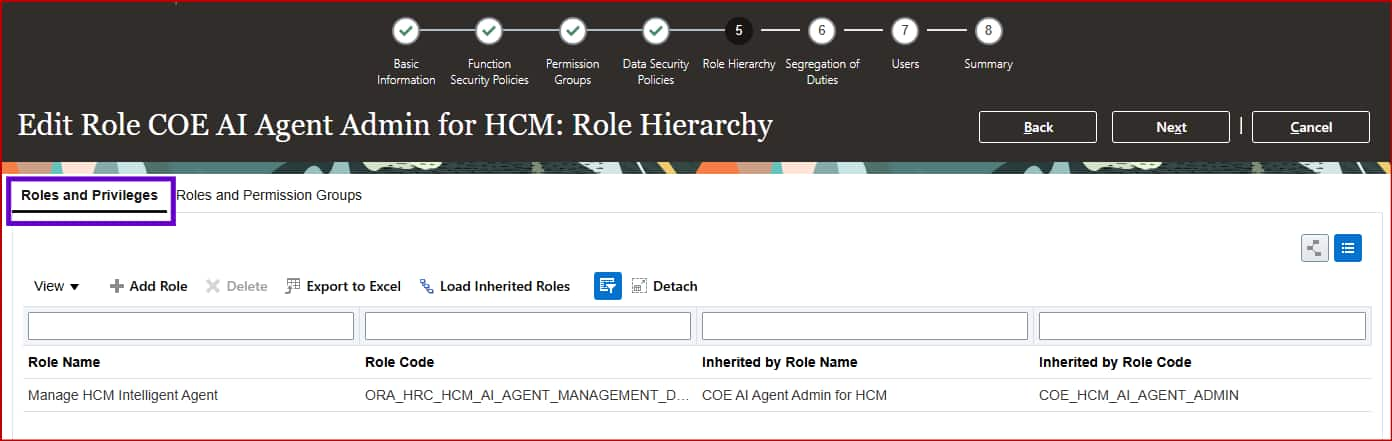
- On the Role Hierarchy page
- Open the Roles and Privileges tab and add
- Manage HCM Intelligent Agent (ORA_HRC_HCM_AI_AGENT_MANAGEMENT_DUTY)
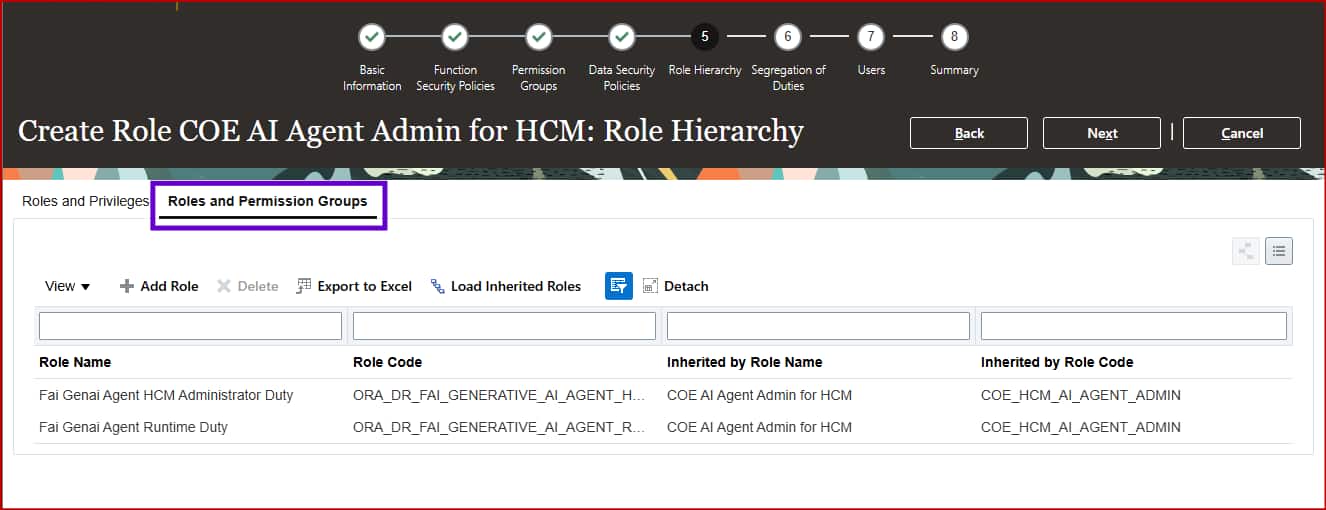
- Open the Roles and Permission Groups tab and add:
- Fai Genai Agent HCM Administrator Duty (ORA_DR_FAI_GENERATIVE_AI_AGENT_HCM_ADMINISTRATOR_DUTY)
- Open the Roles and Privileges tab and add
To make it easier, we have also added below explorer user role for the admins. After all admins do need to be able to run the agents! You can decide to create this as separate role as listed in the next segment or simply add this role to the admin role itself.
- Fai Genai Agent Runtime Duty (ORA_DR_FAI_GENERATIVE_AI_AGENT_RUNTIME_DUTY)
End User Access (Explorer Users)
Allow business users or employees basic access to interact with agents:
- Make sure the profile option ORA_HCM_VBCS_PWA_ENABLED is set to Y
- Create a custom role with Enable Permission Groups selected
- Function Security Policies:: Add Function Security Policy: Access Intelligent Agent Chat (HRC_ACCESS_AI_AGENT_CHAT_PRIV)
- Role Hierarchy section:: Roles and Permission Groups tab: Fai Genai Agent Runtime Duty (ORA_DR_FAI_GENERATIVE_AI_AGENT_RUNTIME_DUTY)
- Assign the custom Explorer role to relevant users. Only permitted agents will be visible to each user, based on further Agent team-level access controls
Important Note:
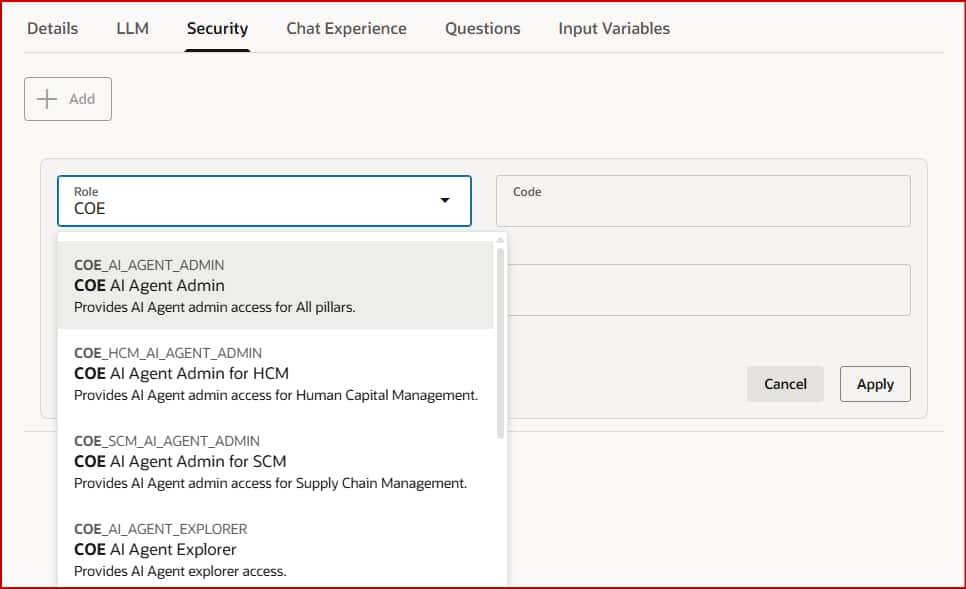
- The end user access (explorer users role) doesn’t let users see all deployed agents. They will only see the agents they’re allowed to access, which is usually managed at the agent team level.
- The LOV on the agents team settings will only show the roles where process group is enabled
Step 3: Other Access Tasks
Privilege for External REST API Tools
For users to manage authentication section for external REST API tools within Agent Studio:
- Add the Create and Edit Backends for Visual Builder Studio (ORA_FND_TRAP_PRIV) privilege to their custom role.
Permission Groups for Channels
For users to create channels (e.g. Slack, MS Teams) from the Credentials tab:
- Add below permission groups to a duty role and assign to the user’s custom role:
- create:ChannelManifest
- create:ExternalChatCorrelation
- read:ChannelManifest
- read:ExternalChatCorrelation
- update:ChannelManifest
- update:ExternalChatCorrelation
- delete:ChannelManifest
- delete:ExternalChatCorrelation
- For each permission group, add the AllRowsAllFields security view within Details > Security Views
- Remember to save and assign the updated duty role to the target job role.
Roles to schedule Workflow agents
For users to setup scheduled trigger for workflow agents:
- Add below role to user’s custom role under Role Hierarchy page
- Open the Roles and Permission Groups tab and add:
- Fai Batch Job Manager Duty (ORA_DR_FAI_BATCH_JOB_MANAGER_DUTY)
- Open the Roles and Permission Groups tab and add:
Summary of Flow
- System Prep: Enable SAS integration, schedule and run the security import and AI Help Agent jobs
- Role Setup: Create custom roles with permission groups enabled
- Access Assignment: Assign admin duty roles for configuration capabilities, and end user privileges for interaction, according to organizational needs.
- Optional: Add REST API, channel, schedule trigger permissions to the Admin role (as needed)
| Pillar | Roles & Privileges | Roles & Permission Groups | Function Security Policy |
|---|---|---|---|
| HCM | ORA_HRC_HCM_AI_AGENT_MANAGEMENT_DUTY | ORA_DR_FAI_GENERATIVE_AI_AGENT_HCM_ADMINISTRATOR_DUTY | — None — |
| SCM | ORA_RCS_SCM_AI_AGENT_MANAGEMENT_DUTY ORA_RCS_SCM_AI_AGENT_MANAGEMENT_DUTY_HCM | ORA_DR_FAI_GENERATIVE_AI_AGENT_SCM_ADMINISTRATOR_DUTY | — None — |
| PRC | ORA_PO_PRC_AI_AGENT_MANAGEMENT_DUTY ORA_PO_PRC_AI_AGENT_MANAGEMENT_DUTY_HCM | ORA_DR_FAI_GENERATIVE_AI_AGENT_PRC_ADMINISTRATOR_DUTY | — None — |
| FIN | ORA_FUN_MANAGE_FIN_AI_AGENT ORA_FUN_MANAGE_FIN_AI_AGENT_HCM | ORA_DR_FAI_GENERATIVE_AI_AGENT_FIN_ADMINISTRATOR_DUTY | — None — |
| CX | ORA_ZCA_MANAGE_CX_AI_AGENTS ORA_ZCA_MANAGE_CX_AI_AGENTS_HCM | ORA_DR_FAI_GENERATIVE_AI_AGENT_CX_ADMINISTRATOR_DUTY | — None — |
| PSC | ORA_PSC_AI_AGENT_MANAGEMENT_DUTY ORA_PSC_AI_AGENT_MANAGEMENT_DUTY_HCM | ORA_DR_FAI_GENERATIVE_AI_AGENT_PSC_ADMINISTRATOR_DUTY | — None — |
| All Pillars | ORA_FAI_MANAGE_ALL_AI_AGENTS | ORA_DR_FAI_GENERATIVE_AI_AGENT_CX_ADMINISTRATOR_DUTY ORA_DR_FAI_GENERATIVE_AI_AGENT_FIN_ADMINISTRATOR_DUTY ORA_DR_FAI_GENERATIVE_AI_AGENT_GRC_ADMINISTRATOR_DUTY ORA_DR_FAI_GENERATIVE_AI_AGENT_HCM_ADMINISTRATOR_DUTY ORA_DR_FAI_GENERATIVE_AI_AGENT_PRC_ADMINISTRATOR_DUTY ORA_DR_FAI_GENERATIVE_AI_AGENT_PRJ_ADMINISTRATOR_DUTY ORA_DR_FAI_GENERATIVE_AI_AGENT_PSC_ADMINISTRATOR_DUTY ORA_DR_FAI_GENERATIVE_AI_AGENT_SCM_ADMINISTRATOR_DUTY | — None — |
| Explorer Users | — None — | ORA_DR_FAI_GENERATIVE_AI_AGENT_RUNTIME_DUTY | HRC_ACCESS_AI_AGENT_CHAT_PRIV |
Important Note:
- For any pillar custom role, ensure to Enable Permission Groups
- If you decide to include Agent Explorer capabilities within an Admin role itself, be sure to also assign the runtime/explorer duty roles (from the last row in the table) to the Admin role.
Unable to find Roles in the Security tab list?
- Check whether the admin role that is being used to setup agent teams has proper Privileges and Permission Groups under the Role Hierarchy setup
- Check whether the user role to be added on agent team security tab has Permission Groups enabled
Useful Links
- Let’s Talk Tech – Cloud Customer Connect Live Demo and Recording: https://community.oracle.com/customerconnect/events/606876-hcm-lets-talk-tech-getting-started-with-ai-agent-studio?utm_source=community-search&utm_medium=organic-search&utm_term=AI+Agent+Studio
- Product Documentation: https://docs.oracle.com/en/cloud/saas/fusion-ai/aiaas/access-ai-agent-studio.html
New to Oracle AI Agent Studio?
Check out the Fusion AI Agent Studio Learning Path — a full blog series from zero to production-grade AI agents, with deep dives on every agent pattern, node type, and tool integration.