
A more responsive update cadence for Exadata System Software
Keeping Exadata current helps you get the latest security and product fixes. AI tools are making it easier to find vulnerabilities and develop attacks. Attackers can also combine lower-severity vulnerabilities to create a more serious attack path.
We recommend applying updates as they become available. To help you stay current with critical security updates, we’re introducing a new, more predictable cadence for Exadata System Software maintenance releases. Here’s what the new schedule looks like.
A regular release on the third Tuesday of each month
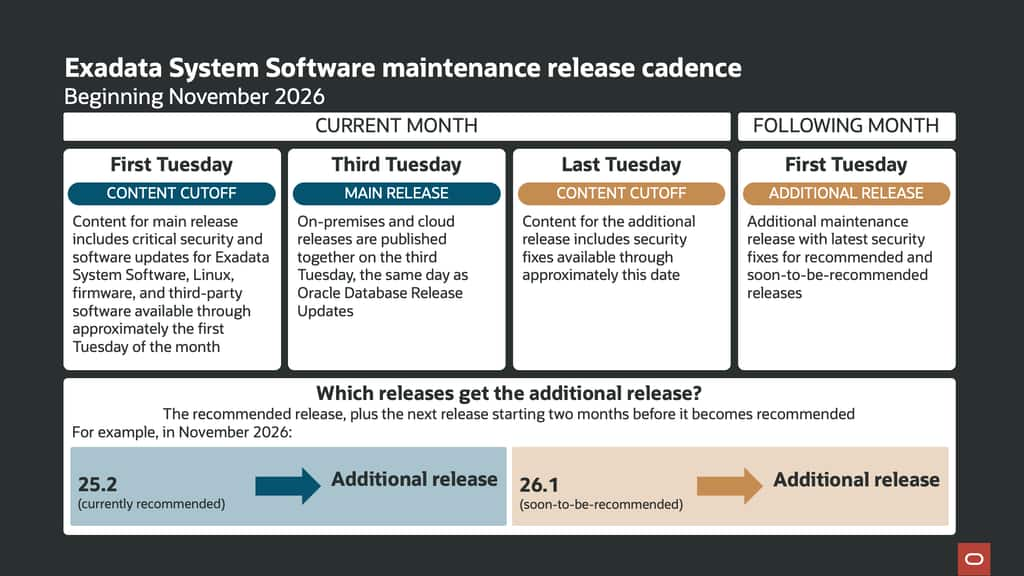
The main Exadata System Software maintenance release will be published on the third Tuesday of each month, the same day Oracle Database Release Updates are published. We’ll publish on-premises and cloud maintenance releases at the same time.
Each Exadata maintenance release includes critical security and software updates for Exadata System Software, Linux, firmware, and third-party software, current through approximately the first Tuesday of the month. This predictable cadence gives you time to review the updates and plan deployment.
An additional release on the first Tuesday of the following month for the latest security updates
Beginning in November 2026, we’ll also publish an additional maintenance release on the first Tuesday of the following month. It will include security fixes available through approximately the last Tuesday of the prior month.
This gives you another way to get fixes that missed the main release cutoff in a tested bundle.
The additional maintenance release follows the recommended release version
Several Exadata System Software releases can be available at once, and we designate one as the recommended release for customers to target. The additional first-Tuesday release is available for the **current recommended release and the next release, starting two months before it becomes recommended. To facilitate adoption of new releases as they become designated the recommended release, we will also offer the additional first-Tuesday maintenance release for a new release starting two months before it’s designated as recommended.
For example, while 25.2 is the recommended release, it gets the additional update. 26.1 will also get the additional update during the two months before it becomes the recommended release. Other available releases will continue to get their regular monthly maintenance releases.
Here’s what the new schedule looks like
How to identify your release
The release version 25.2 identifies the software family; the third number in 25.2.15 is its maintenance revision. Both the third-Tuesday and first-Tuesday images share that product version and maintenance revision. Use the YYMMDD date code to distinguish them:
e.g. 261011 (third-Tuesday release: October 11, 2026) and 261102 (first-Tuesday release: November 2, 2026) identify the two 25.2.15 images. Run imageinfo -ver to see the installed image version. The date code identifies the image, not its scheduled publication date .
For example, the third-Tuesday release for 25.2.15 is 25.2.15.0.0.261011.
# imageinfo
Kernel version: 5.15.0-308.179.6.16.el8uek.x86_64 #2 SMP Thu Sep 18 11:19:34 PDT 2025 x86_64
Uptrack kernel version: 5.15.0-324.217.5.3.el8uek.x86_64 #2 SMP Thu Sep 17 01:58:22 PDT 2026 x86_64
Image kernel version: 5.15.0-308.179.6.16.el8uek
Image version: 25.2.15.0.0.261011
Image activated: 2026-10-23 18:03:27 -0700
Image status: success
Exadata software version: 25.2.15.0.0.261011
Node type: KVMHOST
System partition on device: /dev/mapper/VGExaDb-LVDbSys1
And the subsequent first-Tuesday maintenance release is 25.2.15.0.0.261102
# imageinfo
Kernel version: 5.15.0-308.179.6.16.el8uek.x86_64 #2 SMP Thu Sep 18 11:19:34 PDT 2025 x86_64
Uptrack kernel version: 5.15.0-325.221.6.6.el8uek.x86_64 #2 SMP Thu Oct 22 23:39:20 PDT 2026 x86_64
Image kernel version: 5.15.0-308.179.6.16.el8uek
Image version: 25.2.15.0.0.261102
Image activated: 2026-10-31 20:30:37 -0700
Image status: success
Exadata software version: 25.2.15.0.0.261102
Node type: KVMHOST
System partition on device: /dev/mapper/VGExaDb-LVDbSys1
When planning an update, check the full version and date code for both your installed software and the version you’re targeting. See Understanding the Exadata Software Image Version for details.
For more information on recommended releases, see My Oracle Support Note KB153930 (888828.1).
Options for applying updates
Maintenance releases are cumulative, so you don’t need to install every monthly release along the way. You can move directly to a later release, following the applicable update guidance.
A few Exadata capabilities can also help you apply fixes or plan maintenance with less disruption:
- Exadata Live Update can apply supported fixes online. Depending on what’s included, it may not interrupt databases or require an immediate reboot. Some update work might still need a reboot later.
- Exadata VM Live Migration can move a running KVM guest to another host, making it easier to service the original host. The guest stays available, with a brief pause during switchover. This capability uses Exascale volumes on X10M and later deployments.
- Exadata Autonomous Kernel Update, an opt-in capability introduced in Exadata System Software 26.2.0, can retrieve and apply eligible Oracle Linux kernel updates on database and storage servers without an immediate reboot. It works alongside Exadata maintenance releases and Live Update.
You can also use the Linux DNF release channel for out-of-cycle package updates. A later Exadata maintenance release can be applied over those updates.
Keep your update plan on track
Use the monthly releases to plan regular updates and consider the additional release or out-of-cycle options when you want access to newer fixes sooner. Test updates in a suitable environment first, then schedule production work to fit your operations. Check the Exadata software update guidance for release contents, coverage, and procedures.