
You can use Oracle Cloud Infrastructure (OCI) Functions to respond to HTTP requests through API Gateway. When a request arrives on a defined path, the API Gateway triggers a function to process the request content and send a response. You manage all configuration and deployment using the OCI Command Line Interface (OCI CLI) and the Functions CLI (Fn CLI).
In this example, you create two functions. Function A processes the HTTP request body and returns a JSON payload. Function B connects to OCI Streaming, places the JSON payload on a stream, and sends a response.
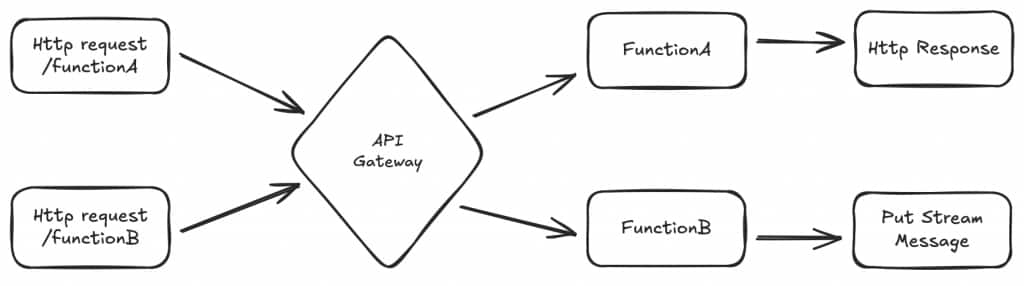
Here’s how you can set this up:
- Create an API Gateway with two deployments.
- Deploy functions to handle incoming requests.
- Send requests to the API Gateway and verify that each request routes to the correct function.
This approach demonstrates how to configure an API Gateway to route requests to OCI Functions. It also shows how to grant permissions using OCI IAM policies, enabling resources to interact securely across OCI services.
Creating an Application and Function
Start by creating a Functions application in Oracle Cloud Infrastructure (OCI). An application is a logical container for your functions and helps you organize related resources and configurations.
Before you proceed, confirm that an Identity and Access Management (IAM) policy grants the required permissions for Functions.
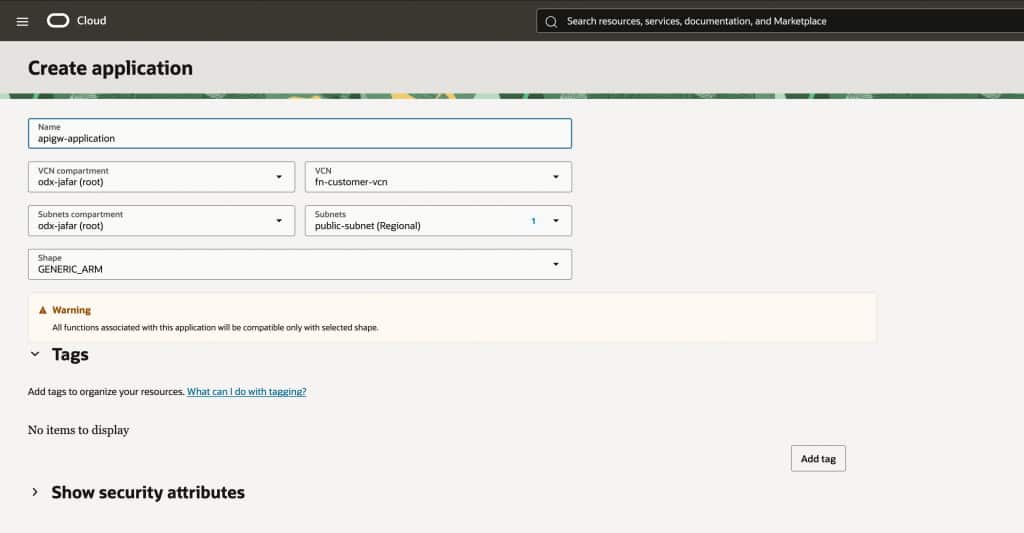
Create a Functions application named apigw-application. Select an available subnet from your Virtual Cloud Network (VCN) to associate with the application.
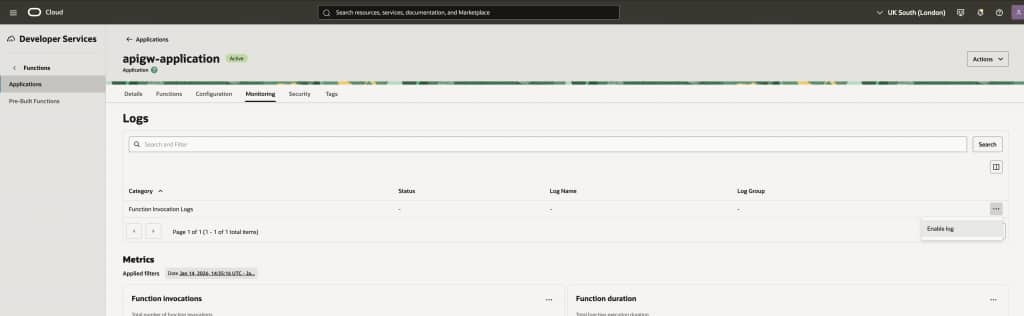
Enable logging to track function activity and simplify troubleshooting.
To run the necessary commands, sign in to OCI CLI and authenticate with Oracle Cloud Infrastructure Registry (OCIR).
Once authenticated, use the following commands to create a template function:
fn init --runtime java apigateway-function-a
cd apigateway-function-a
fn deploy --app apigw-application
fn list fn apigw-application
fn invoke apigw-application apigateway-function-a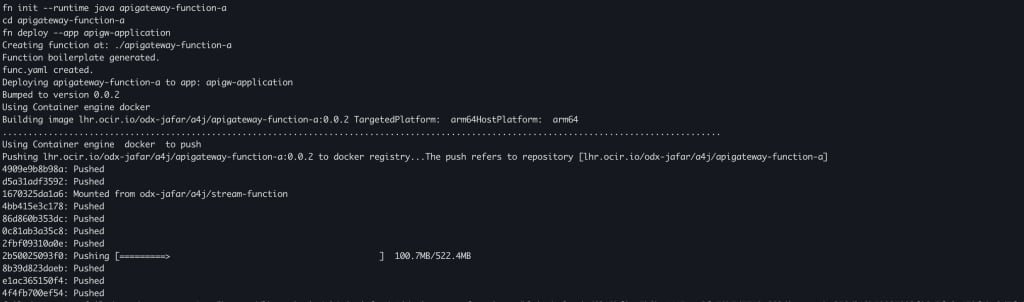
The hello-world function is now deployed and ready to use. If you encounter any issues during deployment, refer to the Functions Troubleshooting documentation for guidance.
Next, create and deploy the second function, apigateway-function-b. Before you begin, navigate out of the apigateway-function-a directory:
fn init --runtime java apigateway-function-b
cd apigateway-function-b
fn deploy --app apigw-application
fn list fn apigw-application
fn invoke apigw-application apigateway-function-b
You will return to these functions later to add code that processes HTTP requests.
Creating an API Gateway
To make your functions accessible over HTTP, set up an API Gateway in Oracle Cloud Infrastructure (OCI). Configure the gateway with two deployments so that each route forwards HTTP requests to the appropriate function.
Before you start, confirm that a dynamic group exists to allow the API Gateway to use the functions family.
Create a dynamic group named e2e-api-gateway and a policy to allow functions.
ALL {resource.type = 'ApiGateway', resource.compartment.id = '<enter your tenancy>'}Allow dynamic-group e2e-api-gateway to use functions-family in tenancyUpdate your Virtual Cloud Network (VCN) security list to allow HTTPS traffic on your public subnet:
- Stateless: Checked
- Source Type: CIDR
- Source CIDR: 0.0.0.0/0
- IP Protocol: TCP
- Source port range: (leave blank)
- Destination port range: 443
- Description: VCN for applications
For more information, see API Gateway and Functions Networking.
Next, create an API Gateway named blog-apigw and select your public subnet.
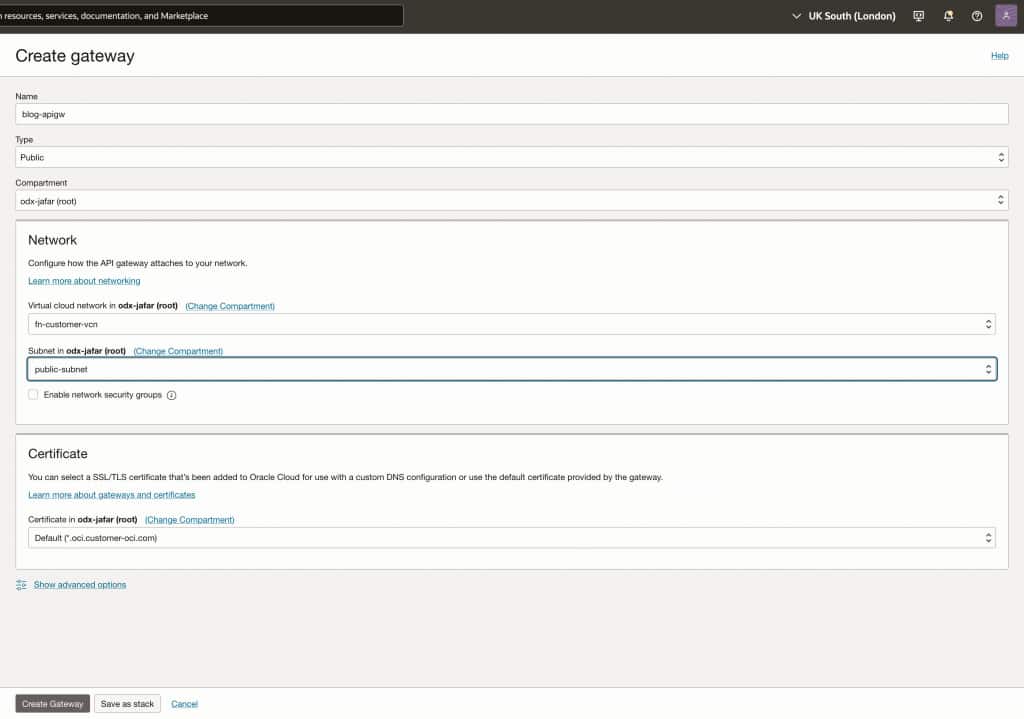
Create a deployment named blog-deployment with the following configuration:
- Path prefix:
/ - Routes:
- Route 1:
- Path:
/function-a - Methods: Any
- Backend Type: Oracle Functions
- Application: apigw-application
- Function: apigateway-function-a
- Path:
- Add another route:
- Path:
/function-b - Methods: Any
- Backend Type: Oracle Functions
- Application: apigw-application
- Function: apigateway-function-b
- Path:
- Route 1:
- Use default settings for all other options.
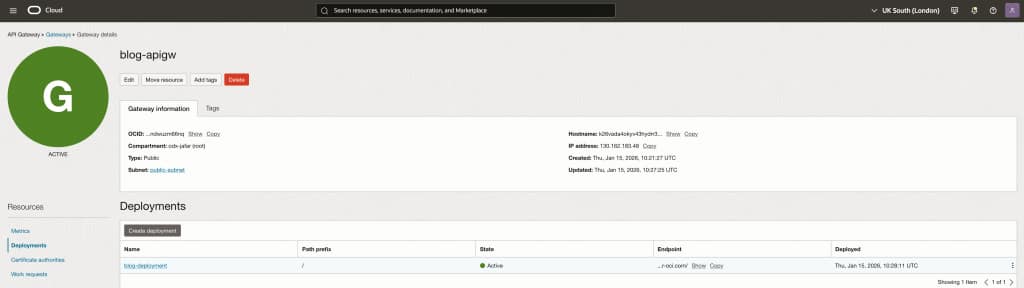
Security note: For demonstration, the API Gateway is publicly accessible. For information on securing access, see API Gateway JWT Token Authentication .
After the deployment is ready, copy the endpoint URL and test your functions:
curl -X GET "https://<your-endpoint>/function-a"
curl -X GET "https://<your-endpoint>/function-b"
Deploying OCI Functions to Handle Requests
Now you will build and deploy two Oracle Cloud Infrastructure (OCI) Functions: one for processing incoming requests, and another for integrating with OCI Streaming. This setup makes your business logic accessible through the API Gateway routes.
The Function Development Kit (FDK) for Java offers the fn-events library, which simplifies handling API Gateway requests.
Example: Building a Function for HTTP POST Requests
You will create a function that receives a POST request with the following body:
{ "title": "Tutorial: Using Functions with API Gateway", "language": "java"}The function responds with a JSON payload:
{ "url": "http://baseurl/your-request-path", "title": "Tutorial: Using Functions with API Gateway", "language": "java"}Steps
- Add Dependencies In
apigateway-function-a, add the requiredfn-eventsdependencies to yourpom.xml<dependency>
<groupId>com.fnproject.fn</groupId>
<artifactId>fn-events</artifactId>
<version>${fdk.version}</version>
</dependency>
<dependency>
<groupId>com.fnproject.fn</groupId>
<artifactId>fn-events-testing</artifactId>
<version>${fdk.version}</version>
</dependency> - Create Request and Response Records In the
com.example.fnpackage.package com.example.fn; public record BlogRequest(String title, String language) {}package com.example.fn; public record BlogResponse(Integer id, String state, String title, String language) {} - Implement the Function Handler Edit src/main/java/com/example/fn/HelloFunction.java
package com.example.fn;
import java.util.Random;
import com.fnproject.events.APIGatewayFunction;
import com.fnproject.events.input.APIGatewayRequestEvent;
import com.fnproject.events.output.APIGatewayResponseEvent;
import org.apache.http.HttpStatus;
public class HelloFunction extends APIGatewayFunction {
@Override
public APIGatewayResponseEvent<BlogResponse> handler(APIGatewayRequestEvent<BlogRequest> apiGatewayRequestEvent) {
BlogResponse blogResponse = new BlogResponse(new Random().nextInt(100), "ACTIVE", apiGatewayRequestEvent.getBody().title(), apiGatewayRequestEvent.getBody().language());
return new APIGatewayResponseEvent.Builder<BlogResponse>()
.statusCode(HttpStatus.SC_CREATED)
.body(blogResponse)
.build();
}
} - Add Unit Tests Edit src/test/java/com/example/fn/HelloFunctionTest.java
package com.example.fn;
import static org.junit.Assert.assertEquals;
import com.fnproject.events.input.APIGatewayRequestEvent;
import com.fnproject.events.output.APIGatewayResponseEvent;
import com.fnproject.events.testing.APIGatewayTestFeature;
import com.fnproject.fn.api.Headers;
import com.fnproject.fn.runtime.httpgateway.QueryParametersImpl;
import com.fnproject.fn.testing.FnTestingRule;
import org.junit.Rule;
import org.junit.Test;
import java.io.IOException;
import java.util.HashMap;
public class HelloFunctionTest {
@Rule
public FnTestingRule fn = FnTestingRule.createDefault();
private final APIGatewayTestFeature apiGatewayFeature = APIGatewayTestFeature.createDefault(fn);
@Test
public void testGetResponseBody() throws IOException {
APIGatewayRequestEvent event = createMinimalRequest();
apiGatewayFeature.givenEvent(event)
.enqueue();
fn.setConfig("BASE_URL", "http://mockurl")
.thenRun(HelloFunction.class, "handler");
APIGatewayResponseEvent responseEvent = apiGatewayFeature.getResult(BlogResponse.class);
BlogResponse responseEventBody = responseEvent.getBody();
assertEquals("http://mockurl/function-a", responseEventBody.url());
assertEquals("a new blog", responseEventBody.title());
assertEquals("go", responseEventBody.language());
}
private static APIGatewayRequestEvent createMinimalRequest() {
BlogRequest blogRequest = new BlogRequest("a new blog", "go");
return new APIGatewayRequestEvent<>(new QueryParametersImpl(new HashMap<>()), blogRequest, "POST", "function-a", Headers.emptyHeaders());
}
} - Update Function Entrypoint Update func.yaml to set the new entrypoint.
schema_version: 20180708
name: apigateway-function-a
version: 0.0.5
runtime: java
build_image: fnproject/fn-java-fdk-build:jdk17-1.1.3
run_image: fnproject/fn-java-fdk:jre17-1.1.3
cmd: com.example.fn.HelloFunction::handler - Validate and Deploy Run unit tests to confirm your implementation. When validation passes, deploy from the
apigateway-function-adirectory:fn --verbose deploy --app apigw-application
Sending Requests and Confirming Routing
With the API Gateway and functions deployed, you can now verify that requests are routed correctly. Send sample HTTP requests to your API Gateway and confirm that each function responds as expected. This process validates end-to-end connectivity from external clients, through the OCI Gateway, to your functions.
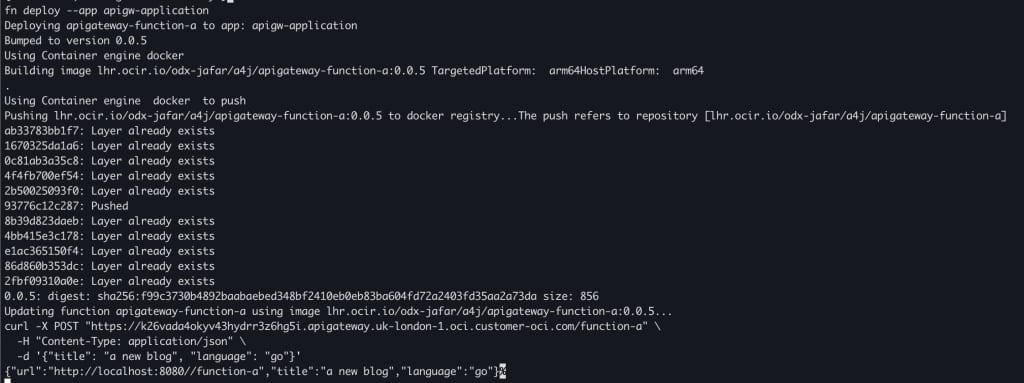
- Send a request to the function
curl -X POST "https://<your-endpoint>/function-a" \
-H "Content-Type: application/json" \
-d '{"title": "a new blog", "language": "go"}'
The returned URL includes the path because the function builds the requestUrl from the deployment root path.
If you receive a 502 Bad Gateway error, review the application logs and troubleshoot using the API Gateway troubleshooting documentation.
Function A is now complete.
Function B: Code and Deployment
Function B is invoked via the API Gateway with a PUT request. This function receives a request body and forwards it to an OCI Stream using the OCI SDK and resource principal authentication.
1. Create a Stream Pool and Stream
Before you begin, ensure your IAM policy permits creating Stream Pools and Streams. To grant full access to the Streams service, use the following policy (replace <compartment-name> with the relevant OCID):
Allow any-user to manage stream-family in compartment id <compartment-name>- Create a Stream Pool named blog-stream-pool.
- Create a Stream within this pool named blog-stream.
2. Add Dependencies
In the apigateway-function-b directory, add the following dependencies to your pom.xml
<dependency>
    <groupId>com.fnproject.fn</groupId>
    <artifactId>fn-events</artifactId>
    <version>${fdk.version}</version>
</dependency>
<dependency>
    <groupId>com.fnproject.fn</groupId>
    <artifactId>fn-events-testing</artifactId>
    <version>${fdk.version}</version>
</dependency>
<dependency>
<groupId>com.oracle.oci.sdk</groupId>
<artifactId>oci-java-sdk-common</artifactId>
<version>LATEST</version>
</dependency>
<dependency>
<groupId>com.oracle.oci.sdk</groupId>
<artifactId>oci-java-sdk-streaming</artifactId>
<version>LATEST</version>
</dependency>
<dependency>
<groupId>com.oracle.oci.sdk</groupId>
<artifactId>oci-java-sdk-common-httpclient-jersey</artifactId>
<version>LATEST</version>
</dependency>
<dependency>
<groupId>com.fasterxml.jackson.core</groupId>
<artifactId>jackson-core</artifactId>
<version>2.13.5</version>
</dependency>
<dependency>
<groupId>com.fasterxml.jackson.core</groupId>
<artifactId>jackson-databind</artifactId>
<version>2.13.5</version>
</dependency>3. Implement the Function
Edit src/main/java/com/example/fn/HelloFunction.java:
package com.example.fn;


import java.nio.charset.StandardCharsets;
import java.util.Collections;
import com.fnproject.events.APIGatewayFunction;
import com.fnproject.events.input.APIGatewayRequestEvent;
import com.fnproject.events.output.APIGatewayResponseEvent;
import com.fnproject.fn.api.FnConfiguration;
import com.fnproject.fn.api.RuntimeContext;
import com.oracle.bmc.auth.ResourcePrincipalAuthenticationDetailsProvider;
import com.oracle.bmc.streaming.StreamClient;
import com.oracle.bmc.streaming.model.PutMessagesDetails;
import com.oracle.bmc.streaming.model.PutMessagesDetailsEntry;
import com.oracle.bmc.streaming.requests.PutMessagesRequest;

public class HelloFunction extends APIGatewayFunction<String, Object> {

    private StreamClient streamClient;
    private String ociStreamOcid;

    @FnConfiguration
    public void configure(RuntimeContext ctx) {
        super.configure(ctx);
        ociStreamOcid = ctx.getConfigurationByKey("STREAM_ID").orElseThrow();
        String ociMessageEndpoint = ctx.getConfigurationByKey("OCI_MESSAGE_ENDPOINT").orElseThrow();

        // When running in OCI the resource principal is available.
        if (System.getenv("OCI_RESOURCE_PRINCIPAL_VERSION") == null) {
            return;
        }
        ResourcePrincipalAuthenticationDetailsProvider provider = ResourcePrincipalAuthenticationDetailsProvider.builder().build();
        streamClient = StreamClient.builder().endpoint(ociMessageEndpoint).build(provider);
    }

    @Override
    public APIGatewayResponseEvent<Object> handler(APIGatewayRequestEvent<String> apiGatewayRequestEvent) {
        if (streamClient != null) {
            streamClient.putMessages(PutMessagesRequest.builder()
                .streamId(ociStreamOcid)
                .body$(PutMessagesDetails.builder().messages(Collections.singletonList(PutMessagesDetailsEntry.builder().value(apiGatewayRequestEvent.getBody().getBytes(
                    StandardCharsets.UTF_8)).build())).build())
                .build());
        }
        return new APIGatewayResponseEvent.Builder<>().body(null).build();
    }
}
4. Add Unit Tests
Edit src/test/java/com/example/fn/HelloFunctionTest.java:
package com.example.fn;

import static org.junit.Assert.assertEquals;
import com.fnproject.events.input.APIGatewayRequestEvent;
import com.fnproject.events.output.APIGatewayResponseEvent;
import com.fnproject.events.testing.APIGatewayTestFeature;
import com.fnproject.fn.api.Headers;
import com.fnproject.fn.runtime.httpgateway.QueryParametersImpl;
import com.fnproject.fn.testing.FnTestingRule;
import org.junit.Rule;
import org.junit.Test;

import java.io.IOException;
import java.util.HashMap;

public class HelloFunctionTest {

    @Rule
    public FnTestingRule fn = FnTestingRule.createDefault();

    private final APIGatewayTestFeature apiGatewayFeature = APIGatewayTestFeature.createDefault(fn);

    @Test
    public void testGetResponseBody() throws IOException {
        APIGatewayRequestEvent<String> event = createMinimalRequest();

        apiGatewayFeature.givenEvent(event)
            .enqueue();

        fn.setConfig("STREAM_ID", "stream.ocid")
            .setConfig("OCI_MESSAGE_ENDPOINT", "https://message-endpoint")
            .thenRun(HelloFunction.class, "handler");

        APIGatewayResponseEvent<String> responseEvent = apiGatewayFeature.getResult(String.class);

        String responseEventBody = responseEvent.getBody();
        assertEquals("", responseEventBody);
    }

    private static APIGatewayRequestEvent<String> createMinimalRequest() {
        String blogRequest = "";
        return new APIGatewayRequestEvent<>(new QueryParametersImpl(new HashMap<>()), blogRequest, "POST", "function-b", Headers.emptyHeaders());
    }
}
5. Update func.yaml
Edit func.yaml to set the entry point and configuration. Replace <oci_message_endpoint> and <stream_id> with your stream values:
schema_version: 20180708
name: apigateway-function-b
version: 0.0.7
runtime: java
build_image: fnproject/fn-java-fdk-build:jdk17-1.1.3
run_image: fnproject/fn-java-fdk:jre17-1.1.3
cmd: com.example.fn.HelloFunction::handler
config:
  OCI_MESSAGE_ENDPOINT: <oci_message_endpoint>
  STREAM_ID: <stream_id>
6. Validate and Deploy
- Run the unit tests to validate your implementation.
- Deploy the function from the
apigateway-function-bdirectory.fn --verbose deploy --app apigw-application
Send Requests and Verify Stream Messages
To test Function B and the streaming integration:
- Send a request to the function.
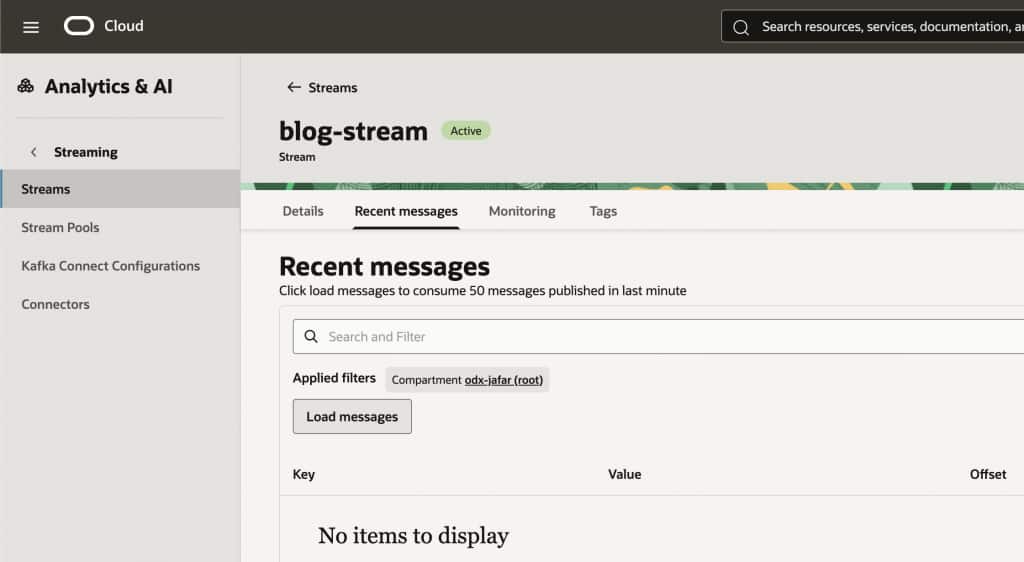
curl -X PUT "https://<your-endpoint>/function-b" \ -d 'a body which will be put onto the stream' - Check the Stream.
Verify that a new message was added to your OCI Stream.
- If you receive a 502 Bad Gateway error, review application logs and refer to API Gateway troubleshooting .