
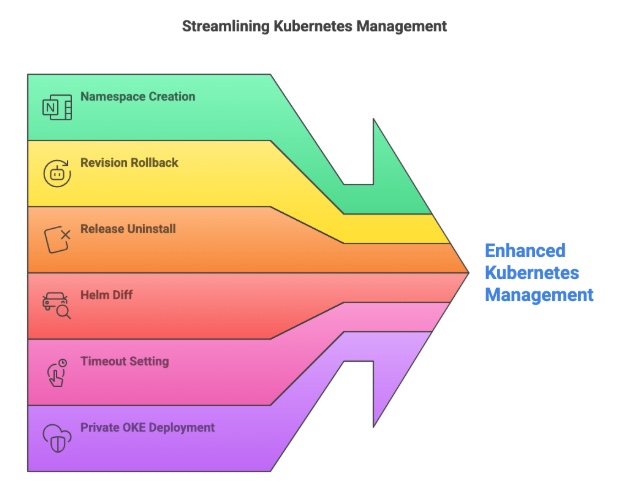
Oracle Helm Deployment offers a robust suite of features designed to simplify and enhance Kubernetes application management. Whether you are creating namespaces, rolling back to a specific revision, uninstalling releases, previewing changes with Helm diff, setting timeouts for upgrades, or deploying to private Oracle Cloud Infrastructure Kubernetes Engine (OKE) clusters, Oracle Helm provides the tools you need to manage complex Kubernetes deployments effectively.
These powerful features, which were developed with a deep understanding of Kubernetes’ operational needs, have been carefully integrated to improve the deployment experience and reduce the complexity often associated with cloud-native environments. As someone who led the development of these features, I can personally attest to the effort and attention to detail that went into making these capabilities available. Oracle continues to provide innovative solutions that help teams scale their Kubernetes workloads seamlessly, whether they are running on private clusters, managing complex updates, or ensuring stability with easy rollback options.
With Helm’s capabilities fully integrated into Oracle Cloud’s Kubernetes offering, you can ensure smooth and efficient management of your cloud-native applications. Ready to streamline your Kubernetes deployments? Dive into Oracle Helm and start simplifying your Kubernetes management today!
1. Creating Kubernetes Namespaces with Helm
Namespaces are a fundamental concept in Kubernetes that allow you to logically isolate and organize resources within a cluster. Oracle Helm Deployment provides full support for creating namespaces during the installation process. This feature simplifies application deployment by ensuring that each workload is deployed in its own isolated environment.
You can easily create a namespace with the --create-namespace flag:
helm install my-release my-chart --create-namespace --namespace my-namespace
The --create-namespace flag ensures that if the specified namespace doesn’t exist, Helm will automatically create it. This eliminates the need for manual namespace management and ensures that your deployments are clean, well-organized, and easy to manage. With this feature, you can automate your namespace creation while ensuring proper isolation of your workloads. To use this feature, pass an argument in the stage OCI_DEVOPS_DEPLOY_USE_CREATE_NAMESPACE_FLAG
2. Rolling Back to a Specific Revision
In any complex deployment, things don’t always go as planned. Sometimes, an update might break functionality or introduce unexpected behavior. In such cases, it’s crucial to have the ability to revert to a previous stable version of your application.
With Oracle Helm Deployment, rolling back to a specific revision of a release is simple and efficient. You can quickly revert to a previous version with the helm rollback command, which allows you to specify a revision number:
helm rollback my-release <revision>
This feature is invaluable for production environments where minimizing downtime is critical. It ensures that if a new release causes problems, you can quickly and confidently roll back to a known good version of your application, restoring stability without much hassle. To use this feature, pass argument IS_HELM_ROLLBACK = true and to specify a version explictly add HELM_ROLLBACK_VERSION
3. Uninstalling a Helm Release
When an application is no longer needed or you want to clean up resources, uninstalling a Helm release is a straightforward process. Oracle Helm simplifies the uninstallation of releases, ensuring that all resources associated with the release are properly cleaned up.
Following command is used to uninstall the helm release :
helm uninstall my-release
This command removes all resources associated with the release, ensuring that no leftover artifacts remain in your Kubernetes cluster. By using Helm to manage your application lifecycle, you can easily clean up old releases and prevent unnecessary resource consumption. To use this feature, set the IS_UNINSTALL_ON_STAGE_DELETE to true at the stage level.
4. Helm Diff: Previewing Changes Before Applying
One of the challenges when upgrading an application is understanding exactly what changes will be applied to your cluster. Deployments can have wide-reaching effects, and any unintended changes can lead to downtime or instability. This is where the Helm diff feature comes in.
Oracle Helm Deployment includes the Helm diff plugin, which allows you to preview the changes that will be made during a Helm upgrade. This is a crucial step for avoiding surprises when updating your releases. With helm diff, you can view the differences between the current release and the new version before applying the changes:
helm diff upgrade my-release my-chart --namespace my-namespace
The diff output will highlight all the changes in your Kubernetes resources, so you can validate them before committing. This feature provides a level of transparency and control, ensuring that you only apply the changes you expect.
5. Setting Explicit Helm Timeout in Upgrade Command
In a fast-paced cloud-native environment, deployments need to be quick and reliable. Long-running deployments can cause significant delays and resource lock-ups, making it difficult to maintain operational efficiency. Fortunately, Oracle Helm provides an option to set explicit timeouts during Helm upgrades.
You can configure a timeout for Helm upgrades by using the --timeout flag, which allows you to specify the maximum duration for a deployment. If the deployment takes longer than the specified timeout, Helm will abort the operation and roll back any changes:
helm upgrade my-release my-chart --namespace my-namespace --timeout 5m
In this example, the upgrade will fail if it takes longer than 5 minutes. This feature ensures that you don’t run into situations where a deployment hangs indefinitely, and it allows you to maintain better control over your Kubernetes operations. To use this feature, set the timeout in oci devops helm stage resource
6. Deploying to Private Oracle Cloud Infrastructure Kubernetes Engine (OKE) Clusters
Oracle Cloud Infrastructure Kubernetes Engine (OKE) is a managed Kubernetes service that provides a secure and scalable platform for deploying containerized applications. One of the key advantages of OKE is that it supports private clusters, allowing organizations to deploy their applications within a private network.
Oracle Helm Deployment fully supports deploying to private OKE clusters, ensuring that your Kubernetes applications remain secure and isolated within your infrastructure. Whether you are using public or private clusters, Oracle Helm provides a consistent deployment experience.
To deploy to a private OKE cluster, you simply need to configure your Helm client with the appropriate Kubernetes context for your private cluster. Once the context is set, you can proceed with deploying your applications to the OKE cluster as usual.
7. Helm Smart Deploy using checksum artifact
OCI DevOps Deploy service transforms deployment efficiency through Helm Smart Deploy—an intelligent idempotency engine that leverages checksum artifacts to detect when a desired state already exists on a cluster, eliminating the need to redeploy. Enabled this feature for all the deployments in July 2023 and have witnesses massive improvements.
How It Works:
- Compares incoming deployment requests against historical checksums of successfully deployed artifacts
- Determines whether the target cluster is already running the exact version being requested
- When a match is found: validates the active state and confirms cluster health in just 30 seconds (~98% reduction in execution time)
- When no match: executes the full 15-minute deployment cycle
The Scale Impact:- DevOps Deploy service processes 400,000 deployments monthly and we are growing rapidly
- Smart Deploy skips an estimated ~136,000 redundant deployments (~34% of total traffic)
- Saves organizations millions of compute minutes and developer-hours annually
- Critical distinction: Each skipped deployment is one that never needed to happen—this separates Smart Deploy from other performance optimizations
Impact on DORA (DevOps Research and Assessment) Lead Time for Changes
What is Lead Time for Changes?
According to the DevOps Research and Assessment team: “the time it takes for a code commit or change to be successfully deployed to production.” Elite DORA performers achieve lead times under one day.
How Smart Deploy Accelerates This Metric:
- Eliminates unnecessary deployment cycles by removing the friction of redundant executions
- Compounds for frequent deployers: Teams deploying hourly or multiple times daily see exponential improvements
- 34% reduction in unnecessary deployment traffic = faster feedback cycles
- Reduced infrastructure churn = more stable production environments
- Measurably faster time-to-value for end users
- Moves organizations up the DORA performance ladder
- Eliminates deployment queue friction
- Transforms “High” or “Medium” performers → “Elite” status
- Ensures every deployment transaction is intentional and necessary, not blindly repetitive
What This Means in Practice:
- Developers spend 33,000 fewer hours waiting for deployments each month
- Infrastructure processes transactions that matter instead of churning on redundant updates
- CI/CD pipelines move from bottleneck to enabler
- Teams reach elite deployment status by removing artificial delays
Growth of OCI DevOps Deploy Service
OCI DevOps Deploy has emerged as a critical infrastructure-as-a-service platform fueling enterprise continuous delivery pipelines. The service is experiencing rapid adoption across both commercial and government sectors, with organizations scaling to 400,000+ Helm deployments monthly and processing more than 24 million operations on a weekly basis—demonstrating the service’s ability to handle massive transaction volumes at enterprise scale.
Regional Availability Expansion:
- All OCI Sovereign Regions: EU data residency requirements (GDPR-compliant)
- US Government Cloud (OC2): FedRAMP High authorized regions supporting federal agencies and compliance requirements
- US Defense Cloud (OC3): DISA Impact Level 5 authorized regions for classified and mission-critical defense workloads
- Commercial Regions: 51 public cloud regions across 24 countries, providing consistent service and pricing parity globally
- Dedicated Regions: Air-gapped and on-premises deployment models for highly classified and regulated environments
Reach out to #devops_users if you have any more questions about the Helm Features