
The LangChain ecosystem separates retrieval, chat history, semantic caching, graph checkpoints, and cross-thread memory. Oracle integrations can place those records in one database environment without making the responsibilities interchangeable.
Retrieval, memory, persistence, and a bring-your-own-model deep-agents harness for LangChain and LangGraph, all on one Oracle AI Database instance behind a single connection pool.
Companion notebook: https://github.com/oracle-devrel/oracle-ai-developer-hub/blob/main/notebooks/langchain_ecosystem/research_agent_with_deepagents_oracle.ipynb
Key Takeaways
- Oracle AI Database is the unified backend for LangChain and LangGraph agent infrastructure. The blog argues that vectors, chat history, semantic cache, checkpoints, documents, and relational data can live behind one Oracle connection pool instead of several separate services.
langchain-oracledbnow covers both retrieval and memory. It addsOracleSemanticCachefor paraphrase-aware LLM caching andOracleChatMessageHistoryfor durable, session-scoped chat history.langgraph-oracledbadds production persistence for LangGraph agents. The new package provides checkpointing and long-term memory so agent workflows can resume across restarts, deployments, and long-running tasks.- The deep-agents setup is model-flexible. Developers can use Claude, OCI Generative AI, OpenAI, vLLM, or another LangChain chat model while keeping the agent’s state and memory in Oracle.
- The main production benefit is reduced fragmentation. Instead of managing consistency, backup, governance, latency, and audit across multiple stores, the blog argues teams can run retrieval, memory, and persistence in one database system.
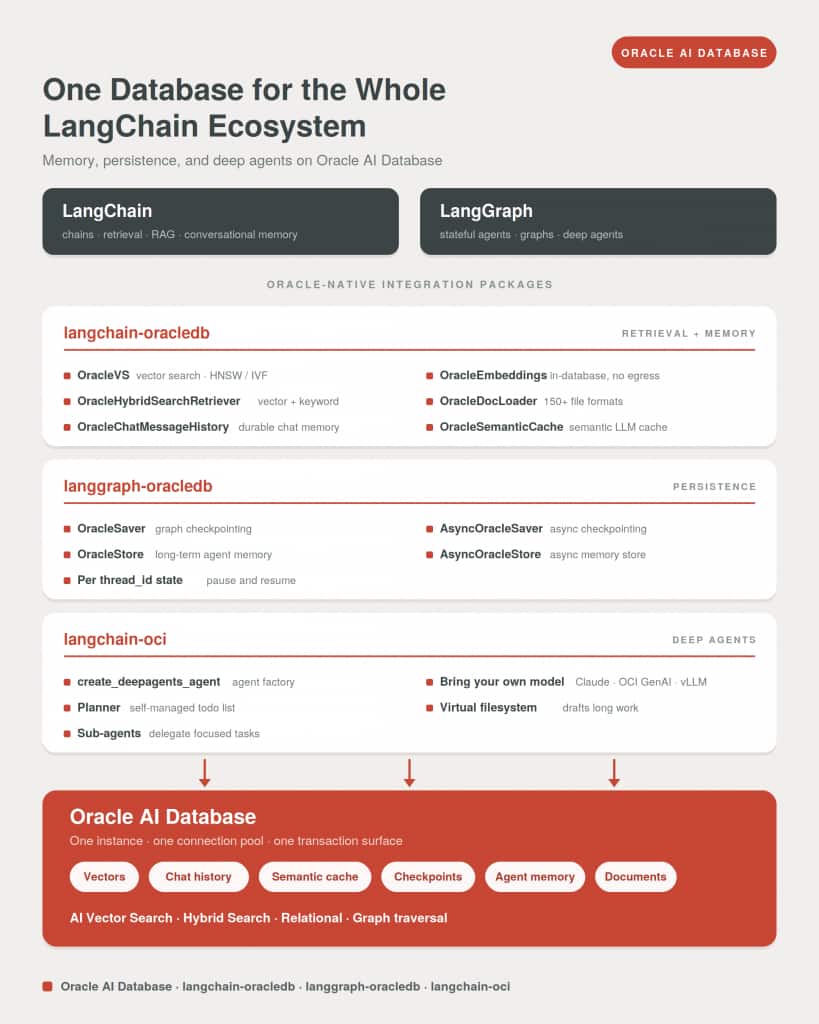
We’ve observed that most Langchain examples keep vectors in one service, chat history in another, cache in an entirely different service and documents in a fourth (a vector DB, a Redis, a Postgres, an object store). It works in a notebook and perhaps even in PoCs but the fragmentation shows up as a massive disadvantage in production, where the consistency, backup, latency, TTFT(time-to-first-token) and audit stories of four systems all have to line up with each other.
Agent memory is everything an agent stores and retrieves as it works. It’s the mix of components, tools, and libraries that let an agent recall information, reuse key details in later interactions, hold onto context for long horizon tasks, and refine what it knows to adapt over time. In practice, that means the conversation so far, the durable facts it has learned across sessions, the working state of a multi-step task, and a cache of answers it has already computed.
An agent that holds those stores together stays continuous and grounded, but if built on a fragmented infrastructure, the cognitive and operational load on the agent increases which leads to failure modes and data synchronization issues.
That’s why over at Oracle, the team have invested in the langchain ecosystem to bring the benefits of the converged AI database to AI developers through three major improvements and updates to the open source libraries of the langchain ecosystem.
- The
langchain-oracledbpackage adds semantic LLM caching via theOracleSemanticCacheclass and durable chat message history via theOracleChatMessageHistoryclass, completing its retrieval-and-memory story. langgraph-oracledblaunches as a new package, bringing graph checkpointing and long-term agent memory to LangGraph.- And
langchain-ociputs a provider-agnostic deep-agents factory on top: the same agent harness running on Claude, OCI Generative AI, or your own model. All of it backed by a single Oracle AI Database instance and a singleoracledbconnection pool.
Memory is becoming the defining layer of the agent stack. The work Oracle is doing to integrate Oracle AI Database on OCI with LangChain gives developers a real path to building memory-first agents that persist, retrieve, and reason over context at scale.
Harrison Chase, Co-Founder and CEO, LangChain
In this companion notebook, we walk through an end-to-end example of using LangChain ecosystem packages to build a deep research agent, a common use case we see in enterprise.
The update to langchain-oracledb package makes Oracle AI Database a first-class backing store for LangChain applications, ensuring AI Developers build enterprise ready AI applications. See a working full code example of the features across the langchain ecosystem packages in this deep research use case.
The update adds two new primitives: OracleSemanticCache for LLM response caching and OracleChatMessageHistory for durable session memory. They join the package’s existing retrieval primitives: OracleVS for vector search, OracleEmbeddings for in-database embedding generation, OracleHybridSearchRetriever and OracleTextSearchRetriever for retrieval, and OracleDocLoader, OracleTextSplitter, and OracleSummary for document processing.
Alongside it, Oracle released langgraph-oracledb, a brand-new package that gives LangGraph agents Oracle-native checkpointing and long-term memory. Both packages are available now on PyPI and documented in the official LangChain documentation.
This release collapses that stack into one.
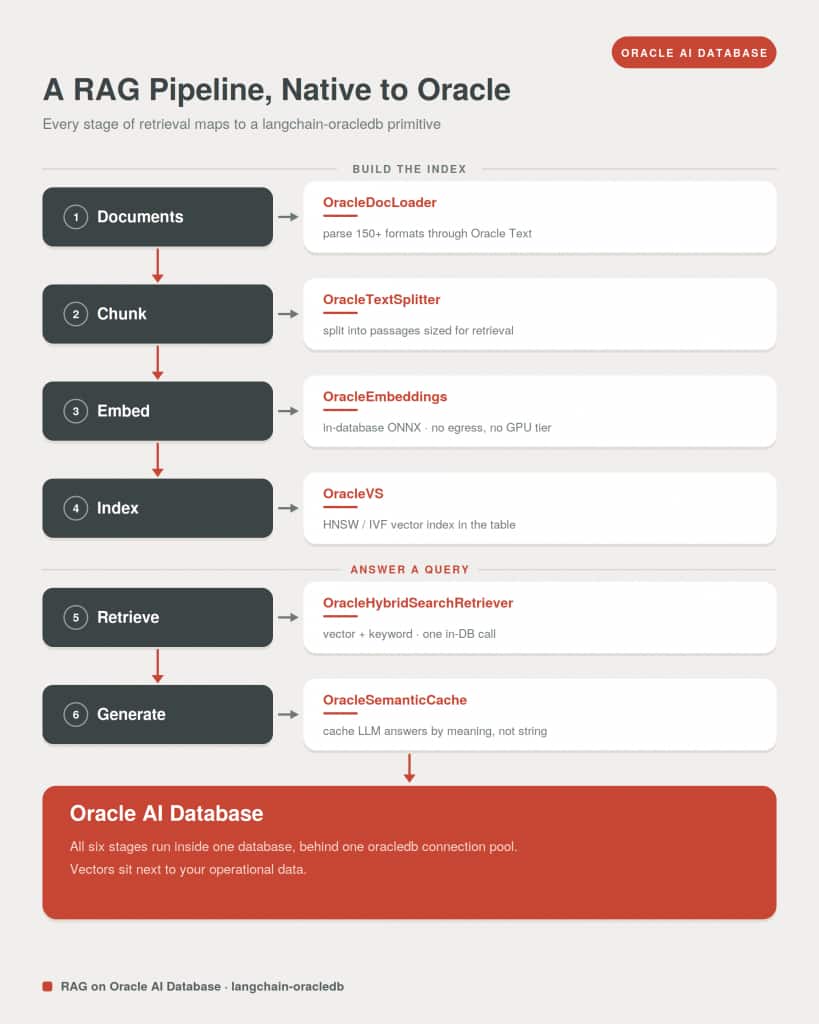
langchain-oracledb already solved retrieval: vectors, hybrid search, and the document pipeline in one engine. What stayed scattered was the memory. The chat history lived in one service, the LLM cache in another. With this update, a single Oracle AI Database instance holds the vector index, the chat history, the semantic cache, and the staged documents, behind one Oracle AI Database connection pool and one set of credentials.
Agent memory isn’t one thing. A production agent needs short-term memory across turns, long-term memory across sessions, semantic caching for repeat queries, and retrieval over both structured and unstructured data. Putting that substrate in one database — vector search natively built in — reduces cognitive load for both the developers building the system and the agents operating inside it.
Richmond Alake, Director of AI Developer Experience, Oracle Database
What’s New in langchain-oracledb
The update extends the package from a retrieval integration into a full retrieval-and-memory layer, with two new primitives:
OracleSemanticCache: semantic LLM response caching. A drop-inBaseCachethat matches prompts by vector distance rather than exact string, so paraphrased questions hit the cache too. A tunablescore_thresholddecides how loose a paraphrase still counts, and entries are isolated by LangChain’sllm_string, so a model upgrade invalidates its own entries without touching the rest. Wiring it in globally is one line,set_llm_cache(...), or attach it to a single chat model and leave an agent’s intermediate calls uncached.OracleChatMessageHistory: durable, session-scoped chat history. ImplementsBaseChatMessageHistoryas rows in an Oracle table. One table holds thousands of concurrent sessions, survives application restarts, and supports bounded reads (history_size=N) so token costs stay capped without deleting older rows. It plugs straight intoRunnableWithMessageHistory.
For teams still on the Oracle classes in langchain-community, langchain-oracledb replaces them with identical class names and constructor signatures, so migration is an import-path change. The new primitives sit beyond that entirely: the semantic cache and chat message history do not exist in the community package. (The vector store, embeddings, and document pipeline are also available for JavaScript as @oracle/langchain-oracledb on npm. The new memory primitives are Python-first.)
The whole picture fits in a screenful:
import oracledb
from langchain_core.globals import set_llm_cache
from langchain_oracledb import OracleChatMessageHistory, OracleSemanticCache
from langchain_oracledb.vectorstores.oraclevs import OracleVS

connection = oracledb.connect(user="agent", password="...", dsn="localhost:1521/FREEPDB1")

# Retrieval, session memory, and LLM caching: one backend, one connection.
vector_store = OracleVS(client=connection, embedding_function=embeddings, table_name="DOCS")
history = OracleChatMessageHistory(session_id="customer-42", client=connection, table_name="CHAT_HISTORY")
set_llm_cache(OracleSemanticCache(client=connection, embedding=embeddings, table_name="LLM_CACHE"))
Three primitives that would normally mean three services, three SDKs, and three failure modes. Here, three tables.
In the customer sessions and developer workshops we’ve run, the pattern is remarkably consistent: teams don’t struggle to prototype agent memory — they struggle to ship it. The prototype dies somewhere between the laptop and the security review. Development runs against the Oracle AI Database container on a laptop; production runs against Autonomous AI Database with wallet-based authentication. AI teams find moving between them is a connect-string change, not a re-architecture.
langgraph-oracledb: A New Package for LangGraph Agents
The second piece of news is a launch, not an update. langgraph-oracledb is a new package that implements LangGraph’s persistence interfaces on Oracle AI Database:
OracleSaverandAsyncOracleSaver: graph checkpointing. Every step of a LangGraph agent’s state is checkpointed perthread_id, so a conversation or long-running task resumes exactly where it left off, across invocations, restarts, and deploys.OracleStoreandAsyncOracleStore: long-term agent memory. A namespaced key-value store withput,get,search, and batch operations, plus optional HNSW or IVF vector indexes so agents can search their own memories semantically, not just by key.
Both accept the same oracledb connections and pools as langchain-oracledb, which is the point. An application that mixes LangChain chains and LangGraph agents shares one system of record (same backend, same pool, same vector index semantics) rather than fragmenting across several.
The packages ship with hands-on worked examples:
- The AI on-call triage assistant in the Oracle AI Developer Hub builds a LangGraph supervisor that delegates to an issue analyst and a policy specialist: vector search over a real past-issue corpus, each on-caller’s saved preferences, and per-thread checkpoints all sharing one Oracle AI Database.
- A companion semantic-caching and durable chat-history notebook covers the primitives underneath:
OracleSemanticCacheskips the model when a new question means the same as one already answered — so you never pay Claude twice for the same answer — andOracleChatMessageHistorykeeps each session’s transcript durable and isolated across restarts.
Deep Agents on Oracle, Any Model
LangGraph is what developers reach for when an agent outgrows a single prompt-response loop and becomes a stateful workflow: one that branches, pauses for human approval, and runs long enough that state has to survive a restart. The framework’s mechanism for all of this is persistence. Graph state is checkpointed at every step, so a run can be resumed, replayed, or continued in a later session. Every one of those checkpoints needs somewhere durable to live.
langgraph-oracledb is a new package that gives them one. It implements LangGraph’s persistence interfaces in full on Oracle AI Database:
from langchain_anthropic import ChatAnthropic
from langchain_core.tools import tool
from langchain_oci import create_deepagents_agent

@tool
def get_stock_quote(ticker: str) -> str:
    """Return the latest stock quote for a ticker symbol."""
    return QUOTES.get(ticker.upper(), f"No quote for {ticker}")

agent = create_deepagents_agent(
    tools=[get_stock_quote],
    model=ChatAnthropic(model="claude-sonnet-4-6"),  # bring your own model: Claude, OCI GenAI, vLLM
    system_prompt="You are a concise financial assistant. Use your tools for live data.",
)
The model is the one thing you swap; the system of record stays Oracle. Claude does the reasoning, and the agent’s plan, files, and per-thread state checkpoint to the same Oracle AI Database backing the chains and the LangGraph persistence: one pool, one transaction surface.
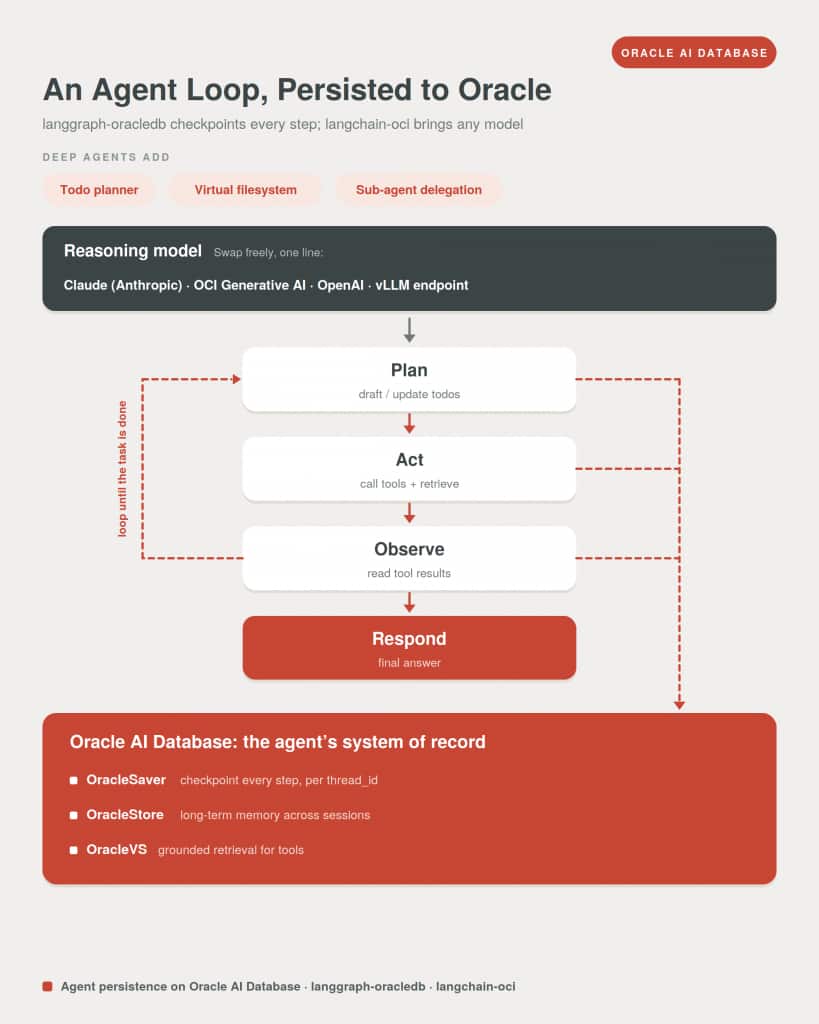
Oracle AI Database as the Unified Memory Core for AI Agents
Oracle AI Database is the unified retrieval and memory core across all three packages. Instead of treating the database as a passive persistence layer, the integrations treat it as the active retrieval engine that makes each LangChain and LangGraph pattern work in production.
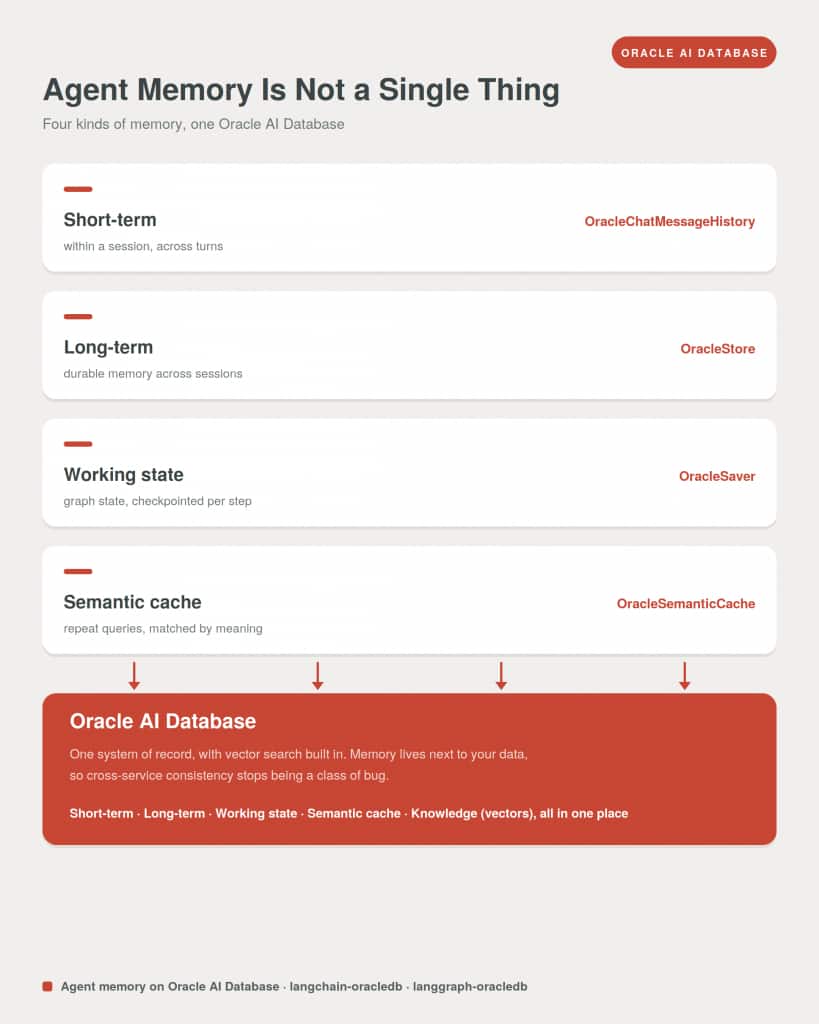
Oracle AI Vector Search brings the retrieval strategies LangChain developers actually need into a single engine: vector similarity for semantic recall and unstructured knowledge retrieval, full-text and hybrid search for precision over keywords, and relational queries for structured, transactional memory that demands consistency. Combined with Oracle’s operational story (backups, replication, high availability, governance), teams get a path from prototype to production without swapping storage layers along the way.
Who This Release Is For
The updated langchain-oracledb, the new langgraph-oracledb, and the deep-agents factory in langchain-oci are designed for:
- AI developers and engineers building LangChain RAG pipelines, applications, retrievers, or conversational agents who need durable memory and retrieval in one place
- Teams building LangGraph agents who need checkpointing and long-term memory on a production-grade backend
- Teams building deep agents who want a provider-agnostic harness (Claude, OCI Generative AI, or a self-hosted model) with the agent’s plan and state persisted to Oracle
- ML engineers moving LangChain prototypes from ephemeral in-memory stores to production-grade persistence
- Teams already running Oracle AI Database who want LangChain and LangGraph applications to write to the system of record directly
- Technical leaders evaluating Oracle AI Database for unified agent infrastructure at scale
Documentation and quickstarts live in the Oracle AI Database LangChain and LangGraph integration guides; source is in the oracle/langchain-oracle repo, with runnable example notebooks in the Oracle AI Developer Hub. Install both packages in the same environment to run the full Oracle-native integration across LangChain and LangGraph.
Frequently Asked Questions
Do I need Oracle Cloud to use these packages?
No. Everything runs against Oracle AI Database Free in a local Docker container, with your own embedding model and your own LLM, and no OCI account. langchain-oci adds OCI Generative AI and other managed options when you want them, but they are opt-in. The code that runs on the free container runs unchanged against Oracle Autonomous AI Database in the cloud, so moving to production is a connect-string change, not a rewrite.
Which Oracle Database version do I need?
Oracle AI Database 23ai or later, which is where AI Vector Search and the VECTOR data type live. That covers OracleVS, OracleEmbeddings, and the memory primitives. Hybrid keyword-and-vector search through DBMS_HYBRID_VECTOR.SEARCH needs 26ai. The free 23ai container runs the chains, the LangGraph persistence, and the deep-agents examples end to end.
Can I bring my own model, or am I tied to OCI Generative AI?
Bring your own. The deep-agents factory takes any LangChain chat model through model=, so Claude, OpenAI, a self-hosted vLLM endpoint, or OCI Generative AI all drop in with nothing else changed. When you pass your own model, the OCI model id and auth are ignored.
How do I migrate from the Oracle classes in langchain-community?
It is an import-path change. langchain-oracledb ships the same class names and constructor signatures as the Oracle classes in langchain-community, so existing retrieval code keeps working once you swap the import. The new memory primitives, OracleSemanticCache and OracleChatMessageHistory, are not in the community package, so there is nothing to migrate there, only to adopt.
Do langchain-oracledb and langgraph-oracledb share one database and pool?
Yes, and that is the point. Both accept the same oracledb connections and pools, so an application that mixes LangChain chains and LangGraph agents writes to one system of record, with one set of credentials and one transaction surface, rather than fragmenting across separate backends.
How is this different from adding a dedicated vector database?
A dedicated vector database gives you similarity search and sits beside your operational data rather than with it. Here the vectors live in the same database as your chat history, your checkpoints, and your relational data, so vector, full-text, hybrid, and SQL retrieval all run in one engine, inside one transaction, under one backup and governance story. Cross-service consistency stops being something you engineer around.
Is there JavaScript or TypeScript support?
The vector store, embeddings, and document pipeline are available for JavaScript as @oracle/langchain-oracledb on npm. The new memory primitives, the LangGraph persistence, and the deep-agents factory are Python-first.
All three packages are available now on PyPI:
pip install langchain-oracledb            # updated: semantic cache + chat history
pip install langgraph-oracledb            # new: checkpointing + agent memory
pip install "langchain-oci[deepagents]"   # new: bring-your-own-model deep-agents factory
Which package should I choose first?
Choose the integration for the task you need to validate, using the package and release named in the companion example. A vector store retrieves evidence; a checkpointer resumes graph execution; a memory store holds longer-lived records. Confirm the exact imports and dependency versions together instead of mixing similarly named package surfaces from different releases.
Continue the implementation: LangGraph persistence with Oracle AI Database. Use the validation described above as the acceptance check for your next step.