
Key Takeaways
- Importing ONNX into Oracle AI Database is not “uploading a file”—it registers a model object in your schema.
- Most “model import failures” are actually privilege or access issues (roles, grants, directory permissions, or wrong schema).
- You can import models using a directory-based path for fast local iteration, or a database-driven import approach if you handle the model as a BLOB.
- Once imported, inference becomes a SQL expression, which makes it easy to embed into ETL, pipelines, triggers, or app queries.
Most teams don’t struggle to export a model—they struggle to operationalize it. The hard part starts after training: running the same model reliably across environments in production.
In 2026, many teams already have solid models exported to ONNX, because it’s the most practical handoff format between training and production. It’s portable, widely supported, and makes it easier to reuse models and move them across stacks without re-implementing inference. Yet production inference still ends up scattered across services: a model server here, a vector store there, glue code everywhere in between, and an ever-growing list of credentials and network hops.
Why Choose ONNX
ONNX (Open Neural Network Exchange) is a standard file format for machine learning models. It’s used to package a trained model into a framework-neutral representation, so the model can be moved and executed across different tools and environments more reliably.
Many ML engineers and AI developers choose ONNX over framework-specific formats because it reduces lock-in and friction between training and deployment:
- Portability: the same model artifact can travel across environments and runtimes with fewer rewrites.
- Interoperability: training and inference don’t need to share the same framework choices.
- Reuse: models become shareable artifacts—teams can reuse existing models instead of rebuilding from scratch.
- Faster prototyping: swapping models becomes simpler, which speeds up experiments and iteration cycles.
- Cleaner production handoff: ONNX helps separate “model development” from “system integration,” reducing glue code and making deployments more repeatable.
Oracle AI Database changes the story. Instead of treating inference as “something outside the database,” you can import an ONNX model into the database, as a schema-native object, and run inference directly in SQL—right next to your data.
How to integrate machine learning into Oracle AI Database
A practical database-to-ML integration usually looks like this:
- Start from the data path: decide where inference should run (next to the data vs across services).
- Set up ownership and privileges: make schema ownership explicit and keep grants minimal and correct.
- Prepare the data in SQL: clean, filter, and validate inside the database.
- Package the model artifact: export the model to a portable format (often ONNX) for predictable deployment.
- Register the model in the database: import ONNX as a schema-native model object.
- Run inference in SQL: generate embeddings or predictions as part of query execution.
- Persist what you’ll reuse: store embeddings next to rows, index them, and query with filters.
- Operationalize updates: re-embed new/changed data, version models, and keep the pipeline repeatable.
A clean, production-oriented flow looks like this: ADB setup → roles/grants → upload ONNX → inference … and the part that causes most failures in real systems: roles/grants pitfalls.
Before getting into setup, a quick note on the target environment: everything below assumes Oracle AI Database 26ai. The same flow works whether you’re running Autonomous Database (cloud) or Oracle AI Database Free 26ai in a local container—but it’s worth confirming the version up front, since many errors are simply caused by an environment/version mismatch.
SELECT banner_full FROM v$version;What does it mean to “load ONNX into the database”?
Loading ONNX into the database isn’t “deploying a model server.” It registers a database model object in your schema—something SQL can call directly. A good mental model is a stored procedure, except it’s backed by an ONNX runtime and the model lives as a first-class object in the database.
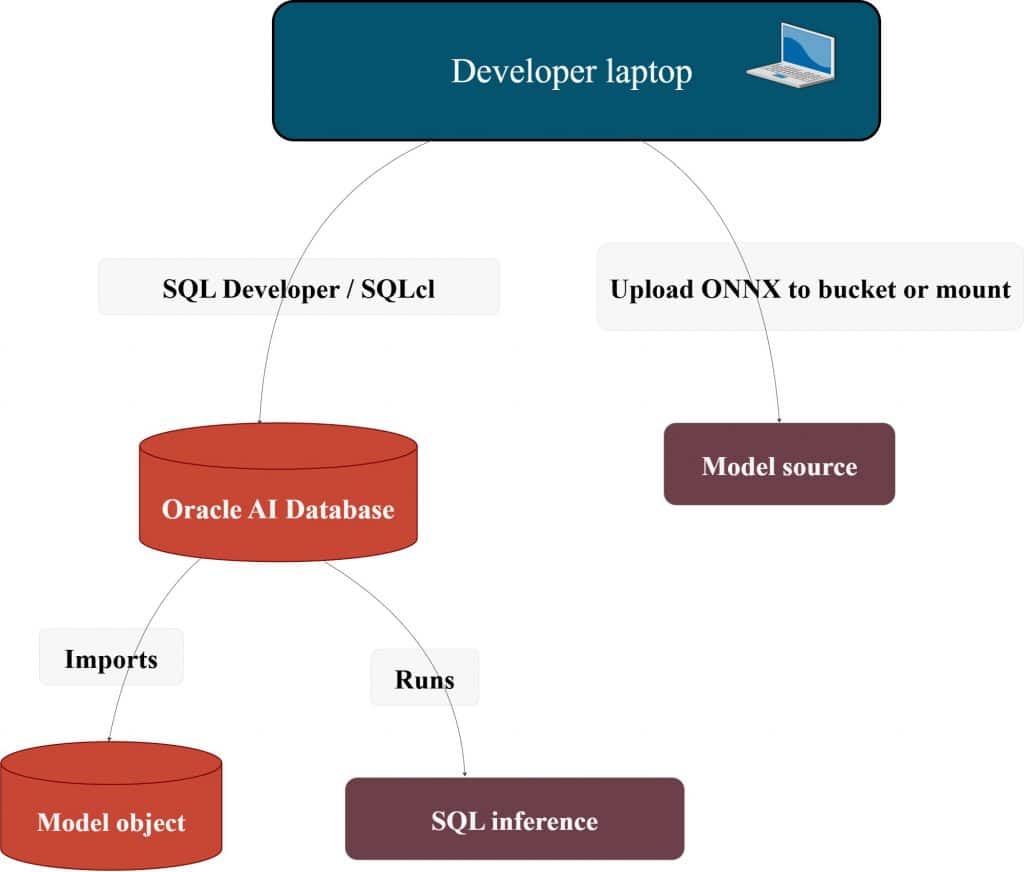
Here’s the full flow from ONNX import to vector search.

ADB setup
This section covers the minimum setup needed to connect, grant the right privileges, and confirm the environment is ready for ONNX import and SQL inference.
What “ready” means for this article
- You can connect to the database (SQL Developer / SQLcl / app connection string).
- You have an admin-capable user for grants (usually
ADMINon ADB). - You know which schema will own the model (we will use
ML_USER).
Roles & grants (the invisible dependency)
The database session that imports the model must be allowed to create a model object and must be allowed to read the model source.
Most “it doesn’t work” tickets come from:
- missing privileges,
- directory grants missing,
- importing under the wrong schema,
- or relying on a role that isn’t enabled the way you expect.
Minimal schema setup (clean, reusable):
-- Run as ADMIN (or a privileged user)CREATE USER ml_user IDENTIFIED BY "<strong-password>";
-- A practical baseline role for building DB apps
GRANT DB_DEVELOPER_ROLE TO ml_user;

-- Required for model objects (common requirement when importing ONNX models)
GRANT CREATE MINING MODEL TO ml_user;
Why grant this explicitly? Because ONNX imports land as model objects. If the schema can’t create the object, the import fails, even if the ONNX file is fine.
A small “privilege flow” mental diagram:

Upload / import ONNX (two production-friendly paths)
You’ll see two patterns in the real world:
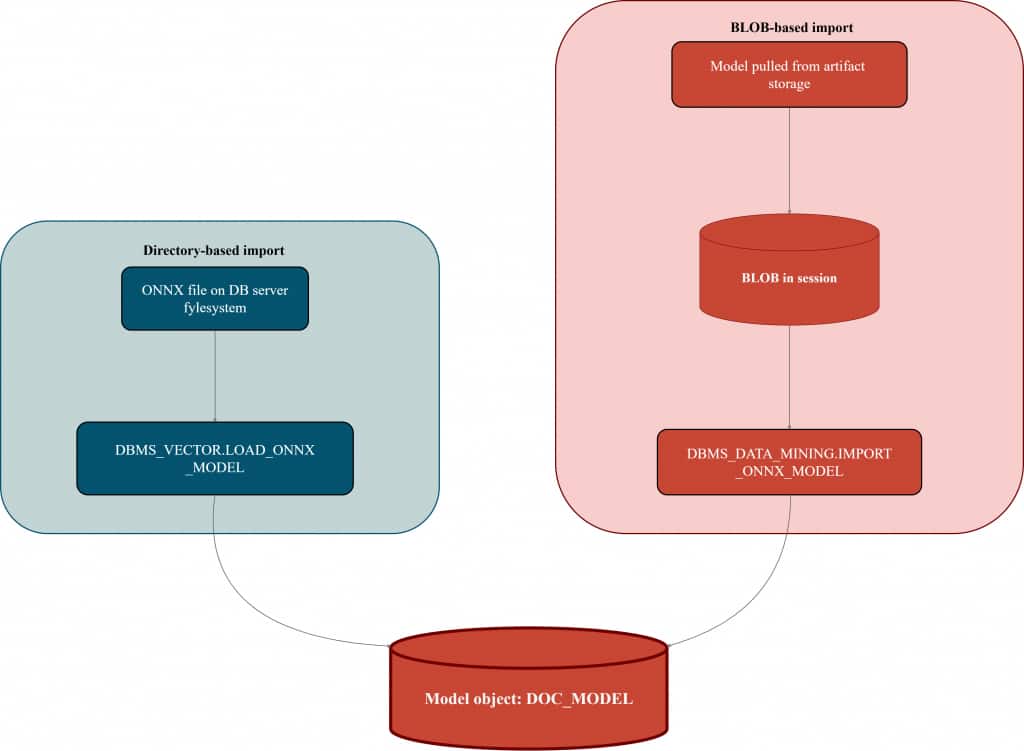
- Directory-based import: fast iteration, simple, great when you have access to a server path.
- BLOB-based import: model comes as a BLOB (for example, retrieved from object storage via your preferred mechanism), then imported.
This article shows both—cloud-first teams usually prefer the second because it avoids filesystem coupling, but both are valuable.
Option A: Directory-based import (cleanest “first success”)
This approach has one dependency: a database directory object pointing to a server path.
Directory creation and grants
-- Run as ADMIN (or privileged user)
CREATE OR REPLACE DIRECTORY DM_DUMP AS '<work directory path>';
GRANT READ ON DIRECTORY DM_DUMP TO ml_user;
GRANT WRITE ON DIRECTORY DM_DUMP TO ml_user;
Import / load ONNX (with explicit metadata)
Why the JSON metadata matters
The JSON block tells Oracle AI Database how to invoke the ONNX graph for your use case. For embedding models, it removes ambiguity by specifying (1) what kind of function you’re loading, (2) which output should be treated as the embedding vector, and (3) how the model’s input tensor(s) map to the data you’ll pass at inference time. That’s what makes the import self-describing and helps prevent inference mismatches later.
When Oracle defaults are enough
For many standard embedding ONNX models that follow common input/output conventions (single obvious embedding output, expected input naming), a minimal import is often enough to get a clean first success.
When you should use explicit JSON
Use explicit metadata when the model deviates from those conventions—for example:
- the embedding output tensor has a different name, or there are multiple outputs and you need to choose one
- the model expects different input tensor names, multiple inputs, or a non-standard signature
- you’re loading a custom/exported ONNX graph and want the import to stay predictable and future-proof
Here’s a quick way to think about it: some ONNX embedding models are “default-friendly” — for example, a well-known embedding model you grab from Hugging Face and export to ONNX. These typically follow common conventions (one obvious embedding output, expected input naming), so a minimal import is often enough to get a first success. Other models are more custom — maybe a fine-tuned model exported from your own pipeline, or an ONNX graph with different tensor names or multiple outputs. In those cases, explicit JSON metadata removes ambiguity and keeps inference behavior predictable.
Default-friendly (minimal import):
-- Run as ML_USER
EXEC DBMS_VECTOR.LOAD_ONNX_MODEL(
'DM_DUMP',
'all_minilm_l12_v2.onnx',
'minilm_embed'
);
Custom model import (explicit JSON metadata):
-- Run as ML_USER (schema owner)
EXEC DBMS_VECTOR.DROP_ONNX_MODEL(model_name => 'doc_model', force => TRUE);

EXEC DBMS_VECTOR.LOAD_ONNX_MODEL(
'DM_DUMP',
'my_embedding_model.onnx',
'doc_model',
JSON('{
"function" : "embedding",
"embeddingOutput" : "embedding",
"input": { "input": ["DATA"] }
}')
);
What happened here (in one paragraph)
- The ONNX file is read from the directory.
- A model object named
DOC_MODELis created inML_USER. - The metadata tells the database how to bind SQL input (
DATA) to the model input tensor, and which output is the embedding.
Option B: BLOB-based import (best for “cloud-first” pipelines)
In many organizations, models are stored in artifact registries or OCI Object Storage. The principle stays the same:
Get the model into a BLOB → import the BLOB as a model object.
Generic BLOB import
-- Run as ML_USER
BEGIN
  DBMS_DATA_MINING.IMPORT_ONNX_MODEL(
    model_name => 'doc_model',
    model_data => :model_blob,
    metadata   => JSON('{
      "function" : "embedding",
      "embeddingOutput" : "embedding",
      "input": { "input": ["DATA"] }
    }')
  );
END;
/
Import paths visualized
How do you know the model is really in the database?
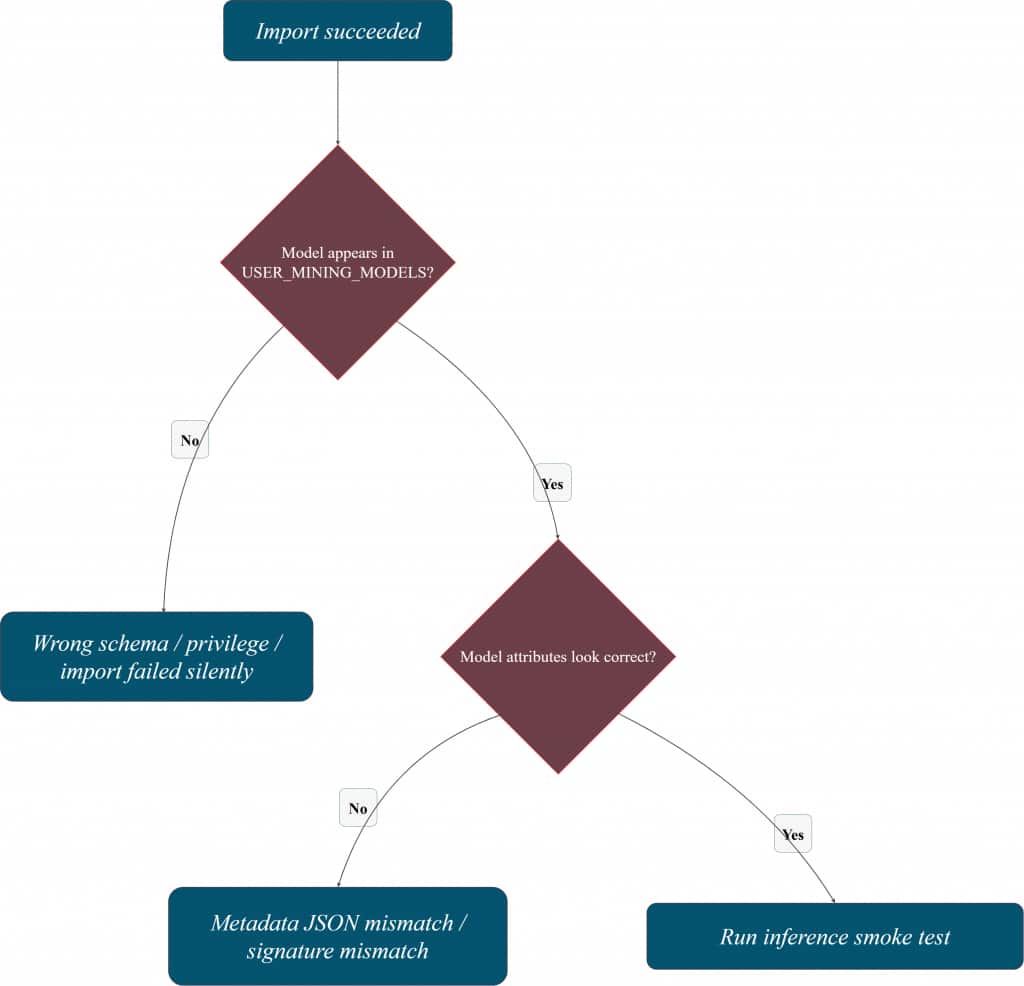
Import is only useful if you can confirm two things quickly:
- the model exists as an object in your schema, and
- the database understands the model signature well enough to run inference.
That’s why it helps to keep a small “verification corner” in your notebook or SQL script—especially when you’re iterating on metadata JSON or switching between schemas.
Check that the model is registered
-- Run as ML_USER
SELECT model_name, mining_function, algorithm, model_size
FROM user_mining_models
WHERE model_name = 'DOC_MODEL';
Inspect model attributes (helps spot signature issues)
-- Run as ML_USER
SELECT model_name, attribute_name, attribute_type, data_type, vector_info
FROM user_mining_model_attributes
WHERE model_name = 'DOC_MODEL'
ORDER BY attribute_name;
Verification mental model
Inference: where Oracle AI Database becomes the runtime
Once the model is imported, Oracle AI Database can invoke it directly from SQL. The key benefit here isn’t “SQL can call a model” as a party trick—it’s that inference becomes a database-native operation, living inside the same security boundary as your data, with the same lifecycle discipline you already apply to database artifacts.
A quick confidence check (smoke test)
This single call verifies the whole chain: model registry, signature mapping, privileges, and runtime.
SELECT VECTOR_EMBEDDING(doc_model USING 'hello' AS data) AS embedding;If this returns a vector, you’ve confirmed the end-to-end path is correct.
A practical pattern: persist embeddings next to your data
In real systems, you typically don’t want embeddings to exist only at query time. You want them stored alongside content so they can be reused consistently (search, recommendations, ranking, analytics), and refreshed intentionally when the model or data changes.
CREATE TABLE docs (
  doc_id   NUMBER GENERATED BY DEFAULT AS IDENTITY,
  content  VARCHAR2(4000),
  embed    VECTOR
);

INSERT INTO docs (content, embed)
VALUES (
  'Oracle AI Database can run ONNX models in-database.',
  VECTOR_EMBEDDING(doc_model USING 'Oracle AI Database can run ONNX models in-database.' AS data)
);

COMMIT;
Embedding lifecycle (what you’re building)

Why this matters (in one short block)
Persisted vectors unlock a clean database-native workflow:
- embeddings are created where the data is,
- stored and governed like any other column,
- reused across queries and applications,
- and can be refreshed via jobs/pipelines with predictable cost control.
We’ve also published a runnable companion notebook for this article in the Oracle AI Developer Hub on GitHub. It walks through the same end-to-end workflow, from importing an ONNX embedding model into Oracle AI Database to validating the model and running in-database embedding inference in SQL.
ML model data sync and retraining: what to keep stable
Once embeddings are persisted, the main question becomes lifecycle: how to keep vectors in sync as data and models evolve. A practical pattern is to treat embeddings as derived data: refresh them when rows change, and re-embed the corpus when you promote a new model version. Keep the model version explicit, validate with a small smoke test, and only then roll the change into production workflows.
Security and privacy risks in ML–database integration
Most failures here are not “ML problems” — they’re access and boundary problems. Keep a least-privilege mindset: make schema ownership clear, restrict who can import models, and avoid broad grants when a single directory/BLOB permission is enough. The safest operational setup is the one that keeps inference and data access inside the database security boundary, with auditing and predictable privileges.
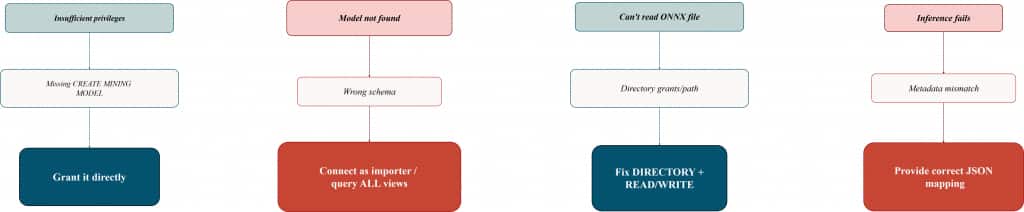
Common ADB roles/grants pitfalls (and fast fixes)
This section exists because most “ONNX import is broken” reports are actually “permissions and ownership are unclear.” The following pitfalls show up repeatedly in real ADB environments.
Pitfall 1: ORA “insufficient privileges” during model import
Symptom: import/load fails with an insufficient privileges error.
Root cause: the schema can’t create model objects.
Fix: grant explicitly:
GRANT CREATE MINING MODEL TO ml_user;Tip: When you’re troubleshooting, prefer explicit grants over “it’s in some role,” because role-enabled behavior can vary across tools and execution contexts.
Pitfall 2: The import worked, but the model “is missing”
Symptom: you imported DOC_MODEL, but USER_MINING_MODELS shows nothing.
Root cause: you’re connected as the wrong user (different schema than the importer).
Fast check:
SHOW USER;
SELECT model_name FROM user_mining_models;
Fix: connect as the schema owner that performed the import—or query broader views if you have privileges (ALL/DBA).
Pitfall 3: Directory-based import fails even though the file exists
Symptom: directory/path read errors.
Root cause: missing directory object, missing READ/WRITE, or directory points to a server path that isn’t accessible in that environment.
Fix checklist:
- directory exists and points to the correct path
ML_USERhasREAD(and oftenWRITE) on the directory- the ONNX file is present at that path (server-side)
Pitfall 4: Import succeeds, but inference fails
Symptom: VECTOR_EMBEDDING errors, returns unexpected output, or can’t bind input.
Root cause: metadata JSON doesn’t match the model signature (wrong input tensor name / wrong output name).
Fix: import with explicit JSON metadata and validate attributes:
SELECT model_name, attribute_name, attribute_type, data_type
FROM user_mining_model_attributes
WHERE model_name = 'DOC_MODEL'
ORDER BY attribute_name;
Pitfall 5: “It works in one tool but not in another”
Symptom: you can import or run inference in one client, but not in another.
Root cause: relying on privileges delivered via roles vs direct grants; differences in execution context can surface as “random” failures.
Fix: for the importing schema, grant the required privileges directly while validating the workflow, then tighten later.
Pitfall map (symptom → root cause → fix)
Conclusion
Thank you for reading, and we hope you found this useful!
Don’t forget to check out the companion notebook on our Oracle AI Developer Hub on GitHub.
Frequently Asked Questions
What are the steps to connect a database to a machine learning pipeline?
Use a simple flow: prepare data in SQL → export a portable model artifact (often ONNX) → import/register it in the database → run inference in SQL → persist and index results → automate refresh and versioning.
How can I keep my database and ML model data in sync?
Treat embeddings as derived data. Refresh vectors when rows change, and re-embed when you promote a new model version. Keep model/version metadata explicit so the refresh is deterministic.
How do I update my ML model with new data from the database?
In practice, it’s an iteration loop: collect new data → retrain → export to ONNX → import as a new model version → validate quickly → re-embed what needs refreshing.
What challenges arise when integrating large databases with ML?
Data movement and operational complexity. Running inference where the data lives and persisting results reduces network hops, simplifies governance, and improves repeatability.
What security concerns exist when linking databases to ML systems?
Least privilege and clear ownership. Restrict model import privileges, control directory/BLOB access, and keep inference within the database boundary when possible.
Do ONNX models become database objects?
Yes—after import they exist as schema-managed model objects and can be referenced from SQL.
Which privileges matter most?
CREATE MINING MODEL is the first one to confirm. For directory-based import, directory READ/WRITE grants are equally important.
Should I compute embeddings at query time or store them?
For experimentation, computing embeddings at query time is fine. For production reuse and indexing, persisting embeddings next to the source data is usually the practical choice—especially if you want hybrid search.
Hybrid search combines keyword search over the original text (exact matches, filters, structured predicates) with semantic similarity over embeddings (meaning-based matching). Keeping both the text and vectors in the same database makes it easy to blend the two signals in one query, which often yields better relevance than either keyword-only or vector-only retrieval.
A common pattern is: persist embeddings for your corpus, compute the query embedding at runtime, and use both for hybrid ranking. This is a key Oracle AI Database advantage: combining relational predicates, keyword/text search, and vector similarity in a single SQL query—without stitching together separate systems.
What’s the fastest end-to-end validation?
Run a single VECTOR_EMBEDDING smoke test and confirm the model appears in USER_MINING_MODELS.
Who does the “heavy lifting” for embeddings when the ONNX model runs in-database?
The computation happens inside Oracle AI Database, as part of the SQL execution. When you call VECTOR_EMBEDDING(...) (or invoke the imported model via SQL), the database runs the ONNX runtime and produces the embedding vector on the database side—no external model server is required for the inference step.
In practice, this means embeddings are computed where the data lives, and the results can be immediately stored, indexed, filtered, and combined with SQL predicates in the same workflow.