
Practical guide with a sample app for adding episodic, semantic, and procedural memory to an AI agent using Spring AI and a single Oracle AI Database instance.
This post shows how to build three types of persistent memory — episodic (chat history), semantic (domain knowledge via hybrid search), and procedural (tool calls) — using Spring AI and a single Oracle AI Database instance. Here’s the code: GitHub repo
Key Takeaways
- LLMs forget everything between sessions. Episodic, semantic, and procedural memory fix that — chat history, domain knowledge retrieval, and actionable tool calls, all persisted in the database.
- One database handles it all. Oracle AI Database stores chat history, runs hybrid vector search, and hosts the application tables — no need to bolt on a separate vector database or search engine.
- Hybrid search beats pure vector search. Combining dense embeddings with keyword matching (fused via Reciprocal Rank Fusion) means the agent finds documents by meaning and by exact terms like order IDs.
- Embeddings stay in the database. A loaded ONNX model computes embeddings on insert — no external embedding API calls, no extra infrastructure.
- Agent memory doesn’t have to be complicated. Two advisors, six tools backed by real database tables, one database, and the LLM stops forgetting.
Why This Matters
Every LLM has the same problem: it forgets everything the moment the conversation ends, sometimes even during long conversations. Spend twenty minutes explaining your project setup, your constraints, your preferences — and it nails the answer. Close the tab, open a new session, and it greets you like a stranger. All that context, gone.
If you want to build an AI agent — one that remembers context, understands your domain, and can take action — you need to give it memory. Practical memory: capturing what users say, retrieving learned facts and executing real workflows backed by database queries.
This post walks through a proof of concept that does exactly that. Three types of memory, one database, and minimal code.
What You’ll Learn
- How to implement episodic, semantic, and procedural memory for an AI agent using Spring AI advisors and
@Toolmethods - How to use Oracle AI Database Hybrid Vector Indexes (vector and keyword search fused with Reciprocal Rank Fusion) for semantic retrieval
- How to compute embeddings in-database with a loaded ONNX model — no external embedding API calls
- How to wire it all together with one database, one connection pool, and minimal configuration
Architecture Overview
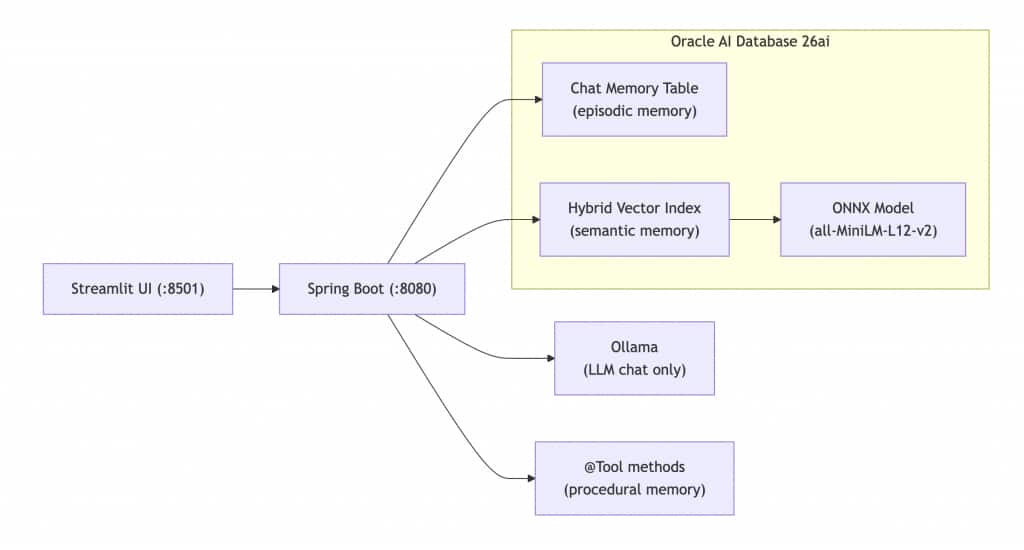
The agent runs on Spring Boot with Spring AI, with Ollama handling local chat inference (qwen2.5). Oracle AI Database 26ai stores all three memory types: a relational table for chat history (episodic), a hybrid vector index for domain knowledge retrieval (semantic), and application tables queried by @Tool methods (procedural). Embeddings are computed in-database by a loaded ONNX model (all-MiniLM-L12-v2), eliminating the need for external embedding API calls. A Streamlit frontend provides a simple web UI.
Both advisors and all six tools run on every request. The agent simultaneously remembers what you said, retrieves relevant knowledge, and executes tasks — all from a single Oracle Database instance. No second database. One connection pool, one set of credentials, one system to monitor.
Prerequisites
- Java 21
- Gradle 8.14
- Oracle AI Database 26ai (container or instance)
- Ollama with the
qwen2.5model pulled - Python 3.x with Streamlit (optional, for the web UI)
- The ONNX model file (
all_MiniLM_L12_v2.onnx) for in-database embeddings
Step-by-Step Guide
Step 1: Set Up the Oracle AI Database and Hybrid Vector Index
Start an Oracle AI Database instance, then run the one-time setup script to load the ONNX embedding model and create the hybrid vector index. This enables in-database embeddings and combined vector and keyword search.
-- Load the ONNX model for in-database embeddings
BEGIN
  DBMS_VECTOR.LOAD_ONNX_MODEL(
    directory  => 'DM_DUMP',
    file_name  => 'all_MiniLM_L12_v2.onnx',
    model_name => 'ALL_MINILM_L12_V2'
  );
END;
/

-- Create a hybrid index: vector similarity + Oracle Text keyword search
CREATE HYBRID VECTOR INDEX POLICY_HYBRID_IDX
ON POLICY_DOCS(content)
PARAMETERS('MODEL ALL_MINILM_L12_V2 VECTOR_IDXTYPE HNSW');
Once the index is created, embeddings are computed automatically on insert — no external embedding API calls required.
Step 2: Define Procedural Memory with @Tool Methods
Procedural memory is implemented as @Tool-annotated methods in a Spring component. These methods execute real database queries via JPA, which the LLM can call when it decides a task requires action, not just an answer. The @Tool description tells the LLM when to use each method, and @ToolParam defines the inputs.
@Tool(description = "Look up the status of a customer order by its order ID. " +
        "Returns the current status including shipping information.")
public String lookupOrderStatus(
        @ToolParam(description = "The order ID to look up, e.g. ORD-1001") String orderId) {
    // Fetches order from DB via JPA, returns formatted status string
}

@Tool(description = "Initiate a product return for a given order. " +
        "Validates the order exists, checks that it is in DELIVERED status, " +
        "and verifies the return is within the 30-day return window.")
public String initiateReturn(
        @ToolParam(description = "The order ID to return") String orderId,
        @ToolParam(description = "The reason for the return") String reason) {
    // Validates order exists, checks DELIVERED status and 30-day window, updates status via JPA
}
The full class has six tools: getCurrentDateTime, listOrders, lookupOrderStatus, initiateReturn, escalateToSupport, and listSupportTickets. The LLM decides when to act; the Java methods define how.
Step 3: Wire the Controller with Advisors and Tools
The controller builds a single ChatClient with two advisors and six tools. MessageChatMemoryAdvisor handles episodic memory by loading the last 100 messages for the current conversation from a relational table and persisting each new exchange. RetrievalAugmentationAdvisor, with a custom OracleHybridDocumentRetriever, handles semantic memory by calling DBMS_HYBRID_VECTOR.SEARCH to run vector and keyword search in parallel, fused with Reciprocal Rank Fusion (RRF). The tools are registered via .defaultTools(agentTools).
@RestController
@RequestMapping("/api/v1/agent")
public class AgentController {

    public AgentController(ChatClient.Builder builder,
                           JdbcChatMemoryRepository chatMemoryRepository,
                           JdbcTemplate jdbcTemplate,
                           AgentTools agentTools) {
        // Builds a ChatClient with:
        //   - MessageChatMemoryAdvisor (episodic: last 100 messages per conversation)
        //   - RetrievalAugmentationAdvisor + OracleHybridDocumentRetriever (semantic: hybrid search)
        //   - AgentTools via .defaultTools() (procedural: 6 @Tool methods)
        //   - System prompt defining the agent persona and tool usage rules
    }

    @PostMapping("/chat")
    public ResponseEntity<String> chat(
            @RequestBody String message,
            @RequestHeader("X-Conversation-Id") String conversationId) {
        // Sends message to ChatClient with conversation ID, returns LLM response
    }

    @PostMapping("/knowledge")
    public ResponseEntity<String> addKnowledge(@RequestBody String content) {
        // Inserts text into POLICY_DOCS table via JDBC (hybrid index handles embedding)
    }
}
All three memory types run on every request. The agent simultaneously remembers what you said, retrieves relevant knowledge, and executes tasks.
Step 4: Implement the Hybrid Document Retriever
The custom OracleHybridDocumentRetriever implements Spring AI’s DocumentRetriever interface and calls DBMS_HYBRID_VECTOR.SEARCH via JDBC. It passes a JSON parameter specifying the hybrid index, the RRF scorer, and a keyword match clause, bypassing OracleVectorStore entirely for retrieval.
Why hybrid instead of pure vector search? Dense embeddings capture meaning — a query about “return policy” can match documents about refunds and exchanges. But they’re weaker on exact terms: a query for “ORD-1001” performs poorly because embeddings encode semantics, not keywords. Hybrid search addresses both: the vector side captures meaning, the keyword side handles exact matches, and RRF merges the result sets by rank position.
Step 5: Run the Application
Start the Oracle DB container, install Ollama, pull the chat model, run the Spring Boot backend with the local profile, and optionally start the Streamlit UI.
Optionally, quick test with cURL:
curl -X POST http://localhost:8080/api/v1/agent/chat \
  -H "Content-Type: text/plain" \
  -H "X-Conversation-Id: test-1" \
  -d "What orders do I have?"
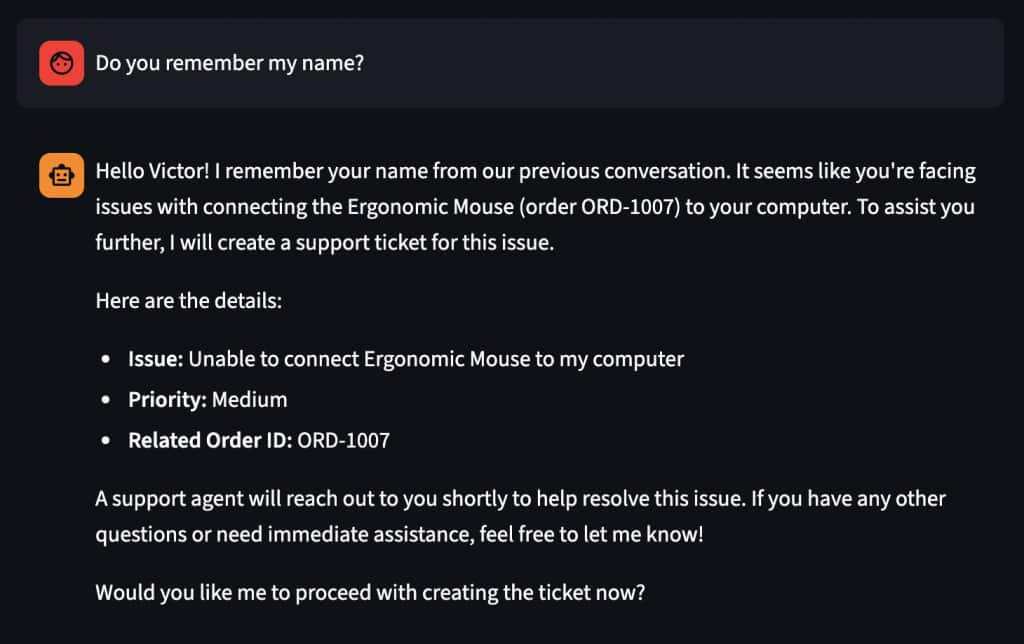
The agent will remember your name and details, or use procedural memory (the listOrders tool) to query the database and return the demo orders. Try “What is your return policy?” to see semantic memory (hybrid search over policy documents) in action. Then type “My name is Victor” followed later by “What’s my name?” to test episodic memory.
Frequently Asked Questions
Why does the agent need three types of memory instead of just chat history?
Chat history (episodic memory) only covers what was said in the conversation. Semantic memory lets the agent retrieve domain knowledge — like return policies or shipping rules — that was never mentioned in chat. Procedural memory lets it take actions, such as looking up an order or initiating a return, by calling tool methods backed by real database queries.
Why use hybrid search instead of plain vector similarity?
Pure vector search matches by meaning, which works well for natural-language questions but struggles with exact terms like product codes or order IDs. Hybrid search runs vector and keyword search in parallel and merges the results by rank position (Reciprocal Rank Fusion), so the agent finds relevant documents whether the match is semantic, lexical, or both.
Do I need a separate vector database to build this?
No. Oracle AI Database 26ai supports relational tables, hybrid vector indexes, and full-text search in a single instance. The POC uses one connection pool and one set of credentials for chat history, vector retrieval, and all application data.
How are the embeddings generated?
An ONNX model (all-MiniLM-L12-v2) is loaded directly into Oracle AI Database. Embeddings are computed automatically whenever a row is inserted into the indexed table — no external API calls and no separate embedding service required.
What are the limitations?
This is a proof of concept. There’s no authentication, no rate limiting, and no streaming responses. It demonstrates the architecture and approach — production use would require hardening those areas.
Next Steps
Author
- Victor Martin Alvarez – Senior Principal Product Manager, Oracle AI Database
Building AI-powered applications with Oracle AI Database and Spring AI.
LinkedIn