
An AI coding assistant may know SQL while still choosing the wrong Oracle API, installation path, or prerequisite sequence. Oracle Database Skills provide task-specific guidance that helps the assistant choose and validate an Oracle workflow.
This is article 1 of 8 in my Oracle AI Database Skills series.
Key Takeaways
- Generic SQL fluency is not Oracle readiness. Models trained on broad patterns make Oracle-specific mistakes — wrong date arithmetic, incorrect isolation semantics, hints that fight the optimizer — that only show up in production.
- Route before anything else.
db/SKILL.mdis a routing front door, not a documentation dump. It helps the assistant pick the next relevant Oracle skill file instead of improvising from pasted context. - Act only through bounded tool surfaces. SQLcl MCP (local) and the Autonomous Database managed MCP server expose small, named tools — the assistant gets a constrained set of capabilities, not a raw connection string.
- Trust follows from database-side evidence. Session tags, audit records, and MCP logs prove what happened; model confidence does not.
Most assistants can write SQL. That’s not the same as knowing Oracle Database. The difference shows up in production. A model that learned generic patterns can assume another vendor’s isolation semantics, borrow date arithmetic that silently miscounts in Oracle, rely on hints that “fix” one plan but fight the optimizer elsewhere, or forget Edition‑Based Redefinition (EBR) during a migration. Give that assistant a live connection and those differences turn into risk.
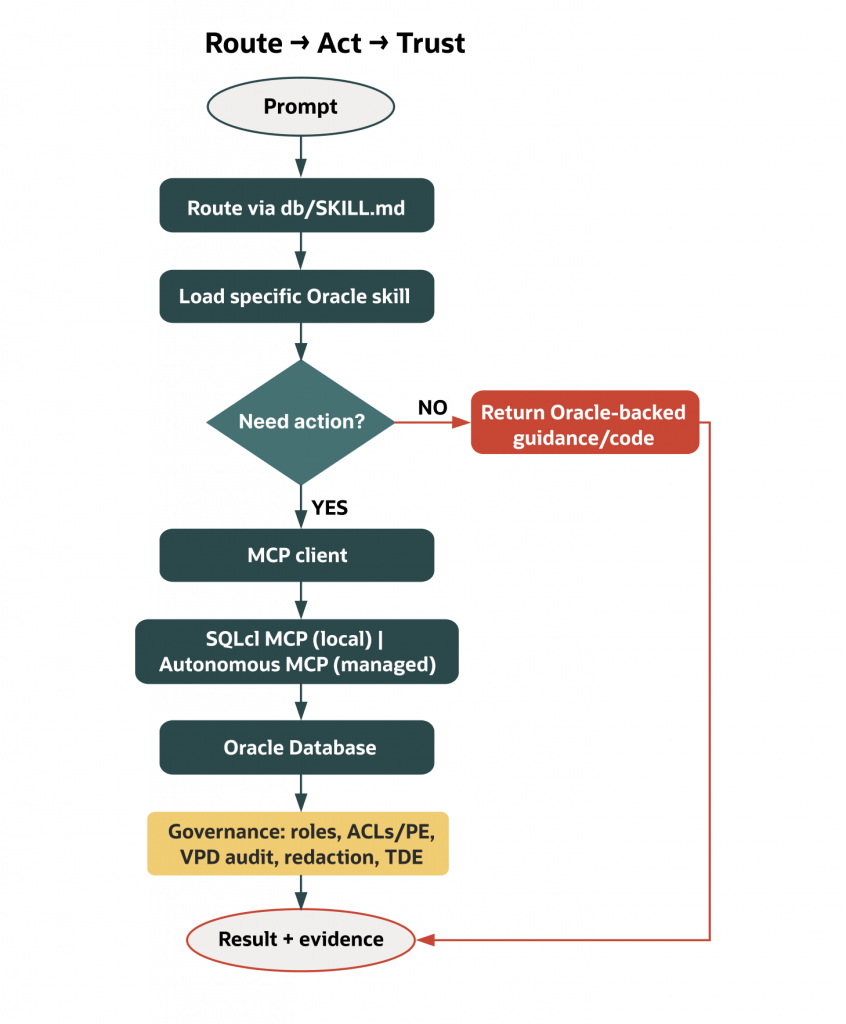
Oracle Database Skills change the operating model. Instead of hoping a generalist remembers every Oracle rule, you route it—one decision at a time—to Oracle‑authored, source‑backed instructions. When action is appropriate, you expose only small, named tools via Oracle MCP servers (MCP = Model Context Protocol), never a blank connection string. And you keep Oracle’s governance in the path so identity, scope, and evidence ride with every request. In short: route first, act through bounded tools, and let the database prove what happened.
Why generic SQL knowledge fails on Oracle Database
Large models generalize across vendors; your database does not. Oracle’s transaction semantics, time idioms, plan management, and governance are exactly where generic advice goes sideways.
- Isolation and consistency are different in Oracle. Many public answers treat isolation levels as dials that change write visibility. Oracle’s multi‑version read consistency gives readers a clean snapshot but doesn’t use the same language or behavior as those engines. Ask a generalist assistant to “make this serializable” and you can get a non‑Oracle explanation—or an irrelevant fix. See Oracle Database Concepts on consistent reads for details.
- Time math bites hard. DATE/TIMESTAMP/INTERVAL semantics and NLS/time zone interactions vary by vendor; Oracle requires vendor‑specific idioms. Skills provide tested patterns for Oracle SQL and PL/SQL so an assistant doesn’t have to guess which expression respects your NLS settings, time zones, and interval choices.
- Plan stability demands a different order of operations. Oracle recommends maintaining accurate optimizer statistics and using SQL Plan Management (baselines) for stability; avoid over‑reliance on ad‑hoc hints in application code. Skills teach that progression so the assistant recommends fixes that survive the next gather‑stats job.
- Governance cannot be an afterthought. “Connect and run” examples usually ignore Virtual Private Database (VPD), Unified Auditing, Fine‑Grained Auditing, Data Redaction, Transparent Data Encryption (TDE), and network ACLs/private endpoints. In Oracle, those are how you make AI access presentable to a DBA, a security reviewer, or an auditor. If you want to ship, keep those controls in the path.
Route first with Oracle Database Skills (progressive discovery)
The oracle/skills repository is not a doc dump. It’s installable operating instructions, loaded sparingly—one file at a time—so assistants (and humans) can make the next decision correctly without carrying 200 pages of context. The Database domain (oracle/skills/db) is organized the way you work: agent safety; features like Select AI, AI Profiles, and Vector Search; app frameworks; performance; DevOps and migrations; SQLcl; and security. The front door is a routing file: db/SKILL.md.
Progressive discovery narrows the model’s attention to what moves the work forward, preserves version truth, and leaves a clean review trail. Because the assistant reads only the next skill, it doesn’t mix versions or unrelated features. Skills mark Oracle Database 19c as the baseline and flag when you need Autonomous Database (Serverless) or Oracle Database 23ai/26ai features. Teams can see which Oracle sources the assistant consulted, in what order, and why.
A concrete path makes this real. Suppose you’re building retrieval‑augmented generation on Oracle. The route in db/SKILL.md steers you through Select AI profiles (to set provider and scope), then Vector Search basics (to choose the right data model and index), then DBMS_VECTOR (to make retrieval programmable). You don’t need AWR or EBR on day one. The route keeps you focused until you do.
Act through bounded tools: Oracle’s MCP surfaces
Sometimes the assistant must do more than explain. It needs to run a read‑only query, inspect a schema, or check a plan. That’s where Oracle’s MCP servers help: they expose small, named capabilities rather than hand the assistant a general‑purpose connection.
- Local development: SQLcl MCP server. Built into SQLcl, it exposes a concise set of named tools—for example, to list saved connections, connect using a saved connection, and run SQL—and supports configurable “restrict levels,” with higher numbers enforcing tighter limits. As of SQLcl 25.4, the MCP server defaults to restrict level 4 (most restrictive). Confirm your version and configuration. Teams can set the most restrictive mode for local experiments. SQLcl MCP can also leave evidence when configured: it can log activity (for example, to a
DBTOOLS$MCP_LOGtable), setV$SESSION.MODULEandV$SESSION.ACTIONto identifiable values (such as the MCP client and a client‑provided model/agent label), and tag LLM‑generated statements with a comment. See the SQLcl MCP docs linked below for version‑specific details. - Managed, governed execution: Autonomous Database (Serverless) MCP server. Enable it on a specific Autonomous Database (via an OCI free‑form tag) and you get a per‑database HTTP endpoint and authentication that serve built‑in tools or custom tools you define with
DBMS_CLOUD_AI_AGENT.CREATE_TOOL. Identity and roles apply as usual. So do network ACLs and private endpoints, VPD policies, and Unified Auditing and Fine‑Grained Auditing when configured. If your team wants a controlled tool surface without hosting anything, this is the right shape: the database remains the control plane for what tools exist and who can use them.
The shared property is restraint. In both cases, the assistant gets the minimum set of named actions appropriate for the task, and Oracle‑native controls keep doing their job.
Keep Oracle governance in the path (trust and evidence)
Oracle’s governance features aren’t an appendix; they are the safety net that lets you ship. Roles and least privilege define what an assistant can reach. Network ACLs and private endpoints restrict egress. VPD enforces row‑level policies you already rely on. Unified Auditing and Fine‑Grained Auditing can be configured to record the activity you care about. Data Redaction and TDE protect sensitive data at query time and at rest. These controls are available and can be configured; they are not enabled by default in every environment.
The benefit for AI work is simple once you see it: your proof is in the database. When actions go through SQLcl MCP or the Autonomous Database (Serverless) MCP server, the same identity, scoping, and auditing options that protect your applications also protect your assistant. The question becomes less “Can we trust the agent?” and more “Show me the database evidence.”
Mini demo: install skills and open the routing door
Begin without touching a database or setting up MCP. Fetch the Database Skills domain and open the routing file. From there, pick the path that matches your role and objective.
You only need internet access, Node.js installed, and a text editor. This step does not connect to a database, handle credentials or secrets, or change any MCP restrict levels.
npx skills add oracle/skills/dbThis installs the Database domain into your working directory. Open db/SKILL.md in your editor. If you’re an app developer wiring a Spring app, follow the frameworks route. If you’re an AI engineer, start with the agent and features routes (Select AI, AI Profiles, Vector) before you let any assistant write SQL. If you’re a DBA, begin with performance and security so the assistant speaks AWR/ASH/optimizer and respects governance. Keep the habit: load only the next file you need, then stop. That discipline keeps model context clean and your review surface small.
Where to find this in Oracle docs and repos
The instruction layer is the skills repo itself, with db/SKILL.md acting as the router. The controlled action layer is documented for both entry points: SQLcl MCP (restrict levels, tool catalog examples, saved connections, monitoring, activity logging and tagging) and the Autonomous Database (Serverless) MCP server (enablement via OCI free‑form tag, per‑database endpoint and authentication, custom tool publication, and governance integration). The trust layer is the familiar security stack: roles and privileges; network ACLs and private endpoints; VPD; Unified Auditing and Fine‑Grained Auditing when configured; Data Redaction; encryption. Each is a first‑class Oracle feature you can point to in docs and verify in your environment.
Source links:
- Skills repo and routing (start at db/SKILL.md)
- SQLcl MCP (using the server; logging/tagging; restrict levels)
- Autonomous Database (Serverless) MCP server (enable and use)
- Oracle Database Concepts — Consistent Reads/MVRC
- Oracle SQL Language Reference — Data Types (DATE/TIMESTAMP/INTERVAL and NLS)
- Optimizer statistics and SQL Plan Management
- Oracle Database Security Guide (19c baseline)
Version scope and environment notes
Most skills target Oracle Database 19c as the baseline. Files that require features from Autonomous Database (Serverless) or newer Oracle Database 23ai/26ai releases—such as Select AI, AI Profiles, Vector Search, or the Autonomous Database (Serverless) MCP server—are labeled in the repo. If you work in a mixed‑version estate, treat those labels as gates and route accordingly. For hands‑on tries in this opener, you need only a local machine with git and a text editor. MCP client steps and database connectivity come later, when action is appropriate.
What’s out of scope (in this opener)
- Enabling or configuring the Autonomous Database (Serverless) MCP server
- Connecting to any database or handling credentials
- Changing SQLcl MCP restrict levels
- Configuring Unified Auditing or Fine‑Grained Auditing
- Demonstrating Select AI or Vector Search live
A short story from the field
A team asked an assistant to “optimize a daily sales query.” The first answer added an index and a couple of hints that looked fine in isolation. The skills route would have sent it somewhere else: read the explain-plan and optimizer-stats files first; check cardinalities and stale stats; consider a plan baseline if volatility is the real problem. That path took longer but avoided chasing a hint that didn’t survive the next gather‑stats job. The difference wasn’t model IQ—it was having Oracle‑specific operating instructions and the habit of loading only what came next.
Where this series goes from here
Everything you need to begin is in your editor: the skills repo, the routing file, and the mental model—route, act, trust. We’ll build outward from that front door, showing how local and managed MCP surfaces work when action is warranted, and how Select AI and Vector Search improve reasoning close to your data. Expect short, source‑backed posts that follow the same grammar:
- Route: pick a path in
db/SKILL.mdfor your role and task. - Act: use SQLcl MCP locally or the Autonomous Database (Serverless) MCP server when you need controlled actions.
- Guardrail: keep roles, ACLs/private endpoints, VPD, and auditing in‑path for evidence and scope.
The eight posts are organized into four groups:
| Group | Posts | Focus |
| Foundation | 1 — this post; 2 — Route, Don’t Flood | Mental model and `db/SKILL.md` as routing layer |
| Action | 3 — SQLcl MCP; 4 — Managed MCP in Autonomous AI Database | Local and remote bounded action surfaces |
| Intelligence | 5 — Select AI and AI Profiles; 6 — Vector‑Native RAG | NL2SQL reasoning quality and in‑database retrieval |
| Rollout | 7 — Agent‑Safe Change Delivery; 8 — The Trust Layer | Safe change workflows and enterprise governance |
Conclusion: a safer default for Oracle‑backed AI
If your assistant can touch Oracle Database, “just let it connect” isn’t an acceptable plan. Put the skills repo between the model and the problem so it learns to work the Oracle way. When execution is appropriate, send it through SQLcl MCP or the Autonomous Database (Serverless) MCP server so actions are small, named, and governed. Keep Oracle’s controls—roles, ACLs, VPD, auditing, redaction, encryption—in the path so every action is scoped and traceable.
What should a skill make explicit?
State when to choose the workflow, which versions and privileges it assumes, which actions change state, and what result confirms success. Test a generic developer request before and after supplying the skill. Count correct API selection and a clean completed task, not just whether the assistant repeats Oracle terminology.
Continue the implementation: Route, Don’t Flood: Using db/SKILL.md to Steer Oracle‑Aware Assistants. Use the validation described above as the acceptance check for your next step.