
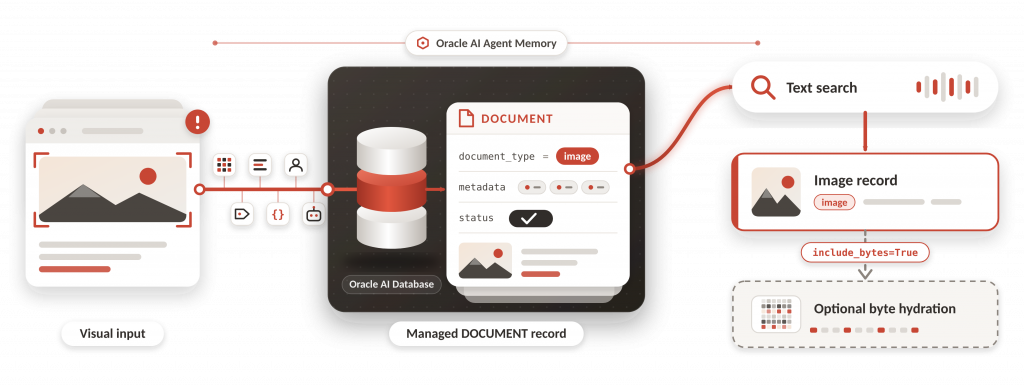
Oracle AI Agent Memory 26.8 expands persistent agent memory beyond text, making visual context part of the memory layer for enterprise agents. Applications can store images as durable document records, attach images to messages, search image records through descriptions or captions, and request raw bytes only when they explicitly need to render, inspect, or forward the original image.
This article focuses on the image-aware memory path: how visual evidence enters memory, how it is persisted in Oracle AI Database, how descriptions and captions make images searchable, why normal retrieval stays lightweight by omitting raw bytes, and how applications can explicitly hydrate image bytes when the workflow requires them.
Companion notebook: Image-Aware AI Agent Memory
Key Takeaways
- Oracle AI Agent Memory 26.8 can persist visual evidence as image records in the managed DOCUMENT table.
- Images can be standalone records or part of ordered MESSAGE content with text and image parts.
- Image search is text-based: descriptions or captions are the searchable representation.
- Default readback omits raw bytes. This is expected and is a core enterprise behavior.
- Applications hydrate bytes explicitly with include_bytes=True when they need to render or forward the original image.
- The companion notebook demonstrates the image path end to end with a generated support-evidence screenshot.
| Release capability | What changed | Why it matters |
| Image DOCUMENT records | Images can be persisted in the managed memory schema with bytes, MIME type, description, metadata, and status. | Agents can preserve visual evidence as durable context. |
| Message image parts | MESSAGE content can include ordered text and image parts. | A user message can retain the screenshot or visual artifact that accompanied it. |
| Text-based image retrieval | Search uses descriptions or captions associated with the image. | Developers can retrieve relevant visual evidence using natural language. |
| Default byte omission | Raw bytes are not returned unless requested. | Normal retrieval stays lighter and avoids unintentionally moving binary data through agent context. |
| Explicit byte hydration | Applications request raw bytes with include_bytes=True. | The original image remains available for display, forwarding, or audit workflows. |
| Runtime validation | The package validates images before persistence or model processing. | Applications get a safer image ingestion path with configurable limits. |
Why Image-Aware Memory Matters
Persistent memory makes agents useful across turns and sessions, but many enterprise workflows are not text-only. A customer may attach a screenshot showing an error state. A field technician may upload a product image. A finance workflow may include a receipt. If the memory layer only stores text, the agent can lose visual evidence that may be important for a later decision. For example, a later support turn may refer back to a previously observed error state, but without the original visual context the agent may no longer have the evidence needed to interpret that reference correctly.
Image-aware memory addresses that gap by turning visual evidence into durable context. The important design choice is that the system does not need to return raw bytes in every retrieval. It can store bytes in the database, search through a text representation, and hydrate bytes only when an application explicitly asks.
How Image-Aware Memory Works
The feature is easiest to understand as four layers: image input, document persistence, searchable representation, and controlled readback.
| Layer | Technical behavior | Notebook proof |
| Input | The application supplies bytes, MIME type, description, metadata, and scope. | The notebook generates a PNG and passes image_bytes to add_image_async. |
| Persistence | The managed schema stores the image as a DOCUMENT row with document_type=image. | The SQL inspection reads IMGDEMO268_DOCUMENT and checks DBMS_LOB.GETLENGTH(blob). |
| Search | The description or caption becomes the text representation used by image search. | search_async(record_types=[‘image’]) returns the current image. |
| Readback | Default readback omits bytes; explicit hydration returns bytes. | include_bytes=False shows bytes=None; include_bytes=True returns a byte summary. |
Database Setup and Runtime Requirements
The companion notebook uses environment variables or Colab secrets for database credentials, so the same code can run against Autonomous AI Database, or another Oracle AI Database environment. Before opening a connection pool, it also sets a Developer Hub program identifier through python-oracledb so database sessions can be attributed to this sample.
import oracledb

oracledb.defaults.program = "devrel-developerhub-image-aware-agent-memory"
Initialize the Managed Memory Store
Image-aware memory uses the same managed store pattern as other Agent Memory workflows. The notebook makes the schema policy visible so developers understand whether the store can create managed objects or must reuse an existing schema. For a tutorial, CREATE_IF_NECESSARY is convenient when the database user can create objects. For production startup, REQUIRE_EXISTING is safer because schema changes should be deliberate.
schema_policy = (
    SchemaPolicy.REQUIRE_EXISTING
    if MANAGED_SCHEMA_EXISTS
    else SchemaPolicy.CREATE_IF_NECESSARY
)

store = OracleDBMemoryStore(
    pool=db_pool,
    embedder=embedder,
    memory_store_id=CONFIG["MEMORY_STORE_ID"],
    schema_policy=schema_policy,
    search_strategy=SearchStrategy.VECTOR,
    vector_dim=CONFIG["MEMORY_EMBEDDING_DIMENSION"],
)
Generate a Synthetic Support Evidence Image
The notebook creates its own image instead of loading a customer screenshot. This keeps the sample reproducible and safe to publish. The image simulates a support case: checkout timeout spikes, severity, region, and a recommended next step. It is the visual input for the rest of the workflow, not an AI-generated answer.
Store a Standalone Image Record
The first image write stores the generated screenshot as a standalone image record. It is scoped by user_id and agent_id, but it is not attached to a thread. That separation is intentional: the notebook first demonstrates standalone image memory, then later demonstrates message-attached image content.
stored_image_id = await memory.add_image_async(
    image=image_bytes,
    description=image_description,
    mime_type=ImageMimeType.PNG,
    image_id=DEMO_CONFIG["image_id"],
    user_id=DEMO_CONFIG["user_id"],
    agent_id=DEMO_CONFIG["agent_id"],
    metadata={
        "demo": "image-aware-memory",
        "case_id": DEMO_CONFIG["case_id"],
        "image_id": DEMO_CONFIG["image_id"],
        "region": DEMO_CONFIG["region"],
        "severity": DEMO_CONFIG["severity"],
    },
)
Inspect the DOCUMENT Row
To verify that the image was persisted successfully, the notebook queries the managed DOCUMENT table using the stored record ID. It checks that document_type is image and uses DBMS_LOB.GETLENGTH(blob) to confirm that the image bytes are stored in Oracle AI Database.
SELECT
    record_id,
    document_type,
    description,
    DBMS_LOB.GETLENGTH(blob) AS byte_length,
    status,
    JSON_SERIALIZE(metadata RETURNING VARCHAR2(4000)) AS metadata_json
FROM IMGDEMO268_DOCUMENT
WHERE record_id = :record_id
Search Image Records Through Text
Image search in Oracle AI Agent Memory is based on textual descriptions or captions associated with stored images, rather than direct pixel-level similarity. These descriptions are indexed and used to retrieve relevant image records through natural-language queries.
image_results = await memory.search_async(
    query="Which image evidence shows checkout timeout spikes in eu-frankfurt-1?",
    record_types=["image"],
    user_id=DEMO_CONFIG["user_id"],
    agent_id=DEMO_CONFIG["agent_id"],
    metadata_filter={"image_id": stored_image_id},
    max_results=5,
)
The metadata_filter keeps repeated notebook runs clean. Without it, older demo images in the same memory store could also match the query. The expected output is matched_current_demo_image=True.
Default Readback Omits Raw Bytes
By default, image readback returns the record information without loading the original image bytes. This allows applications to access image descriptions and metadata without transferring the binary payload. In the notebook, bytes=None confirms that the image bytes were omitted from the response, while the original image remains stored in Oracle AI Database.
images_without_bytes = await memory.list_images_async(
    image_id=stored_image_id,
    user_id=DEMO_CONFIG["user_id"],
    agent_id=DEMO_CONFIG["agent_id"],
    include_bytes=False,
) 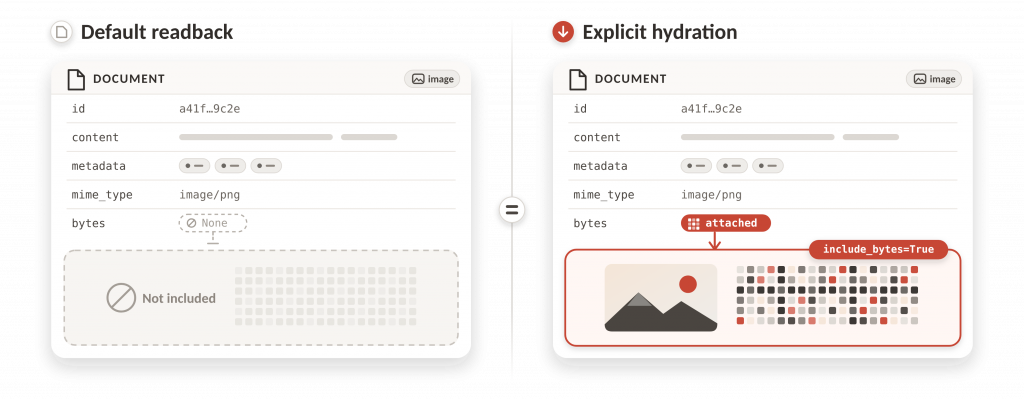
This behavior is especially important for enterprise applications. By omitting raw image bytes from default search and readback, image-aware memory keeps results smaller and faster, reduces the risk of sending raw image data where it is not needed, and gives applications clearer control over when the original image is displayed, forwarded, or inspected.
It also separates searchable context, such as descriptions, captions, metadata, and identifiers, from the binary image payload, so developers can use visual evidence in memory without moving large or sensitive image bytes through every retrieval path.
Hydrate Bytes Explicitly
When an application needs to display or forward the original image, it asks for bytes explicitly. The notebook calls include_bytes=True and prints a short byte summary rather than dumping binary data into the notebook.
images_with_bytes = await memory.list_images_async(
    image_id=stored_image_id,
    user_id=DEMO_CONFIG["user_id"],
    agent_id=DEMO_CONFIG["agent_id"],
    include_bytes=True,
)
Attach Image Evidence to a Message
The second image path attaches the visual evidence to a message. This demonstrates ordered multimodal MESSAGE content. The user message contains a text content part followed by an image content part, and the notebook verifies that the image is persisted as a DOCUMENT row linked to message_id. Preserving that order matters because it keeps the relationship between the user’s text and the visual evidence as it appeared in the original conversation turn.
message_content = [
    TextContent(
        text=f"Customer attached visual evidence for {DEMO_CONFIG['scenario']}."
    )._to_dict(),
    ImageContent(
        bytes=image_bytes,
        mime_type=ImageMimeType.PNG,
        description=image_description,
    )._to_dict(),
]

message_ids = await thread.add_messages_async(
    [{"role": "user", "content": message_content}]
)
The expected verification output is submitted_text_parts=1, submitted_image_parts=1, and stored_image_documents=1. That is the concrete proof that a multimodal message can preserve image evidence.
| Notebook output | Technical interpretation | Why it matters |
| document_type = image | The managed schema stored an image record. | The visual input is represented as durable memory. |
| byte_length > 0 | The image blob was persisted. | The image is not only a local notebook file. |
| bytes = None | Default image readback omitted bytes. | Normal retrieval avoids raw binary payloads. |
| matched_current_demo_image = True | Search returned the image generated in the current run. | The description-based image retrieval path works. |
| <bytes omitted: …> | Explicit hydration returned a byte field. | The original image can be retrieved when needed. |
| stored_image_documents = 1 | An image row is linked to the message_id. | Multimodal message persistence works end to end. |
What the Notebook Demonstrates
The companion notebook demonstrates the image-aware memory path end to end with a synthetic support evidence image that is generated inside the notebook. It shows how a developer can create visual evidence, persist it as a managed image record, inspect the database-backed DOCUMENT row, search for the image through text, keep default retrieval lightweight, and hydrate bytes only when the application needs to render or forward the image.
The notebook is intentionally focused on the stable public workflow for image-aware memory: storage, metadata, search, default byte omission, explicit byte hydration, and multimodal message persistence.
- Install and verify oracleagentmemory 26.8.
- Connect to Oracle AI Database through the same credential pattern used by the other notebooks in the series.
- Initialize or upgrade the managed memory schema with an explicit SchemaPolicy.
- Generate a synthetic support evidence image without embedding customer data.
- Store the image as a managed image record with description and metadata.
- Verify that the image is persisted in DOCUMENT and has database-backed bytes.
- Search for the image through semantic text over the description or caption.
- Show that raw bytes are omitted from normal readback by default.
- Hydrate bytes explicitly when the application needs the image payload.
- Attach image evidence to a multimodal message so text and image parts keep their conversation order.
Enterprise-Ready Image Memory Pattern
The image-aware path is useful because it separates three concerns that enterprise applications usually need to control independently: durable image persistence, searchable textual representation, and raw byte access. The package keeps the image in Oracle Database, lets descriptions and captions participate in retrieval, and avoids moving image bytes through ordinary search results unless the caller requests them.
That pattern makes image memory practical for support automation, operations workflows, document-heavy business processes, and agent copilots that need to remember visual evidence without turning every retrieval call into a large binary payload. Developers can scope image records with user, agent, case, tenant, or workflow metadata. These scopes help narrow retrieval, but they do not replace authorization checks; applications should enforce who is allowed to write, search, or hydrate the original image.
- Persist images as managed DOCUMENT records instead of relying on local files or temporary upload state.
- Use descriptions or captions as the searchable representation for image records.
- Use metadata to keep image memory scoped to the right user, agent, case, tenant, or workflow.
- Keep normal retrieval lightweight by omitting raw bytes by default.
- Hydrate bytes explicitly when the application needs to display, forward, or inspect the original image.
- Attach images to messages when the visual evidence belongs to a specific conversation turn.
Conclusion
Image-aware memory gives developers a practical pattern for visual context in enterprise agents. The package makes images durable in Oracle AI Database, keeps the searchable representation text-based through descriptions or captions, and keeps raw bytes out of default retrieval paths. That combination is important because real agent applications need visual evidence to be remembered without making every memory read heavy, unsafe, or difficult to govern.
The companion notebook proves the core workflow with a repeatable support evidence scenario. It creates an image, stores it as an image memory record, verifies database persistence, retrieves the record through semantic text, confirms that normal reads do not hydrate bytes, explicitly hydrates bytes when needed, and attaches image evidence to an ordered multimodal message. Each step maps to behavior that an application developer can reuse in a production workflow.
For teams building support agents, operations copilots, workflow assistants, or case management systems, this means screenshots, forms, receipts, product photos, and other visual artifacts can become part of long-lived agent memory. The agent can search and reason from the textual representation of the visual context, while the application remains in control of when the original image payload is fetched and shown.
The release moves Oracle AI Agent Memory beyond text-only memory toward richer enterprise context. Graph-aware retrieval captures how facts evolve across time; image-aware memory captures visual evidence that often explains why a fact matters. Together, these capabilities help developers build agents that remember not only what users said, but also the evidence, state, and history behind the work.
Frequently Asked Questions
Can images be attached to agent messages?
Yes. Image-aware memory supports multimodal message content, so a message can include ordered text and image parts. This is useful when the image is part of the conversation context, such as a support screenshot, form, receipt, or product photo.
Where are image bytes stored?
Image bytes are persisted as managed document records in Oracle AI Database. The application can search and inspect image metadata or descriptions without returning the raw bytes in every result.
What makes an image searchable?
The searchable representation comes from text associated with the image, such as a caller-provided description or a generated caption. This lets agents retrieve visual evidence through semantic text queries.
Does image search compare raw pixels?
No. The notebook demonstrates text-based search through image descriptions or captions.
Why does bytes show as None?
Because raw bytes are intentionally omitted from default readback. This keeps normal retrieval results smaller and avoids moving image payloads unless the application explicitly asks for them.
When should include_bytes=True be used?
Use include_bytes=True only when the application needs to render, forward, or inspect the original image and the caller is authorized to access it.
Why omit raw image bytes by default?
Omitting bytes keeps retrieval results smaller, faster, and easier to govern. Applications can explicitly hydrate bytes only when they need the original image payload.
Can image-aware memory work with generated captions or extraction?
Yes. Image descriptions can be caller-provided or produced by an application workflow that uses a vision-capable model. The notebook keeps the runnable path focused on stable image storage, search, default byte omission, explicit hydration, and multimodal message persistence.