
Move agent teams across schemas and environments
using Open Agent Specification JSON or canonical PL/SQL definitions
A repeatable release process can help move an agent team through development, test, and production without manually rebuilding its portable definition. When you migrate a team from one schema to another, you need a release process that carries the reusable definition forward while keeping target-environment security controls in place.
Oracle Select AI Agent Framework provides two complementary export approaches. You can package a team using Open Agent Specification (Agent Spec), a JSON representation designed for agent interchange or retrieve canonical PL/SQL with GET_DEFINITION. Both approaches support repeatable migrations; the right choice depends on how you store, review, and deploy database artifacts.
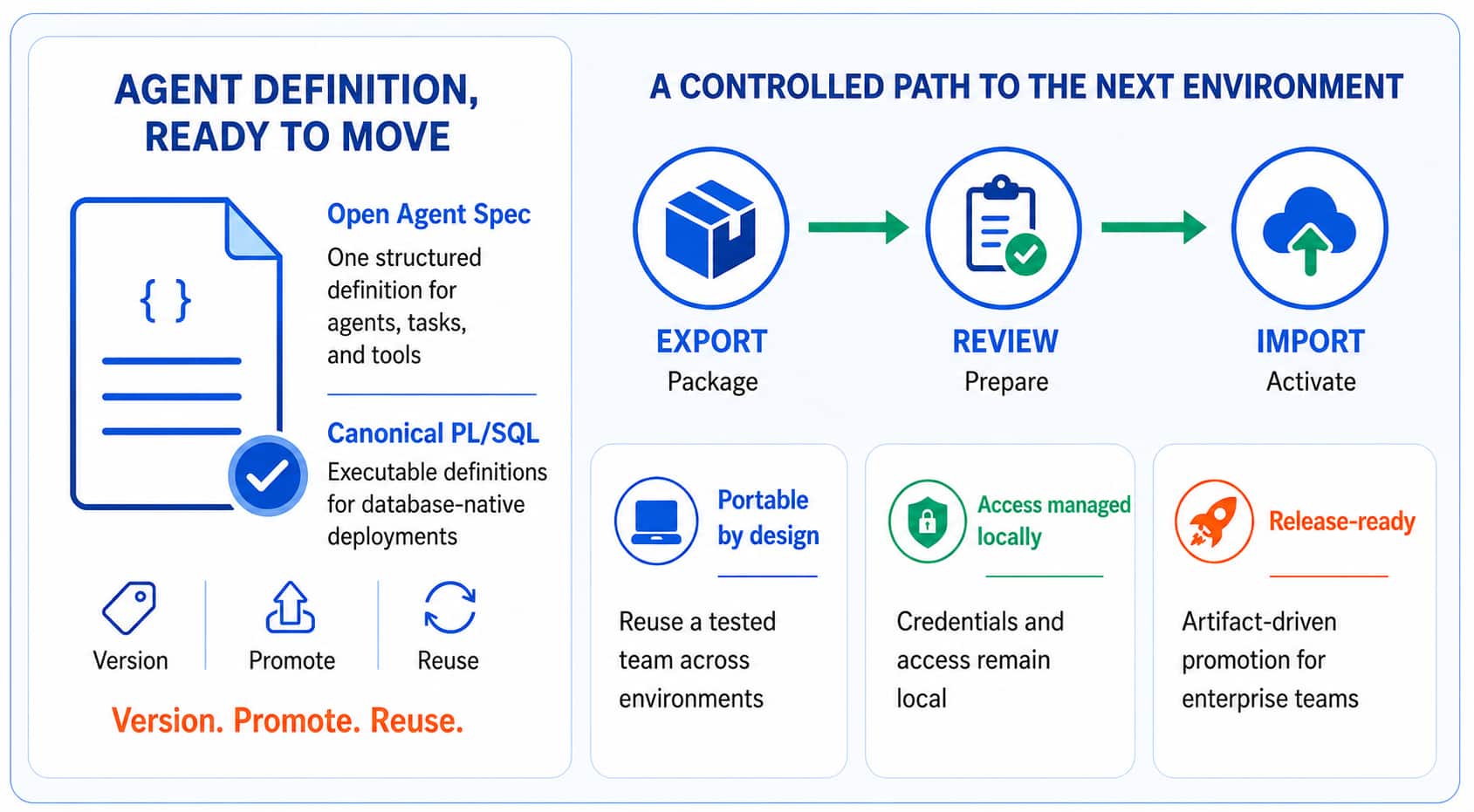
Figure 1. Agent team migration moves portable definitions through a release bundle while target controls remain local.
Migration is a release process, not a copy operation
An Oracle Select AI agent team brings together agents, tasks, tools, AI profiles, and sometimes custom PL/SQL. A repeatable migration process identifies the complete migration boundary, versions the portable pieces, prepares the target controls, and validates the recreated team.
This approach applies whether the schemas are in the same Oracle AI Database, in separate Oracle AI Database environments, or across development, test, and production stages. The important boundary is the schema and its environment-specific controls.
What moves and what remains local
Portable definitions are release artifacts. Secrets, privileges, and network policy are target-environment responsibilities. This separation helps preserve target-environment security controls by keeping secrets, privileges, and network policy outside the portable release artifact.
| Portable release artifacts | Create or bind in the target schema |
| Agent team definitions (JSON or PL/SQL) AI profile definitions Custom PL/SQL tool code Deployment manifests and test assets | Credential secret values Network ACLs and privileges Environment-specific endpoints Target data-access policy |
Two export approaches for the same migration goal
Start with the outcome you need. Oracle Select AI Agent Framework can export an agent team using the Open Agent Specification representation, while GET_DEFINITION APIs return canonical executable PL/SQL for supported objects. Both capture user-facing configuration; neither exports credential secret values, passwords, tokens, private keys, or network privileges.
- Choose Agent Spec when you need a JSON artifact for interchange, cataloging, or DBMS_CLOUD_AI_AGENT.IMPORT_TEAM.
- Choose GET_DEFINITION when your release process is built around executable database scripts. The generated PL/SQL can enter the same GitHub repository, pull-request review, comparison, and deployment process as your other schema changes.
- Use both when it helps: keep a JSON interchange artifact and retain canonical PL/SQL as the deployable record for a controlled database release.
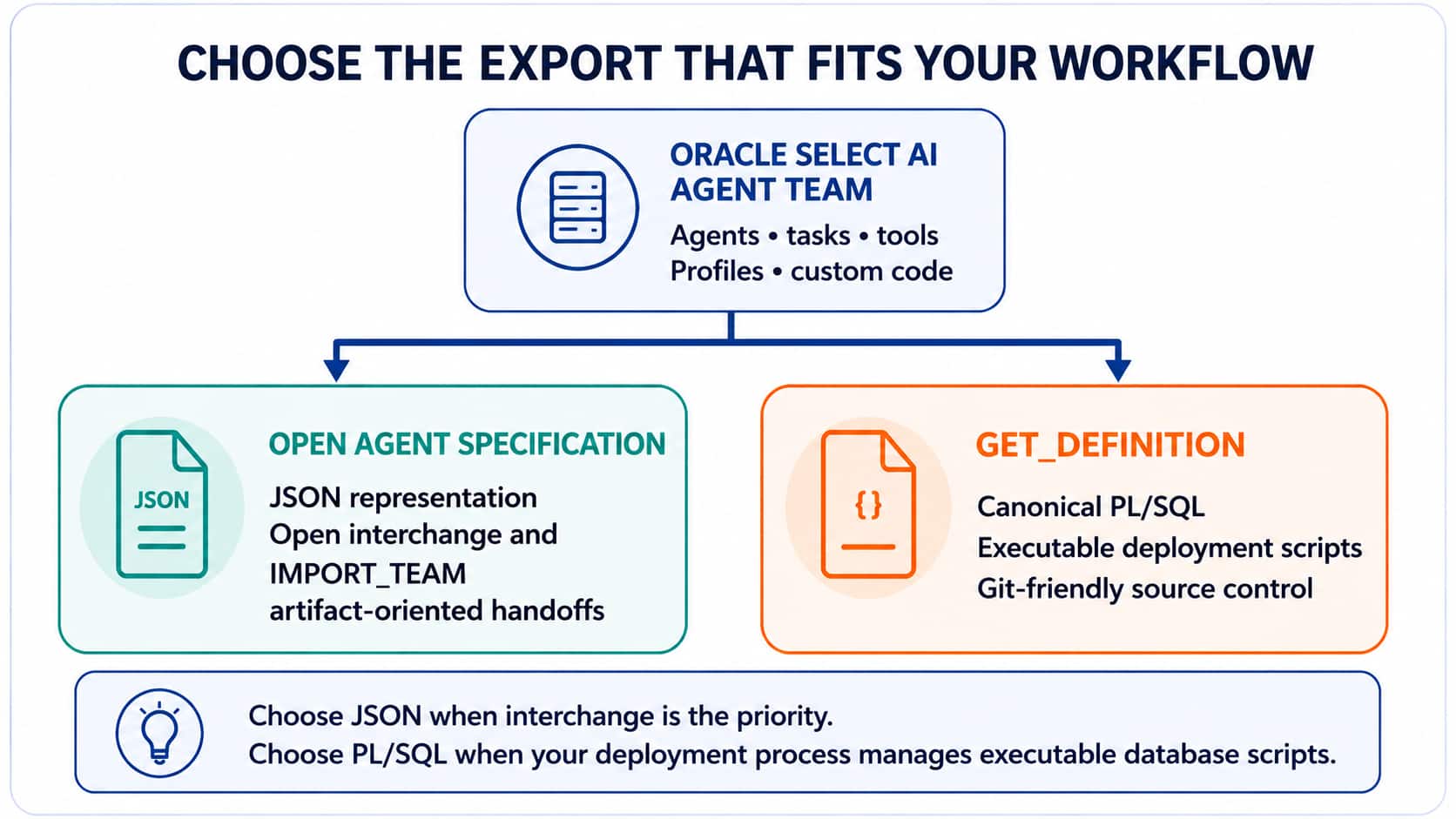
Figure 2. Choose JSON for open interchange or PL/SQL for executable, source-controlled database deployments.
Discover the migration boundary with reusable views
Before exporting, identify the profiles, credentials, tool functions, and network access that the team uses. The companion script oracle_select_ai_migration_helper_views.sql creates views that conveniently expose these relationships. Run the script in the source schema, then use concise inventory queries such as these.
Inventory the team with these companion views:
SELECT DISTINCT profile_name
  FROM v_agent_team_ai_profiles
 WHERE agent_team_name = 'RETURNAGENCY';
SELECT DISTINCT credential_name, credential_source
FROM v_agent_team_credentials
WHERE agent_team_name = 'RETURNAGENCY';SELECT DISTINCT function_name
FROM v_agent_team_tool_functions
WHERE agent_team_name = 'RETURNAGENCY';SELECT host, privilege
FROM v_migration_network_acls;The views identify names and references only. Create the target credentials with fresh secret values and apply the required network ACLs and privileges according to the target environment policy.
Export as an Open Agent Specification JSON artifact
DBMS_CLOUD_AI_AGENT.EXPORT_TEAM returns the Open Agent Specification as a CLOB or writes it to object storage or a database directory. The exported specification could also be versioned in a Git repository using the DBMS_CLOUD_REPO package. This approach is useful when the definition must travel as a JSON document or when a compatible system will consume the specification.
-- Return the Open Agent Specification as JSON
DECLARE
  l_team_spec CLOB;
BEGIN
  l_team_spec := DBMS_CLOUD_AI_AGENT.EXPORT_TEAM(team_name => 'RETURNAGENCY');
  -- Store l_team_spec in your approved artifact repository.
END;
Store the JSON alongside the AI profile definition and custom PL/SQL tool code that your team requires. The JSON artifact describes the team; it does not carry the target credentials, ACLs, or secret material needed to operate it.
Export canonical PL/SQL with GET_DEFINITION
GET_DEFINITION reconstructs a canonical public definition using the corresponding create APIs. For a team, DBMS_CLOUD_AI_AGENT.GET_DEFINITION can include dependent agents, tasks, and tools. For a profile, DBMS_CLOUD_AI.GET_DEFINITION produces the CREATE_PROFILE block. Capture the returned CLOBs as .sql files and include them in your current software configuration management process.
-- Export a team and its dependent agent objects as PL/SQL
SELECT DBMS_CLOUD_AI_AGENT.GET_DEFINITION(
         object_type => 'TEAM',
         object_name => 'RETURNAGENCY',
         params      => '{"dependent_objects": true}'
       ) AS team_definition
  FROM dual;
-- Export the associated Oracle Select AI profile
SELECT DBMS_CLOUD_AI.GET_DEFINITION(
object_type => 'PROFILE',
object_name => 'GENAI'
) AS profile_definition
FROM dual;Canonical output can normalize formatting and value representation. Treat it as an executable source artifact: review it, version it in GitHub or your preferred repository, and promote it through the same approval controls as other PL/SQL and schema changes.
Prepare the target schema
Create or validate the target prerequisites before you recreate the team. This normally includes the required credentials, network ACLs, privileges, AI profiles, and custom PL/SQL tool functions. When a team calls an external provider or object storage, bind the target credential name and target endpoint according to that environment’s policy.
- Create credentials in the target schema with target-specific secret values; do not move source secrets.
- Grant only the network ACLs and database privileges needed by the target deployment.
- Deploy custom tool functions, packages, and any data-access prerequisites before recreating a tool that references them.
- Review object names so the target schema resolves profiles, tools, tasks, and team members as expected.
Recreate the team in the target schema
The final recreation step follows the export format you chose. For an Agent Spec, use IMPORT_TEAM after the target profile and dependencies are ready. For GET_DEFINITION, run the reviewed PL/SQL blocks through your normal database deployment tool. If a generated definition references custom code, credentials, or ACLs outside its scope, create those target prerequisites first.
-- Import a reviewed Open Agent Specification
BEGIN
  DBMS_CLOUD_AI_AGENT.IMPORT_TEAM(
    profile_name  => 'GENAI',
    team_name     => 'RETURNAGENCY',
    specification => l_team_spec,
    force         => TRUE
  );
END;
After recreation, run focused validation: confirm that the team, agents, tasks, tools, and profile references exist; test the tool functions; and exercise the team with a representative request. Keep the release artifact and validation evidence together so you can reproduce the migration later.
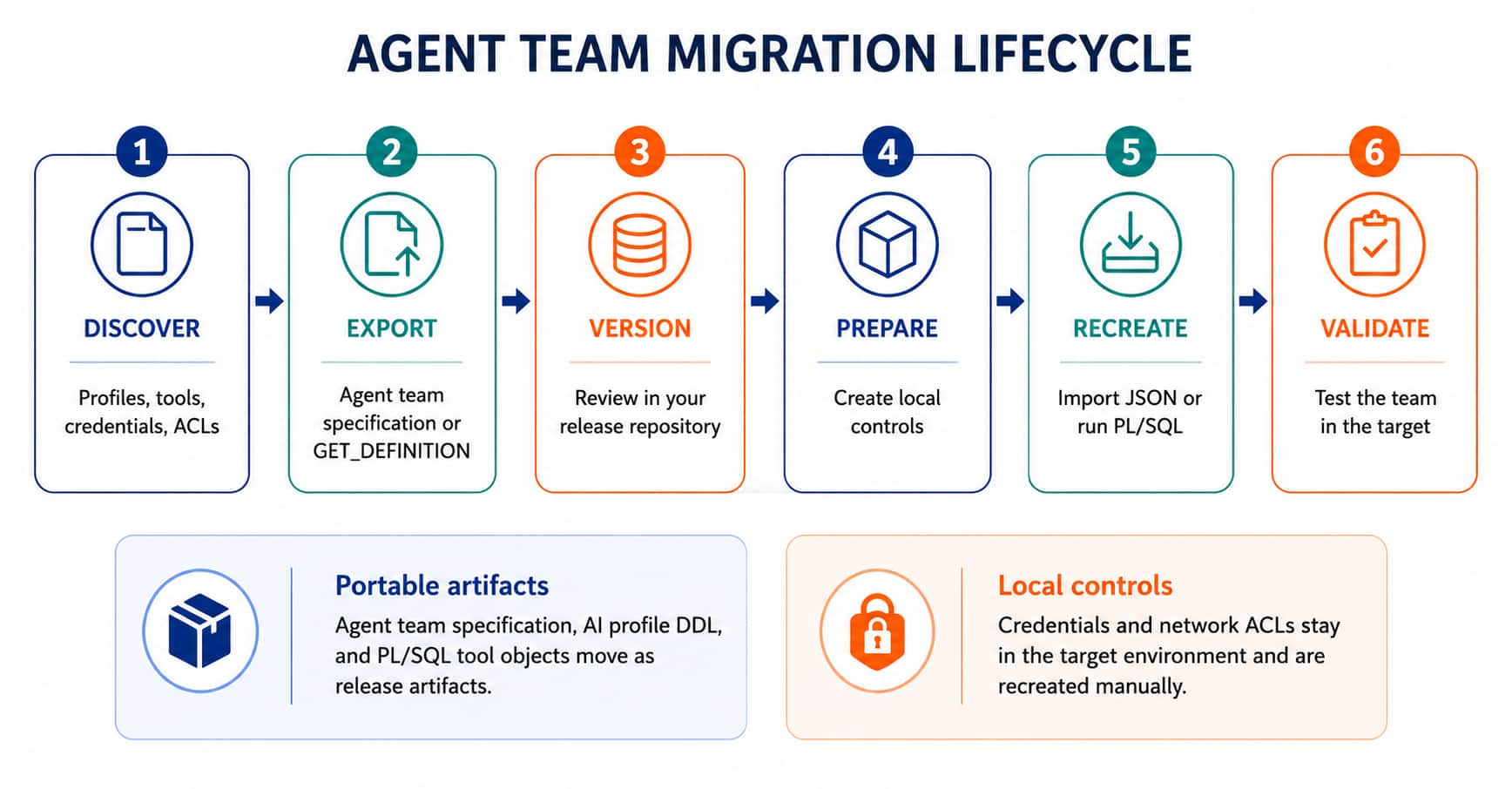
Figure 3. A general migration lifecycle works with either JSON or PL/SQL export artifacts.
Best practices for portable teams
- Use stable, meaningful names for teams, agents, tasks, tools, profiles, and credentials.
- Treat the team definition, profile definition, custom PL/SQL, and migration manifest as one release bundle.
- Version both JSON and PL/SQL artifacts, and review changes before deployment.
- Document every target-only requirement: credentials, ACLs, privileges, external endpoints, and required data access.
- Keep environment-specific values outside portable artifacts whenever your release process can bind them safely.
Move with confidence
Oracle Select AI Agent Framework gives you a practical choice for moving agent teams. Use the Open Agent Specification when an open JSON representation is the best fit. Use GET_DEFINITION when executable PL/SQL belongs in your established schema-change workflow. In both cases, prepare the target environment deliberately, keep secrets local, and treat the migration as a versioned release.
Resources
- Oracle Select AI documentation
- Oracle Select AI Agent Framework documentation
- Open Agent Specification documentation
- oracle_select_ai_migration_helper_views.sql companion script