
This post stands up a LiteLLM gateway on an OCI Compute instance that authenticates to OCI Generative AI using an instance principal — the identity OCI already hands every VM — so there are no signing keys to generate, mount, or rotate. Supported OCI Generative AI models such as Grok, Gemini, Llama, and Cohere models can be reached through the gateway, subject to region and model availability. And because routing is pure passthrough, the new supported on-demand models can be discovered without maintaining a hardcoded model list.
If you saw the announcement that LiteLLM now natively supports Oracle Generative AI, this is the hands-on companion: the exact resources, the IAM that makes instance principal work, and the networking detail that ties it together — start to finish.
Why this shape
LiteLLM gives you a single OpenAI-compatible surface (/v1/chat/completions, /v1/embeddings, /v1/models) in front of Grok, Llama, Gemini, Cohere Command/Embed, and OpenAI gpt-oss — all hosted on OCI Generative AI, with OCI Signature v1 signing handled inside LiteLLM. Running it inside your tenancy on a Compute instance buys a simpler OCI credential story: the instance authenticates as itself, governed by an IAM policy, and you never handle a private key.
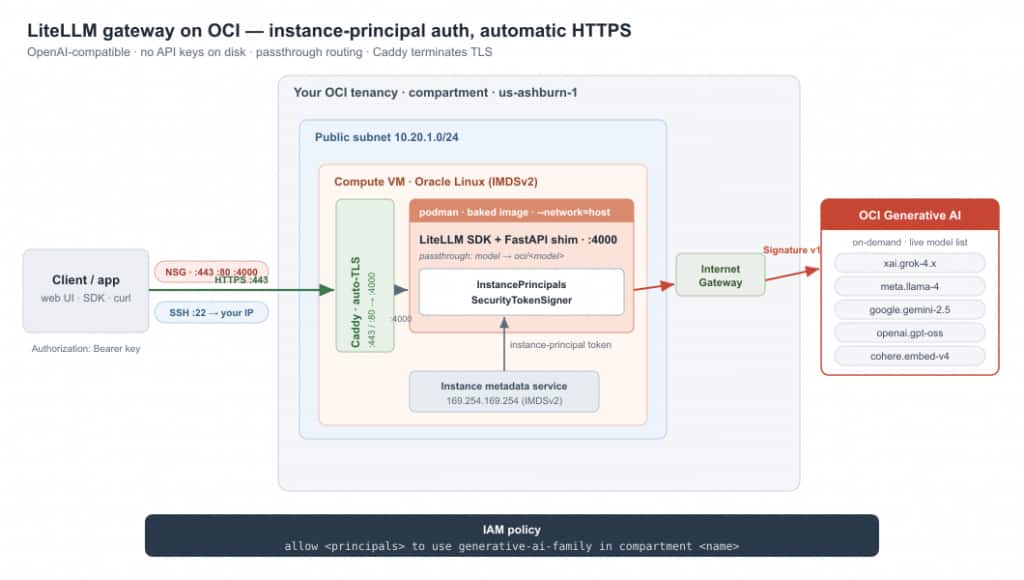
The gateway runs inside your tenancy. The client hits Caddy on :443 (NSG-gated, SSH scoped to your IP); Caddy terminates TLS and reverse-proxies to the shim on localhost:4000. The shim signs each call with the VM’s own instance-principal identity — token fetched from 169.254.169.254 — and reaches OCI Generative AI via the Internet Gateway. One IAM policy authorizes it all; no OCI API signing keys on disk. The federated token is short-lived, so the shim re-federates automatically on an OCI 401 INVALID_AUTHENTICATION_INFO — token expiry self-heals rather than surfacing as an error.
The one caveat worth reading first
LiteLLM exposes OCI two ways, and they are not interchangeable:
- The LiteLLM Proxy (
litellm --config config.yaml) supports OCI via manual API-key credentials only —oci_user,oci_fingerprint,oci_tenancy,oci_key/oci_key_file,oci_compartment_id. There is no way to hand the proxy an instance-principal signer object through YAML. - The LiteLLM SDK (
litellm.completion(...)) accepts anoci_signer=object, which is the door to instance principal, resource principal, and OKE workload identity.
So if you want instance principal without OCI API signing keys, you call the SDK and put a thin OpenAI-compatible HTTP layer in front of it. That’s the path of this implementation. You trade away the proxy’s management UI (virtual keys, budgets, logs); you avoid storing OCI API signing credentials.
Step 1 — IAM: one policy, no keys, no users
Instance principal is an any-principal identity at request time; the only thing between your VM and OCI Generative AI is a policy. Broad version:
allow any-user to manage generative-ai-family in compartment <YourCompartment>Least-privilege version, scoped to the instance via a dynamic group:
# Dynamic group (Identity & Security > Domains > Dynamic groups)
ALL {instance.compartment.id = '<compartment-ocid>'}
# Policy
allow dynamic-group <litellm-dg> to use generative-ai-family in compartment <YourCompartment>‘use‘ is enough for inference. That’s the entire identity story — no OCI API signing key stored on the instance.
Step 2 — Networking
A dedicated VCN keeps the gateway self-contained and trivially removable:
COMP=<compartment-ocid>; REGION=us-ashburn-1
VCN=$(oci network vcn create -c $COMP --region $REGION --cidr-blocks '["10.20.0.0/16"]' \
  --display-name litellm-vcn --dns-label litellmvcn --query data.id --raw-output --wait-for-state AVAILABLE)
IGW=$(oci network internet-gateway create -c $COMP --region $REGION --vcn-id $VCN --is-enabled true \
  --display-name litellm-igw --query data.id --raw-output --wait-for-state AVAILABLE)
RT=$(oci network route-table create -c $COMP --region $REGION --vcn-id $VCN --display-name litellm-rt \
  --route-rules '[{"destination":"0.0.0.0/0","destinationType":"CIDR_BLOCK","networkEntityId":"'$IGW'"}]' \
  --query data.id --raw-output --wait-for-state AVAILABLE)
SUBNET=$(oci network subnet create -c $COMP --region $REGION --vcn-id $VCN --cidr-block 10.20.1.0/24 \
  --display-name litellm-subnet --dns-label litellmsub --route-table-id $RT \
  --prohibit-public-ip-on-vnic false --query data.id --raw-output --wait-for-state AVAILABLE)
NSG=$(oci network nsg create -c $COMP --region $REGION --vcn-id $VCN --display-name litellm-nsg \
  --query data.id --raw-output --wait-for-state AVAILABLE)
oci network nsg rules add --nsg-id $NSG --region $REGION --security-rules \
  '[{"direction":"INGRESS","protocol":"6","source":"0.0.0.0/0","sourceType":"CIDR_BLOCK","isStateless":false,"tcpOptions":{"destinationPortRange":{"min":4000,"max":4000}}}]'
Keep SSH (22) on the VCN default security list but scope it to your own IP. Port 4000 lives on the NSG, so you open it as wide as your clients need.
Step 3 — A baked image, not install-on-boot
The LiteLLM image runs from a uv-managed venv at /app/.venv that ships without pip, so python3 -m pip install oci fails with “No module named pip”. Bootstrap it once at build time and bake the result into an image, so every container start is fast and offline:
FROM ghcr.io/berriai/litellm:main-stable
RUN /app/.venv/bin/python3 -m ensurepip --upgrade \
 && /app/.venv/bin/python3 -m pip install --no-cache-dir oci fastapi uvicorn
COPY server.py /app/server.py
ENV PORT=4000
ENTRYPOINT ["/app/.venv/bin/python3", "/app/server.py"]
podman build -t oci-litellm-gateway:latest -f Containerfile .
podman run -d --name litellm --restart=always --network=host \
-e OCI_REGION=us-ashburn-1 -e OCI_COMPARTMENT_ID=<compartment-ocid> \
-e LITELLM_MASTER_KEY=<your-bearer-key> -e PORT=4000 \
oci-litellm-gateway:latestTwo details that can save you a lot of debugging time:
--network=hostis mandatory. Instance principal fetches its leaf certificate and token from the metadata service at169.254.169.254(link-local address). A container on the default bridge network can’t route to that link-local address; host networking fixes it (and binds:4000on the host directly).- Use the venv’s
python3.litellmlives in/app/.venv; a system python won’t see it. TheENTRYPOINTabove pins it.
Step 4 — The shim: LiteLLM SDK behind an OpenAI-compatible API
This is the whole gateway. It builds the instance-principal signer once, exposes the OpenAI routes, forwards every model name straight through as oci/<model>, and discovers /v1/models live from OCI so there is no list to maintain. Those routes are the Chat Completions–era API (/v1/chat/completions, /v1/embeddings, /v1/models) — deliberately not OpenAI’s newer Responses API (/v1/responses); LiteLLM’s completion() and embedding() map to Chat Completions and Embeddings, which is still what every mainstream chat client speaks. Configuration is entirely environment-driven.
import os, json, datetime, litellm
from oci.auth.signers import InstancePrincipalsSecurityTokenSigner
from fastapi import FastAPI, Request, HTTPException
from fastapi.responses import StreamingResponse

REGION = os.environ.get("OCI_REGION", "us-ashburn-1")
COMP   = os.environ.get("OCI_COMPARTMENT_ID", "")
MKEY   = os.environ.get("LITELLM_MASTER_KEY", "")
PORT   = int(os.environ.get("PORT", "4000"))

SIGNER = InstancePrincipalsSecurityTokenSigner()
OCI = dict(oci_signer=SIGNER, oci_region=REGION, oci_compartment_id=COMP)
app = FastAPI()

def resolve(name):                       # pure passthrough: any model -> oci/<model>
    if not name: raise HTTPException(400, "missing 'model'")
    return name if name.startswith("oci/") else f"oci/{name}"

def auth(r):
    if MKEY and r.headers.get("authorization", "") != f"Bearer {MKEY}":
        raise HTTPException(401, "unauthorized")

def discover_models():                   # live, best-effort; never fatal
    try:
        import oci
        c = oci.generative_ai.GenerativeAiClient(config={}, signer=SIGNER)
        now = datetime.datetime.now(datetime.timezone.utc); out = []
        for m in c.list_models(compartment_id=COMP).data.items:
            caps = set(m.capabilities or [])
            if m.lifecycle_state != "ACTIVE" or not ({"CHAT","TEXT_EMBEDDINGS"} & caps): continue
            r = m.time_on_demand_retired
            if r is not None and r.year > 1971 and r <= now: continue
            out.append(m.display_name)
        return sorted(set(out))
    except Exception:
        return []

@app.get("/health/readiness")
def ready(): return {"status": "connected"}

@app.get("/v1/models")
def models():
    return {"object": "list", "data": [{"id": m, "object": "model", "owned_by": "oci"} for m in discover_models()]}

@app.post("/v1/chat/completions")
async def chat(req: Request):
    auth(req); b = await req.json()
    common = dict(model=resolve(b.get("model")), messages=b["messages"], **OCI)
    if b.get("stream"):
        def gen():
            for c in litellm.completion(stream=True, **common):
                yield f"data: {json.dumps(c.model_dump())}\n\n"
            yield "data: [DONE]\n\n"
        return StreamingResponse(gen(), media_type="text/event-stream")
    return litellm.completion(**common).model_dump()

@app.post("/v1/embeddings")
async def embeddings(req: Request):
    auth(req); b = await req.json()
    inp = b["input"]; inp = [inp] if isinstance(inp, str) else inp
    return litellm.embedding(model=resolve(b.get("model")), input=inp, **OCI).model_dump()

if __name__ == "__main__":
    import uvicorn; uvicorn.run(app, host="0.0.0.0", port=PORT)
Because routing is passthrough, supported on-demand OCI Generative AI models can be reached through the gateway, subject to region, tenancy access, model availability, and LiteLLM compatibility. The live /v1/models discovery means you do not need to maintain a hardcoded model list, and supported new models can become available through the endpoint as OCI exposes them.
Step 5 — Test it
IP=<public-ip>; KEY=<your-bearer-key>
curl -s http://$IP:4000/health/readiness
curl -s http://$IP:4000/v1/chat/completions \
  -H "Authorization: Bearer $KEY" -H "Content-Type: application/json" \
  -d '{"model":"xai.grok-4.3","messages":[{"role":"user","content":"In one sentence, what is Oracle Generative AI?"}]}'
It’s a drop-in OpenAI base URL, so the OpenAI SDK works unchanged:
from openai import OpenAI
c = OpenAI(base_url="http://<public-ip>:4000/v1", api_key="<your-bearer-key>")
print(c.chat.completions.create(model="xai.grok-4.3",
    messages=[{"role": "user", "content": "Hello from OCI"}]).choices[0].message.content)
Step 6 — Harden
- Scope SSH to your IP in the VCN default security list; leave port 4000 (on the NSG) as open as you need.
- Front it with a name and TLS (Caddy). Point a DNS-only A record at the instance, open
80+443in the NSG, then run Caddy alongside the gateway with a two-line Caddyfile:chat.example.com { reverse_proxy localhost:4000 }podman run -d --name caddy --restart=always --network=host \ -v /opt/caddy/Caddyfile:/etc/caddy/Caddyfile:Z \ -v caddy_data:/data -v caddy_config:/config \ docker.io/library/caddy:latestCaddy obtains and renews a Let’s Encrypt certificate automatically (TLS-ALPN-01 on 443, HTTP-01 on 80) and reverse-proxies to the shim onlocalhost:4000, passing theAuthorizationheader through. Nowhttps://chat.example.com/v1works with no port (your domain name may vary here) — which also unblocks browser-hosted chat UIs that refuse to call plain-HTTP endpoints (mixed content). Note most DNS proxies won’t forward arbitrary ports, so keep the record DNS-only (or let Caddy own 443). - Let browser UIs in (CORS). Server-side clients (curl, the SDK, Open WebUI, LobeChat on Vercel) work as-is, but browser apps that call the endpoint straight from the page need CORS headers or the browser blocks the preflight. Set
ENABLE_CORS=trueand scopeCORS_ORIGINS; the master key stays the gate, and since auth is a bearer header rather than a cookie, credentials mode stays off. - Rotate the key by changing
LITELLM_MASTER_KEYand restarting the container. - For real multi-tenant key management, budgets, and request logs, switch to the LiteLLM Proxy with a manual signing key.
Conclusion
This is a single OpenAI-compatible endpoint for supported on-demand OCI Generative AI models, authenticated with the instance’s own identity, without storing an OCI API signing key. That last part is the real win. Revoking access is editing one IAM policy.
And it’s small enough to trust: one VCN, one subnet, one NSG, one VM, one policy — a surface you can hand to a security reviewer on a single page or stamp out per environment from the cloud-init here.
In return, any OpenAI-compatible client—desktop apps, browser UIs, or your own code—can access Grok, Gemini, Llama, and Cohere without SDKs or per-application credentials. And because models are discovered dynamically, new OCI Generative AI models become available through the endpoint automatically.
The only implementation details worth remembering are the non-obvious ones: --network=host for metadata access, bootstrapping pip into the image’s venv at build time, and remembering that instance principal authentication lives on the SDK path, not in the proxy’s YAML configuration.