
Claude’s own memory, Oracle-backed application memory, and LangChain components serve different boundaries. Use the assistant’s features for its supported user experience, an application memory layer for governed persistent records, and framework integrations where they simplify a tested workflow.
Example scope: Code fragments and architecture diagrams in this article explain the pattern; they are not all standalone programs. Use the linked complete sample and its prerequisites for execution, and validate it in a controlled environment before adapting it.
Build a controlled Claude MCP workflow with Oracle SQLcl, Oracle AI Database, Oracle AI Agent Memory, and LangChain.
Companion notebook: Claude MCP Oracle AI Database: When to use Claude memory, Oracle AI Agent Memory, and LangChain together
Key Takeaways
- MCP turns AI-to-database access into an explicit tool contract instead of implicit system access.
- Oracle SQLcl in MCP mode (sql -mcp) is a direct, documented way to connect Claude Desktop to Oracle AI Database through an MCP server.
- Oracle AI Database provides the persistent storage and vector search layer for memory workloads, while Oracle AI Agent Memory gives teams a Python API for threads, durable memory records, scoped retrieval, and context assembly on top of it.
- LangChain plus langchain-oracledb is useful for structured retrieval pipelines once the memory layer is in place.
- A hybrid model is a strong default for many teams: Claude + MCP for operational interaction, Oracle AI Database + LangChain for durable memory records and retrieval.
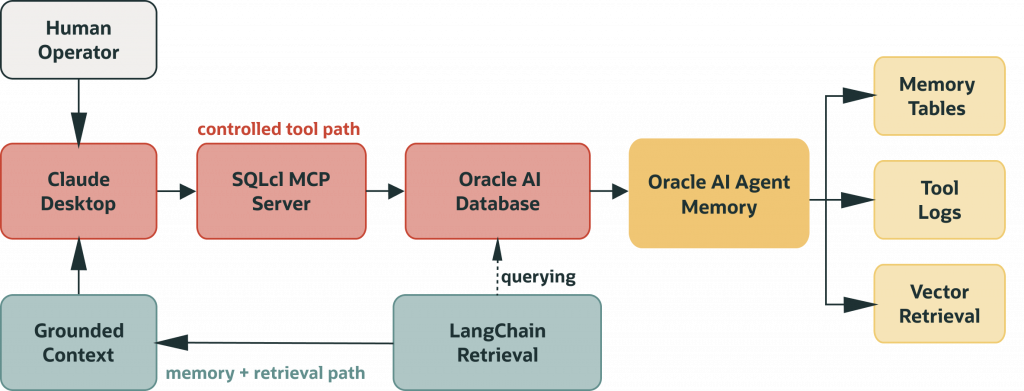
Here is how those components connect in this pattern. Claude talks to Oracle through SQLcl MCP, using the tools and database permissions you expose. Oracle AI Agent Memory is the Python package your app uses to manage durable memory records and context assembly. LangChain is an optional wrapper at the end of the retrieval path. The knowledge base is data in Oracle tables, with retrieval and access governed by your application and database design.
Production success depends less on “prompt quality” and more on boundaries, privileges, logging, and repeatable runbooks.
Many AI assistant demos fail in the same place: not in the first interaction, but in week two. The assistant can generate SQL and explain concepts, but the workflow often lacks durable context across sessions. Teams also struggle to answer basic operational questions, like who executed what, where, and with which permissions.
That is why this topic matters for developer teams right now. If you are integrating AI into workflows that query, analyze, or modify data in Oracle- running reports, inspecting schemas, retrieving context, or writing results back- you need two things at once: controlled execution and durable memory.
MCP defines the execution boundary. Oracle AI Database provides durable storage, vector search, and database controls for application memory records. You can build that layer directly with tables and retrieval logic, but the Oracle AI Agent Memory Python package makes the integration easier once memory workflows start getting more complex. LangChain comes in later when you need structured retrieval and orchestration on top of that.
By the end of this guide you will know how to connect Claude to Oracle AI Database through a controlled MCP boundary, when Claude’s built-in memory is sufficient and when your application needs Oracle AI Agent Memory to manage durable memory records in Oracle AI Database, and how to build a retrieval pipeline you can query, audit, and grow over time.
The developer path through this guide is simple:
- Start with one approved Oracle connection and a read-only validation query.
- Put SQLcl MCP in front of that connection so Claude sees tools, not raw database credentials.
- Check the audit and activity trail before adding more tool access.
- Add Oracle AI Agent Memory when the workflow needs durable thread context, scoped recall, or reusable context cards.
- Add LangChain only when you need application-side retrieval orchestration beyond the MCP interaction loop.
Claude Memory vs Oracle AI Agent Memory
Claude’s built-in memory has improved significantly, with support for chat history and project-level context. It works well for assistant continuity, but it is still scoped to the assistant experience.
Before getting into the memory categories, it is worth introducing Oracle AI Agent Memory properly. It is a Python package that sits on top of Oracle AI Database and provides the application-facing API for conversation threads, durable memory records, scoped retrieval, and context cards you can pass back to an assistant. You can build the same tables and retrieval logic yourself, and the companion notebook shows exactly how that works at the table level. But once memory workflows grow-multiple users, cross-session context, retrieval at scale, this package saves a lot of repeated work. Think of Oracle AI Agent Memory as the API your application talks to, and Oracle AI Database as the storage and enforcement layer underneath it.
In practice, “memory” means different things depending on the layer you are talking about. Claude Memory and Oracle AI Agent Memory solve different problems:
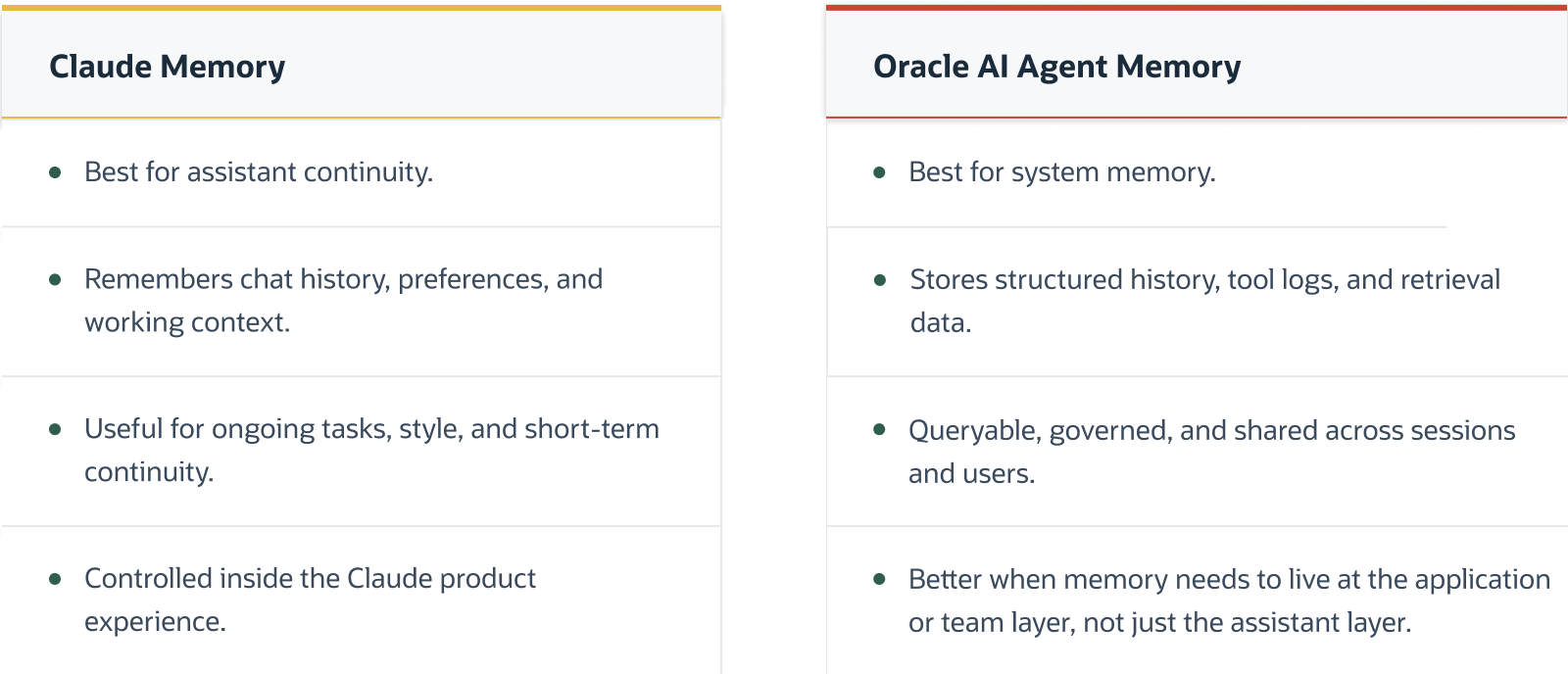
As of writing, Claude’s memory makes conversations smoother, but it’s still scoped to the assistant experience. It’s not built for querying application history, sharing context across users, or enforcing database-level audit and access controls. That’s where Oracle AI Agent Memory comes in. It gives you a persistent application memory layer you can query and manage across sessions and teams. Important decisions should still be grounded in systems of record, application authorization, and human or workflow review where required.
A simple way to think about it: Claude remembers for the conversation. Oracle AI Agent Memory remembers for the system.
Because memory records live in Oracle AI Database and not on one local machine, they can become portable across approved clients. Point a new machine at the same database with the right credentials and policies, and the application can retrieve the same memory records.
Even with Claude memory, teams often need an application-level memory layer. Claude memory is not designed for querying history across users, storing tool logs, or applying database access controls. Oracle AI Database can help fill that gap by providing durable, shared, and queryable memory records for application workflows.
Use the layers this way:
- Use Claude memory for assistant continuity: preferences, project context, and conversational convenience inside the assistant experience.
- Use SQLcl MCP when Claude needs to inspect or query Oracle through an explicit tool boundary.
- Use Oracle AI Agent Memory when your application needs durable threads, searchable memory records, scoped retrieval, or context cards across users, agents, and sessions.
- Use LangChain when your app needs reusable retrieval chains, routing logic, or orchestration around the memory and vector search layer.
Why this architecture is useful for developers
The developer value is practical: each layer gives you something concrete to test before you trust the whole workflow. You can validate the MCP server, the saved SQLcl connection, the database role, the durable application-memory write path, and the retrieval query separately.
That matters after the demo. When an answer looks wrong, a developer can inspect whether the tool call ran, which database user executed it, what SQL or retrieval path was used, which durable memory records or tool traces were returned, and whether the application assembled the right context. The failure stops being “the model was wrong” and becomes a narrower engineering problem.
The responsibilities break down into testable layers:
- The assistant translates user intent into a plan your app or MCP client can inspect.
- MCP exposes a declared tool surface instead of broad implicit system access.
- SQLcl MCP gives developers a reproducible bridge from Claude Desktop to approved Oracle connections.
- Oracle AI Database keeps roles, privileges, memory records, tool logs, and vector retrieval close to the data layer.
- Oracle AI Agent Memory gives Python developers a package API for threads, durable memory records, scoped search, and context cards. This is application memory, not just chat history.
- LangChain handles retrieval workflows and tool coordination where application logic is needed, without becoming the permission boundary.
The payoff is a workflow that is easier to review, easier to debug, and easier to grow. You can start read-only, prove the connection and logging path, add durable memory when the application needs continuity across sessions or workflows, and keep each new capability attached to a named layer instead of burying everything in prompts or a custom agent framework.
Understanding the two execution loops
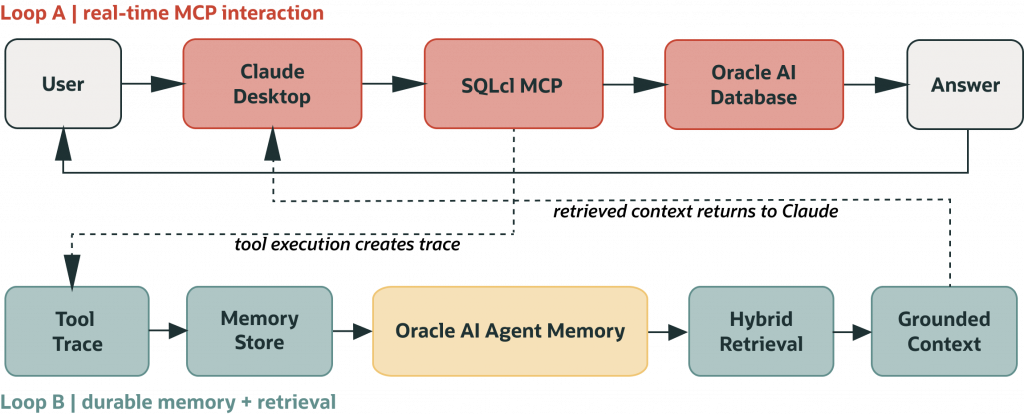
Building on the separation of responsibilities above, the system naturally forms two execution loops:
- Loop A: An operational loop for real-time interaction (Claude + MCP): This is the real-time interaction where Claude works with MCP to run queries, inspect data, and respond immediately.
- Loop B: A persistence loop for cross-session memory (Oracle AI Database + LangChain): This is where Oracle AI Database and LangChain handle durable memory records, tool logs, and context retrieval across sessions.
One loop handles real-time interaction, the other handles durable memory records and retrieval.
SQLcl MCP is for Claude operating interactively- real-time queries during a conversation, routed through a declared tool contract. Oracle AI Agent Memory is for your application code- storing turns, retrieving history, assembling context before Claude sees a prompt. They serve different loops at different times. You can drop either one depending on your use case, but many production setups benefit from both.
Setup Guide: Reproducing the Oracle SQLcl MCP and Claude Workflow
The SQLcl MCP setup is documented by Oracle and reproducible in the way that matters for developers: you can install it, test it, validate the saved connection, and inspect activity before Claude runs a real query.
Prerequisites before you connect Claude
- Oracle SQLcl 25.2.0 or higher.
- Oracle JRE 17 or 21.
- Claude Desktop or another MCP-capable client you are explicitly configuring and testing.
- At least one saved SQLcl connection profile under ~/.dbtools, created with password persistence for MCP use.
- A database user with the minimum permissions required for the workflow. Start with read-only access and a sanitized development or replica environment where possible.
The core idea is simple. SQLcl runs in MCP mode with sql -mcp. Claude Desktop launches it as an MCP server and talks to the database through declared tools and the permissions attached to the saved connection. Connections come from saved profiles in the SQLcl connection store under ~/.dbtools. Claude does not invent them at runtime, it reuses ones you have already created and validated.
One setup detail that catches people out: MCP-compatible saved connections need the password persisted. That is what the -savepwd flag does when you create the connection. Treat that saved profile as a credentialed application path: use a purpose-specific database user, keep the grant surface small, and avoid pointing first experiments at production data.
Once that is done, you configure Claude Desktop to point at the SQLcl executable and pass -mcp as the argument. Claude Desktop manages the server lifecycle from there, and SQLcl translates tool calls into database operations. Oracle recommends granting the minimum permissions required, considering sanitized copies or read-only replicas for AI access, and auditing LLM activity. SQLcl MCP activity can be inspected through database-side traces such as DBTOOLS$MCP_LOG and session views such as V$SESSION. (docs.oracle.com)
SQLcl MCP also supports restrict levels. The documented default is restrict level 4, which disables sensitive commands such as unrestricted file system access and host execution. Treat changes to the restrict level as an explicit security decision, not as a convenience toggle. (docs.oracle.com)
A minimal configuration looks like this:
{
  "mcpServers": {
    "sqlcl": {
      "command": "PATH/bin/sql",
      "args": ["-mcp"]
    }
  }
}
That small JSON block defines the connection between Claude and SQLcl MCP Server. Claude interacts with the database through the tools and permissions exposed by the MCP server, using the saved SQLcl connection profile you created and tested first.
Validation checklist before expanding access
- Run sql -mcp locally and confirm the server starts.
- Restart Claude Desktop and confirm the SQLcl tools are discoverable.
- Run one read-only query against an approved schema.
- Check database-side MCP activity logs and session metadata.
- Document the connection alias, database user, grant scope, restrict level, and troubleshooting owner.
Good first proof looks like this:
- The MCP server starts without a Java or path error.
- Claude lists the SQLcl MCP tools after restart.
- A read-only query succeeds against the expected schema.
- The database-side activity trail shows the MCP interaction.
- A denied query fails because of the database role, not because a prompt asked nicely.
Why put application memory records in Oracle AI Database, not just outputs
Once your first tool calls work, the next challenge is continuity. If memory lives only in chat context, the system is fragile. If memory is scattered across files without structure, retrieval and auditing become expensive over time.
It’s worth calling out the difference here. At this point, the challenge shifts from conversation persistence to system-level memory.
A model that uses Oracle AI Agent Memory is often cleaner and easier to operate as the workflow grows.
The companion notebook builds this memory layer from scratch, so the mechanics are visible and then shows how Oracle AI Agent Memory slots on top of it once the substrate is working.
Memory categories that matter in practice
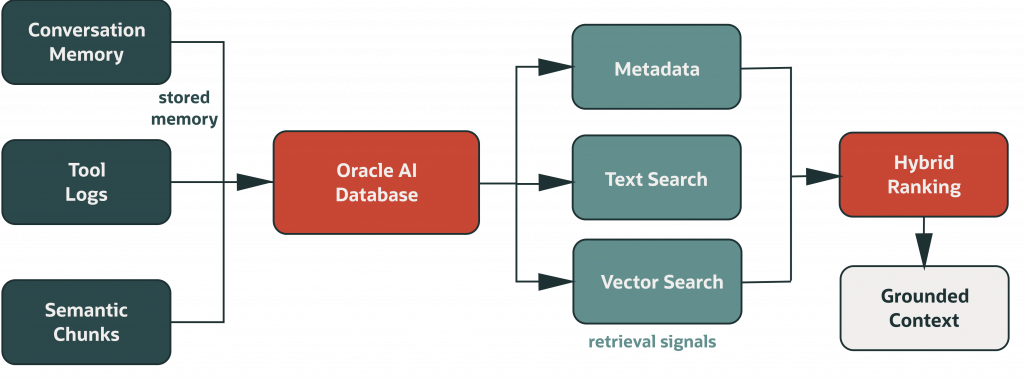
- Conversational memory
Stores user and assistant turns, thread IDs, timestamps, and metadata. - Operational memory
Stores tool inputs, outputs, status, and error classes for troubleshooting and audit. - Semantic memory
Stores chunks and embeddings for meaning-based retrieval when exact keywords are absent.
Why this matters technically
- SQL tables give deterministic filtering and ordering.
- Transactions improve integrity under concurrent writes.
- Vector retrieval helps with paraphrases and conceptual matches.
- Keeping memory on one platform makes it easier to manage, audit, and keep consistent over time.
This works well with Oracle AI Database because structured records and semantic retrieval data can stay in one place.
Where LangChain adds value (and where it should not be overused)
LangChain is useful as orchestration glue, especially when teams want a documented path for tool definitions and retrieval calls. One thing worth stating clearly: in the architecture shown here, Claude Desktop does not call LangChain directly. LangChain runs in your application layer to format context before it reaches Claude’s prompt. With langchain-oracledb, teams can wire vector retrieval in Oracle AI Database while keeping control in database roles and runtime policies.
Good uses of LangChain in this architecture
- Declaring retrieval and memory tools in a consistent format.
- Running retrieval-first answer pipelines.
- Standardizing how context is assembled before generation.
- Building reusable agent patterns across teams.
Poor uses of LangChain in this architecture
- Assuming LangChain automatically makes database access safe.
- Relying only on prompts to limit what the assistant is allowed to do.
- Adding too many tools before your team knows how to manage and troubleshoot them.
A good rule is to enforce permissions in the database and infrastructure layer, not only in framework code or prompts.
Practical Implementation Snippets
The snippets below show the minimum useful shape of the implementation: the MCP boundary, the memory substrate, a package-level memory API, and the retrieval policy that keeps generated answers grounded.
1) MCP boundary snippet
{
  "mcpServers": {
    "sqlcl": {
      "command": "C:\\tools\\sqlcl\\bin\\sql.exe",
      "args": ["-mcp"]
    }
  }
}
2) Memory schema concept snippet
-- CONVERSATIONAL_MEMORY
THREAD_ID, ROLE, CONTENT, METADATA_JSON, CREATED_AT

-- TOOL_LOGS
THREAD_ID, TOOL_NAME, TOOL_INPUT, TOOL_OUTPUT, STATUS, ERROR_MESSAGE, CREATED_AT

-- KB_CHUNKS (used for vector retrieval via langchain-oracledb)
TEXT_CHUNK, METADATA_JSON, EMBEDDING
3) Oracle AI Agent Memory package path
pip install "oracleagentmemory==26.4.0"The package path expects Python 3.10 or later, Oracle AI Database, version 26ai or later for compatibility, an Oracle AI Database connection or connection pool, an embedding model for retrieval, and an optional LLM for memory extraction, summaries, and context cards. The exact adapters depend on your application, but the API shape is intentionally small:
from oracleagentmemory.apis.searchscope import SearchScope
from oracleagentmemory.core.oracleagentmemory import OracleAgentMemory
from oracleagentmemory.core.embedders.embedder import Embedder
from oracleagentmemory.core.llms.llm import Llm

embedder = Embedder(model="YOUR_EMBEDDING_MODEL")
llm = Llm(model="YOUR_LLM")
db_pool = ...  # your oracledb connection or connection pool

memory = OracleAgentMemory(connection=db_pool, embedder=embedder, llm=llm)

thread = memory.create_thread(user_id="user_123")
thread.add_messages([
    {"role": "user", "content": "Remember that I prefer morning deployment reviews."},
    {"role": "assistant", "content": "Got it. I will keep that preference in mind."},
])

thread.add_memory("The user prefers morning deployment reviews.")

results = memory.search(
    query="When does this user prefer deployment reviews?",
    scope=SearchScope(user_id="user_123"),
)

context = thread.get_context_card()
Use oracleagentmemory from your application layer when you need package-managed users, agents, memories, threads, scoped retrieval, and context assembly. Keep systems of record separate from memory records: memory helps provide context, but application logic and authoritative data sources should still decide what is true, allowed, and final. (docs.oracle.com)
4) Retrieval-first policy snippet (pseudo-policy)
- Retrieve relevant memory before synthesizing final answer.
- If retrieval is empty, say context is insufficient.
- Keep answers evidence-first and concise.
- Log tool calls with status and timestamp.
Engineering guidance for production teams
The difference between demo success and production success is disciplined operations. Most failures at this stage come from integration gaps, not model behavior.
Access and privilege model
- Separate accounts per environment (dev, test, prod).
- Start read-only wherever possible.
- Use least privilege grants and schema allowlists.
- Gate write operations with explicit confirmation workflows.
Observability model
- Log tool name, thread ID, timestamp, status, and sanitized inputs.
- Classify failures into runtime, connection, privilege, query, and retrieval.
- Keep a troubleshooting playbook in your repo.
- Check whether retrieval results become less accurate as more data is added.
Reliability model
- Prefer deterministic SQL patterns with bounded result sets.
- Use retrieval-first context assembly for memory-heavy tasks.
- Avoid giant context stuffing as a substitute for memory design.
- Review and prune tool surfaces periodically.
This is also where teams should align with platform and security teams early. Governance should be designed into the architecture, not bolted on after incidents.
Typical failure modes and how to diagnose them fast
Most teams hit a predictable set of issues.
Runtime failure: sql -mcp does not start
Check the absolute SQLcl path, confirm Java is available, and run sql -mcp outside Claude first. Resolve runtime first before checking assistant behavior.
Discovery failure: Claude does not see tools
Check the Claude Desktop JSON, confirm the configured command points to the SQLcl executable, and restart Claude Desktop after edits. If the server starts in a terminal but not from Claude, treat it as a config or environment-path problem.
Connection failure: tools are present but queries fail immediately
Check the saved SQLcl connection alias, confirm the profile lives under the expected SQLcl connection store, and verify password persistence for the MCP workflow. Then test the same connection outside Claude.
Permission failure: queries execute selectively and fail on specific objects
Check the database role first. A selective failure can be the right outcome when least privilege is working. Add grants intentionally, prefer schema allowlists, and keep read-write access separate from the initial validation path.
Retrieval quality failure: answers are fluent but weakly grounded
Inspect the retrieved records before blaming the model. Check chunk size, metadata filters, embedding choice, top-k settings, and whether the query is asking for exact history, semantic similarity, or operational logs.
Why the hybrid model is a strong long-term default
By this point, you’ve probably noticed a pattern: no single layer handles both execution and memory well.
Trying to force everything into the assistant gets messy fast. You either lose control over execution, or you end up stuffing too much context into prompts just to keep things working. On the other side, if you only build backend memory systems, you lose the speed and usability that makes assistants useful in the first place.
The hybrid approach works because it doesn’t try to solve everything in one place:
- Execution stays controlled through MCP.
- Memory stays durable and queryable in the database.
- The two are connected where needed, not tightly coupled.
In real teams, this usually evolves over time. It starts simple: Claude with SQLcl MCP, read-only access, and basic workflows. Once people start relying on it, the gaps show up: we lose context, we can’t trace what happened, or we are repeating work.
That’s when it makes sense to introduce Oracle AI Agent Memory and retrieval. Not earlier.
The goal isn’t to build perfect architecture upfront. It’s to add structure where the system starts to break.
Conclusion
Setting up Claude with SQLcl MCP works well when treated as an architectural pattern, not just a series of setup steps. Each layer has one job: Claude handles intent, MCP enforces the execution boundary, Oracle AI Database stores durable memory records and audit data, and LangChain handles retrieval orchestration where needed.
With clear execution boundaries and durable memory, you can trace what happened, understand failures, and evolve the workflow without introducing hidden behaviour.
That shift, from implicit access and adhoc context to explicit boundaries and durable memory, is what moves AI-assisted workflows from experiments to operational systems.
Frequently Asked Questions
What is MCP in this context?
MCP is a protocol that lets Claude call explicit tools exposed by a server, rather than accessing systems implicitly.
Why use SQLcl for Oracle MCP?
SQLcl already understands Oracle workflows and can run as MCP server with sql -mcp, making integration practical and direct.
Is this setup only for Claude Desktop?
No. The same MCP and memory architecture concepts can be reused with other MCP-capable clients and backend services.
Why include Oracle AI Database if MCP already works?
MCP handles execution boundaries. Oracle AI Database handles durable memory records, retrieval, concurrency, and database access controls. Claude’s own memory helps within a session, but it is not designed as an application memory layer.
What versions are required for the SQLcl MCP setup?
Oracle documents that the SQLcl MCP Server requires Oracle SQLcl 25.2.0 or higher, Oracle JRE 17 or 21, Claude Desktop, and at least one saved SQLcl connection profile with password persistence enabled via -savepwd. Teams should verify the latest compatibility guidance in the official Oracle documentation as MCP support evolves.
Where does Oracle AI Agent Memory fit?
Oracle AI Agent Memory sits between your application code and Oracle AI Database. The package manages threads, durable memories, scoped retrieval, and context cards, while Oracle AI Database remains the storage and enforcement layer underneath.
Where does LangChain fit?
LangChain is an orchestration layer for tools and retrieval. It can help assemble context and retrieval pipelines, but permissions still belong in the database, infrastructure, and application runtime.
Do I need vector search for every use case?
No. Start with structured memory. Add vector retrieval when paraphrase-heavy or concept-level retrieval becomes important.
How do I prevent risky SQL operations?
Use least privilege roles, schema allowlists, read-only access where possible, SQLcl MCP restrict levels, and explicit confirmation workflows for high-impact actions.
Can this support audit or compliance needs?
It can support audit-oriented workflows if tool traces, SQL-level controls, retention policies, and review processes are implemented consistently. Do not treat memory records as the sole authoritative record for regulated or high-impact decisions.
Companion Troubleshooting Appendix
- Minimum viable setup: SQLcl MCP configured in Claude, one approved Oracle connection, read-only validation, and database-side activity logging.
- First checks: confirm sql -mcp starts, Claude sees the tools after restart, and the saved SQLcl connection alias resolves.
- Environment model: use separate credentials and policies for dev, test, and prod, with stricter controls as capability expands.
- Logging model: capture tool name, timestamp, thread ID, status, sanitized input/output summaries, and relevant SQLcl MCP log records.
- Retrieval quality: tune chunk size, enrich metadata, review embedding choice, and evaluate retrieval against representative queries.
- Common anti-pattern: expanding tool surfaces before ownership, logging standards, and runbooks are in place.
- Rollout path: pilot in dev with read-only access and strong logging, then expand capabilities in controlled phases.
What should own enterprise memory?
Choose ownership from the application’s identity, retention, deletion, and audit requirements. Do not assume an assistant’s personal memory is the system of record for a multi-user application. Validate MCP access separately from memory persistence and verify a recall in a second session under the intended identity.
Continue the implementation: LangGraph persistence with Oracle AI Database. Use the validation described above as the acceptance check for your next step.