
This is article 6 of 8 in my Oracle AI Database Skills series.
Vector-native RAG stores and queries embeddings alongside application data. In Oracle AI Database, distinguish vector search with SQL metadata predicates from hybrid lexical-and-vector search, and evaluate HNSW or IVF against the actual retrieval workload.
Key Takeaways
- Storing vectors in an Oracle
VECTORcolumn alongside content, metadata, and provenance means retrieval happens inside the database. Existing governance — row-level security, auditing, data masking — applies to vector queries the same way it applies to any other query. - Filtered vector retrieval is ordinary SQL:
VECTOR_DISTANCEhandles semantic similarity andWHEREclauses handle business predicates in the same statement. Any reviewer who can read a query can understand what rows qualified and why. - HNSW and IVF are index strategies with real trade-offs in recall, memory footprint, and query latency. Choosing between them requires measuring both on your own corpus — they are not interchangeable defaults.
- The answer step can stay inspectable too. Connecting retrieval to a Select AI profile with
SHOWSQLmeans the SQL generation step is reviewable, not just the retrieval that fed it.
Retrieval‑augmented generation works when you can fetch the right context quickly and explain—in plain SQL—why those rows qualified. Splitting storage between a stand‑alone vector store and the database of record speeds early prototypes but makes governance fragile: metadata is duplicated, filters are reimplemented, and audit trails often end at a gateway you do not control. Oracle’s vector‑native approach keeps the entire RAG path inside the database. Embeddings live in a VECTOR column next to the text, JSON, and provenance you already track; you index them with HNSW or IVF using CREATE VECTOR INDEX; you retrieve with SQL that combines semantic similarity and business predicates. Because retrieval runs on database objects, existing policies and audits—when configured on those objects—stay in the path. When you need an LLM to compose the answer, Select AI with AI Profiles lets you scope what the model can see and inspect generated SQL before execution. The result is a retrieval path that is fast enough for interactive use and reviewable under the same governance you already operate.
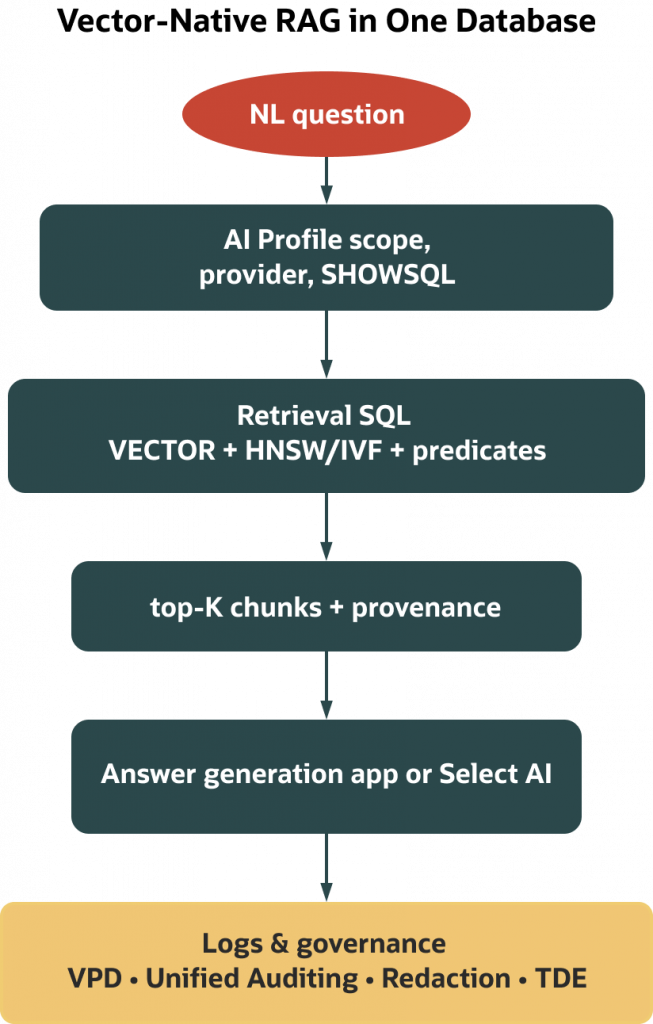
If you read Article 5, you saw how AI Profiles keep NL2SQL inspectable. This article focuses on retrieval: how to store vectors, choose HNSW or IVF, and write hybrid queries you can defend in a review meeting.
Prerequisites
- Oracle AI Database 26ai or Autonomous Database with AI Vector Search enabled for your RU/service tier.
- Privileges to CREATE TABLE and CREATE INDEX in a schema with sufficient quota.
- For external embeddings or Select AI, configure credentials and network ACLs per your organization’s policy.
- Verify CREATE VECTOR INDEX options and the DBMS_* package signatures in your RU before automating builds.
What “vector‑native” means in Oracle
Vector‑native means embeddings are first‑class database data, not a sidecar. You add a VECTOR(dim, element_type) column to the table that holds your chunked content and provenance; you build an approximate nearest‑neighbor (ANN) index—HNSW for interactive recall or IVF for very large corpora—and you query with SQL. The practical effect is governance continuity: when Virtual Private Database (VPD) policies, Unified Auditing, Data Redaction, and Transparent Data Encryption (TDE) are configured on the relevant objects, they continue to filter, record, mask, and protect your retrieval path. When someone asks why a row entered the context window, you can point to the same table‑scoped policies that govern every other query.
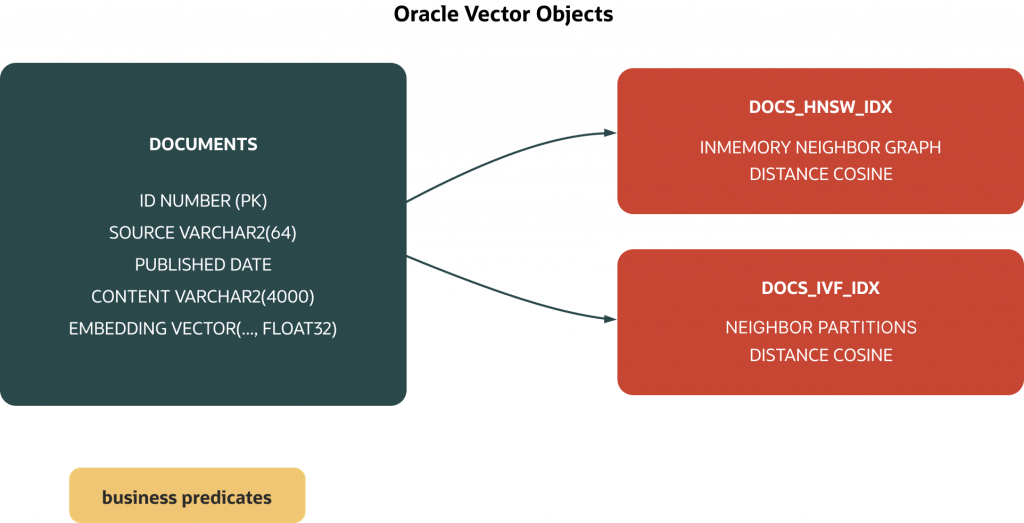
For architecture and security details, see the Oracle AI Vector Search overview and the Database Security Guide for VPD, Unified Auditing, Data Redaction, and TDE:
From document to chunk to embedding
RAG quality depends heavily on two choices you control: where you cut chunks and how you embed them. Oracle provides DBMS_VECTOR_CHAIN utilities for deterministic chunking with tunable size and overlap, so the same document splits the same way as you iterate. For embeddings, you can run an in‑database model (see DBMS_VECTOR support for installed models and ONNX where documented for your RU) or call an external provider with credentials stored in the database and governed by network ACLs. Treat those decisions as versioned preferences you can update deliberately.
Keep the storage shape simple: one row per chunk with the content, the provenance you already carry (source, timestamps, tenant), and a VECTOR column for the embedding. That single‑row design makes hybrid retrieval straightforward because eligibility is a WHERE clause and semantic similarity is an ORDER BY, all in one statement.
Docs:
- DBMS_VECTOR (embedding/model support)
- DBMS_VECTOR_CHAIN (chunking and embedding helpers)
DBMS_HYBRID_VECTOR: keyword + semantic in one call
DBMS_VECTOR_CHAIN and DBMS_VECTOR handle pure vector workflows. When your retrieval also needs full‑text keyword matching – relevance ranking by term frequency, Oracle Text lexer rules, or multi‑language tokenization – DBMS_HYBRID_VECTOR adds that layer. The package provides a JSON‑based SEARCH API that searches by keywords and vectors against hybrid vector indexes. By integrating traditional keyword‑based text search with vector‑based similarity search in a single call, it can improve recall for queries where either approach alone misses relevant results.
Use DBMS_HYBRID_VECTOR when:
- Your corpus has mixed-quality writing (exact keywords matter for short queries, semantic similarity matters for paraphrased ones).
- You support multiple languages with different stemming rules that Oracle Text already handles.
- You want a single managed search API rather than hand-tuned SQL merging of separate text and vector result sets.
For pure vector retrieval with business-predicate filters, the WHERE + VECTOR_DISTANCE pattern in the section below is simpler and sufficient. Reserve DBMS_HYBRID_VECTOR for the cases where keyword recall meaningfully improves results on your corpus—measure both before committing to the more complex path.
Doc:
Choosing an index: HNSW or IVF
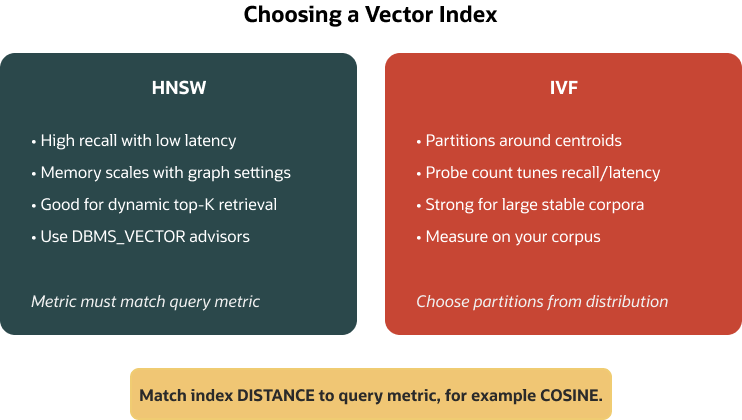
HNSW and IVF both deliver sub‑second nearest‑neighbor search, but they trade memory, build time, and recall differently.
HNSW builds an in‑memory navigable small‑world graph. In practice, it often yields high recall at low latency for interactive workloads, at the cost of a memory footprint that grows with corpus size and neighbor degree. Use the documented memory and accuracy advisors in DBMS_VECTOR to size the index pool and validate recall on your corpus before you build. If you are powering a help center, runbooks, or an internal knowledge base where queries arrive piecemeal and you value accuracy, HNSW is a common starting point – measure and tune for your data.
IVF clusters the vector space into partitions and probes only a subset per query. That design can lower memory footprint and sustain good throughput on very large corpora. You trade some recall and tune it by changing how many partitions to probe. If you manage millions of chunks and steady traffic, evaluate IVF operationally using Oracle’s accuracy and performance advisors.
One optimizer detail matters to plans and expectations: the optimizer uses a vector index only when your query’s distance metric matches the index’s metric. If they differ, the index will not be used and an exact search is performed. If your embeddings use cosine similarity (common for text), create the index with DISTANCE COSINE and use the same metric in ORDER BY.
Docs:
- CREATE VECTOR INDEX (HNSW/IVF)
- DBMS_VECTOR advisors and accuracy helpers
Writing hybrid retrieval you can defend
Hybrid search in Oracle is just SQL. Your business predicates – tenant, source system, publish date, access level—are ordinary filters in WHERE, and VECTOR_DISTANCE ranks eligible rows by semantic similarity. Because this happens on a single table with a single row shape, the execution plan can combine a vector index for similarity with conventional indexes for filters. When configured on the relevant objects, VPD policies still apply to the session.
A typical query looks like this:
SELECT id, source, content
FROM   documents
WHERE  source = 'kb'
AND    published >= DATE '2025-01-01'
ORDER  BY VECTOR_DISTANCE(embedding, :qvec, COSINE)
FETCH  FIRST 5 ROWS ONLY;
Ensure the index’s DISTANCE metric matches the query’s metric; otherwise the vector index may not be used.
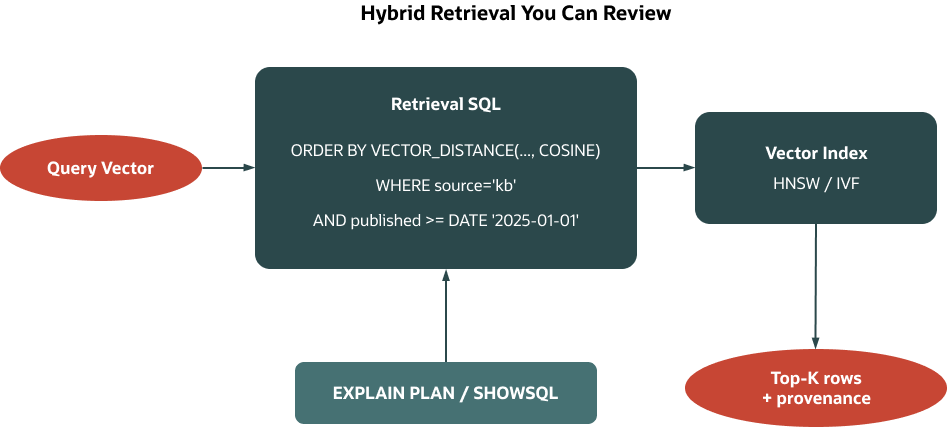
Two small details avoid surprises in production. VECTOR_DISTANCE returns smaller values for closer vectors, so you sort ascending and keep the metric explicit to match the index. Also, the query vector’s dimension and element type must match the column’s or the statement will error. In plans, you will often see the vector index satisfy similarity ordering while B‑trees or partitions satisfy filters; the optimizer’s choice depends on predicate selectivity, statistics, and metric/index alignment.
If you prefer operator syntax, the <=> operator is the cosine distance operator in 26ai. Use it only if your target version documents it; otherwise prefer VECTOR_DISTANCE(..., COSINE) explicitly:
SELECT id, source, content
FROM   documents
ORDER  BY embedding <=> :qvec
FETCH  FIRST 3 ROWS ONLY;
Docs:
A tiny end‑to‑end demo
This toy example shows the loop from rows to top‑K in a few statements. It runs on Oracle AI Database 26ai or Autonomous Database. Replace the three‑dimensional vectors with your model’s actual dimension (384/768/1536 are common), and use FLOAT32 for typical embeddings. For real data, prefer CLOB when content exceeds 4000 bytes.
1) Create a table that keeps content, provenance, and a vector together:
CREATE TABLE documents (
  id         NUMBER GENERATED ALWAYS AS IDENTITY PRIMARY KEY,
  source     VARCHAR2(64),
  published  DATE,
  content    VARCHAR2(4000), -- use CLOB for larger text in production
  embedding  VECTOR(3, FLOAT32)
);
2) Insert a few rows with deterministic toy vectors so results are obvious:
INSERT INTO documents (source, published, content, embedding) VALUES
  ('kb', DATE '2025-01-15', 'How to reset your password',
   TO_VECTOR('[0.10, 0.05, 0.90]', 3, FLOAT32));

INSERT INTO documents (source, published, content, embedding) VALUES
  ('kb', DATE '2025-02-10', 'How to export monthly invoices',
   TO_VECTOR('[0.80, 0.10, 0.10]', 3, FLOAT32));

INSERT INTO documents (source, published, content, embedding) VALUES
  ('runbook', DATE '2025-03-05', 'Rotate API keys every 90 days',
   TO_VECTOR('[0.15, 0.85, 0.10]', 3, FLOAT32));
COMMIT;
3) Create a cosine HNSW index and keep the metric explicit:
CREATE VECTOR INDEX docs_hnsw_idx
ON documents (embedding)
ORGANIZATION INMEMORY NEIGHBOR GRAPH
DISTANCE COSINE;
The ORGANIZATION clause names the HNSW structure as documented in the SQL Reference. Verify feature availability and any licensing considerations in your environment, and keep the query metric aligned (COSINE here) for the optimizer to consider this index.
4) Run a top‑K query. VECTOR_DISTANCE returns smaller values for closer matches, so use ascending ORDER BY. Using a literal vector for illustration (in applications, pass vectors as binds rather than literals to avoid hard parsing and ensure type/dimension alignment):
SELECT id, source, content
FROM   documents
ORDER  BY VECTOR_DISTANCE(
           embedding,
           TO_VECTOR('[0.12, 0.04, 0.92]', 3, FLOAT32),
           COSINE
         )
FETCH  FIRST 3 ROWS ONLY;
Using a bind (recommended in applications). Ensure `:qvec` matches the column’s dimension and element type:
-- Suppose :qvec is a VECTOR(3, FLOAT32) bind variable
SELECT id, source, content
FROM   documents
ORDER  BY VECTOR_DISTANCE(embedding, :qvec, COSINE)
FETCH  FIRST 3 ROWS ONLY;
Operator shorthand (if documented in your RU; <=> is cosine):
SELECT id, source, content
FROM   documents
ORDER  BY embedding <=> :qvec
FETCH  FIRST 3 ROWS ONLY;
5) Add a business predicate to show hybrid eligibility in action:
SELECT id, source, content
FROM   documents
WHERE  source = 'kb'
ORDER  BY VECTOR_DISTANCE(
           embedding,
           TO_VECTOR('[0.12, 0.04, 0.92]', 3, FLOAT32),
           COSINE
         )
FETCH  FIRST 2 ROWS ONLY;
If your corpus grows very large, evaluate IVF. Drop the HNSW index first. Keep a single active vector index per column to simplify planning and maintenance.
Use the documented IVF clause (NEIGHBOR PARTITIONS) in your RU’s SQL Reference:
DROP INDEX docs_hnsw_idx;

CREATE VECTOR INDEX docs_ivf_idx
ON documents (embedding)
ORGANIZATION NEIGHBOR PARTITIONS
DISTANCE COSINE;
After creating IVF, verify search‑effort controls and probe counts for your RU in the SQL Reference and DBMS_VECTOR docs; use those documented knobs to balance recall and latency.
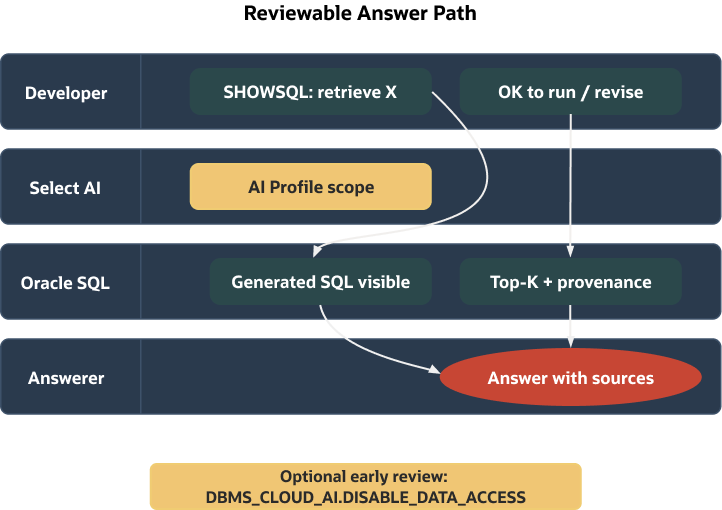
Orchestrating the answer: in your app or with Select AI
Retrieval yields top‑K rows with provenance; you still need to compose an answer. Many teams keep this step in the application: run the retrieval SQL, log the query and bind values, and pass the returned snippets—plus id, source, and published—to an LLM. Because the context is explicit, reviewers can reconstruct what the model saw and sign off on the path.
If you prefer to orchestrate inside the database, use Select AI with a narrowly scoped AI Profile. During early review, enable SHOWSQL/EXPLAINSQL so a human can inspect generated SQL before execution. Syntax for USING/profile attributes varies by RU; follow the Select AI examples for your environment:
-- In a session with an AI Profile that scopes access
SELECT AI SHOWSQL 'List the top 3 KB articles about password resets from 2025.'
USING 'profile = <your_ai_profile>';
To prevent table data from being sent to a provider during review, use the data‑access controls documented for your RU/service tier (see Select AI examples). Enable the appropriate session/profile setting rather than relying on defaults.
Select AI can include sources in responses when configured; check the SOURCES option and relevant profile attributes for your RU, and keep SHOWSQL/EXPLAINSQL enabled until stakeholders are comfortable with the generated SQL.
Docs:
- Select AI examples (SHOWSQL, EXPLAINSQL, object scoping, data access)
Operating in production shape
Demos are short; production is measurement and repeatability. For HNSW, memory depends on graph parameters and corpus size. Use DBMS_VECTOR memory advisors before large builds so you can size the index pool without starving the buffer cache, and measure recall and latency as you adjust graph parameters. For IVF, recall depends on partitioning and probe counts. Use accuracy helpers to compare index settings against exact search on a representative sample, and decide whether a point of recall is worth the latency trade.
Plan hygiene matters. Keep the query metric aligned with the index metric, and gather statistics after bulk loads so the optimizer can choose the intended plan. A minimal stats call looks like this:
BEGIN
  DBMS_STATS.GATHER_TABLE_STATS(USER, 'DOCUMENTS');
END;
/

BEGIN
  DBMS_STATS.GATHER_INDEX_STATS(USER, 'DOCS_HNSW_IDX');
END;
/
Gather index stats after index builds or rebuilds so the optimizer can cost similarity ordering accurately.
If you evolve index settings or dimensions, make DDL idempotent and, where your release supports it, prefer online rebuilds to avoid unnecessary outages. Article_07 covers schema and index evolution strategies.
Governance continuity does not require special workarounds. When policies are configured on the relevant objects, VPD continues to filter rows, Unified Auditing can capture activity, and Data Redaction can mask columns that should not appear in clear text. As with any sensitive path, set MODULE and ACTION at session start, run your retrieval, and make evidence easy to find in audit views. Consider tagging vector queries with a distinct ACTION (for example, RAG_RETRIEVAL) to simplify Unified Auditing filters.
Docs:
- DBMS_VECTOR advisors and accuracy reporting
- Security guide landing (VPD, Unified Auditing, Data Redaction, TDE)
Version scope and environment notes
The VECTOR data type, VECTOR_DISTANCE, ANN vector indexes (HNSW/IVF via CREATE VECTOR INDEX), DBMS_VECTOR, DBMS_VECTOR_CHAIN, and the Select AI features shown here require Oracle AI Database 26ai or Autonomous Database. If you are on 19c, you can persist arrays as JSON or BLOB and compute distances in the application, but you do not have native vector columns, vector indexes, or VECTOR_DISTANCE. Always verify your exact RU or service tier for option names, index clauses, and package signatures before you automate builds. If you use external embedding providers, configure credentials and network ACLs before calling them from the database. Ensure the query vector dimension and element type match the column definition; otherwise the statement will error.
Out of scope
This article stays focused on storing vectors, building the two ANN index types, writing hybrid retrieval SQL, and keeping the answer path reviewable. It does not cover Oracle Text, summarization prompts, or application frameworks. For NL2SQL hardening and AI Profile design, see Article 5. For safe schema and index evolution, see Article 7.
Try it next
- Load 50–100 real chunks from your docs, store embeddings in a
VECTORcolumn, and build an HNSW index; compare recall and latency before and after switching to IVF on the same corpus. - Turn on
SELECT AI SHOWSQLfor the answer step so reviewers can sign off on generated SQL before execution.
References
- Oracle AI Vector Search overview
- VECTOR type, TO_VECTOR, and VECTOR_DISTANCE
- CREATE VECTOR INDEX (HNSW/IVF)
- Querying with similarity and hybrid predicates
- DBMS_VECTOR and DBMS_VECTOR_CHAIN
- Select AI examples (SHOWSQL, EXPLAINSQL, object scoping, data access)
- Security guide landing (VPD, Unified Auditing, Data Redaction, TDE)
Which choice should I validate first?
Start with an exact-search baseline and the required access policy. Measure approximate-index recall and latency against that baseline before tuning HNSW or IVF. Add lexical ranking when exact identifiers matter. A WHERE filter narrows eligible rows; it is not, by itself, keyword-plus-vector rank fusion or a complete authorization policy.
Continue the implementation: Hybrid Retrieval for Agent Memory: Vector, Lexical, and Metadata Together. Use the validation described above as the acceptance check for your next step.