
This is article 2 of 8 in my Oracle Database Skills series.
If you’ve tried to make an assistant “Oracle‑aware,” you’ve likely hit the same wall: you paste a stack of links, the model blends vendor‑neutral habits with stale Oracle guidance, and the answers get vague when you need precision. The fix isn’t more context—it’s better routing. One Oracle skill at a time, in the right order, so every next move follows Oracle’s own sequence.
In Article 1 we outlined an operating model for AI on Oracle Database: route → act → trust. This piece goes deep on the first verb. It shows how to use db/SKILL.md in the public Oracle Database Skills repository as your front door; how to route by persona or by task; and how to enforce progressive discovery so your assistant loads exactly one file at a time. This is a no‑execution article; we stay in the routing lane and leave tools to Article 3 (SQLcl MCP). Prerequisite: you only need to browse https://github.com/oracle/skills in a web browser.
Why routing beats context dumping
Dumping a pile of links into a prompt feels thorough, but it blurs version lines and lets generic “SQL” patterns overrule Oracle‑specific guidance. It also bloats token budgets without improving the next decision. db/SKILL.md fixes this by providing a maintained map of Oracle Database skills, pointing you to the right starting file for common jobs, and encoding short, opinionated sequences for multi‑step workflows. The goal is not to read everything; it’s to pick the next file, digest it, and decide whether one more file is warranted. When you’re actually ready to execute a command, you’ve left routing and entered “act” (Article 3 covers SQLcl MCP).
Treat db/SKILL.md as the front door
db/SKILL.md is the router for the Database domain. It opens with a routing table and guidance to keep context tight—begin at the table, then read only the specific file or category you need.
It also shows the shape of the Database skills, including these directories:
db/agentdb/featuresdb/frameworksdb/performancedb/securitydb/devopsdb/migrationsdb/sqlcl
Two parts matter most on your first pass. First, the file highlights concrete entry points for real jobs—where performance triage begins, where SQLcl basics and MCP server entries sit (setup is deferred to Article 3), how to approach schema migrations, and which agent behaviors (like schema discovery) must be understood before you write anything. Second, it outlines common sequences that act as guardrails. Examples include RAG (skills under db/features: ai‑profiles → vector‑search → dbms‑vector), slow‑query diagnosis (skills under db/performance: explain‑plan → wait‑events → optimizer‑stats → awr‑reports), and agent‑safe schema change (skills under db/agent and db/migrations: schema‑discovery → destructive‑op‑guards → idempotency‑patterns → schema‑migrations). There’s also an MCP setup path you’ll use later when you move from routing to action: sqlcl‑basics → a least‑privilege/privilege‑management skill in db/security → sqlcl‑mcp‑server.
Starting here changes how your assistant behaves. Instead of grabbing whatever looks related on the internet, it asks, “What’s the next Oracle‑authored file?” The result is fewer wrong turns and shorter, more reviewable prompts.
Route by persona when you’re scoping a project
When you’re defining scope rather than responding to a ticket, match your role and load one file. Don’t skim the whole repository first—route, read, and decide.
App developer
If you’re wiring a service to Oracle, start with frameworks and then layer on application‑specific skills. The db/frameworks directory anchors guidance for stacks such as Spring, Django, and SQLAlchemy: connection configuration, driver/dialect selection, data type mapping, and recommended connection patterns. Once the framework is set, dip into app‑dev skills for JSON, Spatial, Text, or pooling nuances you actually need. Doing it in this order avoids needless trial and error—you adopt the Oracle‑tested path before you customize.
AI engineer
Begin in db/agent and db/features. The agent skills cover behaviors that matter when a model touches a database: discover schema before DML, guard against destructive operations, make steps idempotent so retries don’t double‑apply, and identify clients for traceability. The features skills introduce Oracle’s AI‑native building blocks—Select AI and AI Profiles for governed NL2SQL, and AI Vector Search/DBMS_VECTOR for retrieval and RAG. Version gate: check each feature’s documentation. DBMS_VECTOR and many Select AI/AI Profiles examples are documented for 26ai; several AI capabilities are also available in Autonomous Database. Do not assume 19c availability unless a skill or doc explicitly states it.
DBA
The fastest way to get Oracle‑native outcomes from an assistant is to route through db/performance and then db/security. Performance skills teach the assistant to obtain and read the plan that actually executed (for example, via DBMS_XPLAN.DISPLAY_CURSOR(NULL, NULL, 'ALLSTATS LAST')), interpret row sources and cardinality, and pivot at the right moment from plan reading to wait events and then, if warranted, to AWR. Security skills ground privilege design, auditing, and encryption in Oracle’s vocabulary so “least privilege” becomes an actionable design rather than a slogan.
Migration lead
Treat db/migrations and db/devops as two halves of one job. Migration skills help with assessment and translation; devops skills handle delivery mechanics such as schema change workflows, online operations, Edition‑Based Redefinition, and testing. Loading one file at a time keeps heterogeneous estates from collapsing into generic, lowest‑common‑denominator advice.
Route by task when you’re on the clock
When a ticket arrives with a single job, follow the ordered sequences in the repository. Oracle’s diagnostics and defaults are opinionated for a reason; ignoring their order usually costs time.
RAG on Oracle Database
Start with AI Profiles, because that’s where you choose a provider and model and, crucially, define which database objects the model may see. Only after scope and governance are set should you learn retrieval patterns in vector‑search and then orchestrate pipelines with DBMS_VECTOR. The payoff is a governed RAG flow that can be inspected (SHOW SQL) and tightened (OBJECT_LIST and data access controls), rather than a bag of embeddings taped onto a database.
- Route (skills under
db/features): ai‑profiles → vector‑search → dbms‑vector - Reference: Select AI examples (
SHOW SQL,OBJECT_LIST, and data access controls): https://docs.oracle.com/en/database/oracle/oracle-database/26/selai/examples-using-select-ai.html - Version note: Follow the feature docs.
DBMS_VECTORand many Select AI/AI Profiles examples are documented for 26ai; several AI capabilities are also available in Autonomous Database. Do not assume 19c availability unless a skill or doc explicitly states it.
Slow‑query diagnosis
Begin by reading the plan that actually ran. In Oracle that means capturing the executed plan from the cursor (for example, DBMS_XPLAN.DISPLAY_CURSOR(NULL, NULL, 'ALLSTATS LAST')), not relying solely on an EXPLAIN PLAN estimate. If the plan looks sane but runtime stalls, pivot to wait events. If rows and joins are misestimated, fix statistics and cardinality before widening the window with AWR.
- Route (skills under
db/performance): explain‑plan → wait‑events → optimizer‑stats → awr‑reports - Availability note: AWR/ASH access depends on environment and licensing.
Agent‑safe schema change
Discover what exists before you propose change, add loss‑prevention so a single bad predicate can’t harm a table, and make each step idempotent so a retry won’t double‑apply. Only then move into an audited migration workflow.
- Route (skills under
db/agentanddb/migrations): schema‑discovery → destructive‑op‑guards → idempotency‑patterns → schema‑migrations
A compact prompt that enforces progressive discovery
A small prompt can prevent freelancing by enforcing a loop: route, read one file, summarize, decide. That discipline keeps the context precise and affordable.
Prompt
Open db/SKILL.md. I’m [persona or task].
Which single skill file should I load next, and why?
Summarize that file in 5 bullets, then propose the next decision (read another file or stop).
Do not execute any actions.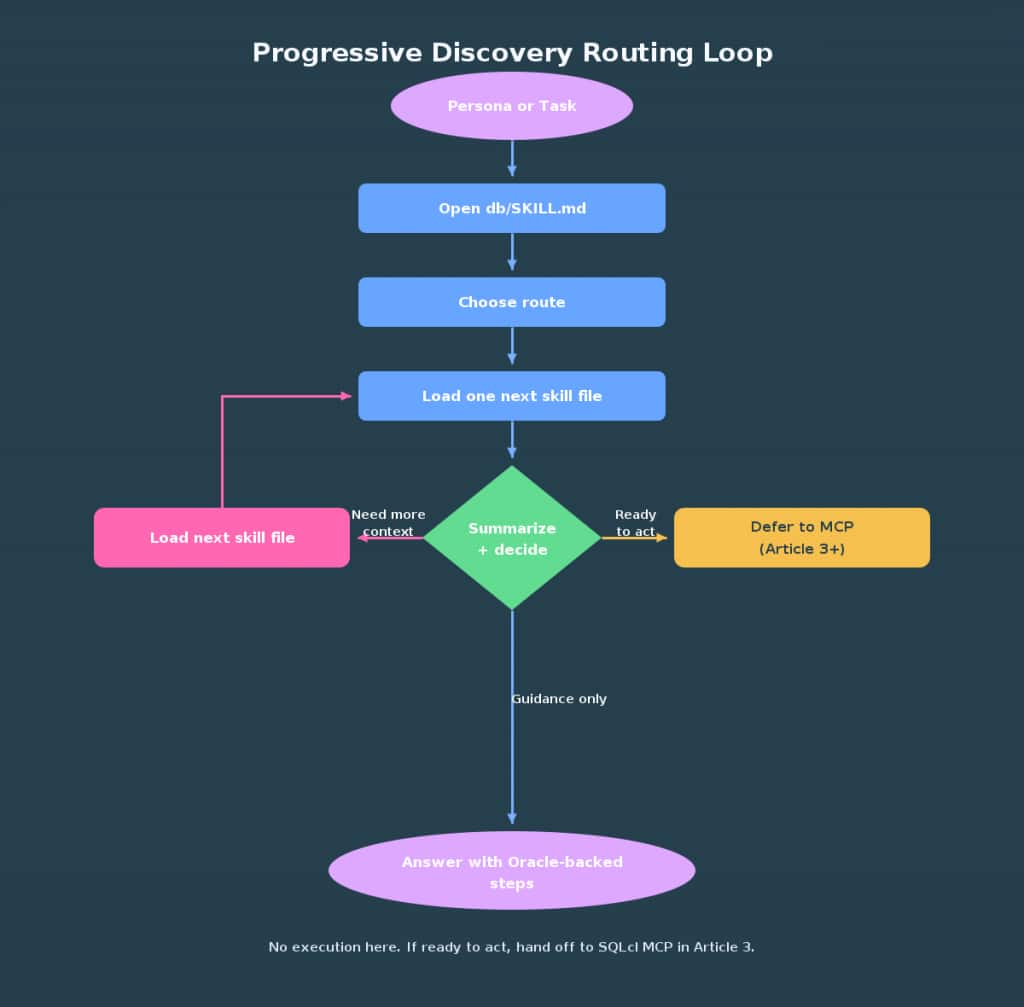
Mini demos (no DB access, no execution)
These prompts validate routing behavior before you connect any tools. They’re deliberately constrained to “read and decide.”
Demo A: Persona‑first route for a Spring app developer
Prompt
Open db/SKILL.md. I’m wiring a Spring Boot service to Oracle.
Which single frameworks/appdev skill should I load next, and why?
Summarize that file in 5 bullets, then propose the next decision.
Do not execute any actions.
Example assistant response
Next file: A Spring Data JPA with Oracle skill under db/frameworks/.
Why: It covers Oracle-specific connection configuration, driver/dialect selection, pooling, and type mapping.
Summary:
- Recommended Oracle JDBC URL formats and service naming for Spring Boot
- Dialect/driver selection and common DataSource pitfalls
- Transaction, batching, and fetch-size options tuned for Oracle
- LOB, DATE/TIMESTAMP, and NUMBER mapping considerations
- Starter checks and links to follow-up appdev skills
Next decision:
- If you need pooling/retry/circuit specifics, read a connection/pooling skill next.
- Otherwise, stop and apply these configuration steps before proceeding.
Demo B: Task‑first route for diagnosing a slow query
Prompt
Starting from db/SKILL.md, list the ordered skill files for slow-query triage.
Load only the first file, summarize it in 5 bullets, then recommend whether to read the next file or stop.
Do not execute any actions.
Example assistant response
Ordered files:
1) The explain-plan skill in db/performance/
2) The wait-events skill in db/performance/
3) The optimizer-stats skill in db/performance/
4) The awr-reports skill in db/performance/

Loaded: explain-plan

Summary:
- Obtain the executed plan from the cursor (vs. EXPLAIN PLAN estimates) and where to find it
- Read row sources and cardinality; spot misestimates and join-order issues
- Recognize anti-patterns (forced full scans, skewed histograms, implicit conversions)
- Interpret plan notes for adaptive features and parallel decisions
- Decide when to pivot from plan analysis to wait-event inspection

Recommendation:
- Read wait-events next if the plan looks reasonable but runtime stalls.
- If the plan is clearly wrong, stop and fix plan issues before proceeding.
Notes:
- The “explain‑plan” skill in this route teaches capturing and reading the actual cursor plan, not just the EXPLAIN PLAN estimate.
- AWR/ASH may not be available in all environments and may require licensing.
Version scope and context‑budget discipline
Assume Oracle Database 19c as the baseline unless a skill states a higher requirement. For AI features, check per‑feature documentation: DBMS_VECTOR and many Select AI/AI Profiles examples are documented for 26ai; several AI capabilities are also available in Autonomous Database. Do not assume 19c availability unless a skill or doc explicitly states it. Label those steps clearly when you route.
Two habits keep assistants accurate and affordable:
- Load one file or short index at a time, then summarize in five bullets.
- Decide whether to stop, read one more, or hand off to action (SQLcl MCP in Article 3). Don’t blur routing with execution.
Why “route, don’t flood” holds up under pressure
Teams tend to bulk‑load context when deadlines loom. Ironically, progressive discovery pays off most when time is tight. db/SKILL.md compresses Oracle experience into short routes you can trust: read the executed plan before hunting waits, scope an AI Profile before experimenting with retrieval, and prove discovery and guards before you accept any schema change. Staying inside those lanes doesn’t slow you down; it eliminates the detours that burn days.
Make the front door easy to reach. The simplest path is to browse the repository in a web browser and open db/SKILL.md. If you prefer a local copy, install the Database domain directly:
npx skills add oracle/skills/dbThis puts the domain files in your working directory so you can open db/SKILL.md immediately. Then set your assistant’s “Oracle Database” system prompt to begin with “Open db/SKILL.md,” and keep the progressive‑discovery loop in place until the next decision is truly to act.
Conclusion
Oracle Database Skills is not a PDF dump for models. It’s an operating method that starts with routing. Use db/SKILL.md as your first touch, load one file at a time, and stop before you wander into execution. In Article 3, we’ll introduce SQLcl MCP as the bounded action surface that pairs naturally with this approach. Until then: route → read one → summarize → decide.
Sources
- Oracle Database Skills repository root: https://github.com/oracle/skills
- Database router (
db/SKILL.md): https://github.com/oracle/skills/blob/main/db/SKILL.md - Frameworks directory: https://github.com/oracle/skills/tree/main/db/frameworks
- Performance directory: https://github.com/oracle/skills/tree/main/db/performance
- Select AI examples (
SHOW SQL,OBJECT_LIST, and data access controls): https://docs.oracle.com/en/database/oracle/oracle-database/26/selai/examples-using-select-ai.html DBMS_XPLAN.DISPLAY_CURSOR(19c): https://docs.oracle.com/en/database/oracle/oracle-database/19/arpls/DBMS_XPLAN.html- Licensing Information User Manual (AWR/ASH availability/licensing): https://docs.oracle.com/en/database/oracle/oracle-database/19/dblic/index.html
DBMS_VECTOR(26ai): https://docs.oracle.com/en/database/oracle/oracle-database/26/arpls/DBMS_VECTOR.html