

Starting with GoldenGate for DAA 26ai, you can now configure Apache Iceberg replication with OCI Object Storage. GoldenGate for DAA leverages the S3 endpoint of OCI Object Storage for connectivity.
Oracle GoldenGate 26ai is the next-generation, AI-native release of the industry-leading change data capture (CDC) platform, designed to simplify real-time data movement and streaming for modern AI workloads. It works by capturing transactional changes (inserts, updates, and deletes) from source systems and streaming them with low latency to target relational databases or non-relational data platforms. This ensures that downstream data lakes and analytics platforms stay perfectly synchronized with source production databases without impacting their performance.
Here is a closer look at how you can leverage this integration to build highly scalable, real-time data lakes on OCI with the Secret Ingredient: OCI’s S3-Compatible API
You might be wondering how an S3 connection natively supports Oracle Cloud Infrastructure. The answer lies in OCI’s robust interoperability. OCI provides an Amazon S3-Compatible API, allowing applications built for AWS S3 to work seamlessly with OCI Object Storage without requiring any code changes. Instead of traditional IAM roles, GoldenGate uses OCI’s Customer Secret Keys. By simply pointing GoldenGate to your specific OCI namespace and region via a custom endpoint URL, you unlock the full potential of OCI Object Storage for your Iceberg Tables.
Benefits of using Oracle GoldenGate to deliver Iceberg Tables into OCI Object Storage
Oracle GoldenGate extends real-time data replication to Apache Iceberg tables in OCI Object Storage, helping organizations simplify the delivery of trusted, analytics-ready data for modern cloud architectures. By combining continuous change data capture with open table formats and OCI-native storage, this integration supports faster access to fresh data, reduced operational complexity, and greater agility for analytics and AI initiatives.
- Faster access to analytics-ready data: Transactional changes are delivered in real time to Apache Iceberg tables in OCI Object Storage, making fresh data quickly available for downstream analytics, AI, and data engineering workloads.
- Reduced operational complexity: Built-in automation for tasks such as compaction, snapshot management, and schema handling helps reduce manual effort and simplifies day-to-day data lake operations.
- Greater flexibility for modern architectures: By integrating Oracle GoldenGate with Apache Iceberg in OCI Object Storage, organizations can support open, scalable, and cloud-ready data pipelines that evolve more easily with business and technology needs.
Architecture Overview
The Oracle GoldenGate 26ai DAA for Apache Iceberg on OCI Object Storage replication architecture is fundamentally an asynchronous, log-based CDC pipeline designed for high throughput and transactional integrity. As illustrated in the diagram, the architecture bridges relational and non-relational source systems with Apache Iceberg Tables on OCI Object Storage
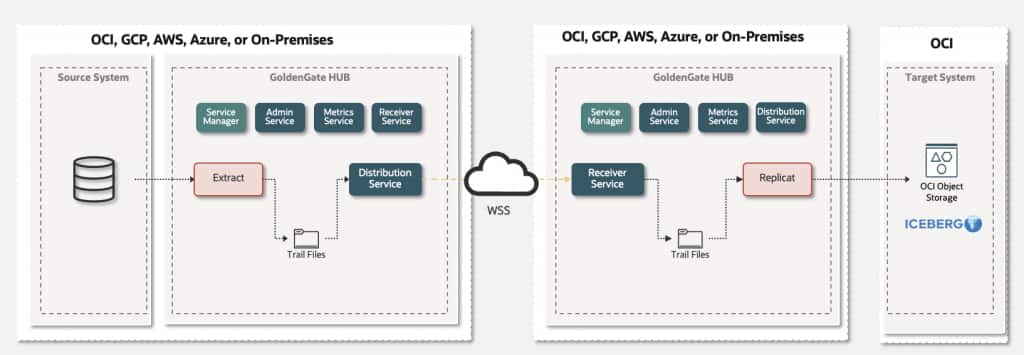
Oracle GoldenGate captures change data from Oracle GoldenGate-certified sources and writes it into GoldenGate trail files, a platform-independent and database-agnostic binary format designed for efficient and reliable data movement. These trail files are then delivered through the Distribution Service to Oracle GoldenGate 26ai for Distributed Applications and Analytics (DAA), where the Apache Iceberg handler with Hadoop Catalog support is used to replicate data into OCI Object Storage. This architecture provides a scalable and consistent foundation for delivering real-time data into open lakehouse environments.
For a deeper technical walkthrough, see the Oracle GoldenGate Apache Iceberg handler architecture deep-dive recording.
Before you begin
What are we going to configure?
A GoldenGate 26ai DAA Replicat for Apache Iceberg, using Iceberg Hadoop Catalog, and s3a//Schema. (Other S3 compatible Apache Iceberg catalogs are supported too.)
Please make sure that the following prerequisites are met before configuring the replicat.
For OCI Object Storage:
Enable Amazon S3 Compatibility API with OCI Object Storage:
- Create an OCI Object Storage Bucket and obtain a unique namespace.
- Enable OCI Policies to work with Amazon S3 Compatibility API.
- Create Customer Secret Key
- Configure a new end-point
For Oracle GoldenGate:
- Install Oracle GoldenGate 26ai and create a deployment.
- Create an Oracle GoldenGate Extract. While adding the Extract;
- It is recommended to use uncompressed operations which can be configured by LOGALLSUPCOLS. LOGALLSUPCOLS causes Extract to automatically include the before image for UPDATE operations in the trail record.
- If a source table does not have a primary key (PK), users can define a substitute key by including a KEYCOLS clause in the Extract. If the source table does not have a PK and KEYCOLS is not specified in the Extract, Oracle GoldenGate Iceberg into OCI Object Storage replication fails.
- Install Oracle GoldenGate for DAA 26ai and create a deployment.
- Start the Service Manager and connect to the Oracle GoldenGate for DAA web interface. Alternatively, you can use the Admin Client command-line interface.
- Create a Distribution Path from the source Oracle GoldenGate deployment to the target Oracle GoldenGate for DAA deployment.
- Create an application configuration for Iceberg Hadoop Catalog and s3a:// Scheme within the Oracle GoldenGate for DAA instance.
- Download iceberg-common and Hadoop AWS SDK dependencies for writing to AWS S3 (
s3a://scheme) dependencies using dependency downloader utility shipped with GoldenGate for DAA. Please note the full path to dependency libraries downloaded. - Add Configuration Properties for Third-Party S3-Compatible Storage
Creating the Oracle GoldenGate Apache Iceberg Replication for OCI Object Storage
- In Home, click “Add Replicat”.
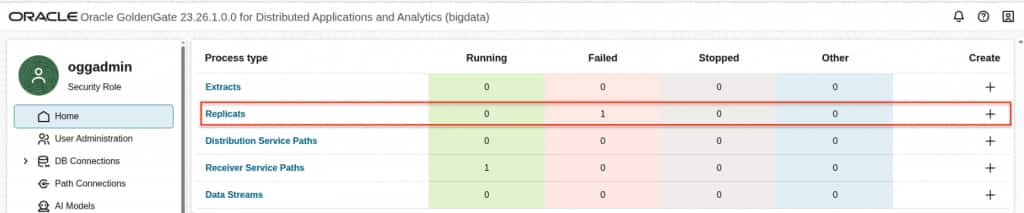
- In Replicat Information, select the type of the replicat and provide a name for the replicat. Click Next.
- Classic Replicat: Classic Replicat is a single-threaded apply process. To determine whether to use classic mode for any object, you must determine whether the objects in one Replicat group will ever have dependencies on objects in any other Replicat group, transactional or otherwise.
- Coordinated Replicat: Coordinated Replicat is a multithreaded apply process. Coordinated Replicat allows for user-defined partitioning of the workload to apply high volume transactions concurrently.

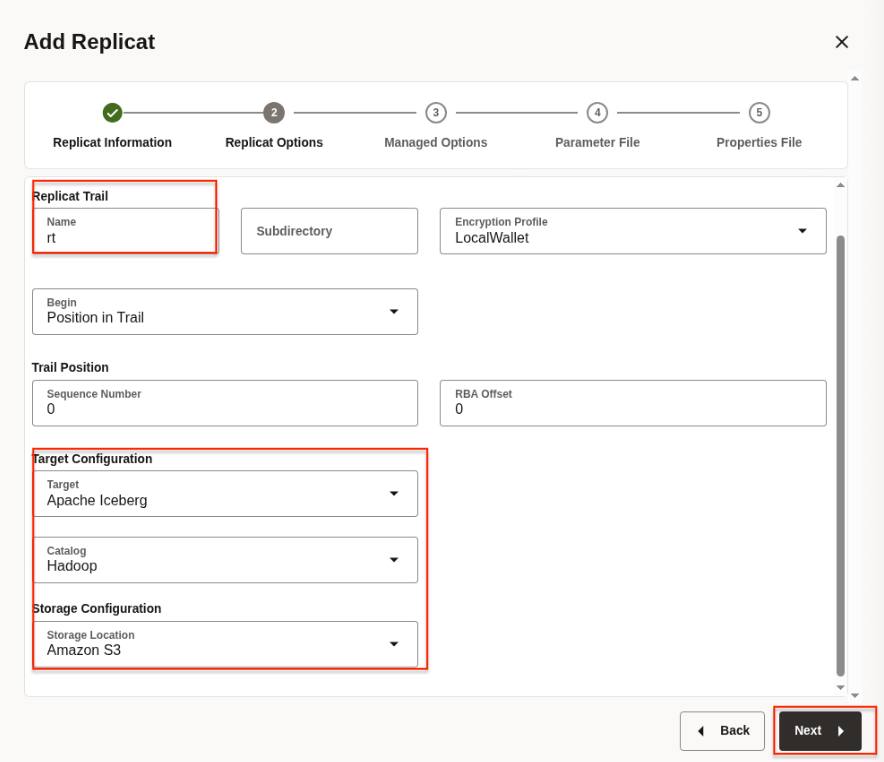
- In Replicat Options, provide the trail file name, select the target configuration and click Next.
- Replicat trail: The name of the source trail file
- Target Configuration:
- Target: Apache Iceberg
- Catalog: Hadoop
- Storage Configuration: Amazon S3
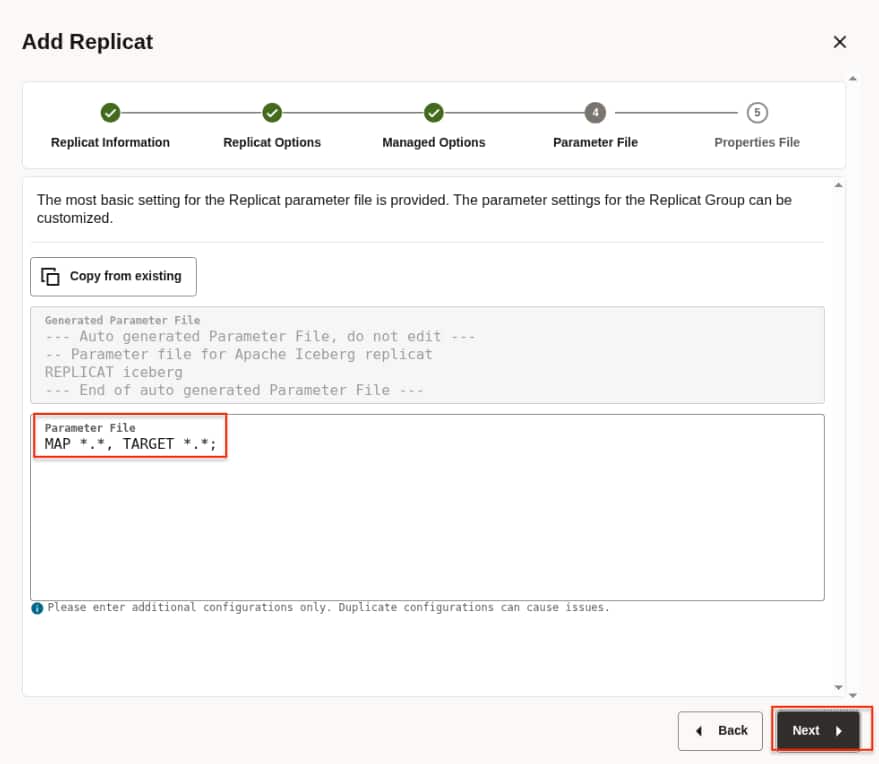
- In Parameters File, Click Next.
- In Properties File, we’ll get this template for Apache Iceberg using Hadoop Catalog and AWS S3 Storage using ‘s3a://’ scheme:
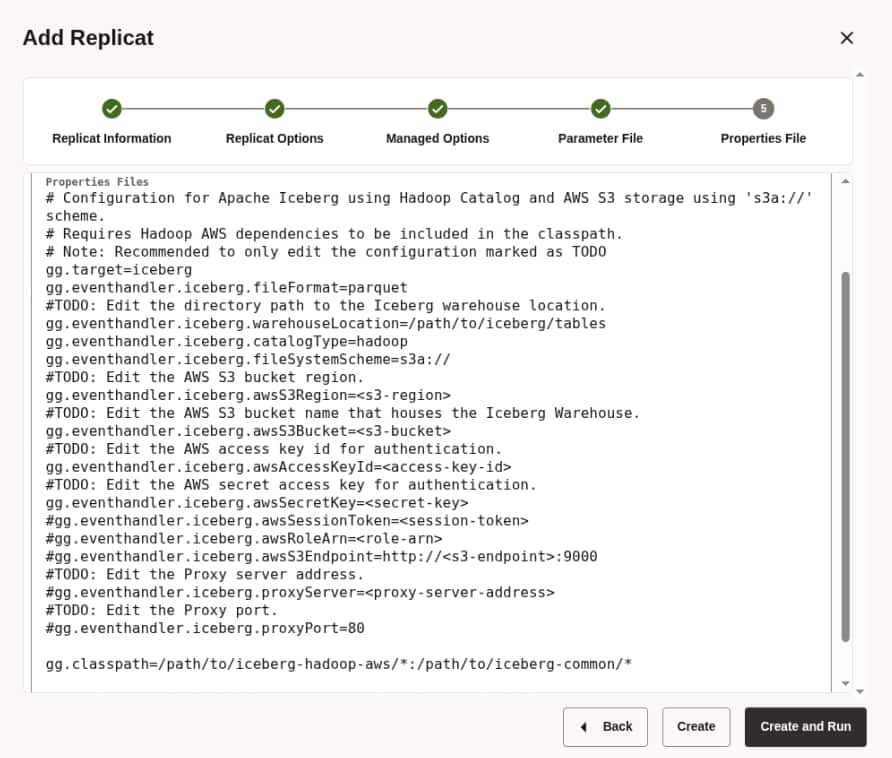
This is the Template properties file:
# Configuration for Apache Iceberg using Hadoop Catalog and AWS S3 storage using 's3a://' scheme.
# Requires Hadoop AWS dependencies to be included in the classpath.
# Note: Recommended to only edit the configuration marked as TODO
gg.target=iceberg
gg.eventhandler.iceberg.fileFormat=parquet
#TODO: Edit the directory path to the Iceberg warehouse location.
gg.eventhandler.iceberg.warehouseLocation=/path/to/iceberg/tables
gg.eventhandler.iceberg.catalogType=hadoop
gg.eventhandler.iceberg.fileSystemScheme=s3a://
#TODO: Edit the AWS S3 bucket region.
gg.eventhandler.iceberg.awsS3Region=<s3-region>
#TODO: Edit the AWS S3 bucket name that houses the Iceberg Warehouse.
gg.eventhandler.iceberg.awsS3Bucket=<s3-bucket>
#TODO: Edit the AWS access key id for authentication.
gg.eventhandler.iceberg.awsAccessKeyId=<access-key-id>
#TODO: Edit the AWS secret access key for authentication.
gg.eventhandler.iceberg.awsSecretKey=<secret-key>
#gg.eventhandler.iceberg.awsSessionToken=<session-token>
#gg.eventhandler.iceberg.awsRoleArn=<role-arn>
#gg.eventhandler.iceberg.awsS3Endpoint=http://<s3-endpoint>:9000
#TODO: Edit the Proxy server address.
#gg.eventhandler.iceberg.proxyServer=<proxy-server-address>
#TODO: Edit the Proxy port.
#gg.eventhandler.iceberg.proxyPort=80

gg.classpath=/path/to/iceberg-hadoop-aws/*:/path/to/iceberg-common/*</proxy-server-address></s3-endpoint></role-arn></session-token></secret-key></access-key-id></s3-bucket></s3-region>
Let’s fill in all the TODO parameters for our environment:
- Directory path to the Iceberg warehouse location:
gg.eventhandler.iceberg.warehouseLocation=/demo/iceberg/tables- AWS S3 bucket region: use the OCI Tenancy Region:
gg.eventhandler.iceberg.awsS3Region=eu-frankfurt-1- AWS S3 bucket name that houses the Iceberg Warehouse: use the bucket in OCI Object Storage
gg.eventhandler.iceberg.awsS3Bucket=demoogg- AWS access key ID for authentication: use Access Key from OCI’s Customer Secret Key
- AWS secret access key for authentication: use Secret -key from OCI’s Customer Secret Key
gg.eventhandler.iceberg.awsAccessKeyId=OCI-ACCESS-KEY

gg.eventhandler.iceberg.awsSecretKey=OCI-SECRET-KEY- To use the Amazon S3-Compatible API, we need to add the new endpoint including namespace and region, in this case in the Path style access:
https://<namespace>.compat.objectstorage.<region>.oci.customer-oci.com
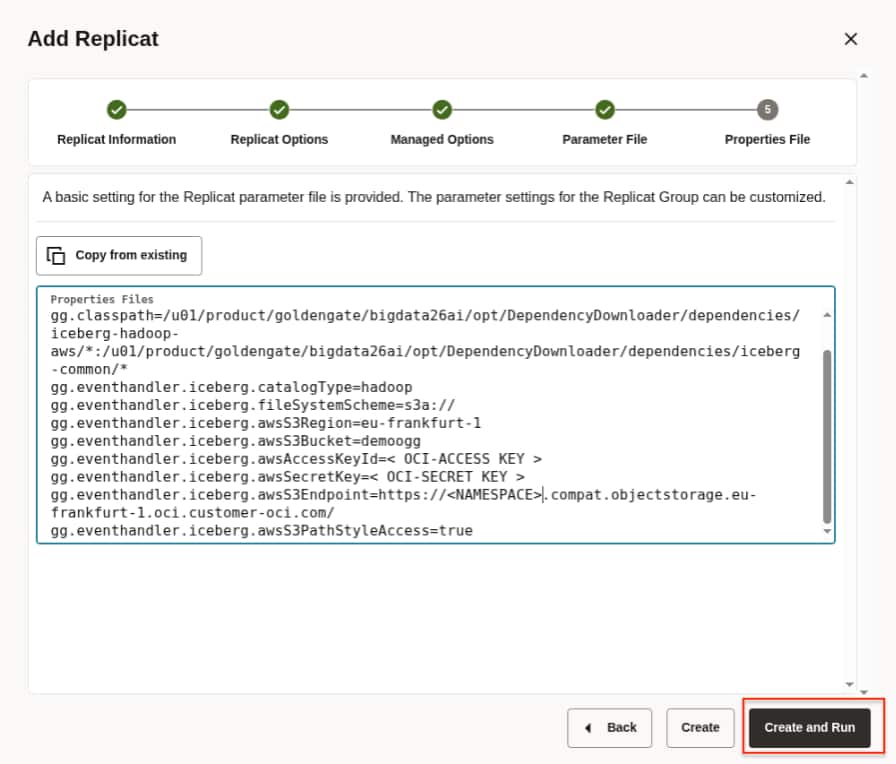
gg.eventhandler.iceberg.awsS3Endpoint=https://namespace.compat.objectstorage.eu-frankfurt-1.oci.customer-oci.com/

gg.eventhandler.iceberg.awsS3PathStyleAccess=true- Adding the classpath with the full path to dependency libraries downloaded
gg.classpath=/u01/product/goldengate/bigdata26ai/opt/DependencyDownloader/dependencies/iceberg-hadoop-ws/*:/u01/product/goldengate/bigdata26ai/opt/DependencyDownloader/dependencies/iceberg-common/*- Extra parameter for dev-test scenarios
gg.handler.iceberg.inactivityRollInterval=5s Keep the remaining defaults unless you have specific requirements (encryption, roll intervals, throughput tuning, etc.). For other optional properties, please refer to GoldenGate for DAA documentation.
The final iceberg.properties file:
# Configuration for Apache Iceberg using Hadoop Catalog and AWS S3 storage using 's3a://' scheme.
# Requires Hadoop AWS dependencies to be included in the classpath.

gg.target=iceberg
gg.eventhandler.iceberg.fileFormat=parquet

gg.eventhandler.iceberg.warehouseLocation=/demo/iceberg/tables
gg.eventhandler.iceberg.catalogType=hadoop
gg.eventhandler.iceberg.fileSystemScheme=s3a://

gg.eventhandler.iceberg.awsS3Region=eu-frankfurt-1

gg.eventhandler.iceberg.awsS3Bucket=demoogg

gg.eventhandler.iceberg.awsAccessKeyId=OCI-ACCESS-KEY

gg.eventhandler.iceberg.awsSecretKey=OCI-SECRET-KEY

gg.eventhandler.iceberg.awsS3Endpoint=https://namespace.compat.objectstorage.eu-frankfurt-1.oci.customer-oci.com/

gg.eventhandler.iceberg.awsS3PathStyleAccess=true

gg.classpath=/u01/product/goldengate/bigdata26ai/opt/DependencyDownloader/dependencies/iceberg-hadoop-aws/*:/u01/product/goldengate/bigdata26ai/opt/DependencyDownloader/dependencies/iceberg-common/*

gg.handler.iceberg.inactivityRollInterval=5s
Note: For security reasons, sensitive values such as the namespace, OCI access key, and OCI secret key are not displayed.
And Click Create and Run.
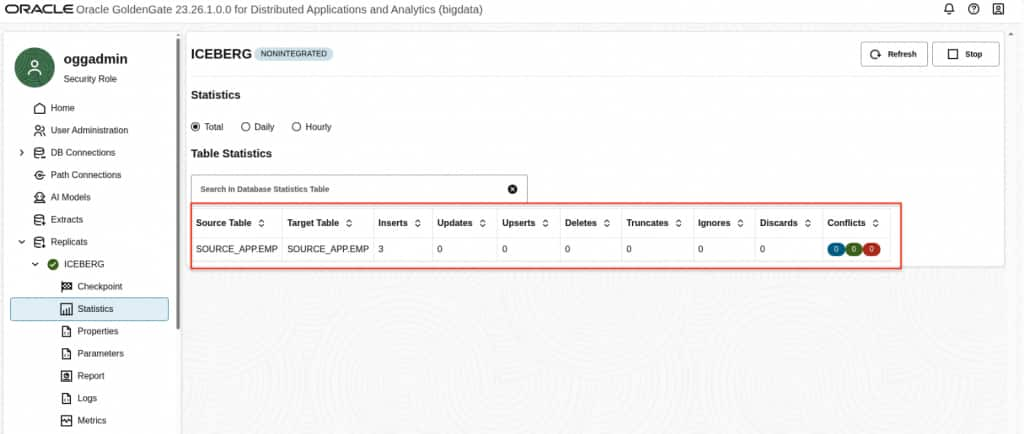
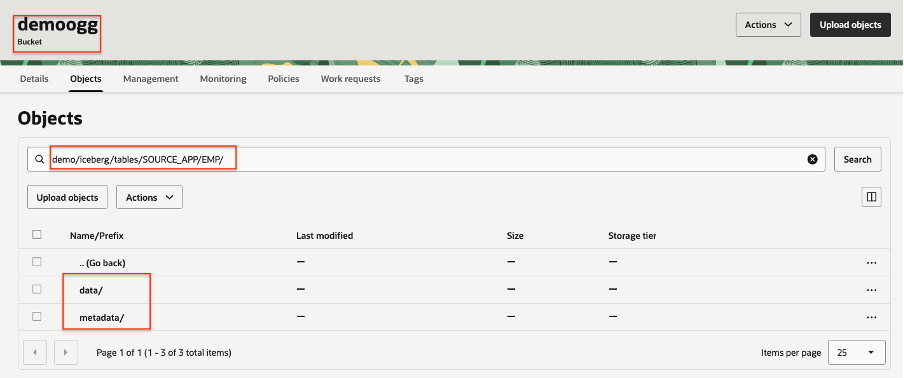
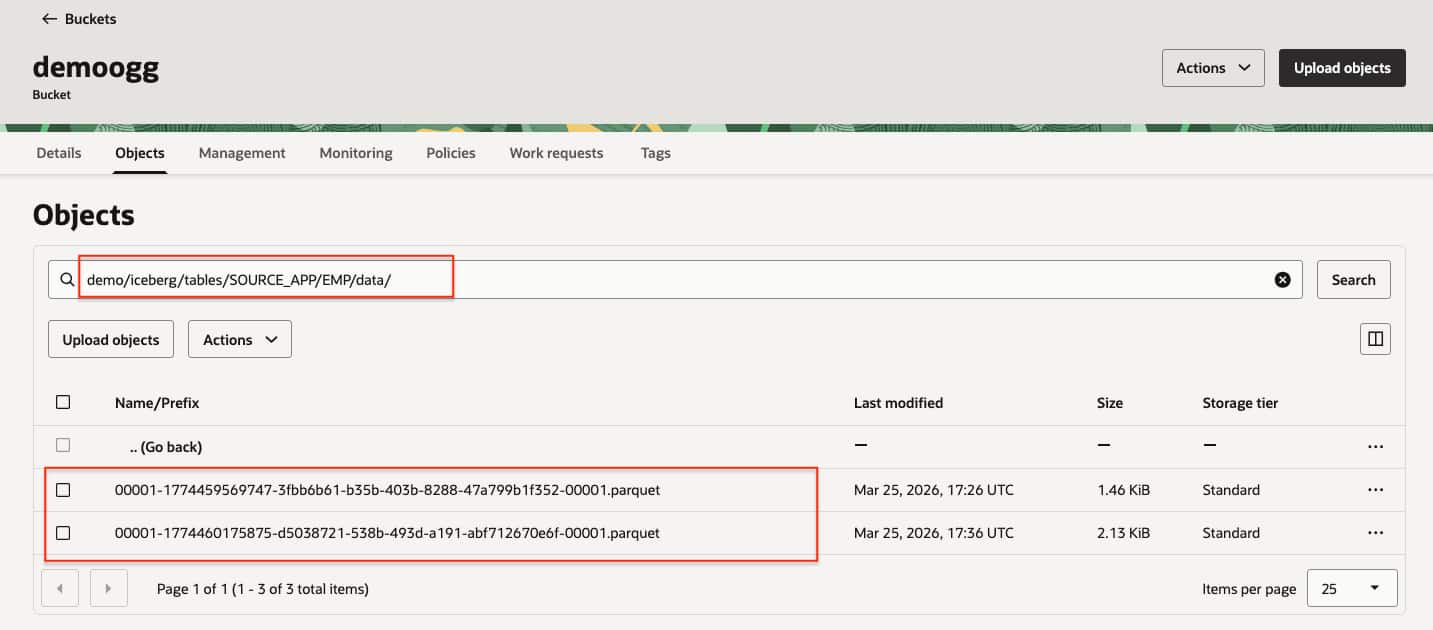
- When Replicat starts running, you can see replication statistics and Iceberg tables being created in OCI Object Storage.
- In the OCI Object Storage:
Conclusion
The certification of Apache Iceberg Tables in OCI Object Storage with Oracle GoldenGate is an important milestone for building real-time, reliable, and scalable data pipelines for modern analytics and AI workloads. With a simpler setup, automated schema evolution, and lower operational effort, this integration makes it easier to combine efficient data movement with cloud-native storage. It provides a practical way to accelerate data-driven initiatives and strengthen real-time analytics capabilities across the enterprise.
NOTE: This configuration applies to a user-managed Oracle GoldenGate 26ai for DAA deployment.