
A practical, lab-tested guide to publishing Oracle Database changes to RabbitMQ with Oracle GoldenGate for Distributed Applications and Analytics (Oracle GoldenGate for DAA) 26ai and the standard JMS Handler.
| Publish committed Oracle Database changes to a durable RabbitMQ queue without a custom GoldenGate handler. |
What is RabbitMQ?
RabbitMQ is an open source messaging and streaming broker. Applications publish messages to the broker, RabbitMQ routes them, and consumers process them when they are ready. This decouples the system that produces an event from the system that acts on it.
Typical RabbitMQ use cases include:
- Decoupling services so that producers and consumers can evolve independently.
- Moving background work to asynchronous workers.
- Buffering traffic spikes when consumers cannot keep up with producers.
- Routing events to one or several interested applications.
- Implementing request/reply and remote procedure call patterns.
- Collecting and forwarding events from distributed or IoT systems.
If RabbitMQ is new to you, the official RabbitMQ documentation and tutorials are good places to start.
Oracle GoldenGate 26ai
Oracle GoldenGate captures and delivers data changes across heterogeneous, multicloud and on-premises environments to support real-time data fabrics. It is built for mission-critical workloads and provides governance for trusted, reliable data.
GoldenGate can capture committed changes from an Oracle Database and make those changes available to databases, analytical platforms, messaging systems and applications with very low latency.
For a broader introduction, see the official Oracle GoldenGate documentation.
This guide shows how Oracle GoldenGate for DAA 26ai publishes Oracle Database changes directly to RabbitMQ through the standard JMS Handler and RabbitMQ JMS Client, without a custom handler.
GoldenGate documents the generic JMS Handler, and RabbitMQ documents its JMS client, but I could not find an end-to-end example for this use case. This lab documents the configuration that worked for me.
Lab architecture
The lab used a single-host proof of concept:
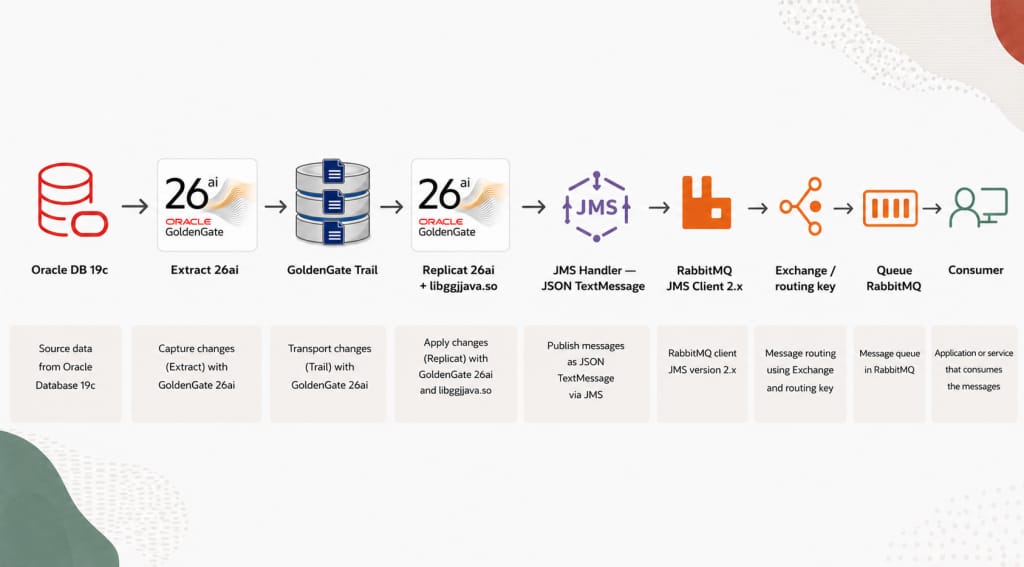
All the steps to configure Oracle GoldenGate 26ai to Extract transactions for Oracle Database 19c is outside the scope of this guide. We start with an Extract that is already capturing the required tables and writing a local trail. Oracle covers that part in Add an Extract.
A single-host design makes the example easier to reproduce. Production deployments will normally use separate hosts, private connectivity, TLS, managed secrets, monitoring and an availability design.
How the integration works
The GoldenGate JMS Handler is provider-neutral. To connect it to RabbitMQ, the Oracle GoldenGate for DAA Java runtime needs three things:
- The RabbitMQ JMS and AMQP client libraries.
- JNDI definitions for the RabbitMQ connection factory and queue.
- A GoldenGate properties file that connects the handler to those objects.
Those three layers do most of the integration work.
Software used in the lab
I tested the following versions. They form a lab baseline, not a general certification matrix or a recommendation to use older releases.
| Component | Version tested |
| Oracle Database | 19c, RU 19.32 |
| Oracle GoldenGate for Oracle | 23.26.1.0.0 |
| Oracle GoldenGate for DAA runtime | 23.26.1.0.1, core 23.26.1.0.5 |
| Oracle GoldenGate for DAA Java runtime | JDK 11.0.30 |
| RabbitMQ | 4.3.4 |
| RabbitMQ JMS Client | 2.3.0 |
| RabbitMQ Java Client | 5.14.0 |
| Java EE API | 8.0, javax.jms |
| Filesystem JNDI provider | fscontext 4.5-b13 |
For a new deployment, select versions supported by your Java runtime and test the complete combination before using it in production.
Step 1: Create the RabbitMQ objects
Create a dedicated virtual host and application user. The lab used these names:
| Object | Value |
| Virtual host | /ogg |
| Application user | ogg_pub |
| Durable queue | ogg.cdc.demo |
| AMQP endpoint | 127.0.0.1:5672 |
For a local lab, use these commands:
sudo rabbitmqctl add_vhost /ogg
sudo rabbitmqctl add_user ogg_pub 'FakeRabbitMQPassword_ChangeMe'

sudo rabbitmqctl set_permissions -p /ogg ogg_pub \
  '^(ogg\.cdc\.demo|jms\.durable\.queues)$' \
  '^(ogg\.cdc\.demo|jms\.durable\.queues)$' \
  '^(ogg\.cdc\.demo|jms\.durable\.queues)$'
Replace the fake password with a protected value for your environment. The jms.durable.queues name is used internally by the RabbitMQ JMS Client.
Create ogg.cdc.demo in the /ogg virtual host as a durable, non-auto-delete queue. You can do this from Queues and Streams in the RabbitMQ Management UI or with your normal RabbitMQ administration tooling.
Step 2: Install the Java and JMS libraries
The GoldenGate handler provides the JMS integration, but the DAA JVM still needs the provider-specific classes required to communicate with RabbitMQ.
Find the Java runtime used by DAA
Do not assume that the system java command is the one used by GoldenGate. Start from your Oracle GoldenGate for DAA installation:
DAA_HOME=/path/to/your/daa/home
DAA_JAVA_HOME="${DAA_HOME}/jdk"

"${DAA_JAVA_HOME}/bin/java" -version
The lab used the JDK bundled with the working Oracle GoldenGate for DAA home. Using the same JDK for the Replicat and the provider libraries avoids unnecessary class-loading surprises.
Download the four required JARs
| JAR | Purpose |
| rabbitmq-jms-2.3.0.jar | RabbitMQ implementation of JMS and RMQObjectFactory |
| amqp-client-5.14.0.jar | RabbitMQ AMQP 0-9-1 Java client |
| fscontext-4.5-b13.jar | Filesystem JNDI provider that reads .bindings |
| javaee-api-8.0.jar | Provides the javax.jms API used by this baseline |
Download them from Maven Central into a temporary directory:
JMS_STAGE=/tmp/ogg-rabbitmq-jms
mkdir -p "${JMS_STAGE}"
cd "${JMS_STAGE}"

curl -fLO https://repo.maven.apache.org/maven2/com/rabbitmq/jms/rabbitmq-jms/2.3.0/rabbitmq-jms-2.3.0.jar
curl -fLO https://repo.maven.apache.org/maven2/com/rabbitmq/amqp-client/5.14.0/amqp-client-5.14.0.jar
curl -fLO https://repo.maven.apache.org/maven2/com/sun/messaging/mq/fscontext/4.5-b13/fscontext-4.5-b13.jar
curl -fLO https://repo.maven.apache.org/maven2/javax/javaee-api/8.0/javaee-api-8.0.jar
Install them in a dedicated directory owned by the GoldenGate operating-system user:
JMS_ROOT=/opt/ogg/jms/rabbitmq

sudo install -d -o oracle -g oinstall -m 0750 "${JMS_ROOT}/lib"
sudo install -o oracle -g oinstall -m 0640 \
  "${JMS_STAGE}"/*.jar "${JMS_ROOT}/lib/"
In controlled environments, retrieve these artifacts from your approved software repository and apply standard supply-chain controls.
This baseline uses javax.jms. Do not mix it with Jakarta JMS 3.x libraries, which use the different jakarta.jms package namespace.
The RabbitMQ clients also use SLF4J. The DAA home in this lab already supplied the required SLF4J libraries, so no additional logging JAR was added. Check your own Oracle GoldenGate for DAA distribution before adding another SLF4J version.
The resulting classpath is:
gg.classpath=/opt/ogg/jms/rabbitmq/lib/*Step 3: Map RabbitMQ objects with JNDI
JNDI provides the bridge between the logical JMS names used by GoldenGate and the RabbitMQ objects behind them. GoldenGate looks up two JMS objects:
ConnectionFactory |
The filesystem JNDI provider reads those names from a .bindings file. The RabbitMQ object factory resolves them to a RabbitMQ connection factory and destination:
ConnectionFactory -> RabbitMQ host, AMQP port and virtual host |
The file only tells Java how to resolve the two names; queue creation and message publishing happen elsewhere.
Create the directory:
JNDI_DIR=/opt/ogg/jms/rabbitmq/jndi
sudo install -d -o oracle -g oinstall -m 0750 "${JNDI_DIR}"
Create ${JNDI_DIR}/.bindings with the following content:
ConnectionFactory/ClassName=javax.jms.ConnectionFactory
ConnectionFactory/FactoryName=com.rabbitmq.jms.admin.RMQObjectFactory
ConnectionFactory/RefAddr/0/Content=jms/ConnectionFactory
ConnectionFactory/RefAddr/0/Type=name
ConnectionFactory/RefAddr/0/Encoding=String
ConnectionFactory/RefAddr/1/Content=javax.jms.ConnectionFactory
ConnectionFactory/RefAddr/1/Type=type
ConnectionFactory/RefAddr/1/Encoding=String
ConnectionFactory/RefAddr/2/Content=com.rabbitmq.jms.admin.RMQObjectFactory
ConnectionFactory/RefAddr/2/Type=factory
ConnectionFactory/RefAddr/2/Encoding=String
ConnectionFactory/RefAddr/3/Content=127.0.0.1
ConnectionFactory/RefAddr/3/Type=host
ConnectionFactory/RefAddr/3/Encoding=String
ConnectionFactory/RefAddr/4/Content=5672
ConnectionFactory/RefAddr/4/Type=port
ConnectionFactory/RefAddr/4/Encoding=String
ConnectionFactory/RefAddr/5/Content=/ogg
ConnectionFactory/RefAddr/5/Type=virtualHost
ConnectionFactory/RefAddr/5/Encoding=String
ConnectionFactory/RefAddr/6/Content=false
ConnectionFactory/RefAddr/6/Type=ssl
ConnectionFactory/RefAddr/6/Encoding=String
queue1/ClassName=javax.jms.Queue
queue1/FactoryName=com.rabbitmq.jms.admin.RMQObjectFactory
queue1/RefAddr/0/Content=jms/Queue
queue1/RefAddr/0/Type=name
queue1/RefAddr/0/Encoding=String
queue1/RefAddr/1/Content=javax.jms.Queue
queue1/RefAddr/1/Type=type
queue1/RefAddr/1/Encoding=String
queue1/RefAddr/2/Content=com.rabbitmq.jms.admin.RMQObjectFactory
queue1/RefAddr/2/Type=factory
queue1/RefAddr/2/Encoding=String
queue1/RefAddr/3/Content=ogg.cdc.demo
queue1/RefAddr/3/Type=destinationName
queue1/RefAddr/3/Encoding=Strin
Set the owner and permissions:
sudo chown oracle:oinstall "${JNDI_DIR}/.bindings"
sudo chmod 0600 "${JNDI_DIR}/.bindings"
Keep credentials out of .bindings. For a remote RabbitMQ server, replace 127.0.0.1 with its private DNS name or address. Use the TLS listener and set ssl=true when TLS is configured.
Step 4: Create the GoldenGate Replicat configuration
The Java Replicat uses two files:
- RRMQ01.prm activates Java Delivery and maps the source table.
- RRMQ01.properties configures the JMS Handler, JNDI and RabbitMQ access.
RRMQ01.prm
REPLICAT RRMQ01
TARGETDB LIBFILE libggjava.so SET property=/path/to/deployment/etc/conf/ogg/RRMQ01.properties
REPORTCOUNT EVERY 1 MINUTES, RATE
GROUPTRANSOPS 1
MAP SOURCE_SCHEMA.SOURCE_TABLE, TARGET SOURCE_SCHEMA.SOURCE_TABLE;
TARGETDB LIBFILE libggjava.so starts Java Delivery. The TARGET clause in the MAP provides metadata to the adapter; it does not mean that the Replicat writes to another database.
RRMQ01.properties
The properties file ties the JMS Handler, JNDI configuration and RabbitMQ connection together:
gg.handlerlist=rmq
gg.handler.rmq.type=jms
gg.handler.rmq.destinationType=queue
gg.handler.rmq.destinationTemplate=queue1
gg.handler.rmq.connectionFactory=ConnectionFactory
gg.handler.rmq.useJndi=true

gg.handler.rmq.mode=op
gg.handler.rmq.format=xml2
gg.handler.rmq.persistent=true
gg.handler.rmq.localTX=true

gg.log=log4j
gg.log.level=WARN

gg.handler.rmq.user=ogg_pub
gg.handler.rmq.password=FakeRabbitMQPassword_ChangeMe

java.naming.factory.initial=com.sun.jndi.fscontext.RefFSContextFactory
java.naming.provider.url=file:/opt/ogg/jms/rabbitmq/jndi

gg.classpath=/opt/ogg/jms/rabbitmq/lib/*

gg.report.time=1m
jvm.bootoptions=-Xms64m -Xmx512m
The key settings are:
| Setting | What it does |
| type=jms | Selects the standard GoldenGate JMS Handler |
| destinationType=queue | Uses point-to-point queue delivery |
| destinationTemplate=queue1 | Resolves the logical queue name from .bindings |
| connectionFactory=ConnectionFactory | Resolves the RabbitMQ connection factory from .bindings |
| useJndi=true | Enables JNDI lookup for both objects |
| mode=op | Creates one message for each DML operation |
| format=xml2 | Formats the operation as GoldenGate XML with column data |
| persistent=true | Requests persistent JMS delivery |
| localTX=true | Uses a local JMS transaction |
| java.naming.* | Points Java to the filesystem JNDI registry |
| gg.classpath | Loads the RabbitMQ, AMQP, JMS and JNDI libraries |
In this configuration, destinationTemplate contains the JNDI name queue1, not the physical RabbitMQ name ogg.cdc.demo. The mapping between those names is in .bindings.
The properties file contains the RabbitMQ credential. Protect it with owner oracle:oinstall and mode 0600, or integrate it with your approved secret-management process.
Step 5: Upload the files through the GoldenGate REST API
The Administration Service exposes these endpoints for deployment configuration files:
POST /services/v2/config/files/RRMQ01.prm
POST /services/v2/config/files/RRMQ01.properties
The examples use placeholder credentials:
OGG_API=http://127.0.0.1:9101/services/v2
OGG_USER=<ogg_user_name>
OGG_PASSWORD=<ogg_password>
The API expects an ogg:config JSON document with one array element per file line. If the two files are in your current directory, jq can create the request bodies:
jq -Rn '{"$schema":"ogg:config","lines":[inputs]}' \
  < RRMQ01.prm > RRMQ01-prm.json

jq -Rn '{"$schema":"ogg:config","lines":[inputs]}' \
  < RRMQ01.properties > RRMQ01-properties.json
Upload the parameter file:
curl --user "${OGG_USER}:${OGG_PASSWORD}" \
  --request POST \
  --header 'Content-Type: application/json' \
  --data @RRMQ01-prm.json \
  --output /dev/null \
  --write-out 'HTTP %{http_code}\n' \
  "${OGG_API}/config/files/RRMQ01.prm"
Upload the properties file in the same way:
curl --user "${OGG_USER}:${OGG_PASSWORD}" \
  --request POST \
  --header 'Content-Type: application/json' \
  --data @RRMQ01-properties.json \
  --output /dev/null \
  --write-out 'HTTP %{http_code}\n' \
  "${OGG_API}/config/files/RRMQ01.properties"
Step 6: Create and start the Replicat
Create RRMQ01-replicat.json with the Replicat definition. Replace the trail and deployment paths with values from your environment:
{
  "$schema": "ogg:replicat",
  "description": "DAA Java Delivery to RabbitMQ JMS",
  "mode": {
    "type": "nonintegrated"
  },
  "begin": "now",
  "source": {
    "name": "aa",
    "path": "/path/to/local/trail"
  },
  "config": [
    "REPLICAT RRMQ01",
    "TARGETDB LIBFILE libggjava.so SET property=/path/to/deployment/etc/conf/ogg/RRMQ01.properties",
    "REPORTCOUNT EVERY 1 MINUTES, RATE",
    "GROUPTRANSOPS 1",
    "MAP SOURCE_SCHEMA.SOURCE_TABLE, TARGET SOURCE_SCHEMA.SOURCE_TABLE;"
  ]
}
Create the Replicat:
curl --user "${OGG_USER}:${OGG_PASSWORD}" \
  --request POST \
  --header 'Content-Type: application/json' \
  --data @RRMQ01-replicat.json \
  --output /dev/null \
  --write-out 'HTTP %{http_code}\n' \
  "${OGG_API}/replicats/RRMQ01"
Because begin is set to now, the first checkpoint starts at the current end of the local trail. This keeps the test focused on DML committed after the Replicat is created.
Start it with one PATCH call:
curl --user "${OGG_USER}:${OGG_PASSWORD}" \
  --request PATCH \
  --header 'Content-Type: application/json' \
  --data '{"status":"running"}' \
  --output /dev/null \
  --write-out 'HTTP %{http_code}\n' \
  "${OGG_API}/replicats/RRMQ01"
Use GET on the same endpoint to check the current Replicat state. After startup, the Java Replicat should connect to the /ogg virtual host as ogg_pub.
Step 7: Publish and view Oracle changes
To validate the complete path, I used one correlation value and committed an INSERT, an UPDATE and a DELETE separately:
INSERT INTO OGGDEMO.CDC_EVENTS (EVENT_ID, EVENT_TEXT)
VALUES (260826194919, 'OGG RabbitMQ blog insert 260826194919');
COMMIT;

UPDATE OGGDEMO.CDC_EVENTS
SET EVENT_TEXT = 'OGG RabbitMQ blog update 260826194919'
WHERE EVENT_ID = 260826194919;
COMMIT;

DELETE FROM OGGDEMO.CDC_EVENTS
WHERE EVENT_ID = 260826194919;
COMMIT;
The row no longer existed in Oracle after the final commit, but the three operations remained in the GoldenGate trail.
RabbitMQ received three ready messages:
sudo rabbitmqctl list_queues -p /ogg \
name durable state messages_ready messages_unacknowledged messages| name durable state messages_ready messages_unacknowledged messages ogg.cdc.demo true running 3 0 3 |
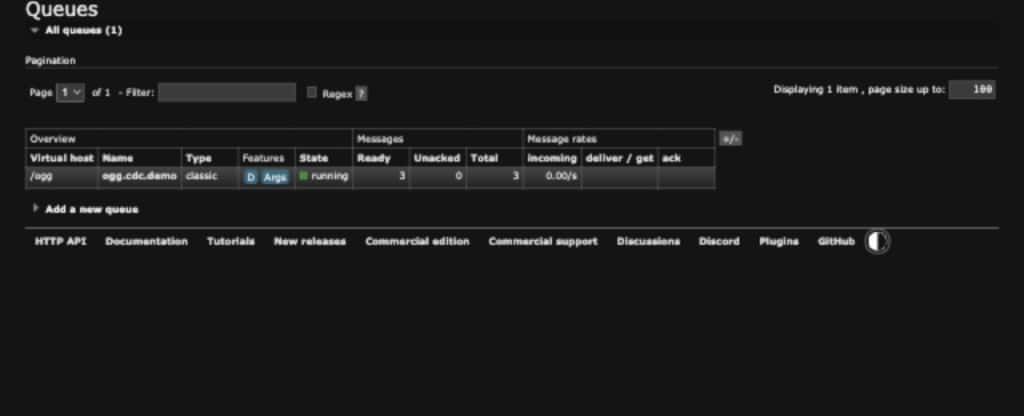
RabbitMQ Management showing three ready messages
RabbitMQ Management may display a JMS TextMessage body as Base64 because the RabbitMQ JMS Client uses its own wire representation. The Base64 display does not indicate a GoldenGate formatting failure. A JMS-aware viewer can decode the body and show the XML generated by format=xml2.
In the lab, the decoded messages matched the Oracle operations and correlation value:
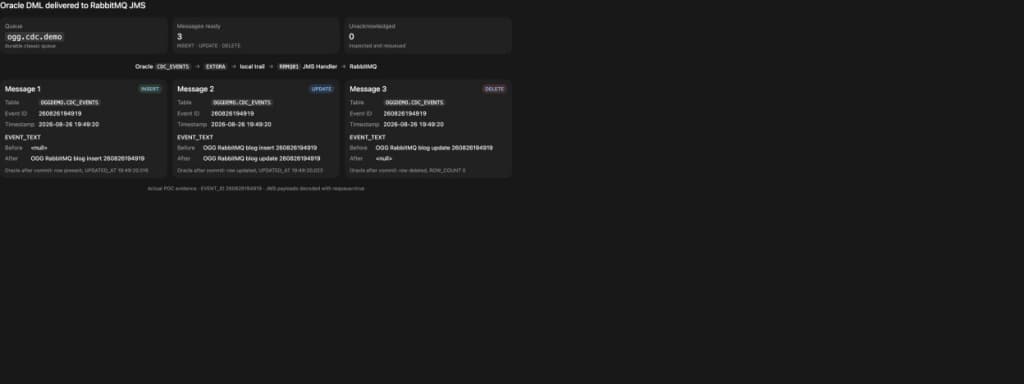
Oracle DML correlated with decoded RabbitMQ JMS messages
MESSAGE=1 TABLE=OGGDEMO.CDC_EVENTS TYPE=INSERT
  EVENT_ID:   <null> -> 260826194919
  EVENT_TEXT: <null> -> OGG RabbitMQ blog insert 260826194919

MESSAGE=2 TABLE=OGGDEMO.CDC_EVENTS TYPE=UPDATE
  EVENT_ID:   260826194919 -> 260826194919
  EVENT_TEXT: OGG RabbitMQ blog insert 260826194919
              -> OGG RabbitMQ blog update 260826194919

MESSAGE=3 TABLE=OGGDEMO.CDC_EVENTS TYPE=DELETE
  EVENT_ID:   260826194919 -> <null>
  EVENT_TEXT: OGG RabbitMQ blog update 260826194919 -> <null>
Three committed Oracle Database changes produced three durable messages in RabbitMQ.
What the test confirms
This integration did not require a RabbitMQ-specific GoldenGate handler. It combined features that already existed:
- GoldenGate capture and trail management.
- DAA Java Delivery.
- The standard GoldenGate JMS Handler.
- The RabbitMQ JMS Client.
- JNDI for provider-specific object lookup.
- GoldenGate REST APIs for configuration and lifecycle management.
GoldenGate continues to use a standard messaging interface while the RabbitMQ client handles the provider-specific connection.
Production considerations
This lab validates the integration path, not a production deployment. Before using the pattern in production, apply your own operational, security and performance checks:
- Keep the input trail DML-only; the GoldenGate JMS Handler does not support DDL.
- Replace loopback and non-TLS AMQP with the appropriate private and TLS-enabled connection.
- Store GoldenGate and RabbitMQ credentials through an approved secret-management process.
- Revalidate the DAA JDK, JMS client, AMQP client and JMS namespace as one tested set.
- Design consumers for possible redelivery; local JMS transactions are not an XA or exactly-once guarantee.
- Monitor both the GoldenGate checkpoint and RabbitMQ queue depth.
Final takeaway
Oracle GoldenGate 26ai DAA can publish Oracle Database changes to RabbitMQ through the standard JMS Handler and the RabbitMQ JMS Client.
Four layers must align:
| Java libraries + JNDI objects + GoldenGate JMS properties + RabbitMQ permissions and queue |
Once those pieces were aligned, the data path worked without custom handler development. Standard interfaces were enough to support a destination pattern for which I could not find an end-to-end example.
Official references
- RabbitMQ overview
- RabbitMQ documentation
- RabbitMQ tutorials
- Oracle GoldenGate documentation
- Oracle GoldenGate 26ai – Java Message Service
- Oracle GoldenGate 26ai – Java Delivery
- Oracle GoldenGate 26ai – Add an Extract
- RabbitMQ JMS Client guide
- RabbitMQ Java libraries support
- Maven Central Repository
- MOS Document ID : 3035558.1.
This is a lab-validated, single-host proof of concept. Replace the example paths, credentials and network settings with values appropriate for your environment.