
1. Overview
This describes how to migrate an Oracle GoldenGate capture configuration from an existing Extract connected at the CDB root to an Extract connected directly to a Pluggable Database (PDB).
The existing CDB-level Extract cannot simply be converted into a per-PDB Extract. A new Extract must be created and registered against the PDB. The migration therefore consists of running the existing and new capture configurations in parallel for a controlled period and switching replication to the trail generated by the new per-PDB Extract.
The procedure is designed to minimize replication interruption and prevent data loss.
Important: This procedure applies to a change from CDB root capture to per-PDB capture. Downstream Extract configurations still need to connect to CDB.
2. Existing and Target Configuration
Before Migration
The existing Extract connects to the CDB root and captures changes for one or more PDBs.
Conceptually:
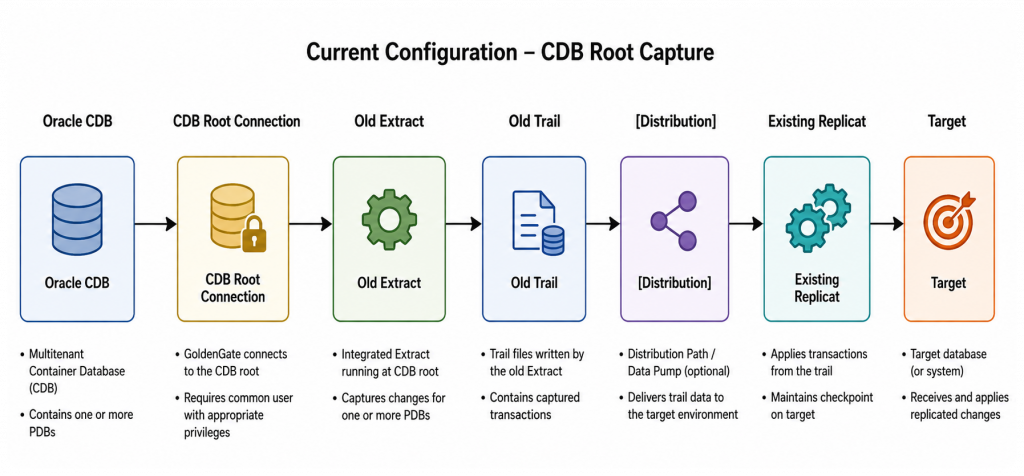
Object references in the Extract configuration may use SOURCECATALOG or three-part object names.
For example:
TABLE PDB1.HR.EMPLOYEES;
TABLE PDB1.HR.DEPARTMENTS;
After Migration
The new Extract connects directly to the PDB using a PDB-local GoldenGate user.
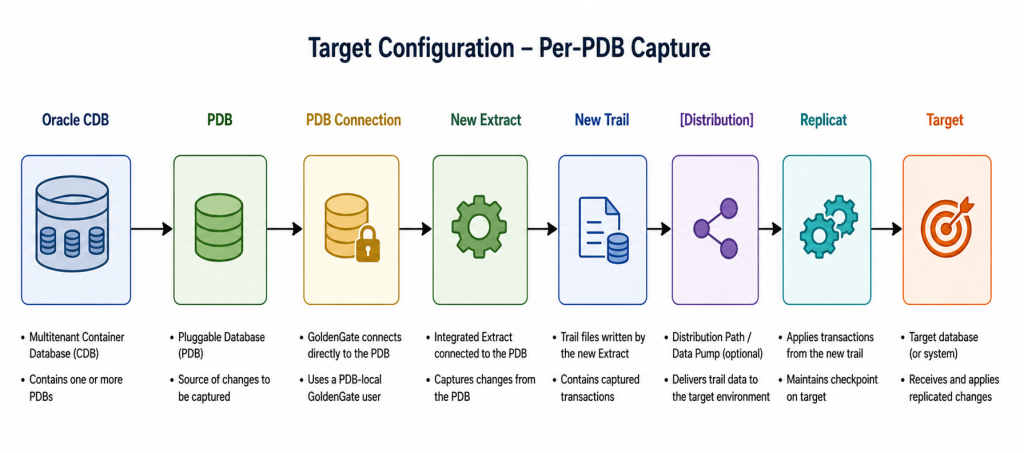
Because the Extract is connected directly to the PDB, the PDB name is no longer required in captured object names.
For example:
TABLE HR.EMPLOYEES;
TABLE HR.DEPARTMENTS;
3. Key Migration Considerations
3.1 The Existing Extract Is Not Converted
Treat the per-PDB Extract as a new Extract.
Do not attempt to modify the existing CDB-root Extract in place and simply change its database connection.
Create and register a new Extract using the PDB connection.
3.2 Parameter Changes
Review the existing Extract parameter file and convert CDB-qualified object references to PDB-local references.
For example:
Old CDB-level configuration:
TABLE PDB1.HR.*;becomes:
New per-PDB configuration:
TABLE HR.*;Similarly, SOURCECATALOG is not required when the Extract connects directly to the PDB.
Review any TABLE, TABLEEXCLUDE, filtering, mapping, heartbeat, DDL, and other object-specific parameters for the same naming dependency.
3.3 Replicat
If the existing Replicat is already dedicated to the PDB, its target database configuration does not inherently need to change simply because capture is moving from CDB-root to per-PDB.
However, during the migration the Replicat must transition from the old trail to the trail generated by the new Extract or Distribution Path.
Depending on the GoldenGate topology, this can be accomplished by creating a replacement Replicat against the new trail or otherwise transitioning the apply stream according to the deployment architecture.
The important requirement is that the new apply stream starts at the correct transaction boundary.
4. Prerequisites
Before starting the migration:
- Create or verify the GoldenGate user in the PDB.
- Grant the privileges required for per-PDB capture.
- Create a GoldenGate database connection that connects directly to the PDB.
- Verify connectivity from the GoldenGate deployment to the PDB service.
- Verify database supplemental logging.
- Verify required schema/table-level TRANDATA.
- Review the existing Extract parameters.
- Identify all objects belonging to the PDB that are currently captured by the CDB-level Extract.
- Identify the trail, Distribution Path/Data Pump, Receiver Path, and Replicat associated with the existing replication stream.
- Verify that sufficient archive/redo logs will remain available throughout the migration.
- Verify that the target Replicat is current and does not have unresolved errors.
Record the existing configuration before making changes.
At minimum, capture:
INFO EXTRACT <old_extract>, DETAIL
INFO EXTRACT <old_extract>, SHOWCH
INFO REPLICAT <replicat>, DETAIL
Also save copies of the Extract and Replicat parameter files.
5. Create the Per-PDB Extract
Create a new Extract using the database connection for the PDB and BEGIN NOW as the starting point.
The new Extract must capture the same source objects currently being captured for that PDB by the old Extract.
Configure a new trail for this Extract. Do not reuse the trail written by the existing Extract.
For example:
Old stream:
CDB Extract -> Trail AA -> Replicat
New stream:
PDB Extract -> Trail BB -> New Replicat
Modify the Extract parameters for PDB-local naming.
For example:
EXTRACT EPDB1
USERIDALIAS <pdb_alias>
TABLE HR.EMPLOYEES;
TABLE HR.DEPARTMENTS;
rather than:
TABLE PDB1.HR.EMPLOYEES;
TABLE PDB1.HR.DEPARTMENTS;
Create and register the Extract against the PDB.
Do not stop the existing CDB Extract at this point.
6. Start the New PDB Extract
Create the new per-PDB Extract with its initial position set to Now (BEGIN NOW). This establishes the beginning of the overlap period while the existing CDB Extract continues capturing transactions.
In the Deployment Console, select Now as the Extract’s begin position. The equivalent Admin Client command is:
ADD EXTRACT <new_pdb_extract>, INTEGRATED TRANLOG, BEGIN NOWThen start the new Extract:
START EXTRACT <new_pdb_extract>Verify that the Extract is running, capturing transactions, and writing records to its trail.
Do not stop the existing CDB Extract or its Distribution Path at this stage. Both pipelines must continue operating until the safe cutover point has been established.
At this stage, both Extracts temporarily capture overlapping database activity:
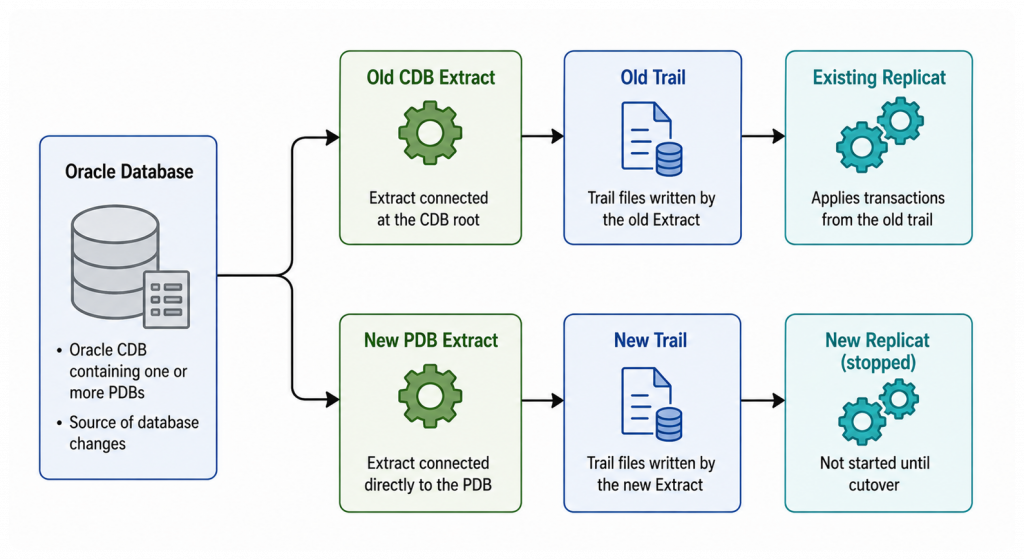
The new trail must be allowed to accumulate captured transactions.
Do not start the new Replicat yet.
This overlap is intentional. It provides a window in which both capture configurations contain the transactions required to establish a safe cutover point.
7. Establish a Safe Cutover Point
The primary concern before cutover is transactions that were already open when the new PDB Extract was registered or started.
The new PDB Extract must be able to capture every transaction that will eventually be handed off to the new replication stream. A transaction that began before the new Extract’s capture point may not be available to the new Extract even if that transaction commits later.
After starting the new PDB Extract, allow the existing CDB Extract and existing Replicat to continue running.
Inspect transactions currently being tracked by the existing Extract:
SEND EXTRACT <old_extract>, SHOWTRANSIdentify transactions that began before the new PDB Extract’s effective capture point.
Wait for those transactions to commit or roll back and for the existing CDB Extract to process them.
Repeat as necessary:
SEND EXTRACT <old_extract>, SHOWTRANSDo not proceed with the final cutover until transactions that cannot safely be handled by the new PDB Extract have completed.
Long-running transactions may extend this waiting period considerably. If an application has unusually long-running transactions, coordinate with the application/database team before migration.
8. Stop the Old CDB Extract and Record the Cutover SCN
After the safe cutover point has been established in Section 7, stop the old CDB Extract. The new PDB Extract is already running and continues to capture the transactions for the new stream.
Stop the old CDB Extract:
STOP EXTRACT <old_extract>, FORCEThen display the old Extract’s checkpoint information:
INFO EXTRACT <old_extract>, SHOWCHRecord the Current Checkpoint SCN from the old Extract as:
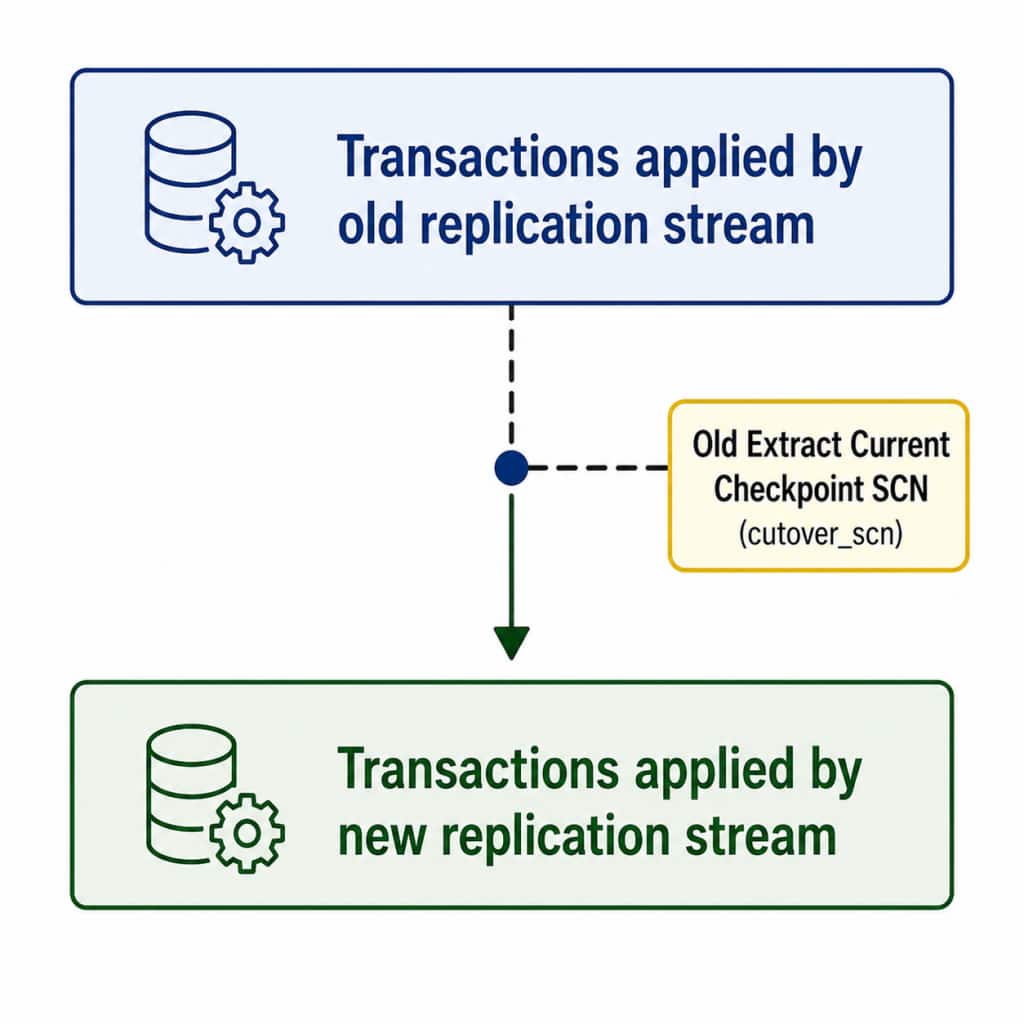
cutover_scn = <old_extract_current_checkpoint_scn>The cutover_scn is the handoff boundary used when the new Replicat is started. It comes from the old Extract’s Current Checkpoint SCN, not from the Replicat checkpoint table.
Alternatively, option is to run the following script to get current and recovery SCN from the API (Make sure to replace the hostname, port and extract name):
checkpoint_text=$(
  curl --silent --show-error --fail \
    --user "oggadmin:$OGG_ADMIN_PWD" \
    --header 'Content-Type: application/json' \
    --request POST \
    --data '{
      "command": "INFO",
      "arguments": "EXTRACT EWEST SHOWCH",
      "isReported": true
    }' \
    'http://localhost:9012/services/v2/extracts/EWEST/command' |
  jq -r '.response.reply[]'
)

checkpoint_values=$(
  printf '%s\n' "$checkpoint_text" |
  awk '
    /Recovery Checkpoint \(position of oldest unprocessed transaction in the data source\):/ {
      section = "recovery"
      next
    }
    /Current Checkpoint \(position of last record read in the data source\):/ {
      section = "current"
      next
    }
    section == "recovery" && /Timestamp:/ {
      value = $0
      sub(/^[[:space:]]*Timestamp:[[:space:]]*/, "", value)
      recovery_timestamp = value
      next
    }
    section == "recovery" && /SCN:/ {
      value = $0
      sub(/^.*\(/, "", value)
      sub(/\).*$/, "", value)
      recovery_scn = value
      section = ""
      next
    }

    section == "current" && /Timestamp:/ {
      value = $0
      sub(/^[[:space:]]*Timestamp:[[:space:]]*/, "", value)
      current_timestamp = value
      next
    }

    section == "current" && /SCN:/ {
      value = $0
      sub(/^.*\(/, "", value)
      sub(/\).*$/, "", value)
      current_scn = value
      section = ""
      next
    }

    END {
      printf "%s|%s|%s|%s\n",
        recovery_scn,
        recovery_timestamp,
        current_scn,
        current_timestamp
    }
  '
)

IFS='|' read -r \
  old_recovery_scn \
  old_recovery_timestamp \
  old_current_scn \
  old_current_timestamp \
  <<< "$checkpoint_values"

old_recovery_epoch=$(date -d "$old_recovery_timestamp" +%s)
old_current_epoch=$(date -d "$old_current_timestamp" +%s)
checkpoint_gap_seconds=$((old_current_epoch - old_recovery_epoch))
checkpoint_gap_minutes=$((checkpoint_gap_seconds / 60))

printf 'old_recovery_scn=%s\n' "$old_recovery_scn"
printf 'old_recovery_timestamp=%s\n' "$old_recovery_timestamp"
printf 'old_current_scn=%s\n' "$old_current_scn"
printf 'old_current_timestamp=%s\n' "$old_current_timestamp"
printf 'checkpoint_gap_minutes=%s\n' "$checkpoint_gap_minutes"

if [ "$checkpoint_gap_seconds" -lt 0 ]; then
  echo "ERROR: Current Checkpoint timestamp is older than Recovery Checkpoint."
elif [ "$checkpoint_gap_seconds" -gt 3600 ]; then
  echo "WARNING: Checkpoint difference exceeds one hour."
  echo "Cutover might take longer. Monitor open transactions and repeat INFO EXTRACT EWEST SHOWCH."
else
  echo "OK: Checkpoint difference is less than one hour."
Fi
Expected results:
old_recovery_scn=17240823
old_recovery_timestamp=2026-08-27 20:58:18.000000
old_current_scn=17240996
old_current_timestamp=2026-08-27 20:58:35.000000
checkpoint_gap_minutes=0
OK: Checkpoint difference is less than one hour.
That would be my preferred approach because it is repeatable, minimizes manual intervention, and reduces the risk of human error.
9. Let the Existing Replicat Reach EOF and Stop Gracefully
After stopping the old Extract and recording cutover_scn, allow the existing Replicat to continue consuming the old trail.
Check its status:
SEND REPLICAT <old_replicat>, STATUSWait until the Replicat reaches end of file (EOF). Recheck the status as needed and do not stop the Replicat before it reaches EOF.
After the Replicat reaches EOF, stop it gracefully:
STOP REPLICAT <old_replicat>Verify that it is stopped:
INFO REPLICAT <old_replicat>If the Replicat does not stop gracefully, use the documented Replicat synchronization procedure before positioning the replacement Replicat.
No Replicat checkpoint-table query is required to obtain cutover_scn; that value was recorded from the old Extract’s Current Checkpoint SCN in Section 8.
This checkpoint establishes the transaction boundary between the old and new replication streams:
10. Start the New Replicat with AFTERCSN
Start the new Replicat using cutover_scn, the Current Checkpoint SCN recorded from the old Extract in Section 8 (17240996):
START REPLICAT <new_replicat>, AFTERCSN <cutover_scn>
AFTERCSN positions the new Replicat to continue with transactions after the specified SCN, preventing transactions through the handoff boundary from being reapplied.
The new Replicat now consumes the new PDB Extract trail and takes over the replication stream:
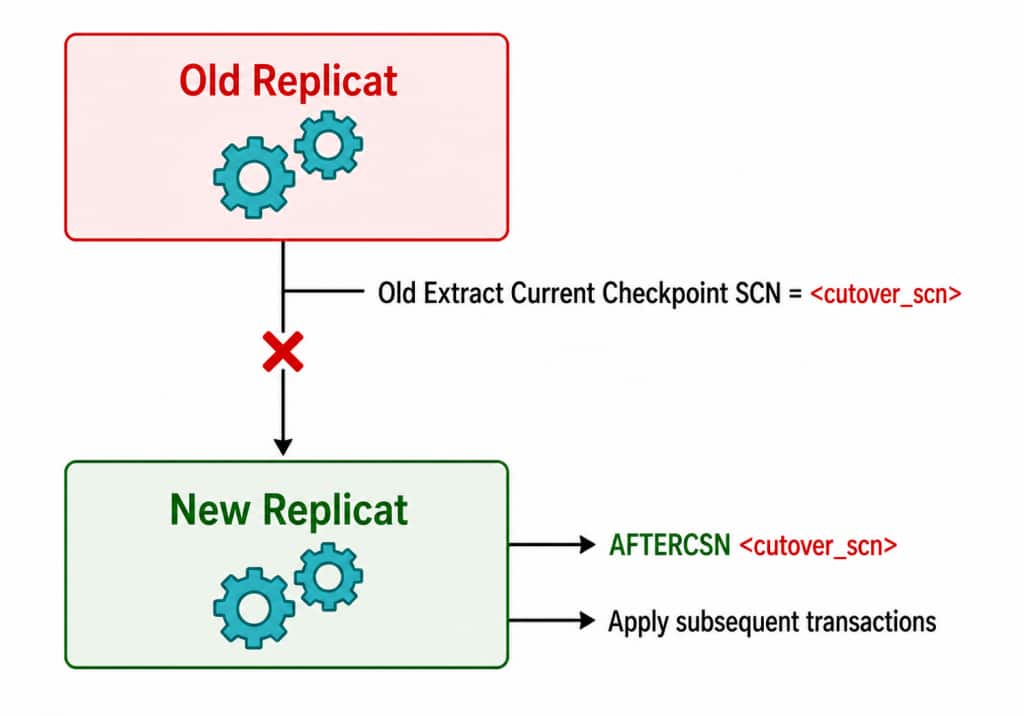
After startup, verify that the new Replicat is running, its checkpoint is advancing, and new source transactions are reaching the target.
11. Validate the New Replication Stream
After starting the new Replicat, verify all GoldenGate processes.
For example:
INFO EXTRACT <new_extract>, DETAIL
INFO EXTRACT <new_extract>, SHOWCH

INFO REPLICAT <new_replicat>, DETAIL
INFO REPLICAT <new_replicat>, SHOWCH
Confirm:
- New PDB Extract is running.
- New Extract checkpoint is advancing.
- New trail files are being generated.
- Distribution/Receiver paths, if present, are running.
- New Replicat is running.
- Replicat checkpoint is advancing.
- Extract and Replicat lag return to expected levels.
- No discarded or abended transactions are reported.
- New transactions committed on the source appear on the target.
Where practical, perform an application-level validation using controlled INSERT, UPDATE, and DELETE operations.
For critical environments, perform additional source-to-target validation using the customer’s standard reconciliation process or Oracle GoldenGate Veridata.
12. Retire the Old Extract
Do not immediately delete the old Extract after the new Replicat starts.
Keep the old configuration available until the new replication stream has been validated.
After successful validation:
- Confirm that the old CDB Extract remains stopped.
- Confirm that the new PDB Extract and Replicat are healthy.
- Retain old trail files according to the organization’s rollback policy.
- Remove the old Extract only after the rollback window has expired.
- Remove obsolete Distribution Paths/Data Pumps and trails if they are no longer required.
If the CDB-level Extract captures additional PDBs, do not remove the entire Extract unless all PDBs served by that Extract have been migrated. Instead, handle the remaining PDB capture configuration appropriately.
13. Expected Interruption
The new PDB Extract can be created and started while the existing replication stream remains operational.
Therefore, most of the migration can occur while replication continues normally.
The principal interruption occurs during the final handoff after the old CDB Extract is stopped and while the old Replicat reaches EOF:
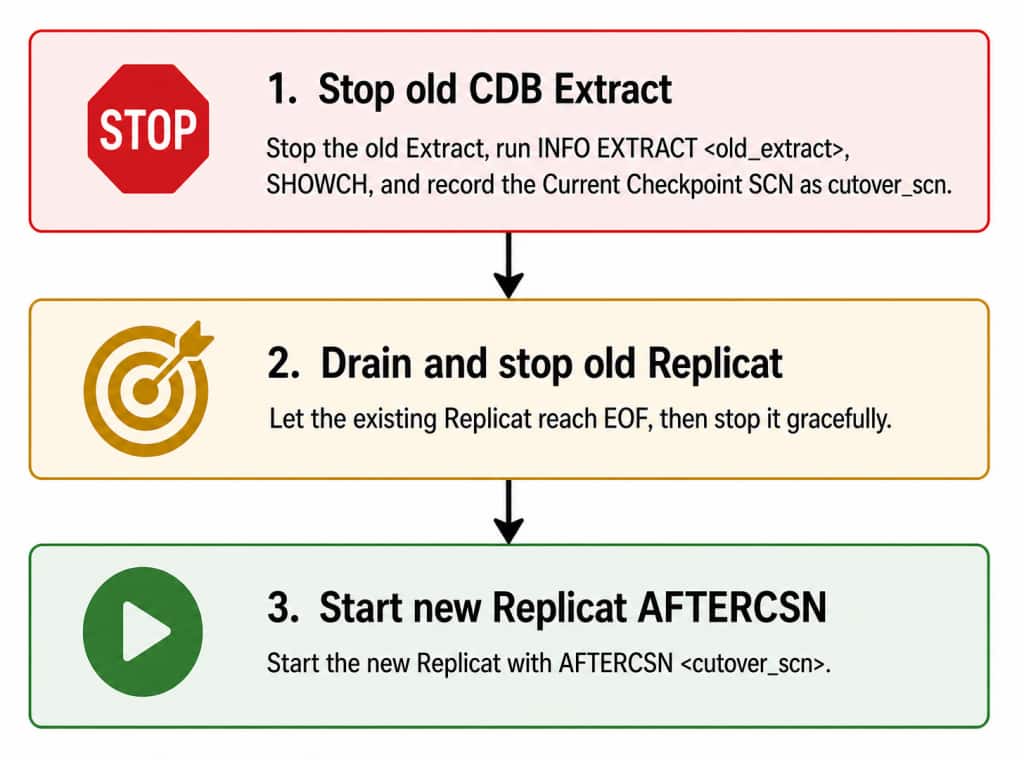
Using the API script provided in Section 8 can streamline this process and reduce the time required to collect and validate the checkpoint values.Under normal conditions this should be brief.
However, the total migration duration can be affected by:
- long-running source transactions;
- Replicat backlog;
- Parallel Replicat synchronization;
- network latency;
- Distribution/Receiver backlog;
- unavailable archive logs;
- target apply performance.
A long-running transaction does not necessarily mean a long application outage, but it can delay when the migration can safely reach its cutover point.
14. Rollback
Until the old replication configuration is removed, it provides a potential rollback path.
If a problem is discovered before the new Replicat has processed significant production activity:
- Stop the new Replicat.
- Determine the exact transaction boundary reached by the new stream.
- Verify the old trail and required source redo remain available.
- Reposition the old replication stream at a safe transaction boundary.
- Resume the old stream.
- Validate source and target consistency.
Rollback after transactions have been applied by the new stream requires careful SCN/checkpoint analysis to avoid duplicate or missing transactions.
For this reason, retain the old Extract/trails until the new configuration has been fully validated.
15. Migration Checklist
Preparation
- Identify CDB-level Extract.
- Identify PDB being migrated.
- Identify all tables/schemas captured for the PDB.
- Record Extract and Replicat checkpoints.
- Back up existing parameter files.
- Verify supplemental logging and TRANDATA.
- Create/verify PDB-local GoldenGate user.
- Create/verify PDB GoldenGate connection.
- Review archive/redo retention.
- Identify long-running transactions.
- Build New Stream
- Create new PDB Extract.
- Register Extract against PDB.
- Change three-part object names to two-part names.
- Remove unnecessary SOURCECATALOG.
- Configure new trail.
- Configure Distribution/Receiver path if required.
- Create new Replicat against new trail.
- Leave new Replicat stopped.
Migration
- Start new PDB Extract.
- Verify new trail is receiving data.
- Monitor old Extract open transactions.
- Wait for transactions predating the safe capture boundary to complete.
- Stop old CDB Extract after the safe cutover point is established.
- Run INFO EXTRACT <old_extract>, SHOWCH.
- Record the old Extract’s Current Checkpoint SCN as cutover_scn.
- Let the existing Replicat reach EOF.
- Stop old Replicat gracefully.
- Start new Replicat with AFTERCSN <cutover_scn>.
- Verify Replicat is applying transactions.
Validation
- Verify Extract checkpoint advancement.
- Verify Replicat checkpoint advancement.
- Check Extract and Replicat lag.
- Check GoldenGate error logs.
- Perform source DML test.
- Verify DML reaches target.
- Perform source/target reconciliation where required.
- Monitor production workload.
Cleanup
- Complete rollback/observation period.
- Confirm old CDB Extract remains stopped.
- Confirm old Extract is not required by another PDB.
- Remove obsolete Extract configuration.
- Remove obsolete trails and paths according to retention policy.
- Update operational documentation and monitoring.
16. Important Operational Principle
The migration should be treated as a controlled handoff between two replication streams, not as an in-place modification of an Extract.
The safe sequence is:
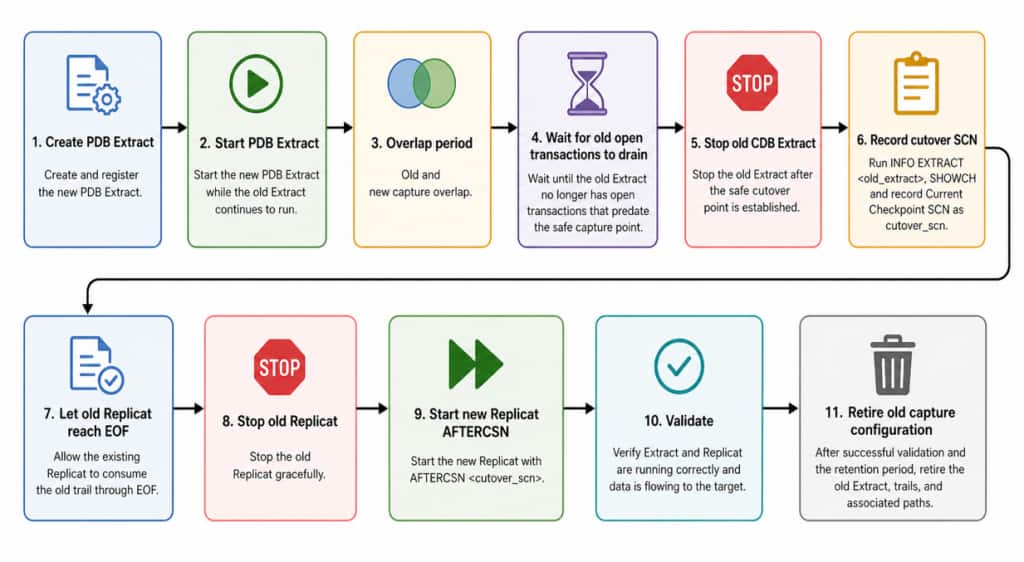
This overlap-and-handoff approach minimizes replication interruption. The handoff boundary is the Current Checkpoint SCN recorded from the old CDB Extract, and the new Replicat is positioned after that boundary with AFTERCSN <cutover_scn>.
Appendix
For reference, here is an example how to find the current SCN with adminclient in Step 8:
OGG (http://localhost:9012 WEST) 21> stop ewest

2026-08-27T20:58:42Z  INFO    OGG-08100  Sending STOP request to Extract group EWEST.

2026-08-27T20:58:42Z  INFO    OGG-02964  Extract group EWEST is down (gracefully).

OGG (http://localhost:9012 WEST) 22> info ewest , showch

Extract    EWEST     Last Started 2026-08-27 20:56   Status STOPPED

Description          Extract Demo
Checkpoint Lag       00:00:03 (updated 00:00:14 ago)
Log Read Checkpoint  Oracle Integrated Redo Logs, per-PDB
                     2026-08-27 20:58:35
                     SCN 0.17240996 (17240996)

Settings Profile     WEST-profile
Encryption Profile   LocalWallet

Current Checkpoint Detail:

Read Checkpoint #1

  Oracle Integrated Redo Log
  Startup Checkpoint (starting position in the data source):
    Timestamp: 2026-08-14 20:48:22.000000
    SCN: 0.0 (0)

  Recovery Checkpoint (position of oldest unprocessed transaction in the data source):
    Timestamp: 2026-08-27 20:58:18.000000
    SCN: 0.17240823 (17240823)

  Current Checkpoint (position of last record read in the data source):
    Timestamp: 2026-08-27 20:58:35.000000
    SCN: 0.17240996 (17240996)

  BR Startup Recovery Checkpoint:
    Timestamp: 2026-08-24 18:59:53.457009
    SCN: 0.0 (0)

  BR Begin Recovery Checkpoint:
    Timestamp: 2026-08-27 03:02:37.000000
    SCN: 0.16567331 (16567331)

  BR End Recovery Checkpoint:
    Timestamp: 2026-08-27 03:02:37.000000
    SCN: 0.16567331 (16567331)

Write Checkpoint #1

  GGS Log Trail
  Current Checkpoint (current write position):
    Sequence #: 857
    RBA: 327879
    Timestamp: 2026-08-27 20:58:38.269574
    Extract Trail: ew
    Seqno Length: 9
    Flip Seqno Length: No
    Trail Type: EXTTRAIL

Header:

  Version = 3
  Record Source = A
  Type = 18
  # Input Checkpoints = 1
  # Output Checkpoints = 1

Description: Extract Demo

Configuration:
  Data Source = 3
  Transaction Integrity = 1
  Task Type = 0

Status:

  Start Time = 2026-08-27 20:56:40
  Last Update Time = 2026-08-27 20:58:38
  Stop Status = G
  Last Result = 520
Note: This example does not include a Distribution Path. If the existing architecture uses one, create and configure a corresponding Distribution Path for the new replication pipeline. After stopping the old Extract, verify that all remaining trail records have passed through the existing Distribution Path and that the Replicat has processed them and reached EOF before completing the cutover. Apart from these additional configuration and validation steps, the overall migration procedure remains unchanged.