
I am happy to announce that OCI Database Migration service (OCI DMS) now supports Oracle AI Database@AWS as a migration target, expanding the options available to customers looking to migrate their Oracle databases to Oracle’s multicloud database services.
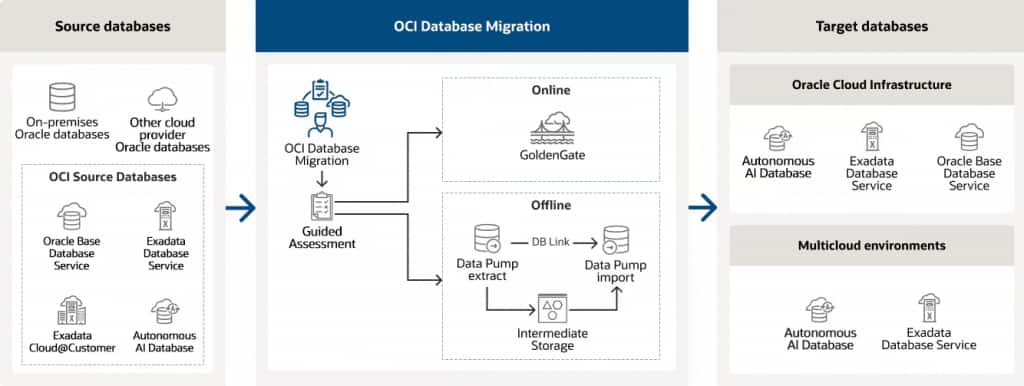
With this latest certification, customers can use OCI Database Migration to migrate their Oracle databases running on premises, Amazon RDS for Oracle or OCI Oracle databases to Oracle AI Database@AWS, using the same managed migration service designed to simplify Oracle Database migrations.
There are two migration use cases – offline and online. An offline migrations requires the application to remain offline during the database migration. Online migrations allow the applications to remain online and continue transacting. During this process, all transactions to the source are incrementally synchronized. When ready, the migration administrator can trigger the switchover to the newly migrated database. OCI GoldenGate change data capture (CDC) replication is used for online migrations.
With the addition of Oracle AI Database@AWS, OCI Database Migration now supports migrations to Oracle’s multicloud database services across the three major hyperscalers: AWS, Microsoft Azure, and Google Cloud.
How OCI Database Migration works for Oracle AI Database@AWS
Getting started with Oracle AI Database@AWS
Before configuring a migration, customers must first complete the Oracle AI Database@AWS onboarding process. Onboarding includes the required AWS and OCI account setup, purchasing the service, linking the AWS account with an OCI tenancy, and verifying the configuration.
For prerequisites and step-by-step onboarding instructions, see the Oracle AI Database@AWS documentation. Once onboarding is complete, you can provision an Oracle Autonomous AI Database from the AWS console.
Initiating the service from Oracle AI Database@AWS
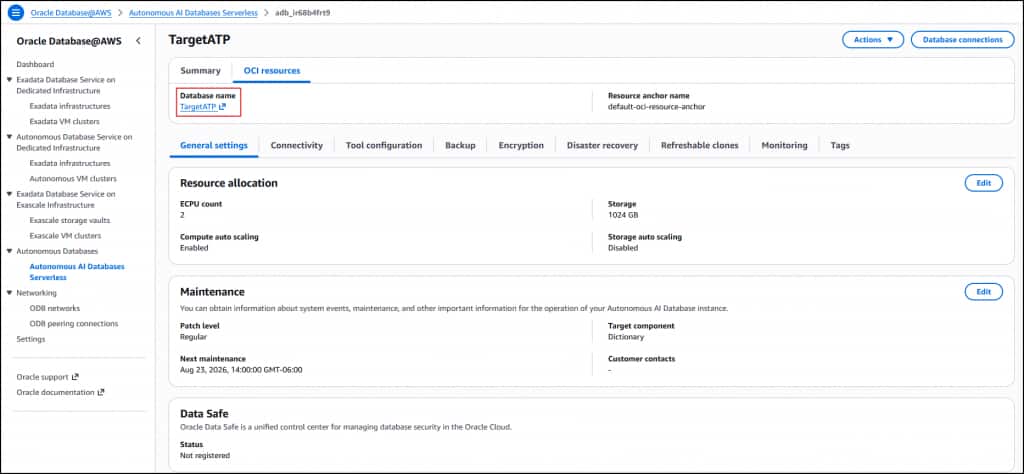
From the AWS console, navigate to Oracle Database@AWS>Autonomous AI Databases Serverless and locate or create an Autonomous AI databases Serverless instance.
Navigate to the OCI resources tab and click on the “Database name” to open the resource in the OCI console.
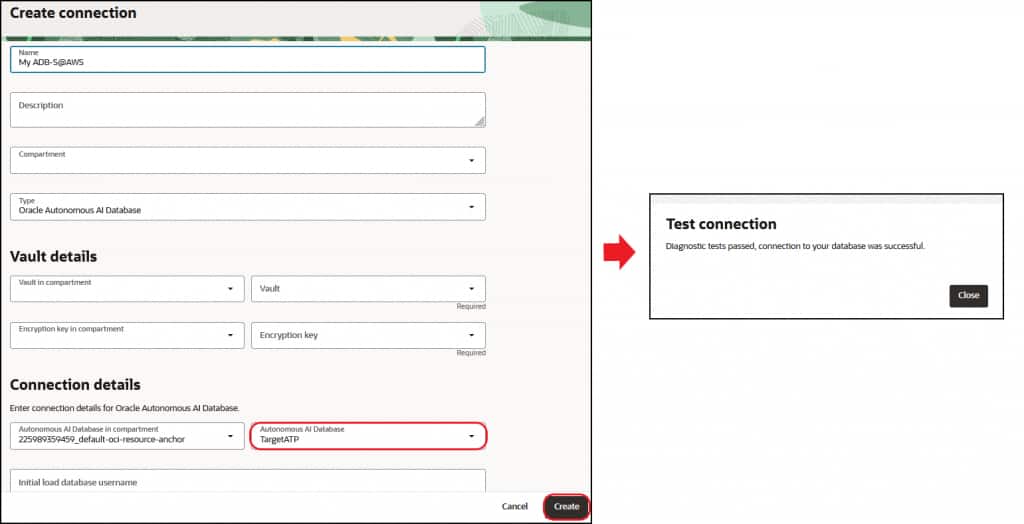
Navigate to the OCI Database Migration service: OCI menu> Migration & Recovery> Database Migration>Database Connections
From there, create your source database connection and identify the target database details. During the creation of the target database connection the Oracle Autonomous AI Database Serverless on Oracle AI Database@AWS will appear as an available target for its selection. After the target connection is created and validated, the migration can be started.
For a detailed walkthrough, watch this short video or see the overview presentation. For more information, visit the Oracle Database Migration product page or the documentation.