
Managing Oracle GoldenGate deployments often involves a mix of consoles, REST APIs, scripts, and operational runbooks. While these tools are powerful, day-to-day operations still require switching contexts, checking process status, reviewing reports, and translating questions into API calls.
At the same time, AI Assistants and AI Agents are becoming increasingly capable of summarizing system state, investigating issues, and automating repetitive tasks. To be effective in enterprise environments, these systems require controlled and secure access to live infrastructure. This is where the Model Context Protocol (MCP) becomes especially valuable.
In this blog, we introduce an open-source MCP Server for Oracle GoldenGate, explain how MCP enables both assistant-driven and agentic workflows, review the available tools, and show how to configure the server with MCP-compatible clients.
What is Model Context Protocol (MCP)?
The Model Context Protocol (MCP) is a standard that enables AI Assistants and AI Agents to interact with external systems such as APIs, data sources, and enterprise platforms through a consistent interface.
Instead of building custom integrations for each assistant or agent, MCP allows clients to discover and invoke tools exposed by a server.
In this model:
- The AI Assistant or AI Agent acts as the user interface or orchestrator.
- The MCP server acts as the controlled integration layer.
For Oracle GoldenGate, this means AI Assistants and AI Agents can answer operational questions and execute actions by invoking tools that call GoldenGate Microservices REST APIs, without requiring direct access to internal systems.
Why MCP matters for Oracle GoldenGate
Oracle GoldenGate is central to real-time data movement and integration architectures. As these pipelines become business-critical, teams need faster and more intuitive ways to monitor, operate, and troubleshoot them.
MCP enables a more natural interaction model:
- An AI Assistant can respond to ad hoc operational questions.
- An AI Agent can execute multi-step workflows, such as validating connections, checking lag, and remediating issues.
All actions are executed through GoldenGate APIs, ensuring consistency and control.
This becomes even more powerful in multi-system scenarios. An AI Agent can coordinate across systems by:
- Using a GoldenGate MCP server to check replication health.
- Querying a database MCP server for validation.
- Inspecting OCI resources through an OCI MCP server.
This enables end-to-end, agent-driven operational workflows.
Unlocking AI-driven operations for GoldenGate
The Oracle GoldenGate MCP Server is an open-source server that exposes GoldenGate operations as MCP tools through REST APIs.
At a high level:
- An MCP client, such as AI Assistants or AI Agents, sends a request.
- The MCP server exposes GoldenGate tools.
- The server invokes GoldenGate REST APIs using configured credentials.
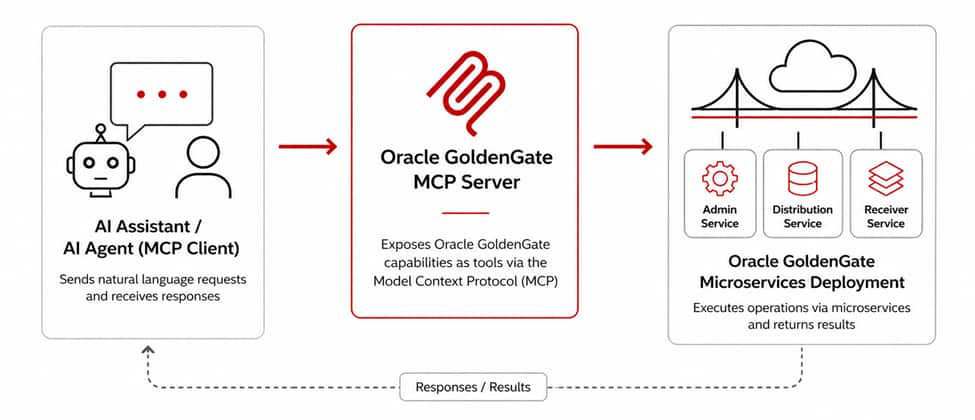
The server is available in the Oracle MCP GitHub repository: https://github.com/oracle/mcp/tree/main/src/oracle-goldengate-mcp-server.
Important: This server is intended for prototyping, development, and testing. It is not an Oracle-supported or certified feature. Always use least-privilege credentials and begin in a non-production environment.
GoldenGate MCP Server capabilities
The server organizes functionality into key operational categories.
Discovery
Discovery tools help AI Assistants and AI Agents understand the structure and components of a GoldenGate deployment. These include:
- list_domains / list_connections
- list_checkpoint_tables
- list_extracts / list_replicats
- list_distribution_paths / list_data_streams
- list_trails
These tools are useful for prompts such as:
- List the GoldenGate domains available in this deployment.
- Show me all Extract and Replicat processes.
- List the Distribution Paths configured in this deployment.
Capture and replication
The MCP server includes tools to create and manage replication components:
- create_extract / update_extract
- create_replicat / update_replicat
- create_distribution_path
- create_data_stream
Creating Extracts and Replicats involves several design decisions, including connections, trails, checkpointing, and parameters.
With MCP tools:
- An AI Assistant can guide the user through the configuration.
- An AI Agent can validate inputs, apply conventions, and propose configurations.
Prompt example:
- Create an Extract for this schema, validate the connection, and summarize the configuration before submitting.
This supports controlled automation while keeping the user in the loop.
Connectivity
Connectivity tools help manage GoldenGate connections and supplemental logging:
- create_connection
- add_trandata_schema
- add_trandata_table
These tools allow AI Assistants and AI Agents to handle setup tasks that would otherwise require manual API calls.
Runtime and monitoring
Operational tools support lifecycle management and monitoring:
- start / stop (for Extracts and Replicats)
- start_distribution_path / stop_distribution_path
- get_extract_status / get_replicat_status
- get_extract_lag / get_replicat_lag
- get_extract_report / get_replicat_report
- get_extract_stats / get_replicat_stats
- get_extract_details / get_replicat_details
- get_data_stream_info / get_data_stream_yaml
These tools support prompts such as:
- Show me processes that are not running.
- Check the lag for my Replicats.
- Start this Replicat.
- Retrieve the report for this Extract and summarize the errors.
This is where agentic workflows provide the most value. An AI Agent can continuously monitor state, detect anomalies, and take action based on predefined policies.
You can see an end-to-end demonstration in this YouTube video: Unlock AI-Powered Automation in Oracle GoldenGate with the New MCP Server (Part 1)
Installation and setup
Clone the repository:
git clone https://github.com/oracle/mcp.gitcd mcp/src/oracle-goldengate-mcp-server
Follow the README.md for Python setup and environment configuration.
The repository also includes an environment template: oracle-goldengate-mcp-server.env.example
Copy it to oracle-goldengate-mcp-server.env and set the required GoldenGate connection information as described in the README.md file.
Configuration with MCP clients
Configure your MCP client such as Codex, Cursor, Cline, or Claude Desktop:
- Register the server, for example oracle-goldengate.
- Use stdio transport.
- Configure the client to invoke a launcher script.
The launcher script should:
- Activate the Python environment.
- Load environment variables.
- Start the MCP server.
Once configured, AI Assistants and AI Agents can discover and use GoldenGate tools.
The configuration steps are covered in this YouTube video: Unlock AI-Powered Automation in Oracle GoldenGate with the New MCP Server (Part 2)
Security considerations
The MCP server operates with the permissions of the configured GoldenGate credentials. This makes access control critical.
For development and testing, I recommend the following practices:
- Use non-production environments for testing.
- Apply least-privilege access.
- Avoid embedding passwords in shared configurations.
- Prefer OCI Vault or secure password files.
- Restrict network access.
- Review actions before execution.
- Enable logging for auditability.
MCP enables AI Assistants and AI Agents to act on systems, but it does not replace standard operational controls.
Conclusion
The Oracle GoldenGate MCP Server introduces a new interaction model for GoldenGate operations. By exposing capabilities as MCP tools, it enables both AI-assisted and agent-driven workflows that reduce manual effort and improve operational efficiency.
Users can:
- Manage connections and TRANDATA
- Create and control replication processes
- Monitor processes and replication lag
- Retrieve and summarize reports
AI Assistants improve productivity through natural language interaction. AI Agents extend this further by enabling multi-step, automated workflows across systems.
Combined with other MCP servers, this approach enables coordinated, agent-driven operations across databases, cloud services, and monitoring platforms.
The best way to get started is to experiment in a development environment, explore the available tools, and define workflows that AI Assistants and AI Agents can execute safely and effectively.
More resources
- YouTube videos
- Oracle GoldenGate MCP Server on GitHub: https://github.com/oracle/mcp/tree/main/src/oracle-goldengate-mcp-server
- Oracle MCP servers: https://www.oracle.com/mcp/
- Oracle MCP GitHub repository: https://github.com/oracle/mcp
- Oracle GoldenGate product page: https://www.oracle.com/integration/goldengate/