
Introduction
Oracle AI Data Platform (AIDP) extends the secure, private connectivity paradigm to enable governed, high-performance access to Oracle Databases across cloud and hybrid environments. AIDP operates within a service-managed tenancy while leveraging customer-defined Virtual Cloud Networks (VCNs) to reach private data sources, including Autonomous Databases, Oracle RAC, and on-premises systems connected via FastConnect or Site-to-Site VPN. This architecture ensures that sensitive data remains within controlled network boundaries, supporting compliance with regulatory frameworks such as GDPR, HIPAA, and SOC 2, while enabling scalable AI/ML workloads.
AIDP inherits the foundational principles of private access—minimizing exposure to the public internet, routing outbound traffic through NAT Gateways, and using Service Gateways for access to Oracle Service Network (OSN) resources. However, a key distinction emerges in how private connectivity is established and resolved compared to Data Flow.
AIDP simplifies and abstracts this model by natively integrating with the customer VCN’s DNS resolver. AIDP dynamically leverages the VCN’s DNS resolution and routing rules to determine the appropriate network path. This means that database hostnames—whether OCI-native or on-premises—are resolved using the same DNS infrastructure already established within the customer environment. Consequently, routing decisions (e.g., through private subnets, DRG attachments, or service gateways) are implicitly derived from the VCN configuration, reducing operational overhead and eliminating the need for explicit DNS bindings to a private gateway.
This distinction has important implications:
- Operational Simplicity: AIDP reduces configuration complexity by reusing existing VCN DNS and routing.
- Flexibility in Hybrid Environments: AIDP seamlessly adapts to hybrid DNS setups.
- Consistency with Enterprise Networking Standards: AIDP aligns more closely with enterprise DNS and routing practices, enabling smoother integration into existing network architectures.
Overall, AIDP enhances the private connectivity model by abstracting DNS and routing concerns, allowing organizations to focus on data and AI workflows while maintaining secure, compliant, and high-performance access to Oracle Databases across distributed environments.
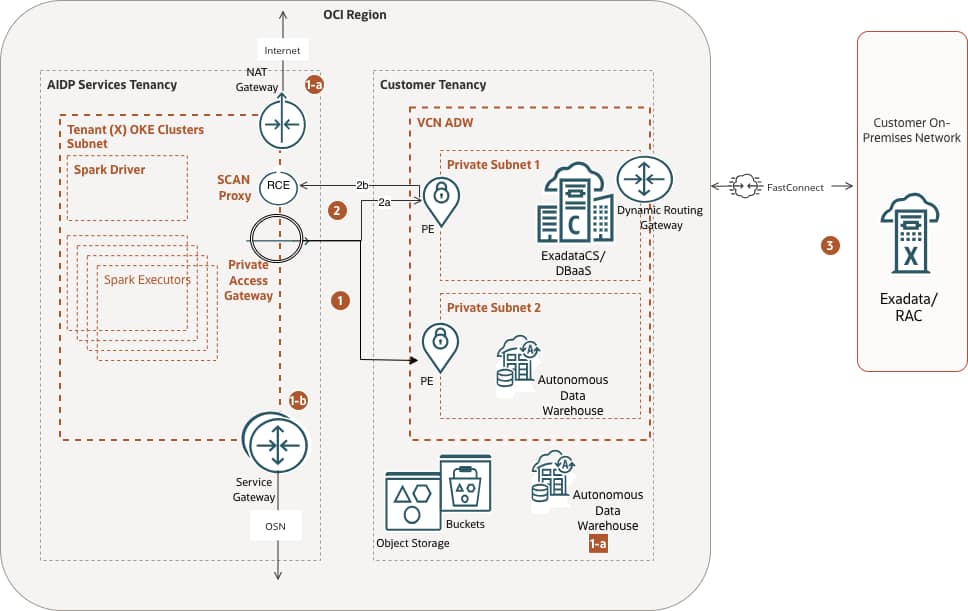
Figure 1 – Schematic Diagram of AIDP service connectivity with Oracle RDBMS use cases
We selected a few use cases below to analyze how network settings and additional configurations enable secure access through private subnets, according to Figure 1 above:
- Connecting to ADB in a private subnet
- 1-a. Connecting to ADB with a Network Access Control List specified
- 2-a. Connecting with the remaining OCI Services
- Connecting to a SCAN (Single Client Access Name) Oracle DB (Exadata/DBaaS)
- Connection to on-prem Oracle/DB (Exadata/RAC)
Note: In OCI Data Flow, private access is explicitly configured via a Data Flow Private Endpoint (PE), which uses a dedicated, explicitly defined DNS name associated with the Private Access Gateway. This DNS resolution is tightly coupled to the PE configuration, requiring users to ensure that database endpoints (e.g., SCAN addresses for RAC) are resolvable through this explicitly defined private DNS mapping. As a result, connectivity depends on deliberate DNS setup aligned with the PE construct.
1 – Connecting to an ADB instance configured in the customer’s private subnet
This is perhaps the most common use case. The diagram shows communication between the AIDP Compute Cluster and the ADB instance, routed through a Private Access Gateway that connects to the Customer Private Endpoint. The Private Endpoint is created when the Workspace is configured as private, and the VCN and Subnet are assigned to it. Figure 2 demonstrates the settings in the test Workspace used to verify the functionality.
Note: At present, Oracle AI Data Platform (AIDP) requires a publicly accessible Default Workspace endpoint to interoperate seamlessly with core platform services such as the Data Catalog, Object Storage, Data Lake, and persistent Volumes. This design ensures reliable service-to-service communication, streamlined authentication, and consistent access to shared metadata and storage layers, which are currently exposed via controlled public endpoints within the Oracle Services Network. While all data-plane interactions can still be secured through private networking constructs, the Workspace maintains a public interface to ensure compatibility and operational continuity across dependent services. Looking forward, Oracle is evolving toward a fully private AIDP Workbench model, in which Workspaces will be attached to customer-managed private subnets. This enhancement will eliminate the need for public exposure entirely, enabling end-to-end private execution environments that better align with stringent enterprise security requirements, while preserving seamless integration with platform services via private endpoints and native VCN routing.
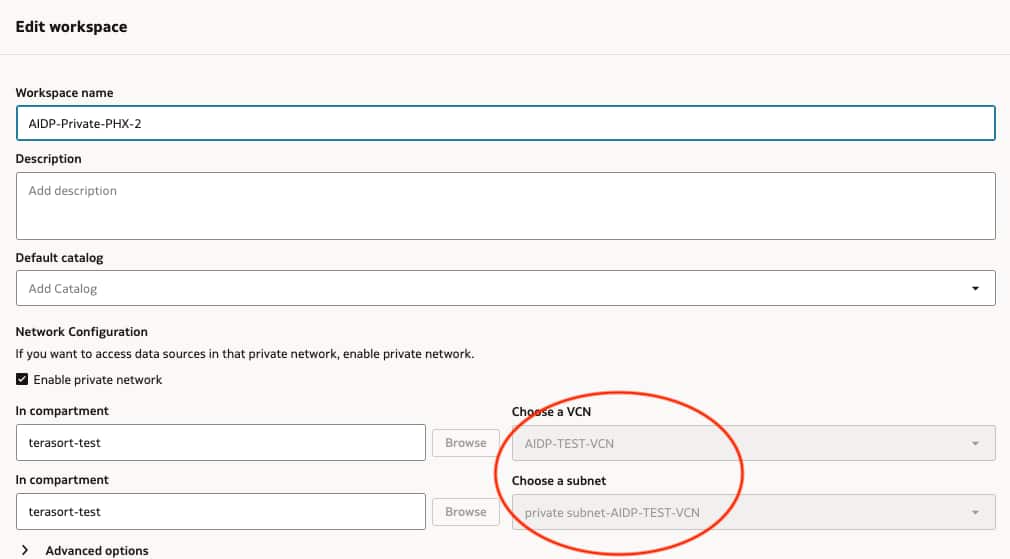
Figure 2 – Defining the Workspace networking.
To test connectivity, we can use some sample notebooks available on GitHub, for instance, this one.
1.a – Connecting with an ADB instance using ACL
Usually, the ADB instance is configured in the Oracle Services Network range; therefore, two potential routing paths can be established: public and private Workspaces.
Public Workspace will connect using the Service NAT Gateway. Although these regional public IPs are advertised, customers can easily identify them by running a notebook, for instance:
!curl -s ifconfig.me


Outbound IP: 144.24.11.156
Similarly, a Private Workspace will connect using a NAT Gateway, but at this time, the customer’s VCN NAT Gateway (**). These IPs are required to configure ADB for the authorized AIDP clusters. Figure 3 illustrates the ADB ACL Configuration below.
** Note: currently, a Private AIDP Workspace does not route to oraclecloud.com public domains, for instance, adb.<region>.oraclecloud.com. Access to these OCI public domains can be granted by raising a support request (SR) on support.oracle.com.
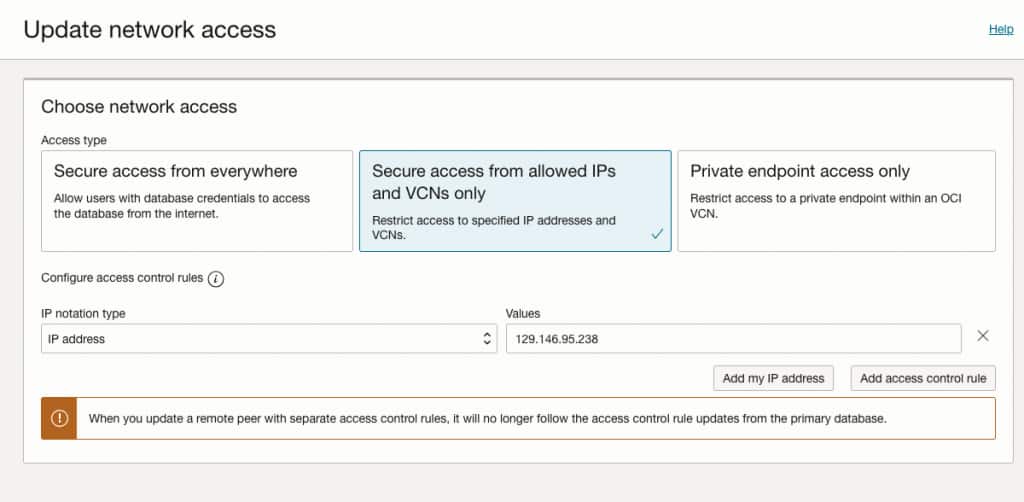
Figure 3 – ADB Network Access Configuration using Access Control List
A common error message occurs if the AIDP Workspace subnet is not part of the authorized IPs that can access the DB, for instance:
TNS:connect request rejected based on current filtering rules1b – Connecting to the remaining Oracle Services Network
Once the compute clusters are created under the Private Workspace, they will be routed to the remaining Oracle Services via the Services Gateway in the AIDP Service Tenancy.
AIDP public workspaces may have access to buckets in different regions. For instance, an application running on IAD can access objects stored in PHX, provided OCI IAM authorization grants such access.
For “Private Access” AIDP Workspaces, they won’t have access to another region’s public Object Store service. The Service Gateway maintains communication with the Object Store service, as depicted in Figure 1, and therefore, regional access is enforced at the domain name resolution (DNS). To resolve this scenario, Cross-Region access within the VCN where the Private Endpoint resides is required.
2. Connecting using Oracle DB SCAN (Exadata/DBaaS)
AIDP can connect to the DBaaS/RAC (Real Application Clusters) or Exadata machine as a client application using SCAN (Single Client Access Name). The SCAN is a virtual name similar to those used for virtual IP addresses. However, unlike a virtual IP, the SCAN virtual name is associated with the entire cluster rather than an individual node, and it supports multiple IP addresses rather than just one.
When the SCAN proxy feature is enabled, a reverse connection entry point (RCE) is established to handle IP-based redirects. As shown in Figure 4, a PE VNIC (private endpoint virtual network interface card) is created in the Customer VCN. The RCE PE VNIC is unique for each Private Workspace setup. One important consideration for the TLS connection to a database cluster is that the database SCAN listeners should redirect network traffic to an FQDN rather than the IP address directly. Only the FQDN redirects from a SCAN listener will enable TLS. Therefore, the database cluster should be configured to redirect to an FQDN when TLS is required.
The configuration steps that happen behind the scenes to create the SCAN proxy feature:
- The user configures the SCAN proxy in the Private Workspace configuration
- The Private Workspace updates RCE to include SCAN configuration (the SCAN listener DNS name and port), which provides a new IP (SCAN proxy IP) in the service VCN binding to the same SCAN port
- The Private Workspace will then use the SCAN proxy IP to create a DNS mapping within the service network, using the original SCAN listener DNS name and the SCAN proxy IP
Figure 4 shows an example of a DBaaS Oracle Database system within a private subnet in the customer VCN. The flow of the picture states the sequence used to identify the connectivity:
- AIDP Compute cluster initiates a connection to the SCAN Proxy endpoint within the service VCN using the DNS name. AIDP Compute defines a customer DBaaS connection through the SCAN Proxy by selecting a specific port. RCE SCAN proxy forwards the request to the underlying PE VNIC listener in the customer network. It then inspects the SCAN listener response for an IP address of the underlying database cluster instance, creates a Class E NAT IP, and replaces the cluster instance IP with the NAT IP in the SCAN proxy response.
- The Private Access Gateway receives the redirect request from the SCAN listener, automatically translates the local listener IP address in the customer’s VCN into a mapped IP address, then returns this information to the Private Workspace components and issues a connection request to one of the local listeners.
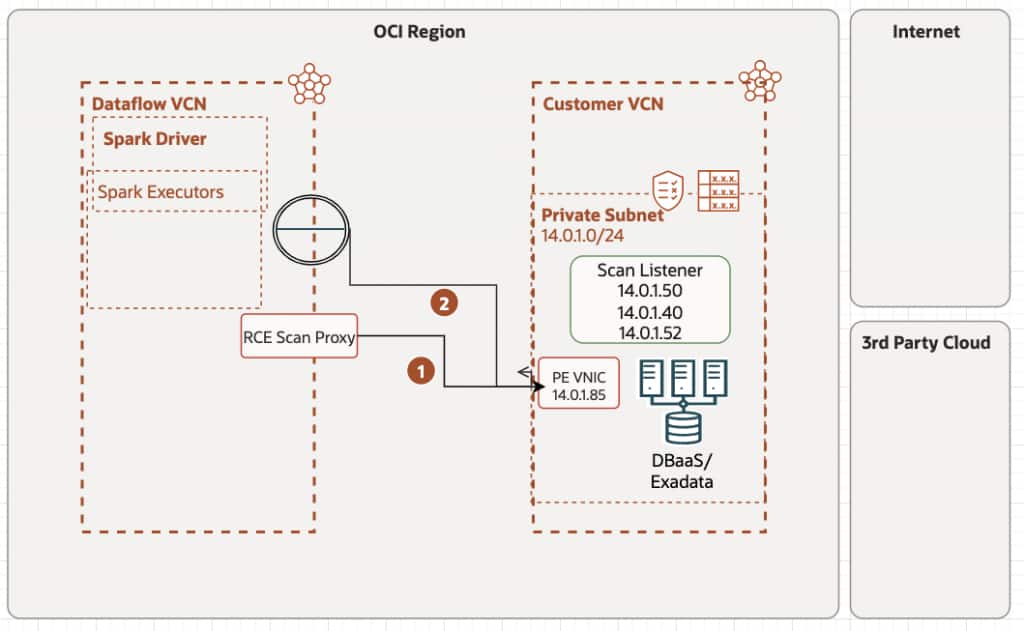
Figure 4 – SCAN connection workflow
Figure 4a below describes the entries required to configure the AIDP private subnet, including the SCAN of the private DBaaS/Exadata instance.
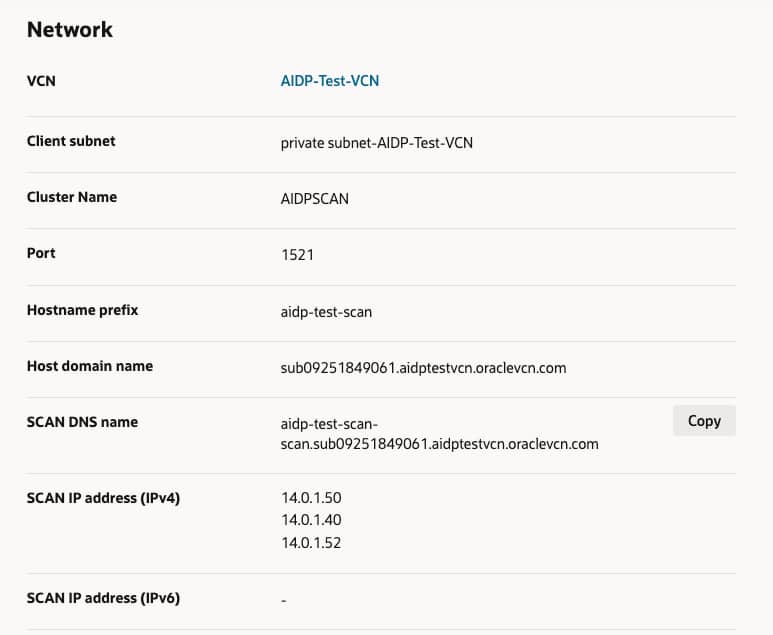
Figure 4a – DBaaS Network Configuration – SCAN DNS name and SCAN IPs
Figure 5 depicts these entries above in the AIDP private Workspace configuration.
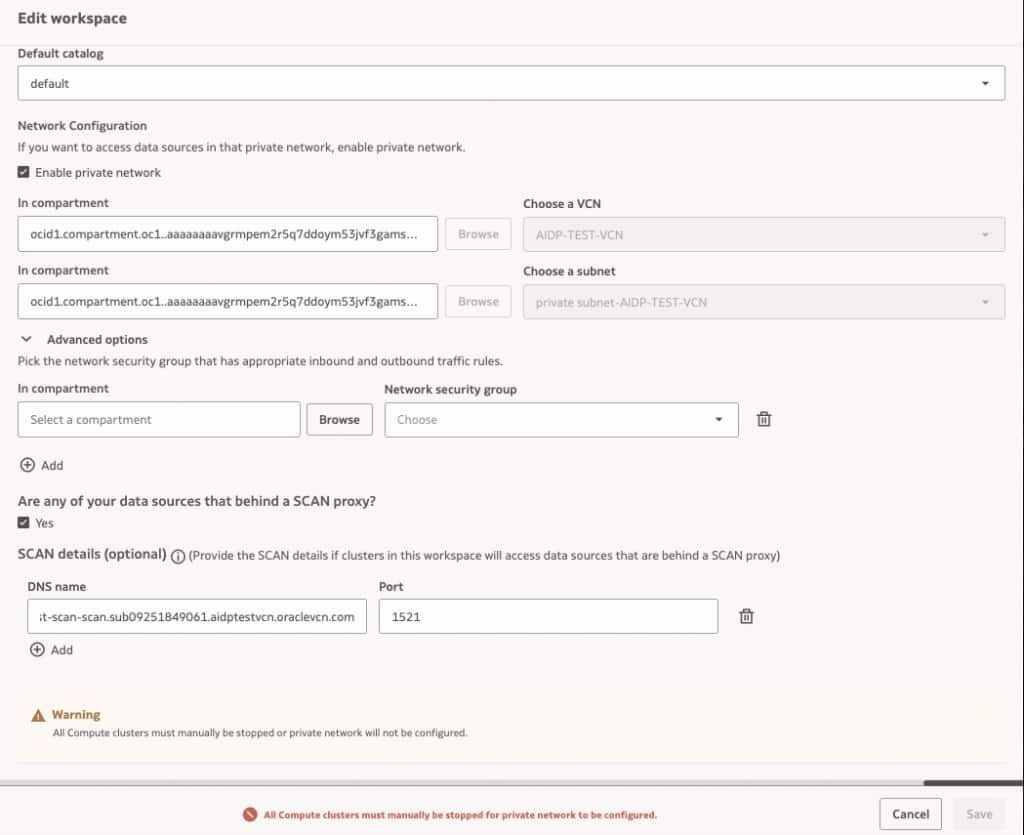
Figure 5 – AIDP Private Workspace SCAN Configuration
3. Connection to on-prem Oracle/DB (Exadata/RAC)
Similarly, as stated in Figure 1, path (3), we can use an OCI VCN subnet to connect to an on-prem engineered DB machine. On this path, create a DNS “A” record for the database system’s SCAN hosts, using their respective IP addresses. Figure 6 below exemplifies the corporate domain (industrial.com), the SCAN FQDN dbscanhost.industrial.com has the IPs of the SCAN hosts responsible for responding to requests from the compute resources in an AIDP private Workspace attached to this subnet.
Note that connectivity between subnets must be in place before this practical implementation can work. For tips on troubleshooting connectivity, please see the section below.
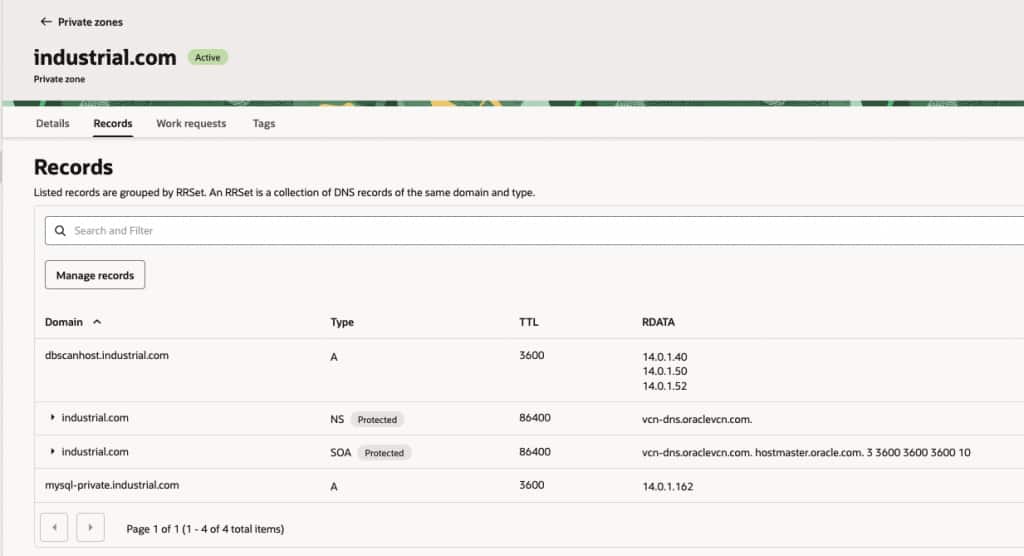
Figure 6 – DNS Record of the remote SCAN
Figure 7 shows a Notebook cell that can be used to validate communication with the SCAN DBs. Note that up to this point, the communication between AIDP and the DB system is using Oracle’s thin client to validate the communication. See the sections below for more details and limitations on thick clients and Wallet use.
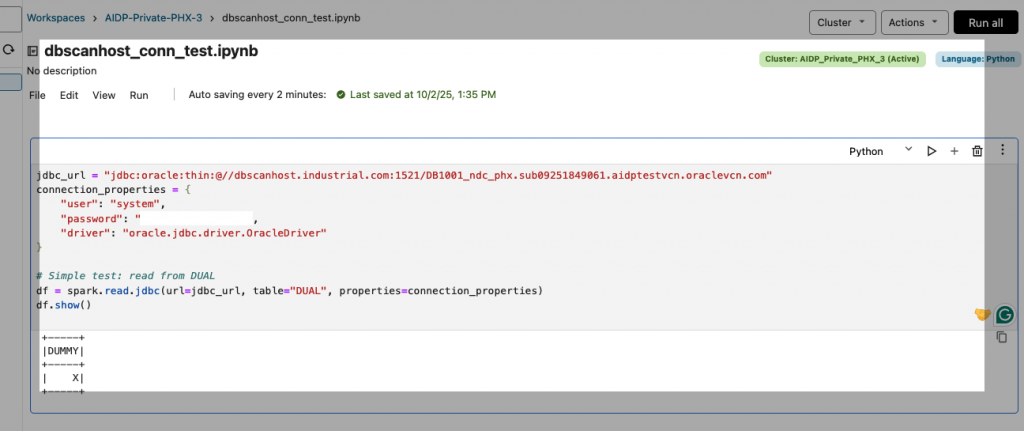
Figure 7 – Remote SCAN simple test script
Considerations about External Catalogs
External Catalogs connectivity follows the same principles as the Notebooks above. The Compute clusters inside the private Workspace will similarly establish communication with the Oracle DBs in secure networks. Also similar is the method of communication, using a JDBC thin client to communicate. Useful to mention that the connectivity between the network segments needs to exist before the AIDP Workspace is defined to use them. As a best practice, build your network connectivity diagram and verify communication among the endpoints before launching the Workspace into a private network segment.
Figures 8 and 9 illustrate a critical connection between an External Catalog and a DBaaS instance (this applies to any RAC-based configuration running on the SCAN protocol). AIDP_Private_PHX_4 is an AIDP Workspace attached to a private subnet where the DBaaS database resides. The Host Scan idpscan2-scan.sub09262255321.aidptestvcn2.oraclevcn.com and port, and the DB Service name can be used to validate that connectivity.
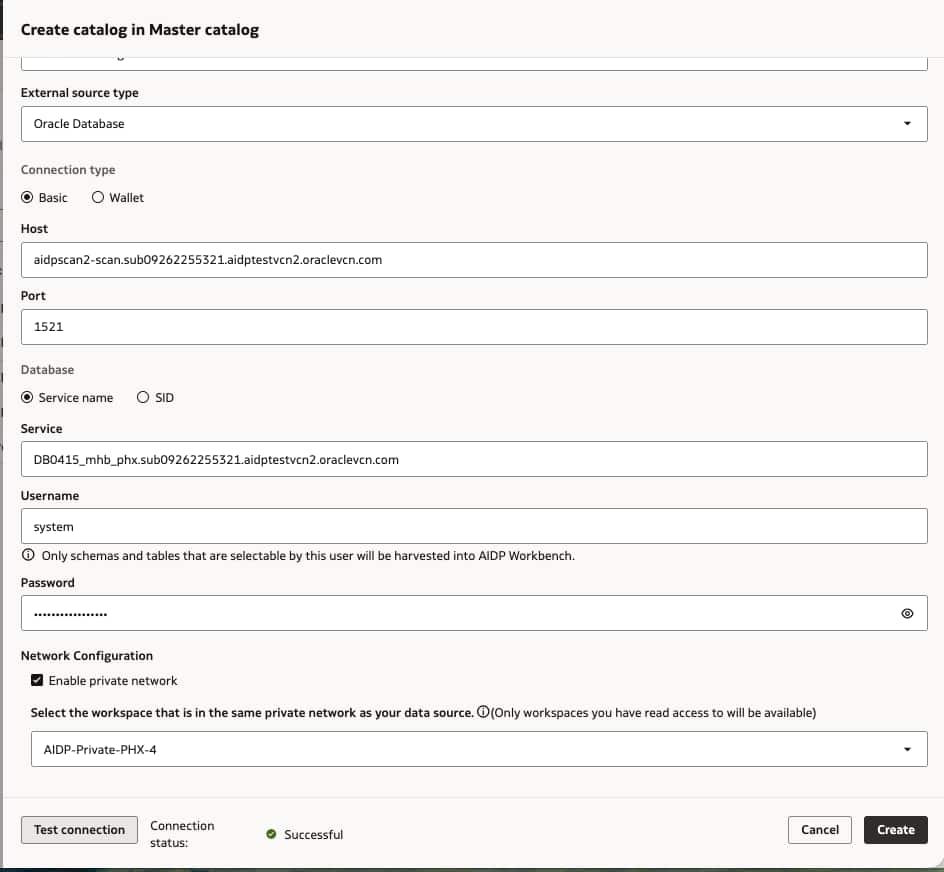
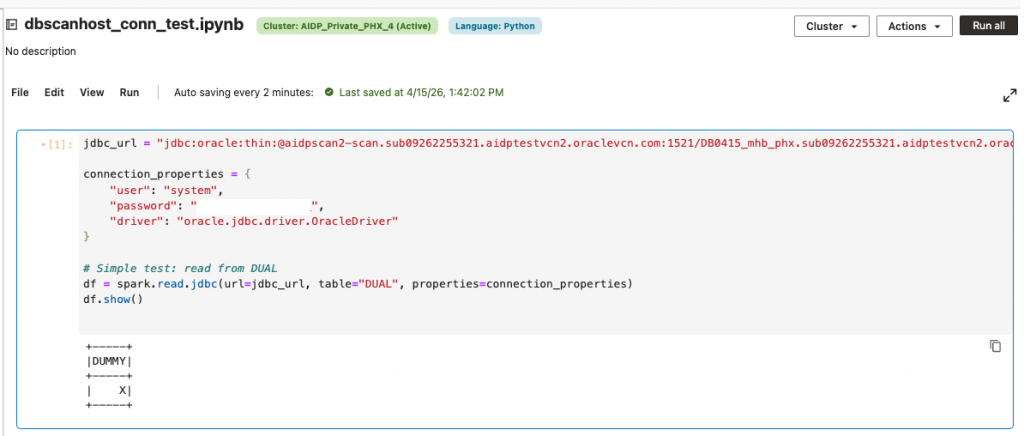
Figure 8 & 9 – Asserting External Catalog and Notebook are able to connect to an external DBaaS
Note: Within a Workspace, only Administrator roles can maintain External Catalogs.
Connectivity tests using Cloud-shell (or an embedded VM in the subnet)
A practical way to validate connectivity to a private Oracle Database from an AIDP private workspace is to use OCI Cloud Shell (highlighted in Figure 10) to attach to the same ephemeral subnet (also highlighted) used by the workspace. By launching Cloud Shell with private network access (or via a delegated subnet configuration), you can effectively place a test environment inside the same VCN context as the AIDP notebook runtime. From there, tools like sql-cl, or simple TCP checks (e.g., nc host port) can confirm whether the database listener is reachable over the private endpoint. This approach helps isolate network issues such as missing security list rules, NSG misconfigurations, or routing problems without modifying the notebook itself. It is particularly useful because AIDP private workspaces often rely on ephemeral subnets and managed networking, making direct troubleshooting difficult; Cloud Shell provides a controlled, reproducible way to verify that the private Oracle Database is accessible under the same network conditions. Figure 10 depicts a process for establishing connectivity to an Oracle DBaaS instance within a private network.
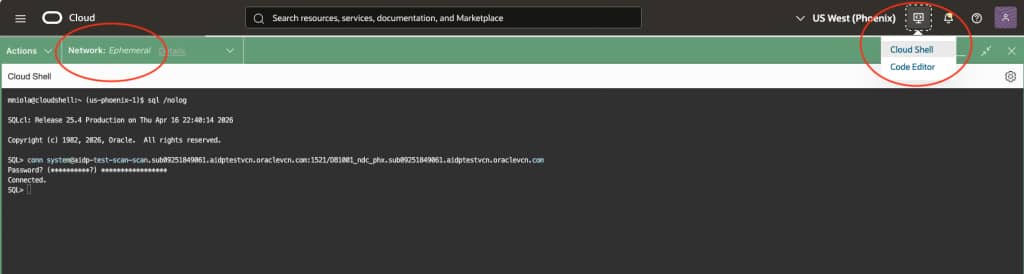
Figures 10 – Using Cloud-shell and SQL-CL to validate the subnet connectivity to the Database
Considerations about thin vs thick client
Running the AIDP pyspark in thin vs. thick mode mainly comes down to which networking and security stack you rely on. Thin mode is lightweight and uses native Python libraries, supporting TCPS (TLS) with wallets for certificate-based encryption, but it does not support Oracle’s Native Network Encryption (NNE) or advanced sqlnet.ora policies. This means it depends entirely on proper wallet configuration and can run into limitations such as stricter certificate validation, hostname mismatches, or incomplete support for complex connection descriptors. It may also behave inconsistently with SCAN (Single Client Access Name) in clustered environments, since it lacks the full Oracle Net stack for advanced load balancing and failover negotiation. In contrast, thick mode, backed by the Oracle Instant Client, fully supports NNE, TCPS, wallets, and sqlnet.ora configurations, providing robust handling of SCAN listeners, encryption negotiation, and enterprise security policies. However, it requires installing and managing client libraries. In practice, thin mode works well for modern TLS-based setups with simpler networking, while thick mode is necessary for environments that enforce NNE, have complex encryption requirements, or require advanced RAC/SCAN connectivity.
Here is a simple statement to test ADB connectivity using thick client (oracledb python lib loaded in the cluster using requirements.txt) and service connection extracted from the tnsnames.ora file from the Wallet.zip:
import oracledb

# --- connection details ---
username = "admin"
password = "<your admin password>"
dsn = "(DESCRIPTION=(ADDRESS=(PROTOCOL=TCPS)(HOST=<your host>.adb.us-phoenix-1.oraclecloud.com)(PORT=1522))(CONNECT_DATA=(SERVICE_NAME=<service name>_<ADB Instance>_medium.adb.oraclecloud.com)))"  # SCAN host + port + service

try:
    # Create connection
    conn = oracledb.connect(user=username, password=password, dsn=dsn)
    print("Successfully connected to the LPG ADP database")

    # Simple test query
    with conn.cursor() as cur:
        cur.execute("SELECT sys_context('userenv','instance_name') FROM dual")
        row = cur.fetchone()
        print(f"Connected to instance: {row[0]}")

except Exception as e:
    print("Connection failed:", e)

Successfully connected to the LPG ADP database
Connected to instance: <ADB Podname>
Similarly, a thin client test on the same ADB instance, extracted from the tnsnames.ora presented in the Wallet.zip file:
jdbc_url = "jdbc:oracle:thin:@(DESCRIPTION=(ADDRESS=(PROTOCOL=TCPS)(HOST=<your ADB host>.adb.us-phoenix-1.oraclecloud.com)(PORT=1522))(CONNECT_DATA=(SERVICE_NAME=<your ADB service>_<your ADB name>_medium.adb.oraclecloud.com)))"

connection_properties = {
    "user": "ADMIN",
    "password": "<your ADMIN password>",
    "driver": "oracle.jdbc.driver.OracleDriver"
}

# Simple test: read from DUAL
df = spark.read.jdbc(url=jdbc_url, table="DUAL", properties=connection_properties)
df.show()

[{"id": 1, "jobResult": null, "name": "Job group for command cd2afacc-e5b2-4fe4-9370-f00b47083d09", "startTime": 1776813152574, "endTime": 0, "stages": {"items": [{"name": "showString at NativeMethodAccessorImpl.java:0", "stageStatus": "running", "id": 1, "successfulTaskCount": 0, "runningTaskCount": 1, "failedTaskCount": 0, "killedTaskCount": 0, "numTasks": 1, "attemptNumber": 0, "submissionTime": 1776813152575, "completionTime": -1}]}}]
Considerations about network traffic and isolation
When running an AIDP Notebook or Workflow task, it is critical to account for network traffic patterns and isolation to ensure optimal performance, security, and compliance. AIDP Spark jobs execute within a managed environment where network traffic flows between your application, data sources, and external services. To minimize latency and control traffic, ensure data sources are colocated within the same region and Virtual Cloud Network (VCN) where possible. Here are additional considerations and information about the AIDP Private Workspace setup:
- Once a Workspace is attached to a private subnet, network traffic to the internet is routed to the Customer VCN subnet via the private endpoint (PE) Infrastructure. The customer VCN setup is responsible for arbitrating between Private and Public requests (this is different from the OCI Dataflow application, where we explicitly inform the DNS zones and FQDNs to resolve). The run may fail if Customer VCN traffic to the public internet is not routed through a NAT Gateway. If the DNS is not resolvable within the Customer’s VCN, network traffic will be dropped. Network traffic to OCI Services (Eg, Object Storage) in the Oracle Services Network will still be routed through the Services Gateway.
- Within an AIDP private Workspace, the Spark application running on any assigned compute node initiates a network connection to the Customer Private resource with the DNS name (e.g.,
customer1.instance1.subnet.oraclevcn.com). This will involve a DNS lookup of the DNS Proxy IP assigned to this Customer, created during PE/RCE (private endpoint/reverse connection endpoint) setup. In a reverse connection, a server initiates the connection to a client, allowing the AIDP Workspace service to access the resource privately by connecting to a designated endpoint within the Customer network. - The Customer’s DNS zones in the private views will create a proxy that would return a
Class E IP address (240.0.0.0-255.255.255.255)for thecustomer.instance.subnet.oraclevcn.comallocating from a specific CIDR range, for instance, 255.33.36.2, as portrayed in the path 2-a of Figure 1. In this example, AIDP compute nodes running customer jobs can establish network connections to 255.33.36.0/24, and a Stateful Egress Rule is created for that destination CIDR range. This means that when an AIDP compute instance initiates traffic to another host and that traffic is allowed by egress security rules, any traffic the instance subsequently receives from that host for a period is considered response traffic (ingress) and is permitted. A Route Table rule is also added to route the AIDP private Workspace PE appropriately to the destination CIDR range 255.33.36.0/24, allocated to that Customer.
Summary
An AIDP private workspace provides a fully isolated environment for running analytics and AI workloads with secure, private connectivity to enterprise data sources. In this setup, all compute resources run attached to a customer-managed VCN and communicate exclusively via private networking, eliminating exposure to public internet endpoints.
Using private access, the workspace can seamlessly connect to databases, such as Oracle Autonomous Database, configured for private endpoints only, ensuring that all traffic remains within trusted network boundaries. It also enables secure integration with on-premises systems via Site-to-Site VPN or Oracle FastConnect, supporting hybrid architectures where data residency or latency is critical.
For more complex topologies, the private workspace supports cross-region and cross-network communication via VCN peering and enhanced routing via Dynamic Routing Gateway (DRG), enabling distributed data processing without compromising performance or security. Additionally, it can connect to enterprise database platforms such as Oracle Exadata or RAC systems, often leveraging SCAN-based access patterns for high availability.
All connectivity is governed by strict network isolation principles—private IP addressing, granular security rules, and controlled DNS resolution—ensuring that Spark workloads and AI pipelines execute securely, efficiently, and in compliance with enterprise requirements.
References
Oracle AIDP Samples – Connectivity
Oracle Grid Infrastructure – SCAN
Architecture and Engineering
- Sivanesh Selvanataraj (Consulting Member of AIDP)
- Abhi Khar (Consulting Member of AIDP)
- Thomas Lau (Director of Engineering)