
Oracle GoldenGate Distributed Applications and Analytics 26ai (DAA) is now certified with Amazon S3 Tables. With GoldenGate for DAA, users can replicate real-time, transactionally consistent data from any Oracle GoldenGate certified source, such as Oracle, or PostgreSQL to Amazon S3 Tables.
Oracle GoldenGate 26ai is the next-generation, AI-native release of the industry-leading change data capture (CDC) platform, designed to simplify real-time data movement and streaming for modern AI workloads. It works by capturing transactional changes (inserts, updates, and deletes) from source systems and streaming them with low latency to target relational databases or non-relational data platforms. This ensures that downstream data lakes and analytics platforms stay perfectly synchronized with source production databases without impacting their performance.
Amazon S3 Tables is a fully managed storage solution designed to store and manage tabular data at scale, providing built-in support for the Apache Iceberg open table format. It simplifies the creation of transactional data lakes, offering higher transaction throughput and faster query performance. Additionally, with the Intelligent-Tiering storage class, Amazon S3 Tables automatically optimize costs based on access patterns, without performance impact or operational overhead.
In this blog, we walk through the configuration details for setting up replication into Amazon S3 Tables. The heterogeneous nature of Oracle GoldenGate allows any certified source to send data to Amazon S3 Tables; therefore, the configuration of the Oracle GoldenGate capture phase is not included in the scope of this blog. However, several other blogs provide detailed guidance on setting up the capture side of Oracle GoldenGate on AWS, including: Using Oracle GoldenGate with Amazon RDS for Oracle, Implement active/active replication between Amazon Aurora clusters using Oracle GoldenGate and Connect to Amazon RDS for SQL Server.
GoldenGate for DAA is an Oracle GoldenGate deployment type that enables users to replicate real-time data into heterogeneous systems such as cloud storage services, message streaming platforms, NoSQL data stores, document databases, cloud data warehouses and lakehouses, including Amazon S3 Tables.
Benefits of using Oracle GoldenGate to deliver data to Amazon S3 Tables
Oracle GoldenGate is essential for delivering reliable, real-time data pipelines from transactional databases into AWS S3 Iceberg tables, enabling real-time data for analytics and AI workloads. Oracle GoldenGate real-time replication allows customers to use advanced Apache Iceberg analytics capabilities and query data using familiar AWS services like Amazon Athena, Redshift, and EMR through the S3 Tables integration with Amazon SageMaker lakehouse architecture.
- AI-Ready Data Delivery: GoldenGate 26ai enriches transactional data with AI-native embeddings in real time, delivering “analytics-ready” datasets directly into optimized Amazon S3 Tables.
- Lowered Operational Costs: The integration automates complex Apache Iceberg maintenance tasks, such as compaction and snapshot management, eliminating the need for manual data lake engineering.
- Uninterrupted Data Flow: Automated schema evolution ensures that source database changes are instantly propagated to Amazon S3 Tables without breaking downstream dashboards or AI models.
Architecture Overview
The Oracle GoldenGate for Amazon S3 Tables replication architecture is fundamentally an asynchronous, log-based CDC pipeline designed for high throughput and transactional integrity. As illustrated in the diagram, the architecture bridges relational and non-relational source systems with Amazon S3 Tables.
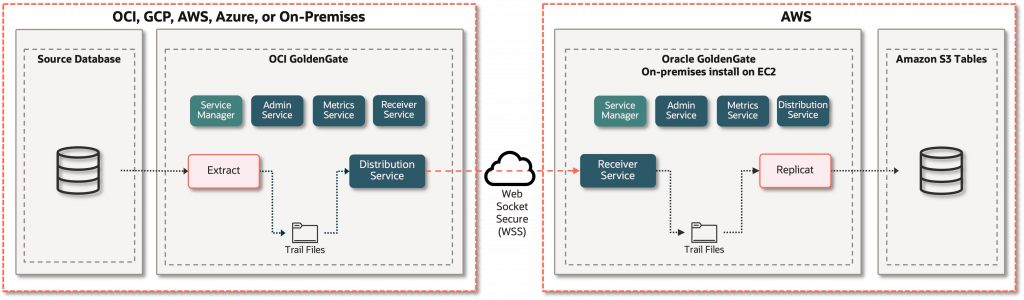
The Oracle GoldenGate extract process captures change data records from Oracle GoldenGate-certified sources and writes them into an Oracle GoldenGate trail file, which is in a platform-independent and database-agnostic, binary format. These trail files are then sent to the target Oracle GoldenGate for DAA through the Distribution Service. Within Oracle GoldenGate for DAA, the Oracle GoldenGate Apache Iceberg handler with the REST Catalog is used for Amazon S3 Tables replication. For more details, you can refer to the Oracle GoldenGate Apache Iceberg handler architecture deep-dive recording.
Before you begin
Please make sure that the following prerequisites are met before configuring the replicat.
For Amazon S3 Tables:
- Create an Amazon S3 Table bucket.
- Create an Amazon S3 Table namespace.
- Assign Amazon S3 Table IAM policies.
- Obtain an AWS access key.
For Oracle GoldenGate:
- Install Oracle GoldenGate 26ai and create a deployment. Alternatively, you can use an existing Oracle GoldenGate 19c or 21c environment.
- Create an Oracle GoldenGate Extract. While adding the Extract;
- It is recommended to use uncompressed operations which can be configured by LOGALLSUPCOLS. LOGALLSUPCOLS causes Extract to automatically include the before image for UPDATE operations in the trail record.
- If a source table does not have a primary key (PK), users can define a substitute key by including a KEYCOLS clause in the Extract. If the source table does not have a PK and KEYCOLS is not specified in the Extract, Oracle GoldenGate Amazon S3 Tables replication fails.
- Install Oracle GoldenGate for DAA 26ai and create a deployment.
- Start the Service Manager and connect to the Oracle GoldenGate for DAA web interface. Alternatively, you can use the Admin Client command-line interface.
- Create a Distribution Path from the source Oracle GoldenGate deployment to the target Oracle GoldenGate for DAA deployment
- Create an application configuration properties file for Amazon S3 Tables within the Oracle GoldenGate for DAA instance. Sample REST Catalog properties file (s3tables.properties):
warehouse=arn:aws:s3tables:<aws_region>:<aws_account_id>:bucket/<s3_table_bucket_name>
rest.sigv4-enabled=true
rest.signing-name=s3tables
rest.signing-region=<aws_region> - Download iceberg-common and aws-java-sdk dependencies using dependency downloader utility shipped with GoldenGate for DAA. Please note the full path to dependency libraries downloaded.
- Secure AWS access keys in GoldenGate for DAA.
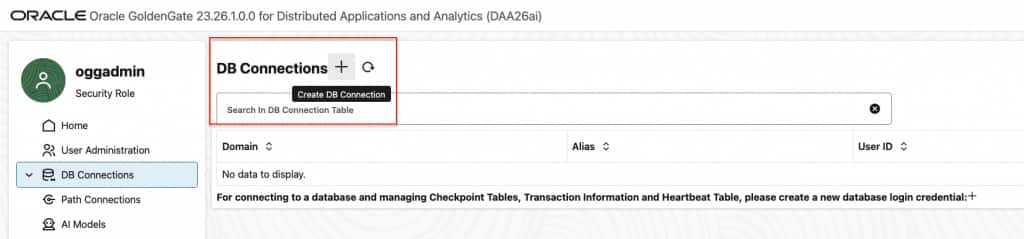
- In Home/ DB Connections, click “Create DB Connection”
- Provide the required fields and submit
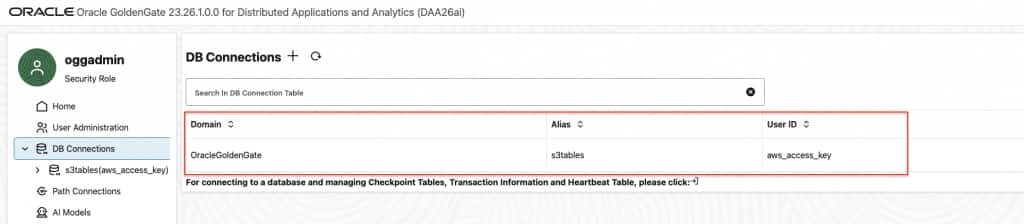
- Credential Alias: An alias for the credential
- User ID: AWS Access Key
- Note the Domain and Alias.
Creating the Oracle GoldenGate Apache Iceberg Replication for Amazon S3 Tables
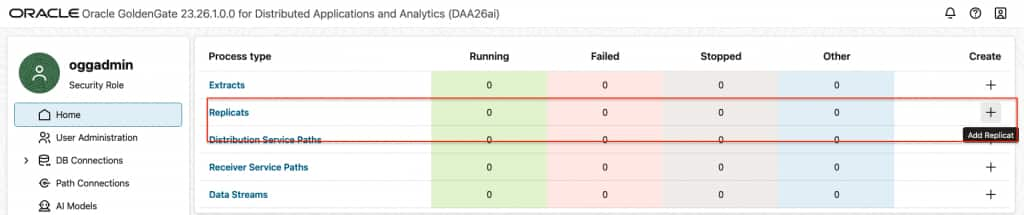
- In Home, click “Add Replicat”.
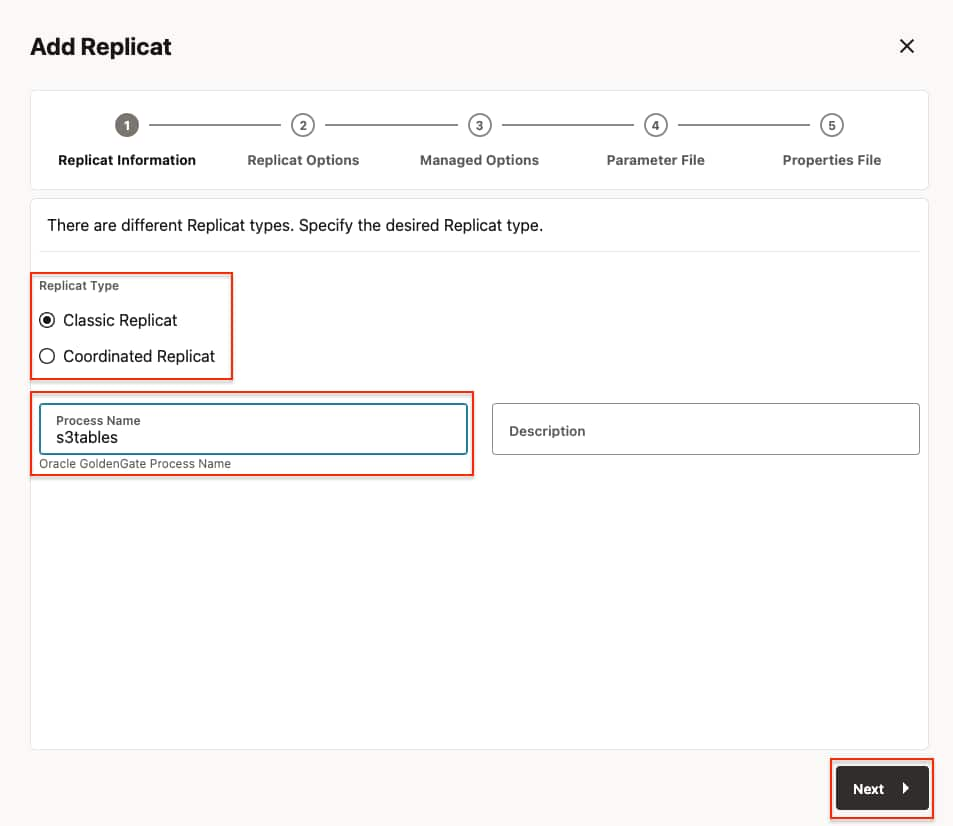
- In Replicat Information, select the type of the replicat and provide a name for the replicat. Click Next.
- Classic Replicat: Classic Replicat is a single-threaded apply process. To determine whether to use classic mode for any object, you must determine whether the objects in one Replicat group will ever have dependencies on objects in any other Replicat group, transactional or otherwise.
- Coordinated Replicat: Coordinated Replicat is a multi-threaded apply process. Coordinated Replicat allows for user-defined partitioning of the workload to apply high volume transactions concurrently.
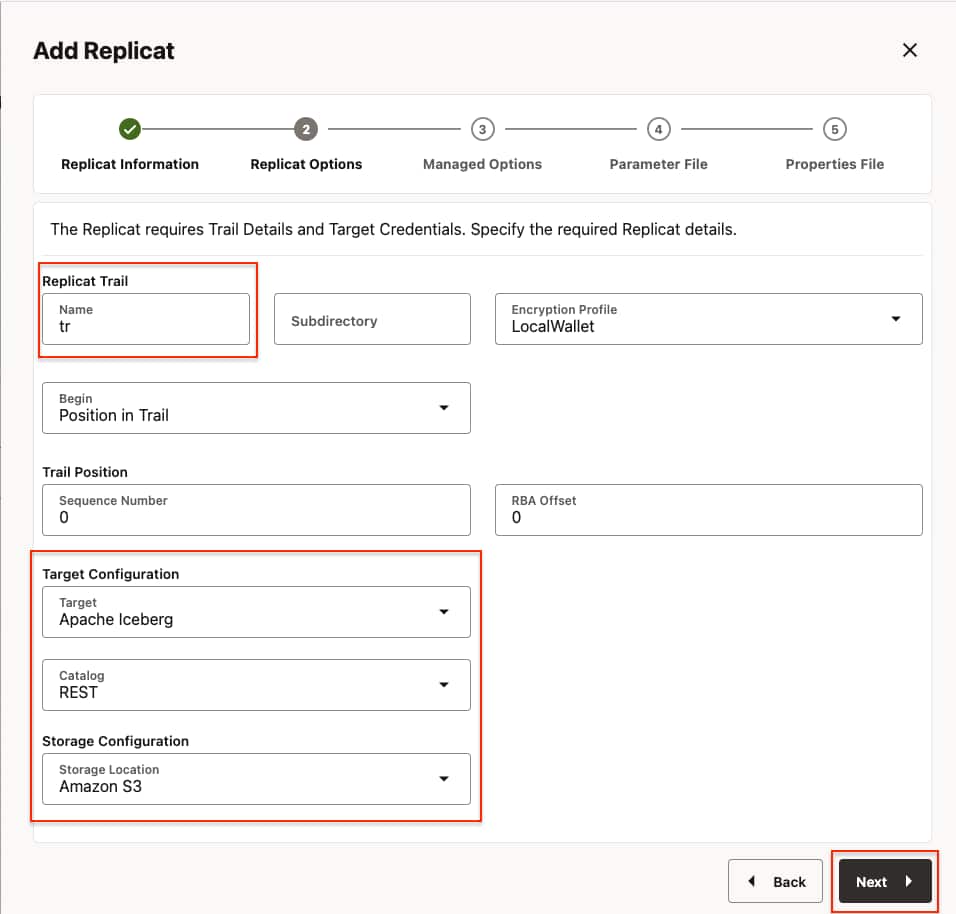
- In Replicat Options, provide the trail file name, select the target configuration and click Next.
- Replicat trail: The name of the source trail file
- Target Configuration:
- Target: Apache Iceberg
- Catalog: REST
- Storage Configuration: Amazon S3
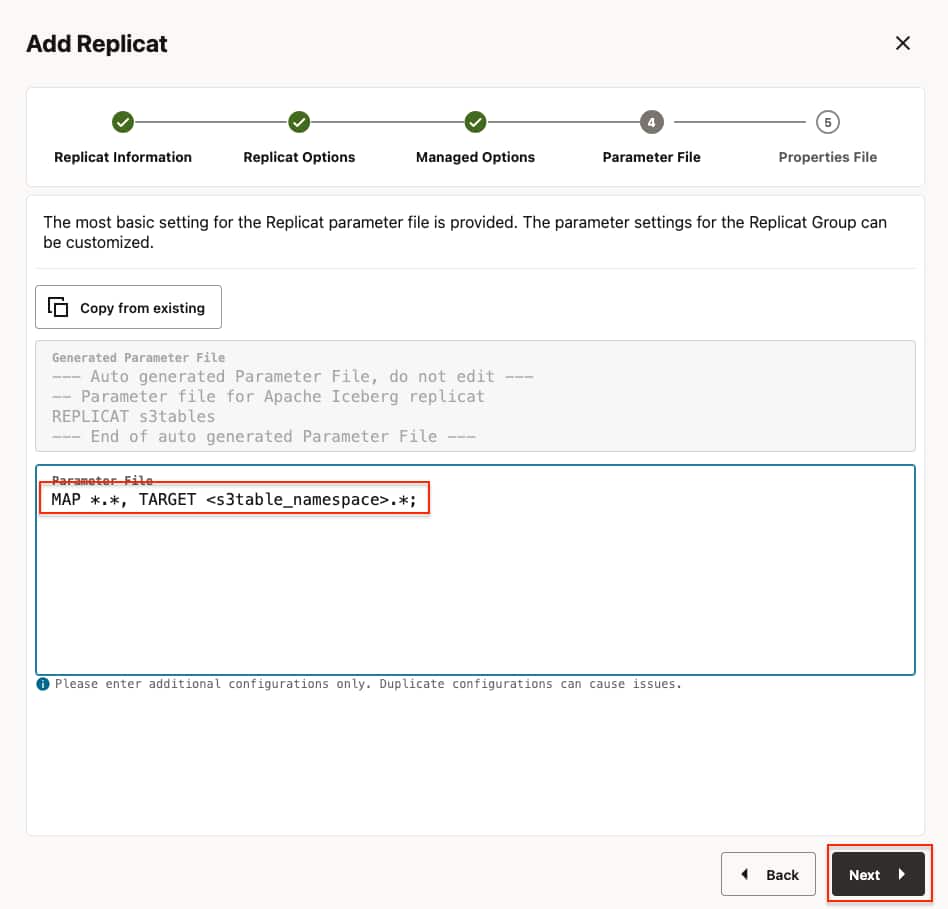
- In Parameters File, you can define source to target (Amazon S3 Tables) mapping. Define the target side of the mapping as <s3table_namespace>.* which maps the source database names to the target Amazon S3 Tables namespace and creates the Amazon S3 Tables with the source table names. Click Next.
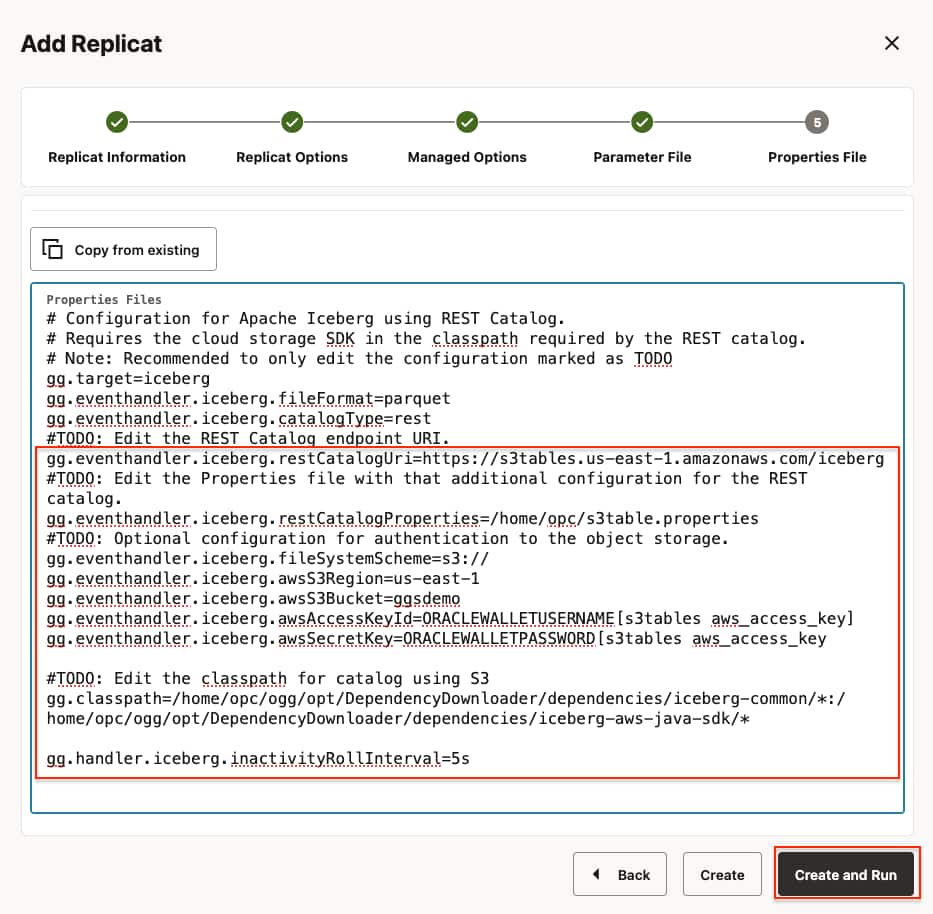
- In Properties File, update the following properties and click Create and Run. Please note that these are the minimum set of properties that need to be updated. For additional properties, please refer to GoldenGate for DAA documentation.
gg.eventhandler.iceberg.restCatalogUri=https://s3tables.<REGION>.amazonaws.com/iceberg
gg.eventhandler.iceberg.restCatalogProperties=/path/to/s3table.properties
gg.eventhandler.iceberg.awsS3Region=<aws_region_name>
gg.eventhandler.iceberg.awsS3Bucket=<s3_table_bucket_name>
gg.eventhandler.iceberg.awsAccessKeyId=ORACLEWALLETUSERNAME[alias domain]
gg.eventhandler.iceberg.awsSecretKey=ORACLEWALLETPASSWORD[alias domain]
gg.classpath=/path/to/iceberg-common-dependencies/*:/path/to/aws-java-sdk-dependencies/*
gg.schema.normalize=lowercase
Amazon S3 Tables naming rules require only lowercase letters. If source table names contain capital letters, using gg.schema.normalize=lowercase will normalize all table names to lowercase.
gg.handler.iceberg.inactivityRollInterval is not active by default and it is configurable. When configured, it starts a timer for tracking the inactivity period. Here, inactivity means there are no operations coming from the source system. In other words, no CDC records are being written to the file. When set, it starts the countdown when the last operation is written to a file. At the end of the countdown, if there are no incoming operations, the file is closed and moved to Amazon S3 Tables. Especially for dev-test scenarios, it can be very useful. For example, you can add gg.handler.iceberg.inactivityRollInterval=5s to the replicat properties to set it to 5 seconds.
Keep the remaining defaults unless you have specific requirements (encryption, roll intervals, throughput tuning, etc.). For other optional properties, please refer to GoldenGate for DAA documentation.
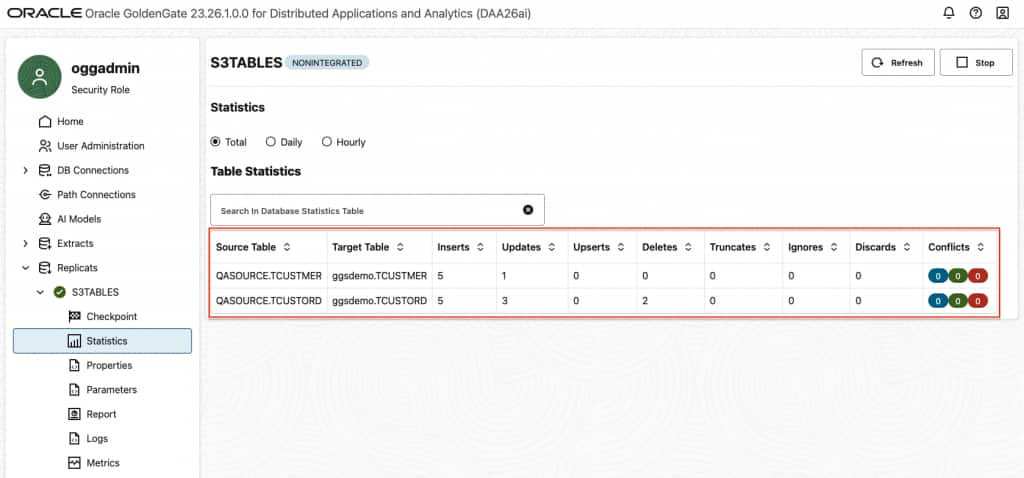
- When replicat starts running, you can see replication statistics and tables being created in Amazon S3 Tables.
Performance Considerations
- The Oracle GoldenGate Amazon S3 Tables replication supports merge-on-read. To improve merge-on-read performance, Amazon S3 Tables replication performs internal aggregation. The default aggregation window is 15 minutes and is configurable (shorter or longer). The longer the aggregation period, the more operations Oracle GoldenGate can aggregate, which is especially beneficial for long-running transactions. You can configure this by adding gg.eventhandler.iceberg.fileRollInterval to the Replicat properties file. For example: gg.eventhandler.iceberg.fileRollInterval=30m
- Oracle GoldenGate Extract writes update operations in two modes: compressed or uncompressed. Compressed mode is the default and includes values for the key columns and the modified columns. An uncompressed update record includes values for all columns. Compressed update records will fail Amazon S3 Tables replication. Oracle recommends uncompressed updates; you can enable them by adding LOGALLSUPCOLS to the Extract parameters. If Extract must use compressed mode, you can add gg.eventhandler.iceberg.abendOnMissingColumns=false to the Amazon S3 Tables Replicat properties file. When it is set to false, Replicat will handle compressed updates by querying the previous values of the missing columns from the Iceberg table. Note that this will have a negative impact on performance.
- Primary key updates with missing column values may result in small data files and delete files for the primary key update operations. For workloads or tables with frequent primary key updates, Oracle recommends generating trail files with uncompressed update records by adding LOGALLSUPCOLS to the Extract parameters. It is recommended setting gg.validate.keyupdate=true if the source is Oracle Database.
Limitations
- Oracle GoldenGate does not support configuration of partition columns during automatic table creation. If partitioned tables are required, the Iceberg table should be created manually with the required partition columns.
- Altering the partitioning schema of a table is not supported after starting the Replication process. If the partitioning schema of a table needs to be changed, the table should be dropped and recreated manually in the target Amazon S3 Tables.
- Pre-existing Iceberg target tables must have identifier columns (key columns) in the schema.
- The following Iceberg data types cannot be used as a key column (Iceberg identifier field):
- Binary
- Fixed
- Uuid
- The current Oracle GoldenGate version supports auto table creation in target Amazon S3 Tables. If the target Amazon S3 Table does not exist, Oracle GoldenGate Amazon S3 Tables replication creates it automatically based on source table definition. Other DDL operations are not supported currently. Alternatively, DDL operations in Amazon S3 Tables replication can be managed by using DDL and EVENTACTIONS parameters.
Conclusion
The certification of Amazon S3 Tables with Oracle GoldenGate marks a significant step forward in enabling real-time, reliable, and scalable data pipelines for modern analytics and AI workloads. By leveraging Oracle GoldenGate 26ai’s advanced change data capture capabilities alongside the transactional efficiency of Amazon S3 Tables, organizations can seamlessly synchronize their source databases with cloud-native data lakes – empowering faster analytics, AI model training, and business insights. With simplified setup, automated schema evolution, and reduced operational overhead, this integration brings together the best of data movement and cloud storage innovation. We encourage you to explore this certified solution to accelerate your data-driven initiatives and unlock the full potential of real-time analytics in your enterprise.
Get Started
Oracle GoldenGate for Distributed Applications and Analytics 26ai
Amazon S3 Tables
GoldenGate for Distributed Applications and Analytics in LiveLabs