


Modern software delivery is built around automation, reproducibility, and immutable infrastructure. While application teams have embraced containers for years, database infrastructure has often remained a manual process. Oracle AI Database is changing that.
Today, Oracle provides a comprehensive container ecosystem that enables developers, DevOps engineers, and platform teams to build, deploy, patch, and manage Oracle AI Database consistently—from a developer laptop to large Kubernetes clusters.
In this blog you’ll learn about:
- Oracle’s container ecosystem
- Oracle Container Registry
- Building custom Oracle Database images
- Enterprise image lifecycle management
- Kubernetes integration
- Oracle AI Database Operator
- Best practices
Oracle Container Registry, Custom Image Builds, and Kubernetes-Native Database Workflows
Modern application delivery has changed dramatically over the last few years. Infrastructure is increasingly automated, environments are expected to be reproducible, and software delivery pipelines now extend far beyond application code. Databases are part of that transformation too.
For Oracle AI Database environments, containers are becoming an important operational building block for DevOps, CI/CD, and Kubernetes-based automation. The container image has evolved beyond a packaging format into a versioned deployment artifact. It has become the versioned deployment artifact that can be promoted across developer laptops, test environments, CI/CD pipelines, and Kubernetes clusters while database data, configuration and secrets remain external and are managed through persistent storage, migration, backup and secret-management workflows.
Oracle provides a strong ecosystem to support this operational model through:
- Oracle Container Registry
- Oracle’s official
oracle/docker-imagesrepository - Release Update (RU)-aligned image workflows
- Kubernetes and Oracle Database Operator integration
- Official container flows for Oracle Single Instance Database, Oracle Real Application Cluster Database, Oracle Globally Distributed Database, and Oracle Connection Manager
Together, these capabilities create a practical path for implementing DevOps principles with Oracle AI Database technologies.
Oracle AI Database Containers as Operational Artifacts
Traditional database provisioning often relies on manual installation, environment-specific configuration, inconsistent patch levels, and operational drift across environments. Container images help address these challenges by introducing standardized, repeatable, and version-controlled deployment workflows.
Instead of provisioning and configuring database environments manually each time, organizations can build a database image once, validate it, version it, promote it through environments, and deploy it consistently across development, CI/CD, Kubernetes, and production platforms.
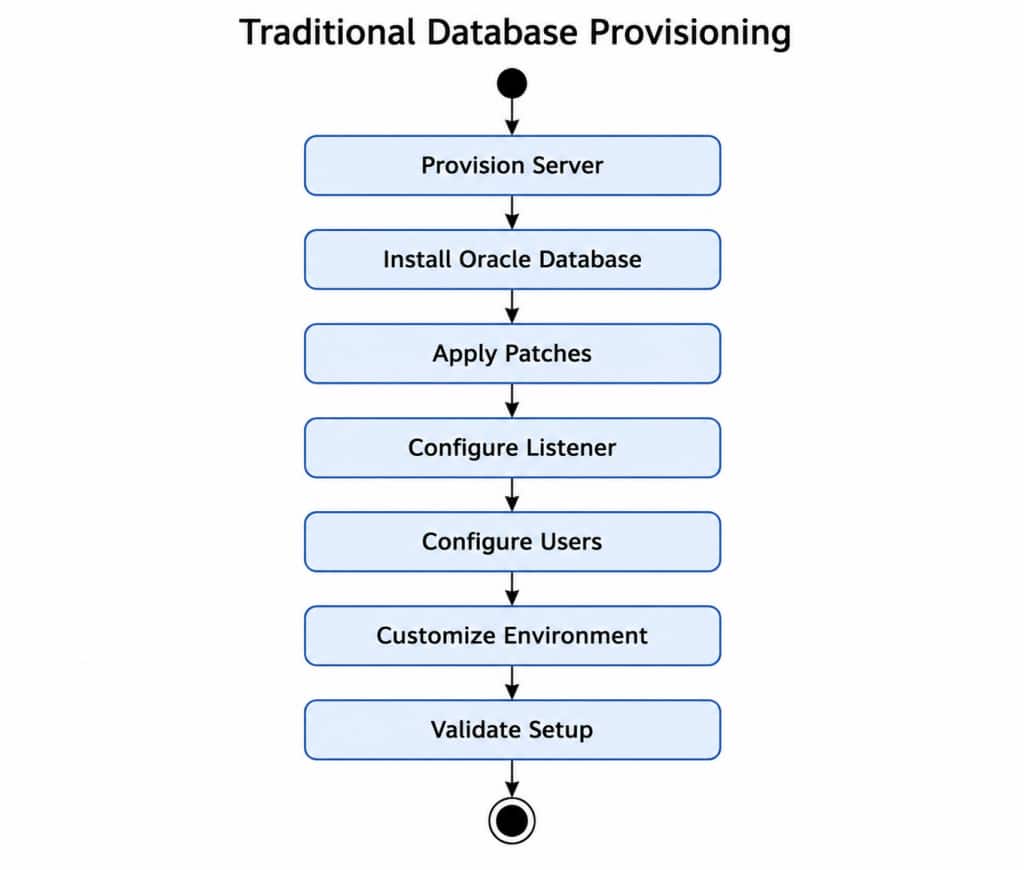
Containers let developers, architects, and platform teams get started with Oracle AI Database technologies in minutes, without a full local install. But speed only matters if the path is clear. That is where Oracle Container Registry, Oracle’s official container image sources, and Oracle-tested image flows make a real difference.
For customers and developers, the value is simple: one trusted place to start, images aligned with Oracle software, and a much easier path to running Oracle AI Database components consistently across laptops, labs, and cloud-native platforms.
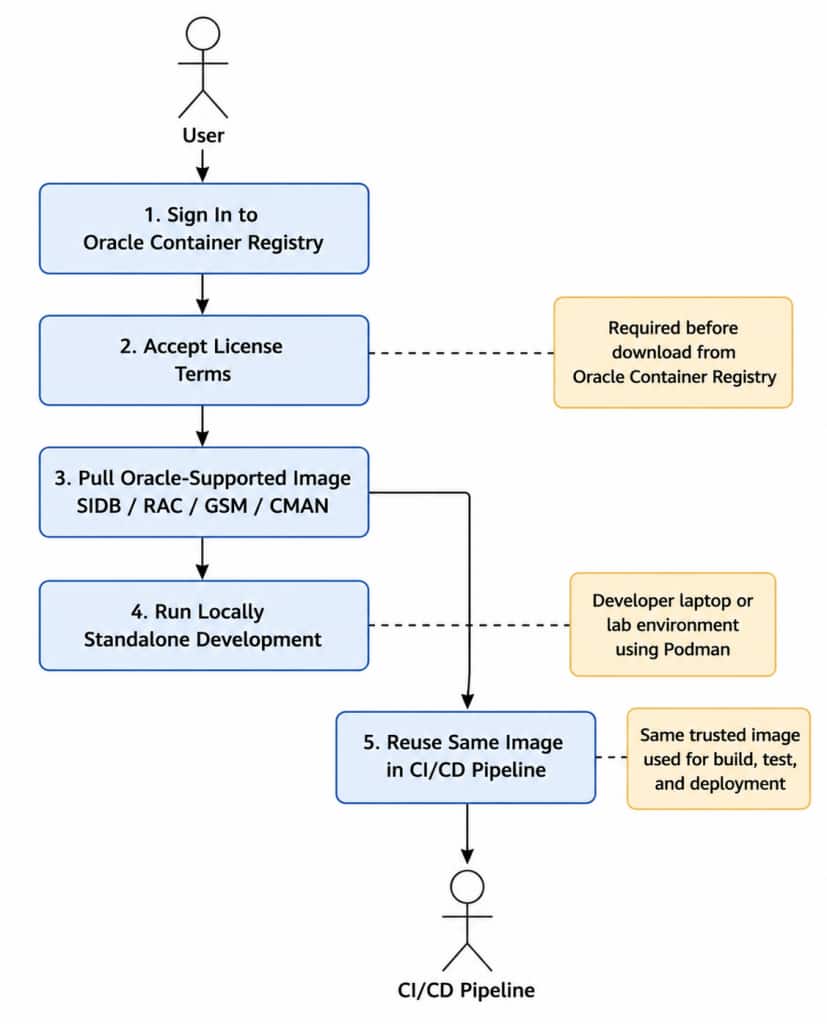
Oracle AI Database Container Images Delivery Model
Oracle provides two complementary approaches for Oracle AI Database containers:
| Approach | Purpose | Source |
|---|---|---|
| Oracle Container Registry | Fast access to Oracle-supported prebuilt images | https://container-registry.oracle.com |
| oracle/docker-images | Build custom images from source and apply patches | https://github.com/oracle/docker-images/tree/main/OracleDatabase |
This gives users flexibility:
- Speed when they want fast onboarding
- Control when they need customization and lifecycle management
This combination is a key strength of Oracle’s container ecosystem.
Oracle Container Registry
Oracle Container Registry (OCR) provides Oracle-managed pre-built Oracle AI Database container images that are production-ready and immediately consumable across development, CI/CD, Kubernetes, and enterprise deployment environments.
These images are:
- Pre-tested and Oracle-supported
- Built on top of Oracle Linux base images
- Aligned with the latest Oracle Linux security fixes and package updates
- Optimized for operational consistency and modern container workflows
By consuming Oracle-provided images directly from OCR, organizations can significantly simplify database provisioning and standardize deployments across environments without needing to build container images from scratch.
Before you download the image from Oracle Container Registry, you need to visit https://container-registry.oracle.com/ and click on Database Repository.
Oracle Container Registry (container-registry.oracle.com) provides multiple Oracle AI Database-related container image repositories under the Database category. These Oracle-managed repositories offer pre-built and Oracle-supported container images for various Oracle AI Database technologies, helping customers standardize deployments across development, CI/CD, Kubernetes, and enterprise environments.
For Oracle AI Database pre-built container images, customers can refer to the following repositories:
| Repository | Description |
|---|---|
enterprise | Oracle Database Enterprise Edition |
rac | Oracle Real Application Clusters (RAC) |
gsm | Oracle Global Service Manager (GSM) |
cman | Oracle Connection Manager (CMAN) |
free | Oracle Database Free |
Example of Single Instance Database Container Image Download
To access Oracle AI Database container images from Oracle Container Registry (OCR), go to container-registry.oracle.com, click on Sign In, select the Database category, and then choose the required repository such as Enterprise. Before pulling the image, you must review and accept the Oracle license agreement associated with that repository.
After accepting the license, you should see the repository access and authentication details.
Once the license is accepted, Oracle Container Registry provides an authentication token that can be used to authenticate Docker or Podman clients for downloading container images securely from OCR. This token can also be used for creating Kubernetes image pull secrets for Oracle Database Operator and Kubernetes-based deployments.
To generate the authentication token, click on your logged-in username in the top-right corner of Oracle Container Registry and select Auth Token. Copy the generated token securely, as it will be used later to authenticate Docker or Podman clients when downloading Oracle Database container images from Oracle Container Registry.
This authentication token is typically used to log in to Oracle Container Registry from the client machine where the container image will be downloaded. After authentication, organizations can securely pull Oracle AI Database container images directly from OCR and integrate them into local environments, CI/CD pipelines, Kubernetes clusters, or Oracle Database Operator deployments.
Example login command:
podman login container-registry.oracle.comThe authentication token can also be used to create image pull secrets for Kubernetes environments, enabling Oracle Database Operator and Kubernetes workloads to securely pull Oracle AI Database container images directly from Oracle Container Registry.
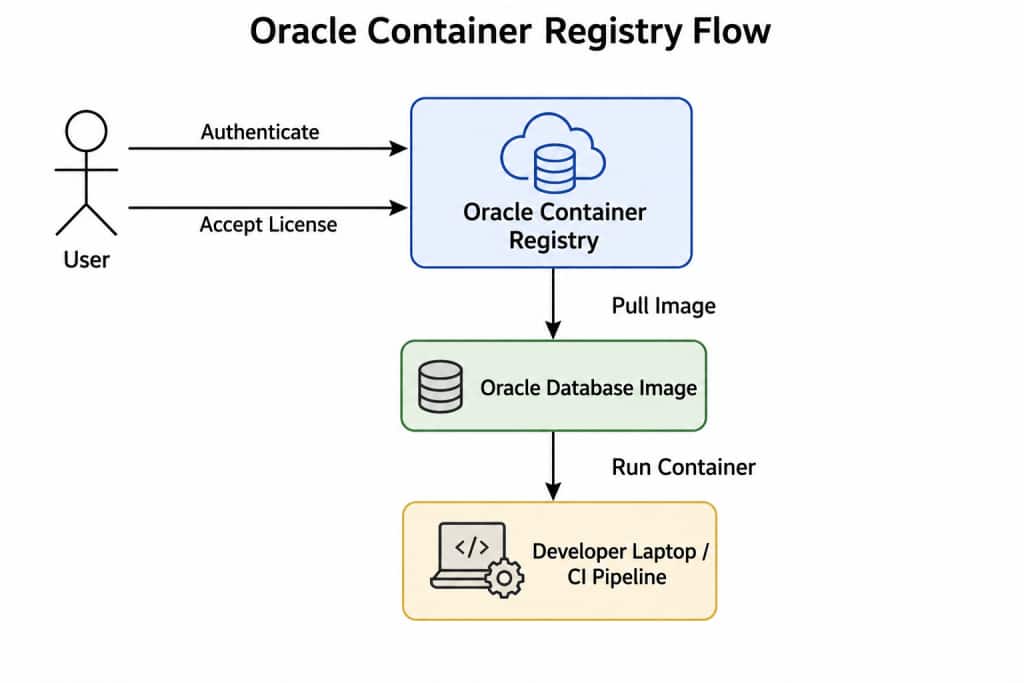
This model can help reduce friction significantly because teams do not need to:
- build images manually
- create custom Dockerfiles
- assemble installation dependencies
- configure database software from scratch
The result is faster onboarding and better consistency.
Oracle AI Database Free and Developer Enablement
Oracle AI Database 26ai Free is a free edition of Oracle AI Database, available as a container image based on Oracle Linux 8. (Terms, conditions, and restrictions apply).
For more information on Oracle AI Database 26ai Free, see: https://oracle.com/database/free.
These Oracle free database images help developers and platform teams:
- Learn the Oracle container workflow
- Experiment with Kubernetes
- Validate CI/CD pipelines
- Prototype DevOps automation
- Build proof-of-concept environments quickly
This is important because DevOps adoption succeeds when the entry barrier is low.
A developer can:
- Pull an image
- Run a container
- Test application integration
- Destroy and recreate environments repeatedly
without spending days assembling infrastructure manually.
Accelerating Oracle AI Database Container Adoption
Oracle-managed container images from Oracle Container Registry (OCR) provide an efficient way to get started with Oracle AI Database container deployments across modern DevOps and Kubernetes environments.
These pre-built and Oracle-supported images help organizations:
- Start workshops and hands-on labs quickly
- Provision development and test environments consistently
- Onboard developers and platform teams faster
- Validate CI/CD and automation pipelines
- Experiment with Kubernetes and Oracle Database Operator deployments
- Standardize container-based Oracle AI Database environments
Because the images are pre-tested, RU-aligned, and built on top of Oracle Linux base images with current security fixes, customers can focus more on application development, automation, and operational workflows instead of spending time building and maintaining container images manually.
For many organizations, Oracle-managed images provide a trusted operational baseline that helps simplify database provisioning, reduces lifecycle management complexity, and can help accelerate adoption of modern container-based Oracle AI Database workflows.
Building Oracle Database Images from Source
For many enterprise environments, pre-built container images are only the starting point. Organizations often require greater control over database image standardization, patching, compliance, and operational lifecycle management.
Enterprise requirements commonly include:
- Specific Release Update (RU) levels with additional one-off patches
- Internal security and compliance validation
- Vulnerability scanning and image hardening
- Custom RPMs, utilities, or operational tooling
- Organization-specific configurations
- Standardized lifecycle and release management processes
This is where Oracle’s official oracle/docker-images repository becomes extremely valuable.
The repository provides Oracle-supported build frameworks and examples for:
- Oracle Single Instance Database (SIDB)
- Oracle Real Application Cluster (RAC)
- Oracle Global Service Manager (GSM)
- Oracle AI Database image patching workflows
- Containerized infrastructure examples
- Custom RU image creation and lifecycle management
By using Oracle’s official build repositories and patching workflows, organizations can build customized Oracle AI Database container images while still remaining aligned with Oracle-supported deployment and lifecycle management practices.
Building a Single Instance Database Image
Oracle Single Instance Database images are usually the easiest entry point.
The build flow is straightforward:
- Clone the official repository
- Download Oracle AI Database software from OTN
- Place the installation ZIP file in the version directory
- Execute the build script
- Produce a reusable container image
Example Build Flow
git clone https://github.com/oracle/docker-images.git

cd docker-images/OracleDatabase/SingleInstance/dockerfiles

./buildContainerImage.sh -v 23.26.1 -e
The resulting image can then be:
- Tested locally
- Pushed to a private registry
- Consumed by CI pipelines
- Deployed on Kubernetes
- Used with Oracle Database Operator
Unified Operational Model
One of the significant advantages of Oracle’s container ecosystem is the consistent operational model across Oracle AI Database technologies including Single Instance Database, RAC, GSM, and CMAN.
The same core principles apply across these deployments:
- Containerized provisioning
- RU-aligned image lifecycle management
- Immutable infrastructure
- Repeatable deployments
- CI/CD integration
- Kubernetes-native automation
This unified approach helps organizations standardize Oracle AI Database operations and simplify modern DevOps and cloud-native deployment workflows.
Conclusion
Oracle AI Database containers are becoming much more than a simple packaging mechanism for database software. They are evolving into a foundational operational layer for modern DevOps, CI/CD, and cloud-native database delivery workflows.
Through Oracle Container Registry, Oracle provides a fast and supported path for consuming prebuilt Oracle AI Database container images, including Oracle Free 26ai images for rapid onboarding, development, testing, and Kubernetes experimentation. At the same time, Oracle’s official oracle/docker-images repository provides the flexibility to build, customize, and standardize Oracle AI Database container images aligned with enterprise lifecycle requirements, Release Updates (RUs), and internal operational policies.
This combination creates a powerful and practical container strategy:
- Prebuilt images for simplicity and speed
- Custom image workflows for lifecycle control and enterprise customization
- RU-aligned image management for consistency and operational standardization
- Repeatable image-driven deployments across development, CI/CD, and production-like environments
Most importantly, the Oracle AI Database container image becomes the operational artifact that moves consistently through the software delivery lifecycle.
Whether organizations are working with:
- Oracle Single Instance Database
- Oracle RAC
- GSM and sharding environments
- Oracle Connection Manager
The same core principles apply:
- Immutable infrastructure
- Repeatable provisioning
- Standardized lifecycle management
- CI/CD integration
- Kubernetes-ready deployment workflows
This is one of the notable advantages of Oracle’s container ecosystem. Teams can start quickly using Oracle-provided images, gradually adopt custom image workflows where required, and align Oracle AI Database operations with modern DevOps and platform engineering practices without completely reinventing existing operational models.
Next in This Series
In the next blog, we will explore how Oracle-managed Release Update (RU) container images help organizations standardize Oracle AI Database lifecycle management across DevOps, CI/CD, Kubernetes, and Oracle Database Operator workflows.