
Summary
Cryptography is everywhere in modern enterprises, yet visibility into how it is actually used is usually poor. Most organizations cannot confidently answer which algorithms protect their databases, where cryptography is implemented, or how quickly they could make changes if regulations or threats demanded it.
This lack of visibility turns cryptography into a hidden operational risk. Standards and customer expectations are tightening, and the shift to post‑quantum cryptography (PQC) will require many organizations to upgrade algorithms and key management across the board. Even before large-scale quantum computers arrive, “harvest now, decrypt later” threats mean data encrypted today may be at risk in the future if it needs to remain confidential for years. The organizations that respond fastest will be the ones that already know what crypto they have, where it lives, and what depends on it.
Giving you a path to that visibility is the purpose of a Cryptographic Bill of Materials (CBOM), and this blog. Here you’ll find where and how cryptography is used in Oracle Database, what your choices are for algorithms, which ones we recommend, and how to move from your current state to one that better helps you address threats, satisfy your compliance requirements, and meet your own organizational standards.
Introduction
In Oracle Database, cryptography touches everything from data at rest and data in motion to Oracle Wallets protecting encryption keys, certificates, secrets, and passwords. Cryptography directly affects the confidentiality, integrity, and availability of your databases, and yet few can confidently answer:
- Which cryptographic algorithms are protecting their databases and data?
- Are encryption key sizes and modes appropriate and strong enough for today’s threats?
- How are keys and secrets stored and protected?
- How could your databases be impacted by newfound weaknesses, regulations, and advances that disrupt your post-quantum timelines?
This is a visibility problem.
Recent events have taught us the cost of unknown dependencies. Log4j was not catastrophic because logging libraries are complex. It was catastrophic because we didn’t know where the library was used.
Cryptography has the same dependency problem, but with higher stakes. This is where a Cryptographic Bill of Materials (CBOM) comes in. Just as a Software Bill of Materials (SBOM) brought transparency to software dependencies, a CBOM brings transparency to cryptographic dependencies. With a CBOM, you can understand and respond to cryptographic risks with more confidence because you’ll have relevant information about the affected databases and owners.
Further, cryptography is not a set-it-and-forget-it control. It needs regular attention as computing power grows, new vulnerabilities emerge, and threat models evolve. Security frameworks such as NIST and ISO 27001 emphasize that you should:
- Use strong encryption algorithms such as AES-256 instead of legacy algorithms such as 3DES, RC2, or RC4
- Adopt strong hashing algorithms such as SHA-512 instead of SHA-1
- Use larger key sizes, whether for AES, RSA, Diffie-Hellman, or elliptic curve cryptography. Advances in computing reduce the effective strength of shorter keys, so AES-128 or SHA-1 may no longer meet your risk tolerance.
- Use modern network security protocols such as TLS 1.3 and TLS 1.2
- Encrypt your keystores and wallets with stronger algorithms
- Enforce encryption across all layers
This blog covers:
- Where does Oracle Database use cryptographic algorithms along with key sizes?
- How can you identify your current cryptographic settings?
- What are the recommendations for Oracle AI Database 26ai and Oracle Database 19c?
- How to modify your current cryptographic configurations to reduce risk from emerging threats?
Where Oracle Database Uses Cryptography
Oracle Database relies on cryptography across multiple layers and features, including:
- Securing client-to-database communication using the industry-standard TLS protocol or Oracle’s Native Network Encryption (NNE)
- Authenticating users with PKI certificates, Kerberos, RADIUS, and passwords
- Securing keys, passwords, and certificates in an Oracle Wallet
- Encrypting data at rest at the tablespace or column level with Transparent Data Encryption (TDE)
- Encrypting database backups with RMAN
- Encrypting database exports with Data Pump
- Protecting data during extract, storage, and load with GoldenGate
- Using cryptography through toolkits such as DBMS_CRYPTO
- Blockchain operations
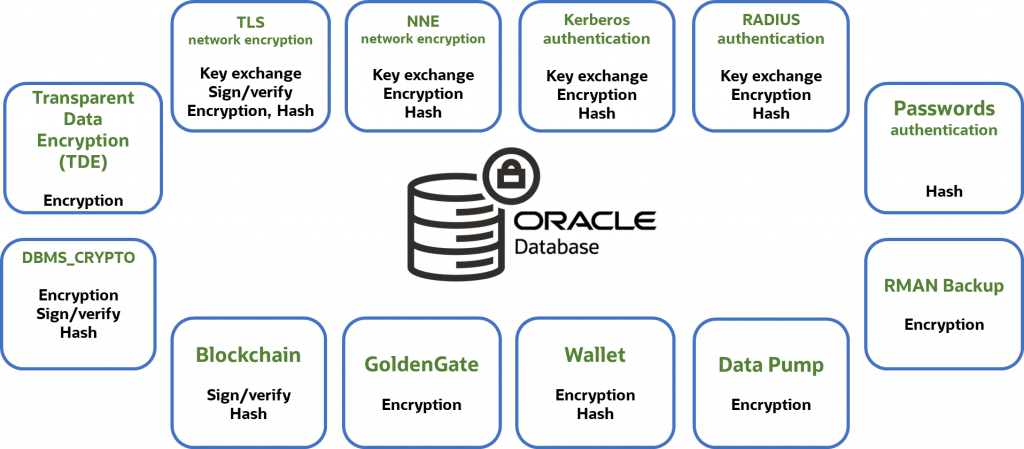
In this blog, we’ll focus on network encryption, Oracle Wallets, and Transparent Data Encryption (TDE) as these features are used by most of our customers. We’ll first show the algorithms supported, along with their key sizes and default (in bold), and then go into detail on how to find what you have, and how to change them. Note that these defaults are for new databases you’ve created manually; database cloud services like Exadata Cloud Service or Autonomous Database will typically be hardened by default.
| Feature/Function | Oracle AI Database 26ai | Oracle Database 19c | ||
| Supported (default in bold) | Recommended | Supported (default in bold) | Recommended | |
| TLS | ||||
| TLS protocol | TLS 1.2, TLS 1.3 | TLS 1.3 | TLS 1.0, 1.1, 1.2 | TLS 1.2 |
| Key Exchange | ML-KEM, ECDHE, HYBRID | HYBRID | ECDHE | ECDHE |
| Quantum-resistant | YES | YES | No | |
| Certificates | RSA, EC, ML-DSA | RSA, EC | ||
| Note: For recommended certificate key/Elliptic curve sizes, see the section on public key certificates below | ||||
| Native Network Encryption (NNE) | ||||
| Encryption | AES128, AES192, AES256 | AES256 | AES128, AES192, AES256 Note: Older database versions, including Oracle Database 19c, supported other algorithms that are no longer recommended | AES256 |
| Integrity Check | SHA256, SHA384, SHA512 | SHA512 | SHA256, SHA384, SHA512 Note: Older database versions, including Oracle Database 19c, supported other algorithms that are no longer recommended | SHA512 |
| TDE | ||||
| Algorithm | AES128, AES192, AES256, ARIA (128, 192, 256) | AES256 | AES128, AES192, AES256, ARIA (128, 192, 256) Note: Older database versions, including Oracle Database 19c, supported other algorithms that are no longer recommended | AES256 |
| AES Modes | CFB, XTS | XTS | CFB | CFB |
| Wallet | ||||
| Algorithm/size | AES 256 | AES 256 | 3DES168(default pre-July 2024), AES128, AES256 | AES256 |
TLS Network Encryption
TLS (Transport Layer Security) protocol, previously referred to as SSL, ensures secure communication between clients and servers by encrypting data transmitted over the network. By using robust encryption, key exchange, and authentication mechanisms, TLS protects sensitive data traveling over the network from inspection, tampering, and forgery, making it essential for maintaining confidentiality and integrity in online communications. TLS also authenticates the database server, increasing trust that the client connection is established with the intended server. Optionally, TLS can also be used to authenticate the client.
The security of the TLS protocol depends upon multiple factors:
- TLS protocol version number
- TLS cipher suites
- TLS key exchange
- Public Key Certificate key sizes
Checking the TLS protocol
Over the decades, the SSL/TLS protocols have gone through several revisions, including SSLv3, TLS 1.0, TLS 1.1, TLS 1.2, and TLS 1.3. All except TLS 1.2 and TLS 1.3 are considered broken and should not be used. Make sure that all database clients are compatible with the specified TLS protocol version, and all use TLS 1.2 or above.
For Oracle AI Database 26ai, the SYS_CONTEXT parameter TLS_VERSION can be queried to determine the TLS protocol version currently used for that session.
SELECT sys_context('USERENV', 'TLS_VERSION')
| Database version | Recommended TLS protocol | Supported TLS Protocols |
| 26ai (server and client) | TLS 1.3 | TLS 1.3, TLS 1.2 |
| 19c | TLS 1.2 | TLS 1.2, TLS 1.1, TLS 1.0 |
The TLS_VERSION/SSL_VERSION parameter in the sqlnet.ora file on both the database client and listener/server controls which TLS protocol version is used. Alternatively, it can be enforced through the client-side connect string in tnsnames.ora. If the parameter is not explicitly set, the highest version supported by both the client and the server is used. However, if you want to ensure that every connection uses the strongest available cipher, you should explicitly specify the TLS protocol version in the server’s sqlnet.ora file.
TLS Cipher Suite Configuration
Just like the TLS protocol, you can explicitly specify TLS cipher suites. If the parameter is not set, the database client and server will automatically negotiate the most secure cipher suite supported mutually. To enforce the strongest cipher suites, set the TLS_CIPHER_SUITES parameter in the sqlnet.ora file, either on the client or server side. Note that this option is also available through the connection string in 26ai.
Recommendations for Cipher Suites
| Database version | Recommended TLS cipher suites | Supported TLS cipher suites |
| 26ai | TLS_AES_256_GCM_SHA384 (TLS 1.3) TLS 1.3 is preferred, but if TLS 1.2 is used, recommended ciphers are: TLS_ECDHE_RSA_WITH_AES_256_GCM_SHA384 TLS_ECDHE_ECDSA_WITH_AES_256_GCM_SHA384 | Approved cipher suites for TLS 1.3: TLS_AES_256_GCM_SHA384 TLS_AES_128_CCM_SHA256 TLS_AES_128_GCM_SHA256 TLS_CHACHA20_POLY1305_SHA256 (non-FIPS only) Approved cipher suites for TLS 1.2: TLS_ECDHE_RSA_WITH_AES_256_GCM_SHA384 TLS_ECDHE_RSA_WITH_AES_128_GCM_SHA256 TLS_ECDHE_ECDSA_WITH_AES_256_GCM_SHA384 TLS_ECDHE_ECDSA_WITH_AES_128_GCM_SHA256 TLS_DHE_RSA_WITH_AES_256_GCM_SHA384 TLS_DHE_RSA_WITH_AES_128_GCM_SHA256 All other cipher suites are deprecated and should not be used. |
| 19c | TLS_ECDHE_RSA_WITH_AES_256_GCM_SHA384 TLS_ECDHE_ECDSA_WITH_AES_256_GCM_SHA384 | Approved cipher suites for TLS 1.2: TLS_ECDHE_RSA_WITH_AES_256_GCM_SHA384 TLS_ECDHE_RSA_WITH_AES_128_GCM_SHA256 TLS_ECDHE_ECDSA_WITH_AES_256_GCM_SHA384 TLS_ECDHE_ECDSA_WITH_AES_128_GCM_SHA256 TLS_DHE_RSA_WITH_AES_256_GCM_SHA384 TLS_DHE_RSA_WITH_AES_128_GCM_SHA256 All other cipher suites are deprecated and should not be used. |
How to upgrade to the recommended cipher suites
For 26ai, set the TLS_CIPHER_SUITES parameter in sqlnet.ora to the recommended TLS cipher suite.
TLS_CIPHER_SUITES=(TLS_AES_256_GCM_SHA384)
For 19c, set the TLS_CIPHER_SUITES parameter in sqlnet.ora to the recommended TLS cipher suites.
TLS_CIPHER_SUITES=(TLS_ECDHE_ECDSA_WITH_AES_256_GCM_SHA384, TLS_ECDHE_RSA_WITH_AES_256_GCM_SHA384)
TLS Key Exchange for Quantum-Resistance
The TLS 1.3 protocol uses a key exchange algorithm to establish a shared session key for encrypting network traffic. If that key exchange uses a non–quantum-resistant mechanism such as ECDHE, sufficiently capable quantum computers could eventually undermine it. In practice, this creates a “harvest now, decrypt later” risk: an adversary can record TLS-encrypted traffic today and decrypt it in the future once they can break the key exchange and recover the session keys. To reduce this exposure, NIST recommends transitioning to post-quantum key establishment mechanisms such as the module-lattice–based ML-KEM.
As ML-KEM is a relatively new algorithm, the current best practice is to use both ECDHE and ML-KEM algorithms together (“hybrid” mode) to provide maximum assurance of privacy for network communications. Oracle AI Database 26ai release 26.1 and later support both “hybrid” and “pure” ML-KEM modes. Note that these modes are only available with TLS 1.3.
The algorithm used is controlled by the sqlnet.ora parameter TLS_KEY_EXCHANGE_GROUPS. If TLS_KEY_EXCHANGE_GROUPS is not explicitly set, the default setting is hybrid,ec,ml-kem, and the key exchange group used will be selected in that order from the first group supported by both client and server.
| Database version | TLS Version | Recommended TLS key exchange algorithm | Supported TLS key exchange algorithms |
| 26ai | 1.3 | Hybrid (default for TLS 1.3) | Hybrid, ECDHE, ML-KEM (can be further restricted by TLS_KEY_EXCHANGE_GROUP setting) |
| 1.2 | ECDHE | ECDHE, DHE, ECDH, DH, RSA. Determined by the selected cipher suite (TLS 1.2) | |
| 19c | 1.2 | ECDHE | ECDHE, DHE, ECDH, DH, RSA. Determined by the selected cipher suite (TLS 1.2) |
How to upgrade to the recommended key exchange algorithms
For 26ai using TLS 1.3, in the sqlnet.ora file set: TLS_KEY_EXCHANGE_GROUPS=hybrid (this will disable EC and pure ml-kem). For 19c (or 26ai using TLS 1.2), there is no parameter to select the key exchange mechanism, as the mechanism is determined by the selected cipher suite.
Public Key Certificates
In addition to specifying the appropriate TLS protocol and cipher suites, a certificate is used to authenticate the database session. Run the following orapki command to get details about the algorithm and key length associated with the certificate.
orapki wallet display [-wallet [wallet_file_directory]] -complete -details
Recommendations for asymmetric key algorithm – elliptic curve
| Database version | Recommended elliptic curve algorithms (in order of strength) |
| 26ai, 19c | ecdsa_secp521r1_sha512 (equivalent to RSA 15360-bits key) ecdsa_secp384r1_sha384 (equivalent to RSA 7680-bits key) ecdsa_secp256r1_sha256 (equivalent to RSA 3072-bits key) |
Recommendations for asymmetric key algorithm – ML-DSA
| Database version | Recommended ML-DSA curve algorithms (in order of strength) |
| 26ai | ML-DSA-87 (equivalent to RSA 4096-bits key) ML-DSA-65 (equivalent to RSA 3072-bits key) ML-DSA-44 (equivalent to RSA 2048-bits key) |
Recommendations for asymmetric key algorithm – RSA key
| Database version | Recommended key length | Supported key lengths |
| 26ai | RSA 2048 or higher | 1024, 2048, 4096, 8192, and 16384 |
| 19c | RSA 2048 or 4096 | 512, 1024, 2048, and 4096 |
There is no default for the key strength of elliptic curve algorithm. You can use “orapki wallet add” command to create certificates and certificate requests with a specified algorithm, key length, and hashing algorithm. NIST recommends using RSA key strength of at least 3072 after 2030, but a key length of 2048 is acceptable for now.
For more information on configuring TLS, please review the documentation:
Oracle AI Database 26ai TLS documentation
Oracle Database 19c TLS documentation
Native Network Encryption (NNE)
Native Network Encryption (NNE) is Oracle’s native protocol for encrypting data in transit. Compared to TLS, NNE is simpler to implement as it doesn’t require you to issue public key certificates or deploy CA certificates on the clients. However, unlike TLS, NNE does not perform server authentication and cannot be used for client or user authentication.
NNE can usually be configured at the server without requiring any client changes. In fact, if you accept the defaults, enabling NNE requires setting just one parameter (SQLNET.ENCRYPTION_SERVER=REQUESTED) in sqlnet.ora. NNE can also be configured with various algorithms and key lengths.
NNE Encryption
NNE encryption is enabled through the client and server parameters found in sqlnet.ora:
SQLNET.ENCRYPTION_CLIENTSQLNET.ENCRYPTION_SERVER
This parameter should be set to either REQUEST or REQUIRED on at least one side of the connection to use NNE.
Once NNE is enabled, setting the NNE encryption algorithm itself is optional. If neither the client nor server sets a value, then the database will automatically negotiate the highest common encryption algorithm. To see if NNE encryption is set, check the following parameters in the client and server sqlnet.ora file:
SQLNET.ENCRYPTION_TYPES_CLIENTSQLNET.ENCRYPTION_TYPES_SERVER
Recommendations for the NNE encryption parameter
| Database version | Recommended encryption value | Supported encryption values |
| 26ai | AES256 | AES (128, 192, 256) |
| 19c | AES256 Note: The other algorithms are cryptographically weak but retained for backwards compatibility only | AES (128, 192, 256) 3DES (112, 168) – deprecated DES (40, 56) – deprecated RC4 (40, 56, 128, 256) – deprecated |
Upgrading to the recommended encryption settings
In the database server sqlnet.ora file, set: SQLNET.ENCRYPTION_TYPES_SERVER=(AES256)
NNE Checksum
Oracle Network protocol always creates packet checksums that help detect corruption during transit. Cryptographic checksums strengthen the verification of data integrity as the data goes through the network. If a higher level of integrity is required, enable NNE cryptographic checksum through the client and server parameters in sqlnet.ora:
SQLNET.CRYPTO_CHECKSUM_CLIENTSQLNET.CRYPTO_CHECKSUM_SERVER
This parameter must be set to either REQUEST or REQUIRED on at least one side of the connection.
Recommendations for the NNE Checksum Parameter
| Database version | Recommended checksum value | Supported checksum values |
| 26ai | SHA512 | SHA256, SHA384, SHA512 (default) SHA1 – considered cryptographically weak and deprecated |
| 19c | SHA512 | SHA256, SHA384, SHA512 (default) MD5, SHA1 – considered cryptographically weak and deprecated |
Upgrading to the recommended checksum settings
The checksum value is set with the SQLNET.CRYPTO_CHECKSUM_TYPES_CLIENT parameter in the client sqlnet.ora file or SQLNET.CRYPTO_CHECKSUM_TYPES_SERVER in the server file. For example:
SQLNET.CRYPTO_CHECKSUM_TYPES_SERVER=(SHA512)
For more information on configuring NNE, please review the documentation at:
Oracle AI Database 26ai NNE documentation
Oracle Database 19c NNE documentation
Oracle Wallet
Oracle Wallets are encrypted PKCS#12 files that store encryption keys and secrets for Oracle Database, including the TDE master key, public and private keys for TLS, trusted certificates, and Secure External Password Store (SEPS) entries, along with credentials for Centrally Managed Users (CMU) and Enterprise User Security (EUS).
Your database may use multiple wallets for TDE, TLS, Centrally Managed Users, Enterprise User Security, Secure External Password Store, Recovery Manager, and GoldenGate. A single database is likely to have many wallets, with their location determined by the feature they support and by the parameter settings for the database and associated components. Search your system for ewallet.p12 and cwallet.sso to locate all of them.
Note: For Oracle Database 19c and Oracle AI Database 26ai, the location of the most database wallets is identified by the WALLET_ROOT initialization parameter. Pluggable databases can run in united or isolated mode. In the united mode, the pluggable databases share the same wallet used by the container (one wallet for the entire database system), while in the isolated mode, the wallet for each pluggable database is in a subdirectory under WALLET_ROOT identified by the PDB’s GUID. In the isolated mode, there are n+1 wallets for the entire system where n=number of PDBs and the +1 is for the container.
Wallets created with orapki from Oracle Database 19.22 onward are encrypted by default with the AES-256 algorithm. In earlier releases, the wallet was encrypted with the now obsolete 3DES algorithm. If you’ve upgraded from earlier database releases using the existing wallet, you may still be using 3DES. To determine the encryption algorithm your wallet is using, run:
openssl pkcs12 -info -in ./ewallet.p12 -nodes
If you still have 3DES encrypted wallets, convert them to use AES-256 by:
orapki wallet convert -wallet wallet_location -compat_v12
The wallets are encrypted with a user-supplied passphrase up to 128 bytes. For TDE wallets, use an ADMINISTER KEY MANAGEMENT command to change its passphrase, else use orapki.
Oracle Database 26ai documentation for converting an Oracle Wallet to use AES-256
Oracle Database 19c documentation for converting an Oracle Wallet to use AES-256
Transparent Data Encryption (TDE)
TDE protects data at rest by encrypting data within the datafiles and redo logs. TDE may be implemented at the tablespace or individual column level, but most deployments prefer tablespace encryption due to superior performance, broader compatibility, and easier management. Our focus here would be tablespace encryption, while a later section in this blog would specify the algorithms for column-level encryption.
| Database Version | Available Algorithms and Key Lengths | Default Algorithm | Recommended Algorithm and Keysize | Available Encryption Modes | Recommended Mode | Default |
| 26ai | AES (128, 192, 256), ARIA (128, 192, 256) | AES | AES256 | XTS, CFB | XTS | AES256* XTS |
| 19c | AES (128, 192, 256), 3DES, ARIA (128, 192, 256), GOST (256), SEED (128) | AES | AES256 | CFB | CFB | AES128 CFB |
The default can be overridden, either explicitly when the tablespace is created (or altered) or implicitly by setting TABLESPACE_ENCRYPTION_DEFAULT_ALGORITHM for Oracle AI Database 26ai, and an underscore parameter _TABLESPACE_ENCRYPTION_DEFAULT_ALGORITHM for Oracle Database 19c.
*Note: Previously encrypted databases that are migrated to Oracle AI Database 26ai retain their original algorithm and mode. Newly created tablespaces will be encrypted with the default unless the default is overridden as noted above.
All modes of symmetric encryption using AES256 are considered quantum resistant.
How to upgrade TDE to the recommended settings
- 26ai
- Upgrade to AES-256 XTS mode using TDE Encryption Conversions (26ai)
- 19c
- Follow the documentation to rekey encrypted tablespaces to use AES-256
TDE Wallet
TDE wallets hold the TDE master encryption key when an external keystore such as Oracle Key Vault is not used. Oracle recommends an external keystore because storing decryption keys on the same server as encrypted data increases risk.If you are using a wallet to store your encryption keys, verify that it’s encrypted with AES-256 as discussed above.
TDE integrates with many Oracle Database features. If you’re using any of them, ensure they are also configured with modern algorithms, encryption modes, and appropriate key lengths.
Oracle Data Pump
Exports of data can be especially vulnerable to theft or compromise because they may be copied or distributed more easily. You may encrypt an export by including the ENCRYPTION parameter in your export command along with these options:
ENCRYPTED_COLUMNS_ONLY: Writes TDE encrypted columns to the dump file set in encrypted format. This ensures that sensitive column data remains encrypted in the dump file while leaving non-sensitive data unencrypted.DATA_ONLY: Encrypts only the row data in the dump file, while the metadata remains unencrypted.METADATA_ONLY: Encrypts only the metadata in the dump file.ALL: Encrypts the data and the metadata in the dump file (recommended)NONE: Does not use encryption for dump file sets (default)
Data Pump’s ENCRYPTION_MODE parameter identifies where the encryption key comes from. There are three valid values:
TRANSPARENT: Uses the database’s master encryption key from Oracle Key Vault or the TDE wallet (if Key Vault is not used) to encrypt and decrypt the exported data.PASSWORD: Uses a passphrase supplied through theENCRYPTION_PASSWORDparameter to encrypt and decrypt the exported data.DUAL: During export, both the database’s master encryption key and user-supplied passphrase are used to encrypt the data. During import, either the wallet or passphrase may be used to decrypt the exported data.
The encryption algorithm is controlled by Data Pump’s ENCRYPTION_ALGORITHM parameter. The valid value for Oracle AI Database 26ai is AES256. For Oracle Database 19c, the valid values are AES128, AES192, and AES256.
Recommendations for Data Pump in modes DATA_ONLY, METADATA_ONLY, and ALL:
| Database Version | Available Data Pump Algorithms and Key Lengths | Default Algorithm | Recommended Algorithm and Keysize |
| 26ai | AES (256) | AES256 | AES256 |
| 19c | AES (128, 192, 256) | AES128 | AES256 |
If the ENCRYPTION_MODE is ENCRYPTED_COLUMNS_ONLY, then the algorithm used for the transparently encrypted columns is used for the export and cannot be specified.
The default ENCRYPTION_MODE depends on what is being exported and the availability of the database’s master encryption key.
- If the
ENCRYPTION_MODEisDATA_ONLY,METADATA_ONLY, orALL, and the master encryption key is available, and anENCRYPTION_PASSWORDis provided, thenDUALis used. - If the
ENCRYPTION_MODEisDATA_ONLY,METADATA_ONLY, orALL, and the master encryption key is available, and noENCRYPTION_PASSWORDis provided, thenTRANSPARENTis used. - If the
ENCRYPTION_MODEisDATA_ONLY,METADATA_ONLY, orALL, and the master encryption key is not available, and anENCRYPTION_PASSWORDis provided, thenPASSWORDis used. - If the
ENCRYPTION_MODEisENCRYPTED_COLUMNS_ONLY, then the mode will always beTRANSPARENT.
26ai: Data Pump Encryption Options
19c: Data Pump Encryption Options
Oracle Recovery Manager (RMAN)
Oracle Recovery Manager (RMAN) is used to back up the database or to recover the database from backups. If RMAN is backing up a database that is already encrypted with Transparent Data Encryption (TDE), the encrypted data remains encrypted in the backup, and the algorithm is not changed from whatever TDE used. For unencrypted databases, or databases where some data is encrypted, and other data is not, RMAN can create encrypted backup sets.
Like Data Pump, RMAN offers a few different modes to select the encryption key.
TRANSPARENT: uses the database master encryption key from Oracle Key Vault or the TDE wallet (if Key Vault is not used) to encrypt and decrypt the backup sets.PASSWORD: uses a passphrase specified during backup or recover via theSET ENCRYPTION ON IDENTIFIED BY <password> ONLYcommand. Restoring a password-protected backup requires the same password used when the backup was created.DUAL: Dual-mode encrypted backups can be created by simply omitting the “ONLY” keyword when theSET ENCRYPTION ONcommand is given. They are restored either transparently using the database master key or by specifying the passphrase that was provided when the backup was created.
In Oracle AI Database 26ai, the available algorithms and encryption mode depends on the database’s COMPATIBLE parameter setting, with the algorithm used selected with the CONFIGURE ENCRYPTION ALGORITHM command.
| Database Version | COMPATIBLE setting | Available RMAN Algorithms and Key Lengths | Default Algorithm | Recommended Algorithm and Keysize |
| 26ai | 23.0.0 or higher | AES (128, 256) in XTS mode | AES256 | AES256 |
| 26ai | Lower than 23.0.0 | AES (128,192,256) in CFB mode | AES128 | AES256 |
| 19c | Does not matter | AES (128, 192, 256) in CFB mode | AES128 | AES256 |
Oracle AI Database 26ai RMAN documentation
Oracle Database 19c RMAN documentation
Compliance and Recommendations
Oracle follows widely accepted cryptographic guidelines such as FIPS 140 and NIST recommendations for quantum-resistant encryption. The following recommendations are based on what is supported as of the blog’s publish date for Oracle AI Database 26ai and Oracle Database 19c. The recommended symmetric and hashing algorithms are currently considered quantum-resistant.
Recommendation for Symmetric Encryption
- Algorithm: AES-256 (Considered quantum-resistant regardless of the cipher mode)
- Cipher Mode:
- XTS for Oracle 26ai (CFB is still available, but we recommend XTS)
- CFB for Oracle 19c (the only supported mode)
Recommendation for Secure Hashes
- Algorithm: While SHA-512 is preferred, SHA-256 is also acceptable. Both are considered quantum-resistant.
Recommendation for Public Key Cryptography or Asymmetric Encryption
- Key strength: RSA 2048 bits or longer, or ECC P-256 or stronger
- Usage: TLS, certificates
Recommendation for Password-Based Encryption
When setting passwords for Oracle Wallet, Data Pump, or other encryption-enabled utilities, use at least 16 characters with a mix of uppercase, lowercase, digits, and symbols.
Recommendations for other database features that leverage cryptography:
| Feature | Algorithm Function | Database Version(s) | Recommendation | Documentation Links |
| Blockchain Tables | Digest, Signature | 26ai, 19c | SHA2-512 | 26ai link 19c link |
| DBMS_CRYPTO | Symmetric | 26ai, 19c | AES256 | 26ai link 19c link |
| DBMS_CRYPTO | Asymmetric Cryptography | 26ai | RSA 2048 and above ECC p256 and above | 26ai link |
| DBMS_CRYPTO | Asymmetric Cryptography | 19c | RSA 2048 and above | 19c link |
| DBMS_CRYPTO | Hash | 26ai | SHA2 (SHA256, SHA384, SHA512), SHA3 (SHA3_224, SHA3_256, SHA3_384, SHA3_512), SHAKE (128, 256) | 26ai link |
| DBMS_CRYPTO | Hash | 19c | SHA2 (SHA256, SHA384, SHA512) | 19c link |
| DBMS_CRYPTO | Message Authentication Code (MAC) | 26ai | SHA2 (SHA256, SHA384, SHA512), SHA3 (SHA3_256, SHA3_384, SHA3_512), KMACXOF (128, 256) | 26ai link |
| DBMS_CRYPTO | Message Authentication Code (MAC) | 19c | SHA2 (SHA256, SHA384, SHA512) | 19c link |
| Kerberos | Algorithm | 26ai, 19c | aes256-cts-hmac-sha384-192 | 26ai link 19c link |
| RADIUS | Client-DB connection | 26ai, 19c | Configure for TLS (1-way or mTLS) using the recommended TLS ciphersuites SQLNET.RADIUS_ALLOW_WEAK_PROTOCOL=FALSE | 26ai link 19c link |
| RADIUS | DB-RADIUS connection | 26ai, 19c | SQLNET.RADIUS_TRANSPORT_PROTOCOL=TLS SQLNET.RADIUS_ALLOW_WEAK_CLIENTS=FALSE SQLNET.RADIUS_ALLOW_WEAK_PROTOCOL=FALSE | 26ai link 19c link |
| WebDAV | Basic Auth digest | 26ai | SHA512, (SHA256 acceptable) | 26ai link |
| WebDAV | Basic Auth digest | 19c | None (MD5 is the only available implementation, but this is not recommended) | 19c link |
Complying with FIPS 140
If your organization requires FIPS-140 compliance, you can enable it through:
- Oracle AI Database 26ai – run the
enable_fips.pyscript as outlined in Appendix C of the Database Security Guide. You can choose between 140-2 and 140-3 modes. The script configures FIPS mode for TLS, NNE, TDE, DBMS_CRYPTO, and the included stand-alone Java client applications. - Oracle Database 19c – You need to set FIPS usage in the following three locations:
- For TLS, set SSLFIPS_140=true in the fips.ora file, located by default in $ORACLE_HOME/ldap/admin
- For NNE, set SQLNET.FIPS_140=TRUE in the sqlnet.ora file, located by default in $ORACLE_HOME/network/admin
- For TDE and DBMS_CRYPTO, set initialization parameter DBFIPS_140=true
For stand-alone Java client applications, you’ll also need to check the CLASSPATH settings and set the appropriate FIPS-validated provider in the java.security property file.
Creating and Managing Your Cryptographic Bill of Materials (CBOM)
Here’s what a typical CBOM includes:
- Component Type: Identifies the type (e.g., feature, library, protocol, certificates)
- Name and Version: Specifies the component’s name and its version
- Algorithm: Lists the cryptographic algorithms in use and their key lengths
- Purpose: Details the purpose of each cryptographic asset
- Expiration/Review Dates: Tracks when the component will expire or needs reviewCompliance
- Regulation: Tracks if the selection was driven by a compliance mandate
- Notes: Any additional relevant details about the asset
By regularly reviewing your CBOM, you can easily track the state of your cryptographic components and ensure they are updated as part of each crypto review cycle. This proactive approach is designed to help you maintain security compliance and minimize vulnerabilities. At a minimum, you should reexamine this list when you upgrade to a new release of the database, or on a relevant external event such as updates to regulations or discovery of a new threat.
Sample Cryptographic Bill of Materials (CBOM)
A sample CBOM might look something like this:
- Database Name: Financial Services Lakehouse (Production)
- Database Owner: John Doe, Senior Director, Accounts Receivable
- Database Administrator: Jane Smith, Lead DBA
- Database Purpose: Support financial and other business analytics
- Database Version and current release update: Oracle AI Database 26ai version 23.26.1
| Component Type | Feature / Component | Algorithm | Key Size / Strength | Mode / Protocol | Purpose | Configuration Location | Review / Expiration Trigger | Compliance Driver | Notes |
| Network Security | TLS Protocol | TLS | N/A | TLS 1.3 | Encrypt client–server traffic | sqlnet.ora, tnsnames.ora | DB upgrade, new TLS CVE | NIST, FIPS 140-3 | Default negotiates the highest supported version |
| Network Security | TLS Cipher Suite | TLS_AES_256_GCM_SHA384 | 256-bit | Confidentiality + integrity | sqlnet.ora | Crypto policy update | FIPS 140-3 | TLS 1.3 approved cipher | |
| Network Security | TLS Key Exchange | Hybrid (ECDHE + ML-KEM) | PQ + classical | TLS 1.3 | Quantum-resistant session keys | sqlnet.ora | PQ threat model update | NIST PQC | Default supports hybrid |
| Certificate | Server Certificate | RSA / ECC | RSA 4096 | X.509 | Server authentication | Oracle Wallet | Cert expiration | NIST | ECC preferred where supported |
| Key Storage | Oracle Wallet | AES | 256-bit | PKCS#12 | Protect keys, certs, secrets | Oracle Wallet | Password rotation | FIPS 140-3 | Default AES-256 |
| Encrypting Data at Rest | TDE Tablespace Encryption | AES | 256-bit | XTS | Encrypt datafiles & redo | SQL, init params | Crypto review | NIST, FIPS | Recommended default for new TBS |
| Backup Encryption | RMAN Encryption | AES | 256-bit | Symmetric | Protect database backups | RMAN config | Backup policy review | ISO 27001 | Ensure enabled |
| Data Export | Data Pump Encryption | AES | 256-bit | Symmetric | Protect exports | expdp parameters | Export audit | Compliance mandate | Use ALL option |
| Crypto Toolkit | DBMS_CRYPTO | AES256, SHA-512 | Various | API | Application crypto | PL/SQL | Code review | Internal policy | Track app dependencies |
Note that this is just one way that the information could be presented. There is an emerging OWASP standard around bill of material called CycloneDX that may be worth considering.
Additional reading material
- Oracle Database cryptographic roadmap: https://www.oracle.com/security/database-security/crypto-roadmap
- Database Security eBook: https://download.oracle.com/database/oracle-database-security-primer.pdf
- Database Security Guide (26ai): https://docs.oracle.com/en/database/oracle/oracle-database/26/dbseg/index.html
- Database Security Guide (19c): https://docs.oracle.com/en/database/oracle/oracle-database/19/dbseg/index.html
- DBSAT: https://www.oracle.com/security/database-security/assessment-tool/
- Data Safe: https://www.oracle.com/security/database-security/data-safe/
- Oracle Key Vault: https://www.oracle.com/security/database-security/key-vault/ Database security blogs: https://blogs.oracle.com/database/category/db-security