
OCI Managed MCP Service for Oracle AI Database enables AI agents and assistants to connect to Oracle databases running in the cloud using HTTPS, OCI identity, governed toolsets, and validated SQL Reports.
In July 2025, Oracle introduced the MCP Server for Oracle AI Database through Oracle SQLcl. That release gave developers and database professionals a simple, local way to connect MCP-compatible AI assistants Oracle databases.
Users were excited because it met them where they already were: in their IDEs, terminals, and daily database workflows. Developers could ask natural language questions, let an AI assistant reason over database metadata, and use Oracle-provided MCP tools to run SQL through a trusted Oracle AI Database connection.
We are now taking the next step.
Our new OCI Managed MCP Service for Oracle AI Database provides native, managed MCP Servers as part of the OCI Database Tools Service, giving customers a cloud-native, HTTPS-based way to connect AI agents and assistants to Oracle databases running in the cloud. Organizations can now provide access via MCP to Oracle AI Database 26ai and Oracle Database 19c instances running on Oracle services in OCI, Oracle AI Database@AWS, Oracle AI Database@Azure, and Oracle AI Database@Google Cloud.
This is more than a transport change. It is the difference between a powerful local developer experience and an enterprise-ready managed service for governed, agentic access to Oracle databases and validated SQL Reports.
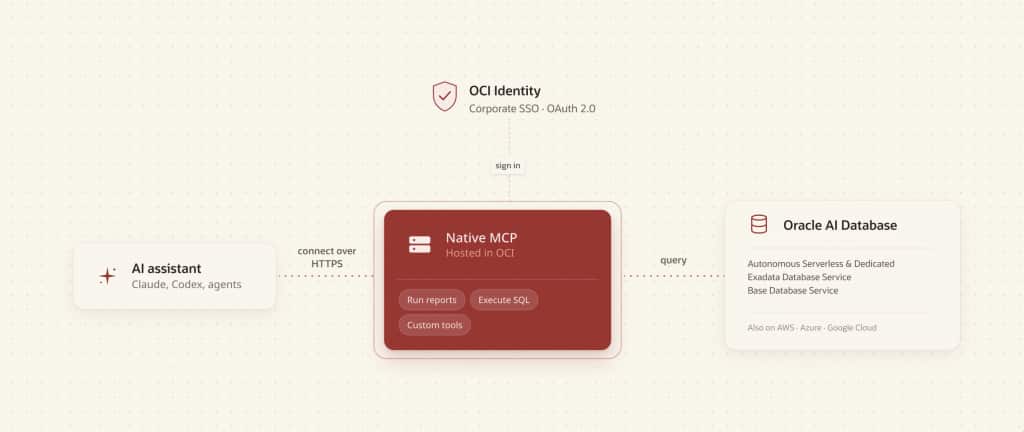
Figure 1: The MCP Server connects AI agents to Oracle AI Database running in OCI using HTTPS and OCI identity controls.
From Local MCP to Cloud-Native, Enterprise-grade MCP
The SQLcl MCP Server we introduced last year remains an excellent choice for developers, DBAs, and power users using their own systems. It is lightweight, familiar, and immediately useful.
But many enterprise AI use cases need something different.
Business analysts, support teams, operations staff, application owners, and other enterprise users need a way to ask questions of validated data without installing local tooling, sharing database credentials, or routing around established access controls.
They need a managed service. They need HTTPS access. They need centralized administration. They need identity-based authorization. And they need the flexibility to decide which users can ask which questions of which databases.
That is what OCI Managed MCP Service for Oracle AI Database provided as part of OCI Database Tools.
Built on OCI Database Tools Connections
OCI Database Tools already provides managed connection resources for Oracle databases. With this new MCP capability, those Database Tools Connections become the foundation for cloud-native MCP access.
Customers can now define:
- MCP Servers which expose one or more toolsets to MCP-compatible AI clients
- MCP Toolsets which group the tools available through a server
- SQL Reports which define validated, reusable, parameterized SQL queries
An MCP Server can offer one or more toolsets. Each toolset can include built-in tools such as run-sql for ad hoc SQL, tools for listing and executing reports, or custom tools defined by a service administrator.
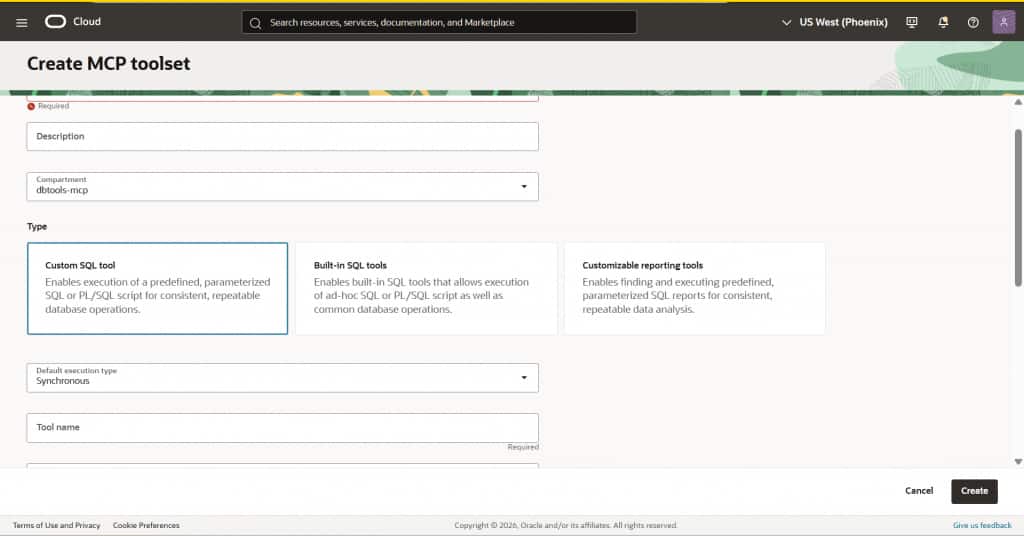
Figure 2: Define custom MCP tools directly in the OCI Console.
This gives customers a practical spectrum of control. Some users may only need access to certain validated reports. Others may be trusted to run AI-generated SQL. Some teams may need both.
Governed Agentic Access for Business Users
The headline use case is simple: let people talk to their Oracle AI Database data through AI, while keeping enterprise controls in place.
A support manager might ask which customer issues are trending this week. A finance analyst might ask for regional variance against forecast. An operations lead might ask which orders are at risk. Today, many of those questions become report requests, dashboard updates, exported spreadsheets, or tickets to technical teams.
With native MCP Servers in OCI Database Tools, an AI assistant can discover the tools it is allowed to use, run validated reports, or, where authorized, generate and run SQL queries through the run-sql tool.
SQL Reports are especially important here. They let teams publish known, governed, and parameterized SQL as reusable MCP-accessible tools. That means organizations can give business users natural language access to validated answers without relying on an agent and it’s LLM to derive the correct SQL for the task at hand.
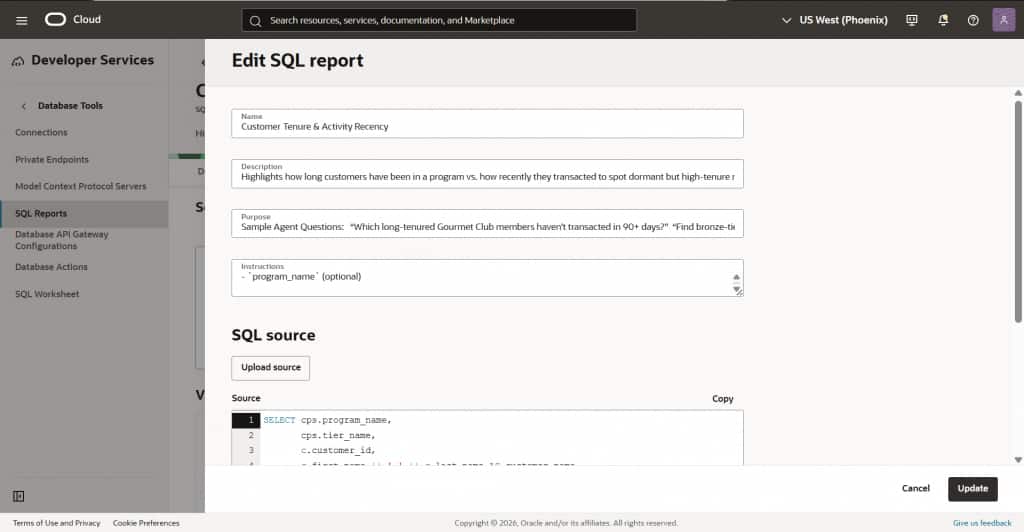
Figure 3: OCI defined Reports allow agents to sample data from business-approved, parameterized queries vs relying on generated SQL from the LLM.
OCI Identity Controls Access
Access is governed through OCI authentication and authorization.
Users authenticate with OAuth 2.0 and OCI federated user accounts. Customers can federate existing enterprise identity providers, such as Microsoft Entra ID, into OCI and use those identities to control MCP access.
Oracle recommends using OCI Identity Groups to grant access to specific Database Tools Connections, MCP Servers, toolsets, and reports.
OCI Database Tools provides three MCP application roles out-of-the box:
- MCP_Administrator
- MCP_Operator
- MCP_User
These roles can be used to restrict access to tools and reports by a specific user or a group of users. For example, an MCP_User might be granted access only to named SQL Reports. An MCP_Operator might also be allowed to use run-sql for ad hoc analysis. An MCP_Administrator can create and manage MCP Servers, toolsets, tools, and reports.
This lets customers decide who in their organization can talk to which databases, through which tools.
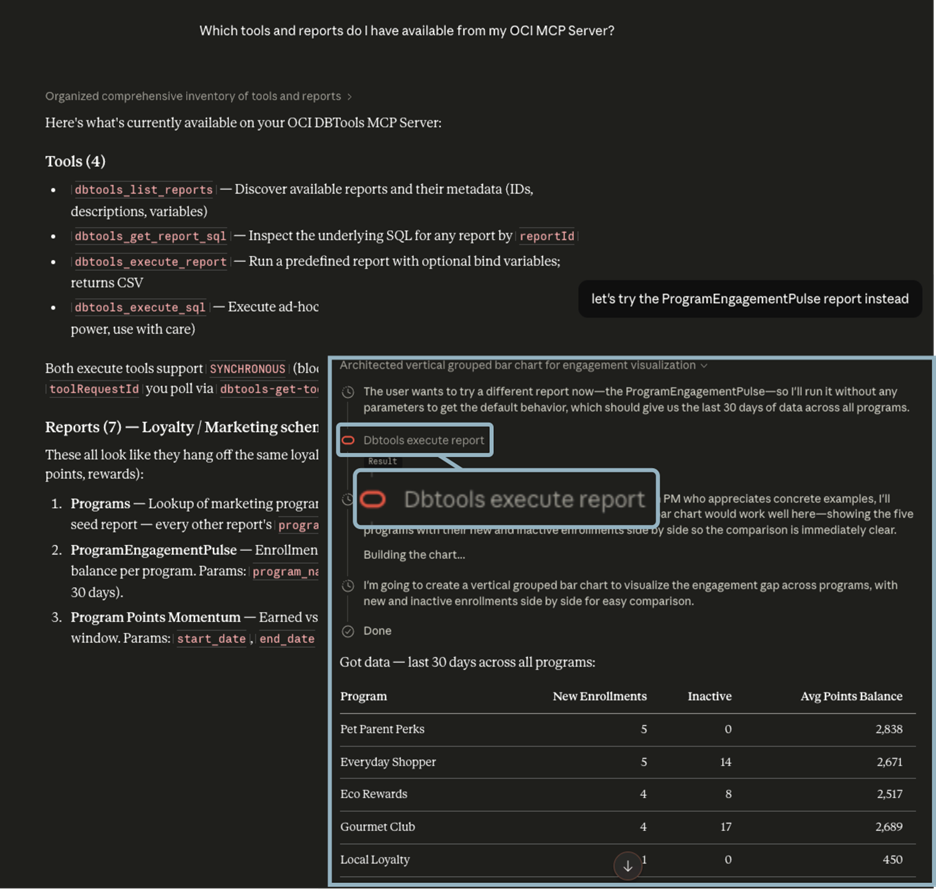
Figure 4: Using my AI Agent, I can ask for a list of available tools and reports, and start exploring my data.
Any Oracle AI Database Service in the Cloud
Native MCP Servers in OCI Database Tools are not limited to one database deployment model.
They support all Oracle databases running in OCI, including Autonomous AI Database, Base Database Service, Exadata Database Service, and other environments available through OCI Database Tools Connections. These databases can be based on either Oracle AI Database 26ai or Oracle Database 19c.
The MCP servers running in OCI also support Oracle databases running on Oracle AI Database@AWS, Oracle AI Database@Azure, and Oracle AI Database@Google Cloud.
That breadth matters since customers do not have to redesign their AI access strategy around one database service or one cloud deployment pattern. They can use a consistent MCP approach across their Oracle database estate in the cloud.
No Separate MCP Charge
The native MCP Server capability in OCI Database Tools is available at no incremental charge. There is no charge for using OCI Database Tools, and customers only pay for the database services and LLMs they use, and the consumption created by running queries, reports, scripts, and other database operations.
In other words, Oracle provides the cloud-native MCP access layer, and customers remain in control of the work they choose to run against their databases.
Developers Still Win
Although the primary value provided by OCI Managed MCP Service for Oracle AI Database is enterprise access for business users, developers and DevOps teams benefit too.
These teams can use MCP-compatible assistants to explore schemas, inspect data, troubleshoot application issues, investigate operational questions, and automate repetitive database tasks. The difference is that these workflows can now be delivered through a managed OCI service with HTTPS transport and OCI identity controls.
SQLcl MCP remains ideal for local development. Native MCP Servers in OCI Database Tools bring the same idea into centrally managed cloud operations.
A New Way to Work with Oracle Database
Oracle databases store and protect some of the world’s most important business data. MCP Servers give AI agents a standard way to discover and use tools to access that data. OCI Database Tools brings these together in a managed, governed, cloud-native service.
With the OCI Managed MCP Service for Oracle AI Database, customers can gain agentic access to all Oracle databases in the cloud, giving users faster answers while preserving control over identity, authorization, database access, and SQL execution.
That is the promise of enterprise AI done the Oracle way: powerful, practical, and governed from the start.
Choosing the right MCP Server
| Oracle SQLcl MCP Server | OCI Managed MCP Service for Oracle AI Database | |
| Best fit | Developers, DBAs, power users | Business users, analysts, support teams, shared AI agents, developers |
| Ideal workflow | Local database exploration, development, troubleshooting, automation | Governed natural language access to approved databases, validated reports, and SQL tools |
| Transport | STDIO | Streamable HTTPS |
| Connection model | Local SQLcl / SQL Developer connections | OCI Database Tools Connections |
| Access model | Database credentials available to the local user | OAuth 2.0, OCI identity, federated users, IAM groups, MCP roles |
| Tools | run-sql and SQLcl-provided tools | MCP Servers, Toolsets, run-sql, list reports, run reports, SQL Reports |
| Operational model | Lightweight local setup | Managed OCI service |
| Database reach | Oracle databases reachable from the local machine | Any Oracle AI Database in OCI, Oracle AI Database@AWS, Oracle AI Database@Azure, Oracle AI Database@Google Cloud |
Oracle SQLcl MCP Server and OCI Managed MCP Service for Oracle AI Database in OCI Database Tools are complementary ways to bring MCP to Oracle AI Database. SQLcl is ideal for local development and DBA workflows that start on a developer’s system, while OCI Database Tools provides managed, HTTPS-based access for enterprise AI workflows, business users, and shared agents.
How to get started
Our new MCP Servers and SQL Report resources can now be defined and managed in the Database Tools Service, found under Developer Services in the OCI Console.
The minimum requirements for defining an MCP Server are:
- At least one Oracle AI Database
- A database tools service connection defined for said database
- A Vault for storing secrets (connection passwords/certificates) for that database
- An Identity Domain, where your MCP Client users will be administered and controlled
You can use the Create MCP Server dialog to easily define your MCP Server based on the above information. You can then add the MCP Tools you wish to be available, along with the required permissions required to access them.
Once the appropriate Identity Policies have been defined, which allow our MCP Servers to access your database connections and secrets, you will proceed to registering your MCP Clients (Agents) so they can interact on your behalf via OAuth2 authentication and authorization workflows.
Note: you will use your own AI agent and LLM with the database, this service is only providing the gateway via the Model Context Protocol (MCP). Always check your company’s AI & security policies before connecting to an AI agent or LLM.
Please consult the Service Docs for an overview of the service and details on all of the features and capabilities.