
With the continuation of the previous article, I’ll walk through practical GraphQL queries in Oracle AI Database 26ai that can be used as direct equivalents to traditional SQL, such as subqueries and joins, using real-world table relationships—showing how complex relational logic can now be expressed cleanly and intuitively through GraphQL.
To illustrate this, we’ll use three commonly related tables: ref link for table definitions
EMPDEPTEMP_ADDRESS
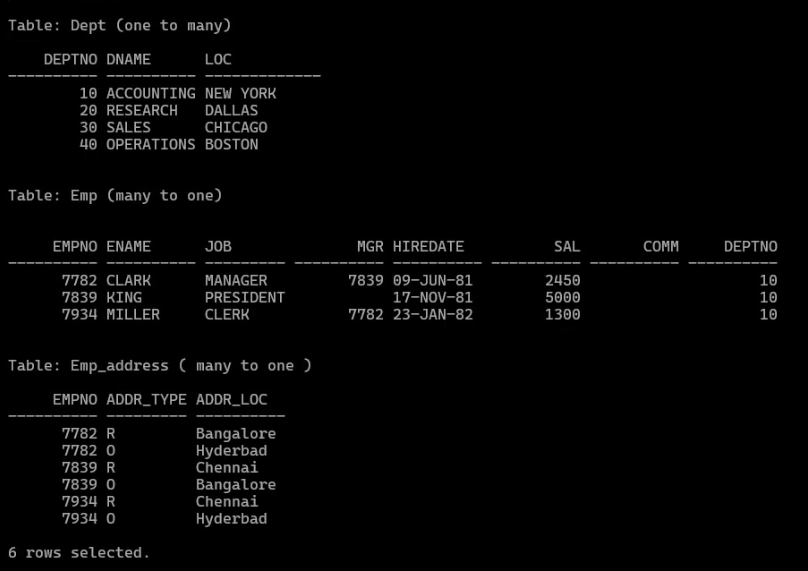
Use Case Overview
Requirement:

Fetch employee details along with department name and office (O) and residence (R) address details. Do a filter on employees belonging to department number 10.
Traditional SQL Approach – Using Subqueries
A common SQL approach is to use correlated subqueries to fetch related data from multiple tables:
SELECT
  e.ename,
  e.hiredate,
  (SELECT d.dname
     FROM dept d
     WHERE d.deptno = e.deptno) AS dname,
  (SELECT a.addr_type
     FROM emp_address a
     WHERE a.empno = e.empno AND a.addr_type = 'O') AS Oaddr_type,
  (SELECT a.addr_loc
     FROM emp_address a
     WHERE a.empno = e.empno AND a.addr_type = 'O') AS Oaddr_loc,
  (SELECT a.addr_type
     FROM emp_address a
     WHERE a.empno = e.empno AND a.addr_type = 'R') AS Raddr_type,
  (SELECT a.addr_loc
     FROM emp_address a
     WHERE a.empno = e.empno AND a.addr_type = 'R') AS Raddr_loc
FROM emp e
WHERE e.deptno = 10;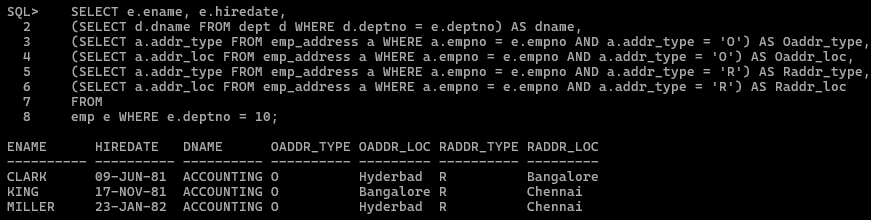
Traditional SQL Approach – Using Joins
The same requirement can also be implemented using joins:
SELECT
	e.ename,
	e.hiredate,
	d.dname,
	a.addr_type,
	a.addrloc
FROM emp e
JOIN dept d
	ON e.deptno = d.deptno
JOIN emp_address a
	ON e.empno = a.empno
WHERE d.deptno = 10;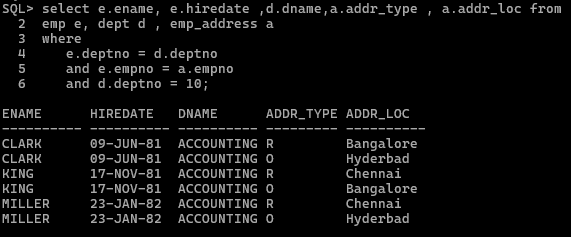
Both approaches require
- Requires strong SQL expertise
- It becomes harder to maintain as relationships grow.
Native GraphQL Approach in Oracle Database 26ai
Now let’s see how the same logic can be expressed using GraphQL, executed directly inside the database—without joins, subqueries, or middleware.
Using Oracle’s native GRAPHQL() table function, the query can be written as:
select json_serialize(data pretty) as GraphQL_JSON
    from graphql('emp @alias (as: e) @where (sql : " deptno = 10 ")
		{ ename,
                  hiredate,
		  deptName :dept{dname},
                  empAddressDetails : emp_address {addr_type, addr_loc}}'
		);
This single GraphQL query effectively replaces:
- Correlated subqueries
- Multi-table Joins

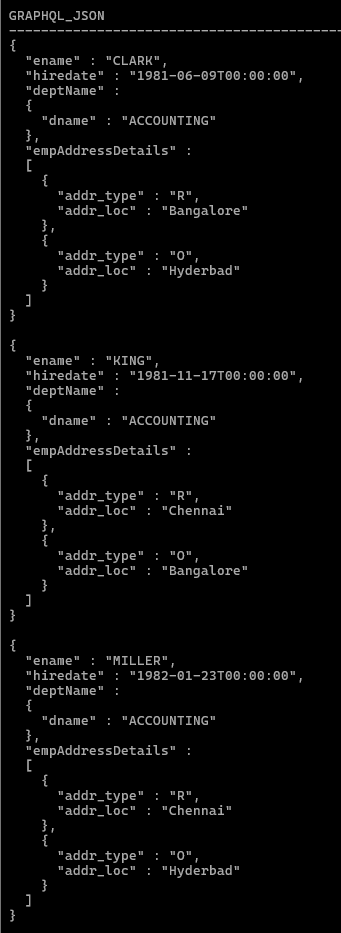
Key Advantages :
- Declarative and intuitive —directly represents the hierarchical data model—employees, their department, and their addresses.
- No join logic required – Developers don’t need to understand join conditions or foreign keys. Oracle resolves relationships automatically.
- JSON-native output – The result is returned as structured JSON, ready for APIs, front-end frameworks
- Database-level execution – The entire query is executed inside the database, benefiting from Oracle’s optimizer, security, and performance tuning.
Example : 2
Let’s take this a step further and look at a more complex, real-world query—one that combines:
- Employee details
- Department name
- Office and Residence addresses
- Manager name (self-referencing relationship)
- List of reportees for each employee and do a filter on employees belonging to department number 10.
This type of requirement is very common in HR and organizational reporting systems—and traditionally results in long, complex SQL.
SQL Approach – Using mulitple Correlated Subqueries :
SELECT
    e.ename,
    e.hiredate,
    (SELECT d.dname FROM dept d WHERE d.deptno = e.deptno) AS dname,
    (SELECT a.addr_type FROM emp_address a WHERE
       a.empno = e.empno ND a.addr_type = 'O') AS Oaddr_type,
    (SELECT a.addr_loc FROM emp_address a WHERE
       a.empno = e.empno AND a.addr_type = 'O') AS Offc_loc,
    (SELECT a.addr_type FROM emp_address a WHERE
       a.empno = e.empno AND a.addr_type = 'R') AS Raddr_type,
    (SELECT a.addr_loc FROM emp_address a WHERE
       a.empno = e.empno AND a.addr_type = 'R') AS home_loc,
    (SELECT m.ename FROM emp m WHERE m.empno = e.mgr) AS manager,
    NVL(
       (select LISTAGG(r.ename, ', ') WITHIN GROUP (ORDER BY r.ename)
        FROM emp r
        WHERE r.mgr = e.empno),'No Reportees'
        ) AS reportee_list
FROM
    emp e
WHERE
    e.deptno = 10;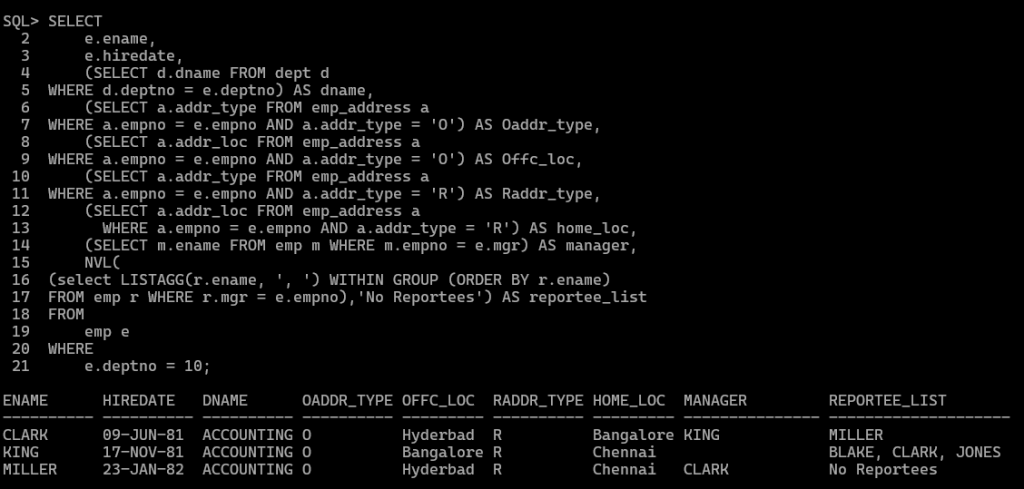
SQL Approach – Using Multiple Joins
SELECT
    e.ename,
    e.hiredate,
    d.dname,
    oa.addr_type AS Oaddr_type,
    oa.addr_loc  AS Offc_loc,
    ra.addr_type AS Raddr_type,
    ra.addr_loc  AS home_loc,
    m.ename AS manager_name,
    NVL(r.reportee_list, 'No Reportees') AS reportee_list
FROM emp e
JOIN dept d
    ON e.deptno = d.deptno
LEFT JOIN emp_address oa
    ON e.empno = oa.empno AND oa.addr_type = 'O'
LEFT JOIN emp_address ra
    ON e.empno = ra.empno AND ra.addr_type = 'R'
LEFT JOIN emp m
    ON e.mgr = m.empno
LEFT JOIN (
    SELECT
        r.mgr,
        LISTAGG(r.ename, ', ')
        WITHIN GROUP (ORDER BY r.ename) AS reportee_list
    FROM emp r
    GROUP BY r.mgr
) r
    ON e.empno = r.mgr
WHERE e.deptno = 10;
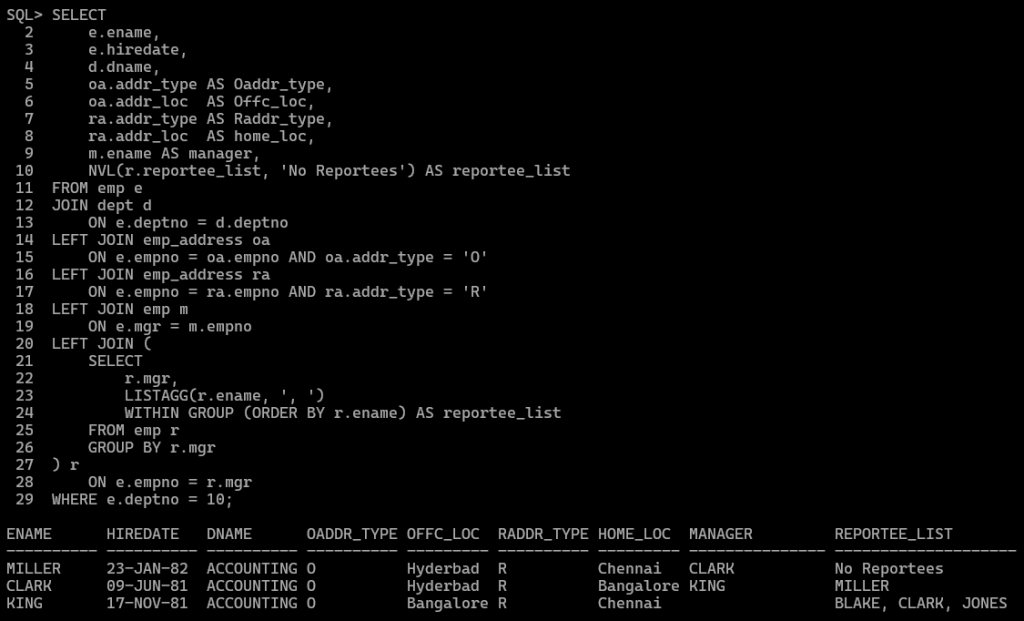
Both approaches require:
- Requires strong SQL expertise to understand
- Complex join conditions and aliases is hard to maintain
- It becomes harder to maintain as relationships grow.
- aggregated subquery (LISTAGG) to fetch reportees
Native GraphQL Approach – Clean and Intuitive
Now let’s express the same logic using native GraphQL, executed directly inside Oracle Database 26ai.
select json_serialize(data pretty) as GraphQL_JSON
        from graphql(' emp @where (sql : " deptno = 10 ")
              { ename,
                hiredate,
                deptName :dept{dname},
                emp @unnest @link( from: ["MGR"], to: ["EMPNO"] )
                    {ManagerName : ename},
                reportee_list :emp @link( from: ["EMPNO"] , to: ["MGR"] )
                    [{ReporteeName : ename}],
                empAddressDetails : emp_address {addr_type, addr_loc}}'
            );
Note:
@where  - filters specific information from a larger dataset
@unnest - flattens the intermediate objects
@link   - defines which foreign key to use when joining or linking tables
For additional information on GraphQL directives, refer here

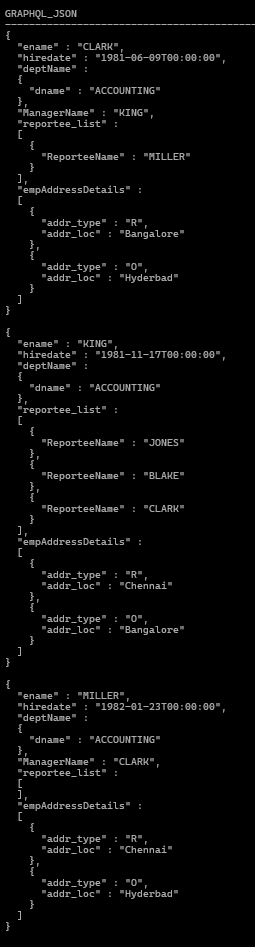
If we like to do order by addr_loc, then include @orderby narrative as below
select json_serialize(data pretty) as GraphQL_JSON
        from graphql(' emp @where (sql : " deptno = 10 ")
              { ename,
                hiredate,
                deptName :dept{dname},
                emp @unnest @link( from: ["MGR"], to: ["EMPNO"] )
                    {ManagerName : ename},
                reportee_list :emp @link( from: ["EMPNO"] , to: ["MGR"] )
                    [{ReporteeName : ename}],
                empAddressDetails : emp_address
                     @orderby (sql:" addr_loc desc") {addr_type, addr_loc}}'
            );
Why This GraphQL Query Is Powerful
This single GraphQL query replaces:
- Multiple joins
- Correlated subqueries
- Aggregation logic
- Application-side data shaping
Key Observations
- Self-referencing relationships are natural
Manager and reportee relationships are expressed declaratively using @link, without self-join complexity.
- Hierarchical data is first-class
Employees, managers, reportees, departments, and addresses are all modeled naturally as nested objects.
- No SQL join logic exposed to developers
Developers focus on what data is needed, not how to join tables.
- API-ready JSON output
The result is returned as structured JSON—ideal for front-end applications, microservices, and GraphQL clients.
Key Takeaway
As queries become more complex, SQL complexity grows exponentially—especially with self-joins and aggregations.
With native GraphQL in Oracle AI Database 26ai, the same logic can be expressed in a single, readable, and declarative query.
This approach:
- Dramatically improves readability
- Reduces development and maintenance effort
- Aligns database access with modern API design principles
In the next part of this series, i’ll show how to call above GraphQL queries using ORDS / API calls