
A practical guide to enhanced DRG capabilities, migration planning, and safe operational validation
Oracle Cloud Infrastructure (OCI) Dynamic Routing Gateway (DRG) is the network hub that connects virtual cloud networks (VCNs), on-premises environments, and remote regions. For organizations still using a legacy DRG, moving to the enhanced version is more than a version change: it creates a more flexible foundation for multi-VCN connectivity, centralized routing, and broader hybrid-cloud reach.
The upgrade is automated, but it should be treated as a planned network change. A successful migration begins with understanding what improves, what changes during the process, and how to validate the environment once the upgrade is complete.
What the enhanced DRG changes
Legacy DRGs were designed around simpler connectivity patterns. Their default behavior forwards traffic between on-premises networks and an associated VCN, and they do not provide programmable route tables. The enhanced DRG introduces routing constructs that make it easier to model more complex network topologies.
| Legacy DRG | Enhanced DRG |
| No programmable route tables; default routing behavior. | Two route tables are created by default, with the option to add more. |
| No visibility into DRG route tables. | Increased visibility into DRG route is available, providing a better understanding on how traffic is routed through a DRG. Also, DRG-specific metrics are available. |
| Single-VCN attachment model. | Multiple VCNs can attach in the same region; mutually connected DRGs can support local VCN-to-VCN traffic. |
| FastConnect and Site-to-Site VPN provide access to local-region resources. | FastConnect and Site-to-Site VPN can support reachability to local and remote regions. |
| Remote peering is limited to a DRG/VCN pair in the same tenancy. | Remote peering can support DRG/VCN pairs in the same or another tenancy. |
Why organizations upgrade
The enhanced DRG is especially valuable when network architecture is growing beyond a single VCN or a single-region footprint. It helps teams consolidate routing decisions, connect several VCNs through one hub, and extend on-premises connectivity across local and remote regions. Existing remote peering connections (RPCs) and local peering gateways (LPGs) continue to function after the upgrade, while the enhanced model also opens the path to more flexible IPSec designs for multi-region connectivity.
For resilience, multi-region IPSec VPN tunnels should still be designed deliberately. The upgrade improves the routing platform; it does not replace the need for redundant paths, tested failover behavior, and clear routing intent.
Simple Use Case:
Legacy DRG
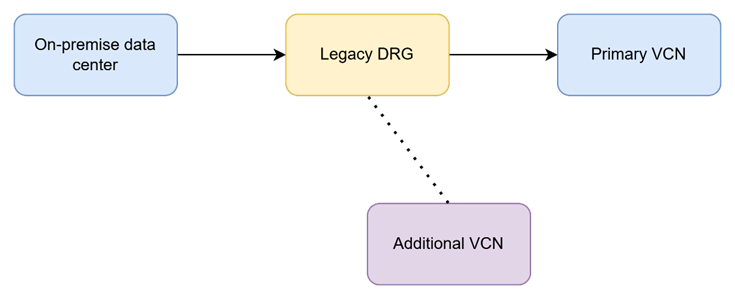
Customer ABC has Legacy DRG with one application VCN and a legacy DRG. Customer has no visibility into the routing tables, therefore there are no programmable route tables. This is a constrained model tied to a single VCN.
Enhanced DRG:
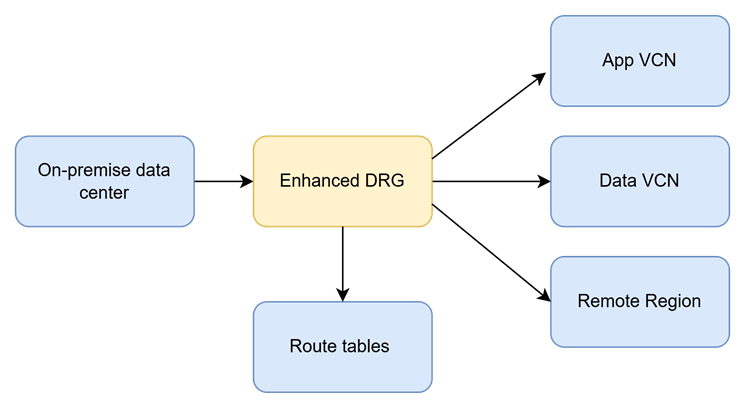
While Legacy DRG can attach to only a single VCN, upgrading to an Enhanced DRG provides scalability to connect multiple VCNs (upto 300 local VCNs). Using OCI FastConnect, resources can be accessed in multiple VCNs that can be in the same or other teancy. Routing tables are now easier to maintain.
Plan the upgrade as a network change
The migration is one way: once initiated, a DRG cannot be rolled back to the legacy version. Confirm that the team has the necessary permissions, document the current topology and routing policies, and schedule the work in a maintenance window.
The source guidance describes the process as an attachment-by-attachment rolling update. Attachments can temporarily enter a provisioning state; BGP sessions and Site-to-Site VPN IPSec tunnels connectivity may be reset or briefly unavailable while individual attachments are updated. RPCs are upgraded instantly with no downtime and zero packet loss just like VCN attachments. Customers will only experience outages on VC or VPN tunnel attachments. Timings depend on topology: allow up to 30 minutes per VC/VPN attachment as a planning baseline. In reality most on-prem attachments take 5-15 minutes to upgrade. The practical takeaway is simple: design and communicate for a controlled service interruption, even where redundant paths can reduce the business impact.
Points to consider
- Oracle plans to upgrade all legacy DRGs by the end of 2026.
- During the upgrade, a customer may or may not experience an outage depending on the services in use (for example, FastConnect) and the duration of the upgrade.
A concise upgrade checklist
- Inventory every DRG attachment, including VCNs, FastConnect virtual circuits, Site-to-Site VPNs, and remote peering connections.
- Confirm identity and access permissions for the person or automation that will initiate the upgrade.
- Capture the existing routing configuration and expected reachability paths before the maintenance window.
- Validate BGP failover expectations and verify redundant connectivity where it is required for critical traffic.
- Choose a maintenance window, notify affected teams, and allow adequate time for the topology size.
- Pause configuration changes while the upgrade is in progress; avoid concurrent network changes.
- After completion, validate traffic flows, BGP sessions, VPN tunnel status, and remote peering connectivity.
- If infrastructure is managed with Terraform, review the next terraform plan carefully before applying changes.
What happens after the upgrade
The upgrade is done with on attachment at a time, so BGP sessions will drop and re-connect throughout the upgrade. By the time the upgrade is completed, all BGP sessions will be re-established and all tunnels will be reconnected. Customers should still validate at this point. The upgraded DRG includes two autogenerated route tables and import route distributions. These default resources are intended to preserve backward compatibility so existing communications can resume without immediate manual routing changes.
That compatibility is helpful, but it should not be the final validation step. Review the effective routing posture after the upgrade, confirm that intended traffic paths match the organization’s design, and make any planned route-table refinements through change control.
Final thought
Upgrading a legacy DRG gives OCI network teams a more capable connectivity hub without requiring a complete redesign on day one. The best outcomes come from pairing the automated upgrade with disciplined preparation: schedule it, understand attachment-level impact, verify resiliency, and validate the routing state afterward. With that approach, the enhanced DRG becomes a practical platform for the next stage of hybrid and multi-region growth.
Further reading
- Oracle Cloud Infrastructure: Upgrading a DRG: https://docs.oracle.com/en-us/iaas/Content/Network/Tasks/drg-upgrade.htm
- Oracle Cloud Infrastructure: Managing DRGs: https://docs.oracle.com/en-us/iaas/Content/Network/Tasks/managingDRGs.htm
- Oracle Cloud Infrastructure API: UpgradeDrg: https://docs.oracle.com/en-us/iaas/api/#/en/iaas/20160918/Drg/UpgradeDrg
- Oracle blog: Introducing global connectivity and enhanced cloud networking with DRG: https://blogs.oracle.com/cloud-infrastructure/introducing-global-connectivity-and-enhanced-cloud-networking-with-the-dynamic-routing-gateway
- Before you Upgrade a DRG – https://docs.oracle.com/iaas/Content/Network/Tasks/managingDRGs.htm#overview__before_upgrade
- Upgrading a DRG – https://docs.oracle.com/iaas/Content/Network/Tasks/drg-upgrade.htm#drg-upgrade
- eVideo – Upgrading a DRG (on YouTube) – https://www.youtube.com/watch?v=PD-85I7mMDY
- DRG Architecture Migration – https://www.ateam-oracle.com/migration-from-legacy-drg-to-enhanced-drg
- Basic Routing Scenarios for the Enhanced DRG – https://www.ateam-oracle.com/basic-routing-scenarios-for-the-enhanced-drg
