Introduction
Oracle PDB SAVE STATE provides a convenient mechanism for preserving the open mode of a pluggable database across CDB restarts. Instead of requiring the PDB to be opened manually after every restart, Oracle can restore its previously saved open state.
In a single-instance database, this behavior is straightforward. In Oracle RAC, however, PDB availability also interacts with RAC services and their instance placement.
In this article, we examine how SAVE STATE works, explore how Oracle maintains the saved state, and use a reproducible RAC test to understand its interaction with service placement and the potential performance implications.
Why Oracle Provides PDB SAVE STATE
When a container database starts, a user-created PDB does not necessarily return to the open mode it had before the CDB was stopped. By default, a PDB starts in MOUNTED mode and must subsequently be opened before applications can use it.
One way to automate this behavior is through an AFTER STARTUP database trigger. For example, a trigger can automatically open all PDBs whenever the CDB starts:
CREATE OR REPLACE TRIGGER open_all_pdbs
AFTER STARTUP ON DATABASE
BEGIN
  EXECUTE IMMEDIATE 'ALTER PLUGGABLE DATABASE ALL OPEN';
END open_all_pdbs;
/
The startup logic can also be customized. For example, most PDBs could be opened while a selected set remains closed:
CREATE OR REPLACE TRIGGER open_all_pdbs_except_some
AFTER STARTUP ON DATABASE
BEGIN
  EXECUTE IMMEDIATE
    'ALTER PLUGGABLE DATABASE ALL OPEN EXCEPT pdb1, pdb2';
END open_all_pdbs_except_some;
/
This approach works, but the desired PDB startup configuration is now maintained separately in the trigger. In an environment containing tens or hundreds of PDBs, the trigger may need to be modified whenever that configuration changes. Starting with Oracle Database 12.1.0.2, Oracle provides a simpler mechanism to preserve the open mode of individual PDBs across CDB restarts using the SAVE STATE clause.
SQL> show pdbs
    CON_ID CON_NAME                       OPEN MODE  RESTRICTED
---------- ------------------------------ ---------- ----------
         2 PDB$SEED                       READ ONLY  NO
         3 SERVICETEST_PDB                READ WRITE NO

SQL> ALTER PLUGGABLE DATABASE SERVICETEST_PDB SAVE STATE;

Pluggable database altered.
After a subsequent CDB restart, Oracle can restore SERVICETEST_PDB to its saved READ WRITE state without requiring separate startup logic.
If the saved behavior is no longer required, it can be removed using DISCARD STATE:
SQL> ALTER PLUGGABLE DATABASE SERVICETEST_PDB DISCARD STATE;

Pluggable database altered.
Once the saved state is discarded, the PDB returns to the default startup behavior and remains MOUNTED following the next CDB restart.
For environments containing many PDBs, this makes SAVE STATE particularly convenient: rather than maintaining a separate list of PDB startup requirements in a trigger, the desired state is maintained as part of the PDB’s saved configuration.
Understanding DBA_PDB_SAVED_STATES
Oracle exposes the persisted PDB state through DBA_PDB_SAVED_STATES.
SELECT con_id,
       con_name,
       instance_name,
       state
FROM   dba_pdb_saved_states
ORDER BY con_name, instance_name;
In a single-instance database, the saved state is straightforward: when a PDB is saved in OPEN mode, the view records that saved state.
CON_ID  CON_NAME          INSTANCE_NAME  STATE
------  ----------------  -------------  -----
3       SERVICETEST_PDB   RACDB1         OPEN
At this stage, the behavior is simple: the view tells us which PDB state Oracle will preserve across a subsequent CDB restart.
The meaning of INSTANCE_NAME becomes more interesting when the same mechanism is examined in an Oracle RAC environment.
PDB SAVE STATE in Oracle RAC
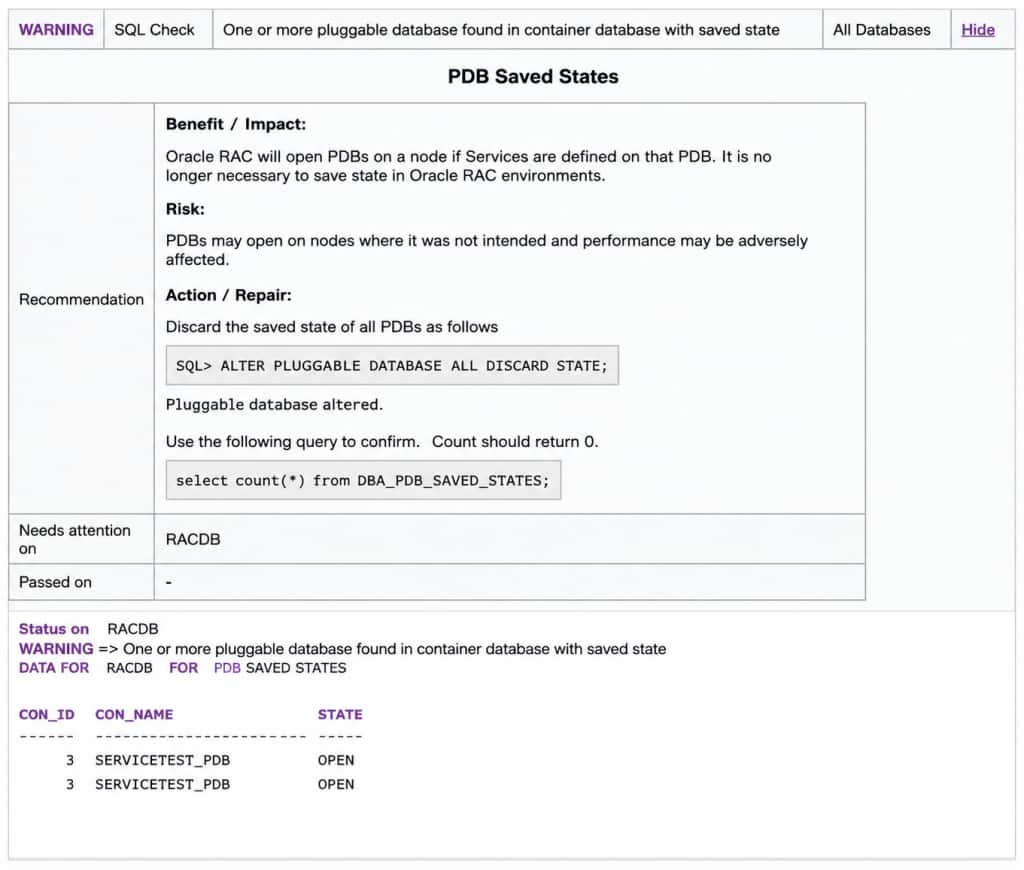
SAVE STATE provides a convenient mechanism for preserving the open mode of a PDB across database restarts. However, its use requires additional consideration in an Oracle RAC environment.
Oracle does not recommend saving the state of PDBs in RAC environments. The guidance also notes that saving PDB state can result in a PDB or its services becoming available on instances where they were not intended to run, potentially affecting performance.
This raises an interesting question:
Why can a feature designed simply to preserve the open state of a PDB influence service placement in Oracle RAC?
To understand this behavior, we will reproduce the scenario in a three-node RAC environment and follow what happens at the Clusterware, database, and listener layers.
Test Environment and Service Configuration
To examine the behavior in Oracle RAC, the test was performed on a three-node RAC database using a dedicated PDB and application service.
The service was configured with one preferred instance and two available instances. Under normal conditions, the service is expected to run only on the preferred instance.
Service name: SAVE_STATE_SVC
Cardinality: 1
Pluggable database name: SERVICETEST_PDB
Service is enabled
Preferred instances: RACDB1
Available instances: RACDB2,RACDB3
Establishing the Baseline
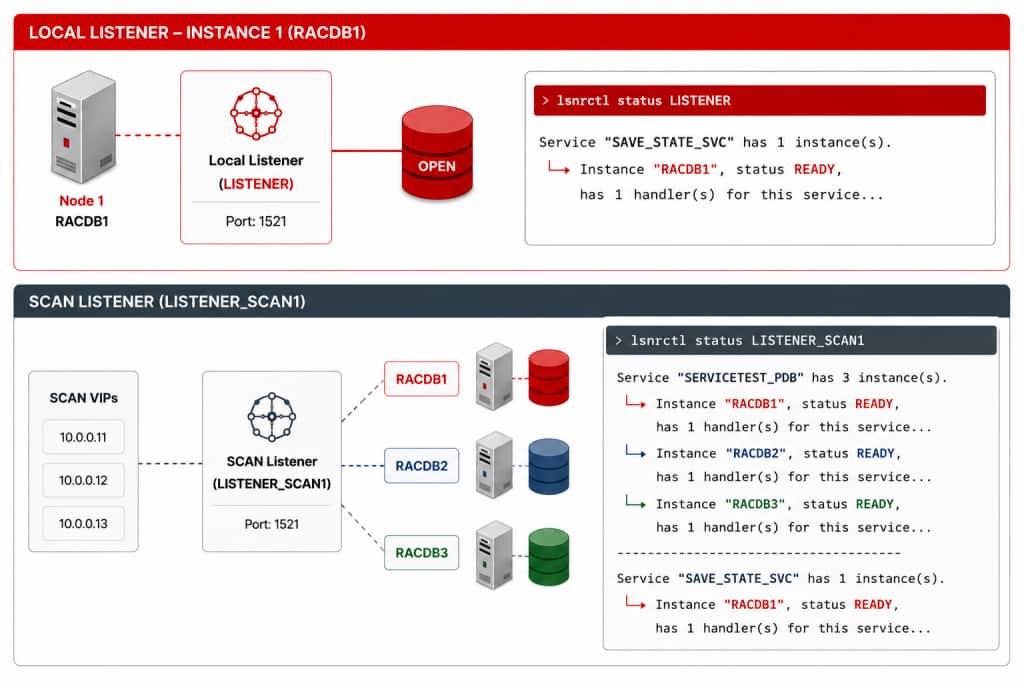
At the start of the test, SAVE_STATE_SVC is running on its preferred instance, RACDB1.
Service SAVE_STATE_SVC is running on instance(s) RACDB1
The service was then verified from the database:
SELECT inst_id,
       name,
       con_name
FROM   gv$active_services
WHERE  name = 'SAVE_STATE_SVC'
ORDER BY inst_id;

INST_ID  NAME            CON_NAME
-------  --------------  ----------------
1        SAVE_STATE_SVC  SERVICETEST_PDB
The listener registration also showed the service available only through RACDB1:
Verifying the Application Connections
Before introducing the service failover, application connections were established through SAVE_STATE_SVC. At this point, the service is active only on the preferred instance RACDB1. All 15 application sessions are connected to RACDB1, which is consistent with the service configuration and registration.
SELECT inst_id,
       service_name,
       COUNT(*) sessions
FROM   gv$session
WHERE  service_name = 'SAVE_STATE_SVC'
GROUP BY inst_id, service_name
ORDER BY inst_id;

INST_ID  SERVICE_NAME     SESSIONS
-------  ---------------  --------
1        SAVE_STATE_SVC         15
Saving the PDB State
With the baseline established, the next step is to save the open state of SERVICETEST_PDB
SQL> ALTER PLUGGABLE DATABASE SERVICETEST_PDB SAVE STATE;

Pluggable database altered.

SQL> SELECT con_name,
            instance_name,
            state
     FROM   dba_pdb_saved_states
     WHERE  con_name = 'SERVICETEST_PDB';

CON_NAME          INSTANCE_NAME  STATE
----------------  -------------  -----
SERVICETEST_PDB   RACDB1       OPEN
Instance Restart and Service Failover
With the PDB state saved and the application workload running through SAVE_STATE_SVC, the next step is to observe what happens when the instance hosting the service becomes unavailable.
Before the failure, the environment is straightforward: SAVE_STATE_SVC is running on RACDB1 and the application sessions are connected through that service.
Preferred Instance Becomes Unavailable
When RACDB1 becomes unavailable, either because of an instance failure or a planned restart, Clusterware detects the outage and starts the service on one of the configured available instances. In this scenario, the service fails over to RACDB2.
Service SAVE_STATE_SVC is running on instance(s) RACDB2
This is normal RAC service failover behavior. RACDB2 was configured as an available instance, so Clusterware starts the service there when the preferred instance is unavailable.
INST_ID  SERVICE_NAME     SESSIONS
-------  ---------------  --------
2        SAVE_STATE_SVC         15
Again, nothing unexpected has occurred. The preferred instance became unavailable, Clusterware started the service on an available instance, and new connections followed the service.
When the Original Instance Returns
RACDB1 is now restarted and rejoins the RAC cluster. From the Clusterware perspective, the service is therefore still running where expected following the failover.
SELECT inst_id,
       name,
       con_name
FROM   gv$active_services
WHERE  name = 'SAVE_STATE_SVC'
ORDER BY inst_id;

INST_ID  NAME            CON_NAME
-------  --------------  ----------------
1        SAVE_STATE_SVC  SERVICETEST_PDB
2        SAVE_STATE_SVC  SERVICETEST_PDB
SAVE_STATE_SVC is now active on both RACDB1 and RACDB2. This is the first unexpected observation in the test. Clusterware reports the service on only RACDB2, while the database reports the service active on both instances.
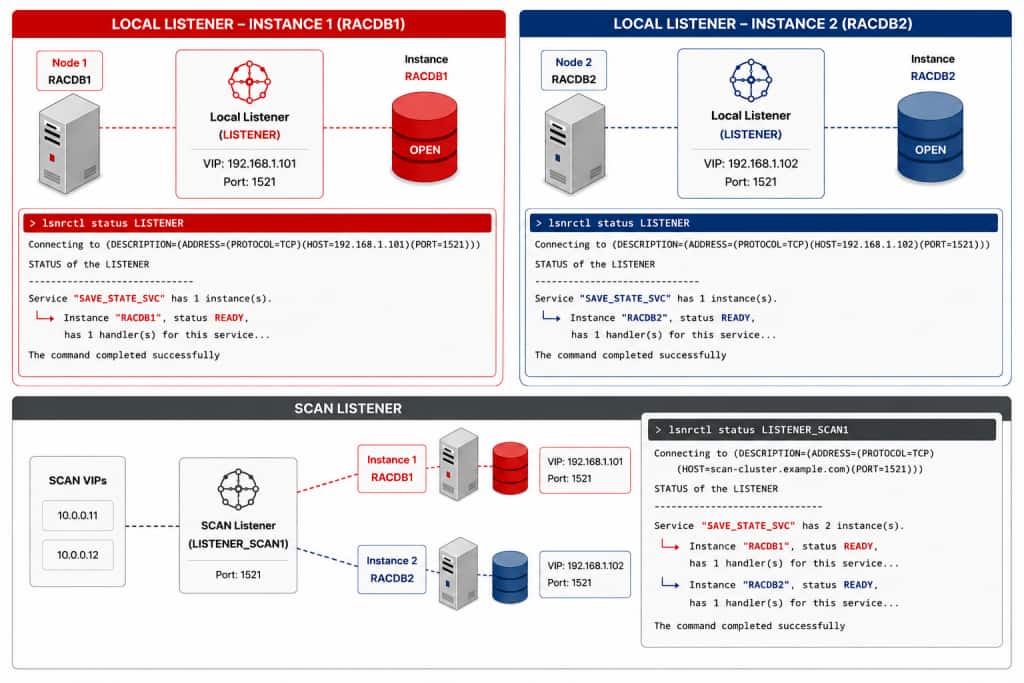
What Does the Local Listener See?
Current Status
- Local listener on
RACDB1:SAVE_STATE_SVCis active. - Local listener on
RACDB2:SAVE_STATE_SVCis active - SCAN listener:
SAVE_STATE_SVCis available on both instances. - Clusterware:
SAVE_STATE_SVCis running onRACDB2.
What Happens to New Connections?
New connections can now use both instances because the service is registered with the local listeners on both instances and advertised through SCAN. The exact distribution depends on connection activity and load-balancing decisions, so the numbers themselves are not important. What matters is the change in placement: the same service is now available through two RAC instances.
SELECT inst_id,
       service_name,
       COUNT(*) sessions
FROM   gv$session
WHERE  service_name = 'SAVE_STATE_SVC'
GROUP BY inst_id, service_name
ORDER BY inst_id;

INST_ID  SERVICE_NAME     SESSIONS
-------  ---------------  --------
1        SAVE_STATE_SVC         17
2        SAVE_STATE_SVC         16
Looking Under the Hood: What Does SAVE STATE Persist?
The test has established an interesting condition. Clusterware reports SAVE_STATE_SVC running on RACDB2, while the database and listeners show the same service active on both RACDB1 and RACDB2. To understand why, we need to examine what Oracle records when SAVE STATE is executed.
Oracle maintains the service-state information associated with a PDB internally in PDB_SVC_STATE$. When the state of a PDB is saved, the PDB and its saved open state are exposed through DBA_PDB_SAVED_STATES, while information about the services running for that PDB is recorded in PDB_SVC_STATE$.
In the scenario examined here, the PDB and service state had been saved on RACDB1. When that saved state was subsequently restored on RACDB1, SAVE_STATE_SVC became active again on that instance, outside the service placement currently being managed by Clusterware. The documented behavior also applies when the service has been disabled using srvctl disable service; the persisted PDB service state can still cause the service to be started.
The important distinction is that the additional service was started as part of the PDB saved-state processing rather than through Clusterware. Consequently, CRS is not aware of the additional service and will continue to report the service as running only on RACDB2, while the database and listeners show the service active on multiple instances.
SQL> select name,name_hash,network_name,con_id,inst_id from gv$active_services
where name ='SAVE_STATE_SVC';

NAME            NAME_HASH  NETWORK_NAME    CON_ID INST_ID
--------------  ---------- --------------- ------ -------
SAVE_STATE_SVC  3042519903 SAVE_STATE_SVC  3      1
SAVE_STATE_SVC  3042519903 SAVE_STATE_SVC  3      2

SQL> select INST_ID,INST_NAME,PDB_GUID,SVC_HASH from pdb_svc_state$ where
name_hash=3042519903;

INST_ID  INST_NAME    PDB_GUID                          SVC_HASH
-------  -----------  --------------------------------  -----------
1        RACDB1       58B45AE144A8BBB1E0634A09E50A175A  3042519903
Notice that GV$ACTIVE_SERVICES reports the service active on both instances, while PDB_SVC_STATE$ contains the saved service-state information for RACDB1. This is the instance on which the service became active again when the saved PDB state was restored.
The result is therefore a difference between the service managed by Clusterware and the service actually active inside the database. During the instance failure, Clusterware performed the expected service failover and started SAVE_STATE_SVC on RACDB2.
When RACDB1 subsequently returned, the previously saved PDB state was restored. The saved service information associated with that PDB could also cause the service to become active on the returning instance.
Once the additional service is active inside RACDB1, it registers with the listeners. The SCAN listeners consequently become aware of both instances, making both available for new client connections.
Performance Implications
The service-placement behavior by itself does not necessarily indicate a performance problem. Oracle RAC is designed to run workloads across multiple instances, and many applications intentionally use services spanning more than one instance.
The concern in this scenario is different. SAVE_STATE_SVC was deliberately configured to run on a single preferred instance. After the saved-state interaction, the same service became available on multiple instances, allowing application sessions to be distributed differently from the intended service configuration.
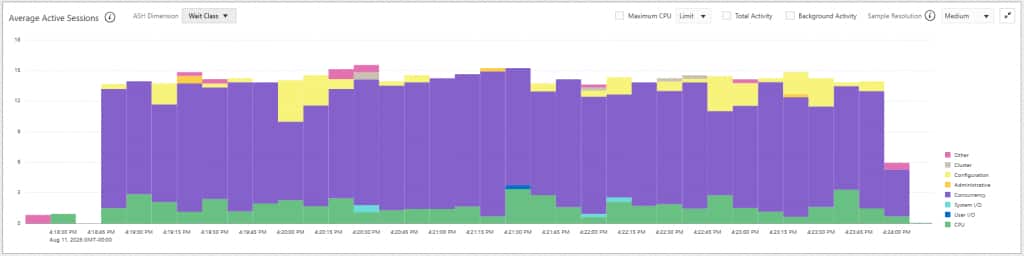
Figures 1 and 2 show the workload when the service is running on a single instance before the service failover.
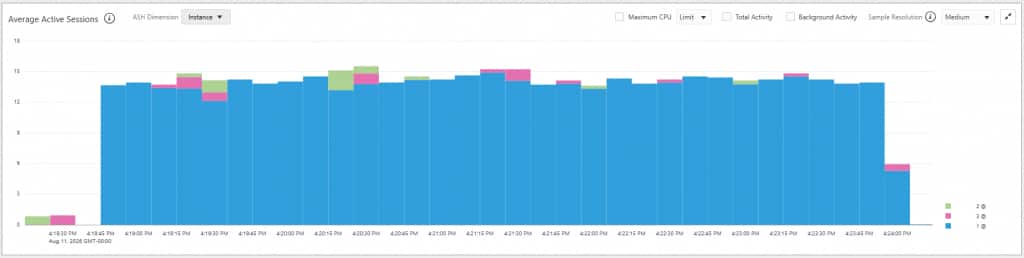
Figures 3 and 4 show the same workload after the service becomes active on two RAC instances.
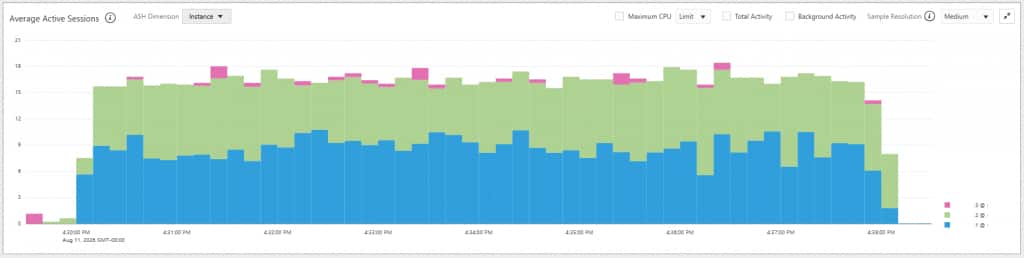
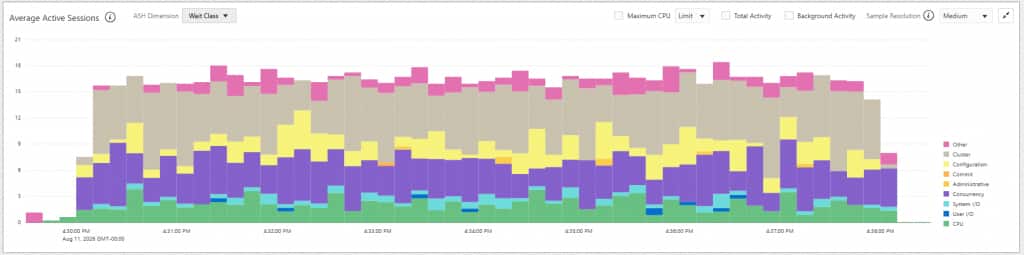
With the workload confined to a single instance, most database time was associated with Concurrency and CPU. Once connections were distributed across RACDB1 and RACDB2, RAC-related waits became a more visible component of DB time. The SQL and workload were unchanged; what changed was where those sessions were executing.
Restoring the Expected Service Placement
Once the condition has been identified, correcting the service placement requires addressing both the persisted PDB state and the service instance that is already active outside the intended Clusterware placement.
The first step is to remove the saved PDB state from all RAC instances using DISCARD STATE:
SQL> ALTER PLUGGABLE DATABASE SERVICETEST_PDB DISCARD STATE INSTANCES=ALL;

Pluggable database altered.
Removing the saved state does not necessarily stop the service that is already running. Because the additional service on RACDB1 was not started through Clusterware, srvctl cannot directly stop that service. The service can instead be stopped from within the PDB using DBMS_SERVICE.
Switch to the PDB and stop the service on the unintended instance. In this test, the IMMEDIATE option is used so that sessions connected through that service instance are terminated as well:
SQL> ALTER SESSION SET CONTAINER=SERVICETEST_PDB;

Session altered.

BEGIN
  DBMS_SERVICE.STOP_SERVICE(
    service_name  => 'SAVE_STATE_SVC',
    instance_name => 'RACDB1',
    stop_option   => 'IMMEDIATE'
  );
END;
/
PL/SQL procedure successfully completed.

SELECT inst_id,
       name,
       con_name
FROM   gv$active_services
WHERE  name = 'SAVE_STATE_SVC'
ORDER BY inst_id;

INST_ID  NAME            CON_NAME
-------  --------------  ---------------
2        SAVE_STATE_SVC  SERVICETEST_PDB
After the service on RACDB1 is stopped and its sessions are terminated, RACDB2 remains the active service instance. New connections through SAVE_STATE_SVC are therefore directed to the remaining registered service instance.
Conclusion
PDB SAVE STATE is a useful feature, particularly in single-instance environments, but its use requires additional consideration in Oracle RAC. In RAC, services already provide the mechanism to open PDBs on the instances where the workload needs to run, making saved PDB state generally unnecessary. As demonstrated in this article, persisted PDB and service state can result in a service becoming active on instances outside the intended Clusterware placement, potentially changing workload distribution and affecting performance. Oracle therefore recommends against saving PDB state in RAC environments, and OraCheck includes a specific check to identify this condition.